Problems? See this thread at archive.org.
You also said you want a docking station. There is no apparent place for an interface in the current design - The top and bottom are each one piece of aluminum and only the two sides have connectors. They'd have to change that to accomplish your wish.
-
From the post the user with the Z1 was using an nvidia graphics card, not intel integrated.
I can force the hd3000 to 2560x1440@35hz but no image is displayed. -
plus i believe that my hd3000 is outputting 2560x1440@35hz but the monitor wont "render" it.
the monitor reports thats its getting 2560x1440@35hz but the image is blank.
if I choose a higher refresh rate I get an error stating the settings are beyond the maximum interface bandwidth. -
Sorry, you're correct. I got mixed up with this post about a Sony Z 2, with integrated graphics, working at 2560x1440: http://forum.notebookreview.com/sony/602724-success-2560x1440-support-new-vpc-z2-dell-u2711.html (I thought the Z1 had intel graphics built in and the nvidia card in the external box, but maybe that's just the Z2?)
What monitor are you using? The guy in the thread above said he got a Dell U2711 to work at 2560x1440x35Hz. My monitor is a WFP3008 (2560x1600, and rather old), so I probably won't have success unless I buy a new monitor. Seems a shame to replace a working monitor with a new one with fewer pixels.
Thanks,
Miles -
I have a Dell u2711 version A09 (the latest manufactured Sep 2011).
So I can get the intel hd3000 to output the full resolution of 2560x1440@35hz but no image is displayed.
It should be noted that powerstrip will allow custom resolutions to be created much more easily than the sony method which has some unnessesary steps.
I am a the point now where I think either the cable is introducing too much interference, or my dell software version wont allow 35hz. -
Does the UX31 support Intel Keyboard Video Mouse (KVM) Remote Control (embedded VNC) ???
My UX31 have the I7-2677M and Intel says it supports vPro and AMT. -
So...I think I will purchase this laptop tomorrow, and I reckon it will be the Sandisk SSD.
Is this a "really" bad decision? -
Well .. this might be a bit of laugh (dunno if it'll work), but connect a "dock" via a USB 3.0 or something?
Or add a separate power "hole" (dunno name of the thing) and a USB 3.0 on the left hand side and use those specifically for a "dock". Then move the USB 2.0 to the right side.
So then design is essentially the same. On the left you have the power plug and USB 3.0 for the dock and (maybe) the micro HDMI. The right hand side has a USB 3.0 and 2.0, micro VGA, and ethernet.
:S Probably just a fantasy of mine heh xD -
Wow very nice setup....

-
I got the Photoshop latest and it runs very well. Opening and editing seems to be a breeze. Mine is on i5 128Gb Adata.
-
I looked up the specs on my Dell 3008WFP, and Dell claims it requires 56 to 86 Hz, so I think I'd be out of luck as well.
However, I just discovered the existence of a device that claims to convert a single-link DVI at 2560x1600x30Hz into a dual-link DVI at 2560x1600x60Hz: Thruput - Videomax - HDMI, DVI single & dual link conversion, Pixel Repair System, Graphics Accelerator
Apparently this thing has been around since 2008, but very poorly marketed (I've searched for dual-link DVI solutions for years, never heard of it). I emailed about price and purchase info, will post here when I hear back.
- Miles
PS: This pdf talks about 2560x1440 as well as 2560x1600: http://www.thruput.co.uk/whitepapers/Videomax Graphics acceleration _DVI SL to DL_ issue 1.0.pdf -
wow, that loosk great.
will try one and report back. -
Just heard from Sun Scientific. Their website is down, but I found a reference to them as being a distributor of Thruput products. They want $485 for quantity 1, so I'm not going to be purchasing it.
- Miles -
Thats ridiculous.
I have been unable to find one any any price.
It will be cheaper to buy a USB3 to DVD-D adaptor which i think will be out soon. -
You might already have solved it or I may be completely mistaken, but anyway...
I found that there is a Intel DPST setting in the power schemas and reading about Intel DPST:
"Intel® Display Power Saving Technology (Intel® DPST) support:
Can reduce display backlight power by up to 25% with minimal visual impact to the end user, depending on Intel® DPST settings and system use."
Maybe you could try to turn this feature off....(it is under the ASUS P4G Power Setting) -
Problem solved.
-
Dear hojthojt,
Thank you for your kindness and your help. This issue still occurs, but i'll certainly try your suggestion to find another hope. I will report after trying.
Thank you again. -
I've uninstalled Syncables, but I still see "reminders" of it, such as the icon being in my system tray and there still being a Syncables exe in the startup when I check the msconfig.
Does anyone have an idea how I go about completely deleting this bloatware from my UX31?
Thanks in advance for any assistance.
P.S. Apologies for posting this question twice, I didn't know which thread was more applicable. -
What is Syncables?
-
I've just tried and there's no chance for me That feature is already turned off in both "on batt" and "plugged" scheme, meaning that i couldn't make it better by switching this feature.
Maybe i'll turn it on and see if it works. -
Hi, I have had my UX31E (with 128GB Adata disk and Sentelic touchpad) for a few weeks. I'm really happy with it, I have no issues with wireless, keyboard, or touchpad (after update to latest drivers and BIOS). I'm not a fast typer with any keyboard, maybe that's the reason
. The vertical viewing angle is quite narrow, but not a problem when you are alone in front of the laptop.
I'm now in the process of removing the pre-installed software I do not need to free up some space on the already small SSD. I have listed what I have removed and what I have uninstalled (might be useful for someone).
The two things that will save the most disk space is to delete the C:\eSupport directory and to delete the recovery partition. Before doing so I did a few things first:
- copied the PDF file with the Zenbook manual in my language and in english to MyDocments.
- Made a copy of the C:\eSupport directory to USB disk (just in case)
- Created recovery DVD's using ASUS AI Recovery
- Removed the recovery partition on the SSD using ASUS AI Recovery
ASUS SW I have uninstalled
- ASUS FaceLogon // Login with webcam, from a security perspective this app is a joke
- ASUS AI Recovery // Keep until you have created recovery DVDs and deleted the recovery partition
- ASUS Splendid// Some video enhancement thing (I think)
- ASUS Secure Delete
- ASUS WebStorage // Online file storage
- WinFlash // Use the EasyFlash feature of the BIOS instead
- AsusVibe2.0 // Multimedia Content for ASUS Users
- Power Wiz // App showing how much battery is left depending on what you are doing
ASUS SW I have kept (so far):
- ATK Package // ACPI driver, functio keys etc...
- Wireless Console 3 // Useful for individual on/off for Bluetooth and Wireless
- ASUS LiveUpdate // Update ASUS software
- ASUS LifeFrame3 // Webcam application
- Asus Virtual Camera // Only works as part of LifeFrame3
- ASUS USB Charger Plus // Dont really know what it is doing...
- PWR Option // The window that pops up when you press the power button
- InstantOn for NB // Not sure what this one is doing....
- ASUS Power4Gear Hybrid // Power management app and energy schemes
I have also uninstalled:
- Microsoft Office 2010 // I use Libre Office
- Nuance PDF Reader // I use Acobat
- Syncables desktop SE // Syncs data between different computers
I also have these Oberon Games:
- Bookworm Delux
- Cooking Dash
- Game Park Console
- Governor of Poker
- Hotel Dash Suite Success
- Jewel Quest 3
- Luxor 3
- Mahjongg dimensions
- Plants vs Zombies
- World of Goo
I have not dared to uninstall the Oberon games yet since I have read (in other threads in this forum) that some people get there windows registry messed up when running the Oberon games uninstaller. Anyone of you with the UX31E that have dared to uninstall the Oberon games? Any issues?
/best regards
HojtHojt
PS Sorry for the long post -
I ended up getting a refund from the online dealer that sold me my first UX31e. (the one that arrived with a DOA screen) and purchased this UX31e-DH72 from the Microsoft Store locally and with a couple hundred dollar discount. So far I'm happy with it. The screen is ok overall, the Sentellic touch pad seems fine to me, The keyboard is ok, it plays streaming video ok, the battery life seems reasonable. And of course it looks smokin hot! Hopefully it'll keep working well into the future... I am curious to see if some of the complaints have prompted ASUS to make changes for 2012.
-
Just ordered the Zenbook UX31 after having gotten robbed (lost my HTC Desire and Dell 11z netbook - on New Years Eve!). Sadly, the Asus won't arrive until either the 13th or 16th, so I'm just reading up on reviews and it sure seems like I made the right decision between the UX31 and Aspire S3! It really is a sexy machine when looking at pictures, now I just want it in my hands so I can give it a good look. Really excited to see just how fast it is with its SSD. I don't normally like to pay this much for a laptop, but since I got 20% off the price I just had to go for it!
I have a question though for people who've already gotten it: Is it possible to play Skyrim on it? I bought the version with i7 processor. -
Hey, it's software for sharing documents between different computers...I think. Anyway, it's something that I won't ever use, hence it's classed as bloatware.
To the poster above, I've uninstalled all of the non-Windows games and have had zero issues. -
me too, i uninstalled them all with no issue.
-
Did you manage to fully uninstall Syncables, dec?
I did uninstall it through the control panel, but there parts of it still there!
-
Was this addressed towards my Skyrim question? If so, delightful. I really didn't expect this computer (even clean of bloatware) to be able to run such a game. Now I'm really looking forward to laying my hands on it!
Is there a list of all the bloatware that comes with it? I'd like to clean up as much as possible when I finally get it, just to make it as fast as possible. -
Apologies, Janne. It was not directed at you. I have the i7 UX31, and I doubt it would run Skyrim smoothly. You do realise that there isn't a dedicated graphics card?
It might be able to run it, but it certainly won't be at full specs.
As for a list of bloatware, there's a sticky that lists 90% of it. -
I manually deleted the directories after install as bits were left. It freed up a lot of disk space.
-
No worries, Gavie! Yeah, I've read about it not having a dedicated graphics card, but I don't really know what that means in practical use; I just learned the difference between a regular HDD and an SSD, so my knowledge about these things is very limited.
Will check out the sticky, thanks for the heads-up!
Cheers! -
Could you please direct me as to how to do this?
It would be most appreciated. -
Just take a look in users application data and program files for folders that are named as per programs you have un installed.
-
I tried that, Dec, and found a couple of files relating to programs that I've uninstalled, but nothing pertaining to Syncables.
Do you remember the specific location? -
Has anyone in Sweden who may have bought it from Dustin.se (the i7 128SSD one - costs 7995 without tax) got either the ADATA SSD or Sandisk?
-
Hi all,
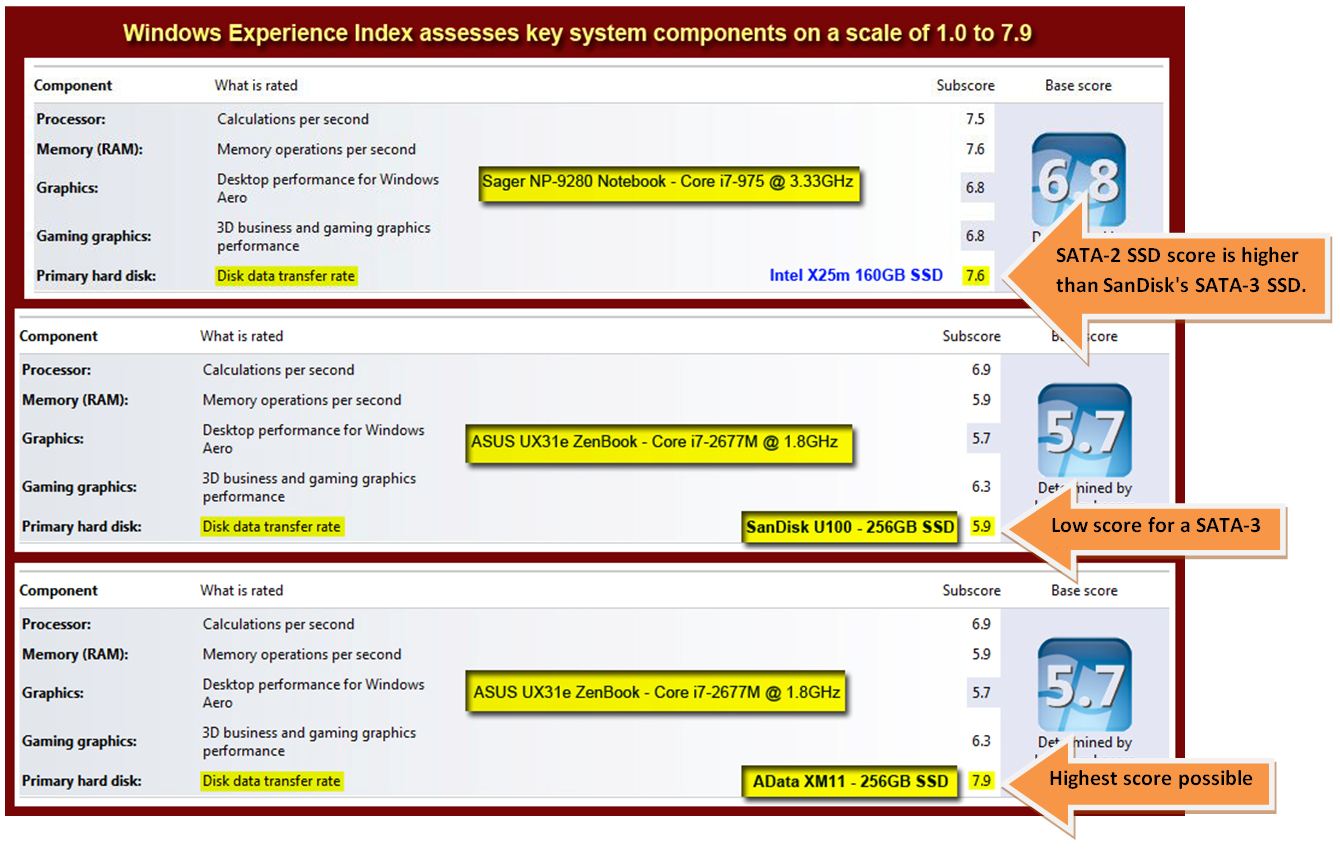
I bought a UX31E back in november, works flawless, but it only has 128gb hdd rated at 5,9 in Win7
Is it possible to change the hdd to a new one? maybe to a "Corsair SSD Force Series 3, 480GB - SATA 6 Gb/s (SATA3.0), 540MB/425MB/s read/write, SandForce® SF-2281"
Thank you. -
Yes, it's possible, and I'm doing it. I've got a Bosmer stealthy archer up to level 36, and about half my play time is on the UX31.
It's not phenomenally beautiful like it would be on a dedicated graphics card and a large screen monitor, but it's quite playable (and still pretty) at medium graphics detail. You'll have to live with framerates around 20 FPS or so, which isn't great, but it's plenty for advancing your character and exploring the plot and the world. -
I believe for many of these ultrabooks you have to get an mSATA SSD. The one you are describing sounds like a 2.5" drive which won't fit in these ultra-thin machines.
-
FYI: There is a new BIOS available on the ASUS FTP site at ftp://ftp.asus.com.tw/pub/asus/nb/UX31E/
UX31EAS210.zip
Not obvious what are the changes. -
Let me know if you install, and tell us about the changes.
-
C:\Program Files (x86)\syncables\
Mine went with uninstall.
But a reference still exists in msconfig. THis does not matter. -
I did install it, but hard to say if there is any difference. I did not notice any.
-
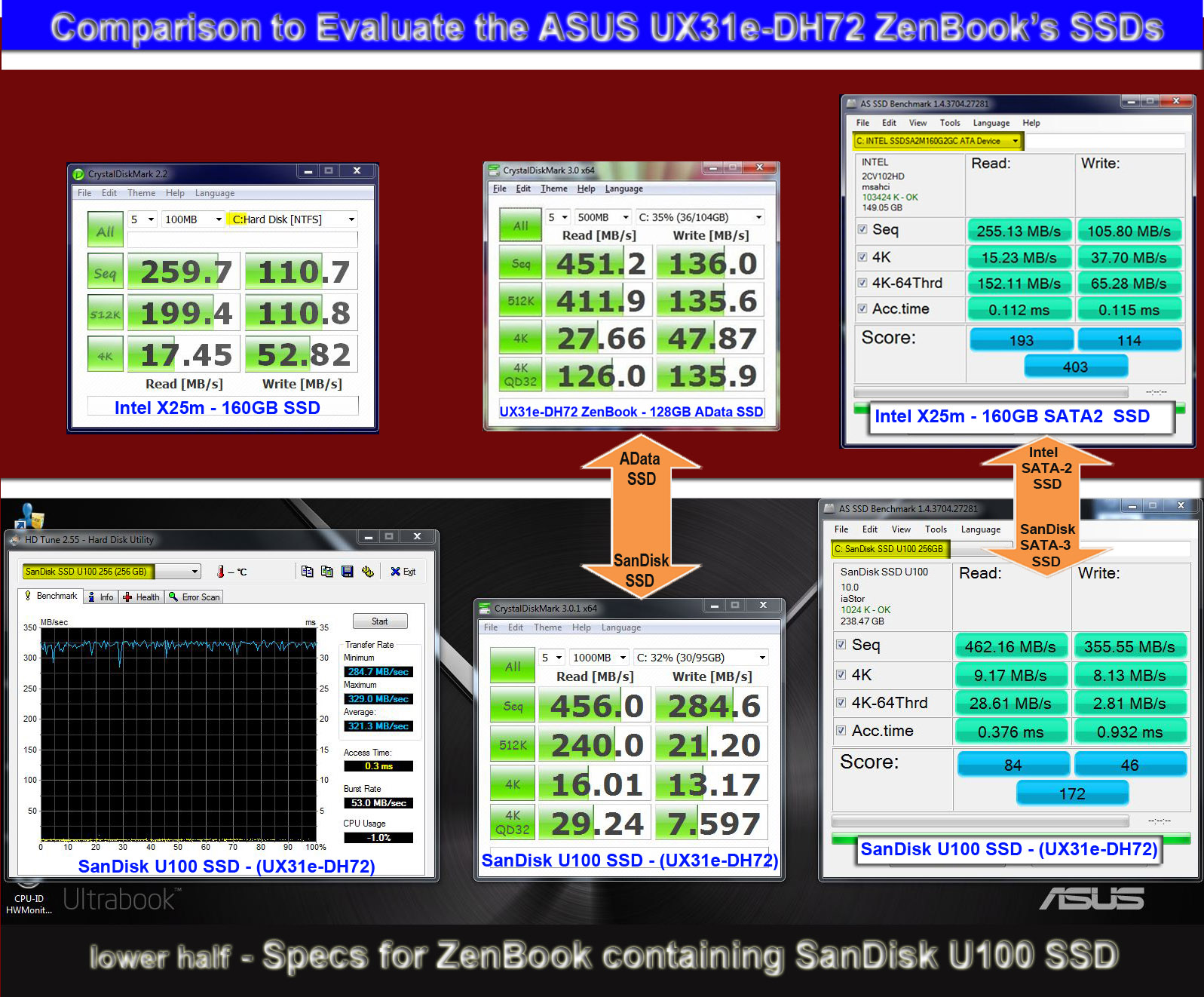
After some extensive research on the ASUS UX31e-DH72, I bought one based primarily on the several ASUS & ADATA news releases touting their partnership and plans to incorporate the SandForce-driven ADATA XM11 SSD in the UX31 ZenBook. After receiving mine and discovering a SanDisk SSD inside, I did more research and testing. Based on both personal testing and the test results from AnandTech.com and other reviews -- it seems that the ADATA XM11 256GB SSD is significantly better in performance in most benchmark categories than the SanDisk U100. The numbers suggest that the SanDisk U100 performance is worst than 2nd tier SSDs. Unless there are undisclosed reliability issues or existing SandForce controller problems with the ADATA XM11, I cannot understand why ASUS in striving for high-performance in their UX31 and then puts the much lower-performing SanDisk U100 SSD in tandem with Intel's Gen2 i7-2677m, 1.80/2.90GHz Turbo2 processor.
Take a look at these numbers (below). It seems my year-old Intel X25m SATA-II SSD (3Gb/s) out-performs the SanDisk SATA-III SSD (6Gb/s) in most bench categories. That is pretty poor performance for a 6Gb/s SATA-III SSD pitted against a SATA-II drive. Only SanDisk's Sequential READ/WRITES stand out compared to my old Intel SATA-II SSD; but in all other categories the SanDisk loses, and particularly loses in the overall total scores. And compared to the ADATA XM11 SSD, the Sandisk falls apart in six out of the eight categories. Perhaps ASUS has a legit reason for this mis-match in key performance components, but it sure seems to contradict its earlier well-publicized partnership plans with ADATA Technology. Comments and criticism are welcome if I am missing something here.Attached Files:
-
-
Okay, so a "1,8 will fit?"
-
Hi everyone!
The product information from the site I ordered it from (Dustin) says it comes with a "128GB SSD (SATA 3.0)" - does that mean I'm getting the better SSD, not Sandisk? -
I think its worth noting that the poorer SSD is still really fast by any standards. Certainly in line with other ultrabooks. Its just that its not quite as good as the adata.
In the real world you are not going to tell the difference.
And in some scenarios the adata is slower ! -
I did install it, but hard to say if there is any difference. I did not notice any.
-
I was hoping that was the case, that in practical use you couldn't tell the difference. It just seems like a lot of people here complain about the Sandisk one, saying that they've had to switch ultrabooks because it was so horrible etc.
-
Hi, I bought mine from webhallen.se early-mid december. It has the ADATA SSD and the Sentelic touchpad. I get 7.9 for the disk in WEI
For some reason Webhallen does not sell the UX31E any longer....
/HojtHojt
Asus UX31 Ultrabook
Discussion in 'Asus' started by pear-i, May 31, 2011.