Problems? See this thread at archive.org.
-
Im not against the modifications. Clearly they exists to speed up boot time, instant on and battery and so on.
It seems the complexity has a down side.
I am sure in a software update or two all will be resolved.
Plus I am now sure the issue occurs in the shut down process rather than wake up process.
This is because even in hibernation the issue occurs. -
I viewed the mini dump logs after one of my crashes. one of them reference a problem with nwifi.sys. I will see what happens next time.
Blue screen view helped with deciphering the logs easier. -
Agreed.
I do wonder if the issue is occurring more often after a clean install.
It would be more helpful if ASUS provided some detail about what each of the drivers and programs and updates do. -
Original install, owned for 1.5 months, zero BSOD's, use for Microsoft Office, Firefox, Photoshop CS5 and IM. Travels weekly on airplanes.
I7, Elan, Sandisk 256g -
My BSOD is off a factory installed unit. I have seen it two or three times. the third i cant confirm.. I have factory restored it and have not seen it since. i will run like this for a while and see if I get the issue again. I think it it most likely a driver and not hardware issue since others are seeing it as well. Maybe a confict with something else i installed the first time around.
-
I have a 256GB Sandisk version and absolutely love it. But one thing I am struggling with is the HDMI out.
I've purchased two separate micro HDMI adapters but the HDMI out does not seem to work to my TV (Panasonic plasma, if it matters). I change to the correct input on my TV, connect my HDMI cable to the micro-HDMI to HDMI female adapter, then I select fn+f8 and NOTHING happens. I've also tried the Win key + P shortcut for projector mode and also nothing.
Am I missing a driver? Is my port defective? Any chance that both of the micro-HDMI adapters are DOA? Any advice would be appreciated.
Thanks in advance for your help.
Edit - I also tested the mini-VGA to VGA adapter provided by ASUS and that works perfectly. Simply plug and play. -
Try with the Windows display manager instead. Right-click on your desktop, Screen resolution, click Detect.
-
No luck with the Windows display manager either
Edit - Figured it out. Turns out one microHDMI adapter was bad (figures since it was less than $2). The microHDMI port on the UX31E seems to be very delicate so I need to hold the adapter very steady for two-three seconds and then it finally collects. But since the port is so delicate, it disconnects if I move the HDMI cable or the laptop even an inch.
I might spring $20-30 for the official ASUS microHDMI to HDMI adapter but I don't see one yet. -
I had this issue, tried everything...then i bought another hdmi cable and it worked strait away. The first cable was G&BL, some known company and the second was some no name,but it worked. Maybe you had bad luck with both cables...
-
Can someone answer this for me please. No response to my earlier query on this.
-
I can't give you an official reply, but I know I just put the factory default image back on, and mine says shutdown... probabaly doesn't help you, but mine is the same as yours.
Edit: I am not on my zenbook at the moment, so I can't check to see if this option is available or will work, but here is something that might help:
http://www.howtogeek.com/howto/windows-vista/change-the-windows-vista-power-buttons-to-shut-down/ -
Thanks for the reply. I just did some RTFM and page 60 it says.
..After activating it, Shut down menu of start menu will be changed to Sleep.
But is also says it is automatically disabled during windows update and will be temporarily changed from shutdown back to sleep until after all updates are completed.
So maybe due to the plethora of updates I have installed it has not reset itself. Or it could be a but I suppose.
Anyway I can just change it manually as you suggest...
Right Click the Taskbar and hit Properties.
This will open up the "Taskbar and Start Menu Properties".
Goto the "Start Menu" Tab
Power button action: [Change from Shutdown to Sleep]
Widget is a waste of time. -
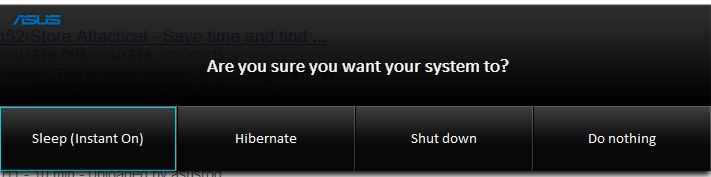
This is what the physical power button (not the windows start menu) looks like when depressed; b/c it is easily depressed accidentally, it provides a menu; I suppose if you want your computer to take some other immediate action you don't need the ASUS tools.
Attached Files:
-
-
Yes I can get my mind around the Power button menu which works correctly for me. Unlike the "Instant On" Widget with its Enable/Disable toggle that does not appear to do what it is supposed to do.
Next Question - is there a way to stop Asus PowerWiz from appearing on boot without uninstalling it. I want it to be less conspicuous? -
I didn't complete the process because I wouldnt be sure how to get it back, but I right clicked on it and an option came up that said "Do not show when windows boots up".. Let me know if that helps.
Frazz -
Thanks Frazz. Tried it and it removed it upon reboot. Then relaunched powerwiz from start menu and right clicked on it again and you can then uncheck the "do not show on reboot" to bring it back.
So I have selected do not show and also pined the icon to the task bar which seems a good solution for me. Only catch is blasted User Acc Control warnings on launch. -
Same here, and the working cable was actually half the price of the non-working one

-
I am very interested in the UX31. I am just wondering if it is worth the extra moneyto move up to the DH72 from the DH51. On another note, should one buy the XH with Windows 7 pro? ANy adive appreciated.
I would mostly doing light browsing and emails. But would occasionaly do some very large spreadsheets.
Thanks -
In my opinion, the $400 bump from DH52 to DH72 is pretty steep.
But the DH53 is a better value deal. For approx $1275 (US Dollars), it has the i5-2557M 1.7Ghz processor and the 256GB Sandisk SSD.
I don't think I can justify an additional $125 for a negligible (<5%) performance upgrade to the 1.8GHZ processor in the DH72. But the additional 128GB hard drive space in the DH53 is necessary if you want to store any photo, music, video, or large files.
For your purposes, I don't know that Windows 7 Pro is needed. -
Got an answer to this form another forum so will post it here in the hope it may be useful to someone.
Simply Right click on it the PowerWiz clock and select "Do not show when windows boots up".
Could not be easier once you know this undocumented feature is there. -
Just noticed this on my UX31 screen tonight. Looks like a smudge but it will not come off. Never noticed this before, damn it time for a RMA.....
Its very noticeable on a white background
Attached Files:
-
-
Hi to all,
I am not familiar with SSD's but plan to install Windows 7 Prof to my UX31E.
So, could you please suggest me how to do. Should I format SSD ?
I plan to;
- Format SSD
- Install Windows
- Update Windows
- Install necessary Asus drivers.
Is there any suggestion. -
Are you planning on installing 64-bit Windows Professional? If so, you can go to your start menu, type Windows Anytime Upgrade, select it, and then upgrade from Home Premium to Professional by typing in the serial key. No formatting or installing drivers necessary
If you plan on installing 32-bit Windows Professional, then you need to do a clean install. -
If you're only doing light work, you won't notice much difference between the i5 and i7.
If you're doing heavier work (particularly multitasking), the 256GB SanDisk SSD more than kills any performance gains from i7-- it's horrendous (can't handle photos, let alone anything heavier- an Atom netbook with a 4200rpm HDD has better multitasking I/O performance (i.e. it won't lock up and stutter like the UX31)). In general, stick with 128GB, in order to have a chance to get the ADATA SSD. -
UK asus shop has charger, and only £30 a pop
-
hello all. I have read all the keyboard issues people have. I find I am getting used to the shallowness of the keyboard (not too much different than my U36JC), but I do have one concern. They keys almost seem as if there is something only under the center of the key... kinda like a pivot point or something. the power button is very "flimsy" for lack of a better term. If you slide your finger over it back and forth, it rocks... Does anyone else notice this or is it just my notebook? If you do notice this, what has been your experience with it, has anyone had any of these keys fall off yet? I am not sure something like that would be covered under waranty, does anyone know if it would? I have a few days left that I could return this to the store and if people report keys falling off, I might just do that... other than that, I am liking the laptop.
-
So I installed windows 8 consumer preview on my DH52 today and came across a couple of problems. One is that I cannot get the bluetooth working for the life of me. When trying to install the atheros BT suite from asus it seems like the program just never installs after extraction and execution. I tried various drivers from other sources and so far it's a no go. Another issue I am having is not being able to connect to a wpa2-enterprise network. I can connect to unsecured and WPA2-personal networks, but the university I attend uses a WPA2-enterprise network, and after entering my credentials the authentication fails, despite it working correctly in windows 7. So if there are any others out there that are also experiencing these issues, or have a solution I'd love to hear it.
-
In uninstalling the bloatware, I lost something that was actually helpful.
When you play videos, my ASUS would automatically switch to something like a movie mode. I can't find the utility that did this. Any ideas on how to get it back? -
I don't notice any issue specific to the power key, but I agree the keyboard I have is terrible, especially for touch or speedy typists.
The hunt and peck crowd probably won't notice it, but I think -- and similar to what you are describing -- keys struck slightly off center give the identical tactile and auditory response as a key struck dead center BUT, nothing gets PRINTED to the screen unless the key is struck dead center.
Some keys are worse than others, but I can press virtually any of the keys to repeat the flaw.
I can't see how this annoying "feature" could result in premature failure, other than in my patience to do any serious key intensive-work on this machine.
ASUS has agreed to RMA my machine, but I doubt they will fix this issue. -
Ref W8, try running the installer in compatibility mode.
-
Pretty tempted to buy one of these. Played with the one Best Buy has (999$).
Question, where is Asus at on the refresh? Are there already Ivy Bridge versions out?
Is there a back-lit keyboard option that will be available or already is?
And is there a certain SN number I would look for to give the best SSD option?
thanks -
Picked up a UX31 (simplest version of them with 128GB), quite bum to have got the Sandisk version, but I'm not too concrened about it. I do have a question for you experts here.
After 2 hours of use I'm quite happy with it, nothing is unresponsive or something, except for little fuzziness with the Trackpad (freezing after I write, waking up a second after). Right now, I could do with it if it continues running like this.
Now, I know they say "if it ain't broken don't fix it", however, assuming I'm happy with everything (except the trackpad, again), is there something that I ought to do regardless of this? some sort of backup? something with the BIOS? perhaps perpare for a bad day if it crashes?
Any answers will be much appreciated, as said, I'm quite satisfied after minimal use, but would like to know if I can prepare myself better if something goes wrong.
Thanks! -
Thanks for the answer. But my Windows does not support upgrade. I have to do a clean install.
I could not find it, could you please send me a link. -
This happens after people were bltching about how the trackpad interferes while typing. And now people are bltching about this. lol
I guess you can't please everyone.
Since I no longer have the ux31, I'm not sure what to tell you.. Maybe there is an option in the trackpad settings to adjust the "delay time" for the trackpad or even an option to disable the "freeze".
Good luck! -
1. To solve trackpad update the drivers.
2. ASUS Shop - ASUS Notebook 45W AC Adapter Compatible with UX21 Series, UX31 Series
my 2 arrived yesterday with free shipping -
Thanks for the reply, I tried this, it didn't seem to make a difference. Still no bluetooth, at least no connectivity to my devices. I have the ability to turn on and off the hardware, and when I do the little bluetooth symbol appears in the tray, but when attempting to add a device (tried a bluetooth mouse and an android phone) it just doesn't seem to do anything. I am now wondering if it is a win 8 thing.
-
it may be that win8 lacks a component that win7 has but is not in the installer.
i bet somone will figure a work around soon as this must affect other makes/models -
I guess I can live with it.
Anything you recommend doing if I'm satisfied overall? how do I avoid getting something to screw up? -
If you have the Elan smartpad, turn the freeze after type feature off. It is supposed to lock edges of the touchpad when typing as an option.
"The Smart Detector feature guards Smart-PadTM against operations from accidental contact when typing. For example: unsolicited pointer movement or click operation."
Start > control panel > mouse > Elan > Additional > Uncheck "enable". -
Thanks, I'll try this.
Anything else I should do as a pre-caution? backup anything? install anything related to BIOS? -
Also: anyone noticed any stuttering when streaming from certain sites? I'm not sure if it's going to stutter like that for every video I play. I seriously hope not.
-
Interesting point on the SSDs
ASUS Zenbook SSD Review - Not Necessarily SandForce Driven Shows Significant Speed Bump - The SSD Review -
I don't think it has anything to do with the UX31 hardware. This is a software issue.
Have you installed the latest Intel HD Graphics and Intel Chipset drivers? -
I feel like the wireless card in this is driving me insane. I have updated to the latest wireless driver and I'm getting all sorts of connections. Sometimes it's blazing fast, other times it slows to a crawl, and other times it just stops... then goes blazing fast again. What can I do to fix this problem?
-
Ref the SSD review. Amazing detail.
But certainly not going to make sandisk owners happy.
It seems that ONLY in the event of a large inbound file copy will the sandisk be better. -
I'm a Sandisk owner, and I'm not ecstatic about paying the same amount of money for the inferior product compared to others. But still, it's like buying a 800 hp car which only coughs up 500 hp. That would infuriate some, but my use of the laptop - if we're sticking to the car analogies - is like taking it to the grocery store every once in a while, so it's not that big a deal for me.
-
Its more like saying you have a 800hp car that will only do 800hp on a motoroway, on a normal road its limited to 500hp... !
-
Been using the zenboo for almost a month and I've got a few issues.
Fan noise. Whenever the temperature goes over 48-49 C, the fan goes kinda crazy. Makes a lot more noise than I had expected. It's in the annoying class. When the temperature is lower than said temperature it makes no noise at all, so that is good.
Any thoughts? Should it be like this or are there any fixes?
I'm also wondering if I should upgrade my bios. I'm currently running version 206 as it was shipped with that version. I've never flashed a bios before, but if it's recommended to ugrade I'll do it any time. -
Same router each time?
Different speeds at the same time each day?
Wireless signals are subject to lots of environmental interference.
Unlikely (but not impossible) that your issues is the uX31 wireless hardware.
FWIW, with latest bios and firmware, I see the full pipe from my ISP wirelessly.Attached Files:
-
Asus UX31 Ultrabook
Discussion in 'Asus' started by pear-i, May 31, 2011.