Problems? See this thread at archive.org.
OK, its 100 times slower than Toshiba's SSD, but I still do NOT have any issues with my Notebook. I wrote about my test. It was not an ordinary test so I believe unless you do a lot of small file copying very frequently you should able to use it without any problem.
But... yes, I agree that, its weird to see this kind of un-consistent SSDs on a $1500 Notebook !
-
I believe that there is problem with your SSD because I run this test 3 times and did not get any performance index lower than 2150 for the first item (0.5 write speed). But its interesting that almost all the other benchmarks higher than mine !

I bought my Zenbook but did not upgrade BIOS or installed any other application. So maybe bios upgrade may change this. -
That SSD should be RMA'd period. The test result should show a steady and consistent build in transfer speeds as you will always see in ATTO SSD testing. Yours does not. There is a significant difference between 16/32 and then again between 128/256 kb samples.
There are a few different avenues that you might want to test and post but the best and most obvious would be AS SSD Benchmark and then do a copy test. -
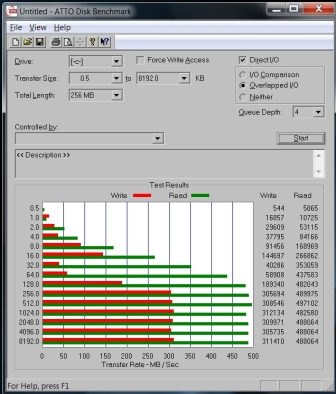
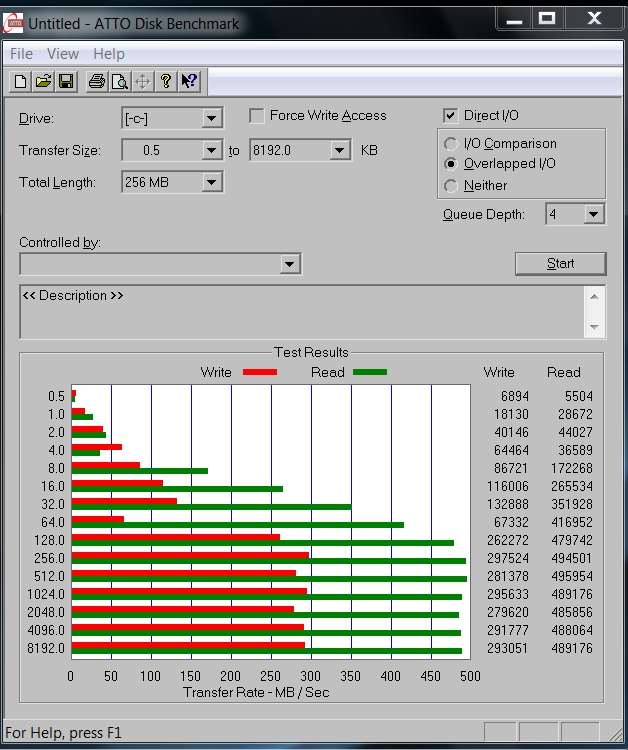
Here is my result with 128GB Sandisk SSD.
Attached Files:
-
-
128GB Sandisk as well @high performance mode..
![[IMG]](images/storyImages/1zv4ti1.jpg)
-
Thats VERY high ! With these system you never realize any difference with A-Data. Are you sure that is Sandisk
I tested my system High Performance mode but my 0.5 K benchmark is 2149. Yours is four time faster than mine.
So, could you please tell us if you did any optimization to your system (bios upgrade, driver upgrade, etc.). What is your bios version ? -
I already mentioned. I believe all I do differently is running the older AHCI controller which noticeably gives me a much more responsive system. I am really surprised this doesn't solve the problem for others here. Many posts back I also showed the visible differences in the Crystal Disk benchmark. Other than that everything else is up to date. NOD32 AV5, using Win7's audio driver though.
-
How do I know the version of my AHCI controller and how to install again the old driver? Thanks.
-
Post #2116 (page 212)
-
I could not find this driver internet. Its deleted or the web site asking for money to download it.
I uninstalled the current driver but after system reboot I see same driver. It does not rollback !
Could you please share the driver with us ? -
Right click Computer -> Manage -> Device manager -> double click IDE ATA/ATAPI controllers - > right click the AHCI controller -> properties -> In tab driver you click Roll Back Driver and restart. To undo this roll back, just update the driver again. Hope this helps.
-
anyone have any information on when the next generations zenbook are coming out? will it be in october? because every year they have to make a refresh?
-
http://forum.notebookreview.com/asus/649714-new-asus-ux31-coming-may.html
looks like they are planning on going with a HD resolution for both the "11 and "13 hopefully the new UX will come with a magnifying glass........ Hey Asus instead of giving us a high resolution why dont you give us a better touchpad and better wireless card and better screen. The viewing angle on the UX 31 sucks. -
Hello Guys,
I am happy to confirm that my WEI score is now 7.5 with the Sandisk 128gb drive, thanks to Myckel. My Atto benchmark numbers are similar to his.....
the one other thing i had to do was disable my antiviurs. for some reason, this was holding back the benchmark scores. the machine feels much faster and smooth now
either way, think it is fair to say that all sandisk issues are driver issues, and not due to hardware issues..i am happy about my purchase now !!! -
UGH!
I just found this:
Fujitsu Ultrabook
And I work for Fujitsu as well. Maybe employee pricing option for this.
This sucks, Asus or Fujitsu!? -
Finally... I did.
But, after that update my WEI disk score is still same 5.9
CrystalDiskMark scores almost same
ATTO Benchmark scores are much better now. Not as good as yours but better.
First two write scores: (128 GB is yours)
128 GB Sandisk 256 GB Sandisk
--------------- ---------------
0.5 8405 6446
1.0 16340 13500
But my BIOS version is 206. I will upgrade that to 211 and re-run these tests. -
Amen to that. I put my ux13e on eBay and sold it after two days. Was forever having to zoom everything in or peer forward to be able to read small text.
-
No matter what the benchmarks say, you should feel a big difference. Just like latief.
Hopefully the bios update will improve your system. It won't get worse..
-
I don't think Atto is a realible benchmark, this is the second benchmark test.
Look at benchmark at 0.5 KB write, it is jump very high compare to first test (No drivers update, no apps open, just run the test)Attached Files:
-
-
I can not believe ! I updated my BIOS to the final 211 and run the test again. SSD ATTO Benchmarks are: (for 256 GB Sandisk)
0.5 --> BIOS 207: 6446
0.5 --> BIOS 211: 508 !!!
1.0 --> BIOS 207: 13500
1.0 --> BIOS 211: 609 !!!
I do not know what to say. I want to believe that its unreliable as incendio said.
Myckel, could you please tell us your BIOS version. -
That's weird, I'm having 211 as well. Try running several tests and make sure the file size is on at least 256MB. Also you can temporarily disable your AV.
Most important: does it feel slower/faster? -
I have BIOS 209. In real apps, I don't feel any diff at all in speed.
Cold boot (Win7) still around 17~20 sec.
My Database app runs fine, didn't feel slower or any increase in speed.
So, I guess, don't really on benchmark test, most important is how its performance in real apps. -
A very interesting thing happened:
I tried to optimize my system. Before this process ATTO Benchmark 0.5 Write speed was 2159 or something like that. But as I wrote before I watched 720p video, copy 5 GB file C to C and activated Full System Anti Virus check there was almost no performance problem with the Zenbook. Just one time 2 sec. lag on the video, thats all. System performance was good.
I installed AHCI driver to 9.2.0.11 and upgraded BIOS to 211. After these upgrades I tried same multitasking. But this time system was MUCH slower then before. 720p video lags very frequently and system performance seems lower than before.
BUT... same ATTO benchmark shows that 0.5 Write speed is 5050 or more !!!
That is something absolutely I can not understand !
Benchmarks show more performance but the overall system performance worse. And worse than that while running the ATTO, my system got a blue screen (once)
I plan to downgrade BIOS ver. 207 which was the original one and will try same tests. I hope to get old better overall system performance.
UPDATE: I rollback to new Sata AHCI Driver (original driver) and my system performs a bit better now. At least I could watch the video without any lag while running anti virus check and copying 5 GB file C to C.
At the end, I believe that my SSD has some hardware problems. One final step is a clean install of Windows 7 and test it just before sending my Zenbook to Asus Technical Service. -
Sorry to hear it didn't work out for you.
Bios flashes are irreversible. -
Just rerolled the driver. Running BIOS 211, did nothing to my WEI score on 5.9 or
ATTO tests. Machine feels the same. -
Is there any way to use single finger edge scrolling instead of the 2 finger scrolling? I can't stand the two finger scrolling.
-
256g Sandisk, Bios 2.09, 10.5.0.1026 Intel driver, AV OFF, Normal load of running processes at 98 including Outlook, Firefox etc.
-
Hello, Just got my UX31E back afer complete failure (MB and display replaced) and reran WEI. Got 2.0 for 3D gaming and Business graphics. ?! had 5.8 before as an agregate score. have opened a ticket with ASUS and may RMA again or just get money back... anybody else have this issue? have tried 2509 HD3000 and the latest driver same score
thinking maybe this failure mode is an incompatible graphics mode that kills chip (on MB) and display which is why they replaced, but replacements have crippled graphics capability -
BIOS 209 is better maybe. Two 256 GB Sandisk's WEI HDD 7.5 benchmark mentioned here were using BIOS 209 so I plan to downgrade to 209 and test my system again.
-
Windows 8 consistently "feels" faster with the latest drivers and BIOS211. Also scores WEI of 7.5... With Windows 7 I never got a WEI score 5.9.
-
Hello!
First of all, the computer is awsome.
I have a problem with bluetooth, im sending audio to a bluetooth reciver but the computer sends audio in low quality, my phone sounds perfect to the same reciver so i think the problem is in the bluetooth stack.
Tips on a stack or the newest drivers to the atheros bluetooth? The ones on asus support site i already have and i dont find atheros drivers anywere else.
Then i have another issue, my recovery files were deleted by accident, is there someone that can share them? Would make my day ;P -
I just got a UX21 with 128 sandisk drive.
My harddisk WEI is 7.4. Does it mean my sandisk drive is fast and good?
not really have used it much so cannot judge real work performance.
AS SSD benchmark performance is terrible though. -
That is very interesting for Win8. My UX31 lowest is 5.6 and highest is 7.9
regards -
Hi, I want to know if anybody knows more info about the Asus warranty below. If our notebook has any Bright Dot or a bunch of white dots on the screen after 30 days of purchase, what will happen ? Will we have to use it with bight dots or Asus will replace the LCD just for LCD cost. Any idea...
Zero Bright Dot (ZBD) Guarantee:
A bright dot refers to a pixel with a defect in its ability to display the correct color output. Notebooks with one or more bright dot within 30 days of original purchase date will qualify for a free panel exchange. The ZBD policy does not cover LCD panels with dead pixels e.g. dark/black dot type. Only the LCD panel will be replaced, not the entire notebook. Please refer to your authorized ASUS Service Center or Reseller for your product specific terms -
So this is kind of weird. My Asus Zenbook UX31 seems to start lagging, eventually freeze, and give me the BSOD (blue screen of death) whenever I see my RAM start going over 3GB... Any ideas why this is happening?
Maybe it's because I don't restart my computer regularly enough and leave a bunch of programs open all the time? Help please and thank you! -
Wow!!! This computer must be a piece of crap from all the problems I've read about in this thread. I wanted one bad but now I'm like nah.... For $1400 that computer should be kick and live up to the hype.
-
Hmm. I'd like to argue about that. In a board, usually only problems are talked about. Why should people without one take part in discussions?
My ASUS UX31E-RY010V (best settings, German version) is running smooth, no problems whatsoever. It is fast. It has got fast wifi connection - anywhere so far. The screen is bright (viewing angle is fine for me).
I'd by it again any time. It's an awesome ultrabook - still the best I think. -
+1, best laptop ever had/seen!
-
Are you seriously asking that...... Because me like a a whole lot of people are about to buy an ultrabook and we want to know other user experiences before we party with our hard earned money.
I really love the Asus brand and ive bought several of there motherboards over the years, but it seams customer support has gone south since getting in bed with Best Buy. I'm glad yours is working awesome and I don't doubt that, but the fact remains this product has some growing to do. I remember when I bought my Asus G50V-A1 and it had a few bugs and Asus had them resolved rather quickly. It seams the company is cutting corners in areas it shouldn't now days. I'm disappointed after reading about so many problems with such a beautiful looking product. I hope Asus redeems themselves this May when the second gen of their ultrabook line comes to market.
Sorry to have been harsh earlier, but I'm let down by a company I've had a lot of respect for over the years. Quality used to be #1 not sure anymore. Good luck with everyone's endevers to problem solve this machine. -
Thats normal. Because only the Zenbook owners who has problems write here. I know because I am one of them
In fact thousands of Zenbook owners using their marvellous laptop without any problem ! So, they do not write anything here.
I had a problem with my notebook but... Still I strongly suggest Zenbook
-
I agree. I have been through a lot of laptops, and this one is my favorite so far. The forums are generally going to exhibit more of the bad than the good. I have gotten more complements from this laptop than any other single device I have owned. It is a sexy piece of hardware. The only issues I have had with the zenbook were caused by installing the windows 8 consumer preview, which is just that, a preview; not quite ready for release. Don't let these boards scare you away from this machine. It's a great piece of hardware.
-
I am here because the first ZenBook I purchased was received in great physical shape but the screen was DOA. I ended up getting a refund from a very nice webstore because they did not have another in stock after waiting a month. I then purchased the same model (UX31-DH72) from the local Microsoft Store. I am very happy with it so far...
Charlie
-
Just picked up one from microcenter, they did buy.com price match and let me open it up too to see that it came with Adata SSD (sandforce sticker in black case), seems to have the elan touchpad too. Very impressive machine...
Looks like one can get euro plug for the charger here: http://www.asusparts.eu/product_info.php?products_id=58230 (shipping is expensive)
ATTO results:
![[IMG]](images/storyImages/ux31atto.png)
-
I do agree that people are more apt to come to forums when they experience troubles in comparison to when they are happy just as those that have had SSD troubles run to the net first yet the vast majority just enjoy their find without writing about it.
I can also compare this thread to the M1330 thread of old which did exactly this and made many believe the 1330 was not all that it was cut up to be. For the record, I was the first to receive and review the 1330 with the first consumer SSD and it still sits behind me....runs fine.
I have to admit, however, that in comparison to the Toshiba Z830 thread, the story is very different here as the Z830 hasn't the troubles as seen in this system. For the most part, that thread has been very positive.
From my own opinion, I have several ultrabooks in front of me right now including the Zenbook.
The poor quality of the Sandisk can't be overlooked and, even harder to swallow, is ASUS' decision to put the stickers inside the packaging in comparison to just about every other example I know that has 'SandForce Driven' or the appropriate designation outside, much less in the specs.
In fact, ASUS really blindsighted customers by putting a 128/256GB SSD in the specs when the ADATA drives are actually 120/240. There were times when SSD manufacturers got raked over the coals for exactly that. Do we believe that ASUS was not aware of such?
Like the feel of this system and the ability to hit SATA 3 speeds...no doubt about that. Curious whats going to happen now that ASUS manufacturing plant has been served an injunction by Apple and that specific manufacturing plant cannot build this system there any further. They are looking for a new manufacturer to manufacture the same specced system apparently. -
The Portege Z830 ssd is nothing to write home about. Actually my 7200 rpm hd on my computer is faster then the ssd on the Portege. -
Forums like these are often (though not always) sites in which people post about problems on their machines in order to get help. Thus, the impression often created is that the said machines are given to dubious build, faulty craftsmanship, etc.
It's not always true though.
My Asus UX31E RY009v has been tremendously reliable, and excepting two BSODs (probably because I connected to public wifi w/ my Trend Micro still off; perhaps to protect my system...), no glitches so far.
(I have since then installed AVG Internet Security 2012 Pro)...
But I do understand the apprehension expressed; $1400 is a lot of money and it ought to be "invested" wisely. For what it's worth, my good experience with the Zenbook (my first ASUS, had one Compaq, one IBM, two Toshibas, and a Vaio SR) has been worth the money I shelled out for it.
Best -
I'd like to add that I am too very content with the ux31, 256gb sandisk, elan. Keyboard needs a little getting used to, but is fine after that(miss my home and end key though
)
Now, some news about the new zenbooks has come out:1080p IPS screen, new backlit keyboard and off course ivy bridge. Looks like the ultimate ultrabook(except for the price probably) -
It can't be 1080p! Too small even on a 13", imagine on a 11"! I do not trust this source
-
Not likely they will go to 1920x1080 when no other ultrabook is at 1600x900 yet (not counting the sony z due to price)
Probably more ram, backlit, chipset refresh in the new version. -
Well, if you look at the resolution of the new ipad... But the best part of it would be that it is an IPS-screen i guess, I'll stop drewling now however and enjoy my first gen zenbook. And remember that, unfortunately if things sound to good to be true....
Asus UX31 Ultrabook
Discussion in 'Asus' started by pear-i, May 31, 2011.