 Problems? See this thread at archive.org.
Asus could put a 1080p into a 11.1 and 13.3... they are doing it in the 10" Transformer Infinity tablet.
-
A key point to consider is that PC's run almost all applications at the native resolution where as mobile devices are typically not and may be using 4 pixels to display 1 real pixel.
-
Absolutely...terrible SSD and only a margin above that of the Zenbook (Sandisk)...and yes there are some concerning things now being released about the new updated Zenbook, especially since Pegatron has been forced to stop building the Zen by Apple and word is out that ASUS is seeking a new builder for the Zen. Peg is a manufacturer that builds bothy the Zen and Air.
This would make this latest info of the new Zen with striking similarities to the Apple (IPS) very questionable...
Here ya go...
http://www.extremetech.com/computin...manufacturers-to-cancel-ultrabook-competitors -
if its true to just goes to show apples true character.
-
Finally got around to install my clean retail Win7 - bye bye bloatware.
Here's ATTO with BIOS 2.11, after clean install, only with required drivers, before Windows update.
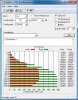
Feels as before - fast
-
I have received my UX31 last week and I am experiencing just the same noise click...click and after remove the rear cover I have discovered the fan is blocked. Only pressing a little to put in a correct position the noise have dissapeared.
-
are yu guys happy with baterry lifetime? i got the u31e my niece macAir the new one, her laptop last 2 hours more than mine ....
-
If you are doing the same tasks, same screen brightness then the ux31e should last slightly longer.
I easily get 6+ hours of usage with BT off, wan on, screen at 35%. -
+1
I get 5-6 hours, all depends what you do... -
Asus Zenbook UX31A and UX21A coming soon with Ivy Bridge, WiDi, matte Full HD IPS display, and backlit keyboard | The Verge Here's the legitimate source, UX31A/UX21A/UX32A/UX32Vd will all offer 1080p IPS Matte displays.
-
Just wondering what brand of wireless router are you guys using with your UX31? Right now I have a Dlink Dir 655 and the download speed is trash on my UX31. I have Charter here in So cal and my speed is 40 down/4 up. With speedtest the best I could do is 13 Mbps. I have tried using every drivers for the UX31 and no improvement at all. Changing channels on my DIR 655 seems to not improve the speed. I am about 8 feet away from my router.
I remember reading some of you guys saying that it really depends on the router. I am looking now at getting a new router either Netgear N600 (3700) or Asus RT-N56U. Any suggestions on which router works best for the UX31? Thanks -
I think just about any router would do well.
FWIW, here is recent wireless test of our UX31 from our ASUS RT N56U

(ISP speed is 75/10) -
i have the 3700 and it works great, not tried the asus
-
Cool. I ended up getting the Netgear 3700! Hopefully this will resolve my issue.
-
Using Billion Bipac 7800n.
Got 150mbps everywhere in house - which is not too big to be fair (BTW - a little bit disappointed this Atheros chip doesn't support 300mpbs). -
Hi, I need a list which describes which driver or utility for which function. If you have a list could you please post it here.
I clean install Windows 7 Pro to my Zenbook. But I installed just some of the drivers. I need a driver for SD Card Reader, I found it and installed but still no access to my SD Card. Any suggestion ? -
I've done a clean install of Win 7 Home 64 with partition reformat and installed only:
BIOS 2.11 (through BIOS)
Intel Chipset
Intel Graphics
Intel Rapid Storage
Intel Management Engine
Atheros (Wi-Fi)
USB 3.0
SD Card Reader
ATKACPI
Elan Touchpad
Everything is working perfect, no unrecognisable devices in the manager and laptop is very fast - so I these are the only must haves, all the other are optional. However I haven't tried USB 2 Ethernet - it might need the driver.
Bluetooth & Audio works just fine with Windows drivers and I consider the rest bloatware (though some might like it
Tried Power4Gear but it was just fancy interface to stock power management with few other options (like disable/enable cam). -
I purchased a UX31E yesterday. I love everything about it, thus I am facing 3 problems with it.
1) when the fan stops there is a faint whisper like sound (electronic circuit sound like it, it is coming from the left upper side around the tab esc f1 f2 buttons)
2) touch-pad sometimes freeze for a couple of seconds
3) when trying to type in Firefox or IE any text it won't type even if I close and reopen Firefox or IE, I have to restart the laptop to be able to type.
here are the specs and software
i7 -2677
4gb
256gb
ELAN 10.5.5.0
1 more noob question
whats the best way to preserve the battery , Do I charge it when it is fully drained or do I always connect ac power whenever it is available etc... -
Can someone please tell how to stop my UX31's display turning off after one minute?
I've changed both the Power 4 Gears setting and the Windows Power Plan setting, and still it goes off after minute. This is very annoying when am I reading walls of text! -
That's probably the smart detect on the Elan touchpad. It turns off the touch pad while you're typing except for a smaller region in the middle, so you don't accidentally move the pointer. You can configure it in the Elan touchpad settings.
Every once in a while you should use the battery until it indicates it is low and then fully charge it up to calibrate the battery meter.
Otherwise I'd leave it on AC whenever possible. Batteries in general hate being discharged, Li-ion batteries really hate being deep discharged -- every time you discharge a battery, it loses a little capacity.
Never store the laptop with an empty or nearly empty battery. Lithium-ion cells can be permanently damaged if they fall below a critical voltage level -- they cannot be recharged again. So if you fully drain the battery, immediately charge it. -
Why would anyone buy a ux31 now? A nex gen will be available in a few months. That means the first gen with all the bugs and cheap parts will drop down in price.
And for what you paid for your current ux31, you can buy a next gen for about the same price. (Asus claims a little less).
All with new back lit keyboard, matte display, LED or IPS display, higher resolutions, 1080p, and who knows what else. A better WIFI card?
Oh, and Asus claims the keyboards are improved. There will be more travel.
If that's the case, I can't wait for the ux31a. -
Because someone might need/want a laptop now.
UX31A is still couple months away, and surely few months later next gen will be announced.
It's always like that with every generation of tech, some will buy, some will wait, there's no one correct decision, it's up to personal choice and circumstances.
I'm happy with this one and I'm sure many others are. So you will be when you get UX31A - if you won't decide to wait further because of something
-
Power options, when to turn screen off, change to never.
-
Right and Wrong !
You are right the new generation will have IPS, Full-HD Display, etc. AS AN OPTION ! If you pay more you will get them.
And Wrong, these will be just OPTIONS but not standart. So, I believe that, if you wait you will not see cheaper devices but more expensive Notebooks with costly good options. (backlit will be standart but others optional) -
Amazon.com: Introducing Intel-Powered Ultrabooks.
UX31E-DH52 for $950.00 and also a $100 gift card from Amazon. Good deal if you dont want to wait for the new version coming in May -
Yep, I and tons of people are willing to pay more for a pimp laptop.
The "It's cheaper than a mac" thing PC was going for obviously failed. And people are actually willing to pay more for a quality product.
I had the UX31 and wanted to like it, but the wifi and trackpad was a major fail. So I have no problem waiting for a better unit.
For now, I'll use my desktop . Or my HP Dv1000 from 2006. Still running strong. lol -
Thanks for the suggestion, but still the screen turns off. Any other ideas?
Does the screen turning off after a minute or two of inactivity affect anyone else..? -
The power setting must be set for ALL profiles for it to work at all times.
-
Got it.
Thanks, guys. -
Hey guys,
No problems at all, nothing to share ?
I am sure that, hundreds of Zenbook owners are here, but why nobody shares anything !
I have a question. Could you please share your battery life. Reviewers says Zenbook battery lasts 5:31 but I do not think mine lasts that much. I do not charge it until battery level is %10 or less. -
guys, how did you go through this ridiculous SSD partitioning, crazy
did you guys just plain simple reformat it or delete the partition / expand C ? If asus prepares a computer, they definitely do b.s.
-
I just went to the disk management tool (under the System Management app in Windows), deleted the D partition, and expanded C.
Not sure why Asus splits the disk, especially considering the average buyer will have no idea how to change that. -
Depends what you do with it. Under Win 7, I was getting around 5 hours with moderate activity (Wifi, Office apps, browsers, etc.) - a bit more than the MBA on Win 7 (that was around 4:30). With Win 8, it's down to 4-4:30 (probably some driver issue).
-
In the win 8 thread that existed a couple weeks back (and seems to have disappeared) there were users, including myself, that were having troubles connecting to a wpa2-enterprise networks. I have since bought a USB wireless N adapter, and can now connect to the wpa2-enterprise network with no problems whatsoever. So there is definitely some sort of atheros driver issue with windows 8 that needs to be addressed.
-
Suddenly, after reinstalling Windows 7 SP1 in UEFI mode to GPT drive, SanDisk 256GB SSD WEI score went up from 5.9 to 7.6. Weird.
-
Can you run the ATTO disk benchmark and post your results?
Disk Benchmark | ATTO -
Hey guys!
1. i7 core hits the chasses much? i5 would be better choice?
2. no backlit keyboard spoils the party?
3. touchpad improved finally?
4. wi-fi okey?
5. LED display: is it IPS or TN? How are view angles, gamut?
Thanks!
P.S. Consider this one with 13'3 and new Samsung N900 X4B with 14' display.
Samsung Series 9 900X4B - 15" - Core i5 2467M - Windows 7 Home Premium 64-b - NP900X4B-A02US - Notebook Computers - CDW.com -
1. Both are fine, go for i7 if you need more power
2. Can't see why it would...typing at night?
3. Got the Elan, no problems
4. Full 150Mbps with Billion 7800n
5. Angles and panel very good for TN. For the gamut best see review...
I considered N900 too but Zenbook won in my book, trying both N900 seems more fragile and not built as well. -
@Luke997
Thanks! But what U meant saying " ...not built..."
Overall quality? Or aluminium keys? What exactly made U to take Zen?
Have U had chance to see Samsung X4B in real? Imagine 15' display! It must be cool! And it is matte! Asus has glossy...
P.S. What about a 50Whr polymer (non-removable) battery? What to do if it dies one day? -
Chassis and screen is a bit flimsy and flex, feels much cheaper and less durable than Zenbook.
As for the build quality, some users reported problems with flimsy screen hinge and sometimes visibly put together badly (uneven spacing etc.)
Also users were reporting very, very poor Wi-Fi, forcing USB dongle unless you sit close to the access point.
I wanted ultralight 13.3-14 machine so X4B was out of the equation.
I have to say though, N900 is still great laptop and was second on my shortlist.
As for the battery - it should last long if you use it properly (i.e. not keeping full charge all the time and not depleting to near 0% every time, but rather keep in the "midrange").
My previous Acer TimeLine lost very, very little battery life in 2 years of 12-14h daily usage (still could do 6-7h!), which is pretty amazing, so I unless it is faulty or you plan to keep the laptop for very long time - shouldn't be a problem.
Ultimately if it does die after warranty, you buy new pack and replace it, not as easy as with regular laptops, but certainly doable. -
@Luke997!
Are U talking about new NP900 X4B or previous NP900 model line? The new one came on the market just in February..... -
Isn't that the old Series 9? The new Series 9 is out:
http://forum.notebookreview.com/samsung/638253-new-2012-samsung-series-9-13-3-a.html -
just got my ux31
absolutely stunning notebook and i really want to love it. keyboard rocks, but i'm having issues with the ELAN touchpad, slow and unresponsive at times. is this a driver issue?
can you guys tell me what should be done first after unpacking?
- reinstall windows?
- bios update?
- driver, how and which?
btw mine is an i5, with a SANDISK 128gb -
Update Elan driver:
ASUSTeK Computer Inc. -Support-
Disable ASUS Smartpad, it might cause touchpad to "freeze" at times due to the way it works. -
http://www.theverge.com/products/zenbook-ux31a/5378
IPS matte + IB
Should wait for th1s c4ndy: status 'rumored'.... So what are the chances? -
Hi all,
I've had my UX31 for about a month now, and really like it. I have to admit, I wasn't sure about the keyboard at first, but it's something I've gotten used to and I can type fine on it now.
In case it matters, I've got an Elan touchpad and Sandisk hard drive. I haven't noticed anything wrong with the touchpad (once I turned Smart Detector off), and the hard drive is fine. I think somebody said a few pages back that the sandisk drive has some sort of technology that gives it lower benchmarking scores but is just as fast in everyday use, which would make sense as I've definitely been impressed with its speed.
Anyway, I thought I'd post an interesting experience I had regarding gaming performance on my UX31:
I was wondering if Diablo 3 would be able to run on the UX31 once it comes out, and figured if Starcraft 2 runs ok then Diablo 3 should be fine. So I installed Starcraft 2 and found it ran quite poorly, all settings on low and a sub-20 fps. Oh well, I thought, it's not supposed to be a gaming machine, fair enough. Then, for no reason I decided to run the ASUS updater which told me an update for the Power4gear software was available, so I installed that. A few days later, I decided to try Starcraft again to see if it was playable at all, and was surprised to find the game running very smoothly at medium/low settings! After some experimentation and a few system restores to find out how this had happened, I found that the updated power4gear software had improved the graphics capabilities somehow. The WEI scores were unchanged, but there was a definite, substantial increase in performance.
The only downside was that now the laptop was hibernating when I closed the lid. This was fixed by changing all the 'Hibernate after' settings in the power4gear control panel to 'never'. Also, this takes a while because each time you change the setting, you have to click 'save' before you go to the next tab, or it will just revert back to hibernating.
Anyway, I just thought I'd share this as it seems to be an easy way to gain a fair bit of extra performance. Also, a computer this thin running starcraft 2? Wow! Very impressive. -
Has anyone tried to load an image using PXE boot on the UX31E? Have updated to latest BIOS but can't find any information on it.
-
Hey everyone, I've run into a huge problem with my Asus UX31...
For the past week, if my Asus ever turns off / enters sleep mode, I can't turn it on! I get the feeling it's "trapped in sleep mode" and won't turn on when I open the lid / hit the power button.
That said, after holding the power button enough for it to power down, about 1 in 20 chances when I turn it back on will it actually "turn on". Otherwise I just get a black screen... -
Hi, which power4gear version you used?
Asus UX31 Ultrabook
Discussion in 'Asus' started by pear-i, May 31, 2011.


