Problems? See this thread at archive.org.
What % is your battery level (battery wear) at? I got my UX31 since Oct of last yr and so far my battery wear is at 18%.
-
Attached Files:
-
-
Hi ToJa92,
thanks for your reply.
Thanks for contacting them. Please let us know what they respond, that would be cool!
Cool - go over and ask em
Kind regards
mb277 -
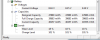
Looks like my UX31 goes pass 100% when charging. This afternoon leave my charged plug into the notebook, and I just noticed this when I unplugged the charger. It shows 101% charged and the current capacity mWh shows more then the full charge capacity?????????
 .........
-
I have installed the latest touchpad driver. It is much better than the old ones (sentelic or elan driver)
The problem is, shortcut key (Fn F9) to enable or disable touchpad manually doesn't work any more though disable touchpad when using external mouse still works.
Any suggestion how to make this works?
Thanks. -
I installed the new touchpad driver too. Double finger scrolling doesn't appear to work now. Does anyone know how to configure the new driver?
Thanks! -
Well, either the person replying didn't look at my question at all, or they refuse to check it for me.
My email's on the bottom, reply on top:
I'm going to give them a ring on Monday instead, hoping for a real answer. -
Works fine for me, double click Asus Smart Gesture tray icon, you can configure touchpad setting from there.
-
I have an early version of the UX31E that uses the Sentelic touchpad. The new drivers and utility Asus Smart Gesture cause the Sentelic touchpad to stop functioning after install and reboot.
has anyone with a Sentelic touchpad got the new Asus drivers to work?
They do install a Asus touchpad device but the touchpad doesn't function after reboot.
Alternately, anandtech said at one point that Asus offered warranty replacement of the Sentelic touchpad with a Elan touchpad. Has anyone been able to accomplish that?
I contacted Asus but, based on previous experience, the only reply one receives to support requests is the message "This mail didn't reply yet !!" -
Here are the steps to that works for me
1) Uninstall Sentelic driver, it is horrible after all, makes boot time longer
2) Install Asus's driver, make sure you have net framework ver 4
3) done
With Asus's driver, boot time increased significantly and every touchpad functions works well (except for shortcut Fn F9), if still not functioning, check its configuration, make sure that you uncheck disable touchpad on mouse detection option. -
Thanks for the advice.
Unfortunately the steps that you used do not work for me.
I may have to attempt to get warranty replacement of the touchpad. -
Well, just called them. Turns out they don't actually stock the keyboards here in Sweden. However, if I e-mailed them[Asusparts] again, they would try to get the spare parts warehouse to take pictures of the connectors for me. So I just e-mailed and now we'll have to wait until pictures arrive
I'll post them here once I receive them. -
The response from ASUS support was:
"It's my pleasure to help you with your problem.
Please reinstall Sentelic Touchpad driver."
Gotta love ASUS support. -
Had this laptop for a few months and just noticed that the power adapter is really(!) hot, as in almost can't touch it, when running of the AC. Is this normal? Not sure when it started.. Worried the adapter might pack it in. Thoughts?
-
having a similar issue with the power adapter. Could someone else confirm this?
-
Well, got a reply from them yesterday. Not even the spare part center had the UX31A keyboard in stock, I only got an image of the UX31E keyboard. Not very useful, perhaps? I'm pretty sure the 31E has already been tear-downed a couple of times. Ifixit has a UX32VD teardown, but they don't show the keyboard connector(and it might differ from the UX31A).
-
Yeah, mine gets pretty hot too.
-
This is the first laptop that I have owned that doesn't have a DVD drive not has not come with a backup Windows DVD to restore the computer.
First of all, what does making an ISO file do for me? If I were to attach a USB DVD drive for example and insert the DVD created from the ISO file, do I get a clean reinstall of Windows 7 to factory settings or do I get my system back with all of my programs at the time the ISO file was made?
Second, when I went to create an ISO file using the ASUS utility, it made two different ISO files. Now what do I do with two? I was only expecting one. Do I burn two separate DVDs with these files? One DVD? If I have to burn two DVDs and I go to restore in the future, will the first DVD prompt me to insert the second DVD? Confused
-
The 2 isos are for 2 different disks. One disk will be win7. THe other disk will be mostly drivers and asus stuff. After you insert the first disk, you willl be prompted to insert the second disk. After completion of both disks, you should have a fully operations asus system.
i also can recommend using a iso to usb program to save on burning disks and need for a dvd drive. There are others out there you can use as well. Personally, I'm just going to keep both ISOS on a couple of storage drives and when I need them retrieve them and use a usb for the install.
ISO to USB -
Can someone explain what the hidden 4gb partition is?
-
This is partition for Intel Rapid Start technology.
HTC Flyer P512 Tapatalk -
OK, that makes sense. So if I burn these two ISOs to two DVD's and put disc 1 in an external USB DVD drive, I should be able to boot from that disc and get a system restore restarted, correct? I've asked this question on a couple of forums but can't seem to get a direct answer.
I was entertaining putting the ISOs on a bootable USB but I thought the process would involve too much trial and error. For example, how do I merge all the files from these two ISOs onto one USB? All the files or some of the files? After the files on the first ISO have done their thing will the computer know that the disc two files are also on the USB key and start downloading the drivers from the USB key? Again, I can't seem to get a straight answer. -
<edited>
Moved my problem to its own thread. -
Is it true that the recovery partition is 8GB? I have this 8GB partition on my already small 120GB SSD (because manufacturers count using 1024kB instead of 1000kB). Un-ing-believable.
I have the UX31E-ESL8 from Microsoft Store. -
AR9485WB-EG Drivers below if anyone is sick of crappy signal. Fixed mine right up.
ASUSTeK Computer Inc. -Support- Drivers and Download WLAN -
Zenbook UX31e SSD upgrade mod
Has any one tried it, or seen stuff on the net about it?
I have looked around but I cant find anything. Im trying to upgrade my SSD from the XM11 to a Crucial 256 SSD (CT256M4SSD3). Asus have used a silly form factor so Im not sure of how to secure it yet.
I know the drive will work since they both use the mSATA standard, but the SSD size is different, the XM11 being like a gum stick, were as the Crucial is about the area of a match box.
I still havent been able to remove the SSD yet, the screw holding it down was really really tight :/ Since I was unable to remove the screw, I was unable to see how well the socket for the mSATA holds the the SSD, ie, how firm it holds.
Ive had ideas such as...
*Making a extension with some plastic to add the length and secure it.
*Some insulation tape, secure to the lipo batt
*Since the SSD is above the RAM (eek), place a portion of static bag between the SSD and RAM chips.
Reference:
- A tear down can be found here.
- CT256M4SSD3 form factor: 29.9 x 50.8 x 3.75 mm
- ADATA XM11 form factor: 9.5cm x 2.9? (cant rem exact)
*EDIT
I managed to get the SSD out last night. With the gum stick form factor for the UX31 they have chosen to have no chips on the underside (side to the ram) of the SSD, there is not much clearance. Maybe about 1 to 1.2mm at the most between the top of the ram chips and bottom of SSD PCB.
The clearance between the top most chip of the SSD and case is about 1 to 1.5mm. The mSATA slot holds the SSD firm-ish, but you defo need other means of secure it - thats if there is enough room which I think there is but it will be pretty much resting on one of the ram chips. -
I have my zenbook for less than 3 months and it was fine when I used it one day.
The next day I turned on my zenbook and the screen had a stretch of white on top.
Brought it down to the service centre and the staff told me it was an internal crack and asus doesn't cover warranty for cracks of all kind.
My notebook has not suffered from any physical damage and it just cracked but asus will not grant me my warranty?!
It will cost $600 just to change the whole screen. -
I wanted to buy the ux31a-DB51, but I notice that they're either:
- out of stock
- low stock, not getting restocked
- discontinued
-
Greetings!
I haven't had any problems with my UX31E since the date of purchase in January (except I've found it completely dead one day, but sent it to ASUS, which fixed it by resetting CMOS ), but now after using ultrabook for few days with wireless Logitech mouse my touchpad stopped working. I tried installing different versions of drivers (ELANtech), disabling/enabling it in BIOS, I've even reset the ultrabook to factory state. Nothing helped.
What I've realised:
- after reset to factory state touchpad WORKS for 30-40 seconds while I enter computer names, passwords etc. Then it stops.
- when touchpad is enabled in BIOS the FN+F9 shows no graphics indicator of touchpad state (on/off), it just shows a loading icon next to mouse pointer
- when touchpad is disabled in BIOS the FN+F9 shows the graphics of disable touchpad on every press
- there is ELAN tab in Mouse settings, but everything is grayed out.
Honestly, I don't know what to do now, so I'm asking for your help. How else can I make ELAN touchpad show in Device Manager?
- Voozyo. -
Hi decworld,
Could you please post or pm me a live link with your UX31E Win7 HP image - iso1 and iso2?
I have been trying for days now to change my system language to english with no success.
I highly appreciate your effort and hope it is not much of trouble for you?
Thank you in advance! Cheers.
UX31E i7 256gb user here.. -
Hi decworld, hope you still have your rars - I sort of desperately need them
My Zenbook UX31E i7 256gb - hope it's compatible.
Thanx.
-
Can you please walk me through the process? I installed Windows 8 from scratch(formatted the drive, including the recovery) and when I try to install the drivers from Asus I get an error stating that they only work with Asus machines. This is very annoying as there are many features that do not work properly anymore. I want my touchpad gestures back; please help. -
Hello , I got an Asus UX31A with Sandisk SSD :-/
Any Chance to replace this ? maybe with converter ?
Mini PCIe PCI E mSATA 3x5cm SSD to 1 8" Micro SATA Adapter Converter Card PA6010 | eBay
Thanks! -
Does anyone know how to get to the LCD panel on these laptops (UX31E) ?
-
does anyone know of a video that shows how to replace UX31E keyboard and/or keys? i want to replace an AZERTY kbd with QWERTY
-
x2
just did a format on the drive and got rid of all asus stuff and partions. to install win 8
i downloaded all driver and apps from asus for the machine ASUS - Notebooks- ASUS ASUS ZENBOOK UX31E . have all of them install bar these ones.
1 – TPM_Infineon_Win8_64_Z430003137 what is, wont install ! (Trusted Platform Module couldnt be found. tpm issue?)
2 – Enable_OSD_Win8_32_64_Z10 what is this and how u install it ?
3 – KBFilter_Win8_64_Z1005 what is this wont install !
4 – IRST_Intel_Win8_64_Z11501207 what is this wont install !
thanks in avdance -
Should be almost identical to the UX21E.. this might help:
Replacing an Ultrabook (Asus UX21E) Keyboard -
Hello,
I have replace the keyboard. I am now owner of an Asus UX31e with a keyboard from UX31a work in it.
But I can't activate the backlight.
The Fn-keys (F3 / F4 / a) have no function. Software or hardware problem?
Thanks -
Hello,
I have a UX31e, about a year ago i posted something here that my screen suddendly broke. It did not turn on, but on an external monitor it worked. They replaced the monitor.
That was strike 1.
Strike 2 was a half year later, it didnt boot, it turned on but nothing happend. They replaced the entire motherboard..
And now (11-2-2013) the screen shows 2 grey bars from the top left to the middle of the screen.
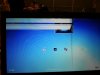
I saw it today, i havnt used it in 3 days, it did not move or do anyting. and the next time it turned it on it shows me the bars.
I am really done with this laptop.
Is there anyone who had this?
Im bringing this back tomorrow to the retailer.
If anyone is interrested ill post what asus thinks what the problem is.
Greetings -
My SSD (Sandisk 128GB) started playing up after ca. 6 months.
It appears that the firmware has quite poor flash cell data cycling (to ensure equal wear between the cells), especially when there's not a lot free space and good amount of data shifted daily.
Cells started to fail (which was causing various issues - Windows rebooting, browser crashes, etc.) and once I've recognised the issue - freeing up a lot of space didn't help - apparently firmware can't mark worn out cells properly and balance wear.
Sent laptop back to ASUS 2 weeks ago, got it back within a week, new SSD and new MB (this was surprising).
Very happy with the ASUS service, straight forward RMA, pick-up and delivery.
Laptop is practically as new now, back are 12 sec boot ups and lightning speed in app access and general responsiveness.
Since the firmware on the SSD is the same - and Sandisk doesn't care about these - I've learned my lesson and got fast 64GB SD card as a storage for large amount of data which doesn't require SSD class access (photos/music/videos). This leaves me with 94GB with Windows, all the apps and storage / transfer files which I want to process/access quickly, should reduce the risk of another failure to near zero.
Just a shame ASUS didn't go for a standard mSATA like most other Ultrabooks makers - in which case I would have some nice 240-256GB SSD onboard with better firmware and ability to replace in future for a fraction of the Sandisk cost. -
I have a question in particular for those who have installed their own copies on windows 7 (specifically ultimate x64, if it makes a difference), who had previously been having the bsod issue after waking from sleep. I just looked through the past 100 pages or so, but couldn't find specifically what I'm looking for.
For those who had the bsod issue after initially installing their own copy of windows 7, which drivers/utilities/other Asus apps did you need in order to have a fully working system? I use sleep all the time, so this is an important feature to me.
Other notes, I have the adata 128 ssd, appears to be selantic touchpad (or however its spelled), core i5. I think that's the only unique specs to mine. Oh, and I updated the bios in hopes that would resolve the issue, but no go.
Hopefully someone here was previously in my position and was able to figure things out..because this is driving me crazy. I'm almost ready to resort back to the original Asus image and deal with the bloatware.. So any help would be greatly appreciated. Thanks! -
So I brought it back to the retailer, and they send it back to ASUS.
For the broken screen they charge 337,51 euro's (450,52 dollars)
Thats insane! i can buy an even better external screen for my laptop ( since im only using it now at work )
Ofcourse in the letter they tell me its my fault and that I somehow bumped it or hit it against something else...
Im gonne ask them to proof it that I broke it... well see what happens. -
Hello all,
I made terrible mistake while playing with Ubuntu and I lost hidden stock partition on my UX31e with 256GB SSD. Do you think I can download original partition so I can copy it back? Of course I can install Win 7 Pro x64 by myself, but I would like to sell this model at some point and I want to have it in original state. Thank you in advance for any kind of help. -
I have the UX31E with the dreaded Sentelic Touchpad and 9.1.77 drivers.
What about the ASUS Smart Gesture drivers? will they help things at all? I guess I can try those.
Possible to buy the Elantech part from Asus and have it installed locally? -
I searched this thread (and frankly the entire interwebs, plus I called an Asus repair facility) and cannot find a replacement battery part # or someone who will sell it.
I know this laptop has been in folks hands for some time now and I'm wondering if anyone has replaced the battery themselves.
I understand other things may break on this laptop before the battery dies, but the battery dying is a certainty and I don't want to invest before I know if a replacement can be had. Thanks! -
Guys, Zenbook user reporting in
I upgraded straight to Windows 8 when i got my UX31E. I didn't update the BIOS or anything, just installed it like that. But i've been getting random shutdowns everytime on battery. It just keeps powering itself off [not shut down, its like poof-gone]. The battery still holds charge as i can still power it back on and use it..just tha after sometime it shuts itself off again. Any ideas?
-
First try to update exisiting drivers via drivermax
DriverMax - CNET Download.com
If this stops it powering off then up then update the bios here
ASUSTeK Computer Inc. -Support- Drivers and Download UX31E
If not then do you still have the win 7 install you can roll back to or reinstall?
You need to get your machine in a reasonable state before you update the bios for windows 8 because if it powers off during a bios update you could damage your machine.
Hope this helps. -
I thought I would contribute as have read through most of this thread and had some very useful tips thank you.
I'm on an windows 7 (upgraded to pro) install.
I upgraded the bios to 214 and updated all drivers, via drivermax to the following


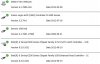

I hope this helps - since i have updated (touch wood) I have had no blue screen or any other wake up issues. -
Can anyone help me. I am really confused by what is happening. I kind of wanted to try Windows 8 in UX31E. So I upgraded BIOS and installed Win8 without any problem. After sometime I decided that I don't like the Win8 anymore and wanted to go back to Win7. However I can not install it back over Win8. It gets stuck on the the step where it looks for drive on which in install and asks for some drivers in order to proceed. Is this because of BIOS upgrade? I would appreciate any help. I tried all the BIOS settings possible but still no go.
-
Hi,
I have the UX31E and the problem with the fans starting spinning for som seconds and then stop, and then for some secons later, they start spinning again.
I have read in other threads about this problem but not for this model. Anyone got a solution? -
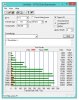
Am i trippin or there is something seriously bad with my faulty U100 128GB SSD at UX31e ?
My old C2D with 4200rpm hdd was faster in normal day usage...
Asus UX31 Ultrabook
Discussion in 'Asus' started by pear-i, May 31, 2011.