 Problems? See this thread at archive.org.
whats wrong with a glossy display? fyi, a glossy display is more vibrant than a matte one.
-
Perhaps, but only in optimally lit rooms with a diffused light source. Or a completely dark room. I don't think most people use their laptops in such environments at least not during the day. There's a reason why virtually any high end desktop monitor uses a matte display.
-
Wrongs? They are almost unusable in sunlight or a brightly lit room, unless they have high brightness they work as a mirror and even if they are bright black areas in pictures/movies have the mirror effect. The positive effect of having sharper edges (due to less scattering of light between pixel positions) isn't enough to be worth it IMHO.
-
It never bothered me all these years.
-
Which is why it is a personal thing...
Generally though your choice of screen does depend on your use of it. -
Hi. I'm in the U.S. looking for the U500VZ, which has not been released here. Can someone please post a link of the place where you bought it in your country? Thank You!!
-
It didn't bother me either the first time I bought a notebook with glossy screen (a Dell Inspiron E1705). Or so I thought at first until I realized that the computer had to be positioned differently, that I often turned off lights that could cause glare and that having to have the backlight turned up to maximum actually lowered battery lifetime. Not to mention that the bright backlight was more irritating for the eyes especially in combination with being in a room with the majority of lights turned off - all kinds of contrast isn't positive after all.
I use my computer 9-14 hours a day so not irritating the eyes is priority #1. -
You could look into an antiglare layer since thats how panel makers do it.
-
Honestly if you're spending 10 hours or more behind a computer actually working nothing beats having a proper desktop monitor with correct ppi and so on. Especially if you don't want to strain your eyes a lot.
-
Getting your distance and setup correct is also important.
-
Well to have it work properly requires professionals, the right chemicals and a clean room. I've seen one or two LCD resellers that converted glare panels to matte and vice versa so there's that.
Not that I'm complaining over my UX51VZ/U500VZ - the screen is very good and already have the anti-glare layer
I've read that there are another new kind of anti glare that doesn't "smear" the light as much as traditional anti-glare does, if a screen could keep most of the sharpness from a glare one while not working as a mirror it would the ultimate solution. IIRC that solution was intended for smartphones but here's hoping it can work on notebook screens too. -
It seems to take a long time for the advances to move over
-
Definitely. There's already technology for touch panels that has virtually no input lag, but it will probably take years before it makes it into smartphones / tablets / laptops.
-
That along with OLED backlighting, high refresh rates, high PPI etc.
-
This news is in German, but ASUS plans to extend the UX51VZ product line with two high resolution screen models. Screen resolution 2880×1620 with either 2 x 128 GB SSD or 2 x 256 GB SSD.
Asus bietet Zenbook UX51VZ auch mit WHDQ+-Display an - ComputerBase
Cheers -
Really hating this new trend towards ultra high resolutions on small screens. Just because Apple did everyone has to follow... Until font scaling is properly resolved (which it wont be at least not with legacy programs) I don't see the point. Not to mention the higher the resolution the more of everything will be required; more bandwidth, more disk space and so on. Things are already small and sharp enough on a 15" with FHD. Glad I bought my UX51 before these resolutions become standard on high end laptops.
-
I checked out the UX31A the other day so I could get a sense of the build quality of the UX51VZ (which isn't carried in any stores around here). The whole thing is nice and solid, though the lid gives a little more than I'd like when you push it back. I was really impressed by the clarity of the screen but couldn't help wishing that the surface had that glass panel look that so many of the other laptops there had (only my personal preference though, it's a great looking screen!). The speakers were pretty good but still not nearly on par with the macbook air that I played with. The salesperson I talked to made me more conflicted over getting the UX51VZ because he said it would be no good for doing high-demand stuff like video games and photoshop and multitasking. But I got the sense that he was talking about ultrabooks in general and didn't have much knowledge of the specific model I was talking about. He was really gunning for the Lenovo Y500, which is probably a little better suited for my needs and wallet but it's kind of clunky and ugly imo.
Anyway, is there any reason I should stay away from the UX51VZ if I'm looking for a portable multitasking + graphics processing machine? Do I really need a gaming laptop if I want it to perform decently? -
anyone played any games on this yet?
how is the gaming performance vs the HP DV6 ? -
Hi,
Does anyone know how to force shut off this computer? Holding the powerbutton doesn't seem to work. And have anyone experienced a tingeling sensation when you rub your finger around the chassis of the lapotop (especially on the back of the screen) while its plugged in? I have read that this is a common "problem" with laptops with aluminium chassis. -
You could always use a multimeter to check for any leakage.
-
It is common. If you read the manual it will say to use earthed power sockets in which case the case will be earthed. When using an unearthed one there will be a very small leakage current on the chassis with a frequency of 50 or 60 Hz, it's mostly the AC characteristic of the leakage that makes it noticeable. It's not dangerous in any way.
-
While I agree Windows doesn't scale things too good the movement to higher resolutions is only positive. Smaller pixels doesn't necessarily mean sharper picture but gives a lot of advantages like seamless scaling of pixtures and text. And the extra resources needed is nothing compared to everything else in a modern computer.
-
OK, thanks. How about forcing shutdown? Does holding the powerbutton down work for you?
-
Hi All!
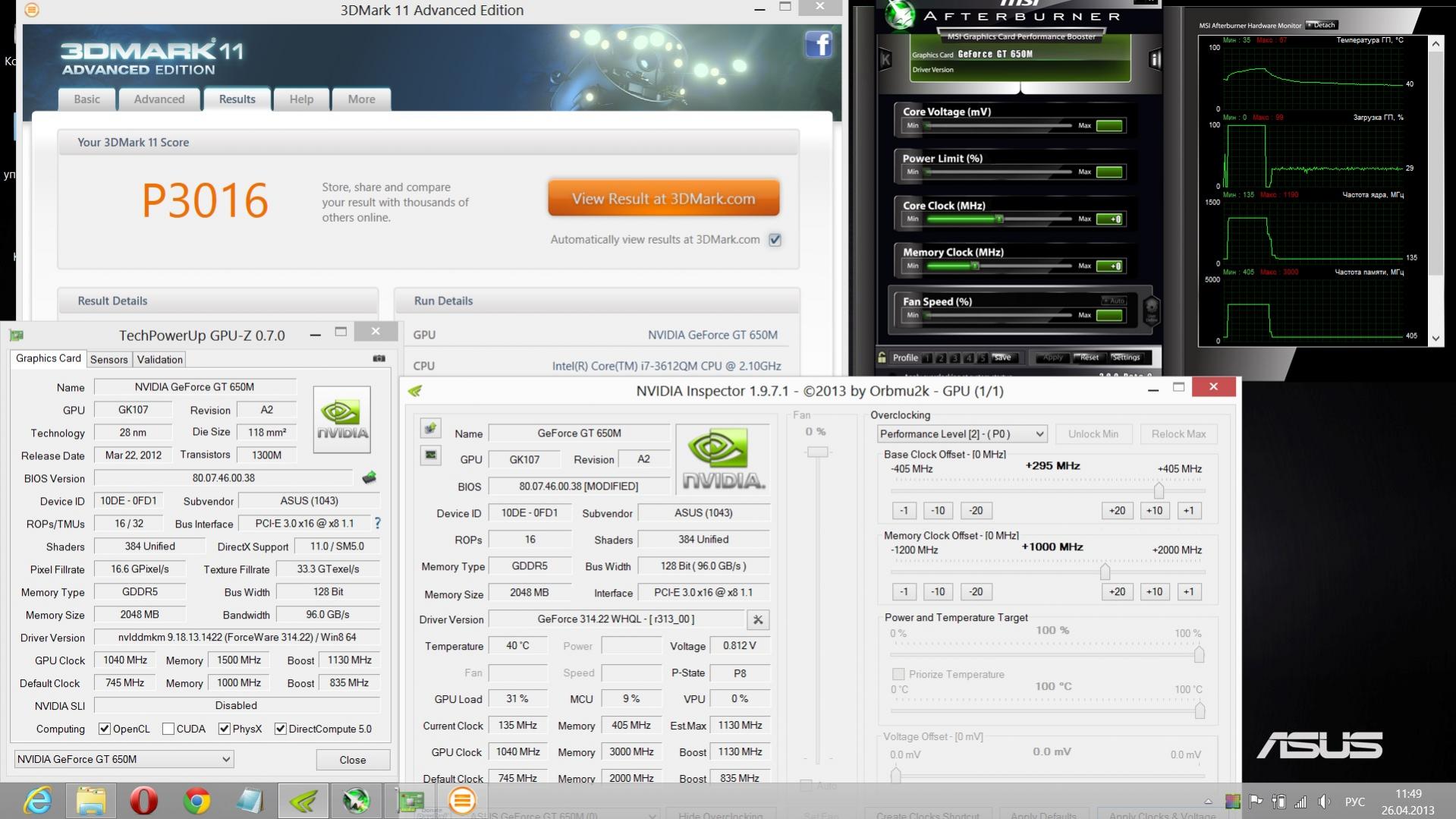
I've been here a little overclock videocard in my U500VX. So successful combination of such powerful and ultrabook format case no one else has yet. Asus just great!Attached Files:
-
-
I wonder if I can get close to that with my 5935G and 7770M combination? CPU is going to be the main issue.
-
I'm very sorry I didn't see this before now! No, the standard forced shutdown doesn't work sadly :/ It's possible to select that pressing the power button will shutdown the machine (in power options) but that's not the same thing...
-
Hey Klem66 !
What bios GPU uses you?
thx ! -
Now i use the modified bios in which I unlocked the Nvidia lock. I also integrated the latest videobios from the new BIOS 206 to my BIOS 204, and it is i also unlocked.
-
Here's my new best for 3DMark11: P2941
![[IMG]](images/storyImages/3dmark11155proc800memthrottlestop.jpg)
-
Write the frequency of the GPU and memory. Used to overclocked the Nvidia Inspector?
-
GPU = 1050 mhz
mem = 2800 mhz
Yes, Nvidia Inspector used. -
Sockfish
You use bat file through P5 state? -
Awww you almost matched my 4 year old acer
Generic VGA video card benchmark result - Intel Core 2 Extreme Processor X9100,Acer Aspire 5935 score: P2984 3DMarks -
I can not understand what you want? You have no one to talk to? The theme of your Acer is in a different forum thread. And this topic is discussed in a specific model Asus U500. Everything you write is offtopic. I ask the moderators attention.
-
Any inf on a HasWell refresh
-
I used a bat file using P0 state (Performance level 2).
Why is a notebook retailer trolling in the Asus section? Nobody cares what your Acer is scoring. -
Wasn't aware that the 7700M series was available 4 years ago...
-
Sockfish
Ok. I understand. I used a modified bios. -
hey guys im kinda new when it comes to this, im using nvidia inspector and the max core speed I get is 875 as it only adds 135 mhz. My question is how to overclock even further, I would appreciate any help on that .. one more thing, I know that our laptop doesn't have a PCI express slot, is it possible to plug in an external gpu ?
-
It was the last Acer to have an MXM slot and I was just playing around, it's in no way a practical setup for anyone really (it's far heavier, has far less battery and it's cpu is half as fast).
Usually when I go into a thread with a benchmark it's just people to squeeze what they can from their systems in a little friendly banter/competition but alas sometimes people get defensive instead *shrugs*
@TalalTango
You can only go beyond +135mhz by using a modified system bios (which has the Video bios inside) which has been modified to raise that limit.
An external GPU would need some sort of fast PCI express link from the notebook (like thunderbolt) which this machine does not have so not really. -
Meaker
I'm not sure if it's against the forum's rules, but is there any chance u might give a hint on where can I find a modified bios ? -
Hi! Tell marked as SSD and HDD by default (factory)??? And the most important question is where you can borrow or download a copy of the recovery partition??
I have a license (sewn in UEFI)!!
Just contact me myself can not prompt enough!! ))) -
Tools should be included on the machine to create recovery media.
Zenbook U500 Announced: 15.6" HD IPS, GT650M, Quad-Core i7...
Discussion in 'Asus' started by kanuk, Aug 29, 2012.




![[IMG]](http://s19.photobucket.com/user/brightfish/media/3dmark11155proc800memthrottlestop.jpg.html)


