Problems? See this thread at archive.org.
Ok, I am going wide here:
1) Is anyone OCing their 8700m here (either SLI or not)?
2) Is anyone able to get the two GPUs temps with RivaTuner?
I am monitoring GPUs temp but it always shows the same for both.
RivaTuner comes with an additional tool for the XPS M1730 logitech LCD; as far as I know XPS M1730 is the only machine with an embedded additional logitech lcd, and it comes with DUAL 8700m 256MB each.
So, if they bothered implementing a tool for the logitech lcd specifically for the 1730, why in the hell Rivatuner is not working with the line dual 8700m monitoring the right value for the 2 GPUs temp?
Is anyone able to tell if the GPUs temperature are increasing consistently (always the same) on 1730 or they may differ from each other?
I am mainly trying to understand here before OCing if it is normal to see always the same temp for both GPUs(as in my case).
thanks,
JI
-
Since the dual config is setup to share the same heatspreader/pipe - I'm guessing both would be almost identical in temp... but that's just my 2 cents...
I've read that 169.04 was the best set of drivers for overclocking... some had luck with 169.09 (I did in 64bit but no bluray) for overclocking as well...
Rivatuner - 750/1500/850 settings... boosted 3Dmark06 by 800 points for me. -
So my 3rd XPS M1730 its on its way...
AMSTERDAM,
NL
12/31/2007
11:42 A.M.
THE RECEIVER WAS UNAVAILABLE TO SIGN ON THE 1ST DELIVERY ATTEMPT. A 2ND DELIVERY ATTEMPT WILL BE MADE
12/31/2007 5:34 A.M. OUT FOR DELIVERY
12/31/2007 5:33 A.M. IMPORT SCAN
So, and because I wont be going back to nl till the 8th i called ups, they said the package will be retuned to ireland...
Meaning a 4th replacement will have to be ordered... -
Thanks for sharing,
so you too are/were seeing both temps as the same?
Are you setting fan speeds as well from rivatuner?
Cheers,
JI -
Also: are you able to track FPS in SLI from rivatuner? I am able to track FPS in OSD only using single GPS.
thanks,
JI -
I haven't tried looking at temps or FPS from riva - didn't know it could even do that.... I just used it to overclock it.
The fan speed I set to 100% - but right now I have it set to auto-control. -
May I ask your 3dmark06 score? I am scoring 8025 without OCing.
-
Come one guys, it won't take any time at all.
Have a break from your constant driver problems and help a man in need.
-
Yesterday I recieved my new Dell, which looks absolutely gorgeous. Unfortunately the looks are far more stunning than its performance. For a 4k + machine I expected more. I dont know, maybe its a combination of vista and the drivers but i expected to get blown out of the water with the graphics. I most certainly am not. I am upgrading from a previous 2.2 mhz single core xps laptop with a single 256mb gpu.
A couple wierd things to note:
She came WITHOUT SLI enabled (kinda wierd) so i had to manually do it.
When I go the display settings it only shows me as having only 256 mb of dedicated graphics memory. Is that normal for vista? Shouldnt it show 512?
I dont know my framerates for crysis and cod4 but its near impossible to play the games at my native 1920x1200 res on low or low/med. I cant even play wow fully maxed at native. I use a high speed 4g readyboost drive.
Any thoughts or suggestions?
btw i called dell and they said it was normal for vista to display 256 for my setup and also normal for it to ship without SLI enabled. Sounded kinda fishy to me. -
SLI disabled is normal - if you enable it, the DVI port doesn't put out video simulatenous to the LCD and DVI... it only does one or the other... that saves a tech support call I suppose.
It only says 256 because each card only has 256. I don't know if normal SLI rigs show the total memory - but I believe they don't (correct if I'm wrong) - they just show what the primary display adapter has for video memory. If a normal SLI rig DOES show both cards total memory - it could be due to the fact that it's a special SLI card (two GPUs one card)... maybe...
Sorry to hear your disappointed with the performance. I can play COD4 at all high settings (no AA or Vsync) at native res (1920x1200) and get 30fps which is playable to me... medium native res for Crysis I get around 20 in huge maps, 35 in deathmatch maps...
Some games it's slower than my desktop (solo 8800GTX) and some games the laptop's a bit faster and really impressive than my desktop. I think due to the driver hangup with SLI - I'd be way happier with a single 8800m in the desktop than dual 8700s.... but they have to make their markup attractive still right? -
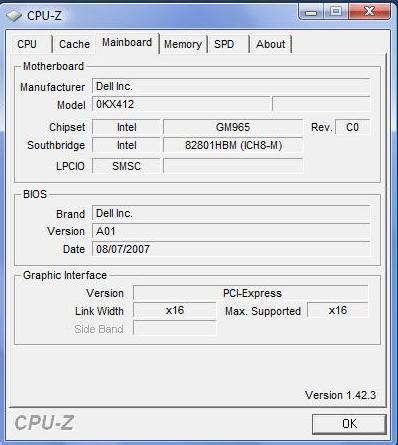
No - but I can tell you what it says:
Manu: Dell Inc.
Chipset Intel GM965 Rev. C0
Southbridge: Intel 82801HBM (ICH8-M)
LPCIO: SMSC
Bios (someone else asked this before too)
Brand: Dell Inc
Version: A03 (I JUST got this laptop yesterday as a replacement to my defective rig)
Date: 10/30/2007
Graphic interface is PCI-Express at 16x lanes.
Hope this helps! -
Brand new rig - stock drivers with bloatware - no OCing - 7989 (156.69 drivers - 4GB Ram - T7700 - SLI turned on obviously).
-
I just ran 3dmark06 and got 8337 with it oc'd to 2993mhz
im trying to upgrade my drivers to anything but the stock ones but nvidia setup says i dont have vista 32 but i do. this is really lame im pissed. modded inf doesnt make a difference is there any way to get around this? -
Happy New Year to all !
-
hey dude, is there any way to get the A03 bios for us?
Also, in what manner was it defective? -
I dont think is available for download... mine also has A03
-
I registered 8300 with no OCing for 3dmark06, I am using the 167.45 drivers from the Dell site known as the "Performance Drivers". The only problems I am having at the moment are sometimes on boot up I get a black screen and have to boot into safe mode or keep rebooting to get it through(only happens with Sli enabled). The other problem I have had is games will sometimes freeze up. The fans are running full on at the time so I am thinking some sort of heat issue. Trying to capture temps with rivatuner now.
Dell XPS M1730
T7500 2.2GHz
4GB RAM OCZ
120GB / 7200RPM Fujitsu MHW2120BJ G2
17" WUXGA - SEC5443
Dual Nvidia 8700M GT 256MB Sli enabled
AGEIA PhysX100 PCI express card
Display Driver - 167.45 ( Dell Performance )
Vista Premium 32bit -
Is this what you are looking for?
Attached Files:
-
-
This is my first post in a long time and I just got my Dell 1730 for Christmas (bought it for myself) and although I am slightly computer savy I was wondering if anyone could take me through the benchmark and OCing of the laptop. I have basic specs for the beast other than I added Bluetooth (I thought it should have been free). I am getting good performance compared to my last laptop (Dell Inspiron 9300) but I am wondering if it has anything more to give. SLI has been enabled now, and my main game is WoW. Anything anyone can suggest or recommend for a newbie to OCing and testing...... go easy on me guys, it's my first time! And Happy New Year.
-
I tried 167.45 from DELL but I was having the same issue. I think if you turn on the machine without power plugged it works fine, but I couldn't live with it.
Switched to 169.04 laptopvideo2go, best so far for performance/stability - compared to the stock driver. I am scoring 8025 on 3dmark06 without OCing. Not sure if I am going to OC ... I am playing Crysis DX9 1440res with high object quality, high textures, high post-proc, everything else on medium (shaders included), and it runs smoothly. Every other game I tried runs great with high details on high res (CNC3, world in conflict, UT3, Hellgate).
Pretty satisfied so far, not sure if it is necessary to OC. Any hopinion would be appreciated tough. A 2/300 boost on 3dmark06 score would mean significant improvement on games as the ones above? -
JohnIdol - I take it since you are not using the stock Dell drivers that you do not watch BluRay - correct?
-
I didn't customize my system with the bluray reader, so You guess right.
-
so let me get this right.......at the moment its a trade off between drivers for game performance or for bluray movie playback??
So the Dell drivers work for blu-ray movies etc, but the laptopvideo2go drivers work better for games??
Thats a bit crappy TBH.
I am getting the BluRay drive, so if I upgrade to drivers 169.04, I am forced to purchase AnyDVD to watch a BluRay movie?? I dont intend to use media direct etc, just win media player........or if Im using the laptop more for development and not games, then the stock Dell drivers are better since they allow BD Movie playback?
Also do I need to disable SLI to watch a BluRay? -
Maybe i'm alone on this - but with my system - I cannot playback a bluray movie without WHQL drivers... since the only WHQL drivers that exist for the 8700 are the ones Dell provides (or windows updates - same thing) then you sacrafice performance right now for bluray playback.
BeeJayTee or someone else above stated they were using 169.04 drivers and also had a bluray drive, but they have failed to respond back if they have tried bluray since installing those drivers, as my system does not playback bluray with those drivers (or any beta driver (non WHQL) installed).
AnyDVD HD will NOT fix the driver problem - it just fixes the copyprotection from blocking the output to a non HDCP display. It also lets you rip the movies to your hard drive if you really wanted to waste the space for an HD or BluRay movie. *shrugs* -
^^^
I woudl also like to know the answer to this, as I was planning on upgrading to the 169.04 drivers also. but also wish to watch BD Movies..... -
169.25 from laptopvideo2go is WHQL
-
upgrade your display driver... try 169.04 or 169.25. After enabling SLI, goto Manage 3D settings and play with settings in there...
e.g.
Antialiasing - Transparency [Multisampling]
Force mipmaps [Bilinear]
Multi-display/mixed-GPU accel [Single Display performance mode]
SLI performance mode [Force alternate frame rendering 2]
Texture Filtering - Quality [Performance]
etc.
If you expand the control panel window a bit and click on a setting, a helpful description and explanation is given at the bottom.
Rivatuner to OC your GPU
Processor OC from the BIOS
Also look at your msconfig startup programs and disable everything except the essentials
Turn off windows UAC, firewall, defender, indexing, etc...
benchmark with 3DMark06
also try out
* PC Wizard 2008
* automz Ultimate Tweaker -
169.25 from laptopvideo2go is LABELED as WHQL but it in reality is NOT WHQL when you try to install it. Installing brings up the box about the driver not being digitally signed from laptopvideo2go. I don't know if it's due to 169.25 being beta before WHQL or not.... BUT I tried downloading it from nvidia.com and then adding the INF manually - and doesn't save the SLI setting (cannot enable SLI) - and after some tweaking and luck to get it to stay - all my games would just go into the blackbar flickering state when entering my games. (The bars are horizontal on the screen and flicker like it's being electrocuted or something).
163.75 was WHQL also, but it had horrible performance in crysis and I never even saw a modded inf version for that release.
Once again - I'd love to hear from someone who has some good performance drivers installed that still allows a way to playback bluray.
Sorry if I seem crabby - I hate this limitation/issue
-
Is this like the software for
http://www.freewarepocketpc.net/ppc-download-capture-screen-utility-v1-0-0007.html
http://www.mobiletopsoft.com/pocket-pc/download-capturepro-1-4.html
Windows Mobile Phones - Screen Capture
where u can click pics of screen shots ?
How do u do that in Laptops ? -
What page did you find that quote on? If you want a great screen capture utility - try Snagit from Tech Smith... fantastic product - been using it forever.
http://techsmith.com/screen-capture.asp -
I have my machine dual-booting Vista and XP. XP for gaming, Vista for everything else. This way you can run Dell provided drivers in Vista and get the latest performance drivers in XP. It has been working great for me.
-
I am not using anything this sexy, just Paint program from Accessories. First press PrntScrn key, then start Paint and use Ctrl+V to get the screen shot into Paint window. After that use cutting function to get the part you need and save it. When I attached the picture to my last post here, there was no trace of Paint, just the cut out portion of the screen I wanted to add to the post.
Hope this helps. -
But that is quite simply not a fashion anyone WANTS to do... I like to take breaks between work and play a few minutes in a game OR watch part of a movie... so I'd have to restart and wait a minute to start and end my breaks just to watch a movie or play a game? No offense Mikla - I used to do exactly that back in the windows 2000 days... boot into 98 to game - but that's just not something that should have to be done, nor am I willing to do it anymore - not for a $4000+ laptop.
-
My problems would be solved IF I could get the WHQL version of 169.25 to install... The one from laptopvideo2go and it's modded inf are NOT WHQL certified...
Does anyone have a way around this as the ones from nvidia's site really ARE WHQL as I am using them on my desktop computer. It must be the modded inf that is breaking the certificate?? -
btw, I got 8316 3dmark06 score using the 169.25 drivers - up from 7989 with the 156.69 WHQL drivers. Still stock speeds.
-
More news... with 169.25 SLI enabled and RivaTuner 2.06 with patch files allowing overclocking to 750/1500/850 - 3dmark06 score went up to 9141.
Now if only I could get bluray playback with that score - I'd be a happy camper. *sighs* -
How did u get 169.25 to install...i am still running stock drivers and cant seem to get nvidia setup to believe that im running vista ultimate 32bit. The thing is I KNOW im not lying.
-
I used this version of the driver and INF file:
http://www.laptopvideo2go.com/forum/index.php?showtopic=16545
I've also downloaded the 169.25 from nvidia and put the INF in that directory it creates and ran setup - same thing - non-WHQL anymore.
I'm currently chatting with Dell to see if they have a work-around or can provide newer drivers than 4 months old when all the new games that have exploded for Christmas are very sluggish with their old drivers... -
Update: Dell told me that they will have new WHQL drivers up in 8 days. *blank stare* Seriously?? Either they lie incredibly well for this XPS chat stuff or maybe it's really that great of support... time will tell.
3DMark06 score of 9197 with OCing of 750/1500/875. -
Hello everyone I've been following this thread since I got my 1730 in October and let's just say that I log in almost everyday.
Regarding newest Nvidia drivers, has anyone noticed the increase in the GPU temp in Nvidia panel???
I still use 169.09 NBF. When installed 169.25 and 169.28 from laptopvideo2go.com the temp increased around 8-10C degrees. Without playing with 169.09 temp is 52-53C and when under stress it reaches around 61C the fans kick in . With .25 .28 it's 60c, fans don't start and only when it reaches 66-67C fans start working.
Cheers guys
Al -
Does the Dell stock driver that comes with the laptop run any games decently whatsoever?? Im only really after Gears of War TBH, but dont want to lose my ability to play back BD Movies.....
If I do upgrade the drivers, I hear 169.04 are the most stable etc. Shouls I go for the NBF or the laptopvideo2go version???
Its otherwise an awesome laptop, even though Im still waiting for mine - its just Dell's lack of keeping up with these driver issues that brings it down.
Gleep52 - I really do hope Dell release some new drivers in 8 days! Just in time for when I receive my laptop!! If they dont, I'll also be on the phone to them - if enough people complain maybe they will pull their fingers out
-
Don't think you need to OC if your main game is WoW.
-
Just so you all know, im running the service pack 1 for vista. After over 2 hours of waiting for the patch to install its running great. No probs. Graphics are looking better and no more explorer or firefox "white outs" also lots of other goodies seem to run smoother. So if you can get hold of the candidate release then do it. Its worth it. Havent had a single prob yet and been running it over a week now. Also you will see that after the update windows recognises your total 4 gb or ram for those of you that have it. YAY
-
Sweet score!
How are temps? How are fans?
Did you test on Crysis on any other game? -
great; what about games (I mean performances on specific games)?
-
Is that Vista 32bit that recognises the 4GB RAM?
-
On a different note - the BluRay drive that you can get with the laptop - Im assuming its not a BluRay Writer?? Its just a BD Reader and a DVD/CD Writer?
-
I'm on Vista 32 bit SP1 RC v.668
It registers the 4 GB but it is not actually in play. Task Manager shows Total Physical Memory at 3261MB. I remember reading some time ago that SP1 would not correct this...
However, network file copying has been fixed... no more waiting forever to "calculate time remaining"..... -
bluray can be read only or write - two different models.
Yes vista32bit says 4GB now in the system properties (weird). Might not be able to use it still, but at least it recognizes it.
SP1 RC only took 38 minutes (I timed it). Though I downloaded the whole 548MB file before applying it.
johnIdol: I haven't looked at temps - just ran 3DMark06 and then tried out COD4. I have a game saved at a spot where the stock Dell drivers only run at 6-9 fps which is unplayable - thus I saved it there. With the 169.25 drivers it's 35 fps and when I overclock it's 45-50fps... huge differences and as of right now - I'm not switching back to the bluray drivers.
I'll try Crysis on it later today or tomorrow maybe - but that game is kind of a let down when you factor in the hardware requirements...
-
vista recognizes 4gb all right but it can't use it because of the
32 bit architecture. pre sp1 tells you how much ram it can use. sp1
will show you 4gb so that ppl who bought 4gb ram won't retrun their machines but the ammount of ram your system will be using won't change. so much for the great improvement.
-->*OFFICIAL: Dell XPS M1730 Owner's Lounge*<--
Discussion in 'Dell XPS and Studio XPS' started by J-Bytes, Sep 27, 2007.