Problems? See this thread at archive.org.
Though my usable memory space may not have changed with SP1 RC - I notice the OS is much more snappy, network data transfers through my gigabit switch are now not limited to 10~12MBps but rather they are around 50-70MBps now - AWESOME speed. I've also rerun PCMark05 and gained another 300 points (was 5700s now just slightly over 6100).
Can't really complain on thatI wonder what it will be like when I update my motherboard drivers... still using stock at the moment.
-
Thanks for that.
/gets to work on the new bios -
Probably shouldnt be asking in this thread, but since we were discussing it.......how much space does Vista SP1 take?? Also are there any timelines etc of when the full version will be released rather then RC's?
I still think the driver issue is more important, and Dell needs to pull their finger out........7 more days if they stick to their word (I aint holding my breath!) -
I just installed SP1 and that seemed to clear up the issues i was having installing newer versions of nvidia drivers. After installing newer drivers (169.28) i can report my 3Dmark06 went from 8378 to 8577. CoD 4 i can now play at 35 fps at 1920x1200 and crysis is smooth on medium at 1280x800. It seems to have really improved a huge amount but i am disappointed that i cannot watch any of my 8 blu-ray movies now. Im gonna call dell now and ***** at them to give me blu-ray support or newer factory drivers.
On another note, I keep having a problem with Windows Defender blocking Rivatuner 2.06 from booting at startup. The help file says it will continue to block the program at startup and there is basically nothing i can do about it. Any ideas on how to get defender to stop blocking it? -
Let us know how you get on with ringing Dell.
Im also gonna rin and complain if they havent released anything new by the time I get my M1730! -
Another question - are they any problems with running Vista'a Aero interface when SLI is enabled?? I hear the Areo does not run with SLI enabled with the Dell drivers??
-
Whats the aero interface? Im a bit n00b with vista atm. Btw i just overclocked my video cards to 674/1358/853 and scored a 9015 on 3dmark06. Im wondering what a good tool to monitor the temp of my cards would be.
-
The Areo interface is what makes Vista look all pretty - the glass type effects, seethrough padding around windows, and so on......
-
yeah aero interface seems to be intact. 9488 3dmark06 just now. Anyone know what temps are safe for the gpu to operate in?
-
What are the Dell 167.45 performance drivers like??
Do they offer better performance in games and does BluRay still work??
If I could watch BD Movies and play Gears of War/UT3 with high settings then I'd be happy! -
Is there anyone that could try this out to confirm? We may be able to use original nVidia drivers......
http://forum.notebookreview.com/showthread.php?t=204367 -
Hi guys,
did any of you try Warmonger? Is a free demonstrative game for AGEIA PhysX downloadable from this link: http://www.warmongergame.com/
You can level buildings and all that kind of stuff you've seen on UT3 AGEIA maps. It's a **** game but it runs smooth at maximum res and very high detail. It is developed on the UT3 engine. the only problem is that once in a while it freezes, as UT3; I'd say it's the drivers as for UT3.
Can anyone try out and give some impressions and confirm this thing about the freezing?
JI -
OH MY FRICKING GOSH. I totally tried this once before - but manually selected the 8700 out of another INF that broke the digi sig.... *sighs* Actually I tried it once before and picked the 8800GTX since I know it is HDCP but I used the 169.04 drivers which are not WHQL and thus it didn't work then either... go figure. That was before I realized WHQL was the blu-ray playback key...
For the record - yes this works, and NO it doesn't matter what you pick. I picked two 8800 GTXs
I had to do it to BOTH cards seperately, then reboot, then enable SLI, then reboot again even though it didn't prompt me to reboot... 8296 3dmark06 standard no overclocking... With the standard OCing of 750/1500/850 I got a 9091 3dmark06 score.
So far I've tested The Simpson's movie, POTC, and Superman Returns... all played beautifully in both mediadirect and the real version of PowerDVD Ultra... *sighs* I feel so satisfied right now...
It's pretty awesome when someone who doesn't even have one of the laptops yet can find a solution Thanks for pointing it out ifti!
Too bad they have to be the WHQL drivers and not the beta drivers too Beggers can't be choosers though! *giggles like a little school girl* hmmmm *pulls some chest hair out to regain his manliness*
-
Downloading now! It's pretty amazing that no came since Red Faction has had destructible environments... MAN I loved that game and making rocket tunnels... this game looks similar to that with the destructible environments... I'm hoping for a lot of silly fun with this game Thanks for pointing it out johnIdol!
-
For all you hardware temp freaks - I used riva to show my temp - OC'd to my standard 750/1500/850 and it peaked at 78 degrees in the first segment of 3dmark06.
Now strangely enough - the monitor in Riva shows that my Core Clock is set at 810 (not 750) the shader clock at 1620 (not 1500) and my memory is clicked almost correct at 848.57 instead of 850.
When I set it to defaults the 625 shows 675 and the 1250 shows 1350 as well... is my card factory overclocked or something? -
BTW I meant to do this earlier - when I got my replacement model - I noticed the screen is MASSIVELY different. The old one (Laptop A) was always pretty dark and I constantly tried turning up the brightness thinking the battery was on instead of plugged power - but as it turns out perhaps it was the model of the screen?
Here is a link to some pictures I took comparing the two screens... Laptop B is the new one and let me assure you it is EXTREMELY vivid... almost too vivid - but completely enjoyable so far... I just hope it doesn't screw up my photography
http://www.tanksdigitaleffects.com/gallery/4101195
In the pictures the old one is on the left - new one is on the right... -
Anyone know how to get the actual make and model of the LCD via software?
I tried Sandra Lite - but it said it was a generic pnp monitor...
-
OMG GLEEP i am having the same issues with rivatuner showing my core gpu clock at 675/1350/799 when its not overclocked! I am using Lavalys Everest Ultimate 4.20.1233 for core temp monitoring and the like and it too shows my core gpu as 675/1350/799 when i know my gpu isnt overclocked. I even tried uninstalling the drivers (169.04) and rivatuner and moving to 169.28 with the SAME ISSUE. Funny thing is, that nTune monitor shows gpu speed as 625/1250/800 when its not overclocked. I dont know about you but im going to trust nTune monitor. Here is a link to my post on the lavalys forums about this discrepency.
http://www.lavalys.com/forum/index.php?showtopic=2874
What kind of temps do u usually show for the gpus? -
I installed the 169.25 by directly updating (without the modded inf). It sounds like the card fans kicked in a bit louder than i recall prior.
Also, while I don't really care about this, the window animation (minimize/maximize) that I'm used to seeing has strangely disappeared...
Will try this out over the next couple days. -
ok, the window animation is back... just set to "best appearance" and then back to "let windows decide"...
-
3dmark06 score: 9918 (OC - 750/1500/800)
http://service.futuremark.com/orb/resultanalyzer.jsp?projectType=14&XLID=0&UID=13160868 -
No bothers, let me know how it plays and how do you like it.
It's not bad... for a free game. -
Man, way to push THE BEAST!
What about some in-game results? -
Hi there! Glad it worked!
Which driver are you actually using?? Did you download it from nVidia directly??
Also could you test game performnace and let me know what you think?
Your 3DMark06 score seems great using the tweak, and as long as games run smoothly and BD Movies playback fine, then I think we have a fix here!
Ive been thinking - the modified inf that is downloaded from laptopvideo2go just adds the mobile support. Hence you can run the exe setup file and the cards will be detected and installed. But by getting the nVidia drivers with un-modded inf, you just have a few extra steps in the fact that you have to manually go into device manager to update the drivers etc - but who cares? It only takes an extra 30 seconds!!
I think we have a good fix here guys. Gleep52 - could you get back to us after som emore testing on how games etc perform and whether you are happy with the results??
If positive, then we dont need Dell or LV2G any more - original nVidia drivers will be fine, and we can stay up to date!!!!
-
Hey Gleep,
Remember to stick these hotfixes on if you are running Vista - they will increase game performance!
http://www.nvidia.com/object/windows_vista_hotfixes.html -
Hi ZW,
Sorry for the late reply, been a mad xmas/nyear.
Unfortunately the 800 ram is only running at 667. I was hoping we might get lucky and the board/bios would run them at 800...no joy though. I dont think there is any but If there is I could use an fsb software overclock utility to take the ram and cpu up together for a nice little boost. Havent seen anything like that for this laptop though yet!
The thing came with one Hitachi and one Fujitusi, so they were straight out and a couple of 200gb Seagate Momentus's put in which run like a dream.
I'm also having an engineer come over Monday to replace the sharp LCD. Its fine and all but it is dark compared to other LCDs and when you try to boost it with the Nvidia control the colours get washed out, so I hope he brings the LG or actually as long as its bright and has nice colours Ill be happy whatever make it is.
One thing I have noticed. When SLI is enabled on these 169.28 drivers I get ever so slight mouse lag in UT3. Anyone else noticed this at all? Disabled its sharp as a razor, but with SLI on its a little laggy (obviously the fps are higher but not as much as I expected!)
tom
-
I have been running the 167.45 drivers and have never had a problem. No crashes or no boot up problems. I have not OC'ed the card and am only at 3.0 ghz on the CPU.
-
I have no problems with BluRay... I am using the 167.45 drivers. I have the BR-RE Burner.
-
^^^
But do the Dell 167.45 drivers give you good performance with games also? -
BigJayTee .... I see you have a Samsung display and run 167.45 - can you make a cold startup on AC power without Black screen. What is the trick - and use 169.04 but love to run 167.45 due to blu-ray support.
Any body else got a solution to this BSOD with samsung display? -
No problems at all. None.
-
I like it. Even with Vista Aero I get good 3Dmark06 scores.
-
I will say I reinstalled my system from factory default, went to 167.45, did the Nvidia recommened updates that applied, Ignored Windows Updates wanting to update the Nvidia Drivers, and did all the other Microsoft Updates.
-
btw, gleep and ifti described how to get 169.25 WHQL (for blu ray support) installed by simply updating the driver directly rather than running the setup program... Worked for me... even though I don't have blu-ray.
-
Another question topic guys;
What is the bestest CD/DVD/BD Burner on the shelf? Is there a Dual Layer factor here, that I will be able to use? How dependable is it, when ripping and burning images/iso's? Let me know!
Cheers! -
Same question for both you guys using you current driver setup - whats the gameplay like? What are your 3DMark06 scores like?
It would be good to get an idea of the difference between the performance drivers, and the ones from Nvidia direct - even though its choosing a different card
Thanks -
Gleep & Zergworld - I believe you have tried my suggestion and instaled straight from nVidia. Remember these drivers are more for desktop cards, so operating teperatures may differ. Keep an eye on your GPU temperatures in case they overheat!
Looking at the Dell performance driver 167.45, look like it has been tested with the following games....
Crysis
Call of Duty 4
Sam & Max
Painkiller
FIFA 08
Flight Simulator: Acceleration
The Witcher
Elder Scrolls
Battlefield 2142
Age of Empire 3
Guild Wars
Sims 2
F.E.A.R.
Supreme Commander
Infernal
Bioshock
If it runs these fine looks like its a decent driver.
However, the following issue remains...
"Using the Component dongle to connect the external TV and enable it, "Resize HDTV desktop" has no function in NV control panel when SLI is enabled."
What exactly does this mean? Does the laptop come with a HDMI dongle instead so that the component doesnt need to be used in the first place?? TBH I am more likely to connect to my LCD TV via either HDMI, or VGA.... -
It is in my signature:
3DMark06 8975 -
8975 with the Dell 167.45 drivers is great!!
I think I'll try these drivers first also....
At least Blu-Ray etc will also work! As long as I can run Gears of War on high settings with it, Im happy
-
How can you tell which display you got in your laptop? I've read there are a few different ones they use?
Also, I doubt there is any, but is there any performance benefit going to Vista Ultimate?
Would a CLEAN install of Vista also improve performance from the factory install?
Thanks -
Ive not received mine yet so cant tell you how to check for the display etc. Which display is meant to be good and which is meant to be bad anyways??
If you are talking about performnace as in game performance, XP still wins since it doesnt use as much system resource as Vista. Personally, I like Vista, and games still run fine on Vista anyways.
Im also going to be re-installing the laptp with my copy of Vista Ultimate. A clen install should improve performance a little, since you will be getting rid of all the Dell installed bloatware etc. Many people just uninstall this extra Dell-installed stuff, but I tend to re-install as that way you know its definately clean, and only has what you want installed on it.
I would recommend the reinstall highly. -
i don't actually play any games
but, my 3dmark06 score is quite good - 9918
http://service.futuremark.com/orb/resultanalyzer.jsp?projectType=14&XLID=0&UID=13160868 -
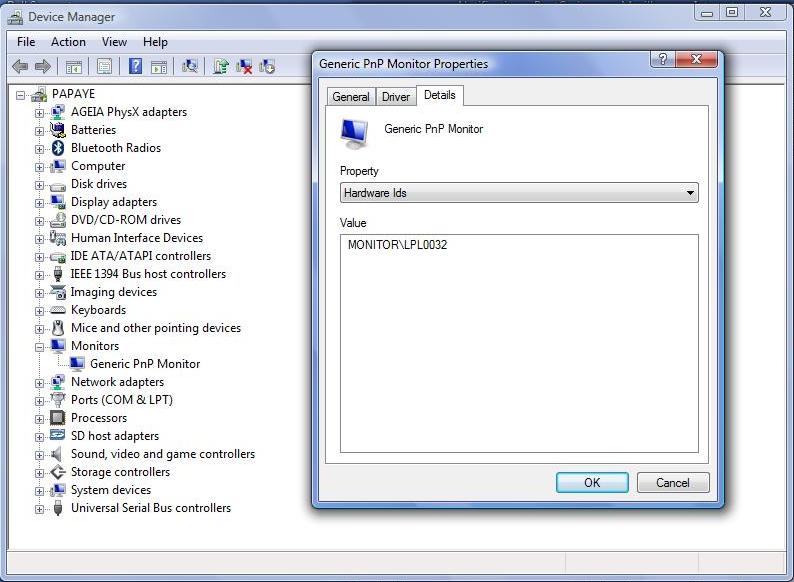
In Device Manager go to Monitor -> Generic PnP Monitor -> Details -> in Properties choose Hardware Ids.
LPL0032 means I have an LG monitor, which is considered the best out of three offered by Dell so far because it does not have bottom whitish light leaking problem. The other two are made by Samsung and Sharp. Samsung screens are reportedly plagued by bottom of the screen light leakage, while the opinions on Sharp were divided.
You can find all this in the earlier posts, somewhere in the first hundred, I believe.Attached Files:
-
-
I wonder what kind of screen is the new one you got? It really looks better than the first one.
-
Mine is a MONITOR\SEC5443
Not sure what that is.. I am awaiting a replacement as my home key fell off and my CD-Rom is not working.. So i guess we'll see what they send me with the new one.
Thanks for the info. -
Thats an awesome 3DMark06 score!!
I take it all you have done is overclocked the processor to 3GHz, and everything else is stock??
I think Im also gonna probably go for them drivers as well now
When you did the direct update, which card did you choose?
Finally, does Vista's Areo interface work properly with SLI enabled?? -
About that question on SUGGESTED DVD Burners, and DUAL LAYER Burners. Fella's?
-
8800 GTX on both. Overclocked the CPU 2.8->3.0, and 3d cards to 750/1500/800
-
Yup - thanks to PCHM for the tip on how to find the monitor make and ID vendor - yes I have the LG. And yes, I'm now loving it.
Zerg: is XP really 1000~2000 3dmark06 points higher than vista then? Or are you doing some fancy overclocking? I'm curious to know which model card you picked as well when you did the forced update.
James: I don't know about burners, but I bought that LG BD/HD drive from NewEgg and am loving it. For a home theatre machine it is just perfect and the cheapest solution by a long shot (if you already have a home theatre machine that is.) *grins* -
i'm on Vista 32 bit Ultimate
CPU Overclock @ 3.0 GHz
Video Overclock @ 750/1500/800
I tweaked my system using AutoMZ ultimate Tweaker, disabled lots of unneeded services, and startup programs... turned off UAC, Search Indexing, etc, and set my drives for performance caching.
Also, I'm on Vista SP1 RC, but don't know how much diff that makes if anything...
I chose the 8800 GTX for both cards
-->*OFFICIAL: Dell XPS M1730 Owner's Lounge*<--
Discussion in 'Dell XPS and Studio XPS' started by J-Bytes, Sep 27, 2007.