Problems? See this thread at archive.org.
Went and got a replacement for my xps 13 (qhd) that had the non-stop fan, on the new one right now and there is no fan noise but a very faint but annoying sound coming from under the keyboard, I'm assuming that's what coil whine is. Losing patience with dell, if I can't get used to it might go return again and buy a MBP
Edit: As I am updating things and my battery is draining, the noise is going down, but it is still noticeable
-
-
It is strange that although skylake cpu is a more power efficient and 9350 has a larger battery, however it last less than the 9343. There must be something wrong with the bios configuration or the hard disk is much worse concerning the power efficiency.
-
Many BIOS and drivers tweaks still to do. Same as with 9343 at the beginnig.
-
I've checked the posts, but is there any 1TB compatible SSD?
-
It is with many windows 10 devices. I think you have to blame the OS this time.
-
Wasn't it shown already that it was an issue with the Samsung 950 SSD in the Anandtech breakdown?
http://www.anandtech.com/show/9702/samsung-950-pro-ssd-review-256gb-512gb/2
It shows that even when the SSD is idle, it isn't being put in lower power consumption mode. -
Is there any evidence that XPS also suffers from this bug, not just Anandtech's setup?
-
I just tried the Monoprice USB-C Male to DisplayPort Male Cable, 3ft Black with the Dell 9350 XPS 13. It DOES NOT work at 60Hz. I can only get 30 Hz at 4k. The pass through function does work, but now both monitors are stuck at 2560 x 1440 in order to get 60 Hz.
I have a Dell P2715Q and a Dell U2713HM.
http://www.monoprice.com/product?p_id=12908
I can't believe Dell couldn't be bothered to make a cable that allows you to use their flagship notebook with one of their flagship 4k monitors... What the?
Has anyone found a cable that works yet? -
I just bought the Signature Edition of the XPS from the Microsoft Store, but now I am having second thoughts about the Dell Cyber Monday deal. The only difference is the one I got has a 128 SSD vs the 256 PCIe SSD for the Dell deal.
Should I cancel my order and get the dell one tonight? -
For those that really want the faster 951 upgrade vs the stock SSD, or an 850 EVO, this is an interesting read for power, reading and writing....
My takeaway for the 951, more power, faster writes, but reads are not that significantly different....what is most important?....
http://techreport.com/review/28446/samsung-sm951-pcie-ssd-reviewed/5
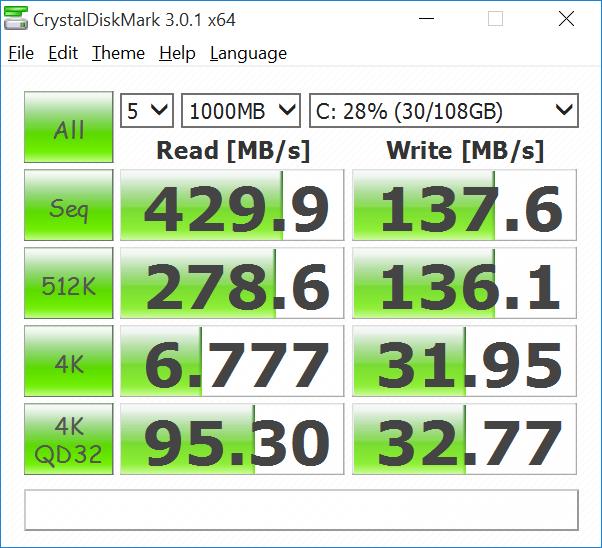
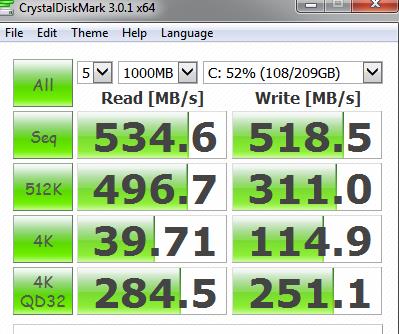
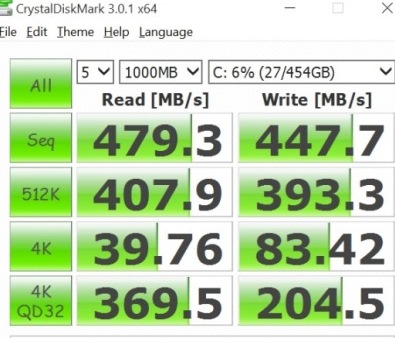
The other thing that I don't understand is my Crystaldiskmark comparisons on the 128Gb stock SSD and the 500Gb EVO upgrade showing the EVO in general much faster on writes and smaller file performance, but when the 128Gb is stuck in a USB 3.0 (ZTC) enclosure, its performance increases over the 9350 bus....very odd, suggesting something in the bus, driver, or bios...
All that said, and understanding this is a somewhat enthusiast oriented thread, I don't see any perceptible differences in (I don't game) software applications between the 128Gb(871) and 500Gb(850) EVO in 2 9350s side by side. hmmmmmmmAttached Files:
Last edited: Nov 30, 2015 -
-
This adapter "allegedly" outputs 4k @ 60 Hz:
http://www.monoprice.com/product?c_...tm_medium=12024643&utm_term=Skimlinks-2617611
By the way, thanks for letting us know that that cable only outputs 4k @ 30Hz since currently, that is the only USB-C to DisplayPort cable in the market right now. I was about to purchase that cable but was hesitating since one guy posted a comment that his MacBook only outputs4k @ 30Hz with that cable. -
What about battery life please?
-
even with all the reports going around,
i may bite on the xps 13 i7 qhd from amazon by the end of tonight.
not spotting any better deals around! -
Sorry to come up again with the question, but does anyone know which 1TB SSD is compatible for the i7, QHD version? And which 1TB Dell uses? Thanks
-
I think there isn't 1TB SSD m.2 form factor, neither SATA nor Pci-express until next year.
-
But Dell is selling the 1TB option, that's why I asked.
-
Dell should have an OEM version, not public released yet.
-
I think the 1TB is the SATA 2.5 SSD, not the M.2 SSD.
-
Dell XPS 13 2015 doesn't use 2.5 SSD.
-
Went for the Dell Cyber Monday deal ($949.99, FHD, 8GB RAM, 256GB SSD). Fingers crossed I get a good one...
-
I have the new XPS 13 9350, and purchased two Dell UltraSharp 24" U2414H monitors (1920 x 1080 @ 60hz).
What is the best way to connect these monitors to get full resolution? Docking station?
Thanks in advance... -
qhd i5 256gb for 1150.
it was down to that or an i7 for roughly 175 more.
fingers crossed the issues round these parts are resolved by that time! -
I went for http://www.microsoftstore.com/store...-Signature-Edition-Laptop/productID.326871500 for $899. Don't like pm950 pcie SSD included on Dell offer. Will go for sm950 pro next year.
EDIT 12/01/15: Offer ended today, now is $999 again.Last edited: Dec 1, 2015 -
Of course you're right! My mistake.
-
To be my last post about this and to summarize:
- XPS 13 is only M.2 PCIe compatible (no Sata SSD, no mSata).
- there is no 1TB yet for M.2 except for an OEM version Dell is selling and shipping, and there will be only a consumer 1TB in 2016 as announced by Samsung.
- both of the below M.2 SSD are compatible with the XPS 13, the first being a little (marginally in real use) faster, hotter and more battery consuming (and double the price):
Samsung 950 PRO -Series 512GB PCIe NVMe - M.2 Internal SSD 2-Inch MZ-V5P512BW ( http://www.amazon.com/Samsung-Series-512GB-PCIe-NVMe/dp/B01639694M) and
Samsung 850 EVO 500 GB M.2 3.5-Inch SSD ( http://www.amazon.com/dp/B00TGIW1XG/ref=psdc_1292116011_t1_B01639694M).
If people can confirm this or correct any wrong assumption, I would be very grateful and will not ask anymore about it. Sorry for the insistence, but I'm in Brazil and after I buy the new SSD I will not be able to return it, and the same for the PC (which is hugely expensive compared to US prices, like double), thus appreciate the patience and help. -
notebookcheck.com did a review with the qhd model: battery was 5h 33min only in the wlan-test. brightness of the display: 280cd/m2
-
Yes, mrbernstein, all of that is correct. Except, the XPS 13 is also m.2 SATA3 compatible, otherwise the EVO 850 wouldn't work.
Considering how badly Samsung handled the 840 EVO (degraded in speed, I've had one, it got pretty awful and they never really fixed it), I personally am weary of buying a Samsung SSD.mbernstein likes this. -
OK, thanks. But otherwise there is no other option apart from Samsung, is there?
-
Did this work for you? This is essentially what I'd like to do. Has anyone been successful in daisy-chaining two external monitors to the new XPS 13?
-
Amazon still has these on sale this morning, the xps9350-5340slv is 1299 (300 off ms store price). The others are still on sale too. Can anybody tell me if the 5340slv uses the pci-e ssd or the standard ssd?
-
Few questions on the graphics side:
- how well does it play 4k films (not home made, but Theatrically released movies), like a big file, say 20 plus GB?
- has anyone used it with Avid?
- how does photo editing goes with large files? Say Lightroom or Photoshop with 40MB RAW files? Does it take too long to open? Rendering's time is long?
Not expecting desktop speed, but want to know if performance is OK.
Thanks. -
He didn't say is not m.2 SATA3 compatible, neither do I, only is not 2.5 SSD compatible.
-
I know you didn't say that, and I just meant to clarify, because of his "only m.2 PCIe" part.
-
Good call -- I was debating doing something similar myself.
BTW, for those interested you can get a similar price (i.e., $899) through the Microsoft Education Store. You might need a university email, but I'm not sure they even require that anymore.
Ooh, good deal! Where did you find that one? -
it was from dell's website.
didn't spot anything that came close to dell's pricing on monday.
not sure if it is still there.
i have been prowling about for the past month reading what few reviews were out for the xps 13.
i was committed to it even prior to reading about everyone's troubles.
coming from a 5ish year old clevo, i'm quite excited to jump from w7 > 10 and from sandy bridge > skylake
actually, i was convinced that i was going to impulse snatch a u3415w curved monitor from dell yesterday too.
came out to about 550 after monday discount, but that thing seemed to fly off the shelves in minutes before i could.
i imagine there should someday be a cable, if not already, that allows the xps 13 to run such a monitor
*edit*
BATTERY UPDATE
i realize that the editor's note says so, but i'm still not entirely sure if the editor's note inserted this morning applies to the passage below. reads slightly ambiguously to me.Last edited: Dec 1, 2015 -
Notebookcheck just reviewed XPS 13 QHD+ i7. ( http://www.notebookcheck.com/Test-Dell-XPS-13-9350-2016-i7-QHD-Notebook.154377.0.html )
New details and a thorough comparison between FHD i5 and QHD+ i7.
-
Does anyone know what is the difference between RAID mode and AHCI mode for the SSD? I'm a bit confused because RAID usually means multiple disks connected together, while XPS 13 only has one disk.
-
Nice! I had pretty much decided I wanted FHD due to the increased battery life and decreased price. But I would have been very tempted to go for the QHD at that price.
I think it does apply. That is, the times specified in the review are now accurate. -
From which review is that update taken?
-
Previous version mentions 9:37 hours and new one says 11:54.
That is 20% improvement. Sounds very nice.Last edited: Dec 1, 2015 -
If the brightness of that review is correct and it's max is less than 300 it will be a deal breaker for me..and I thought Lenovo was bad. Hoping that was a bad test unit. Why have a laptop at all if you can't take it away from your darkened office.
-
Really impressive
-
Does anyone know if the dynamic brightness is still a thing on the qhd 9350? Sometimes I feel like the brightness changes but it could very well be in my head. I got my replacement xps 13 (had the one with a broken fan) and it's a great laptop. For anyone on the fence, I would still definitely recommend this laptop.
As a side note, I haven't timed it but I am getting excellent battery life -
Good catch!
Which review? The one I linked cites an "average brightness of 318 nits."
It is, unfortunately. You can disable it on the QHD by flashing the firmware. You can find the download somewhere on this thread, though I don't know if the tool has been officially released by Dell, so you do it at your own risk.
I'm hoping it won't be an issue as I opted for an FHD XPS 13, which can't be flashed like the QHD. If as bad as it was on my old X1 Carbon, I'll have to return it.Last edited: Dec 1, 2015 -
I didn't find the auto brightness thing that bad, I wasn't even sure if it was actually there, it's just something I'd rather not have on. You have nothing to worry about
-
This one. You can translate it or not the numbers still show less than 300 across the board.
http://www.notebookcheck.com/Test-Dell-XPS-13-9350-2016-i7-QHD-Notebook.154377.0.html
Dell claims 400 so there is something wrong somewhere.
English version is here.
http://www.notebookcheck.net/Dell-XPS-13-9350-InfinityEdge-Ultrabook-Review.153376.0.htmlLast edited: Dec 2, 2015 -
Hi guys !
I have been using XPS13 9350 for about 20 days now and its working perfectly ,except one problem.
I noticed that sometimes audio output doesnt work . No music or system sounds can be heard .
After restarting the system , the speakers are back on and the sound output is there.
Please help .
I'm running on bios version 1.0.5 -
Cool. As long as it isn't too noticeable, I should be okay.
Ah, good catch. However, that review expressly notes their brightness measurements may be unreliable. Plus, the review I quoted measured the brightness as being above average for an ultrabook. So, I'm hoping it won't be an issue.
Dell XPS 13 2015 Skylake Infinity Display Owners Thread
Discussion in 'Dell XPS and Studio XPS' started by abd_97, Oct 12, 2015.