 Problems? See this thread at archive.org.
I use Monochrome USB-C to Display port adapter for my 4K monitor and a USB-C to HDMI for my TV. Both work perfectly. (4k @ 60Hz), Ordered them online on the manufacturer's website.
-
-
Just sent my second one back for a refund. Any sort of movement on trackpad causes this noise. Surprised it's not been mentioned in any of the online reviews.
-
Thanks! But I've tried 3 different adapters all with previous positive feedback. It should be either my notebook itself, the driver or some setting... I'm wondering it it can be the USB-c connector itself, maybe changing the mother board. Guess will call Dell...
-
Guys,
I'm planning to buy XPS 13 9350, but smodges on palm rest and keyboard looks very disappointing.
Can you please confirm that this is a real issue and how do you avoid it? Do you use serviette or?
Thanks, -
It is a real issue, I've just taken to cleaning the laptop fairly regularly, about once a week, maybe. A damp cloth will do.
-
Hi ..I am new here... I found some interesting article regarding XPS 13" with Iris 540:
http://www.ultrabookreview.com/10395-dell-xps-13-9550-iris-540/
but i dont know how to use the Throttlestop - I've made this comment. Am I right?
http://forum.notebookreview.com/threads/the-throttlestop-guide.531329/page-464#post-10259862 -
Concerning my complaints, I've got a few solutions I would like to share to maybe help others:
- SLEEP issue: using elevated CMD I run first "powercfg -h on" and then "powercfg -h off" to make sure Hibernate was Off and that Hiberfil.sys was deleted (not present). After that, I put PC to sleep via start menu, and after that I am able to sleep again closing the lid.
- Concerning the DisplayPort adapter not working via USB-Type C, I called Dell and they instructed me to do the following:
BIOS>System Configuration>USB/Thunderbolt Configuration. There I enabled all six options on top (two columns of 3 rows). Then enabled "Security Level - Display Port only".
After that, Display Port worked fine in my Dell 2713HM. It did not work on my Dell 2713H. Since on the 2713H I had HDMI work in full resolution, I'm letting it go... Weird, but at least I got all my monitors working.
Hope this helps.
speedracer likes this. -
Could someone with the Iris model confirm that they can disable voltage control under bios - power management - c-states, and increase the graphics performance greatly? I no longer have this laptop so I cannot check.
-
So has any consensus been reached regarding the cause of a black screen of death? My 9350 i7 QHD is repeatedly getting a black screen that can only be remedied by a hard reboot. I have upgraded all drivers, and it came with BIOS 1.3.3. I have an intel 8260 on the way. Is it possible there is something else going on? I can't replicate the problem reliably. But it seems to mostly happen when using the web browser and usually when scrolling. It might not happen for an hour, then it could happen repeatedly after rebooting a few times.
-
Never had that issue, but have you tried upgrading to the Beta graphics driver? Download the zip and follow the instructions in the included txt file.
https://downloadcenter.intel.com/do...ows-10-and-Windows-7-8-1-15-40-?product=88355 -
I've also been getting a lot of the flashing screen, especially when streaming video. Disabling Wifi via the function key makes it stop immediately. Running beta drivers.
Hopefully they fix this eventually. -
I have the flashing screen, too, but only when connected to the charger and streaming video (most of all YouTube).
If I set the screen brightness to 60% or less, it stops, but it's annoying. -
Hello,
finally my new XPS 13 2016 9350 came... luckily / unfortunately it doesnt have Samsung SSD 951, but Toshiba THNSN5512GPU7 (XG3) , which should provide speed around 2000MB/s. But when I have tested the drive ... i got only 800MB/s thats not even half. .Does anybody same SSD and same problems with XPS 13 ?
http://forum.notebookreview.com/threads/dell-xps-13-9350-ssd-performance.787079/#post-10263977 -
look on the bright side. Dell may have opted for the Toshiba SSD for lower power consumption.
The 9350 has a shorter battery life compared to the 9343 despite having a more efficient 6th gen iCore CPU and slightly bigger battery.
The Samsung SSD may be the one to blame for this. -
thats really nice
but I would like to have at least speed around 1500mb/s
-
To be honest you probably won't notice a difference in day to day usage.
-
ofcourse not
but it really bothers me
-
I have the Samsung SSD, and I'm very satisfied (aside power consumption), but...
Does Toshiba can perform better than this??
-
For those who are having touchpad issues and have chalked it up to the driver or just a bad design, etc (scrolling issues, responsiveness, etc):
Bought this a couple weeks ago refurbished on eBay, had same issues - contacted for warranty repair and touchpad was replaced today....not a single issue now! Same model touchpad, same driver. Everything just works beautifully now. Like it more than my previous MacBook Air's touchpad and that's saying a lot (used Windows with the MacBook). Just an absolute pleasure to use now!
It may be worth it to get the touchpad replaced if you're having any issues. Completely resolved every single one for me. -
well this is results of Toshiba 128GB THNSN5128GPU7 :
http://club.cnews.ru/blogs/entry/obzor_igrovogo_monobloka_msi_ag270_k_boyu_gotov_
![[IMG]](images/storyImages/2v0auwjs.jpg)
and this is Toshiba 1TB THNSN51T02DU7 results:
http://www.thessdreview.com/our-reviews/ngff-m-2/toshiba-xg3-m-2-nvme-ssd-review-1tb/3/
![[IMG]](images/storyImages/Toshiba-XG3-1TB-NVMe-M.2-SSD-Crystal-Diskmark-2.png)
and mine Toshiba 512gb THNSN5512GPU7 is just terrible
![[IMG]](images/storyImages/Toshiba512_GB.jpg)
-
Is this on the Truecrypt encrypted SSD..?
-
I have the Samsung and i'm very happy with it!
Sent from my iPad using Tapatalk -
Toshiba 512GB SSD w/ BitLocker on. Super fast for real world usage, including some larger SQL Server 2014 databases.
![[IMG]](images/storyImages/ssd.png)
-
Btw, can you expect Wifi speeds above 866Mb/s with 1820A card? 802.11a should be capable of 1300Mb/s.
-
yes. Truecrypt with MBR and AHCI mode
-
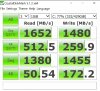 Educate me here, y'all. I just got my 13 last week, i5 8G QHD and took out the 256GB SSD and put in a 512GB Samsung 950PRO. To load the SSD, I changed to legacy boot and loaded it with Windows 10 Pro. BIOS is set for RAID.
Should I have configured it differently? I couldn't find any way to boot from a DVD or USB except to have it in legacy mode. Once it was set up, I couldn't then go back to secure boot or even select AHCI mode, so it's still in legacy/RAID. Should I do something different?Last edited: May 30, 2016 -
Well, did you do benchmarks without the encryption?
-
With CrystalDiskMark I've got diferent results with Samsung SSD.
I'm very happy with it. =)
![[IMG]](images/storyImages/hjFR8AC.png)
-
nope. the NTB came from my company. They havent tried it before encryption :/
-
does anybody have some special nvme driver for the toshiba ssd? can somebody check the installed drivers in programs and features? thanks
-
I have done some testing without any modification, and there were no big difference, only minor. But this week I should get Thermal pads and Gelid Thermal paste, so I will try it again in the end of week and let you know.
-
Bought a 9350 after selling my 9550.
Can't believe Dell is still using the same graphics controller as the 9343 causing the adaptive contrast.
Love the laptop, but it's very ****ing annoying. -
I have bad news for you. The Dynamic Brightness Control (it's not adaptive contrast!) is embedded on the IGZO panel itself. Since the 9350 is using the same panel as the 9343, it still has DBC. I know, it has been driving me crazy how Dell's sales reps have been lying just to sell the 9350, I myself have been a victim. Before I bought this, I asked a sales rep if the "auto dimming" issue does not exist on the 9350, and I was promised that it does not. So i went on to buy this. Now after 7 months this issue is still here.
There is some good news though cause Dell finally acknowledged the issue and released an official fix but only works on the QHD+ panel since that one has firmware flashing capabilities. The bad news is, the 1080p panel does not. There is no physical way to flash the panel's firmware on Dell's side and may most likely need Sharp's intervention. The annoying thing is, Dell is playing the innocent again and is trying to dodge the issue as to prevent incurring additional costs. If you try to buy online and speak with a Sales Rep, they would deny to the heavens the issue and would say there is no such thing on the 9350. -
For me the auto dimming has become non-problem. Initially I found it annoying. But now its aaaaalmost welcome, okay maybe not, but I find it subtle and okay. Of course hoping next iteration has it has a software option.
-
Yeah, I know. I had the 9343 when it first came out, but instantly returned it since the CABC on it was very noticeable. The 9350 is better in that regards, but still annoys me.
I ended up buying a i7 QHD+ model on eBay for $1450 CAD and will return this i5 FHD model to Amazon. $250 extra for essentially a screen, but I guess I do get a spec bump with the i7-6560U, double the storage, and Iris 540. Just worried about scaling, but it should be ok, hopefully. -
Have you applied the fix? I saw on notebookcheck when they applied it, the display now shows 400nits brightness and stays that way unless manually toggled by the user. good luck!
-
I really like the look of this laptop, but there seem to be so many issues with it.
Should I stay away and look to the X1 Carbon? If I were to get the XPS 13, is the Iris Pro version decent on battery life? Can I disable the auto brightness? -
You can check some "reviews" like these
http://www.notebookcheck.net/Dell-XPS-15-2016-9550-InfinityEdge-Notebook-Review.156354.0.html
http://www.ultrabookreview.com/10234-dell-xps-15-9550-review/
https://www.youtube.com/playlist?list=PL2OzPwdKxTAw8TnHfv-xHBE0y_b4T5fRI
Some issues are here, although new drivers/BIOS seems to have resolved a lot of them:
http://forum.notebookreview.com/thr...ist-of-hardware-and-software-problems.784691/
I'm really pleased with my 9550. Repasting the CPU/GPU, fixing the thermal pads, updating the BIOS/drivers, and doing a clean install of windows 10 massively upgrade the experience for <$30. There are tutorials and pros right here that can help you with all these upgrades.
But if you are not able to do/willing to learn at least some of these items maybe there are better options. In the issues thread above, you will see some people exchanged their 9550s or just changed to different laptops. That said, every laptop I have ever owned required significant tweaking.ericc191 likes this. -
I've had mine for a couple of weeks now and really like it. It has some problems scaling video on just a few cases. Weatherbug is one. Microsoft Volume Licensing download screen is another. Other than that, mine has been a real charmer and I got mine through the outlet store as a refurb. I did swap out the 256GB SSD and put in a 512GB and loaded it clean. Updated all of the drivers and it is just a charmer.
I wish I had bought Complete Care when I bought it. It was offered at $129 for 3 years. I called them to add it earlier this week and was quoted a myriad of different prices from two different agents, the lowest being $210 with a $50 Dell git card. Not too bad, but I'd really like to get it at the $129 that was originally offered. I emailed our sales rep at work to see if he could help get me a better rate. We'll see...
I've been a Latitude owner since the days of the C800 (what's that, mid 90's?) and was a little apprehensive about bailing out of the business family and into the home line. I'm tickled to death so far though. Love it!ericc191 likes this. -
I can definitely do that. I was talking about the XPS 13, but I assume your 15 is nearly identical when it comes to what you were talking about. 1.5mm thermal pads will do the trick?
So if I buy the laptop off Amazon and then try to add that care plan at Dell, the price will be much higher, huh? I wonder if SquareTrade has a comparable warranty. -
Sorry about that - not sure about the thermals on the XPS13.
FYI I don't think you can upgrade RAM in the XPS 13; if that is the case make sure you get enough at purchase... -
The RAM in the XPS 13 with Skylake is soldered on.
-
I took a leap of faith and ordered it off Amazon for $1200 no tax. I'll let you guys know how my luck plays out when it arrives later this week. At least with Amazon, I'll have no issues if I need to exchange or return.
I wanted 16GB of RAM, but the price was just not worth it. After scouring the web for the best deal, this seemed to be it. As for the SSD, I can always upgrade that on the cheap myself.
I debated quite a bit between the i7-6600u and i7-6560u. I really would have preferred a setup of the i7-6560u and FHD Non-Touch, but oh well. I think as long as I can get 6 hours of battery life out of it, I'll be happy. I also chose the i7-6560u version because it seemed to be the only one that would allow me to disable the auto brightness feature.
I also ordered some IC Diamond thermal paste, 1.5mm thermal pads and 2.0mm thermal pads. I have no problem routing the heat from the CPU to the under body shell if it means I can save 10-15c on the CPU and allow it to stay running at max under load.
Lastly, I plan to throw in the Intel Wireless 8260.
Specs:
- Intel Core i7-6560U 2.3 GHz Processor
- 8 GB RAM
- 256 GB Solid-State Drive
- 13.3-Inch UHD Touchscreen, Intel Iris Graphics
- Sexy gold lid?
-
I just discovered a huge problem with my XPS. After using it for so long plugged in most of the time, the battery has seemed to be damaged. I have set the battery to only charge maximum at 70% so as to preserve the lifespan. I have only realized this now after using the laptop on battery. The battery gauge seems ok and the status in BIOS is healthy. But for whatever reason, my XPS keeps shutting down all of a sudden as if it looses power when on battery mode. When I plug the laptop back on AC, it does not shut down.
Has anyone experienced the same? -
Got a Dell XPS 13 today with i7 IRIS 540.
Seems Dell is installing Toshiba XG3 SSDs now more often. Better read/write results out of the box!
-
Hows your battery life? You have FHD or QHD?
-
i7 iris 540 16GB RAM, 512GB and QHD.
Can't tell battery life now.
First impressions:
- build quality and materials are best
- QHD is great, but mega glossy. Installed an antireflective foil today and it's very usable now for outdoor use and direct sunlight.
- Device is silent (fan off) when browsing web.
- Tried "light gaming" (Company of heroes 2) and it's absolutely fluid on medium settings. Didn't try higher.
- System is very, very fast. I was able to raise write speeds of Toshiba SSD to 1350MB/s after installing newest Intel Rapid Storage drivers from Intel site.
- Touchpad is great for my needs. No jumping cursor, two finger scroll (back/forward) with chrome is great, Trackpad surface is absolutely smooth like glass.
- HDMI (Audio&Video) over USB-C works with cheap adapter (waiting for WD15 dock)
- Unusual grainy fonts on external monitor. Updated graphics driver and set scaling to 100% on external monitor again, logged of and after login the scaling worked well. No grainy fonts anymore.
- Scaling is set to 250% and 100% on 1080p external monitor by default. When connecting USB-C-HDMI adapter the fan is more often on (not so quiet). Was expecting lower noise levels at low usage tasks.
(Is anybody using USB-C/HDMI adapters with non turning fans?)
- Keyboard is great, except the Space bar (a tiny bit wobbly, but not terrible)
- Spent this morning outdoors and the sun heats the black trackpad to very temps. Almost burnt my fingers, good indicator to open the sunshade.
- Automatic driver search/install at dell site doesn't workLast edited: Jun 8, 2016pressing likes this. -
So I've had this notebook basically on release. i5/8gb/fhd/128gb
The problems I have noticed which are still around:
- Flickering/black screen, especially after waking from sleep and streaming video. It seems to stop when you turn off wifi with the function keys.
- Crackling speakers. Doesn't happen often, but occurs from time to time.
Other than that the laptop has been great. I'm curious though - for those that have replaced the internal WiFi/BT card, do you have issues with the flickering screen? I have an Intel 7260 nic in another computer that doesn't really need it that I might want to try putting in, but disassembly of such a premium and beautiful laptop is such a shame imo. -
-
My first try didn't go so well. Returning to Amazon.
While I was setting it up, I was so happy with how quiet it was. Then.. about 5 min in, I noticed a "Click, click, click" towards the top right of the keyboard. I listened closely and it does "Click, click, click" every 5 seconds. I thought to myself, "Okay Eric, stay calm. There are probably a lot of updates to be done and one of them will surely make that noise go away."
As I began to do all the Dell updates, it restarted to install the updated Bios when I suddenly heard extremely loud beeps coming from the speakers. I went to check the computer to see what it was doing and saw this:
![[IMG]](images/storyImages/iovsxNi.jpg)
Needless to say, I'm a bit annoyed. Other than this, there seemed to be a lot of electrical noise coming from the top left side of the keyboard when doing anything graphically intensive. From what I've read, though, that is normal.
I am returning it and MAY try purchasing it again or I may try going with something else. I did like the idea of Iris 540 graphics, but really, I probably would have mainly played Team Fortress 2 to pass the time at work. I think 520 graphics can handle that game.
I will say, I do enjoy the touch screen. It's quite useful. In the very short time that I've used it, I can see how nice it could be to have it all the time.Last edited: Jun 7, 2016
Dell XPS 13 2015 Skylake Infinity Display Owners Thread
Discussion in 'Dell XPS and Studio XPS' started by abd_97, Oct 12, 2015.


