Problems? See this thread at archive.org.
I'm using WD15 Dock with Displayport and HDMI Out with two 1080p monitors. They are both connected via native Displayport connection, as reported by Windows 10.
The USB-C (USB/Thunderbolt) connection is very stable with newest NVM26 firmware an thunderbolt drivers.
For me they ironed out all bugs like display flickering or my second monitor not activating (staying in standby mode).
Even after standby mode both displays are working always very stable.
The dead HDMI port seems to affect 15" XPS models with HDMI-Out port, not the USB-C connection?
Here is a niche list of all XPS13 downloads:
http://downloads.dell.com/published/pages/xps-13-9350-laptop.html
-
Maybe the dock, I don't know. Mine is attached directly. Besides no waking the Monitor up after Sleep, during regular usage it also sometimes goes blank for a few seconds before the image comes back.
-
Had exactly these problems after purchasing my XPS 13 in 2016.
With new BIOS & Thunderbolt Firmware updates the screens work always fine.
I'd try to update all drivers and then another USB-C to HDMI adapter if it still doesn't work.Vasudev likes this. -
So it seems a firmware can be forced installed with the admin cmd option /f ... But if I understand correctly 26 is taken down? But the now 16 is still newer than the first 16? Maybe I can force that one.
-
hello guys, would you mind to inform me about the dell xps 13 i7 7500U has the thunderbolt 3 with 2 lanes or 4 lanes?
thanks in advance -
Hi guys,
FYI, you can now remove CABC on the full HD models for the XPS 9350/9360 : http://www.dell.com/support/home/us/en/19/drivers/driversdetails?driverId=312K3
It works perfectly, but you have to update your BIOS to the last version first and install it through the subfolders.Bigmouth likes this. -
Did you test this? Wonder what it does with battery life.
-
Yes I did and it's perfectly working.
I can't tell about battery life but it should change a lot. It's much more comfortable anyway.
According to notebookcheck (they tried on the new xps 13), the battery life decreases for like 5-10%. I think it's worth. Just lower the general brightness if you want better battery. At least it'll be up to you, unlike with CABC. -
I did an update to the latest bios when it came out, and it might not be correlated, but now yesterday my front light blinks orange and the battery does not take charging anymore. It says connected not charging :|
Anyone else seen this or have some tips? -
New bios 1.7.0 :
Fixes -
1.Fixed a Bitlocker recovery issue when Dell Type C Dock or Dongle is connected to the system, and PCR2 is selected in the Bitlocker Group Policy
Enhancements -
1.Improved the stability for the file transferring while USB LAN connected in pre-OS
2.Optimize CPU loading to Improve EE noise
Wondering about #2 there, does it affect coil noise, does it affect performance?
Will try it I guess. -
Let us know how it goes! I haven't found a need to update the bios for awhile but if the most recent one finally reduces coil whine, I'm all for it.
-
Went fine, I don't think it did anything visible to be honest...

-
Btw, I have a 25% reported battery degradation, and get about 5 hours I feel, and I was thinking of replacing the battery actually.
Thoughts on this:
https://www.ebay.com/itm/1PC-New-or...674520?hash=item239b51a518:g:P0kAAOSwhhpamkId
Is really an original battery, and is it easy to install? -
You can replace it with a higher capacity battery from the 9360.
https://www.ebay.com/itm/NEW-GENUIN...574165?hash=item361db41155:g:lGgAAOSwqeFZelCc
Battery life might also go up more if you throw in an intel 9260 wifi adapter while you're in there, to replace the older broadcom that's inside now. -
Interesting, thanks. Will likely buy. I did put in a 8260 adapter a year+ ago, while I put in the SM951 512MB.
I assume the 9260 is a good step up, better performance and less power usage?PAPPL likes this. -
Let me know if the battery and wifi adapter work for you. I have a stock 9350, been happy with it. Windows 10 updates and Bios updates seem to have resolved my coil whine and touchpad issues over the past year. I get about 5 hours of battery life, so am tempted about this new battery and wifi adapter if it'll give me about an extra hour of life and better wifi signal (though I'll say the original wifi adapter has worked very well for me in general).
-
Ordered both the Intel 9260 and the 9360 battery, hope to get back to 8-10 hour battery time with it, effectively maybe doubling, could be well worth it!
6W extra capacity on the battery vs new 9350 battery and there are power reduction mentions on the wifi card too.
I don't like opening the machine too often as the T5 screws so quickly lose the grip, but fingers crossed... -
You can buy screws from parts-people! or maybe other places with cheaper shipping.
-
Thanks bought some not so cheap T5 screws on Ebay too. I saw the parts people site had some but they were philips head, which is fine I guess, but just did ebay instead.
-
I decided to pull the trigger too. Bought both and hopefully will get them next week. I also did a little research on undervolting - I plan to also undervolt my CPU and also repaste it with thermal compound since I'll be in there. I figure if this is the one and only time I ever open the laptop up, I might as well do everything to optimize it.
My hope is that with everything I do: new battery, wifi card, undervolted CPU and thermal paste I might get close to 8 hours battery life. I'd even consider 7.5 hours a success.kirkyboy likes this. -
Release of Intel(R) Thunderbolt(TM) 3 Firmware Update NVM26
Fixes
- Not Applicable
Enhancements
- Enhanced support compatibility with Thunderbolt driver.
Intel_TBT3_FW_UPDATE_NVM26_FJJK7_A08_4.26.11.001.exe
05 Apr 2018
Updated successfully -
Hm I cannot update, it says I need the latest driver. Which driver is this? Link? I think I had similar issues the last time...
-
Hey, not sure if you tried the 9360 battery, but to save you some trouble it will not work. I put the battery in my laptop and the computer refuses to charge it. Had to put back my old battery.
-
Hm thats not good, I ordered mine on Ebay, from China possibly, not sure about returning, could be just as expensive in shipping as the battery. Have not received it yet - I thought it would work as it came "recommended" in the posts above. Is its known to work / not work?
-
The person I bought the battery from confirmed that it will not work due to the special monitoring Dell laptops use when deciding whether to charge the battery. Apparently we're not the only ones to have tried this.
-
My 9350 battery wore out a lot as well. I now only have 32W instead of the 56W from origin according to power cfg. And I can tell the battery life has degraded a lot indeed...
So what battery would you recommend to buy? I'd like to not pay too much (Dell proposed me 90€...) but I'd like something safe as well.
Thanks! -
I'm sitting here with the Intel 9260 AC card, new torx screws and the 9360 battery... But since buffpatel says it wont work, I will have to order a new 9350 battery it seems... no point in opening the machine just yet..
-
Can you share wher you bought your torx screws? Mine are getting old as well.
-
Something like this: https://www.ebay.com/itm/2x-for-Del...ttom-Cover-T5-Torx-Screw-ZJPS038/192432112272
Tomatot likes this. -
So, how was it again, since this laptop has only 2 PCI lanes over TB3, it can do total of 20Gbit right? So that means only 1 exernal 4K60 display and not two as that requires 40Gbit?
If only 1 4K display, can it do USB 3.1 data at same time then? I think I knew this but have forgotten. -
Anyone using the Dell Command Power tool? I just inserted a new battery and wanted to try to keep it alive longer.
Originally I did a fresh install of Windows 10 and as few Dell tools as possible. So I just installed that specific tool now and it looks quite awesome.
The only issue is that the system won't follow the rules set in custom charging. Say 50% (start) to 85% (stop). I can connect at 90% and it still charges...
Anyone seen something similar? is this tool relying on more software somewhere?Attached Files:
-
-
This driver works great ...
Intel Skylake Serial IO driver for Windows 8.1 (64-bit) - Thinkpad 13
https://pcsupport.lenovo.com/us/en/downloads/ds112484 -
Thanks. The original question is from a few years ago. Already moved to Windows 10 a long time ago.
-
I recently installed the AC9260 intel card in my 9350, and the wifi works great. It is definitely faster than the Dell Broadcom 1820...The problem is the BT portion shows up as not working code 43.
Have struggled with this for a couple days. Install problems discussed for the most part on the web are with the wifi portion. Most common thing to do to avoid is to delete the wifi and BT drivers during the uninstall prior to removing the 1820 which I did. There is still a Broadcom btwampfl.sys driver in device manager details, and disabling that and stopping Bluetooth Service in startup by Broadcom results in no change except code 43 become 39 (corrupted or missing driver). Odd thing is I can remove the BT device in device manager, remove intel BT software, scan for device changes and Intel Wireless Bluetooth shows up (does not have btwampfl.sys)!!! Below Intel BT in device manager it shows Microsoft BT Enumerator and Microsoft BT LE Enumerator. At the same time a BT audio hands free with a triangle shows up in sound, vid, game controllers, and similar HID device shows up with triangle...Then after rebooting it goes back to the Intel Wireless BT error. All this is after removing the intel BT 20.70.0_64.exe software, and not yet reinstalling..... Do not want to reinstall clean windows over this as there is soooo much software installed...arg..Gotta say the wifi speed is great!
Appears to be a driver issue, but what next? -
I have the new Intel AC9260 card and its flawless here. Intels software works just about perfect and updates monthly through their online tool, although I check it manuall because I'm eager.
https://intel.com/content/www/us/en/support/intel-driver-support-assistant.html
Best thing is to uninstall the old and have the driver file for the Intel ready downloaded for when you startup first time with the new adapter. Get rid of all the Broadcom stuff.floydo likes this. -
Solution to the AC9260 bluetooth issue (above). Finally found Widcomm Bluetooth software in Programs and Features...Had followed directions to uninstall the broadcom hardware and software, but missed Widcomm down at the bottom of the alphabetical list Programs and Features...Uninstalled the conflicted bluetooth device in Device Mgr, uninstalling the program, then reboot and everything is fine! Kirkyboys comment and finding some bluetooth services by broadcom running was the clue....
-
Hi, after a little over 2 years my XPS 13 my harddrive lost connection, seems because the battery ist swollen. Removed the back cover and it popped away and the battery looks really dangerous.
Took a pic:
https://imgur.com/mlCFnZJ
After reassembly the trackpad poped out of the case.
Contacted Dell phone support, and there is no battery replacement or support anymore (Europe), because this type of Dell 56Wh (5K9CP) battery isn't in stock anymore.
Seems to be a wide spread problem, there are a lot of topics about this situation with XPS models.
e.g.
http://www.mod-gadget.com/dell-xps-laptops-widely-suffering-from-swollen-battery/
Anyone experienced the same problem and has a solution?
br -
That battery looks very dangerous. It can cause a serious fire and-or send dangerous chemicals into your house.
You need to dispose of that battery properly ASAP. It can combust on its own so just taking it out of the computer and leaving it in your house is a non-starter (especially if you do not have fire insurance on the house lol).
If you can't get a battery from Dell I suppose you are stuck typing in 5K9CP to find a reliable on-line retailer of laptop batteries. -
Hi, XPS 13 9350 (late 2015) owner here.
I recently replaced the battery.
I contacted Dell service via phone. I've been told that battey JHXPY is the right replacement for 5K9CP which, in fact, seems to be out of stock. I absolutely wanted an original battery. Now I have the JHXPY mounted and everything works fine. I changed the battery 5 months ago.Noth likes this. -
I want to give you and anyone else who has this problem a bit more information, since I've been looking for a solution for a long time and only after talking twice with the Dell service I found out the solution was so simple.
In my case the battery was simply exhausted.
But I know that in many other customer had a problem with a swollen battery.
I paid
- € 54.32 for an out of warranty repair
- € 30.00 for shipping
- € 18.55 VAT (Italy)
lorenzo -
You had luck. The original battery no. 5K9CP aka JHXPY (56Wh 90V7W) is out of stock since October. No information about future availability from Dell warehouse.
I need to remove the dangerous battery, but i do not want to replace it by a possibly dangerous non-OEM battery.
Not happy.
-
Well, that's pretty unacceptable. I think that if you have the chance to speak with a technician he/she should provide you or any other customer with an alternative. This laptop is only 3 years old!
Last edited by a moderator: Nov 12, 2018 -
Bought a replacement battery from ebay, because no other option available.
The battery is like the original numbered 5K9CP aka JHXPY (56Wh 90V7W).
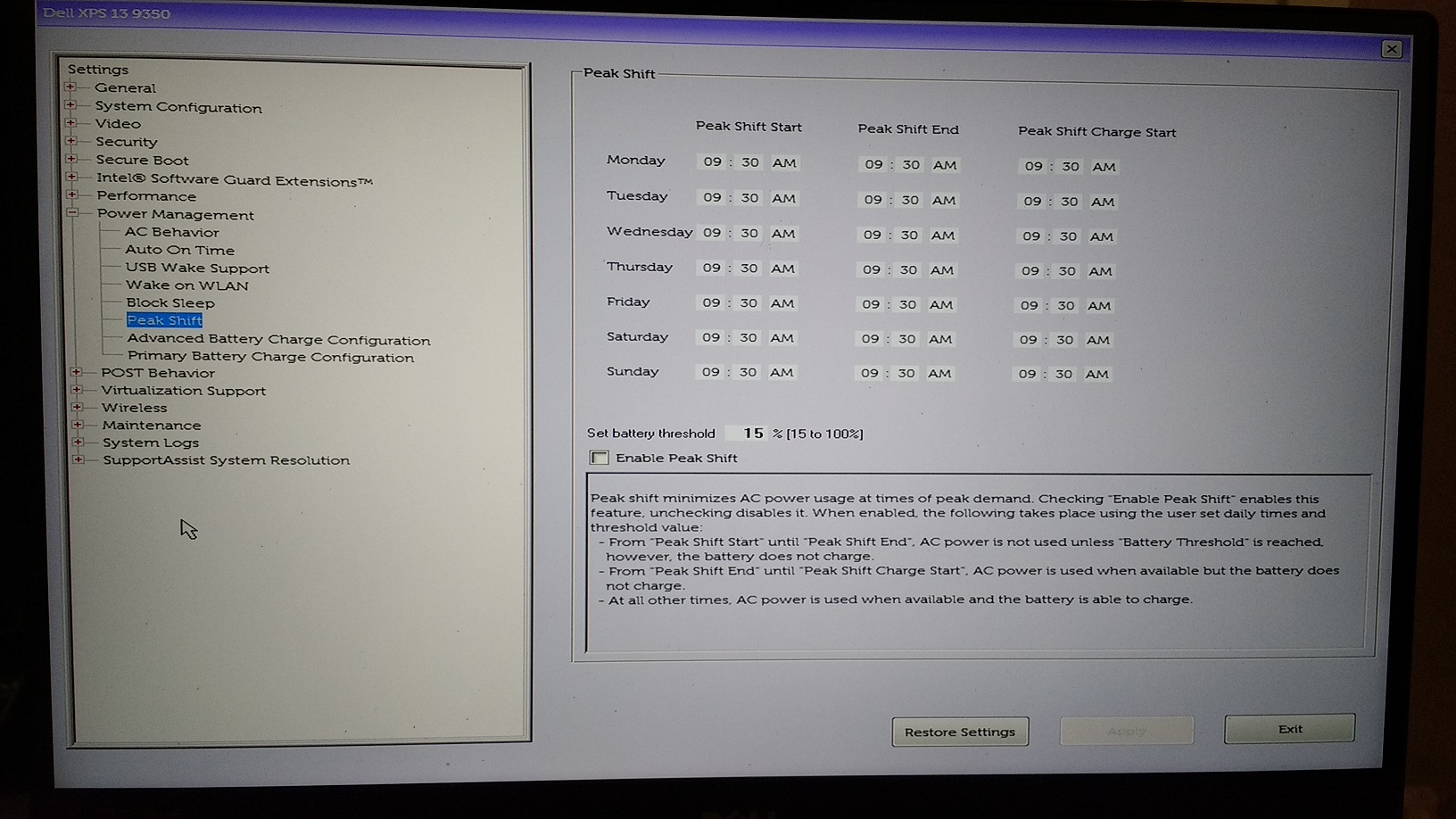
In BIOS setting there is another option for advanced battery settings named "Peak charge".
Afaik "Peak charge" battery settings are part of Latitude laptops.
It is disabled, but when it gets past 12:00pm the battery is not detected anymore and i get an LED error code (white/amber).
12:00pm is the default Peak charge setting in BIOS. Tried another settings and reflashing BIOS, resetting BIOS,..... no luck.
No charging possible every day. i need to unplug the replacement battery every day to get it recognized again.
I hate this laptop and DELL.
This workaround seems to recognize replacement batteries for several days, but still getting battery error / not charging after few days:
- Enable USB-C Powershare in BIOS
- Set all times in Peak Charge Settings (BIOS) to the same time (e.g. 09:30am) and set Battery treshold to 100%
- Disable Peak Charge (uncheck)
- Disable all other battery optimizations (Power charge,...)
Last edited: Dec 27, 2018 -
I like my XPS 9350, so when it started developing problems I decided to repair it. Even if it's still in warranty, I'm not sure I'd want to send it in to Dell. I did that before and that took a while. The repairs are not earth shattering in any way but I thought I'll post something in case it helps someone:
1. Battery change: my old battery started swelling some time back. I noticed that the bottom edge of the trackpad, which is normally slightly recessed, was protruding upwards instead. I bought, tried and returned a bunch of batteries from Amazon and Ebay. I tried a couple of JD25G versions, but the issues I ran into were
- can charge successfully, can keep the laptop going after unplugging from AC, but cannot boot laptop by itself (without AC). I suspect the output voltage was just not high enough.
- I *think* I received one which worked, but the battery capacity was significantly below the original's (use Window 10's battery report to check: https://www.laptopmag.com/articles/generate-battery-report-windows-10)
- just DOA.
This was the one that worked for me:
https://www.amazon.com/gp/product/B07DFRQG1J/ref=oh_aui_detailpage_o07_s00?ie=UTF8&psc=1
I had asked the seller about the capacity and voltage output for the battery (the question and answer is still in the Q&A section). The battery arrived with the Dell logo on it, and it has worked flawlessly. I saw someone post a review saying the battery isn't genuine and doesn't work, but it does for me.
2. Keyboard change: about a month or so ago the number keys started acting strange: some numbers would have a delay after tapping before showing up. Sometimes a number would be repeated twice. Sometimes nothing shows up. I swapped the keyboard with this one:
https://www.ebay.com/itm/Original-N...e=STRK:MEBIDX:IT&_trksid=p2057872.m2749.l2649
It has worked without issues. The disassembly and reassembly took a couple of hours, essentially the battery, speakers, multimedia board, motherboard, wifi card, fan had to be taken out before the keyboard can be accessed. This video helped walk through the steps involved:
It turned out that I could place all the screws associated with each step (e.g. speaker removal) into a pile, as the screws seem to be similar (or largely similar) for each. I didn't have to track each individual screw's original location.
3. Thermal compound change: I noticed that the top of the keyboard runs warm sometimes. I don't know if that has anything to do with the number keys going wonky. I used HWInfo to track temperatures, and it seems at times the CPUs reached the 90s and even 100C. I thought I would try cleaning out the old thermal compound and put some Arctic Silver on it.
Opening the bottom case again, I saw that two of the heatsink screws were stripped. Probably due to some Dell tech in a past repair. I bought Vampliers:
https://www.amazon.com/gp/product/B00LMMU2HG/ref=oh_aui_detailpage_o00_s00?ie=UTF8&psc=1
I wasn't sure the pliers would extract the stripped screws, but they did, immediately. I was pleasantly surprised. I found some replacement screws from a Lenovo screw pack they sent me a while ago, I believe the screws are of type M2x3mm.
The heatsink seems quite soft in that it bends easily. It didn't come into contact with the fan as well as it should, so I bent it till it did. The old thermal compound also looked like it's mostly dried out. I cleaned it up and put Arctic Silver on the chips. Right now it seems to run about 10C cooler, I'll keep an eye on it some more.
That's it, I hope the info helps someone.PAPPL likes this. -
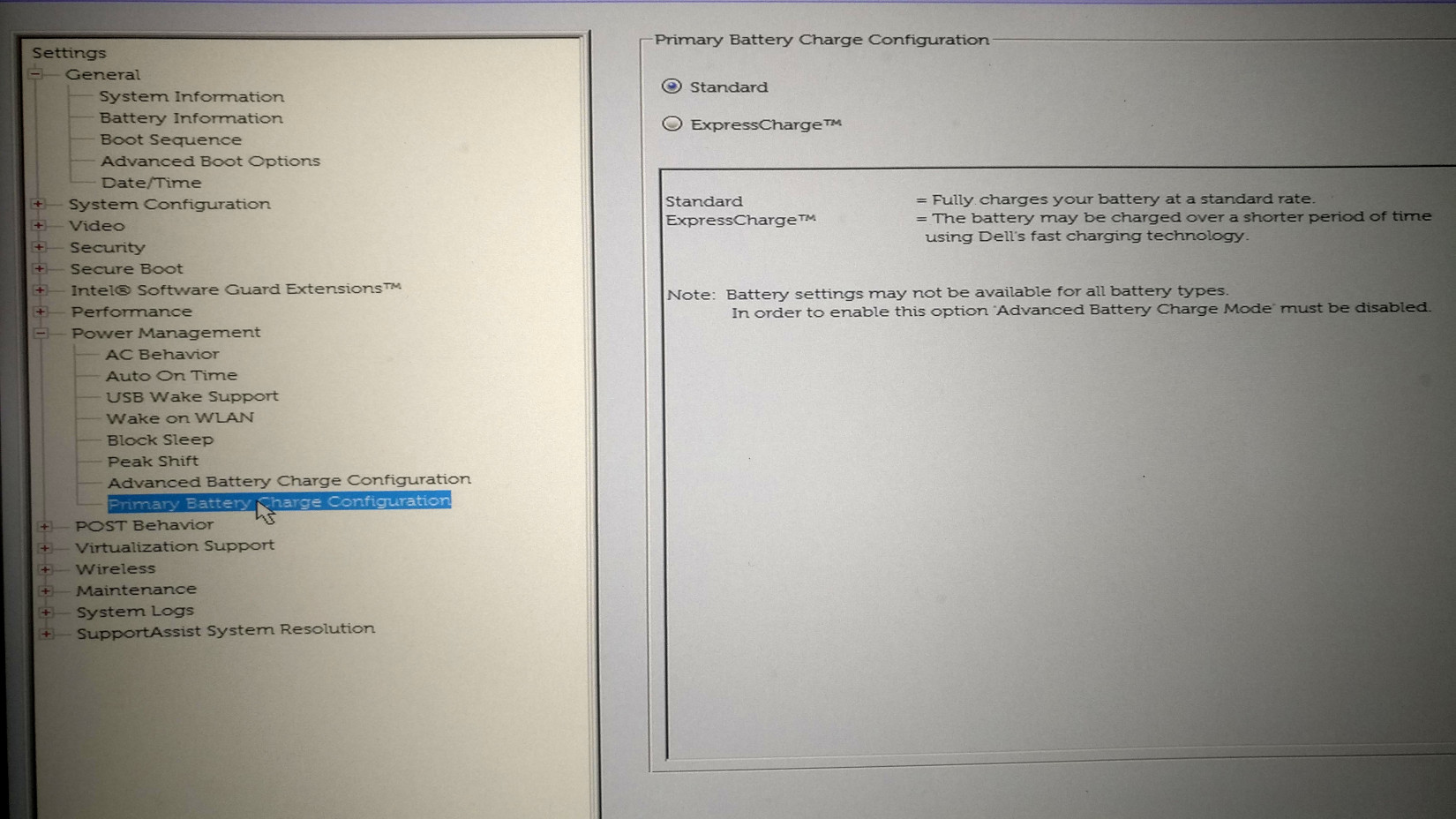
Which BIOS battery optimization settings are available with your replacement battery?
With my replacement battery there is now a new setting "Peak charge" in BIOS power management menu.
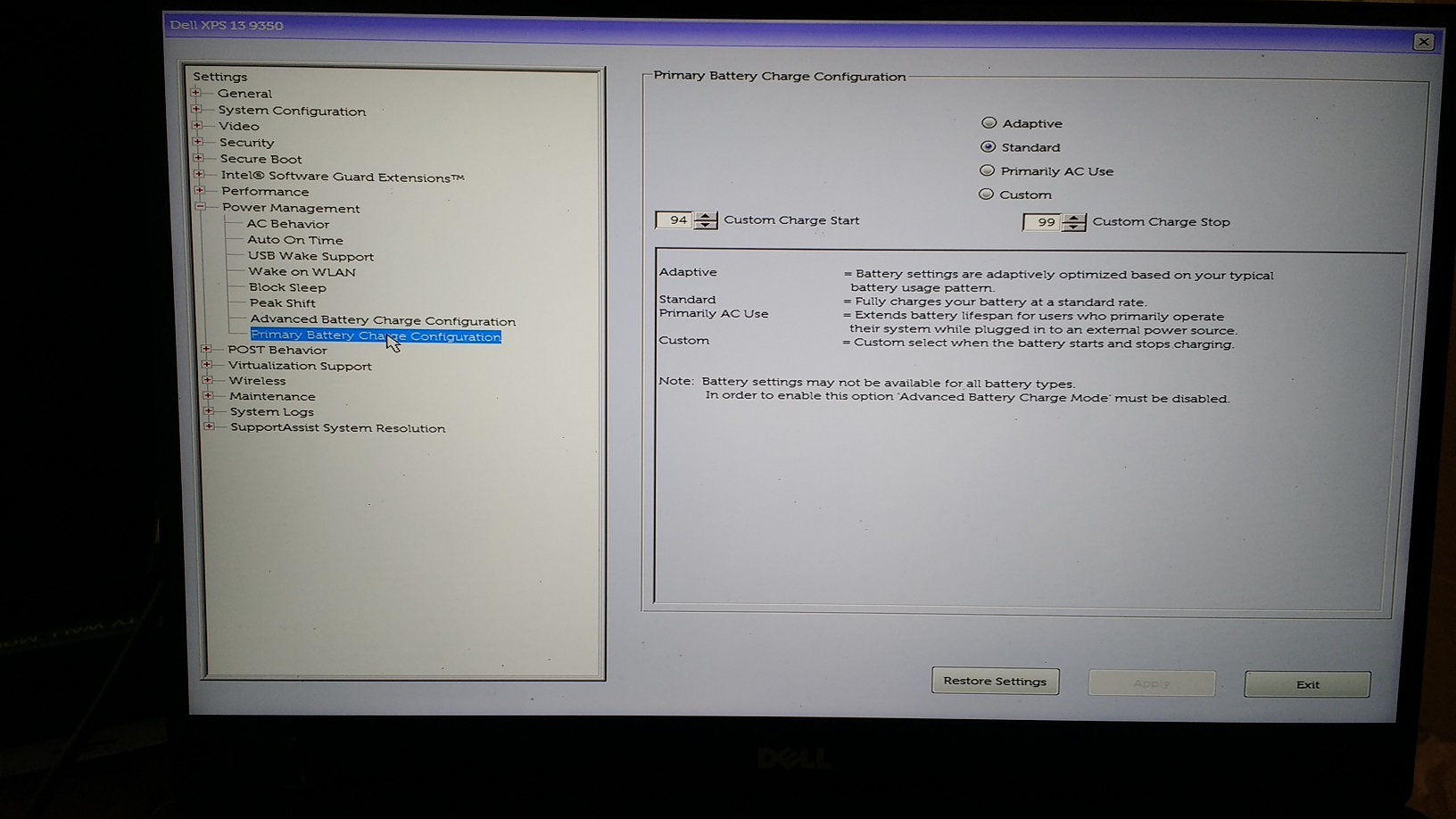
With the original battery the setting "Primary battery charge configuration" was available instead.
Maybe some replacement batteries ship with a wrong battery management chip (from the Latitude line with "Peak charge" option) which causes the battery-LED blink error. -
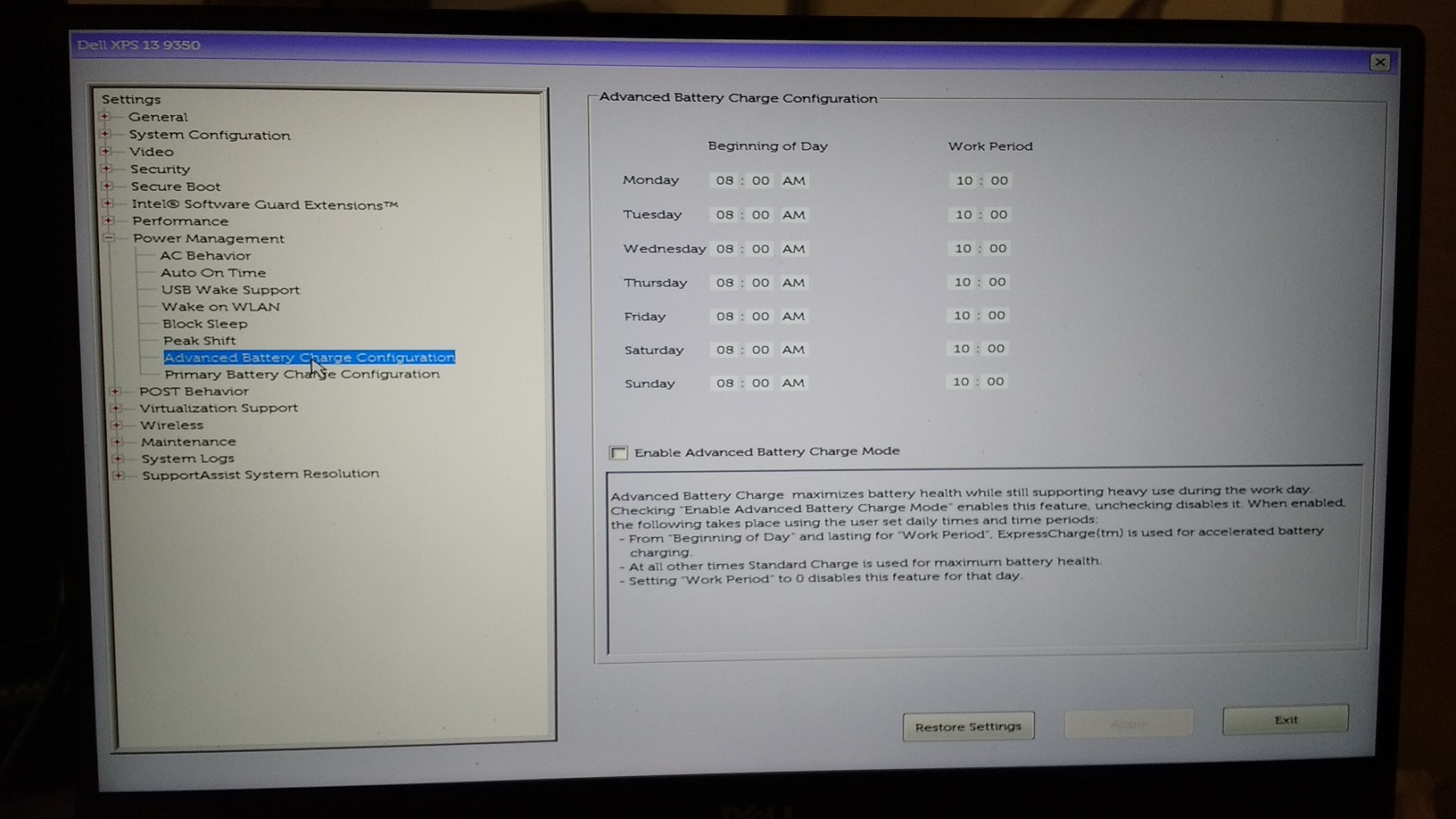
A few photos of my battery-related config are attached.
I didn't actually consider changing any config when I swapped batteries. My intention was simply to use another that is the same as the original. If there are config changes needed, I think the seller ought to bring it up. If the seller says it should be a direct replacement and it does not perform that way, I'll return it. It's a battery, it's supposed to be plug-and-play.
On a separate note, the temperatures didn't seem to go down as much, I was over optimistic before
Attached Files:
PAPPL likes this. -
-
Thanks for the screenshot. Now i see.
Here is a screenshot of my bios battery setting with the replacement battery.
XPS 13 charge options are replaced by a new "ExpressCharge" setting.
Returned the battery, XPS 13 works without battery installed if AC or USB-C-power attached. (No errors)
Attached Files:
Last edited: Jan 29, 2019 -
-
How we can get all screen notification (like volume, brightness etc) back after reinstall Windows. Thanks.
PS Btw... just installed W7x64 -
What is your screen ID (device manager) - SHP1420, SHP1421 or SHP144A?
Dell XPS 13 2015 Skylake Infinity Display Owners Thread
Discussion in 'Dell XPS and Studio XPS' started by abd_97, Oct 12, 2015.