 Problems? See this thread at archive.org.
I had a similar set up. With the big battery, you will lose the HDD space. But will not hear the HDD spinning which is nice.
Clean out your fans and radiators while you have the laptop open. You might also repaste the CPU & GPU.
That Samsung is still on Anand's buyer's guide. The competition has caught up to Samsung so you can get similar performance from cheaper brands. https://www.anandtech.com/show/9799/best-ssds
Unless you are doing certain specialized work, you might not notice a difference between a SATA & nvme drive speeds. Previously, nvme prices were much higher than SATA prices, but generally prices are pretty close these days. (regardless, you will need a SSD in the m.2 form factor to fit in that slot).
-
I recently replaced the Samsung drive which was getting super slow for no reason. SMART values are good and did say 90% spare available after writing 26-29TB (Rated 35TBW). Had to replace it since it was constantly missing on cold boot. I went with 1TB Crucial P1.
-
I ordered the battery and they're already sending it, thanks pressing...
I've also decided to replace my old SSD with the Samsung 980. Is it compatible? Can 9550 have access to it all its features? Thanks again pressing. Big help -
Yeah the 980 pro will work in the m.2 slot on your 9550, although I think there are better drives for the money out there.
Vasudev likes this. -
My understanding is that the 980 won't perform any quicker in a 9550 than a cheaper 970.
Vasudev likes this. -
Older laptops like the 9550 can not utilize the higher speeds of new and expensive pcie 4.0 drives (like the 980 Pro).
But frankly, most users won't notice a difference between the SATA and pcie drives, unless doing very specific tasks. Since pcie prices have dropped so much, I would lean towards pcie drives (TLC is higher performing than QLC so is a better choice for some people.)
https://www.howtogeek.com/444787/multi-layer-ssds-what-are-slc-mlc-tlc-qlc-and-mlc/ -
9550 still running fine. A few issues I will try to address:
1. DC power jack is not securing the power cable well anymore. Power jack looks fine from the outside but might just buy a new one. They are cheap and easy to install.
2. A few number keys are getting wonky, in particular the "6". I will try to clean that blowing air or something. I think it is just dust as the key is used infrequently.
3. Annual dust cleaning to keep laptop running cool.
4. I wonder if the carbon fibre coating is starting to get sticky. Can't tell. Still looks new which I never expected.
I thought about upgrading to a touchscreen. But they are expensive and I don't think the old hinges will do well with the constant movement. Plus the laptop is getting older so don't want to throw good money after bad (still runs fast and virtually without flaws).Vasudev likes this. -
Re-discovered a broken hinge mount by the power cord. The hinge mount looks like some delicate sintered metal which is epoxied to the inside of the carbon-fibre case. The mount was cracked & the epoxy bond fully failed. (edit - you can see a second crack in the mount by the black screw in the photo below)
To fix, I cleaned the mount and case with alcohol. Then glued the mount with Loctite Extreme Glue (which is thick, a bit flexible, and was on the bench). Let dry for 24 hours for full curing per datasheet.
2-part epoxy might be better but with unknown plastics adhesives are a crapshoot and can easily fail or destroy the plastics. Try a test before committing to an adhesive!
Finished maintenance:
1. Replaced power jack. The plastic tab which is screwed into the chassis broke; that looks like a safety design. Cheap and easy to replace. EBay seller "pc*doctor" sells a part that looks better quality than the OEM and it arrived in 1 business day.
There are a few youtube videos showing this process. Also Dell has a service manual here
https://dl.dell.com/topicspdf/xps-15-9550-laptop_service-manual_en-us.pdf
2. Blew a lot of air into the keyboard and the number 6 works fine now.
3. Cleaned the fans, radiators, etc.
4. I don't think the carbon fibre is sticky. Cleaned with water and a microfibre cloth.
EDIT - I also reseated the wifi card and antenna cables. That improved wifi performance.
FYI - I used hi-temp electrical tape to improve airflow from the fans to the radiators and out the back of the laptop. You can see some of that tape in the photo. This worked for my situation quite well.
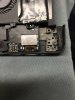 Last edited: Apr 28, 2021Vasudev, custom90gt and Chang_loo like this.
 -
So for everyone that may find himself here with the same issues I described.
The electronic loop shop was able to repair the device and, like I assumed, it was caused by a corrupted BIOS/UEFI.
You might be able to do this yourself if you are confident that it is the same issue and get compatible BIOS flasher which runs for around 50 Euros I think.
Now I am sitting on the cost for damage that is neither a normal age related defect but Microsoft/Dell actively changed something as critical as the BIOS on my system without notifiying
me and damaged my device. If it was someone else you'd say it's a hack/malware attack. I am kind of mad about this since as the small guy you have no repercussion against this.Last edited: Apr 29, 2021 -
Does the xps 15 9550 have a sd card adapter in it? Asking this because im trying to use a security camera and it seem like to fix it... i need a micro sd card and connect it to a laptop so i can download some firmware on it the micro sd card... then put it into my camera.
Does the laptop has this? I do see a slot on the right side of the laptop right next to a usb port. Is that it? But its a micro sd card so its very tiny. -
The xps 15 9550 has a standard SD card slot, not a micro-SD slot, so use an adapter.
Sent from my SM-G986U1 using TapatalkPapusan likes this. -
Okay thanks.
I also recently got some earbuds that have no wires... and thus its bluetooth. I tried to use it with my dell xps 15 9550 laptop but for some reason it keeps on stopping everytime? How do i fix this issue?
I can use it with my iphone without that much issue... but lot of issues with the dell laptop? -
I originally thought the SD card slot would be a useless feature, but I find myself using it more often than I thought. I picked up a Micro-SD adapter on Amazon for next to nothing.
Bluetooth is sketchy in my XPS 15 also. I tried to use a BT mouse, and had so many problems, I went back to a standard wireless USB mouse. -
The bluetooth, headphone jack, and USB3 never worked perfectly on my 9550.
You might try checking for wireless updates for your laptop at the Dell site (type in your service tag for the exact drivers Dell recommends):
https://www.dell.com/support/home/en-us/product-support/product/xps-15-9550-laptop/overview
Dell's drivers often are old versions. You might find more updated wireless drivers from the manufacturers on the internet.
Finally, some people upgraded the wireless cards for faster speeds. I don't know if the bluetooth would work better there but it is not expensive or difficult to change. You can search the forums here for recommendations.Papusan likes this. -
I had to change the BT/Wlan card on my 9550 because it never worked well. An Intel 9750 or 8560 (I guess because I have sold my 9550) replaced the original card.
Never had a problem again with the intel card.Last edited: May 4, 2021 -
https://www.amazon.com/Vanja-Adapte...s=micro+sd+adapter&qid=1620238183&sr=8-4&th=1
https://www.amazon.com/SanDisk-Micr...adapter&qid=1620238183&sr=8-5#customerReviews
Is this what you got? Any of these two would work?
So you can't use wireless earbuds or wireless headphones with the dell xps 15 9550? I don't have much idea about bluetooth but i bought a wireless earbuds and connected it to my iphone okay... so im confused why wouldnt it work with a dell xps laptop? -
I bought this one:
https://www.amazon.com/gp/product/B073JWXGNT
It's a card, plus adapter. Your first link is nothing like what I have, your 2nd link says "up to 32GB". The one I bought, my link, has no capacity limits beyond the media limits.
I'm not saying what you can or can't hookup or use. I'm saying I had a lot of trouble getting Bluetooth to work for me, so I gave up. The ONLY thing I tried was a mouse, didn't work well, so I went back to a USB mouse.
YMMV. -
I have used a variety of Bluetooth stereo headphones and they all worked great using my xps 15 9550's stock built-in Bluetooth adapter. I actually couldn't use wired headphones until I replaced the audio daughterboard, which has the 3.5mm jack on it.
Sent from my SM-G986U1 using Tapatalkpressing likes this. -
I replaced the audio daughterboard also. The audio jack still is a bit wonky.
-
Hi. I have a dell xps 15 9550 laptop bought from many years ago. I am still using it and its fine most of the time. I had upgraded the battery, ssd and ram a while back.
But today, when I turned on the power button, it did not turn on. I then pressed the power button again and it turned on... then turned off immediately. Then after a while... it finally turned back on. I have it connected to two external monitors if that matters.
Now a while back, I occasionally had some issues with this laptop. Such as back then sometimes when I turn on the laptop, it would have the scanning disk for errors and it never finishes... so i power it off and then power it on and its back to normal. But its been a while since i had this issue.
Now its windows 10 pro. I also have bitlocker enabled and a windows password. So everytime i power it on... i need to enter my bitlocker pin... then my windows password to access my laptop. I do this for security since i heard if you don't have a bitlocker pin or use veracrypt, well if someone had access to your laptop... they could literally turn it on and put malware/virus in it etc.
Now my concern is because earlier today, I had it not powered on after many tries until later on... I do not want to power off my laptop for a few days. Is this fine and do most of you do this? I heard lot of people make their computer sleep when they are away from their computer whether they go to sleep or away from the apartment etc. But my concern is besides theft... well I wouldn't want someone having access to my laptop and say do something to do without me knowing. Thus imagine planting malware/virus/trojan etc.
When I go out for a short time, I usually just task manager and lock my computer. Thus you need to enter my windows 10 password in order to access it. But I heard that windows 10 password is completely useless right? So when I heard this, even when I go outside for a bit, I shut down my computer completely. Then power it on and enter bitlocker pin and windows 10 password each time.
But is there a way to protect my laptop security If I don't want to turn my laptop off? The thing is Im outside the US right now... so my concern is if one day I power my dell xps 15 9550 laptop on and it doesn't power on at all etc. Then I'm stuck with no laptop while outside the US.
Anyone have any advice here? I mean I don't mind just locking it when I go to bed... then when I wake up... I only enter my windows 10 password. But I read this is a huge security issue if someone has access to it while you do not know and your laptop is powered on.
I read also in this subforum many people had issues with the power button such as it not turning on? Or once it powered on... then it powered off pretty much immediately? -
Also. I check dell site and they sell the dell xps 15. But what are the models of these? There are 2 of them right? The latter is the new XPS which is much more expensive?
The thing is I do have the dell xps 15 9550 powerbank that i use with my laptop. I actually bought 2 of them. But would these be compatible with the current dell xps 15 laptop that is out now? I remember someone said the new one uses usb-c... so that mean my 2 dell pw7015l would be useless then? If i buy a new dell xps 15 laptop, I want it to be compatible with my old powerbanks as I don't want to buy another powerbank. -
Replaced a failing keyboard today. Parts-People in Texas claims to sell OEM Dell keyboards. This types better than the spongy keyboard that came with my 9550 so I am very happy with the supplier. This was only about $10 more than the cheap ones on eBay.
Two unrelated laptop issues:
- The wireless card 1830 has 3 coax cables going into it (black, white, grey). When removing the white coax, the card's pad lifted and the outside round contact got stuck in the cable. That took an hour to remove from the cable end. Wireless works without the white coax; not sure what white is for but I'm not getting 5G signal into the laptop and download speeds seem slow but I need to research that a bit more. I don't use bluetooth (it was always wonky on the 9550).
What is the best card that will work on the 9550 now?
- 2 heatsink standoffs broke. Those were outside the GPU and must have ripped off the motherboard board at some point. I noticed the nVidia card running a bit hot the past few months but don't really use the laptop for games or anything so just thought it was dust and old thermal paste.
I just removed the broken standoffs and put them on the other side of the board like nuts. The heatsink arms which engage these 2 screws just bend down a bit lower so I don't think the pressure distribution changes very much to be honest. Ideal solution would have been to buy longer screws and appropriate nuts but figuring out correct lengths and sourcing would have been a root canal.
I'll benchmark the GPU this week. -
Picked up and installed the Intel AX200 wifi card for $25 down the street. I read that some newer wifi cards may require newer CPUs. Works perfectly.
There are tricks to removing and installing the uber-tiny coax cables for the wifi card so learn before doing!
This is where I downloaded the driver:
https://www.intel.com/content/www/us/en/download-center/home.html
EDIT - Internet is much smoother and a bit faster. Very happy with this card upgrade. All 9550 owners should consider this IMHO.Last edited: Nov 1, 2021Vasudev likes this. -
Did quick CPU and GPU benchmarking to check thermal paste and new GPU heatsink clamp system. No issues noted.
- Throttlestop bench showed no throttling and reasonable temps at each core.
- Unigne Superposition benchmark was 2805 at 73*C max with no throttling anywhere and no flags; score in line with scores from other 960M 6300HQ laptops.
Blowing out the dust and new thermal paste drops idle temps from say 43*c to 33*c lol.Jean-Cyril likes this. -
Dell replaced the card in my 9550 with an Intel DualBand Wireless-AC 8260. The 8260 was much better than the original card.pressing likes this.
-
Has anyone here done a clean reinstall of windows ten or ten pro... which is what I have and then after you did it, you have no wifi connection?
When I click on the bottom right corner, you see that globe which means you aren't connected to the internet. When you click on it normally, you see a bunch of wifi connections for you to connect to. Instead it shows
Network and internet settings
Airplane mode that is blank and you cannot click on it.
I went to troubleshoot and show available networks and it shows nothing. This is what I see under device manager for network adapters and other devices
Network adapters
WAN Miniport (IKEv2)
WAN Miniport (IP)
WAN Miniport IPv6
WAN Miniport L2TP
WAN Miniport Network Monitor
WAN Miniport PPOE
WAN Miniport PPTP
WAN Miniport SSTP
These above appear to be installed? There is no yellow exclamation point or anything like that above. When I right click each one of these WAN, it shows device status this device is working properly for each one of these.
However the devices below do have yellow exclamation points and they show The drivers for this device are not installed (code 28) There are no compatible drivers for this device. To find a driver for this device, click update driver. Of course update driver does not work due to no internet.
3D Video Controller
bcm2045a0
Network Controller
pci data acquisition and signal processing controller
pci data acquisition and signal processing controller
pci device
pci memory controller
sm bus controller
unknown device
unknown device
unknown device
Can anyone explain why I have no wifi and apparently no wifi adapter driver if that maybe the case? Note, my BIOS was very old before I did this clean reinstall. I remember it was like over 5+ years old at least and I never did a bios update. I never did an update because the concern of it bricking... made me never do a bios update. Could that be a reason?
Or do you always have to download the drivers from the dell site? If so, how would you know which ones? -
I did it one or two years ago... And it works perfectly.
Maybe I had to get killer wifi drivers by my own but after that windows update everything.
I did went to Dell website for some other specific download just to be sure latest driver is installed.
Envoyé de mon GM1903 en utilisant Tapatalk -
You need to download the drivers and keep it offline. Usually Win 10 has most driver included for basic functions and sometimes it doesn't.
By the looks of it you need to update/download Broadcom wifi and/or Dell/Internet Ethernet and rest of the drivers should be installed by windows updates. -
Which is the wifi driver from the dell install site? Is it a main one or the one specifically for your laptop? I downloaded two of the drivers i found in network... under my service tag. I then transferred those files to a usb flash drive and then connected it to my dell xps laptop and open it. Nothing happened as I"m not sure if it even installed correctly. -
I entered my service tag on the website. There seems to be 31 total drivers for my dell xps laptop with the service tag. Two of these are network drivers. So I need to install all of them? I tried installing both the network drivres... intel wireless wifi driver and the bluetooth driver and it doesn't seem to do anything? -
https://support.microsoft.com/en-us...6-4d78-7f07eee84d2c#WindowsVersion=Windows_10
Have you tested with Ethernet?Spartan@HIDevolution likes this. -
Stop engaging with this lunatic.
Sent from my iPhone using Tapatalkguho likes this.
Dell XPS 15 (Skylake) 9550 Owner's Lounge
Discussion in 'Dell XPS and Studio XPS' started by T2050, Oct 30, 2015.


