 Problems? See this thread at archive.org.
76c is ok for the CPU, these X9000 are speced up to 105c. However if the CPU is around 90c I would start to worry.
Around the same temps on my GPU´s, yes 60c is very good considering there is SLI.
-
Magnus what OS & Graphics drive are you running in just cause 2 utube?
I have been playing Medal Of Honour BETA on steam everything maxed out. Fun game!! -
Im buying Final Fantasy XIV today I fancy a new MMO (havent played one in years)
Is Just cause 2 worth a go? the first one just didnt have the structure at all and the missions were awful - Im slightly confused about this Medal of Honour , I am sure I saw a review of it months ago? and they hated it - they said it was crazy easy to shoot people and just not that good in comparison to games like Bad Company 2? (maybe that was the console version?)
The X9000 reallly is a beast eh? and the 8800MGTX - many of the new graphics cards only have a 128bit architecture - its almost like they overpowered these and scaled back so as to spread over more time and make more $$$.... hmmmm..... -
@Dan
I use Vista 64 Ultimate and driver version 197.15. Actually I game mostly in Win XP PRO SP3 so I dual boot both Vista 64 and Win XP Pro.
Just Cause 2 is run in Vista 64. Most vids I have posted on youtube I run on my Win XP partition.
Yes the X9000 definitely is a beast when you run it at 3.8Ghz, I think the X7900 too, though I don´t have any experience with the X7900. -
@DanXbix were did ya download 259? for xp, thanks.... wanna try see 3dmk06 score get.
guessing cpu score of about 3000 @ 3.4 (fully tweaked) is the ball park for X7900 win7
an xp should be most > probably 3050 @ 3.4
have ya tried set bios to 3.2 then TS to x17 an see if can volt to about 1.425v?
3Dmk06: XPproSP3 , 260.63 beta, stock gpu clks, NO TS, Beast raised 20mm
set bios to 3.2 (default 1.4125v) > cpu sc=2981 sm2=6669 sm3=7376 14589
set bios to 3.4 (default 1.4625v) > cpu sc=2900 sm2=7030 sm3=7534 14841
then set bios to 3.2 an set TS to x17(3.4), 1.4625v ,clk mod ticked > cpu sc=3140 sm2=7030 sm3=7521 15188
( TS @ x17 1.35v, clk mod ticked > cpu sc=3156 15214)
no TS no undervolting get better cpu sc on 3.2 than 3.4 -
Hey Guys, my CPU seems to be running fine at 3.6 GHZ with a 1.2875 Voltage - is that normal? seems quite low....
-
Hey hikkoo thanks for your reply i will try some more tests tonight.
quick question
I use MSI Afterburner for OC GPU also so GPU temps/clock will show in the gaming lcd. While playing MW2 i noticed GPU2 keeps underclocking (powermizer)
i was running at 572/1430/859 but only GPU2 downclocks. How can i turn off powermizer while gaming easily without reg hacks? app? is this safe aswell? -
mrmarkwalker yes that is quite normal. Stress test it with Prime 95 or Orthos and see if the computer reboots and check the temps.
-
Danxbix if one GPU underclocks the game isn´t using SLI, thereby the other GPU is idle.
However MW2 should use SLI. It´s an easy fix though the downclocking. Either the GPU´s hit a high temp thereby underclocking or the profile for the game isn´t run in high performance mode. There is an option on the Nvidia profile for the game that it should run at full speed all the time. -
Hey Magnus72 been looking at your videos on utube great work
How are you running those graphics clock speeds so stable? mine down-clocks while in 3dmark06 after a few tests and the temp is no more then 55c.
I found that high performance mode option and seems to work with most games but with MW2 the clock speeds are ok but Graphics load is eneven 95% gpu 1 5% gpu2 it runs perfect but thought that was wierd. Also powermizer setting don't seem to be working on gpu2 while idle? gpu1 clocks down to 216mhz but gpu2 stays on 500 -
My GPU´s is really stable at 640/1600/950 speeds. I actually even overvolted them earlier and ran the GPU´s at 680/1700/980 without any problem
Also usually setting the Power Management Mode in Nhancer to Max Performance usually helps.
Do the same for 3D Mark 06 set it to Max Performance. I can recommend to use Nhancer which makes it all much easier. -
so gpu2 downclocking during 3dmk06, sure mine doesnt in 3dmk06 , DanXbix do ya think possible could be to do different 9800mGTX Bios to mine?
PowerMizer is mainly to do with on battery but also when plugged in saves power HERE lol want max power not save power.
so me disable in NCP 'Mobile > Change PowerMizer Settings' dont want anything not necessary when benching.
me Beast's NCP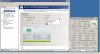 ...what others dont have? like is there a option "cpu" to disable PhysX ...default its on GeForce 9800MGTX(2)
have ya noticed any slowdowns during gaming after an hour? this is a sure sign one or both cards overheating or cpu....have ya checked with other temp monitors to make sure temp mon ya currently using matchs near same
so OS has been reinstalled after install new sli board, correct?
me fault > your still using 258.96 from Nvidia site
probably already checked this > win7 Power options set to balanced or performance? have ya also checked in Advanced power settings > Processor power management hasnt changed from 100%....because has happened to Beast but for vista64, got changed to 50% think from windows updates -
Hikkoo & Magnus72
Sorry guys been asking to many questions!!! just want my beast perfect!! lol
I work in IT network admin (linux/windows) but i'm a complete noob to tweaking SLI setups etc
Currently running Win 7 x64 Ultimate, Nvidia Drivers 258.96 d/l from NVIDIA DRIVERS 258.96 WHQL intel chipset 1.0.25 and all the win 7 drivers from phyloids m1730 site.
Here's some screen captures of TS, MSI afterburner, gpuz etc Laptop Forums and Notebook Computer Discussion
Laptop Forums and Notebook Computer Discussion
[URL="http://forum.notebookreview.com/attachment.php?attachmentid=56860&stc=1&d=1286704335"[/URL]
(i know i have a lot of crap installed lol
these are my settings and in attacment image 3 all games profile are setup like this.
Just Cause 2 & MW2 seem to have both gpus at full clock speeds but when monitoring with MSI afterburner app (logitech lcd) usage on gpu1 is high 90% and gpu2 10-20%.
I can't use nHancer as not compatible with 259 drivers yet.
I have done a fresh install on win7x64 and tried 197,259,260b nvidia drivers from the nvidia site (using drive sweeper everytime). I found i get the best score with 259 drivers.
GPUs are not over heating as i have been monitoring and idle @42C get no higher than 61C in MW2. CPU idle @40C but gets quite high while gaming & 3dmark06 75C roughly
Whats the best setting for physics GPU2 or CPU? i assume GPU2
Hikkoo 3Dmark06 GPUS clocks are the same & usage is identical but i can only get a score of 12663 cpu-2950 @ 3.4ghz default voltage & with throttle stop. Havn't had time but I will dual boot WinXP x64 and see what i can get but would prefer win 7.
all i want is a good score in 3dmark06 & those games to share an even load across the gpus lol -
I thought always set physX to CPU - as if you set it to a card it's like setting that card to just deal with PhysX?...hmmm that doesn't sound right either
-
Hey Hikkoo why do you run at 3.2 GHZ? and not 3.4??
-
Lost Planet 2 benchmark, me beating the Asus G73, I7 920Qm and ATI 5870m in the benchmark test.
1920x1200
TEST A RANK: B AVG FPS 37.1
TEST B RANK: B AVG FPS 36.7
8xCSAA, Vsync On and all other options maxed, that means all options on High as high as it can go
Graph is here ViciousXUSMC benchmark that is.
http://forum.notebookreview.com/gam...-2-benchmark-released-your-performance-2.html -
What graphics driver are you using?? Also do you run Windows XP? is it faster than Windows 7 for games? I thought it wasnt?
-
Any M1730 owners looking to sell their laptop? I'm interested in a 8800M GTX or 9800M GTX one.
Thank you -
DanXbix, for "good" 3dmk06 score + Help rule out heap of that stuff installed in 64win7 which could be effecting 3dmk06 an maybe TS > need spare Hdrive ,
first copy into folder on usb stick > intel chipset driver infinst911 autol 1.1.30.0(Version: 9.1.1.1025) ,64bit Nvidia driver 258.96 win7, 3dmk06, cpu-z, gpu-z, TS 285 or 277, Hwmonitor, .....also MSI 200 but dont install msi on spare Hdrive until after run some 3dmk06 tests.
REASON: need to also rule out if Gpu OC tool causing issue to 3dmk06.
No other drivers. dont need matrix storage manager for a single set up drive (but is a must for RAID setup).
me have tried without matrix storage manager on a single setup drive, over a year in vista64, an xp for all benchys, an short time in 32win7 no issues
1.set Bios to 3.2 an please dont change during testing
2. take out Hdrives an mark them to match engraved markings on side of hdrive caddy '0' an '1', so never to mixup when reinstall RAID hdrives after finish testing
(dont forget to change Bios 'Sata Operation' to way it was before, when reinstall RAID hdrives )
reason for spare hdrive....if disable heap of stuff in 64win7 ya have there, then ile be responsible if mess it up..lol we cant have that
NOTE: Always remove Battery pack before take out Hdrives. Be careful with hdrive sata connector is of flimsy design, ive fractured once copper tape part of sata conn > got reseat hdrive error , used a hairdryer to heat copper tape an was able to boot to second drive OS , do take me drives out a lot which is probably why damage.
3.raise beast about 20mm for good airflow an plenty space around Beast not tucked near walls
4.Boot F2 an BIOS set to RAID Autodetect/ACHI
5. Install 64win7, then chipset reboot > then gpu reboot an everything on usb stick except MSI tool
check power options set to High Performance win 7
6.Go to NCP Enable SLI first
NCP > adjust image settings with preview > select use my prefrence emphazing: Performance(move slider all way to left)> apply.
NCP > Set SLI Physx configuration > set to Auto-select (Recommended) seem to get slightly higher scores on this than other 3 settings but for xp
(sorry discovered win 7 no powermizer settings look HERE)
win control panel > System > Advanced System settings > under Performance click on settings Tab > select "Adjust for best Perforformance" > apply
set Themes to windows classic
7.run 3dmk06: TS on x16 1.4125v( make sure unlock Max FID/VID even though its on x16 an tick 'Set Multiplier' box), clk mod ticked.(dont press Save Tab in TS)
now reboot then adjust TS @ x17 1.4625v clk mod ticked ....should see a good difference between scores (me get about 670 diff look below)
8.now install gpu oc tool
now set clk gpus to 572/859/1430> minimize MSI > open TS an adjust TS to X17 1.4625v clk mod ticked > minimize TS
(remember you were able go to 1.45v but was with 8700m so could try that...try avoid BSOD's at first because too many bsod may corrupt gpu oc tool) > open TS an change > minimize TS
how much increase in score getting with overclock? no gain?
9.know see if can undervolt in steps @ x17, aim to get to 1.4125v without BSOD... hope so.... NEVER PRESS SAVE TAB IN TS when testing if do by accident delete desktop shortcut TS icon, delete unzipped TS folder an unzip again,
NOTE: evertime adjust an set TS, then minimize > will remember settings until ya reboot > so need to keep unlock max FID/VID , adjusting volts an multiplier etc
if still same prob undervolting X7900 with TS @ x17 from default 1.4625v... go to UncleWebs Thread HEREfor extreme cpu's and ask nice what could be causing this....(uncleWeb is the creator of ThrottleStop an Real Temp)
ive tried above an got these scores for 64win7
3dmk06 : X9000(non-ES), stock gpu clks, 258.96, set bios to 3.2, room temp 20c, raised 20mm
TS-277 >X16 ( made sure unlock Max FID/VID even though its on x16), 1.4125v, clk mod ticked > cpu sc=3910 sm2=6034 sm3=6715 13521
TS-277 > X17, 1.4625v, clk mod ticked > cpu sc=3071 sm2=6411 sm3=6945 14194
now me install msi 200 applied oc gpus to 572/859/1430
TS-277 > X16, 1.4125v, clk mod ticked > cpu sc=2894 sm2=5943 sm3=6880 13577
TS-277 > X17, 1.4625v, clk mod ticked > cpu sc=3059 sm2=6229 sm3=7067 14133
usage hitting 99% gpu1 an 100% gpu2 (J951N)
tried next day boot from cold start got blank screen during 3dmk06 (all did different is apply overclocking at startup in msi) so pressed power button continously to shutdown then booted, tried again got score 14078 cpu sc=2992 gpu usage 98%, 99% , X17, 1.4625v, clk mod ticked , MSI 572/859/1430 - room temp 22c
going to try NSPT 6.06 .. then see if can force 6.03 to work on win7
EDIT: 14161 with 6.06, 572/859/1430, TS > x17 1.4625v clk mod ticked, cpu sc = 3018
14218 with 6.03, 572/859/1430, TS > x17 1.4625v clk mod ticked, cpu sc = 3076
14296 with 6.03, 572/859/1430, TS > x17 1.35v clk mod ticked, cpu sc = 3103
14251 6.03, gpus stock clks, TS > x17 1.4625v clk mod ticked, cpu sc = 3086
ABOVE: Did no updates to Win7 but going to update win7 if makes any difference
UPDATE:installed over 150mb win7 important updates > hdrive blue light very active after finish win7 installations, needs to be quite before run benchy ,so try next day from cold start notice not much difference 3dmk06
14262 > 6.03 - 572/859/1430, TS X17, 1.4625v, clk mod ticked , sm2=6334 sm3=7102 cpu sc=3076
14268 > 6.03 - stock GPU clks, TS X17, 1.3125v, clk mod ticked, stock GPU clks, sm2=6463 sm3=6935 cpu sc=3104
ISSUE: also run 3dmk06 with HWmonitor116 , get odd high max temp core1=95c (max core0=73c) clk mod ticked, x17, 1.4625v.......
clk mod not ticked, x17, 1.4625v > max core1=90c core0=67c + (RealTemp360 max cores 72c, 94c)
Set Bios to 3.4 (1.4625v) No TS, still same high temp core.
have cleaned internal cooling vents about 2 weeks ago.
me X9000 No good run on 1.4625v all time, ...lucky can undervolt alot to avoid this issue.
NOTE: this is just test guide for X7900 undervolt prob an get good score not best, going to try more tweaks + test which Services Local setting to disable in 64win7
to run cooler an cpu last a bit longer
goooooo!!!!!MAGNUS
-
WOW awesome post hikkoo will try all of those steps
-
wait little still editing ......lol having trouble with timing out net
also try c572/m914/s1430 , ive always used this > memory = core x 1.598 upto about c645 after that memory too high for J951N
mine can go max m1034 only for benchys, test Crysis in vista 652/1042/1630> saw random faint small square spots along mid of screen.
so far somthing not right... scores lower than vista an overclocking have no effect....... reinstalled 64win7
stock gpu clks ,TS > X17, 1.35v, clk mod ticked > cpu sc=3091 sm2=6481 sm3=6922 14257
Msi200 572/914/1430 TS > X17, 1.3125v, clk mod ticked > cpu=3086 sm2=6279 sm3=7080 14215
uninstaled msi an install NSPT 6.03 , 572/914/1430 TS > X17, 1.3125v, clk mod ticked > cpu= 3109 sm2=6286 sm3=7109 14272
Magnus right!! about drivers an 3dmk06 xp best , issue with win7 chipset drivers in inifnst911 autol > only install one driver in Device Manager > intel ICH8M SATA ACHI controller-2829 the ExpressRoot port-2A01 an Processor to DRAM Controller-2A00 stay microsoft basic driver v6.1.7600.16385
whereas xp or vista with infinst911 have intel drivers for these, so maybe better fps for games an benchys than win7
updated with dells R153997 driver for Express Root an DRAM Controler in win7 similar results
dam... cant replace vista64 with win7 yet -
I had nothing but nightmares with my XPS M1730. It was rebuild completely, replaced and rebuilt again... all along the way none of the problems being permanently fixed. I purchased the 4-year onsite warranty, so it was more frustration than anything else. About a month ago my case was escalated and I received an Alienware M17X R2 as a replacement. It has current specs. The only downgrade was no Blu-Ray burner, but that was to be sent as soon as it became available. I received an email today stating they are sending out a tech to install it, as it is now available.
You should ask for the same as a replacement. I was overly polite to everyone at Dell despite my maddening frustration. Even the overseas guys that I could hardly understand received the nice treatment... took time to build rapport and used a lot of "please" on the phone. I also sent a couple of emails to customer service that were very nice. Bear in mind this was a 2 year process. Dell sent a Qualex technician to my house a total of 12 times before they ultimately did the right thing for me. So, be calm and patient. -
heya guys im looking to join this officially and i need your experience. So due to limited funds im stuck between getting a
Intel X7900 Core2 Extreme, with dual 8700m gt in sli, with 8gigs of ram [kinda poo but the upside is has dell next day warranty till 2012.
X9000 core2 extreme with dual 8800m gtx in sli but no warranty
T8300 [email protected] or 2.4 with dual 9800m gt sli with a warranty from a refurbisher for 1 year.
all potentially about the same price which should i strive for i need teh help!!!
Just so u kno i hate alienware and think they look soo ugly i mini sick in my mouth everytime i think about one....oo there i go =[, so please no go just save for 17x cos i hate em.
thanks for reading im at your mercy. -
Hmmmm Difficult one - I personally went for option 2 with the X9000 and dual 8800GTX in SLI . What I would do is ask the seller to transfer it into your name if you do that (they just phone up dell and say so and so is buying the laptop here is the model number, put it into their name please) . That way you could maybe buy more cover, or at least they will help you if anything goes wrong (at a cost), mine only set me back $900 (AUS) So i didnt really care and it plays every game maxed out.
Yeah go X9000 its such a beast. Also you could ask for the service tag and check it out that it isnt a ship wreck..... I didnt but you could
Hope that helps
Edit: Def not option 1 its between options 2 and 3 - for peace of mind you might consider option 3.... hmmmm or are you a gambler like me?? - Some of the other guys on here will give you a more definitive answer I am sure
-
i would go for Intel X7900 Core2 Extreme, with dual 8700m gt in sli, with 8gigs of ram [kinda poo but the upside is has dell next day warranty till 2012.
because with mine i got a 9800gtx card under warranty because my 8700gt sli were replaced 2 times. Its Genuine Dell warranty to so you could extend for Au $540 2years -
But the cards are so lame Dan - its a pointless purchase - unless he goes out and spends a ton on the upgrade...
Also worst case senario you could always put the unwarrenty one on your home insurance and cover it for "accidental damage" right?
At least you can in the UK
Edit: Also what if his cards dont give out like yours did.... he would be up the creek without 60fps
-
Yeap, rather than going thru all those troubles for an upgrade that's not even 100% sure on, go with 8800GTX SLI. 8700's are garbage compared to 8800's.
-
Couldnt agree more, and the 9800 GTXs are great but not such a step up (especially when you overclock the 8800GTX)
Infact I have seen better results with the 8800mGTX over a few people on these forums with the 9800GTX (this could be driver or setup related however)
-
that is true as the 8700gt sli are truely bad compared to 8800 or 9800's. I could not go back from my 9800gtx sli's
-
Get the 8700M gt and get a 8800M GTX SLI from ebay.
The warranty is divine! -
No problem running Medal of Honor Tier One on the XPS M730, my oldest son playing
YouTube - MoH Tier One #3 1920x1200 High Quality, XPS M1730, X9000 3.8GHz, 8800m GTX SLI @ 640/1600/950 -
Thanks guys you have given me some good perspective, @eleron i cant afford that ebay to uk[where i live] means 3/4 of the price of the used laptop just for a new card.
tbh im prolly going to follow marks advice so i can try and copy his or magnus' super set up.
thanks a bundle thought ill let you know how it goes with progress
cheeeers!! -
Cool , its such a great rig and as long as you know what you are doing and keep you eyes on things like temps/dust and generally maintain it well you will have a joy with it. Magnus is a machine on these forums and generally with give you solid info on anything to do with this machine.
I almost sold my XPS M1730 last month but then I went into the shops and mine still outperformed pretty much every sub $2500 laptop I could find, thats crazy! -
@Magnus
Do you do all your gaming on Windows XP and would you recommend it? I miss the blistering speed that operating system runs at
Have you had better frames per second with XP?
Finally where do you get all your drivers for the M1730 and XP. Sorry for so many questions , cheers mate. -
Thanks mate appreciate that - is it worth the XP install then? Im not sure how to make a dual boot....
-
In order to have dual boot, first install the older operating system on a partition, then the newer one on another.
Could be a hassle, I`m not sure you can install the game just in one place, and be able to run it on both OSes... -
You can install say Vista or Win7 first and then Win XP. Problem would be that once both operating systems are installed only Win7 or Vista will boot. That is easily fixed though using a program called EasyBCD.
Great tutorial here by the way:
How to dual boot Vista and XP (with Vista installed first) -- the step-by-step guide with screenshots
Mrmarkwalker yes I use Win XP for 95% of my gaming. Comparded to Vista 64 my tweaked Win XP Partition is quite a lot bit faster
I have all Win XP drivers for the M1730, also GPU drivers I download from laptopvideo2go.com -
I`m curious as to how 7 handles against XP.
-
Cool so I have Windows 7 installed currently if I install windows xp on the second harddrive will it boot windows 7 from the first and then I just use that program you mentioned?
-
Hi im new here and ive owned my xps m1730 for nearly a year( Got it off someone else who previously owned it for about a year) Anyways the thing is my laptop's gaming performance has recently been dropping.. i will usually load a game such as left 4 dead on max res and settings and it will run smoothly for about 30 secs and then drops to a very unplayable framerate.. Is this a sign of my card dying or is there another issue that might have occurred ? And Seeing as my laptop is out of warranty does this mean im pretty much screwed if i run into any serious issues with my laptop ? Any help or info would be appreciated thanks .
-
You install EasyBCD in Win7 and fix the bootloader corruption. When that is fixed you will have a menu to choose from Win7 or Win XP
-
Looks like you laptop is overheating. Try monitoring temps while you are gaming. If this is the case, do a thorough cleaning of the system. There are tons of guides about it on this forum. It doesn't look like a sign of hardware failure to me.
P.S. Indeed, if something in your laptop fails, you are pretty much screwed without a warranty. Try calling up Dell and see if you can extend it. In the end, it is worth every penny. -
Is it extendable or renewable if its expired ? Just wondering if anyone has faced that before... Usually when the laptop is idle its around 60.c+ when im gaming it rises up to around 85 is that normal ??
-
I'm not sure if it is extendable after its expired, but it is still worth a shot.
As for your temps, they do seem a bit on the high side. When I have my CPU overclocked to 3.2/3.4GHz and it reaches 85, it starts to throttle, and system becomes unusable. -
Oh my apologies did you mean cpu temp ? Cause what i mentioned was the GPU temp ..
-
Problem running infinst911 Chipset Driver on 64win7 for Beast......(infinst911.exe is only installing ICH8M SATA ACHI Controller 2829 in me device manager)
FIX:
copy folder with infinist911 to win7 desktop > then after copied to desktop create infinst911 shortcut in folder that has infinist911 > right click infinst shortcut > properties > add to Target: -A (space then -A) > apply > run infinst911 short cut > should see file list extracted, had to do hidden search of some files on list to find extracted folder location(mine named IPMx2). didnt close any window because think removes IPM folder
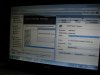
Start > usersname > organize > Folder and Search options > view > select Show hidden files, folders, drives > apply > mine extracted in hidden >>>>> AppData folder > Local > Temp > IPMx2 > dragged IPMx2 folder to documents > last closed everthing clicking okay on Files were extracted successfully window an unselected hidden files, folders,
(standard ACHI 1.0 serial ATA controller) > ICH8M SATA ACHI Controller-2829 7.0.0.1013 > First run Infinst911.exe to install ACHI Controller-2829 > REBOOT
worked me way down manually using IPMx2 folder to update all these in Device Manager evertime each update finish close both
PM965 Express Processor to DRAM controller-2A00 8.3.1.1005
65 Express PCI Express Root Port-2A01 8.3.1.1005 > reboot
Family SMBUS controller-283E 1.0.0.2
ICH8M SATA ACHI Controller-2850 9.1.1.1016
ICH8 Family USB UniversalHostControllers -2830 -2831 -2832 -2834 -2835 9.1.1.1016
ICH8 Family USB2 EnhancedHostControllers -2836 -283A 9.1.1.1016
ICH8 Family PCI Express Root Port 1 283F 8.6.1.1002
ICH8 Family PCI Express Root Port 2 2841 8.6.1.1002
ICH8 Family PCI Express Root Port 4 2845 8.6.1.1002
ICH8 Family PCI Express Root Port 6 2849 8.6.1.1002
ICH8M-E LPC Interface Controller-2811 8.6.1.1002 > reboot
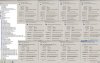
update USB controllers with IPMx2 get 2 error message "USB Device Not Recongnized". an after finish, reboot or statup get usb error message in taskbar, (updating 2832 an 2836 gave error), but next day no erros in taskbar
didnt get the annoying blank screen during 3dmk06 like when first time 64win7 an just 2829 installed with 258.96.....say good bye to me vista64
only get about 100 points more with all above updated (before only had 2829 install ), 3dmk06, 258.96...
so 64win7 put 185.85, stock gpu ,TS x17 1.325v clk mod ticked > 14738 cpu=3070 sm2=6769 sm3=6769
MSI 200, 600/ 959 /1500, 185.85, TS x17 1.325v clk mod ticked > 15161 cpu=3076 sm2=6798 sm3=7842
EDIT: Easier:: First run infinst911_1.1.30 installs ony SATA ACHI Controller-2829 > REBOOT
run again infinst911 to extract file list, didnt close chipset Device program (if close.... extracted files are removed from Temp folder) > find extracted files > drag folder with files to desktop > (close all programs) use folder to update drivers manually for 64 win7
IPMx2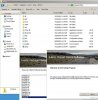
-
I see. Well, 85 is a bit on the high side of things, but your GPUs should work fine at these temps. Hm...try cleaning your system, if you do any overclocking, revert back to stock speeds and see if the problem is gone.
-
did ya try this > shutdown beast overnight .....next day from cold start > raise beast 20mm then bootup play soon as possible ...does it take 30sec for unplayable again .....or it take much longer ..probably dust inside blocking internal cooling vents...
do ya have extreme cpu on 3.2 or 3.4ghz in bios?? -
Tried it .. same case smooth within the first few minutes or secs then slowdown... and it shows as 3.2 ghz
Dell XPS M1730 Owner's Lounge, *Part 3*
Discussion in 'Dell XPS and Studio XPS' started by BatBoy, Oct 6, 2009.


