 Problems? See this thread at archive.org.
sorry meant take apart Beast to check plug connectors on Mobo are fully seated. probably seen Ripfires guide HERE
thats good what happened when removed ram ...consider also Bios maybe corrupted , idea with floppy was to try reflash Bios A10
-
awesome, i brought mine back to life for maybe a day with the baking procedure... seen this? NVIDIA reaches settlement in class action suit affecting Apple, Dell, HP laptops -- Engadget
-
Still no update on my replacement upgraded 9800gtx sli cards. Not showing on Dell Support & Status page either. I really hope this dell rep was being truthful otherwise i'm going to lose it lol. BTW 1x Single 8700GT card that they sent me sucks beyond belief, i can't believe they would try and replace a SLI card for a single card ! Do they think were stupid!!!!
Rant over for now! -
I phoned dell to check status of replacement cards first they guy said they were not sent yet then after asking why next business day warranty isn't really next business day more like a few day +++ he said my tech had the cards and would ring me to arrange a time and he would chase it up for me. hmmm lies?? he also said these replacement were coming from a different centre and i would not see it on the dell website under Support & Status. is this true? i can see all other services & parts replaced. If they don't replace soon what do you guys recommend. I have always been calm when speaking to them too.
-
@nika1964
me tried booting up with no sli board installed .. couldnt get to bios,
only got power light continously on + hd light came on for about 3 secs an cpu fan on. looks like if both cards dead ya cant get to bios
then installed sli board an tried to boot (a few times).. kept getting black screen ..wth!!!.... cap lock flashing + power light continously on, hd light on for 3 secs + cpu fan on but gpu fans didnt turn on.. (bios was set to 3.2 ghz so all fans should be on max speed)
took off keyboard an removed 3volt Mobo battery and fixed prob
removing 3v batt from Mobo will set Bios to all default settings > say if Bios was set to "RAID 0n" will be changed to
default "RAID Autodetect/ACHI"
put 3v batt back after an hour ... guess what lol kept get black screen again + power light on + all fans on continously an can not get to bios.
left 3v batt installed > waited half an hour with batt pack an AC plug removed then pressed power button for 30 secs to drain system board an tried again an got this message
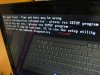
in Bios date = dec 16 2008, all me personal Bios settings did change to default -
NICE. I will try the same. Many thanks for your efforts buddy.
-
Well done Dell! Woohoo looked on dells status and support
K650M CARD (CIRCUIT)..., GRAPHICS..., NVIDIA..., NB9E, GTX 1
has been shipped!! look out hikkoo i will take some of your benchmarks on lol -
sweeeeeeeeeeeeet
-
I know i always wanted this card!! can't wait! I do have weekend support but doubt i will get a call until monday. So much for my premium warranty lol
-
If I'm not mistaken,
weekend support = weekend tech support provided by Dell /w NBD service which doesn't count weekend delivery. -
Oh i see my mistake. Goto say at least it was only 1 week since initial problem of sending wrong graphics card then they upgraded me from my 8700gt sli cards. some people here waited months!! I am happy with the outcome!!

hangon i have Year Value Night/Weekend Onsite Service? -
DanXbix ..crazy about get one card , be prepared if they bring 8800 .....if do then send a box of printed copies
to dell of jamserver2004 link an others about gpu fault ....because thats not good to knownly replace a fault part with another known fault part.
lol ile even give all me secrets to beat me scores, vantage mad dude in sig soon changing to
@ nika
before removing 3v Mobo batt > disconnect everthing off Beast including AC plug , take out batt pack, drain system board, take out ram an goodluck! -
What M1730's aren't for...
![[IMG]](images/storyImages/funny-pictures-cat-sits-on-your-keyboard.jpg)
-
Dell just phoned to organise time to install 9800GTX SLI cards. in one hour hopefully if they sent the right cards this time i will be able to play some games at highest settings.
update. OMG these cards are awesome!!!! now to get a higher 3dmark score then 12900. Going to format laptop. Hikkoo what GRX overclocking app are you using? MSI Afterburner doesn't show correct clock speeds -
I have a problem with Windows 7 64 Bit Ultimate: can't install Quickset to manage leds and backlight
I tried to install old versions but i get always an error on startup installation: something like: the version of the file is not compatible with this version of windows, check if you need 32bit or 64bit etc..etc... I tried Vista 64bit too but nothing
Plz someone can help me with url for the right download link?
THANKSSS!!!
Marco -
Hi guys,
I've got a question. Could someone upload sound drivers somwhere (R181712 - the one from dell site)? I'm going nuts. Everytime I try to download it from dell website it looks like file is corrupted. So I've tried 5 different versions already and they're all . Now I'm using R134779 but speakres arent worsking and mic is too quiet. PLS HELP.
-
@molder2K and M1730owner,
I get my drivers from here.
Dell XPS M1730 - 'The Beast': XPS M1730 Vista Drivers (64-bit)
It is BatBoys site and they all work great. -
Hey hikkoo i noticed on hwbot on your benchmarks you are running a different Graphics bios then me. GPU1 - 62.92.7E.00.0C GPU2 - 62.92.7E.00.0D
What version graphics drivers are you 9800gtx sli owners using? What version Grx bios? Do your card clock down automatic when just idleing?
hikkoo the highest score i have in 3dmark 06 is 12575 so far but i still need to do a fresh install. -
Thx, but I need drivers for Windows XP. Besides, he's got links pointing to the dell's ftp website so it wouldn't work.4
edit: FOUND IT! -
Dan you should hit around 14000-15000 in 3D Mark 06.
-
Try not to kill it. If Dell need to replace it again, they are allowed to put back 8700 SLI's.
When I had 8800, it was upgraded to 9800 after few replacements, then went back to 8800 again when it died. -
My understanding so far is:
Connect to XPS DVI > HDMI cable from the XPS to the HDMI input on the HDTV;
Use the component video adapter on the XPS SPDIF connecter;
Run the component video cable from the XPS SPDIF adapter to the HDTV;
My ultimate goal is to get Video and Audio from the Internet on my XPS to the HDTV. The HDTV does have all the necessary inputs and a RJ-45 one too which I do not understand what that would be for.
I do not have broadcast TV so all my media is from files and the Internet. I am going to be networking a Patriot Box to media on my network which will be connected by HDMI to the HDTV.
If anyone can give me some better direction on this install I would really appreciate it. Thanks everyone. -
thanks for you replies all
I used throttlestop 2.77 @ 3.4 & 259v Nvidia Drivers. I can't seen to get any higher??? i have noticed in some games the second card clocks down to the power saving settings (maybe because its not SLI compatible). Any advice as my 8700 cards could get 11800 in 3dmark 06 -
I run videos from my computer on my TV all the time, sunnah. You're right with the DVI > HDMI for video, but why not simply use a 3.5mm stereo to composite audio adapter for the sound?
-
Edit:....wth! XPSm1730 effected PURCHASE DATE RANGES from November 2007 – January 31, 2009.
purchased new in march 2009 that means me cards not going to die maybe date wrong????
found 6.03 Nvidia system performance tool gave best scores for 3dmk06 , used 197.16 + XPpro32
which power saving settings??? do ya mean PowerMizer in N.C.P? me have it disabled when run benchys.
DanXbix what 3dmark06 cpu score getting @ 3.4 X7900......X9000 gets over 3000 with tweaked OS @3.4.........did you undervolt X7900 for 3dmk06??????
clk mod ticked in TS???????
have different gpu bios because gen1 , your cards are gen2.
did they give ya a refurbished or new sli board? -
I've downloaded about 7-8 times from differents computers this file but I always get this error: "The version of this file is not compatible with version of windows you're running. Check
your computer's system information to see whether you need an x86 (32 bit) or x64....."
I'm running windows 7 ultimate 64Bit (4gb..). I'm going crazy
-
sorry dont have win7 64 installed ...... did ya try Psyloid win7 quickset drivers in sig (bot page 319)
-
@hikkoo: downloaded and installed but I don't have the colour led controls...
-
@molder2k i used the vista 64bit dell quickset. Seem to work fine.
@hikkoo Yes used Throttlestop with these options ticked (Clock Mod 100% & Set Multiplier x17) i can't undervolt below std 1.4625 as it seems to always bsod. I haven't really tweaked win7 x64 OS yet so maybe that is a problem lol
How do i disable Powermizer for benchmarks? i don't have the options in Nvidia Control panel?
I think these cards were brand new too, electostatic packing was sealed with sticker
I have been testing some games out like Crysis & Call Of Duty Beta and these cards are awesome top temps of 69C (OC mode Fans Full Blast) idle 42C. In crysis all setting high @1920x1200 and getting 36-40fps
@ACHlLLES i don't game with them Overclocked only benchys with fans fullblast but thanks for the heads up -
woow!!!!!! they must be new...crysis real cool fps an temps good
im stumped how ya cant go below 1.4625v should be able to go atleast 1.4125v...lol were missing somthing.
if ya did tweak win7 OS probably get about 200points higher, so no point doing that yet until get what Magnus suggested.....
when got free time.. run on 3.2 in bios(me default 3.2 voltage = 1.4125v.... think your X7900 same?) ...try both not using TS an using TS to see if get better 3dmk06 cpu score @ 3.2 than on 3.4.....if ya have 3dmk pro can set to run cpu tests only to save time. -
I get my best score in 3D Mark 06 in Win XP Pro. However even in Vista I get 15300 in 3D Mark 06. In Win XP I get 16668 instead, so quite a difference.
However I run my CPU at 3.8GHz dialy, it´s a cool CPU indeed and my GPU´s overclocked to 640/1600/950, Crysis only max out at around the 67-70c range. Most games maxes out at 65c
Dan I think you should try a different chipset driver? I just tested and reverted back to the Intel 8.3 chipset drivers and my 3D Mark 06 score dropped by around 2000 points, also framerate dropped in Crysis. So try different chipset drivers. You only have to update the PCI Express Root manually to test out different chipset drivers in device manager. -
Thanks guys i will try tonight! Maybe look at getting a x9000 too lol
Magnus72 i am using the drivers from psyloid win 7 page http://forum.notebookreview.com/dell-xps-studio-xps/462318-m1730-windows-7-drivers-page.html i think ver .1.0.25? http://www.psilo.be/Downloads/infinst911autol_X64.exe
have you got any links to the other drivers? is this it Intel Chipset Driver 8.3.0.1013 download from Guru3D.com
also should i try the older 197 nvidia drivers? using 259 currently -
Hey guys M1730 X9000 SLI 8800 etc - I Have a problem though - My blueray drive the Mats h i ta J110 (something like that) wont read Bluerays I tried an American disc in it (its an Aussie machine) and it didnt even read it? Im hoping people may have had this problem in the past?
Cheers guys appreciate the effort you put in to forums like this -
I have found the 260 beta driver to be the best I have used thus far in actual gaming....
-
Probably different region code? Have you tried other blurays
-
@mrmarkwalker i have a Bluray Writer Mats$$$a J220 and had it replaced under warranty recently as it would read DVD/CD but not any Blu-rays. Possibly faultly but try an AUS bluray first with the correct playback software like CyberLink PowerDVD Mark II Ultra.
-
Yeah its strange it wont let me change the region code to American? - I will try an Aussie disc but that would be quite annoying also as I will be heading back to the UK soon....
I can read CD/DVD's as well but Blueray you would think it would at least read the disc - but with Cyberlink PowerDVD software (the blueray version) is says no disc in drive.....not cool. -
Have you tried forcing the install with the "have disc" method - or have you tried that also?
-
Have you tried forcing the install with the "have disc" method - or have you tried that also?
-
Run Dell Diagnostic in Bios. Mine had an error "optical ???" and dell just replaced it.
That was exactly what happened with mine. Would read cd/dvd but no bluray would show up (Movie,Blank Disk or Data Bluray) -
Ah ok I will give that a go thanks mate - where abouts in the Bios is the diagnostics (if its pretty straight forward no worries)
-
Power - F12 - boot options - diagnostic mode / if you have instaled /
-
Hey guy i ran a few tests in some spare time at work
3Dmark06 Pro Scores:
CPU
@3.4ghz bios - CPU SCORE 2822
GRX
@3.4ghz bios - GPU Clock-560 Memory-849 Shader-1400 (could prob bump this up some more)
SM2.0 Score:5077
HDR/SM3.0 Score:6367
2nd test 3DMARK06: 12303 SM2.0=5019 HDR=6339 CPU=2803
without throttlestop CPU Score 2800
CPU Temps C1 max-70c c2 max-82c
Looks like i'm held back by my cpu. When i undervolt cpu @3.4 to 1.412 even 1.485 and about 1min+ i get BSOD error code 0x123000000 i think which is CPU related. I might dual boot with XP x64 and see what scores i can get.
using Nvidia 259 driver, Intel Chipset 1.0.25, Win 7 x64 currently -
Oh dear I have had an error message!
Error Code 0147
Msg:Error Code 2000-0147
Msg: Unit 0: Optical drive BIST -- OPU test failed
The given error code and message can be used by Dell Technical Support to help diagnose the problem
Do you want to continue testing
HELLLLL NO!
Any ideas people? The drive reads DVD/CD but not the Blueray my eyes yearn for!
-
hey thats exactly the same error as my old drive!! its faulty! have you got warranty still? ebay has some cheap m1730 drives.
-
No warrenty! arghhhh I will have a lookk on ebay then cheers mate
-
I might just stick to watching DVD movies no drives on Australian Ebay
(
-
Woot, updated the SLI profile for Just Cause 2 runs smooth as butter
YouTube - Just Cause 2 1920x1200 High Quality, XPS M1730, X9000 3.8GHz, 8800m GTX SLI @ 640/1600/950 -
Nice I'm starting assassins creed 2 again framerate was so bad before (on 2.8ghz) I'm on 3.6ghz now but my CPU gets up to 76-77c (idles around 35-40c)is that too high?
Graphics are hitting 58-60c which in my experience is pretty good for ANY computer under load right??
Also do people think it's worth re-applying thermal pastes?
Dell XPS M1730 Owner's Lounge, *Part 3*
Discussion in 'Dell XPS and Studio XPS' started by BatBoy, Oct 6, 2009.


