Problems? See this thread at archive.org.
Ah well, i was expecting this kind of questions....so i kept the final step in the oven for you
Actually what we're doing using prime is to put the system under an excessive and extreme situation to see if it "blends". If it is stable under these circumstances, then its fine to affirm that you're good to go
In normal day use those situations rarely happen, even in gaming. The usage is more distribuited along the cores, which is a dynamic thing, even under heavy gaming. So sleep well, all fine here ^^
About the last step....well theres a second thing you can do, but its totally optional.
Giving the fact that you found youre stable voltage clock, in TS you can enable C-States and Power Saving mode.
Instead of using EIST, which should be disabled, those power saving states as long with C-States throttles the speed from your max multiplier (19x) down to 11 (that goes down to 6x if you enable SFLM) in order to mantain a good compromise for both speed and power saving.
When a game or application that requires a full power kicks in your cpu will automatically go to the higher multi in a blink of the eye and stays there
Fire up TS and enable, once youre sure that everything is fine:
SLFM
Power Saving
C-States
Now download CoreTemp and enable the program to monitor the cpu using G15 Keyboard panel. Game with something and youllsee - the cpu will stay @ 3,8ghz when needed
Now go on and test a game.
-
-
You guys make me wanna buy that CPU...
-
If anyone is interested in A Blu ray drive for their beast, i'm selling mine
eBay.be: Sony NEC Optiarc BC-5500A Slimline Blu-ray drive M1730 -
Yes, all works as you say - thanks! I still couldn't get CPUgenie to work, just get a BSOD as soon as I open it now. Probably an operating system issue...
Cheers, Andy -
Yeah probably, althought im sure theres a way to make it work.
As soon as i get time to use my beast again ill double check the issue.
Anyway glad that everything went as planned ^^ -
So when are you guys making that thread about tweaking the beast?
Like an A to Z guide ?
-
Yeah that was my ideaa.
For now im still planning how to do it, ill cover the most stuff, and mag will cover sli profiles and optimizations.
Then we add our findings about oc and stuff.
Most likely from a to z yes, a complete thing with everything covered, drivers included, Oses and compatibility. -
Yes a nice tweak/sli/performance guide would be reall nice.
-
I have an xps1730 with 8700M GT, not sli. (T8300) 4 gb
Can I run a U2711 or U3011 which are 2560x1440 and 2560x1600 respectively?
Do I need to or should I upgrade my video card? To what?
Thanks for any help. -
They should run, but don`t expect any gaming at native resolution...
-
Well a single 8700m GT is pretty weak, so if you can upgrade to 9800m GT or 9800m GTX SLI instead.
-
How about photo editing at their native resolution
-
Might work, but you`d have issues there also. As Magnus recommended, you should upgrade to at least an 8800M GTX SLI. The difference is stellar.
Now guys, I may have figured out the stinkin` slowdowns. I`ve never defragmented the hdd`s and boy, it`s been filled and deleted more than I can remember...
Any program recommendations or will the Windows Defragger do ? -
The defragger in Win 7 and Vista is fine. But I like Auslogics better. It's quicker and more communicative.
The 8700M is perfectly fine for photo editing. -
Yea, definitely doesn't look good.
Check this out
Red is for fragmented files. Apparently, most of them
Attached Files:
-
-
-
-
Dell only supports proprietary modules, so if you do upgrade, it must be their format.
The XPS can handle the 8700 M GT, 87MGT SLI, 8800M GTX SLI, 9800M GT SLI and the 9800M GTX SLI. -
I gave you an hint a few posts ago about the slow texture loading.
Youre on raid 0, 20% freespace, i guess NFSHP is on the outer side of the disc, thus the read speed in raid 0 can drop to 50mbit which is not sufficent enough.
The defrag screen seems to say that i was right Defrag the baby, files should be indexed and moved to the center/first part of the platter. It should be fine then.
Run a chkdsk (deep, /r /f) as well! -
-
I did defrag it, and now I have 120 Gb space out of 500, on that particular drive, so 25% free, and later, when I get home, I`ll do the disk checking also.
Hopefully, it will fix all the issues, cause it mainly runs on 50 fps constant, rarely dips at 20 or so, then jumps back at max fps... since I`ve eliminated downclocking, the driver issue, and the chipset, all that was left was the hdd slowdown.
If that doesn`t take care of it, i feel a "format c: " coming up
-
A fresh OS install is always to consider in these situations, be sure you do a full format thought.
Have you kept your OS althought you had your gpus replaced? -
Actually, no, but I had a previous version of XP that got messed up somehow, and couldn't format at that time, had too many things on it so I installed another one, on a different folder...
Even now, I should specifically buy an external hdd, just for that, and format everything and make it a RAID 1 setup... sure, it might take longer to install things, but half as much to load, and not too mention the stability and safety issue... -
If i were you id drop the whole RAID thing and have 2 hdds available, but its up to you.
I think your OS is messed up enough, so youre using your old partition with actually 2 windows installed, but only one boots because the last one went corrupted?
XP is too much sensible to these things, it screws up in the time since it doesnt correctly delete the old os traces completely. Plus using a custom windows folder makes things badder.
Imho your top priority is a full format, i guess Mag does agree as well. Youre soooo much crippled in this state, no matter how much you can optimize the system. -
Yea, as soon as I get a new external HDD I`m on that. For now... I have to deal with what I got.
Ok, so reinstalled the game, runs somewhat smoother now. Still a lot of fragmented parts in the hdd, a full system format is needed in the near future... -
Kingpinzero mate,
I'm hoping my 9800M GTX card arrives tomorrow - was delayed for customs charges to be paid
I'll install it and set it up as you said in your mini-guide (page 445 - thanks again) but two more questions for you:
1. Which graphics driver should I use? Just get the published one for the card from Nvidia?
2. I'm hoping to run games, FSX, etc out of windows (7, Ult, 64) but will I improve frame-rates or other performance by changing some windows settings like:
a. Drive indexing (not sure if I have pre-fetch turned on)?
b. Aero effects?
c. Anything else which grabs too much resource?
Cheers, Andy -
Definitely turn off Aero effects in Win 7.
-
For now the best driverset "newer" under Win7/Vista is 265.90quadros with a modded inf. You can get them over laptopvideo2go.com
Otherwise based on Magnus72 advices and findings, you may try 197.25, but logically you will lose driver optimizations and updated sli profiles, and you will need something like nhancer to create them as Mag does.
For newer 26x.xx theres a cool tool for OC/Sli profiles editing that i advice to use, its called Nvidia Inspector.
Well, heres my thoughts:
- Keep windows prefetch as it speeds things up but definitely turn off drive indexing service
- No need to disable AERO, the eye candy wants his cut Simply right click on the game shortcut (on your desktop) and under Compatibiity Tab check Disable Desktop Composition / Aero Effects
- Swap File needs to be at least 4096MB; try to run a small number of programs in background (like the common things and for god sake, no dell stuff, aside the hotkeys)
- If you can avoid any antivirus. If you can't, get Microsoft Security Essential as its lightweight and non invasive. Otherwise Windows Defender does just fine
- Althought im against it, give Game Booster a go. Its a tool that lets you defrag the ram and it terminates unuseful programs/resource hog services/apps in background
- When your cards are installed, enable sli, then in 3d preferences under nvidia NVCP be sure to set "single display mode" and power management to "prefer maximal performance"
I think i covered everything, if anything comes up to mind ill add it most of these things will be included in the guide thought!
Cheers man
-
I agree. And RAID-1 is a poor option for a gaming laptop. It's meant for things like servers and critical always-on computers, not the M1730s. If you're tolerant of the possibility of failure and your drives aren't too old, you may want to go with RAID-0. Otherwise go with no RAID like King says.
Also, get rid of XP
-
Na, XP is still the best for gaming, especially when at high details, where every frame counts...
I need to improve the visual image of games and so on... and that Monitor Tool Magnus recommended only made all images foggier somehow, instead of increasing the vibrance. -
XP is the best on our machine for DX9 gaming.
Anything else DX10/Vista a dual boot with win7 is good enough for it.
The problem is that older cards doesnt get huge benefits from newer drivers, and older ones arent better under vista/seven.
So XP is still the best bet...also the majority of titles are still developed in DX9 so theres no point to run them crippled on Seven.
On the other hand games like Just Cause 2 can really benefit from Seven if paired with X9000 and 9800m GTX along with newer drivers. -
OK! I got the card today, fitted it and set up as your advice - great! Temperatures on Furmark were 80 degrees after 5 minutes, again, as you predicted. I dropped the Flight Simulator X shortcut onto Game Box and pushed all the 'performance' sliders to max. Of course, MUCH, MUCH improved over the 8700M GT but still not a great framerate but with some tweaking I'll get a great result.
Then, I ran my new setup on 3DMark 06 and got a score of about 12,200. "Hmm, where do these guys get 16,000 3DMarks on the same CPU and graphics?" Hehe, I KNOW what you're saying - "Welcome to our world, Andy"!!
Of course, I know there must be a load more tweaking I must do to max-out my benchmark scores but, in the absence of Kingpinzero's yet-to-be-published tweakers guide, what things can I look at?
I'm trying all the obvious things like exiting all background programs, cleaning-out as many startups as poss, defrag the disk, etc etc., but perhaps there's just a few things more that will give me better scores?
Don't get me wrong, I'm not unhappy, and always knew this 'tuning for best performance' was going to be a long road, full of compromises.......Thanks for your continued help,
Cheers, Andy -
So lets see, first things first:
Cpu must be at 3,8ghz;
Gpu must be at 600/1500/900;
Drivers 265.90q;
Os windows 7 x64
That basically gives you 15k in 3dmark06.
The important part is that power management should be configured to "prefer max performance" instead of "adaptive" under nvidia control panel (3d settings).
How we get 16k? With windows xp
The difference in performance from 8700 to 9800m gtx is huge, it cannot be unnoticed.
Also check if sli is correctly enabled and remember to disable vsync! -
If you update to the A11 BIOS, you won`t see temps over 72-73C.
Unless you`re at 3.4 constant, in which case the fans should run full time, again, 80C is unacceptable. Are you keeping it raised ? -
Does anyone know of a person with an XPS M1730 with SLI that has not had any graphics issues?
I'm curious if the failure rate is 100% -
I've had so many replacement parts and a replacement machine that i'd be hard pressed to list everything they've replaced and how many times it was done.
On both xps m1730 machines the graphics cards failed. This new SLI is rock solid but I am hardly using the machine because I'm probably going to sell it. Don't want to end up in the position I was before where I couldn't sell a machine because I knew it had defects.
The litany of replaced parts included power supply, motherboard, ram, proc, multiple HD's, Fan's, heatsinks, cables, etc.
I consider this as well as several other Dell models I've owned essentially saddled with poor design/execution with low life expectancy. Other machines have long outlived those machines.
I do believe that those with the x9000 and proper cooling/airflow solutions have definitely extended the life of their machines/graphics cards.
However I find it absurd that as consumers we need to take these steps; the machine should work as intended without requiring upgrades or aftermarket cooling solutions. -
Nah its normal mate.
Furmark stress the hell out of the gpus and oced the temp range should be around 80c after 5 mins.
In games/normal day usage it doesnt reach those temps, mainly staying around 72-73c.
Also about the cpu, consider that hes running 1.475v at 3,8 like mine so under prime having 80c its pretty reasonable imho. -
Oops! SLI was disabled.....dunno how I missed that, and I also had vsync on (now disabled). So its a 3DMark06 score of 14474 now, and we're in the ball-park. I guess you guys will agree that the 3Dmark06 tests are 'hard' on the CPU; even at 3.8Ghz (checked with throttlestop) I'm only getting 1 or 2 FPS on CPU tests 1 and 2 (is that normal?)
I can't remember making any settings changes in 3DMark06 but if I had, would it make much difference to the scores? Thanks again for getting me there (well, almost) in the end!
Cheers, Andy -
Ah well you're perfectly in the range.
And yes 3dmark06 does love Quads, therefore the score achieved using our x9000s is fine on your end. 1-2 fps is normal, sometimes you can get even 0-1 lol, so you're in imho.
On a side note, i little question to you all: im about to write the guide, i was thinking to put a donation button. Before doing so, i want to ask everyone is thats fine with you all, specially Magnus.
Granted alot of stuff in the guide is based on my findings - but it is also true that some other things are taken from this awesome thread and from his awesome users.
Credits will be given where's due, naturally. If things get popular we can use the donations (althought i doubt it will work) to get newer hardware for research/tweaks, stuff like this. -
Ahh, OK then; all seems well.
I think the concept of donation for the guide is perfectly sound; you have already saved me many hours of newbie frustration and possible mistakes.
Cheers, Andy -
Another subject. I bought on Ebay a 'genuine' Dell PA19 power brick as a spare. When I travel between work in Brazil and home in UK, I want to have a power brick at each place to cut-down on travelling weight. The beast is heavy enough as it is!
However, the new power adapter throws-up a message on start-up that it's not recognised, even though it does show as charging the battery. I checked a few times and the connections, etc are OK. Also, I am pretty sure this IS a genuine Dell adapter; comparing very carefully with the original in terms of labels, construction, etc., if it's a copy, it's a very, very good one.
Thinking the new one had damaged my mainboard, I replaced it with the original and all's well (with the new one the BIOS doesn't OC so the fans don't go full-blast).
Is there a way for the BIOS to be 'forced to recognise' the new adapter, or is it faulty and I should therefore get a refund?
Cheers, Andy -
Errr, it's quite possible I'm talking cr*p about the power adapter - I got it working but not sure how! I don't think it's a physical/electrical connection issue, but seems to be about the laptop 'recognising' the AC adapter. Once I'd shut down, plugged-in the 'new' adapter and then booted-up, it recognised it as OK.
Which begs the next question: Except for the brick supplying the right voltage and current, does anybody know if there's some kind of code or frequency modulated on the power so that a only a genuine adapter can be recognised? I do know there's lots of electronics inside the brick from when I dried-out the original after a flood at work (yes, it's been fine since)
Cheers, Andy -
Well if the adapter is shown as Unknown then its 100% faulty.
However you can use it to charge up the battery when the laptop is off, althought its no use; if you want to keep the performance you need the right brick otherwise the OC thru bios will not work as you already noted.
Also the m1730 uses some kind of protection but the throttle state itself is commanded by bios.
In otherwords beside not having the fans at full blast, both cpu and gpus will stay in throttled state and theres no way to overclock them or bring them to normal clocks. Its like a "safe" mode but directly managed to the bios.
In other words, i think your new brick is faulty or not genuine. The ones that are shows 230w under bios propreties and they enable unthrottled state on both cpu and gpu when in use.
Note that the unknown brick doesnt regulate voltage and the chipset which regulates battery/power state kindly bypass it, therefore is all managed from the brick. This can leads in overvolts and stability, most likely it will damage the beast.
There have been reports of batteries exploded. It may not be your case so dont alarm yet, but kindly think to use it again.
Better ask for a refound...and get a genuine one,althought pricey.
EDIT: i see your second reply. Thats a way to trick the power regulator chipset into thinking that the adapter is the original. Still, what ive said above stands still. Beside the initial check, once tricked, the rest is up to the newer brick. The fact that doesnt work as it should in cold boot its a reason to not use it.
Also, this is a known trick if you dont need full blast on fans while retaining an unthrottle state (thus leaving the bios enabling fans when needed): boot your xps without AC, then after the initial bios screen, plug it in.
It works as always but without the full fan blast. -
Here I'm . System used from April 2008 about 30 hours per week , only for gaming - 8800GTX . No problem so far .
-
Guess I`ll be busy for the weekend. Bought an external WD hdd and started backing up stuff.
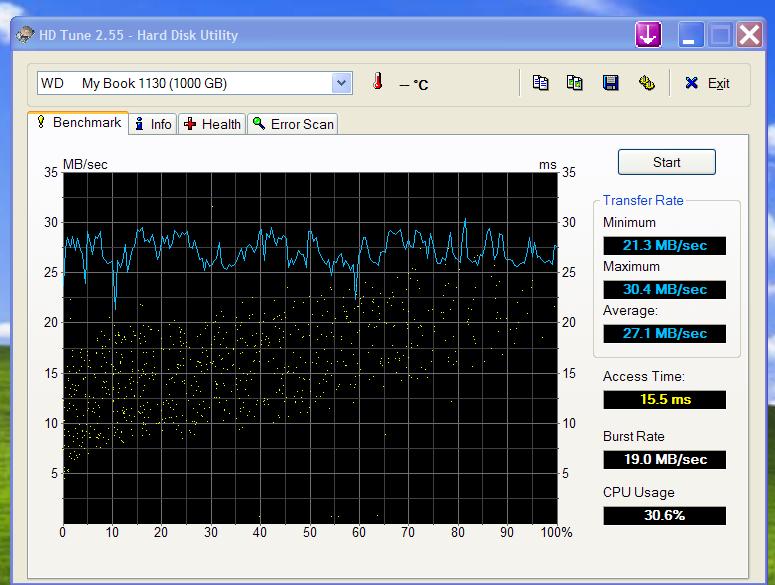
Here's an hdtune test of it. Not that impressive, but oh well.
You guys said RAID-1 ain`t for gaming. Well, how is that? since read times practically are cut in half, so load times are way lower than on standard hdd`s...
RAID-0 is awesome for installing games and such, but apparently makes a big mess of things after some installs/reinstalls...Attached Files:
-
-
Still single drive is the best.
First because you dont really need ssd comparable speeds for gaming beside shorter loading times.
Second, one hdd in ntfs is better handled by the os where the whole surface has the same reading speed regardless if its fragmented or not.
Third, a matter of space. As an example you can use a faster drive for windows , like 7200.4 rpm or 7400 and use a larger one for games.
In my setup im using my os on the default 320gb 7200.4rpm, while my games/emulators sits on the second bay hdd,which is a WD caviar blue 500gb 7200.4 but with 32mb of cache,which is damn fast for my gaming needs.
I think the whole raid 0/1 is bs on a laptop if you plan to game on it.
I advice to use such configurations for work enviroments,where data crunching is essential.
Also dont forget that you can go ssd in the future or even better get an hybrid drive like momentus, if speed is what you need. -
Hmm. I'm still thinking.
However, why wouldn`t gaming benefit from a RAID 1 setup? I mean, it`s all about loading stuff from hdds, and the faster, the better, not to mention the safety issue, right?
I dunno, I think I might set up a RAID 1 array tomorrow...just for the heck of it and see how it works. -
Well, it was working OK but after a re-boot it failed to recognise again. You're right, I will ditch it for a refund; it was only a 'convenient' second AC adapter anyway.
Cheers, Andy -
Can I get some comments or experiences of using an external TV screen with the beast and 9800M GTX graphics, please? If I use a DVI-to-HDMI adapter and send the picture to, say, a 32" HDTV, will I get good resolution, i.e. as good as a non-HD broadcast picture, or better?
Cheers, Andy -
So, just to be clear, which one's right?
1. Booting-up without AC sets-up the machine EXACTLY the same as with AC, except the BIOS doesn't up-speed the fans. The CPU and GPU are both overclocked, but the only difference is the fan speed?
2. Booting-up without AC prevents the BIOS overclocking the CPU, but Throttlestop's (TS) multiplier is still set to x19 (200Mhz*19=3.8Ghz). The CPU runs only at its standard 2.8Ghz, so TS has no effect and the GPU remains overclocked as before. So the effect of AC (or no AC) is on the CPU and fans only, not the GPU?
3. None of the above?
Cheers, Andy
Dell XPS M1730 Owner's Lounge, *Part 3*
Discussion in 'Dell XPS and Studio XPS' started by BatBoy, Oct 6, 2009.