Problems? See this thread at archive.org.
Well it could be the CPU too, even if I have it at 2.6Ghz I still have 6MB L2 cache along with more CPU instruction sets.
-
It can't be that MUCH of a difference..
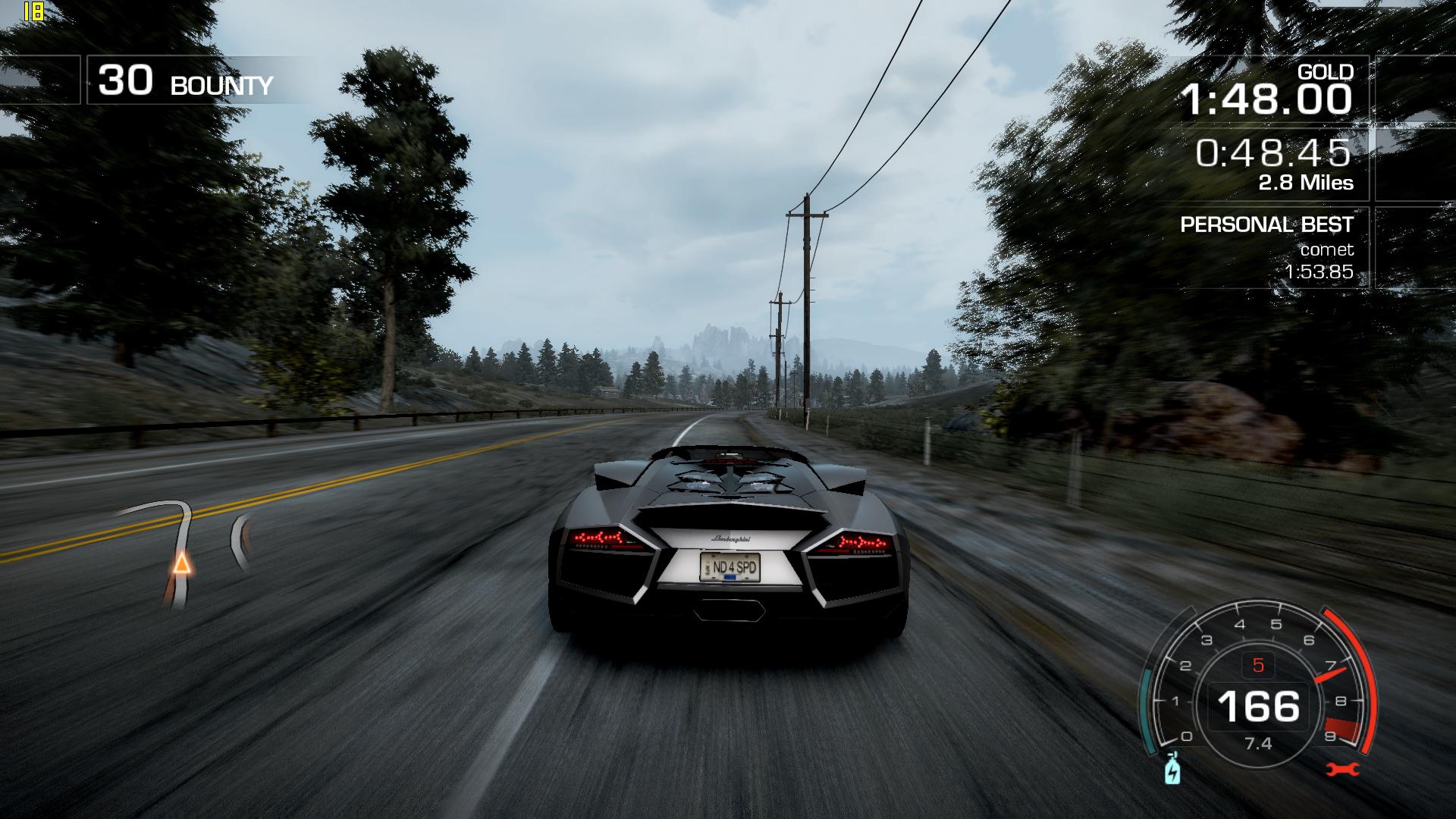
Take for example the race with the Lambo Reventon. At some point it drops at 18 fps for a few seconds then jumps at 45-50...
I simply don't get where the big difference comes from...
Not too mention it looks so cartoonish...
Mag, mind taking a few screenshots? for refference, in game, of the lambo reventon where it's being presented and one in a random map?
Something like this (taken in the reventon race) -
Hmm that drops of framerate you have might be the game world loading in new areas.
For me it drops occasionally to 30 fps, but that is only when the game world loads in the new area then it´s right up to 50+ fps again. This only happens for 2 seconds.
However in game when you show the lambo it don´t drop anything for me in framerate. -
Just noticed something weird. Like in the presentation of the car cutscene, first its like 22-23 fps as in the screenshot. If I quit that menu and go back in the presentation its up at 55 fps.
So there something else that kills performance... must be CPU related, from what I can tell... -
I think that mag is right into assuming that its a problem if loading data such as textures.
Now youre on raid 0 right,so hdd speed shouldnt be an issue,unless youre running out of space thus having the game installed on the outher side of the hdd where speed drops to 50mbit.
But it should suffice anyway.
What bothers me is the low l2 cache. 3mb can not be enough compared to our 6mb and this forces the cpu to heavily rely on windows swap file and ram.
Try to increase win swap file to at least 4096mb (4gb) and be sure that windows prefetch/indexing is disabled. -
Youre welcome mate.
Actually i was thinking to make a defenitive thread for tweak and guides for our beast.
Since Mag had this project as well in mind, i would like to join forces to create a guide with oc tools, tweaks and profiles.
We can update it with drivers and stuff like it.
What you think guys?
We can also add a benchmark ladder as well
-
I`m totally up for that, as a tester, that is.
-
I have 20% free space on the games drive, 4096 mb in the swap file, prefetch disabled...still in the screenshot with 18fps, it dips at the same value...
It's almost like I'm experiencing micro-stuttering at times...
Also, I keep disabling powermiser, it shows as being disabled, then after exiting the game it`s back enabled... what the...
LEdit : POWERMISER IS THE CULPRIT !
I've setup a graph with Rivatuner and indeed it does downclock in the exact same places...temps are more than reasonable, 55C, and it downclocks!
Now I need to forcedly disable powermiser cause it`s a killer...
These quadros are killing me! -
Eleron, about your freespace that confirms my theory. 20% free space then the game is located to the outer side of the hdd, thus the slow down.
Thats why i hate raids and prefer a single fast disk. The load time is everywhere the same, thus smooth.
About powermizer, try this: PowerMizer Manager | Some More Bytes
The fact that it enables itself...confirms that it is indeed working.
Also alot of peoples have similar problems as yours, games lag, drop frames and whatsnot. http://forum.notebookreview.com/gam...cards/261929-disable-powermizer-tested-6.html -
I've used that app, rebooted, now for the test...
-
Told you man.
Im not expecting that you trust every single word i say lol, but i know what powermizer does. And its a mess.
Note that me and mag arent subjected to it because our fans are always on thus it overwrites the need of downclock the card when a certain temperature is reached as fans are already spinning.
Iirc powermizer is set to downclock the cards at 70c. -
Ok, so I've done that. Rebooted. Checked the graph, no downclock in that area anymore. STILL IT DIPS AT 19 FPS.
I'm so sick of this driver... -
Cant think of anything else then.
Leave the system as it is but...revert the nfshp profile to the original one and test it again.
You can do it thru inspector,theres a button for it. -
Kinpinzero: Yeah, I'd definitely welcome a dedicated 'tweakers' thread!
Your mini-guide for the processor overclocking worked well but you just KNOW I'd be back with more dumb questions!
I raised the BIOS setting to 3.4Ghz, all OK including fans now at max.
In Throttlestop, I had to go to a 19x multiplier at 1.4 volts (19x199.5Mhz=3970.5Mhz) - seems OK?
Now in CPU Genie as soon as I 'enable CPU management' I get the BSOD and a reboot. However, I can run thevoltage optimisation wizard @ 'brief' setting 3min per voltage level but as it ramps-up from 6x @ 1v to 19x @ 1.2v (why not 1.4?) I'll have to wait over 23hrs to see what voltage it can run at 19x??
I'm probably in the wrong part of the program.......
Would you expect me to be able to 'enable CPU management' at these settings (i.e. 1.4v and 19x set in Throttlestop)??
Cheers, Andy -
If you get bsod at v1.4 then your voltage is too low mate
Remember to hit save and ulk button in ts (it should notice the changes).
If your cpu is an oem probably it can run at 4ghz but i advice not as its unstable.
Drop your multi to 18, you should reach 3,8ghz, then save.
Keep ts open, open cpugenie.
Now test the 18x multi at v1.4 and see if it passess the 3 min test.
If it does, drop a bit the voltage, and so on
Remember that in cpugenie you have to uncheck all the multipliers, check only the one you interested in.
Theres no reason to run a full test for all the multis, you need only to make sure that 3,8ghz is stable.
Probably for 19x multi youll need around 1,475v.
Anything else im here ^^ -
Well i got another tip for ya if cpugenie is a mess.
Google wprime95 and download it.
Set multi and voltage as said, run prime95.
Now select "just stress testing" and select "small fft" torture test.
If it goes above 5-6 cycles youre sorted
-
Ok, so I tried with the powermiser manager. I set it to max performance. The game RAN WORSE than before.
I'm sick of this quadro driver... -
Something isnt right.
Beside the cpu our system is identical (well im not using raid).
I dont understand why your GTX runs like that. It shouldnt.
Switch to some other driver mate, but imho the problem must be somewhere else.
Im using quadros, others as well, and we're not experiencing a single problem. -
Thanks, KPZ for being there!
I really haven't had much success with CPU Genie, but it's probably me. In TS, when you said "Drop your multi to 18, you should reach 3,8ghz, then save', I'm not completely with you.....Surely to get 3.8Ghz, the multiplier MUST be 19 to get from a base 200Mhz (x19) to make 3800Mhz, or 3.8Ghz? How can I get 3.8 at 18?
Anyway, whatever I tried as a test (at either 18x or 19x, 1.4v) I get either a reboot or a BSOD, then a reboot. Sometimes a BSOD which hangs and I have to push the power button to reboot.
BUT, with wprime95 I have run over 8 iterations of the 'small fft' test and it's not crashed! Does this mean I can now go back to TS, lower the voltage in increments and keep testing with wprime95 until I can't get more than 5-6 cycles, then return to the last voltage that gave stable cycles?
Cheers, Andy -
Yes set the voltage to 1.3750 in Throttlestop and run Prime 95. If it is stable the CPU is stable. I run my X9000 at 3.8Ghz 1.3750v all day long and it is stable.
-
Thanks, Magnus, I'll go try it now!
Cheers, Andy -
Installed 266.58q Dell drivers.
Still some minor slowdowns, but drastic improvement overall. Where it dipped at 18 fps before, now it`s over 20 something.
I guess it was the driver after all. -
Ah man, dont mention it, we're here for help
Mag gave you already my answer. CpuGenie can be a biotch sometimes on some configurations, it may or may not work on your pc/os.
Anyway, if prime is stable, then you're sorted. Do exactly has mag said, and as you noticed as well.
Drop the voltage a notch and run prime95. If it doesnt fails then its stable at that voltage.
When an iteration stops then you know that youre not stable anymore.
Every cpu is different so you may need more or less voltage to being stable.
When youre stable, you can try for fun to bring the X9000 to 4ghz. Same thing applies, find the sweet spot with voltages and you're sorted ^^
About the multi for 3,8ghz, i wrote that based on what you said earlier:
TBH It sounded strange but ive been off home since 2 days (just got back) so i didnt had my xps at hand (even when i written the small guides, all memory there).
Then i thought i was remembering something incorrectly and your was the right assumption, thats why i said to drop the multi.
But, on second thought, i think you had a typo there: 19*199.5 is 3790.5mhz, in otherwords, 3,8ghz. Just switched the numbers
-
But you're still above 20fps which is not normal imho mate.
-
I know, so I guess that`s the best the CPU can to in these circumstances, sincer the Crysis benchmark showed an average of 39...
-
Well NFSHP doesnt like 2 cores, thats a straight port from xbox360 version, which uses 2 cores for physics and calculations plus 1 for sound framework (like BC2).
I guess we're fine because we're running our cpus at very high clock, but dont forget that the game forces to use it at 99% in some cases. Thats explain.
However your Crysis bench is fine, because crysis is not a cpu hog, more a gpu hog actually.
Any driver above 265.90q brings down the performance a bit, like official 266.58 verde. -
Thanks, and yes, it seems CPUGenie isn't at home on my machine - guess I won't be buying it then!
At 3.8Ghz, I have stability (over 9 cycles on prime95) at 1.35v; lower and it crashes. I'll try the 4Ghz and see what voltage I need for stability. Uhh, is there any risk of damage to the CPU at these frequencies or voltage levels, or is it a safe process to push it till it crashes?
Cheers, Andy -
Well, I`ll have to benchmark again and see if there`s any difference...
-
Nah its safe. The crash/bsod actually its a way for the mobo/cpu to halt the whole system to prevent further damage, like when it overheats, it shuts down.
If voltages arent crazy, theres no damage happening (and it cant be, the max voltage you can push on our xps is 1,5).
Theres a phenomenon called elctromigration, which caused many past cpus to "die" due to higher clocks/voltages ( Electromigration - Wikipedia, the free encyclopedia) but it seems that doesnt affect newer cpus so much. Our Penryin is relatively new, but its not that old, thats for sure.
Glad anyway that we helped mate Now on the GPU...and then we want to see benchmarks!
-
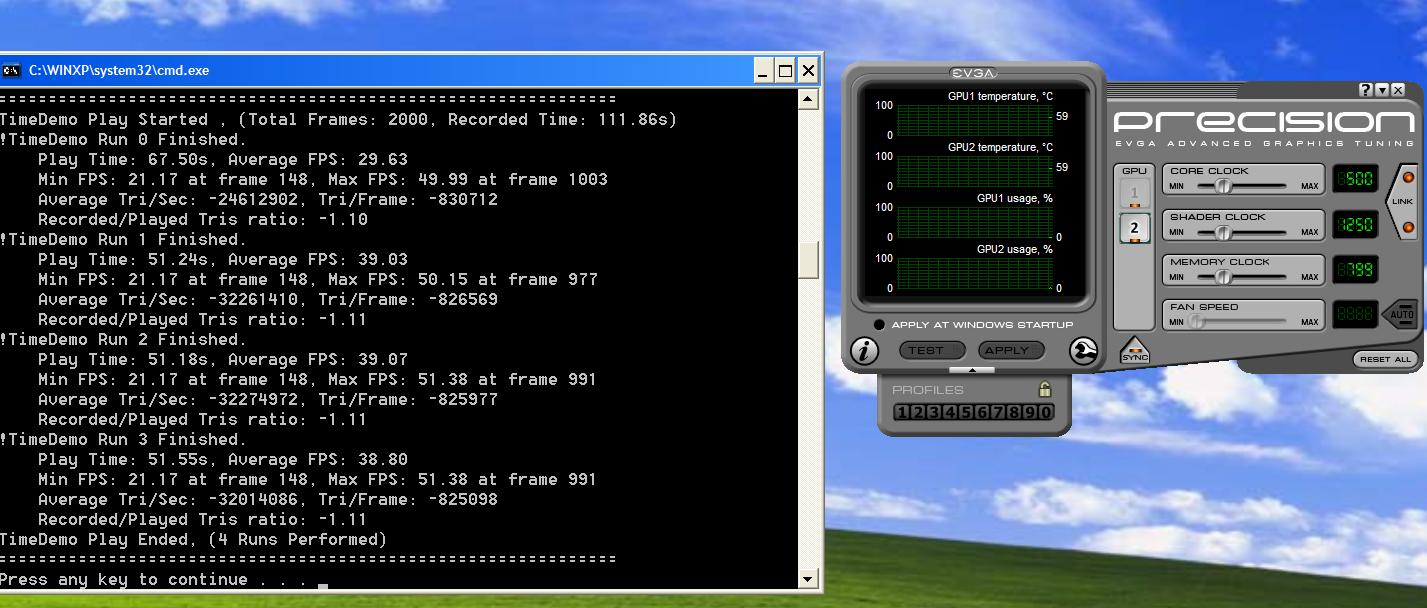
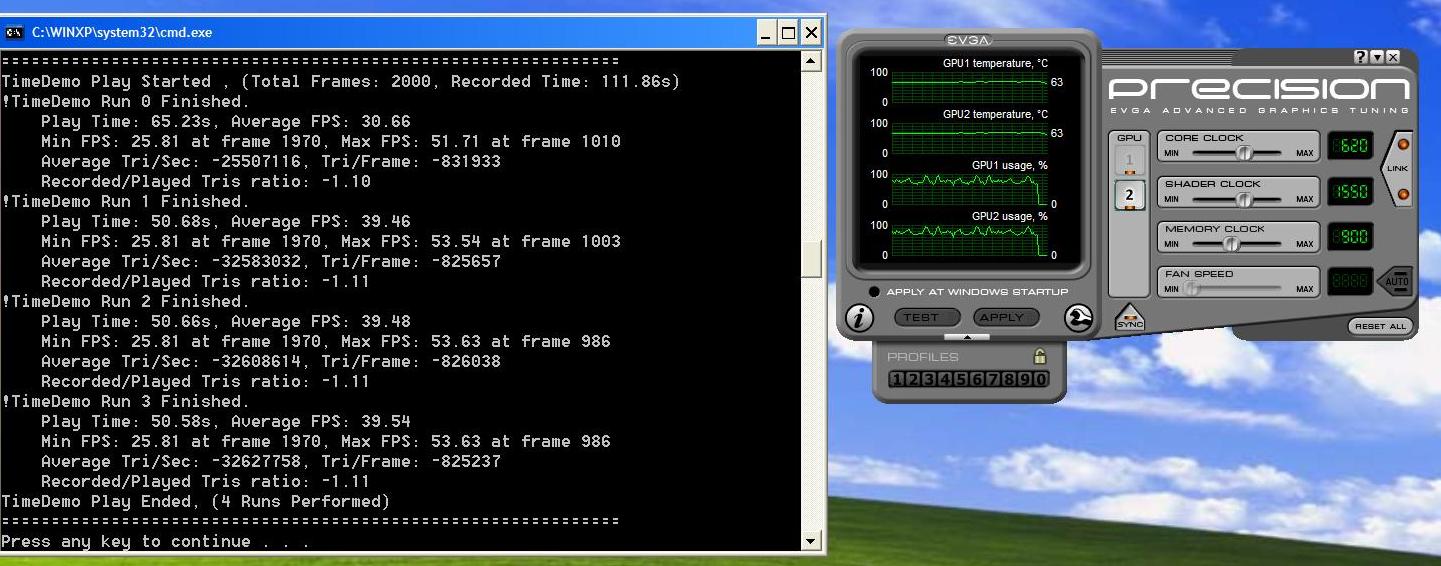
And surprisingly enough, here are the results.
Standard clocks, 500/1250/799, and OCed at 620/1550/900.
I guess my 2.6Cpu is a real bottleneck for these cards...
Noticed another weird thing. With Mag's config, ingame Crysis has a weird sound , like a sort of background buzz. Only in standard Crysis, C:Warhead has no issue like that...
Attached Files:
-
-
Scores are fine man.
Even with an x9000 @ 3,8 you will not get so much higher than that, just check our benchs. We're hovering around 42-43fps with 50/52fps max. -
Yeah, but the thing is my OC does almost nothing, appart from raising the min fps.
Also, with Mag's config I have a weird ghosting effect of the weapon...do you guys have it also ? -
eleron, I've been following this thread and it's pretty interesting. Since no other XPS owners are chiming in with comments, I am wondering if these issues are unique to your system. I played many hours of Crysis on the XPS M1730 I used to own and never experienced that buzzing sound you're having.
My old XPS system had 8800M GTX SLi with the T9500, 2.6, 6MB Penryn CPU.
Is anybody else other there experiencing these quirks? -
It was only in the menu, it disappeared as soon as I loaded a map. Odd indeed.
-
I can confirm what Fox said, didnt had any issues similar to Eleron.
Ive started to think about it when NFSHP related problem arised, but then i thought it cant be possible, systems are the same.
Now im wondering if really theres something different in your system.
So no, no ghostings or sound problem with Mag autoexec. -
Wow.
I have not tweaked the game in any other way, nor have I installed any performance booster or sorts.
This is mind blowing, i tell you...
Which chipset are you guys using and what's the Intel Chipset version for the xps ? for future refference, that is...Attached Files:
-
-
Good to know - thanks.
I seem to have stability at 4Ghz and 1.3875v. Do you think I should leave it at these settings or settle for 3.8Ghz and lower voltage? I think you're saying that 'stability is stability' and to stick with the highest stable settings I can get.
Also, for the record my crashes / failures all seem to come from setting the voltage too low in Throttlestop. If TS accepts it then prime95 will always stress-test it OK. I have yet to see a failure from prime95! I'm saying this becuase it's quite possible I'm doing something wrong (or maybe it's my cynical brain disbelieving a standard 2.8Ghz processor is running happily at 4Ghz and minimum voltage.......)
Also, when I look at HWinfo32's 'system summary' while the stress test is running I'm seeing voltages swinging between 1.35v and 1.4625v (remember I set TS at 1.3875v), and the multiplier 'ratio' shows 17, not 20. Can I assume that HWinfo32 is only seeing the overclocking from the BIOS settings, (i.e. 200Mhz*17 = 3.4Ghz), and the Throttlestop 'boost' isn't shown?
Just trying to validate what I'm getting here.
When my GPU gets delivered I'll be 'back atcha' for more assistance, no doubt!
Cheers, Andy -
Hmm that ghosting issue I have to look into that and see if I can remove it. I don´t have so much ghosting at all actually. But as I said I will try that config and see if I have any ghosting issue, I have numerous configs for Crysis.
However I think it has to do with Ambient Occlusion. -
Can anybody help me? I have an older M1730 with the 8700m GT SLI, and for a few months whenever i try to load a video that runs in flash, such as youtube or or ustream or something to that effect, the driver crashes and 99.9% of the time doesn't recover and I'm forced to restart. This has happened with the 3 most recent drivers on the Nvidia website. Could anyone shed some light on the subject?
-
@eleron
I just tried and didn´t see any ghosting. Do you see ghosting even in daylight?
Man I love these 9800m GT´s, they run so much more cooler than my 8800m GTX did. I mean games maxes out at 65 degrees celsius
-
Man im in hurry,coz im going to work (6am here lol).
All correct...about the "auto downlock/downvolt"...simply go to bios, under cpu settings and disable EIST (enhanced intel speedstep) then disable it in TS.
Report back!
Ps: 3,8ghz is what u need.Keep 4ghz only for benchmarks
-
Yep, I have that ghosting effect just about anywhere, but it`s less visible in daylight.
Mine maxes out at 72C standard clocks, and 73C with OC in Crysis, and below 70 in other games
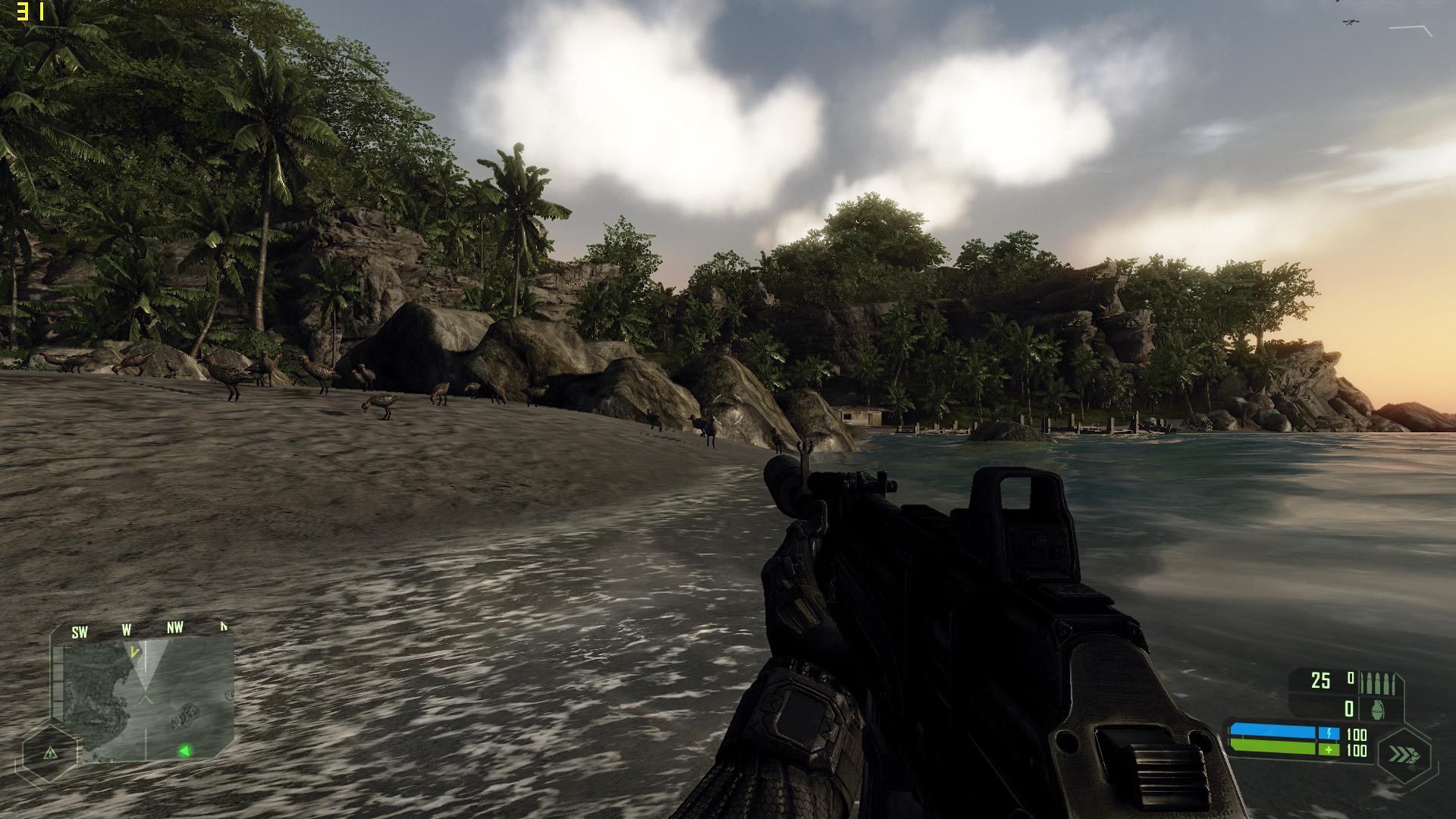
I`m not going to do a full system reinstall, it`s pointless, but I`m still waiting for you guys to start that topic about tweaking the beast. I`m pretty sure I`m doing some things differently than you. I mean, take the screenshot, it looks ... well, not so good. In NFS also.
I guess we're all interested in a full how-to tweak for performance and quality...Attached Files:
-
-
Hmmm, after disabling speedstep in BIOS and TS I can't get stability at 3.8Ghz and 1.45v!! The second processor core is failing. God I hope I haven't cooked it!
But now I think I'm understanding the situation. Before, with speedstep enabled, my 'super score' of 4Ghz and 1.3875v couldn't be true, because the speedstep would throttle the frequency and/or voltage (?) below my limits. So what's next, keep upping the voltage without speedstep and try to get stability at way over 1.4 volts?
Do you think my CPU has a problem on its second core now?
Cheers, Andy -
I had that too. I fixed it by going to an older nvidia driver: 176.78. Someone a few posts back (from memory) said it was the older 8XXX cards having problems with newer graphics drivers, or maybe a clash with Windows 7. Anyway, try an older driver and it'll probably be fixed.
Cheers, Andy -
Edit: double post.
-
Well your thoughts are correct.
Eist makes oc unstable since the dawn of time (desktop cpus remember..) so disabling it its a priority.
Based on your findings im guessing that you need at least v1,4750 for 4ghz on your oem cpu.
But remember what we adviced before: stability first.
Keep your cpu at 3,8ghz and fiddle with the voltages to find the stabilty.
Then move to 4ghz.
Keep in mind that 4ghz are theorical as not all the cpus can reach that speed without excessive voltage. Mine doesnt, Magnus can, as an example.
So my advice is this: keep 19x multi with 1.4v and run prime.
If its stable drop to 1,38v and try again.
Just forget 4ghz for now and focus over 3,8 stable: if you need more than 1,4 dont worry as long as you dont hit 1,5. Im keeping mine stable at 1,475 and its rocking good
Let me know hows doing.
Ps: the stability tests you made werent stable at all due to throttling probably. -
Btw its not possible that your 2nd core is dead, for various reasons.
First you would be able to see one core only, second most likely the system will not boot.
Btw thats explains why cpugenie kept bsoding..actually the program was trying to stress test those voltages while disabling eist.
This is what i understand from the tech docs. -
Damn I couldn´t resist. I just tried the Crysis 2 beta just to labour with settings and making an SLI profile for it was a pain in the butt. However I now have an SLI profile for it and I just copied tried my autoexec.cfg file and it seems to work. 1920x1200 and fps from 35-40+ fps not too bad.
I will definitely buy the game when it hits stores. For me a Beta is just a beta not a complete game in anyway. -
Ive preordered now, but ive told to myself to hold back on the beta.
Actually the beta runs only in DX9, it misses both DX10/11 render path and even in DX9 the HIGH setting is quite...STUNNING.
The game is marvelous based on what ive been reading so far....so i preordered now.
Supposedly it should run like Warhead which is more optimized than crysis one, so imexpecting a good framerate. -
Thanks, Kingpin; again, good to have the benefit of your considerable knowledge and experience. It's normal to think as a 'Newbie' that the experts don't have time for us but here I'm getting all the answers I need and a few more I didn't realise I needed!
So right now its passing the stress test at 3.8Ghz and 1.475v (same as your figures - what a relief!) which brings me to the next daft question: will using the machine for other things while stress-testing the CPU cause it to fail BECAUSE it's already flat-out on the test, or are we just checking the ceiling limits for frequency (multi) at the lowest voltage obtainable? In other words, are we really WORKING the CPU with the prime95 test, or just finding its voltage limit at high multiples? Hope you see what I'm getting at. Maybe I can get a lower voltage to be stable at 3.8Ghz if I leave the machine only doing the test, instead of surfing the net at the same time.....
Secondly, now I disabled EIST in BIOS, maybe I can re-try cpugenie.....
Still waiting for my graphics card, but this time is well-spent tweaking and learning about the CPU's capabilities.
Cheers, Andy
Dell XPS M1730 Owner's Lounge, *Part 3*
Discussion in 'Dell XPS and Studio XPS' started by BatBoy, Oct 6, 2009.