Problems? See this thread at archive.org.
GTA4 is pretty demanding... I'm not sure about the shadows but found this:
Shadows lag my PC... Any fix? [GTA IV] - Steam Users' Forums
seems everyone who plays GTA4 hits a massive decrease in performance with shadows on (possibly with the latest GTA4 patch making performance worse...)
realistically it IS a demanding game, even for one that's a few years old now - and looking at some of the videos you posted the higher details ones are running at 900p whereas the 1080p version vid wasn't on high... that last video "1080p with high" had a flickering shadow issue which may have been in a previous version of the game with "better" performance
run a 3dmark06 - with your overclock you should be past 14000marks without issue, if that's the case then I seriously doubt there's any driver/hardware issue and it's most likely the game itself... remember, users uploading youtube videos prob just want to "show off" their laptop so you're only seeing what they want you to see
additionally, not sure but when you install the latest nvidia drivers do you click "custom install" then tick the box that says "perform clean install"? that removes traces of previous drivers that may cause issues before installing new ones
-
-
Allright, I just did a 3DMark06 benchmark and I scored 13804.
And when I installed the new BETA driver I indeed did the perform clean install thing but not the custom install.
I use the default Nvidia settings except I chose "High performance" in the power mode setting. (The normal power mode setting of my laptop as the one in the Nvidia configuration screen are on "High performance" -
aye that 3dmark is about what you should get tbh, am getting the same with my slightly lower overclock on the 555m but I do have the 2820QM - you've done everything right, power's on high performance as it should be, drivers are cleanly installed (and I'm using the same ones you are... just so I can "get the most" out of the bf3 beta tomorrow) etc so it's likely just GTA4 itself dude - don't worry too much :-S
-
I see, well thanks alot for helping me.

Guess I have to play without shadows on which doesn't bother me that much but I always want to get the best out of my laptop. ^^ -
I tried overclock my GT 555M, but the 3dmark06 benchmark not changed... Why I see Core clock and Memory clock 0 MHz? Why I have this problem?
Further I tried to play to Battlefield: Bad Company 2 (right click and NVIDIA GPU GT555M), but don't works with my GT555, it works with integrated card Intel graphic HD 3000.
Playing with Mafia 2, resolution 1280x720 and very low setting, I've seen 20-22 FPS with Fraps, how this is possible? I don't understand!! -
When i found vbios gt 555m ? I will tray do change voltage , but I can't find this file :/
-
Not sure what's going on there, it reports you GPU memory as 32 MB also.
It appears that 3DMark06 isn't recognizing your card correctly either.
Did this card/computer ever work correctly?
Do you have all the correct drivers installed? Not just the nVidia drivers but chipset and other drivers also.
. -
My Santech X65 (same Clevo W150HRx) has Optimus tecnology by Nvidia... When I done benchmark, I seen orange led that means Nvidia GT 555M works. If this led is green means Nvidia GPU don't work...
Actually I installed all driver here or here.
Also I see "GFX: Intel(R) HD graphics family" in System 3dmark06 section... -
does anybody know how much the GT555 on lenovo y570 can be oc ?
-
You'll probably get a better answer from the Lenovo forum.
. -
Maybe someone in the Clevo forum can help you.
In my opinion either your GPU has failed or you have the wrong drivers installed.
. -
Orange LED means all is good, green means all is bad? That sounds bass-ackwards to me...sounds and looks to me like the benchmark was running off the Intel graphics, as 3k is about right for the Intel.
-
Have played the BF3 Beta today with the GT 555M overclocked with Corce Clock 770 MHz, Shader Clock 1540 Mhz, Memory Clock 1000 MHz and the overall performance is ok. If you run the game on the auto-setup mode or everything on medium then you will do fine with 30-40 FPS. Going to high or ultra may only get you 20-25 FPS. Not sure if these are the correct amounts but that's what I got so far by testing and playing the game.
-
This results for 720p , 900p or 1080p ? -
Sorry for not providing that, the result is on 1080p. (1920x1080)
Altough I lowered the resolution later on which gave me more FPS and made me able to higher up the settings and still get some decent FPS, I still have to mess around with the settings though and I will post what suits me the best. (Best graphics and performance.)
Lowering the resolution can give you more FPS if you really want some smooth gameplay. You can play it on a high resolution though but you will have to turn down your overall settings so it will be at a playable FPS. You may want to mess around with the settings to see what give's you the best graphics and performance. -
Hi guys,
I was recently following this thread and decided to overclock my 445m. the 3Dmark11 results quite surprised me.
NVIDIA GeForce GT 445M video card benchmark result - Intel Core i7 Mobile,Dell Inc. 0T105W score: P1759 3DMarks -
Is everyone able to overclock very high with the new beta driver for BF3? Im scared to try any clock over 675/950 for my 550m because at like 700 the driver will crash on me when I launch anything that uses the graphic card.
-
I have the Verde 280.26 Driver for GT555M, and a 3D Screen. I can only manage at around 10200 3DMarks06.
Resolution 1280x1024 -
I played now 2 hours bf3 without OC with 1366x XX and everything at low
i have around 40 - 60 FPs and it plays very fine.
BUT: the gpu has around 76 C and the max recorded is 86 C ( WITHOUT OC)
is that bad?
why is my GPU so hot?
is that dangerous 4 my 555m gt? -
I noticed that with beta driver 285.38 GPU generates more heat while gaming (2-4c degrees) than with 280.26 version.
As an example maximum temperature I had with 280.26 playing GTA-IV was 68-69c, while 285.38 driver kicked GPU temps to 72-73c. -
I'll try and test this when I get a chance - i'm on the current beta drivers also, so it will be interesting to see the results.
Can I ask what settings you were running GTA IV, if your card was o/c and if so what clock speeds? I'll try to replicate
Also - going a bit off topic I know but letmeknov I should give you rep just for your profile picture
-
also noticed there's more heat - wasn't burning or anything but still...
additionally, I don't have a fps counter, is there one built into bf3? I basically just adjusted things until they looked "smooth" without any fps dips(so I'm guessing 40fps+) and ended up with a resolution of 1366x768, fsaa off, post fsaa on high - textures on ultra and everything else on high
also noticed it auto-detected me to 1080p on medium, which ran "fine" I guess, but would rather have higher settings :-S
has anyone actually tested fps difference between the normal and beta drivers on bf3? cheers -
Ok, so first of all I turned off HDR/Bloom effects, because I do not like how they are made in GTA and moreover turning it off gives some extra fps. Still figureing out what graphic setting are best to have smooth gameplay with good graphics. But lets see some of...
These settings gives very good quality and quite decent frames (25-40) if GPU is overclocked (Core Clock: 770 MHz, Shader Clock: 1540 MHz, Clock: 1000 MHz) :
Video Mode: 1920x1080 (120 Hz)
Texture Quality: High
Reflection Resolution: High
Water Quality: High
Shadow Quality: High
Night Shadows: Off (Night shadows are awesome, but too 'heavy' for gt555m)
Texture Filter Quality: Anisotropic x16
View Distance: 70
Detail Distance: 70
Vehicle Density: 70
Definition: On
VSync: Off
Disappoints that in different cases fps drops immediately to low 15-18, for example when the weather changes or at some various areas. I love to play when it's night outside, cos the fps shows it's best. Hope it helps!
Haha, thanks mate. Ling-Ling for the win!
-
there was some dust in my fan.
i cleaned it and now i have at furmakt burn test 1080 8x AA without oc 66 C
and when i oc @ 760 1520 960 the temps are not getting over 71 C
*puh
does that mean i can now play with OC? without troubels of crashing my gpu?
cause i played without oc @ ~80 C the last days without any troubles -
Ok a small update from 3D Enabled XPS 17:
When 3D is turned on I am getting 10232 3DMarks
When 3D is turned off I am getting 11870 3DMarks
That's a huge difference. Anyone know why this is so? Both are ran at 1280x1024 resolution but I didn't see the emitter getting enabled or any 3D effect on screen... Just the option of stereoscopic vision was turned ON. And such a big difference. -
If you want a fps counter download fraps can be used in any game. Can also record with it to.
-
Today I had my L702X repasted with MX-4 and the fan mesh removed (courtesy of Dell engineer, who came to replace my mobo). I tested the temperatures before and after by running GTA IV with clocks set to 770/1540. Maximum temperature went down from 76 deg. Celsius to only 69. Too bad I uninstalled Crysis 2, which used to bring the temperature up to 81 degrees.
-
Hi Guys, i am after some advise and info please...
I am quite computer savvy or so i thought until getting my new laptop, and after running Crysis 2 on ultra high i was baffled why Crysis 1 couldn't achieve the same. I have never been a OC person but after doing some heavy duty sniffing around on the net i am still none the wiser if i am going to gain from OC my GPU and if its worth voiding my warranty as there are so many newbies giving tosh advice to people like my self. You guys seem to know what you are doing and by the sounds of it are getting the good results so can you advise me on if its worth it just to get my games to run that little bit better although i would love to see just what the card is capable of.
& how to go about it safely.
I have run 3DMark 06 on my machine (stock) with the pre-installed driver
and then with the new 285.38-notebook-win7-winvista-64bit-international-beta driver as 3D mark advised that i should upgrade my graphics driver and i did get a much better score just from doing so.
I have screen prints of both results and would happily email them to you guys for advice of the results etc...
I have also downloaded MSi afterburn and kombuster but am worried on doing damage by following the advice of these people who clearly don't have much experience in OC. -
while i think on my spec is:
Dell XPS 17 - I7-2720QM 2ND GEN - HD+ WED True-Life 1600 x 900 - 3GB GT 555M - 8GB DDR3 -1TB, 2X 500GB 7200 DUAL HDD - BACKLIT KEYBOARD - WINDOWS 7 ULTIMATE -
a.) use MSI afterburner application... or just nvidia performance tools which enables overclocking straight from the nvidia control pannel
b.) overclocking always carries an element of risk, if one person can run a card at a specific speed then, as a rule of thumb another person should also be able to run around that speed - but this isn't always the case. Nowadays overclocking doesn't carry as much risk as it did in the past as cards generally have failsafe mechanisms built into the software/hardware which will monitor temps/voltage spikes and revert back/clock down automatically if needed
c.) a good starting point for the gt555m is taking the core graphics clock to 750 and the memory clock to 950... I don't use MSI afterburner so don't know if you can independently change the processor clock as it's locked to the core on nvidia performance tools, at those values it'd be 1500
then run a graphically intensive game for a couple of hours such as metro 2033/Crysis/Crysis2... if the game crashes/has artifacts on screen/the frame rate drops violently (due to the card overheating and clocking itself down) then bring the values down and try again, but at those clock speeds you should be OK, am running at slightly higher speeds without any cooling and could potentially push it higher but just have no need to.
with my overclock I haven't really noticed much of a heat increase but there have been reports that the new beta nvidia drivers (released for BF3 beta) have raised temps somewhat... this could limit your overclocking ability.
Additionally, my logic may be flawed but as you have an optimus system your nvidia card isn't being used all of the time like in the 3D l702x systems, this could also potentially increase the life of your overclocked card as it's not constantly being used.
your 3dmark11 score should also go from about p13XX to p17XX with that overclock (providing you're using new drivers)
hope that helps somewhat -
Thanks Jon, that's the information i was after, How long have you had your computer if you don't mind me asking and have you noticed and problems since you OC?
-
no worries!
Have had the l702x since march, overclocked it the day I bought it and I've noticed no issues with the overclock I'm using... still, always a risk that a new driver/graphically intensive game could make the overclock unstable but there have been posts in this thread of people running at 800 gfx core/1000 mem without any additional cooling and it being OK. I'm not quite brave enough to push it that high
All in all the gt555m is really overclockable and I'm pretty impressed that it can just about rival gtx460m (stock clock) performance once overclocked
-
@paulc83
Jon vMagic speaks the truth.
You should read this thread from the beginning (if you haven't already) and seek other info and make sure OC'ing is for you. As you can see a lot of us have had some pretty impressive results by OC'ing our 555M cards.
If you choose that OC'ing is for you, start slow and work your way up, making sure to monitor temps, performance and stability within your comfort level and under your conditions.
. -
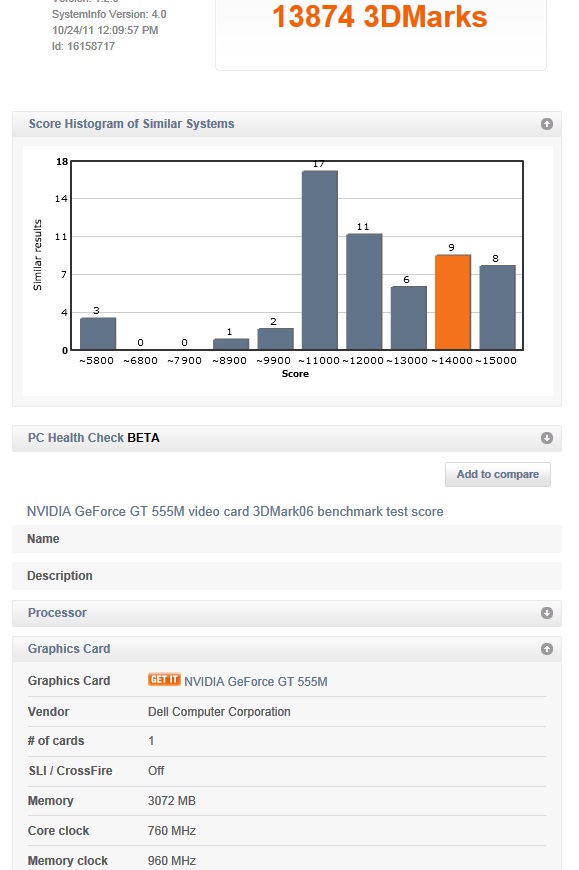
new nvidia driver + standard overclock = 13874 in 3dmark06
Attached Files:
-
-
Jon can you post a link to the latest driver please? Good result there.
-
Here it is, pal.
You can always grab the latest graphics driver at
www.nvidia.com
-
Good man, thanks
-
Just installed new drivers 285.62 and my fan is going nuts! Anyone with the same problem??
-
@up: no problem at all
285.62 (3dm11)
stock: 1433
770/1540/1080: 1829
Almost 30% better score And while I haven't got any artifacts I can consider this clocks as stable. GT555m is pretty much amazing.
-
Glad to here! I havent downloaded the driver yet but i now think i will
Heres the exact link http://uk.geforce.com/drivers/results/39092 -
Hi guys, am new to OCing so please bear with me. Basically I want to try and get BF3 running on my laptop. Went on a lot of other threads and people have told me that I won't be able to run it on the GT555m. After stumbling across this thread though I am optimistic.
Obviously my current processor isn't going to hack it but I've found a 2720qm on ebay for £109.99 and will order it today.
I have downloaded afterburner and the new verde driver and have changed the clock speeds to 750mhz core / 950mhz mem and ran World in Conflict on 720p with everything on medium for about an hour and averaged over 30fps.
I can post my 3D mark scores later on. Do you guys think my changing the processor will give me enough power to run BF3 on at least 720p with everything on high?
PS I know I don't have a dell but your thread seems the mose useful I've found. -
who's told you this laptop won't run it?
am getting 45fps-ish at 1600*900 with most things on high
see : http://forum.notebookreview.com/dell-xps-studio-xps/620649-l702x-bf3.html
yeah my gt555m is overclocked but even without being overclocked I'm sure this would run the game on "high" at 720p without issue -
Exactly, dont listen to anyone that says this card cant play it as they simply dont have a clue to what their talking about.
-
Also I dont think he needs to upgrade his processor right? The game relies heavily on the graphic card. I think a laptop i5 can handle it with a 555m.
-
Yup, looking at some benchmarks it doesn't seem to matter (in the single player at least) if you're using an i7 2600k or an i3 (!) you'll be bottlenecked by the GPU
so yes, the i5 should be completely fine -
I have a 550m and it doesnt over clock as well. Someone claimed they OC'ed their 550m core to 760. I cannot get my clock past 675 without it crashing.
It is not over heating because my temp never went over 64C.
Did I end up with an unlucky one or can someone else with a 550m confirm it cannot OC that high? Im assuming it has something to do with voltage.
Also memory seems to do nothing other than maybe increase heat. -
running my 555 at 760 at the mo so I'd be surprised if the 550 could get that high :-O
memory overclock definitely gives less of a noticeable improvement and does increase heat somewhat -
Cheers guys for the advice. I've ordered the i7 anyway.
-
Thanks to everyone for their advice and contributions within this thread. I have OC my 555m and am now able to game at 1080p whereas before it wasn't really possible.
Great thread great site and some really nice helpful people on here. -
glad it's working for you... would personally suggest playing at 1600*900 for a smoother experience and the ability to turn some settings up, but if you're happy at 1080p that's awesome
Overclocking the GT 555M card.:-)
Discussion in 'Dell XPS and Studio XPS' started by kroenen04, Mar 30, 2011.