Problems? See this thread at archive.org.
installed BF: bad company 2 to "get ready" for BF3... with overclock it runs about the 50+ FPS mark on 720p with 8xCSAA (runs better than 4xMSAA), 8xAF, DX11 mode, everything on high except HBAO off (performance hit for minimal quality difference) and VSYNC off (not worth it unless I can keep a solid 60fps)
on "medium" overall graphics settings it can keep 60fps+ on 1600*900... and actually run pretty playable at 1080p (30fps+) but would rather have the resolution sacrifice for prettier images.
from what I've seen of BF3 I'm hoping/honestly think it'll be realistic to get 30fps+ on 720p with a mix of medium and high (not max) settings but i'll have to wait and see.
GT555M does continue to impress me though.
-
-
@LeeTone out of respect for the people that read this thread I think we owe it to them to clean up the mess we created and let this thread get back on track.
I'll make you a deal, go delete all of your posts on this subject, just put the word "Removed" in place of whatever text is there, in return I will do the same to the posts I posted in response to your posts.
Once that is done I will then approach all who responded to either of our posts and request they also remove their posts in the same manner, I'm sure if we do the above they will follow suit. Once that is done I will ask a moderator to come in and delete any post that reads "Removed".
In other words we'll just agree to disagree and move on.
@kroenen04 I apologize for making such a mess of this thread, I will do my best to put it back the way it should be, the above is my first attempt at doing so. It never should have gotten this out of control.
@Meaker I apologize to you for things that were said to you while you defended my position, I feel responsible for that and I'm sorry it took place since you didn't deserve to be treated like that.
@LeeTone I apologize to you for any damage I may have caused to your credibility on this subject, it was never my intention for this to become this out of control. I felt I needed to put a stop to what was being said because I felt it to be bad information, I was going to let it slide until you attacked and insulted Meaker. I still feel you owe him an apology but that's for you to decide.
@Sam_A_1992 I agree with you, we should all be doing our best to understand the pro's and con's of "Hot Rodding our junk BEFORE we do it. I just felt this thread wasn't the "Pro's and Con's" type thread, more of the we've already weighed the pro's and con's and here's our settings and results type thread. I also had a problem with the information being provided and didn't feel it was "Educational" at all.
Maybe there should be a Pro's and Con's of OC'ing thread, I'm sure we could all learn a lot on the subject from those more knowledgeable than us. It might also create an interesting conversation if we can keep it technical in nature and leave out the personal component.
@Everyone Else, let's get back to having fun with our 555M cards!
. -
@Hatchett, i think thats a good idea about making a seperate thread dedicated to the pros and cons of overclocking. I dont feel i know enough to start it but i'll happily contribute later on once its developed. As tbh ive sort of got a bit lost after that last discussion of what the cons are.
-
I'm not sure I know enough to start that thread either.
I'm not sure any of us know all the cons but a few that come to mind would be:
Heat - we need to be careful of heat due to the fact that the faster the frequency the more heat is going to be generated. Heat can and will kill these chips unless we take measures to monitor and control it.
Chip Life - Electronic components have a life cycle also, if we run the chip faster we're going to get to the chips end of life faster. Only nVidia knows the exact specs.
I'm sure there's other cons but those are the biggest ones that come to my mind right now.
The way I look at OC'ing is this: I must accept the consequences of doing it if there are any. I owe it to myself to try to understand what it is I am doing and take precautions if required. I must accept the fact that it's possible that damage can occur and be willing to deal with anything that happens, if I'm not willing to take 100% ownership then I shouldn't be doing it.
. -
Yeah i think those cons are the main biggest ones. Good statement though thats what everyone needs to read before they do any overclocking i think.
-
Where is DX 11 options in BAttlefield 2 form were i can enable it
???? -
You can change the DX version under Documents> BBC2> Settings.INI
-
After reading this thread and some of the OC'ing threads for other nVidia cards on this site I noticed that people mentioned 2 things that got my attention and made me think "how does that affect performance?". One was VSYNC and the other was Triple Buffering.
So I set out to do some testing to answer that question. I decided I should do some baseline tests to compare to. The baseline tests were done with the stock nVida settings for VSYNC and Triple Buffering and the card was overclocked with MSI Afterburner using the following settings:
Core Clock: 760MHz
Shader Clock: 1520 MHz
Memory Clock: 970 MHZ
I was pleasantly surprised after running the baseline tests with a 3DMark06 result topping 15K.
3DMark06:
3DMark11:
Results
3DMark Vantage:
I then turned on VSYNC and Triple Buffering and re-ran the tests, I had originally planned on doing the tests separately but the nVidia control panel said that Trippe Buffering improves performance when VSYNC is also turned on so I turned them both on and combined them into one test.
3DMark06:
3DMark11:
Results
3DMark Vantage:
The only gain was on the 3DVantage test, the 3DMark06 test suffered greatly and it didn't have mech affect the 3DMark11 score.
While digging around in the nVidia setting I noticed another setting called Power Management Mode and decided to see what affect that had on performance. The following tests were done without VSYNC and Triple Buffering. The only change from a stock nVidia config was to change the Power Management Mode from "Adaptive" to "Prefer Maximum Performance".
3DMark06:
3DMark11:
Results
3DMark Vantage:
Once again I was surprised to see another 3DMark06 over 15K . As you can see the Power Management Mode didn't seem to change much. The best results I saw were Stock nVidia settings which at the end of my testing I reset back to stock.
I monitored temps during all testing and the highest temp I saw was 70C, not bad considering all these tests were run back to back with no breaks in between.
. -
Thats usefull thank you hatchett. So basicly there is quite a performance increase with vsync and t buffering off. I use vsync in most of my games with maxed settings and most of the time it stays at 60fps so i dont need to turn off vsync really. That was stock levels aswell no overclocking, these games include:
assasins creed 2 max settings with vsync between 45-55fps
Oblivion, as above with a solid 60fps, goes to about 80fps with vsync off
Hawx 2, as above between 50-60fps
Mw2, as above between 34-60fps mainly about 45-50
Crysis about 19-25fps
Fallout new vegas, 45-50fps
Also all source games like l4d2, tf2, css are all at 60fps.
I have more games but will be here a while if i list them all, but the above games are maxed with no overclocking. -
Nice findings, Hatchett. I wonder how VSYNC and Trippe Buffering affect FPS. As for Power Management Mode, I think that Adaptive mode might make an impact on battery, while Maximum Performance mode would keep the card running at its best regardless of the power source. Another possibility is that Adaptive mode downclocks the card, when it is idle, which might improve battery life and heat issues on 3D/non-Optimus systems.
-
No, even in 'Prefer maximum performance' mode GPU is downclocked when system stays idle or you are doing some easy tasks.
-
Hey guys... at firs: thanks for this great thread in this forum.
Great tips for OC the GT 555.
My question:
Do u think BF3 would run fine with the OC settings from Kroenen 04?
Core Clock 760 ?
Memory Clock 970 ?
With an :
XPS17
I7 2630QM
4 GB Ram
GeForce GT 555M
17,3 Display No 3D -
Definitely yes. But most likely to get it smooth you should lower the graphic settings or resolution.
-
Thats good =) thanks for the quick answer.
If i can play with medium (or some high) graphic setting it would be GREAT!
All of u guys use a external Cooler for the OC Notebook? -
I dont use any external cooler and when oc i dont get more than a few degree increase anyway, stays around 76c which is good.
-
I don't use a cooler either...your best bet for temps would be to re-paste rather than use a cool IMHO.
This card seems to stay pretty cool. -
it will run, remember BF3 is being developed cross-platform with current gen consoles in mind... Providing DICE do a good job optimising the engine then you'll have no trouble surpassing console visuals... Bad Company 2 was never a great PC engine tbh but that still runs without issue. DICE have gone on record as saying "no current gen hardware will be able to run the game at max settings" but I'm guessing (if there's a low/med/high/max type setup) you'll be able to play the game at 720p with 2/4x AA with a mixture of medium and high settings without issue and it'll still look amazing. -
Monitor your temps and then determine if you need extra cooling. We all use our computers differently and have them in different environments. Some of us play games for hours on end, others for 30 minutes at a time.
If you monitor your CPU/GPU temps your computer will tell you what you need to do in regards to cooling.
I do not use extra cooling as my usage doesn't require it.
. -
Hi!
Sorry for my English , but im from Poland , and this language isn't my official.
This is my result for OC GPU :
3D mark 11
p1900
![[IMG]](images/storyImages/przechwytywanienu.png)
GPU temp when i play Crysis 2 is 71-72 C , I never seen higher temp , but i play for 1-2 h.
GPU settings :
Core Clock 825 Mhz
Shader Clock 1650 Mhz
Memory Clock 1080 Mhz
I don't show 3D mark 06 result , because this benchmark doesnt work good for my notebook :/
Edit:
Now on this settings crysis 2 crash :/ Today I haven"t time to check ,how clock setting i must downcloaking . Maybe I must take up GPU voltage , but it is more danger that changed cloack :/ -
VERY nice results.
-
It is very nice result.But i doubt you can play games,long enought with this result.You will get very high temps with this Clock after 30-40 min.My advice is seek more reasonable Clock.Something like 760 core 960-70 memory.With this OC i play Crysis 2 on hardcor setting /1600 : 900 resolution (25-27fps) for 3-4 hours and get max 80 C(with cooler master 3).When OC the memory more then 1000 mhz i get 88-89 for long play.
-
Those clock settings are probably the reason 3DMark06 won't run correctly.
-
I don't tested this settings for 3dMark06 .Then I tested for mark06 my Cpu work on 1.5-1.8 Ghz . I don't know why :/ -
I've been reading this thread a bit, I really like the results of the gt555m card you guys been posting.
Just one thing, most of you are using the xps 17 with the 192bit 555m card.
My new laptop is coming tomorrow and will have the 128bit 555m card,
will there be a difference between your results and mine?
Both these cards have 144 core and have 590Mhz speed on stock. -
I don't know the answer to your question but I'm looking forward to finding out!
-
Toffy, what type of memory will it have - DDR3 or GDDR5? With DDR3 you can expect lower results, but GDDR5 might give you a boost. It would be interesting to see, which configuration is faster - DDR3@192bit vs GDDR5@128bit
-
Will post my 3dmark11 results tomorrow then
It's DDR3 version still. -
still surprises me how many versions of the gt555m there are:
Versions (ordered by performance)
144 cores 709MHz (GF106), 128Bit GDDR5 z.B. MSI GX780
144 cores 590MHz (GF106), 192Bit DDR3 z.B. Dell XPS 17, Alienware M14x
144 cores 590MHz (GF106), 128Bit DDR3 z.B. Schenker XMG A501 / A701 (Clevo W150HRM / W170HN)
96 cores 753MHz (GF108), 128Bit GDDR5 z.B. Lenovo Y570p / Y560p
so assuming you have:
144 cores 590MHz (GF106), 128Bit DDR3 z.B. Schenker XMG A501 / A701 (Clevo W150HRM / W170HN)
it won't be quite as good as the verision we have in the l702x but am expecting it'll be about the same in terms of how overclockable the core/memory is -
Someone know something about the new Nvidia Driver exclusiv for BF3 ?
-
+1 Interested to find out about this.
-
Ive always thought that if some versions of the 555 are stock at 700mhz and up then it should always be safe to overclock to that level if our stock is 509mhz? anyone see my logic? i know its 128bit and has faster memory but would that make a difference in terms of the stock mhz level?
-
The driver has been released and there is a notebook version for it. Can we download this version or wait for Dell?
They are claiming that there will be a 30%+ increase in performance as well... -
Did you mean the beta 285.27 version? I am always using latest drivers provided by nvidia, don't see the point to wait for dell's ones. So feel safe to try it out.
-
I dont know waht they are claiming about that,but i see that:" Your PC's NVIDIA GeForce GT 555M does not meet the game's recommended requirements"And below that pop-up brand new laptop wich should run BF3. Well thats a big HYPE.Well people its time to drop that old laptop in the garbage and buy new more powerfull
-
-
When i search for a new Driver on Nvidia.com i find the
280.26... but no 285.xx for the GT 555M -
That's because you have to search for a beta drivers.
-
Ah ok thank you =)
installed ! =) -
so...the BF3 Beta is out now, have someone try it with the GT555M ?
-
I have a little problem... Why I have this very low score?
I have Santech X65 (same Clevo). I don't understand
![[IMG]](images/storyImages/score3dmark06gt555m.png)
-
Not sure why but your Core clock and Memory clock are 0 MHz, are you trying to overclock your card your card?
It appears you have your clocks set to zero MHz. -
heh - will be fine... have read stories of people playing on a gtx460 (desktop) 1080p with fsaa and a mix of high/ultra with stable fps... people have had this beta maxed out on a 560ti, though there is some confusion about whether or not the "ultra" graphics settings actually work at the moment
at any rate, 720p with 4x aa or 900p with minimal/no fsaa and a mix of medium and high settings will run fine imo - the engine seems really good from what I've read - and you'll still get an experience that surpasses consoles -
Hey,
I'm new here but I followed this topic for a while as I have a Nvidia GT 555M myself but I think I got some problems with it.
My specifications:
Manufacturer:
Dell XPS 17 (L702X) Laptop
Processor:
Intel® Core™ i7-2720QM CPU @ 2.2GHz (8 CPUs) with Intel® Turbo Boost Technology up to 3.3GHz
Memory:
8192MB RAM
Hard Drive:
624 GB
Video Card:
NVIDIA GeForce GT 555M (Overclocked - Core Clock: 770 MHz / Shader Clock: 1540 MHz / Memory Clock 1000 MHz)
Operating System:
Windows 7 Home Premium
It's quite hard for me to explain but I think that my video card can't handle shadows and smoke so good.
I can play GTA IV fine with everything maxed out on 1920x1080 with 40-50 FPS except for the shadows, when I turn shadows on low it will drop to 30 FPS (which is not that good to play with IMO) and when I put it on medium-high it will go to the 10-20 FPS and ultra high give's me 5 FPS.
Also with the smoke, when smoke appears in any game it will instantly drop a lot of FPS like GTA San Andreas which I can play easily with 80-100 FPS but when smoke appears from the car by drifting or any other things it will drop to 20-30 FPS until it disappears.
This might be normal for the video card but the thing is that I watch people playing the same games with the same video card with way better performance and even better settings. Like on GTA IV, I saw someone playing it with maxed out settings including the shadows with about 40-50 FPS while mine will be at an unplayable 5 FPS. And In most cases I even got a better processor and more RAM and my video card is overclocked. (with MSI Afterburner)
I just don't get it so maybe someone can explain me why or how I can fix this if this is not ok.
Sorry for my bad English. -
tried updating drivers?
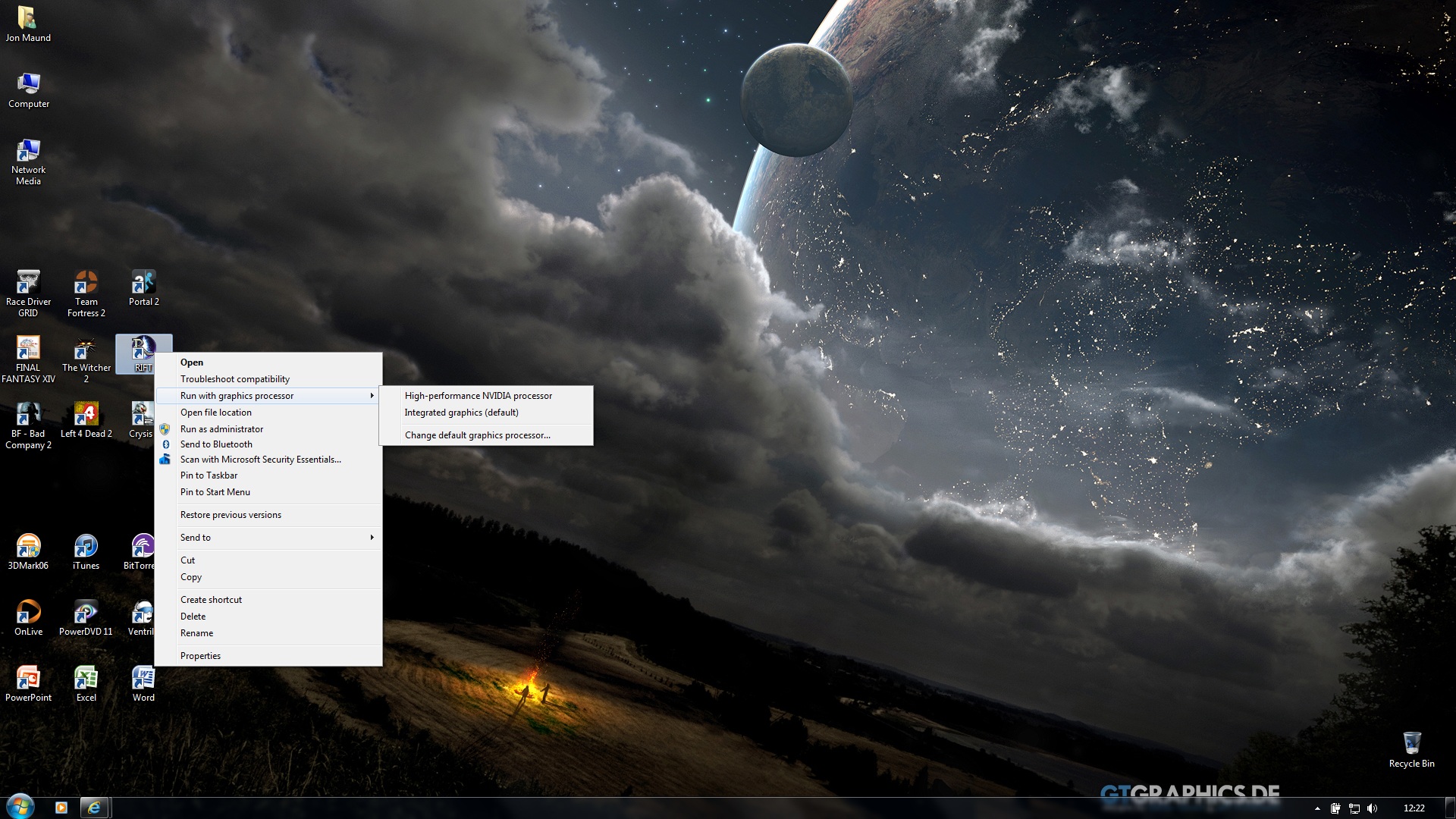
also, try running games by right clicking on the icon and clicking "run with high performance nvidia gfx"
additionally... that seems like a pretty beefy overclock, been stable for you? -
early videos of the BF3 beta have come in... anybody worried about not being able to play it on the l702x should check below. Keep in mind with a mild overclock and new drivers you should be getting around 13k to 14k in 3dmark06 with an l702x and all videos below were likely taken with fraps and, therefor prob had a fps hit of about 10fps
Battlefield 3 Early-Beta Gameplay - Lenovo y560 - YouTube
^^ above video is on a lenovo y560, this features an ATI Radeon HD5730, a card which (without overclocking) only hits a score of about 7000 in 3dmark06, this video shows it running at 30fps+ with all settings on medium and 4x AA at 1366x768
Battlefield 3 Beta Footage on Laptop (Lenovo y570 Thinkpad) - YouTube
^^ above video on a lenovo y570... this features a gt555m (like the l702x) BUT it's the "96 cores 753MHz (GF108), 128Bit GDDR5 z.B. Lenovo Y570p / Y560p" version of the card which is less powerful than the l702x's 144 core version and scores about 8000 on 3dmark06 without overclock. unfortunatly the person who uploaded the video did not post what settings or resolution was being used but said he averaged 45fps without fraps
Battlefield 3 Beta Gameplay @ 1080p w/ GTX 560m - ASUS G74S-XR1 - YouTube
^^ 1080p with a mix of high and ultra settings running on a gtx 560m (no info as to whether it was overclocked), of course it's more powerful than a 555m but, overclocked the gap is significantly smaller (I get 14k on 3dmark06 with the 555m, average gtx560m score is around the 15k mark)... and, realistically dropping to 720p or 900p would improve performance by a fair bit (as would changing hbao to ssao in settings, turning off FSAA etc)
http://www.youtube.com/watch?v=5fg4jenjM34
additional video with the alpha maxed out on ATI Radeon Sapphire HD 5770 1GB GDDR5 (720p) and still getting 45fps+ this card averages around the 15k mark on 3dmark06
can confidently say BF3 will run fine on the l702x -
Yes, I got the latest BETA drivers. I used Dell drivers before but they don't update that much so I decided to use the original Nvidia drivers.
Currently on 285.38.
I don't got that option when I right click an icon.
And yes, everything is running stable so far.
I did benchmarks and heavy gaming (GTA IV, BFBC2, CoD:BO, DiRT3, etc.) since I overclocked it and there are no artifacts or graphical glitches, the temperature is allright too (it stays about 60-75 celcius for me if I am right) -
see attachment for where the "run with graphics processor" should be...
might be able to turn it on/off in the context menu from the Nvidia Control pannel, desktop dropdown, "add run with xxx to context menu"
then again, certain games do have effects which hit graphics performance rather hard - rift, for example has a transparency effect on the portals which, if the camera is right behind it, drops the frame rate significantly... some effects dont like FSAA etcAttached Files:
-
-
Thank you for trying to help me but it seems that I don't got that option when I right click the icon. I got 2 things to turn on/off in the 'desktop' dropdown menu and they are both enabled.
And yes, I surely do know that some effects can cause a (big) framedrop but I still don't know why I have some lack of performance in comparison to other people playing the same game with the same video card. GTA 4 for example, I can play everything maxed out but when it comes to shadows it will be unplayable while someone else with the same videocard has the shadows on high/ultra high and even record that with FRAPS and get playable to good FPS.
Here is an example:
GTA IV auf Dell XPS 17 L702x - YouTube
http://www.youtube.com/watch?v=JmBbiNbh93s
http://www.youtube.com/watch?v=ND28borjGG4
I got a slightly better processor, double the RAM and the same video card but overclocked in most cases.
Settings maxed out (except shadows) on 1920x1080 gives me a solid 40-50 FPS but when I turn shadows on LOW it will be 30 FPS.
I also tried the same resolution as his in the game but it gave the same results when I turned shadows on.
I got GTA IV on the latest patch and run it as administrator so I'm almost sure that the problem is with the video card. -
In the Nvidia control panel make sure that GTA is set to use the 555M and not global preference.
One other thing you can try is changing the VSYNC setting, see if that helps. -
I did both but still the same result. It might be the settings but I am not sure.
Overclocking the GT 555M card.:-)
Discussion in 'Dell XPS and Studio XPS' started by kroenen04, Mar 30, 2011.