Problems? See this thread at archive.org.
"Performance you need. When you need it.
The Dell Studio XPS 16 delivers the ultimate multimedia experience with an optional full 1080p Hi-def widescreen display and optional Blu-ray DiscTM player. It also has a fast 8ms response time for a crisp, clear resolution during fast-action video and gaming. " -Dell.com
While the XPS-16 isn't advertised as a "gaming laptop" it is advertised as a laptop that is capable of gaming. Limiting the 4670 at an arbitrarily low temperature is like limiting the hard drive to a 10GB/day quota.
Supposedly Dell throttles the card at 84C. What happens if that number were instead 80C? Or 75C? Why not 50C? Where do we draw the line?
I'm not really much of a gamer, but if I want to play a modern game for 3 hours in a row once a month, I would like to have the performance I need. When I need it.
-
It seems that Dell is just going to sweep this model under the rug. Dell_Bill hasn't been here in a while and quite honestly his idea to start new threads about throttling is pretty bogus.
Don't they pay people to do this? And even starting threads, it is not like anyone outside of Dell_Bill's world will even consider any evidence on these forums, simply because they aren't on Dell's community forum.
EVERYTHING that can be done on the consumers side of this has been done and there is not hope in sight.
DELL can say goodbye to many of those who were loyal enough to spend this much money on a laptop and will now look into other manufacturers for better results. -
SXPS 1645 is my first high end laptop, i skip lunch and dinner, I even deprived my self from taking a cab, just to save money in order to buy a high end laptop. sigh! i should have done a research first before deciding to purchase this SXPS 1645.
 no more Dell next time for me. but anyway im I'm still hoping the GPU throttle will still be fixed.
-
Anyone have the Zalman NC-2000 laptop cooler? Does it help prevent the GPU from reaching throttling temps?
-
Ok, looks like i have GPU throttling while playing Left 4 Dead (1)...
I have 1645 w/130w AC, A08 BIOS, LED LCD, no cooler yet
With a room temp of about 60F (15.6C)
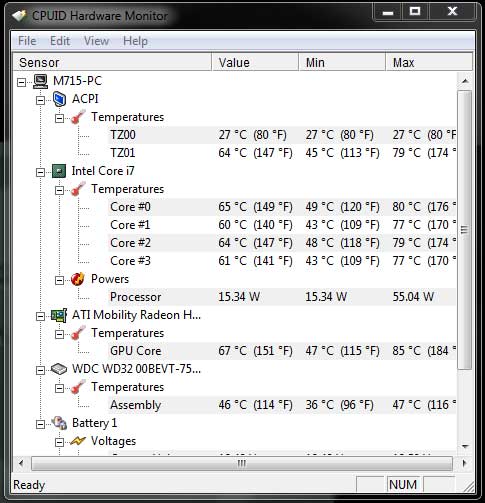
CPU idle 52-55C
GPU idle 52-55C
My concern is with a recent tech visit where I got a 130w AC adapter and they replaced the DVD, so he had to pull the heat sinks and put on new "stuff", the "thermal compound pad"? for the GPU was not large and he had to use 2 My gut feeling is now things heat up faster and higher than before
Unfortunately i don't have much prior data...
Max temps i have seen now: GPU 85C / CPU 80C
When playing Left 4 Dead, the GPU can hit 80+C in less than 5 mins
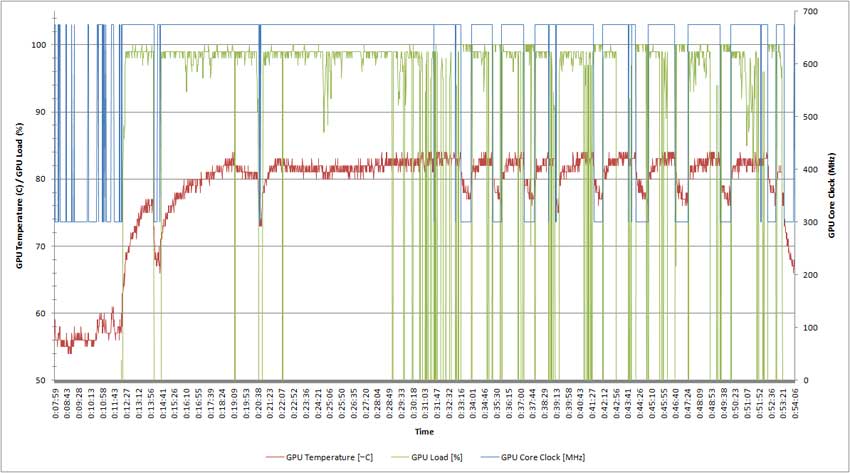
1st Graph show full log (about 1 hour)...after about 15 mins of playing you can see the temp climb to 84C, then the GPU throttle back to 300MHz, and then that cycle continue, full speed/throttle/full speed/throttle...
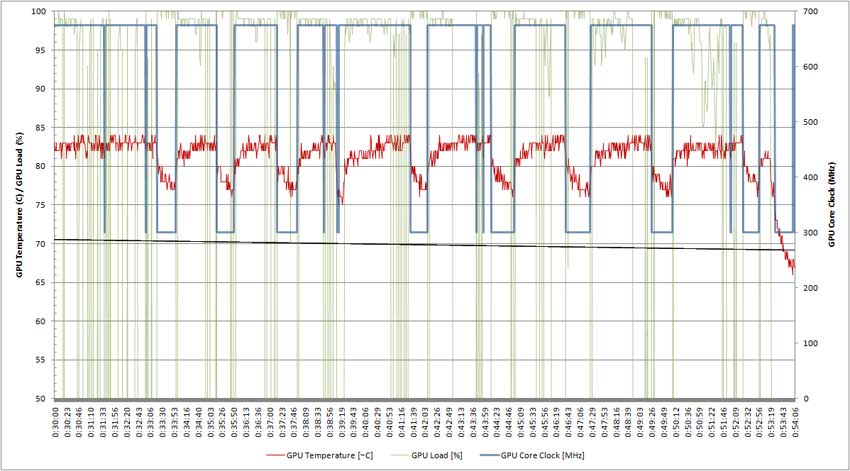
2nd Graph is just an expanded snapshot of the throttling that is happening
When gaming what temperatures should i be seeing on my CPU
All 4 cores go up to high 70's-80c
Oh placing a thermometer near the exhaust vents on the left side of the screen i have seen 125F+ I need to pickup a thermocouple for my multimeter so i can get a reading closer to the vent without blocking anything...
Attached Files:
-
-
I have it and I definitely can say it does help. Last time I played COD Warfare 2 and the GPU temp never went above 70C. No GPU throttling noticed as well.
Nikolay -
Well I thought I could avoid it, but I've started experiencing Dell's-self-imposed GPU throttling. Here are the results of a recent MP match in Battlefield: Bad Company 2. I don't even know what to say anymore.....
As you see it throttles down to 300mhz on the GPU core clock and 499.5mhz on the GPU memory clock for a couple seconds, and continually cycles like that. And all this occurs right after the GPU temps touch 84C (the Dell-imposed GPU limit). This all translates into noticeable slowdowns in-game which are annoying as it just keeps happening in cycles after the initial throttle (I only included 2 cycles). Dell, I really tried to keep this thing's (xps 1645) temps down below 84C, buying and applying AS5 thermal paste, putting bottle caps (yes bottle caps!) under my system to allow for better cooling, using a USB fan (which drops temps ~2-3C) when I'm gaming, and yet I still see this. All these things I really shouldn't have had to do in the first place (Not to mention the lock-ups due to sound, and flash, that I had to find a fix for on NBR). I don't know what else you want me, and others in this situation to do apart from return these things. I came from a defective M1530, which I couldn't game on due to overheating (and in-game slowdowns), and now this one that is starting to show the same signs of in-game slow-down, though due to Dell-imposed GPU throttling this time. We suggested maybe a replaceable vent cover, no answer. We suggested an increase of the GPU limit, no answer. I seriously don't know what else. I really like this laptop, but this is just not acceptable on design standpoint, (screen is blocking vent's optimal airflow). Can some action actually be taken by Dell to fix this problem those who have it, like me??? Bill? This is quite ridiculous.Code:Date , GPU Core Clock [MHz] , GPU Memory Clock [MHz] , GPU Temperature [°C] , Fan Speed [%] , GPU Load [%] , 2010-04-22 23:27:10 , 675.0 , 796.5 , 83.0 , 30 , 100 , 2010-04-22 23:27:11 , 675.0 , 796.5 , 82.0 , 30 , 100 , 2010-04-22 23:27:12 , 675.0 , 796.5 , 84.0 , 30 , 100 , 2010-04-22 23:27:13 , 675.0 , 796.5 , 82.0 , 30 , 100 , 2010-04-22 23:27:14 , 675.0 , 796.5 , 82.0 , 30 , 100 , 2010-04-22 23:27:15 , 675.0 , 796.5 , 83.0 , 30 , 100 , 2010-04-22 23:27:16 , 675.0 , 796.5 , 83.0 , 30 , 100 , 2010-04-22 23:27:17 , 675.0 , 796.5 , 83.0 , 30 , 100 , 2010-04-22 23:27:18 , 300.0 , 499.5 , 78.0 , 30 , 100 , 2010-04-22 23:27:19 , 300.0 , 499.5 , 77.0 , 30 , 100 , 2010-04-22 23:27:20 , 300.0 , 499.5 , 79.0 , 30 , 98 , 2010-04-22 23:27:21 , 300.0 , 499.5 , 79.0 , 30 , 100 , 2010-04-22 23:27:22 , 675.0 , 796.5 , 81.0 , 30 , 0 , 2010-04-22 23:27:23 , 675.0 , 796.5 , 82.0 , 30 , 0 , 2010-04-22 23:27:24 , 675.0 , 796.5 , 80.0 , 30 , 0 , 2010-04-22 23:27:25 , 675.0 , 796.5 , 82.0 , 30 , 100 , 2010-04-22 23:27:26 , 675.0 , 796.5 , 82.0 , 30 , 100 , 2010-04-22 23:27:27 , 675.0 , 796.5 , 82.0 , 30 , 100 , 2010-04-22 23:27:28 , 675.0 , 796.5 , 81.0 , 30 , 100 , 2010-04-22 23:27:29 , 675.0 , 796.5 , 81.0 , 30 , 100 , 2010-04-22 23:27:30 , 675.0 , 796.5 , 82.0 , 30 , 100 , 2010-04-22 23:27:31 , 675.0 , 796.5 , 82.0 , 30 , 100 , 2010-04-22 23:27:32 , 675.0 , 796.5 , 82.0 , 30 , 100 , 2010-04-22 23:27:33 , 675.0 , 796.5 , 83.0 , 30 , 100 , 2010-04-22 23:27:34 , 675.0 , 796.5 , 83.0 , 30 , 100 , 2010-04-22 23:27:35 , 675.0 , 796.5 , 83.0 , 30 , 100 , 2010-04-22 23:27:36 , 675.0 , 796.5 , 82.0 , 30 , 99 , 2010-04-22 23:27:37 , 675.0 , 796.5 , 83.0 , 30 , 99 , 2010-04-22 23:27:38 , 675.0 , 796.5 , 83.0 , 30 , 99 , 2010-04-22 23:27:39 , 675.0 , 796.5 , 83.0 , 30 , 100 , 2010-04-22 23:27:40 , 675.0 , 796.5 , 82.0 , 30 , 100 , 2010-04-22 23:27:41 , 675.0 , 796.5 , 83.0 , 30 , 100 , 2010-04-22 23:27:42 , 675.0 , 796.5 , 83.0 , 30 , 100 , 2010-04-22 23:27:43 , 675.0 , 796.5 , 84.0 , 30 , 100 , 2010-04-22 23:27:44 , 675.0 , 796.5 , 82.0 , 30 , 100 , 2010-04-22 23:27:45 , 675.0 , 796.5 , 83.0 , 30 , 100 , 2010-04-22 23:27:47 , 675.0 , 796.5 , 83.0 , 30 , 100 , 2010-04-22 23:27:48 , 675.0 , 796.5 , 84.0 , 30 , 100 , 2010-04-22 23:27:49 , 675.0 , 796.5 , 83.0 , 30 , 100 , 2010-04-22 23:27:50 , 675.0 , 796.5 , 83.0 , 30 , 100 , 2010-04-22 23:27:51 , 675.0 , 796.5 , 83.0 , 30 , 100 , 2010-04-22 23:27:52 , 675.0 , 796.5 , 84.0 , 30 , 100 , 2010-04-22 23:27:53 , 675.0 , 796.5 , 83.0 , 30 , 100 , 2010-04-22 23:27:54 , 300.0 , 499.5 , 78.0 , 30 , 100 , 2010-04-22 23:27:55 , 300.0 , 499.5 , 77.0 , 30 , 100 , 2010-04-22 23:27:56 , 300.0 , 499.5 , 77.0 , 30 , 100 , 2010-04-22 23:27:57 , 300.0 , 499.5 , 77.0 , 30 , 100 , 2010-04-22 23:27:58 , 675.0 , 796.5 , 79.0 , 30 , 0 , 2010-04-22 23:27:59 , 675.0 , 796.5 , 82.0 , 30 , 0 , 2010-04-22 23:28:00 , 675.0 , 796.5 , 81.0 , 30 , 0 , 2010-04-22 23:28:01 , 675.0 , 796.5 , 81.0 , 30 , 100 , 2010-04-22 23:28:02 , 675.0 , 796.5 , 80.0 , 30 , 100 , 2010-04-22 23:28:03 , 675.0 , 796.5 , 81.0 , 30 , 100 , 2010-04-22 23:28:04 , 675.0 , 796.5 , 83.0 , 30 , 100 , 2010-04-22 23:28:05 , 675.0 , 796.5 , 82.0 , 30 , 100 , 2010-04-22 23:28:06 , 675.0 , 796.5 , 82.0 , 30 , 100 , 2010-04-22 23:28:07 , 675.0 , 796.5 , 81.0 , 30 , 100 , 2010-04-22 23:28:08 , 675.0 , 796.5 , 83.0 , 30 , 100 , 2010-04-22 23:28:09 , 675.0 , 796.5 , 82.0 , 30 , 100 , 2010-04-22 23:28:10 , 675.0 , 796.5 , 83.0 , 30 , 100 , 2010-04-22 23:28:11 , 675.0 , 796.5 , 81.0 , 30 , 97 , 2010-04-22 23:28:12 , 675.0 , 796.5 , 80.0 , 30 , 97 , 2010-04-22 23:28:13 , 675.0 , 796.5 , 82.0 , 30 , 97 , 2010-04-22 23:28:14 , 675.0 , 796.5 , 81.0 , 30 , 100 , 2010-04-22 23:28:15 , 675.0 , 796.5 , 82.0 , 30 , 100 , 2010-04-22 23:28:16 , 675.0 , 796.5 , 82.0 , 30 , 100 , 2010-04-22 23:28:17 , 675.0 , 796.5 , 84.0 , 30 , 100 , 2010-04-22 23:28:18 , 675.0 , 796.5 , 82.0 , 30 , 100 , 2010-04-22 23:28:19 , 675.0 , 796.5 , 83.0 , 30 , 100 , 2010-04-22 23:28:20 , 675.0 , 796.5 , 82.0 , 30 , 100 , 2010-04-22 23:28:21 , 675.0 , 796.5 , 82.0 , 30 , 100 , 2010-04-22 23:28:22 , 675.0 , 796.5 , 83.0 , 30 , 100 ,
-
I couldn't agree more man, that is why I am waiting to hear from Dell about how unhappy I am with this systems performance.
DELL, YOU ARE DROPPING THE BALL TO SAY THE LEAST! -
is it throttling when my frames go from 50-60 to a constant 15 frames. my gpu temps are high but im sure they drop as soon as i alt tab out of the game to check.
-
I would guess that it was because that is exactly what was happening to me during those drops. Log it like I did with GPU-Z and please post your temps if you notice the same drops like in my log......
-
yep just logged it 300mhz core in the middle of game. but my temp sensor didnt work its 0 instead of 84 like yours.
-
Sounds like GPU throttling, I had cpu throttling then upgraded to the 130w AC adapter and BIOS A08, this seems to have cured the cpu throttling, but now the gpu throttling at 84C is very evident and does the same thing you describe. Log the data and watch the gpu mhz drop when it hits 84C. I posted some data and graphs of my computer's gpu back a few posts (#105)...
Try data logging with GPU-Z, that utility seems to work quite well for me, and under the "sensors" tab it has its own simple chart that when you tab out you will be able to see the dips where the gpu is trying to cool off. -
Is Dell looking at this issue? Does Dell not consider this a problem?
-
Apparently Bill and the other Dell people disappeared once this issue came up. Bill was going to report this problem to the engineers but I dont know what happened there, apparently the truth of this problem was too ugly to explain.
-
I posted on the official Dell forums to get their attention. Lets see if it works.
http://en.community.dell.com/support-forums/laptop/f/3518/t/19332935.aspx -
thanks. maybe that will get the point across. i can not play battlefield at all anymore.constant low frames are no fun.
-
my GPU started throttling of late @@ not because of temps (it was 65 C). But since it was recent, i thought it could be due to my 10.4 drivers from dell. So i uninstalled them completely, and windows used the WDDM 1.1 driver thingy. And it stopped throttling! GPU-Z log showed. Anyone want to try this? The WDDM driver is rather old, 24/9/2009 i think...or 2008.
-
Interesting... was the GPU constantly throttled or did it occur in cycles (could PowerPlay have become disabled)? Are you getting good performance now? I find it hard to believe that the WDDM driver could actually be useful.
-
cycling, powerplay was on. Clocked up and down like a maniac. FPS on warcraft (yes OLD) dropped to less than 25. But now its fine.
-
does anyone want to undertake the hassle of trying this out? To be sure, i reinstalled 10.4 and sure enough, throttling happened. After reverting back to the WDDM driver...its smooth. Temps are still the same. Im not sure about game performance decrease tho.
-
I'm not sure exactly what you want to have tested, but I'm running the latest Dell approved drivers (as posted in the "Latest Drivers" thread) and the new A09 bios. Since then, I have not been able to make my GPU throttle... even at temperatures up to 90C.
-
BIOS A09 by itself for the XPS 1645 seems to eliminate any GPU throttling caused by hitting 84C (I hit 88C and saw no signs of throttling).
-
BIOS A10 for the XPS 1645 re-introduces GPU throttling (supposedly at 81C this time instead of 84C). This is a major disappointment (especially seeing how the one "problem fix" about sleeping that it fixes is something that I've been having issues with
)
-
How do you revert back to BIOS A09? I updated to A10 before I knew it had the gpu temp limit.
-
what games are people experiencing gpu throtteling? i want to try for myself to see my system
-
With BIOS A08 or A10, probably every modern game since it throttles at ~84C.
I know with A09 I have no GPU throttling but other problems still exist for me (CPU Throttling). -
I have been lurking around these forums for some times now, and maybe I have missed it, I am not quite sure, but as far as i have seen, the throttling is very consistent in core i7 models, but I have not seen as many issues coming from the core i5 processors. Am I just missing something here? Or is there less throttling happening in the core i5 processors since it runs cooler than the i7?
-
The heat doesn't really affect the performance of the CPU in any way. The issues with the XPS 16 are believed to be power related, with increased risk with i7 quads with ATI 4670 cards and/or RGBLED screen.
-
I am using Studio XPS 1645 15.6" WLED i720QM with 4670. I am experiencing GPU throttling since A10 BIOS update. When I play F.E.A.R., fps drops to 22 from a very high value (like 120-140) in 10 minutes. I also use Ubuntu Linux 10.04 and when I play Nexuiz on it, or some GPU intensive applications, FPS also drops to a very low value.
I think a BIOS A11 update is necessary. Does anyone have information about this update? Is Dell not taking this issue seriously after the A9 update and 130 W adapter change? Do we want so much really? -
The consensus is that ALL BIOS updates after A09 will likely have the thermal limit at a low value (i.e. 84C-ish for the 4670), and that A09 was just a "mistake" (I hope this is not true but it really seems that way). Now that our Dell contact left the NBR forums, there is nothing left to do but speculate. Just use the steps to revert back to A09- it has it's problems- but its a helluva lot better than A10.
Edit: can't hurt to copy and paste your message and post it here (and click the up arrow)! http://www.ideastorm.com/ideaView?id=087700000000iE4AAI -
My 1645 get's so hot that my CPU throttles BEFORE my GPU hits 84c, regardless of whether i use TS or not.
So yes A11 is needed IMO. Both A09 and A10 are buggy and my CPU goes to pentium 1 speeds even with normal temps -
I posted my comment to ideastorm. Now, to revert back to A09, what is the best way? Also, where can I find A09 version in case I do not have it?
-
Well, I reverted back to A09 using the BIOS application (Winplash or something like that). Of course it is a temporary avoidance of GPU throttling, CPU still throttles. We need information provided by Dell.
-
Soooo we have no updates about what dell is going to do regarding the 84c heat limit on the GPU? Dell Bill has friggin vanished....
Sorry, but that's unacceptable. My 1647 is a replacement for my M1530. It's suppose to preform better then my old laptop.
I'm contacting Dell to see what other laptop they can send me to replace this.
How does the Alienware Mx11 preform for gaming? -
A09 for the XPS 1645 removes the 84C limit. I think this is the equivalent of A07 for the 1647. The newer BIOSes have the problem you described.
-
Thanks for the reply gpig, Ive been following your post on the dell forums with great instrest!
I love this laptop, but this whole throttle issues bugs me and makes me feel sick. My bios in my laptop is current A09. I may downgrade back to A07. -
Btw A09 DOES have gpu throttling. It's just at 101c
-
AO9 for the 1647? or the 1645?
-
105c is the threshold to were your computer will shut off so nothing is wrong with the 101c limit. Now if your comp ever reaches that you are either living in the desert and your comp is full of sand, You covered the vents completely, or you have something seriously wrong with your laptop
-
Or you play around with Furmark. I reached that temperature before I removed the dust filter vent covers.
-
Ok well furmark is not representing real world usage. That is pushing the GPU to its absolute limit.
My cpu does not pass 78c or my gpu 79c while playing Starcraft 2 or Empire: Total War for hours. I was lucky and did not experience throttling on my 1640 until close til to when it crashed and they replaced it. Now i experience no throttling in the 1645 i guess im just lucky. -
1645..........
SXPS 1640/1645/1647 GPU Throttling
Discussion in 'Dell XPS and Studio XPS' started by danp224, Feb 25, 2010.