Problems? See this thread at archive.org.
I have read a lot about thermal throttling and couple of apps to help with this. I was wondering if anybody had tried pulling the heatsink and applying a high quality thermal paste?
-
-
9Q33 here. Dell agreed to replace my display out of warranty. The new display has no ghosting issues but the touch screen does not work. Device manager shows error code 10 (A request for the HID descriptor failed.) for the I2C HID device. Bios and drivers are up to date. Dell phone support is stumped and they want me to send my laptop in for them to look at-- which is impossible for me since I need my laptop for work daily. How anyone else had this issue?
The only thing I can think of is if the 9Q33 and 9Q23 displays are not inter compatible. My old 9Q33 display had the Dell logo on the top right of the bezel whereas the replacement part has the XPS logo (i.e. as seen on the 9Q23 models). I wonder if they sent me the wrong part? I asked Dell this several times but they are unwilling to entertain my question. -
I believe someone earlier in the thread had the same problem - does sound like the wrong part.
Sent from my iPhone using Tapatalk
XPS-12 9Q23
I7, 8GB, 256GB -
That definitely sounds like they sent you the wrong part. Just keep insisting upon home support and imply your dissatisfaction, they should give in. You could also try their twitter support however they are slower.dan76 likes this.
-
Dell XPS 12 with i5-4200U (9Q33) running Windows 8.1 x64. Not showing remaining working time on the battery. Does anyone have same issue?
-
To be able to boot the Acronis USB stick in secure boot mode I had to edit the file bootx64.xml in the directory /efi/boot/ and change Arguments="quiet" to Arguments="vga=0x31B quiet".
The corresponding file for legacy boot mode is bootwiz.cfg in root directory. There the line 'KERNEL xyz.dat quiet' can be changed to 'KERNEL xyz.dat vga=0x31B quiet' but I think it is not necessary to edit anything. -
New XPS 12 9Q33 owner here and just joined this forum.
Is there a consensus on the need/recommendation on getting an extended warranty on these units? Dell just quoted me $295 to extend my warranty out 3 years, and will throw in a $75 gift card as a bonus.
SquareTrade will do 3 years for $175, $75 per claim, or $290 with no cost per claim. -
Bought a Q2 2014 XPS 12 a few days ago ( i7-4510U, 256GB SSD, 55 WHr battery) and it's supposed to arrive on Friday.
Hopefully the screen on this model is IR-free. I started to worry a bit after reading this thread, but since there seems to be a panel without IR availible I assume it's in the new model.
I'll report back here once it arrives.
Edit:
It arrived yesterday, screen shows no IR after running the test for 10 minutes, tech support confirms that they use the newest revision panel in the current model. However, while in laptop mode the bottom left corner is not properly aligned with the frame but sticks out a bit for some reason. ( https://www.dropbox.com/s/eii1kruhbqx56dx/VID_20141028_171114.mp4?dl=0) -
I occasionally have this issue and used to grudgingly do the forced shutdown. Usually when I try to wake it up the keys become backlit, but there is no display on the screen and pressing buttons don't help. What I learned is that if I close the lid completely for a couple seconds and open it back up the display comes back and everything works as normal.
However, in my experience it's not worth going into sleep mode unless there are windows you absolutely can't close out and save for some reason. Mine cold-boots much much faster than it wakes from sleep mode. -
I have this laptop which I bought last October. For Some reason the laptop feels very Slow. when I open an webpage it opens So Slow . If i open a webpage with lot of images it nearly takes 2-3 seconds to open the page and then each image opens tile by tile. I would appreciate if an yone else has faced these problems and have a Solution for this. My system has Trend Micro anti virus. I have even tried disabling the anti virus but it is still the Same.
Idont use the original dell image and instead I am using windows 8.1 pro .
Thank you for looking at my post. -
I want to upgrade the ssd drive in my Haswell core i5 based xps12. I replaced the original drive a while back with a Samsung evo 240gb drive. I would now like to install the Samsung 840 EVO MZ-MTE1T0BW. Is this drive compatible? I would like to be able to keep the fast boot.
Sent from my SM-N910A using Tapatalk -
Whoa, I didn't realize there was a 1TB msata SSD! ... I honestly don't know, but if your 240gb was recognized and this one is the same msata connector, then I would think it's fine. Someone else may have a better answer for you.
-
I just saw it today. I would love to have it but for $400 I want to make sure it works
Sent from my SM-N910A using Tapatalk -
Got an older XPS 12 for work. We've got pro support so they came out and replaced the display. No change (ghosting issue). Send it into Dell and they didn't fix it either. I'm doing a system exchange so I'm assuming they'll give me a newer XPS 12 (2014). We'll see if it has the issue. If so I'm going to just ask them to send me an XPS 13 and be done with it. I'll report back.
-
Everyone has the bluetooth + wifi problem? If I turn on the bluetooth, the wifi speed gets very slow and keep dropping.
Thanks! -
Yes, I think it's universal... and not just with the XPS12, I think it's a problem with the Intel-7260 card itself... just my opinion and observation.
-
I got the Evo 840 1tb drive installed and it works great. I have noticed some micro scratches around the outside edges of the screen. So now I am thinking of putting a screen protector on. I wad wondering if anybody here was using a Skinomi protector.
-
Hey guys...I'm planning to pick up this one... Dell Factory Outlet: Error . Can any one confirm whether Image Retention is there or not in those new models(i5 4210U /i74510U)?
-
I just picked up a mint condition XPS 12 with the i7 4650U, Intel Graphics GT3 5000, 8GB RAM, 256GB SSD, manufactured in October 2014 for a little over $500. I don't see this configuration on the Dell website anymore. Does anyone know what these were selling for new? I assume it's a rare configuration because I can't find any for sale on eBay. Thanks.
-
I had an i5 4210U about 6 months ago and had some image retention on the LCD.
-
I feel like I remember seeing that configuration for sale on the microsoftstore.com site. The highest model on Dell.com is the 4510u i7, which is selling for $1749 on both Dell home and Dell Business. So, I question whether or not you really got yours for just over $500. That would be the deal of the century on the XPS 12. I bought my i7 4500u from the Dell outlet and still paid $800, which is still a great deal.
-
I purchased it on Craiglist from the original owner. I also thought it was too good to be true, but the unit works great and is as advertised.
-
Just spent a while reading through this thread. What a shame regarding the image retention issue. I purchased an xps 12 last week from Amazon (XPSD12-5328CRBFB), {i5-3337u} & had the issue immediately (will return). Of course I went to the web to find a little more info & just purchased another one (XPSU12-5327CRBFB), {i5-4200u} thinking it was just a bad batch of older ones. The newer one arrives today but after reading this thread I'm convinced it will also suffer from the same issue. This device completely suits my needs but I find this issue unacceptable. I think the way Dell was/is handling this is absolutely atrocious. This is supposed to be their "Xtreme Performance System" line of products, best of the best I thought... The last time I owned a Dell was about 10 years ago and it seems like things haven’t changed. Anyway, it seems like this thread stops rather abruptly regarding the issue. Am I to assume this is finally resolved and they are taking care of it? Or is this still up in the air and people are just accepting the faulty screen?
Thank you again to all have posted details regarding their experience with the XPS 12. -
Anyone know if this works on the XP12
http://www.amazon.com/Samsung-250GB...852011_1_1?s=pc&ie=UTF8&qid=1426024587&sr=1-1 -
Yes, any mSATA drive should be compatible. Drive is removable while the RAM is soldered on and not upgrade-able. Good luck to you!
-
Just an update for those still wondering about this issue. I had my screen replaced a bunch of times and eventually Dell and LG produced a new panel that has to date been totally free of image retention. Have a look through my comment history if you are interested in how long it took me to find a solution! But I am happy to say that the new panel is now many months old (perhaps even over a year) and it is fine. Whatever the issue was it is certainly resolved now for me.dan76 likes this.
-
Could you please post the data of that new display panel?
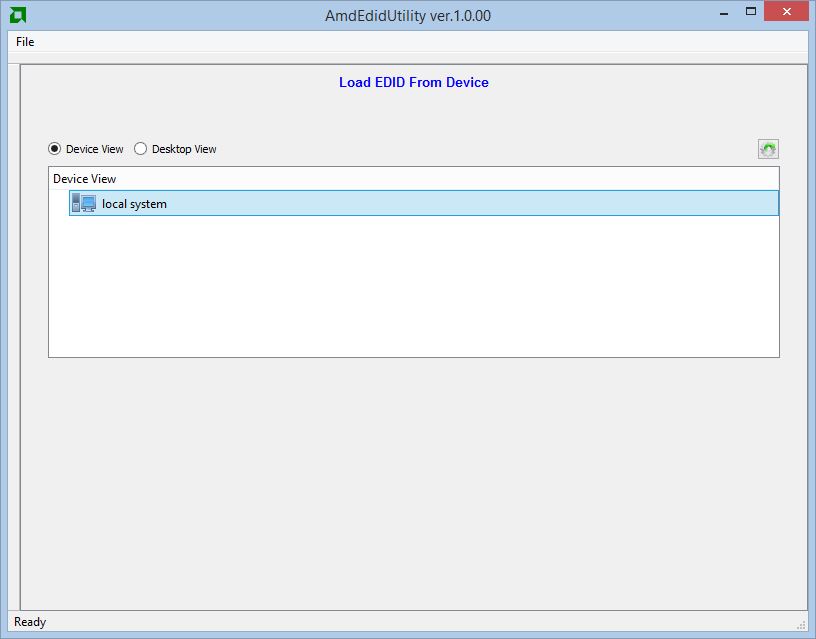
You can use this software from AMD to get the EDID data: http://developer.amd.com/tools-and-sdks/graphics-development/amd-edid-utility/ -
Hi foggybd,
I downloaded the software but it doesn't appear to show any relevant data. The attached image shows you all I can see, the 'local system' icon does not open any further. No options I can see enable any detailed analysis.
If there is some other thing you would like me to try I'd be happy to oblige.
Cheers.Attached Files:
-
-
Hmm... There might be bit of info in device manager, monitor properties. Under the 'details' tab flip the dropdown box to 'Hardware IDs'.
Mine says LGD03FD.
I picked up a B-grade 9Q33 Haswell (April 2014) for $600 on ebay. Except for scratches on lid and bottom it is like new. It has the i7-4500U, 8GB ram, but only 128GB SSD. I might upgrade the SSD if i like this unit. It has no IR so far (one day of use). How long does it take to show up? -
The hardware id (LGD03FD) has been the same for all the panels, that isn't a unique identifier...
 Sorry I can't be more helpful.
-
You could try Nirsofts dump edid here:
http://www.nirsoft.net/utils/dump_edid.html -
Hi all.
Wonder if UK readers may be able to help.
I have an XPS 12 which I love (mid tier model with i7-4500, 256GB, 8GB). I recently renewed the warranty at £80 for a year which I was happy with for peace of mind.
Sadly, I had 3 repairs done the past few weeks due to a mobo fault, consequently there were further issues which damaged other parts of the laptop (screen, DC-in jack and memory). Further repairs were completed without success, despite the excellent engineer who obviouly knew what he was doing. Dell have said they have now done 3 repairs and can't do anything further and are only offering a refund. They will NOT offer a replacement because it's a refurb from Dell outlet UK, which is fair enough. However, I've since found if I agree to the refund, Dell won't include the cost of a new warranty which I only extended in January this year.
Does anyone know if this is allowed in them not reimbursing me the extra cost of a new warranty in UK?
Any help would be greatly appreciated since I'm unsure where I stand. It's a damned shame they can't fix it as I love my XPS 12 and will miss it greatly when traveling/working away. Thanks in advance. -
I don't know if it is helpful but here is the output:
DumpEDID v1.02
Copyright (c) 2006 - 2014 Nir Sofer
Web site: http://www.nirsoft.net
*****************************************************************
Registry Key : DISPLAY\LGD03FD\4&7269f63&0&UID68092928
Manufacture Week : 0 / 2012
ManufacturerID : 58416 (0xE430)
ProductID : 1021 (0x03FD)
Serial Number (Numeric) : 0 (0x00000000)
EDID Version : 1.4
Display Gamma : 2.20
Image Size : 27.6 X 15.6 cm (12.5 Inch)
Maximum Image Size : 28 X 16 cm (12.7 Inch)
Maximum Resolution : 1920 X 1080
Support Standby Mode : No
Support Suspend Mode : No
Support Low-Power Mode : No
Support Default GTF : No
Digital : Yes
Supported Display Modes :
1920 X 1080 60 Hz
***************************************************************** -
Hey, been doing some reading on this saga and it looks like the only way to find the specs on the panel is to take off the back cover. Its not hard, just a few screws. I'd be stoked if u'd open er up and get it.
My unit is showing IR after about a week. So I will need a solution. If I know what part number to look for I will try to get a panel and replace it myself. -
Hi foggybd. I'm not going to risk causing a problem or voiding my warranty. I'd recommend pursuing it directly with Dell as it is a manufacturer defect. Even if you are out of warranty it is the kind of thing you might get lucky on, certainly in Australia you would be covered by consumer rights and Dell would be obligated to fix it free of charge.
Good luck. -
Hi again, looking through my comment history it appears I did record the screen details when it was being installed...
The panel number was CN-06P54W. I can't guarantee that this number is a unique identifier or that it will fix your issue. I'd recommend reading through this thread fully and getting a proper understanding of what people have said and what their experiences have been. For me at least, the panel number listed above solved my IR issues.
I hope you can figure it out! -
Just running through my post history it looks like the panel I am using now is the one detailed in this post. The post also includes an image of the panel sticker showing all the information there is to see...
It looks like at least one other user said they receivd this panel and it failed for them but my experience and the experience of a bunch of others on this thread has been that this panel fixed their IR problem.
Last edited: Apr 3, 2015 -
Have you run the IR test or is it just in normal use that there is no IR?
I only ask because I had my screen replaced 2 weeks ago and on the test there is very minor IR across the whole screen, I'm just wondering if that's normal or if it will get worse. My last panel showed IR around the edges but not in the middle so it does at least seem different... -
I've had my screen replaced so many times I can't remember; 6 times maybe, perhaps 7? So I think I'm pretty qualified to comment. My current panel has no image retention issues. I know exactly what to look for and how to test for it and I can categorically tell you my screen is fine.
-
You must really like the XPS 12. Don't blame you, I think the hinged screen format is amazing. I hope Dell does a refresh of it. It blows MacBook and iPads out of the water imo.
-
To be honest there weren't that many options when I was looking for a new laptop. I didn't want a Mac and the Yoga 2 wasn't released yet. I love the new Surface Pro 3 but at the time the first surface was only just being released and it wasn't nearly as good... The XPS 12 was the only option for a tablet hybrid with the kind of power I wanted.
I'm also a fan of Dell's warranty support which paid off given how many screen issues I had. After the first few screens (and almost a year of usage) they offered me a refund but there still wasn't anything on the market to replace it with so i opted for an upgrade from the Sandy Bridge model to the Haswell model in the vain hope of fixing the IR issues (it didn't). That gave me a pretty nice performance and battery boost and a brand new laptop to boot!
Eventually they released a new panel that fixed the IR and since then everything has been good. When the surface pro 4 comes out I'll be in straight away though as the digitizer and pen support will be really helpful for me. -
Yup, performance was the #2 reason I got the XPS 12. Mine is the Haswell also, I made sure of it. Amazing power, it equals my 2 year old desktop i5 quadcore! Thanks to the hyperthreading. Tack on 8 hour battery life and...well its just untouchable.
I won't be getting a Surface because the flimsy detached keyboard doesn't work for me and the screen resolution (on a slightly smaller screen than the Dell) is too high for my so-s0 eyesight. The touch screen is higher grade, but I don't really need that. -
That's great thanks, I wasn't doubting you, just making sure that there was an issue with my new panel as it's slightly different symptoms to the last few (so far).
-
As with others here, I am in a similar situation. I had the XPS12 2013 edition, that got replaced for the 2014 edition after 3 screen replacements, but the IR is actually worse on this one (lovely laptop otherwise). I haven't bothered trying to get the screen changed on this one yet - simply because I didn't think there was a fix. It is great to hear that some people now have screens without IR, will give a replacement another go before the warranty runs out.
-
I just purchased the xps 12 about a week ago for $899 with i7-4510, 8GB Ram, 256GB SSD, and 1080p touchscreen. Unfortunately, I am having the screen retention issues. I'm torn between getting it repaired or just taking it back to the store. The only problem is that I doubt I can get a machine with similar specs for that price. I really love this machine as it is light, super quiet, and fast enough for my needs. Oh yea, and let's not forget the price. I can get the 2014 xps 13 with similar specs for the same price, but I've been reading a lot of reviews about how loud and whinny the fan is. I need a relatively quiet machine. What other machines do you guys recommend to replace this machine in case I send it back.
Last edited: Apr 13, 2015 -
This is the same monitor that I have and it has the image retention issue. I checked the device manager as you suggested (under monitor properties and hardware ids). It also says,
MONITOR\LGD03FD -
We discussed this earlier. The panel revision isn't reported to the OS. Its on a sticker located on the panel itself.
-
The XPS 13 has a higher resolution panel (1440P?), making everything in windows much smaller. Windows also has scaling problems sometimes above 1080P.
Asus Zenbook? Its not convertible tho... http://www.amazon.com/Zenbook-UX305...&qid=1428943238&sr=1-9&keywords=Lenovo+Yoga+3 -
Wow, this thread is still going strong. I haven't stuck my head in here for ages.
Question: One of the screws fell out of the bottom of my machine. It holds together fine without it (and I've tightened the others to keep the rest), but it bugs me to have a missing screw. Does anyone know where to get just a single replacement screw?
*edit* Oh, and...
There aren't really "fixed" and "broken" screens -- the IR symptoms just come in a spectrum and they've stopped using the panels where it's more obvious. So, a new screen might still have light IR. My "fixed" panel from about a year ago was perfect at the start, then developed very mild IR after a while. I'm just fine with it, and someone who hadn't had the original problem would never even notice. So, yes, a "fixed" screen developing minor IR isn't abnormal. The only question is whether it's mild enough that you can live with it. And, of course, keep watching to make sure it doesn't get any worse, since it seems to take awhile for the IR to hit its peak.Last edited: Apr 15, 2015
XPS 12 Owners Lounge
Discussion in 'Dell XPS and Studio XPS' started by swenpro, Oct 21, 2012.