Problems? See this thread at archive.org.
First, my unit is on its way to repair Depot in Texas to get a replacement backlit keyboard.
Next, for whatever it is worth, I was asked if I could suggest anything to Dell to improve their service and I sent them the link to this site and forum and I encouraged them Greatly to do themselves a Huge Favor and check it out for my answer, which they said they would.
Finally and in times like these being without a computer, as the XPS 15 is my Desktop replacement, I am strongly debating if I should just buy an Apple iPad for backup or should I trust Dell and get a Tablet from them? :-/
Thanks and Best Regards Everyone,
SD
Sent from my iPhone using Tapatalk
-
can any of you guys tell me what to do about google chrome on my xps 15 ..the 64 bit version of google chrome has perfect scaling as a browser on the xps but its very unstable...it crashes soooo much.is there any fix for this 64 bit version to not crash or something..its driving me crazy
-
use the beta not canary builds, mines fine. if it plays up it will be a extension you installed.
-
where can i find it please give a link?
-
Anyone able to scale AC Unity properly? Even dropping the screen resolution doesn't help, it switches back to full res and letterboxes the game. Also, even on high performance mode the game runs laggy. Anybody experiencing the same problem?
-
Anybody knows when the new successor of XPS 15 will come out?
-
Could someone tell me whether or not Raid0 is possible with mSata and Sata?
Thanks.
Also... Could someone transfer the first post under my name? Lol. There needs some sort of organization with all these post. Who ever created this thread should be shot. Laziest OP ever for not updating the first post with useful links of all the contributions on here. #annoyed.
-
Have you checked the wiki?
-
Hi Guys,
I have a small problem. It might not be specific to XPS15. Yesterday everything was fine today when I booted my laptop I noticed that no audio was played. I have a red X on ym speakers and it says No Audio Output Device is installed.
I thought it was the drivers but when I checked the Device manager I got another suspicion. In the device manager I can see the driver Under Sound, video and game controllers option that is listed as playing but I cannot find Anywhere the realtek microphone and speakers. I checked skype too and I have no input/output devices listed as they were vanished, even the special software maxewell or sth for sound has dissapeared from my laptop anyone that can help? -
AC Unity runs poorly even on PCs with 2x GTX 980s. I don't think you'll be able to get acceptable performance out of it at this time.
That resolution bit scares me though. Newer games tare starting to use a different kind of resolution scaling - one where it keeps the full native resolution but reduces the render resolution. That being said, it should be more compatible with devices like ours but you're saying it still letterboxes the game... Not good. Microsoft/Intel REALLY needs to fix this already... I can't believe we're almost into 2015 and this problem still exists. I'm sorry I don't have a solution but I share your frustration.adlerhn likes this. -
Hi Everyone,
First let me say, I am not Stupidstitious at all and I do not believe in Jinxes as well, yet ironically after I started reading the Outright Shameful and Disgraceful issues a lot of individuals were having with this so-called State-of-the-Art XPS 15 unit, I started sharing my believed Great purchase and Luck and then just as quick my XPS 15 keyboard Died! :-(
I just received an email from the Dell repair depot stating that they did receive the unit and determined the keyboard to be in fact Bad, yet unfortunately they do not have a replacement in stock and it can take up to 2 weeks to get one. :-(
For just over a 7 month strictly home use Desktop replacement I am Not impressed with the unit or Service and I Need to get very important matters addressed this month and doing it from an iPhone, which is all I have, is just an impossibility.
I am Now Strongly contemplating on just jumping Ship once again picking up a MacBook Pro with retina Display and selling the XPS 15 whenever it comes back from repair, as I just cannot TRUST what will obviously go wrong next and be without computer for any length of time.
I am very Sincerely Sorry for "Everyone's" Disgraceful Woes & Issues and I Truly Wish I could Help "Everyone" yet what I am Greatly starting to Strongly See is Why Many "Professionals" put their monies and Trust in APPLE!
I Really Like and Prefer PC yet Dell, who Once was The Top, has since Greatly Turned me Off and not just with my recent issue yet Everyone's Disgraceful Ones as well.
Best Regards,
SD
Sent from my iPhone using Tapatalk -
SO I just noticed that occasionally my CPU just hangs .87 GHz and does not change at all until a reboot. That explains a lot of the random lag in Chrome and other things. I am still investigating as to what triggers this if anything does at all. Any thoughts??
-
Technical n00b here who has a couple questions regarding my Dell XPS 15.
1. About 50% of the time I'm using my computer, it's really loud. It's like it's thinking and making really loud steady noises while doing so. That's the best way I can describe it. I don't believe this to be normal? I have never heard this on a laptop. What can I do to determine if something is broken? I have uploaded 2 YouTube videos here of the noises. You can hear them best if you wear headphones.
Video 1 - VID_20141120_015348.mp4 - YouTube
Video 2 - Dell xps weird sounds - YouTube
2. My laptop tends to heat up a lot. Especially if I have it on my lap while sitting on the couch. Even if I try to not cover where the heat is let out, it still gets hot. I have to bring it to a fan to cool down. Is this normal? Is it dangerous?
3. My warranty is up on December 9, 2014. They are telling me 1 year extended warranty is $299 and 2 year is $539. Would it be worth it to buy this? From the weird noises to heating up, it worries me not to be protected.
Thanks in advance for the help! Much appreciated. -
With regards to the noise that is the coil whine issue so many have been plagued with. I actually had to put in my headset to make sure the noise was coming from your video and not my laptop
. Where did you purchase the laptop and with what? Often times Visa covers all electronics with +1 additional year warranty and Costco covers +2 years from the date manufacturer warranty ends.
-
Hi All,
Just a day ago I ordered an XPS 15 with 512sdd and QHD+ display in the UK (got almost a 30% discount from the list price)... but after reading a few pages on this forum I'm concerned that this might be a bad investment. Lots of the reviews I've seen rate the XPS as a really good laptop, but at the same time the reviewers only test it for a couple of weeks. My concern is that in a few months or just as the warranty expires, something will break and I'll end up with a very expensive, carbon-fibre door stopper.
I decided to get this as my wife has an XPS 15 (also haswell, but with an i5-4200U) which she got back in April and (touch wood) she never had an issue with it. And I also have a 7 year old Dell which is still going strong (Inspiron 1520).
So my questions for you is: I'm being silly at spending > £1000 (>U$S1600) on this laptop?
I work as a software developer and I do prefer to have a quad core, > 16gb ram, big ssd laptop for my work... so I'm not going to waste that on wordpad. And also I want to limit the chances of having to send this for repair as setting all my development environment takes me a few of days.
Thanks a lot,
e. -
Thanks for the reply TurkishDelight! I had heard about the coil whine issue but did not know that was what it was. A little bit reassuring to know I am not the only one having this issue. Is it dangerous to the computer, or more just an issue of annoyance/noise? Is there anything under warranty that can fix this? Also, why does it only occur half the time I'm using it?
Thanks also for the info on the warranty. I actually bought the laptop used from a guy who had it for a couple weeks. I will check with him to see what method he bought it with.
What are your thoughts on the heat issue? -
I have just realized that the light of the Caps Lock key is not working in one of my system (it used to work). The keyboard backlight is fine, only that indicator is failing.
I really don't know if it stopped working right when I had the motherboard replacement for the coil whine, or maybe some time before or after that.
Moreover, I have realized I am not alone. About 10 days ago this thread was created in the Dell Communities: Dell XPS 15 (9530) Caps Lock light not working - Laptop General Hardware Forum - Laptop - Dell Community
Has anyone else had the same issue? Maybe even recently? -
Did the motherboard replacement fix the coil whine?
-
I listened to the videos, I'm not sure that it's the coil whine - it sounds more mechanical, like something might be wrong with the laptop fans. That would also explain the excess heat from the laptop - when it heats up, is the GPU in use at all (you can check with the Nvidia notification icon)?
-
This is only my personal experience, but I've had pretty good luck with my XPS 15 so far - same 512SSD/QHD+. I bought it when it first came out last November, and it's been chugging along pretty well ever since. I'm also a software dev, so I'm running multiple browsers/VMs/Visual Studio and it's been good. YMMV, but definitely one of the better laptops I've owned. I also got the 3 year warranty though, so maybe all the problems are just waiting for then
-
I upgraded my 32gb mSata to a 250gb Samsung Evo 840 and everything seems to be working really well following a clean install except I can't seem to get my 750M graphics card working. The drivers seem to install but I don't think the card actually works. Every time I open Geforce Experience it asks me to install the same driver over and over again and it doesn't let me optimize games as I have a cross where the required graphics card tab is. Nividia Control Panel doesn't open either.
Any ideas how I can get this working? -
I think that now I understand why so many people that buy high end laptops (in particular macs) are so inclined to get a 3 year warranty too. I think I might do the same and get a 3 year warranty.
Thanks a lot woohoo! -
I've also not had any issues (other than the coil whine). Remember that it's those that have problems that are the ones that are most likely to post. Also, I would imagine you could find similar threads for other manufacturers.
-
YES. This computer is absolutely silent (but I've had a bunch of other motherboards that were noisy).
So, if the fix for the Caps Lock light were to be a motherboard replacement, I would refuse. I prefer a silent laptop without Caps Lock indicator.
Maybe is the Caps Lock light what causes the coil whine?
-
i have the same issue broo....do telll me if u find a fix...my chrome hangs too and crashes and my cpu power increases to 60 percent even idly
-
Just an update for anyone else who may come in to this problem. I downloaded the oldest drivers available on the dell xps 15 wiki (not from the dell website, as those didn't work either) and it all worked fine.
-
I was also thinking it might not be a coil whine issue. It sounds more like the computer is thinking, as if I went to a Facebook page and was scrolling down constantly and it's trying to load new things. It only happens about 50% of the time I am using the laptop.
Where exactly would I check to see if the GPU is in use?
I want to get this fixed if its a problem as my warranty runs out December 9th. -
FYI - after my recent keyboard issue with the Dell XPS 15 9530, which I have still not heard back from them on when the replacement keyboard will be available, I have decided to jump Shop one Final time and go back to Apple, as I do not nor can I be subjected to mail in repairs after the standard warranty expires and then just left in Complete Limbo to Boot.
Once I receive the repaired unit back I will put it up on eBay for $1, 800, which includes the extended repair warranty until 10/2016 and their Ultra Slim USB CD/DVD external drive, which is brand New and never opened.
The Very Best of Good Things & Luck to Everyone,
SD
Sent from my iPhone using Tapatalk -
DId you simply remove the 32gb msata drive and replace it with the 250gb Evo with the 1TB HD still installed? I just want to know if you can have the 1TB Hard drive and an another 2.5in internal SSD as I'm considering upgrading too.
-
I am certainly not the expert here but I do believe there is a coil whine, that is if the high pitched crackling/squeaking noise is what we are referring too. That being said, I think mine makes the same issue from time to time. Does your laptop completely randomly make this odd squeak/click noise that comes from the power button? It does it once and done. Also does the noise change when you move the laptop around? Lifting or tilting from side to side.
I'll be honest, if you warranty is running out then I would call now and have them send out a box. Worst case scenario they find nothing and return it but might as well use what you got before it runs out. -
Have you monitored what is using the CPU? I can't seem to find why the clockspeed just gets stuck at .87 but it happens almost exclusively after it wakes from sleep..
-
Yeah, it only happens from time to time. But when it does happen, it will happen anywhere from a minute to a couple hours.
I am on the phone with Dell now and at first he was saying that he thinks it has something to do with my hard drive, but I explained it was the motherboard. He had to discuss it with his colleagues and I found a dell support document for him to read. After 2 hours on the phone, he is going to submit a request for a technician to come replace the motherboard.
He did offer them sending a box out so they can look at the laptop but I cant afford to not have a laptop for 5+ days. -
Hi All,
Sorry for the flood of msgs in this thread.
I am having my motherboard replaced by Dell and the tech support said they ordered the motherboard ' YPDX6 ASSY,PWA,NBK,I7-4702,D,M3800'. From what I have read from this thread, the motherboard everyone has had theirs replaced with is ' TWG2C ASSY,PWA,NBK,DIS,I7-4702'
He said it's on the list of replace motherboards to replace ones with noise issues.
Old
NWYM9 ASSY,PWA,NBK,DIS,I7-4702,9530
43PNN ASSY,PWA,NBK,DIS,I7-4712,9530
MF0W3 ASSY,PWA,NBK,UMA,I5-4200,9530
CRVX3 ASSY,PWA,NBK,I7-4702,D,M3800
New
TWG2C ASSY,PWA,NBK,DIS,I7-4702,9530
T37HN ASSY,PWA,NBK,DIS,I7-4712,9530
MHTH2 ASSY,PWA,NBK,UMA,I5-4200,9530
YPDX6 ASSY,PWA,NBK,I7-4702,D,M3800, 9530
Which one is correct?
Thanks!Last edited: Dec 4, 2014prplhaz4 likes this. -
Hi desm0nd,
My two coil-whine-free motherboards are:
- For the 4702HQ: FVRW3 - MB SVC Kit TRPM, W8H (Contains TRPM MB TWG2C , I7-4702,9530 – Used WW except China and Russia )
- For the 4712HQ: 5YK6X - MB, Service Kit, TRPM, W8P (Contains TRPM MB T37HN NBK,DISPLAY...,I7-4712,9530 - Used WW except China and Russia )
Now, I am not sure about the one for the 4712, but I am pretty sure I've had other FVRW3 (TWG2C) motherboards for the 4702 that did have the noise.prplhaz4 likes this. - For the 4702HQ: FVRW3 - MB SVC Kit TRPM, W8H (Contains TRPM MB TWG2C , I7-4702,9530 – Used WW except China and Russia )
-
So it might not be that the CPU gets stuck at .87GHz after I awake it from sleep. I was working yesterday and I noticed that as soon as I unplugged the laptop from external power it cycled down to .87GHz and remained there. When I plugged it back in it further cycled down to .76GHz and then went back up to .87Ghz. So for some reason when I initially unplugged the PC it got stuck at .86Ghz and only momentarily went down to .76 before going back to .86 after plugging the charger back in. Again, the issue is alleviated by a reboot but I still can't figure out why it even does this.
-
Hi Everyone,
Through Great Need, Strong Persistence and detailing my Sheer Disgust, I got Dell to find a replacement keyboard yesterday, install it and get the unit back to me Today!
If one of you Great individuals would not mind, and one who never adjusted the Factory default settings, can you tell me what time interval the Keyboard Back Light is set for in Quickset?
Thank you So Kindly,
SD -
So the Dell technician came to replace my motherboard. Turns out, it was the wrong motherboard. It was missing a clip (forget what the name of it was).
Spent another hour on the phone with Dell, and they are now sending the motherboard with product code WKMMW
Arghhh -
I suspect some throttling issues with my machine.
I noticed it when I played the game battlefield bad company 2, this game is from 2010 so it should be playable with this kind of gpu performance.
Anyway, as soon as the game is on the fans kick in and make a very audible sound. Then the laptop gets very hot and the game start to lagg, sometimes it even freezes the whole system and I have to sign out (ctrl+alt+delete) in order to exit from it.
I have some arctic silver laying around somewhere but I have never applied cooling paste on notebooks before, is it difficult to do it? I have done it before to my htpc's and desktops but not on laptops. So the question is, should I try to repaste it my self or should Dell do it?
Will Dell even bother to do it properly? Anyone here have some experience?
I shall mention that doing cpu intensive work is no problem, but only when doing heavy gpu intensive things.
Regards, -
I would bet that the laptop lowers the clock speeds of both the CPU and GPU as it cannot keep one or both running at a safe temperature. Here's a review that explains the situation: Review Dell XPS 15 (9530, Late 2013) Notebook - NotebookCheck.net Reviews
I find it quite disappointing that Dell packs a very fast CPU and "goodish" GPU, but they cannot be fully utilised for more than 20 minutes (or even less)
I'm not sure how easy it's to reapply the thermal paste in this laptop, but if it's under warranty, I would call dell and ask them to send an engineer to do this.vayu64 likes this. -
Hi Everyone,
Come On Now, someone must be able to graciously tell me the Factory default settings for the Keyboard Back Light in Quickset?
Thank you Kindly,
SD -
If anyone else has not really been satisfied with the trackpad performance, give this a try: http://forum.notebookreview.com/hp-envy-hdx/563791-definitive-guide-envy-trackpad.html (download Rell's EnvyTouchPad.exe)
I turned off two finger scrolling in Dell Touchpad, and enabled this, and it's been a lot better - a lot smoother scrolling in Firefox/Chrome, and proper horizontal scrolling in Visual Studio (with Dell Touchpad, it would just move the cursor left and right, not actually scroll in VS).
It's somewhat maddening how Synaptics/Dell still can't have a good touchpad experience, but some third party application can help it so much, ah well. Hopefully Dell puts precision touchpads in all of its new laptops going forward. -
SDeP58,
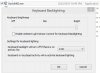
Mine says 1 minute.
Since I have never modified it, this must be what the default is.
-
Hi IceManKent,
Thank you So Much, as I Greatly appreciate it! :thumbsup:
Was the Default Brightness all the way up like it shows in your very gracious pic or did you raise it?
Best Regards,
SD -
I honestly don't recall if the default brightness was all the way up or not - but I do know that I have played around with that setting via the function keys for brightness - and I do prefer the full brightness setting.
-
Any update on this? For me it feels like the laptop gets slower and slower already :/
-
I doubt dell will do anything as it is already slower than the evo so look on dells xps 9530 page like the rest of us do
-
IceManKent,
Thank you So Much as I Greatly appreciate it! :thumbsup:
Best Regards,
SD -
What do you mean with that?
I checked the dell website already, obviously no new firmware. I just thought someone had contacted Dell already about it.
Anyway, I made a thread in the dell support forum:
XPS 15 9530 - 840 Evo Firmware update - Old data performance fix - Laptop General Hardware Forum - Laptop - Dell Community -
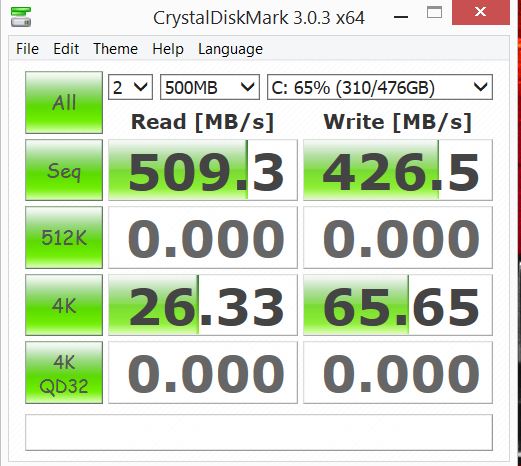
Could it be that my ssd is damaged alreadyanyway? Just did a crystalmark test and 26mb/s read and 45 mb/s write seems a bit slow ? :SAttached Files:
-
XPS 15 (Haswell) Owner's Lounge
Discussion in 'Dell XPS and Studio XPS' started by mark_pozzi, Oct 23, 2013.