 Problems? See this thread at archive.org.
Thanks for your effort
There's a link to the soundcloud of the song in my initial post but here it is again: https://soundcloud.com/grey-scale/zere-greyscale-sepia
Unfortunately, I can't provide any more than that. It occured many more times to different songs and kinds of music, but unfortunately I can't remember those since I mostly listen to internet radios.
-
Hi,
You are very welcome!
I definitely seen and went to your provided link in your original post yet it was in fact a recording of a song with your issue and I was hoping you had a particular song that does the garbling, which you did not record and which I could try out for you, as I have had absolutely no problems or issues with any videos or music sounding distorted in any way.
Best Regards,
SD -
The song in my recording is this one on soundcloud: https://soundcloud.com/grey-scale/zere-greyscale-sepia if you're hearing the distortions here, then you have the same problem as me as this is one plays fine on other computers and even on mine with the drives deinstalled.
Whether this one on picosong: Playing: 2014-06-06_14-26-14.mp3 - picosong is my recording with the distortions.minor9 likes this. -
Definitely not hearing the distortion on my machine.
-
Thank you. Could you maybe have a look at your driver version in the device manager?
Did you ever format and reinstall your system? There were some posts about different MaxxAudio versions after a clean install of the OS. Maybe this causes the distortions.
I'd love to gather as many information on this issue in order to fix it, so any help is appreciated. -
I have formatted/reinstalled a few times, as well as been in a near-constant struggle with drivers in general, so definitely not a benchmark system. Unfortunately, I don't have MaxxAudio drivers installed, so it's running with the default MS/Windows HD Audio driver (6.3.9600.16384 8/22/2013).
-
Thank you as this (The Original Song) is what I was wanting!
I Really would like to say that it is the Song, yet unfortunately the song plays Perfect and without any Distortion at all and if I could do anything like check what driver or etc., I have on my machine Please kindly let me know, as I just Feel So Sincerely BAD for you and for "Everyone" that is unfortunately and maybe Disgracefully having so many unnecessary issues for their Hard Working Dollar$!
Best Regards,
SD -
Questions for the guys who have tried linux on the 9530.. which distro works best right off the bet? as in drivers... resolution settings.. scaling... and so forth. I am trying to get into linux. I am familiar with it but not too well. You advise is very much appreciated.
-
Drivers, everything worked perfectly since day 1.
On HiDPI, any of the recent releases of any distro should work fine. With older desktop environments you needed to adjust the sizes of the fonts, but that was it. Moreover, things have changed a lot in the last year in this aspect. Now some desktop environments will detect your screen resolution and automatically adjust the scaling.
If you are trying to get into Linux, I'd advise you to use Ubuntu, as you will find more resources in the Internet for it. You can always change later if you have reasons to (I've been using Ubuntu myself as my main OS some years so far).
There is more detailed information about the XPS 15 and Linux in the wiki: XPS 15 Wiki Linux. Note that the information about which Desktop Environments need tweaking is outdated, as some of us haven't installed the system from scratch in the last months. Feel free to update it with your experience. -
I have throttling issues too, when playing games like LoL (not an intensive game). 100+ fps straight down to around 15 and the GPU drops down to 135 mhz. I read about applying thermal paste a few pages back but I don't think I'd be too comfortable doing this. Is this actually the best thing to do or should I just contact Dell about it?
It happens more when resting it on a tray on my lap and less when I have it on a desk but it still happens occasionally on a desk. I want to upgrade to an SSD but want to make sure my laptop is good before doing it. -
My W key has started clicking loudly when pressed.
Guessing there's a crumb under it or something.
Can I just prise the key off like most keyboards? -
On the topic of the coil whine, has anyone else noticed the noise of their unit to become more silent with time? (i.e. months). One of my units is definitely nowhere as noisy as it used to be. Unluckily I need to replace its motherboard, as the Nvidia graphics card is faulty. Very likely I will get a noisier board than the one I currently have.
Does it make any sense that the noise changes over time? Has anyone else observed a similar pattern? May it be designed so that the noise disappears when components settle or age, or was I just lucky? Or even, may the faulty graphics card (which was faulty since day 1) have affected the power usage patterns? -
Yes, you should be able to. One of my computers had an issue with the Z key, so I removed it and fixed it myself. Of course, be careful, the supports of the keys are very thin. There may be more details in the operations manual.
-
Thanks a bunch for your answer. I did go ahead with the Ubuntu 14.04 LTS. So far its amazing. I have a dual boot setup. The only bad thing is that I have to disable UEFI which in return disables my windows OS. So when I want to use WIndows, I have to enter bios and enable UEFI. Not a huge deal... but I rather have the option to choose at startup. Another thing is that the display was really tiny when I installed the ubuntu OS. I need to figure out how to scale things and change themes and so forth..
Once again thanks for the help
-
Well, that explains it. As I mentioned before, deinstalling the audio drivers "solves" the distortions.
-
Thanks, mabe you could look for the driver version of the audio driver in the device manager. Have you formatted or reinstalled the operating system or installed new drivers?
-
Unless you really want the stability of the LTS, I'd advise you to use 14.10. HiDPI support is moving pretty fast these last months, so 6 months can make a big difference in support. In any case, When I got my XPS I installed Ubuntu 13.10 and after a couple of tweaks (documented in the wiki) I was able to use it perfectly as my main PC.
On the boot side... I think you did something wrong there... I have no issues with UEFI, nor I have to enter the BIOS to boot one system or the other. I just have secure boot disabled (even though it should be possible to enable it if you use signed versions of the kernel). There is a ton of information on this on: https://help.ubuntu.com/community/UEFI
And check the wiki for the font and scaling settings for your desktop environment. -
Hi,
OK, now when I said that I would do "Anything" to hopefully Help "Anyone" on this Great site and forum I did not mean taking my computer apart!
Seriously, I Hope the following links below Truly Help you! :thumbsup:
Best Regards,
SD
How to Pop a Key Back Onto a Dell Laptop Keyboard (with Illustrations)
How to remove a key on your Dell laptop keyboard | Dell US -
went to local shop over weekend, this laptop is quite nice. i was impressed.
-
So far I have everything setup on the 14.04, I need to get used to using stable ubuntu for a bit, after that I can maybe move forward with the 14.10. Do you know if they update the LTS version frequently? I figured out the dual boot problem. But now I am having a problem getting Ubuntu to see the nvidia card... I googled a lot but with no luck. How have you fared with it? I am thinking about going to Nvidia site directly and downloading the latest stable version they have.. whats your opinion?
-
The LTS is updated frequently, but only for security fixes. For new versions of almost any program, you have to upgrade your distribution.
Is there any useful info you think you could add to the wiki on that? Something not stated in the Ubuntu UEFI page, or maybe just a link to that page if you found there everything you needed.
I am using the Nvidia proprietary driver, installed from the Ubuntu repository (I think you have to enable the "restricted" universe). The downside is that that stays at version 331 for Ubuntu 14.10.
I've tried using the xorg-edgers ppa, where version 346 is available, but the screen remained black on boot, so I reverted to the Ubuntu version.
Alternatively, you could try installing the driver from the Nvidia website, but I don't like installing anything that doesn't come in a deb package.
Ah, and if you want to make proper use of the Optimus technology (i.e. battery savings when not gaming and performance when needed), you should install Bumblebee (more info in the wiki). -
Hello guys,
Has anyone measured the discharge rate when on battery for the 9530?
the most i can get when idling is around -10,000 mW. This is with min brightness, bluetooth and wireless disabled, and some other minor tweaks.
as soon as the mouse is engaged, this goes up to around -12,000 mW and the more the usage the more it goes up.
I'd appreciate some feedback if anyone is able to get some better battery performance.
Tx -
Audio inputs and outputs
Microphone (Realtek High Definition Audio)
Speakers (Realtek High Definition Audio)
Driver Provider - Microsoft
Driver Date - 8/22/2013
Driver Version - 6.3.9600.16384
Sound, video and game controllers
NVIDIA Virtual Audio Device Wave Extensible) (WDM)
Realtek High Definition Audio
Driver Provider - NVIDIA
Driver Date - 10/6/2014
Driver Version - 1.2.26.0
I have never reformatted or reinstalled the OS and never installed new drivers except for whatever updates became available and were automatically installed.
I Hope this Helps you out somehow.
Best Regards,
SD -
I do plan to update the wiki in a week or so after I document properly everything I have done. I got the Nvidia to work and finally gamed a bit last night. I installed bumblebee and wine. I use the $optirun wine "gamename.exe" and it worked flawlessly. I have had not trouble with the blank screen so far but I will keep an eye out for it. When upgrading to the lastest ubuntu, do you need to reinstall everything you have had on the LTS? If I were to upgrade to 14.10, I would hate to go through every install again
-
Absolutely not! Just run "update-manager" and you should see a button to upgrade the distribution (you can run update-manager right now and just not press the upgrade button, just to see where it is). Usually the upgrade is completely smooth.
Which Nvidia driver are you using? 331 from the Ubuntu repositories, or 346 from xorg-edgers? -
I am not sure... but whichever driver you get when you install bumblebee! I am at work and laptop is home. I will let you know soon. It might be the xorg one though.
-
Actually I found the reference link I used to get it setup properly.. this one helped me overcome the errors also! When Ubuntu didnt detect my GPU, it showed me troubleshooting steps.
https://wiki.ubuntu.com/Bumblebee -
So tomorrow my Premium Warranty (the one I got with the system when I purchased it last year) is going to expire. I called Dell to inquire about extending it and the 1 year premium price is $282.77 and the 1 year "hardware with in home service" was quoted at $260.71. Both sounded high but I have some questions for anyone that's extended their warranty.
Would the extended warranty cover things I read about on this thread like the motherboard/processor noises and a replacement for the track pad to the newer style that doesn't get all marked up just from simple use. While technically these things are really not considered broken, if they occur they would certainly be considered defective so I wonder if the extended warranty covers things like that.
Even though I purchased this laptop a year ago, I really havn't had a chance to use it much other than turning it on once in a while. Even though I don't have any issues at this point I'm afraid when I really start to use it things will turn up. Even with as little as I've used it, the track pad is already looking bad and I wouldn't mind getting that replaced with something better if it's available.
Any thoughts would be welcome.
Jetty -
Do you have room for 1 more?
Well like the saying goes, “Nothing lasts Forever”
A few days ago I noticed that when I hit certain keys with the left Shift key nothing would appear so I rebooted the computer and all was Thankfully good. The very next day it started again and once again I rebooted the computer and all was good again until unfortunately today as now after countless reboots and a complete shut-down and restart the certain keys are no longer responsive.
I am putting a call into Dell technical service today yet I guess it is now safe to say that I have now joined the countless others, in this, which I have always felt, with this Great site and forum and tremendous issues, to be a Real Disgrace and Shame!
I got the unit in April of this year it never left my home or desk for that matter, has been greatly cared for and this to me is making me greatly see, in this short time, of the things that are probably yet to come.
I will update what has happened after I go through the Dell channels.
Best Regards,
SD -
Folks,
I'm completely confused about how I am supposed to boot my XPS 9530 from a USB stick containing a bootable .iso image (specifically, the ShadowProtect Recoverey Environment .iso).
Can someone please provide an A-to-Z, step-by-step process for booting from a (brand new, 64GB) USB stick? Please recognize that I have no understanding as to what "UEFI" means, or what "safe boot" means, or even how to select a boot device.
A step-by-step-by-step process would be invaluable to me, and since I can't find it anywhere, might be invaluable to others as well.
Thanks!
Jay -
Now Please bear with me because I am a Real Novice when it comes to computers and what I have learned since, I basically learned on my own!
Remove any USB peripherals (External Hard Drive, Cell phone charger and etc.)
Shut Down the computer
Put the Bootable USB sick in a USB slot preferably in a 3.0 slot, which your safe on any of the 2 available ones on the computers left side.
Start the computer and continuously tap the F12 key (above the - key)
You will be brought to the Boot-up manager screen and there you would choose Boot from USB
I Truly Hope this Helps you! :thumbsup:
Best Regards,
SD -
Thanks for your note, SD, but it doesn't correspond with what I encounter. When I reboot and press F12 repeatedly, I instead get this screen:
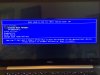
As you can see, the only options are:
Windows Boot Manager
VProRecovery **
Diagnostics
Enter Setup
Change Boot Mode Setting
I'd love to click on "Boot from USB" but it is not presented as an option!
[** Incidentally, I'd love to remove the VProRecovery thing, since I've ditched Norton Ghost in favor ShadowProtect.]
Do you have any ideas as to what I can do? Again, step-by-step guidance is what I'm looking for, since half the terminology is meaningless to me!
Thanks!
Jay -
Jay,
I tried inserting the USB stick with the Bootable ISO image for you and it worked exactly as I had outlined with the USB option.
I then rebooted with a USB stick that did not contain the Bootable ISO image and I got the exact screen you get minus the VProRecovery, which you claim is from Norton Ghost and I never had.
Are you Absolutely sure that the USB sick has the Bootable ISO image installed on it and do you have another computer in which you can check the contents of it, as it should be - 11 items containing 4 folders labelled (Boot, EFI, preload and Recovery) then the remaining 7 Files should be (AUTORUN, boo.mgr, bootmgr, bootmgr.efi, bootnxt, MASTER and Media)
If I were you I would not be too concerned with trying to remove the VProRecovery right now, just make sure that your USB stick has all the above mentioned files and folders and Nothing more!
Best Regards,
SD -
SD!
That's an excellent discovery!! No, I do not have 11 files on my USB drive -- I have one file whose file name ends with .iso. Am I supposed to "unpack" the .iso file somehow? I just copied it whole onto the USB drive, but apparently that is not the thing to do! So glad you made that discovery! Now, what is the correct process to create a bootable USB drive from an .iso file? Can you tell me?
Many, many thanks!
Jat -
You are Very Welcome and I am so glad that we were able to determine this, as you must extract the files to have a Bootable USB stick. :thumbsup:
You can make a Bootable USB recovery stick in your My Dell at the Charms screen if your system is still working.
1. Go to the charms screen and select My Dell
2. Select Backup
3. Select Create Recovery Media and follow the prompts from there.
If for some reason you do not have a working Dell XPS 15 then,
Go to the following link (see below) download the free software and follow the step by step instructions on how to extract a .iso file, then you can transfer the necessary files to a clean and formatted USB stick.
Good Luck and Best Regards,
SD
Windows 8 ISO Extractor - How do I extract Windows 8 iso with WinISO? -
Anyone try to daisy chain 2 or 3 monitors like on the surface pro? Any luck? Thanks.
-
Can anyone help with this bizarre issue?
A Dell engineer replaced my screen and System Board today
Now in the BIOS my Product Name shows up and "Precision M3800" and in the device manager my GPU is listed as a "Quadro K1100M"
My guess is that he used a refurbed M3800 System Board.
I can't flash the 9530 BIOS, although NVIDIA Drivers for the GT750M seems to install fine, albeit without changing the Device Name.
Will this cause any problems? So far everything seems to work ok, including games, but the engineer is coming back tomorrow to replace two screws, so then is my chance to get him to take further action if necessary.
(One further caveat, I'm in Thailand and neither the IT phone support nor the engineers speak even remotely passable english, so it's a little hard to explain things) -
I'd tell them about it and get them to replace the board again. They shouldn't be installing M3800 boards in an XPS 15 machine, even if the machines are similar!
-
Hi, I have tried to get this info from the Dell Community forum, but no one has replied yet.
Has anyone got a system with the 4712HQ CPU that does NOT have coil, scratchy or itchy noises?
I confirm I have a fully* noise-free 4702HQ (so, that one does exist), and I am wondering whether to play the motherboard lottery with the 4712HQ or to leave it be for some months.
(*unless you put your ear right on top of the keyboard, which is nonsense) -
Thanks for the reply
This is going to be fun, explaining this to an engineer who speaks literally no english! -
For what it is worth. I have a 4712HQ as well with Absolutely No so-called Coil Whine or Scratchy noises unless as you said. I put my ear right on the keyboard, which by the way recently Died, and is being scheduled for Ship out Depot repair.
I only had this unit for 7 months now and with the keyboard dying this soon it should show "Everyone" that if they plan to keep the unit for awhile to definitely get the Extended Service contract, as this doesn't impress me One Bit! :-/
Best Regards.
SD
Sent from my iPhone using Tapatalkadlerhn likes this. -
I've also recently read somewhere (was it here?) that extending the warranty at a later point is very expensive (almost 300$ per year I think). So, it seems a good idea to buy the computer with the maximum warranty period. Looking back, that's one mistake I made.
-
I think that is exactly right, as I cannot remember the exact amount I paid and I unfortunately do not have access to that info right now,
All I do know is, I am very glad that I did, as if I didn't then this keyboard replacement would rest solely on my pockets, as I bought the unit new on eBay yet it only had 3 months left from the original contract and I immediately extended it the max that I could, as I definitely do not make it a habit to keep on buying what's the next New!
Dell shipped out the box today, sent me an email with a tracking number, which when checked is unbelievably estimated for a tomorrow delivery, so, so far I really cannot knock their service at all yet like I have already said, I am not too impressed with the quality of parts they seem to use.
I am very sorry to hear that you did not or could not buy the extended service plan as it seems with this particular unit one really needs it, especially if it is one they intend to keep awhile.
Maybe an outside service center like Square Deal would cover your unit for a minimal cost...just a thought!
Best Regards,
SD
Sent from my iPhone using Tapatalk -
Are there any better touchpad drivers? Mine is Dell touchpad driver at version 17.0.15.84 which seems to be the latest.
PS: fwiw, A06 seems to discharge the battery faster, not easy to prove it though (w/o spending lots of time)! -
Allow me to echo many of those on this thread, the XPS 9530 is junk. I'm sitting typing on the XPS after a visit yesterday from a Dell appointed engineer to replace both the system board and display unit. The nvidia GT 750m failed completely after several weeks of increasing coil whine, the transistors eventually failed. As the engineer stated, 'Dell know about it, nVidia know about it'.
The XPS is now on it's third display unit, the previous two replaced because of numerous dead pixels. Sadly the apparently brand new unit is even more defective than the previously replaced unit, I'm now looking at a display with at least triple the number of dead or stuck pixels.
The on-site engineer then proceeded to role off a whole list of known faults with the XPS that Dell have no realistic intention of addressing as this would require substantial re-engineering and that's just not going to happen. Basically the XPS is Dell's attempt at a Macbook Pro built down to a cost but sold to the general public at near Apple pricing.
I'll be calling Dell to go through the fun of spending half an hour convincing some Dell representative that I need another on-site engineer to visit to replace the display unit that they've just replaced. That's three system boards and four display units for an apparently premium product.
As soon as this is done it'll be listed on eBay starting at 99p. I'll never touch another Dell again. -
Sorry to hear that you have had so many problems with your machine. What were the known faults that the Dell engineer listed?
-
I use the generic Synaptics driver (v 17.0.19.0) and I think it's a bit better.
-
All this Sad & Disgraceful News and what has Shamefully happened to you is very Disheartening to say the least and I am Truly Sorry for your very Ugly ride with Dell and their so-called State-of-the-Art XPS 15 (9530) computer, yet I just Sure Hope that you intend to be Totally Up Front & Honest in your intentions to sell it on eBay, as there are innocent Buyers out there that spend their Hard Earned Dollar$ and Definitely Need to Know All of the units issues before Rightfully Bidding!
Best Regards,
SD
Sent from my iPhone using Tapatalk -
That would be very stupid, giving the fact that almost every motherboard suffers from coil whine!!! I have had three XPS and 4 different Motherboards. Only one wasnt afflicted with coil whine that much... So, if i were you I would never do it!
-
Hah, that's funny. But really, we don't have many options:
A) Live with it
B) Ask for a refund and buy something else
C) Ask for a motherboard replacement. If C) doesn't work, repeat a few times, or go to A) or B).
My stats are somewhat similar so far. Had 5 motherboards in 3 different XPSs. One of them is not noisy (that one's a keeper). Now playing the lottery for my other system.
XPS 15 (Haswell) Owner's Lounge
Discussion in 'Dell XPS and Studio XPS' started by mark_pozzi, Oct 23, 2013.


