Problems? See this thread at archive.org.
fwiw take out an extended warranty with Dell, give them one more chance after that then unleash hell until they replace it with a new laptop!
If they let you do that with it being an old model?
-
I bought it in the US and I live abroad, and here they can't give a replacement laptop. I already tried that.
The stupid thing is that they once had to replace the motherboard, daughter motherboard, screen and casing, all this because they can't replace it with a laptop, so it cost them even more. I practically received a new laptop -
What issue do you exactly have? No POST? I killed my second Motherboard too. This machine is a fail-by-design and has some serious Problem with EC/BIOS. Even on youtube there are several Videos about those problems with this laptop model
Gesendet von meinem SM-G930F mit Tapatalk -
Yes I know. That's why I don't touch the bios at all and even avoid some driver installs. The bios is just so fragile.
When the laptop works fine, it's a joy to be used. -
Yes, this is the only thing you can do.
My problem was that the standby/sleep mode stopped working, so i "had" to try out some BIOS settings :/
Gesendet von meinem SM-G930F mit Tapatalk -
If this is to me, I have no nVidia card anymore, it's completely gone. No sound from the speakers. And the machine won't recover from hibernate or sleep, only a full shut-down.
-
Wow, a defective nvidia card is really bad :/
I had the same issues with recovering from sleep...
Gesendet von meinem SM-G930F mit Tapatalk -
I installed Creator's Update. Working fine. There was one unexpected improvement. Before, when I enter the bitlocker pin on boot, it was really slow registering the keys after they had been pressed. With the creator's update, it now works properly.
Touch wood, no major hardware issues to date - it's been my bread & butter machine (used pretty much daily) for over 3 years and battery wear is still at 3.9%, which is impressive. Only problem I've had is with the keyboard - not all keys register all the time (particularly the T), so I use an external keyboard when not traveling. Generally, other than it being a bit heavy, it's been a great machine and I have been very pleased with it. Sorry to hear that others have been suffering from reliability issues. -
There are 3 problems I encountered with this laptop after 3 years living with it.
- Battery got swollen to the state that it even made my touch pad popped out from original position and cannot use touch pad again >> Solution: take the battery out immediately and consider replacing, but I doubt it will not happen again due to bad original battery design from dell (no plastic made hard shell that can prevent swollen) and my intense working environment so I will not replace and use this laptop on AC power forever.
- Left speaker failed after 1 year of using (out of warranty), not replacing also to save budget for external speakers. I read many reports on google that this 9530 model's speaker always got failed when playing max volume for a short time and need replacement so no need to replace due to bad quality that speaker provided.
- Laptop GPU -750m throttles right at the time it reached 80 degree C, make games unplayable. I read many reports showing that other laptops from specific brands like ASUS, MSI, Apple they only throttle GPU when 85 - 90 degree C, not low like DELL. I even disable intel's turbo boost to reduce heat for the GPU and it still throttles but somehow playable a little bit. Is there any vbios or modded bios that can alter temperature limit of gt750m ? If yes please support me. -
My 9530 is awaiting it's 5th motherboard!
Many other parts installed almost everything except QHD screen.
Last year I drove though 40 countries and had DELL replace motherboard and keyboard in Berlin on the street, then motherboard and palm rest in Manattan outside hotel elevator, then at a bar in Kingston Jamaica another motherboard with back casing, then at an airport car park a SD card reader board which caused battery harddrive SSD and keyboard to malfunction! So now I'm documenting it all and putting it on social media! They refuse to replace unless I return to South Africa! Seeing as it cost $2500 I'm pot committed and will definitely purchase extended warranty in 6 months when my 3 years expires!! Even if they give me a new unit! -
Wow ok so I believe your story proves this is not meant to be a "travel" laptop
-
Has anyone installed the fall creators update on this computer? I installed it and everything seems to be functioning properly with one exception: Microsoft Edge has an intermittent lagginess that makes it unusable-- this problem is limited to Microsoft edge as I do not have the problem using other programs including Google Chrome at the same time. Wondering if this is a issue with the XPS 15 in general or if it is unique to my situation/perhaps a corrupted install…
Thanks in advance,
N123 -
Do a clean install then as it is fine here and I didn't use the upgrade path as it is inherently buggy. I let it update my games rig, 1st off the internet was broken, then various other bugs and lagginess.N123 likes this.
-
That's the biggest flaw in the Windows 10 regular update scheme of two major releases per year. Anything major should be done in a clean install - an in-place upgrade will be nearly impossible to make bug-free, especially with the high performance gear that we've got. Back in my desktop days, I used to do a clean install even when swapping my graphics adapter for a better one.
Don't get me wrong - a clean install is great, and gets rid of all the junk that one inevitably accumulates as time goes by, leaving you with a lean, mean fighting machine. I usually do it every six months or so anyway, so Windows 10 works for me. For people that can't spare the time and effort, this is a major pain. They should look at LTSB options. -
I installed the Fall Creators update on a 9530 and everything is fine. I don't see any lags with Edge (after installing uBlock). Clean installing from scratch should be a last resort: I'd look into other configuration areas (esp video drivers) first.
My Win10 install on the 9530 uses stock Win10 except for the touchpad driver. I avoided any newer nVidia or other drivers other than those from Windows Update and I disable hibernation, Rapid Start, Superfetch, Prefetch, etc. to reduce the chance of issues and resource overhead: so far it seems to be working.
Let us know if you figure out the Edge issue. Good luck! -
After much research on the matter, I confirmed that this issue is due to a bug with Dragon dictation--this software causes Microsoft Edge to become unusably slow/lagging when launched; this abnormal Microsoft Edge behavior resolves when Dragon dictation is closed. There are other users complaining of this problem--hopefully Nuance/Microsoft fix this issue shortly…
-
My trackpad has started lifting up (left side).
From my research it is caused by the battery underneath - swelling and pushing the trackpad assembly up.
I looked around the Internet for a replacement.
Dell part number 7d1wj (91Wh) 11.1V 8000 maH.
I would say it is next to impossible to (trust) all the sites that have "compatible" batteries for this laptop.
Most are coming from China - and a lot of the "different" sites actually look like it is the same exact company - using a few different www addresses and store names !
When reading reviews from those who bought replacement batteries it is clear that they are SUB-standard - and "fake", where they are either duds, don't have the specified capacities, or do not last long and become early garbage.
That left me with no option but to call Dell.
They only have "refurb" batteries available, with a 90 day warranty - at a high price.
It is costing me 159.99 CAD, plus shipping/tax = 197.74 for a refurbished battery.
I've had a lot of trouble with this 9530, and had many replacements for a myriad of issues.
I know that batteries wear out, but I expected better quality from Dell.
Are there (any) reputable, high-quality batteries out there (other than going to Dell like I am doing) ?
UPDATE:
I receive my replacement battery from Dell today - [19dec2017] - 5 days after my order.
When I opened up my laptop to remove the old battery it was pretty clear that the old battery was bad.
It was swollen up in many different places - almost like a bunch of compartmentalized balloons had been filled up.
In any event, the replacement battery is now installed - and working.
Better yet, the trackpad has returned to its former position - being flush with the surface of the laptop again.
The trackpad buttons still work, too.
I sure hope this replacement battery gives me better service than the one that came with it !!Last edited: Dec 19, 2017 -
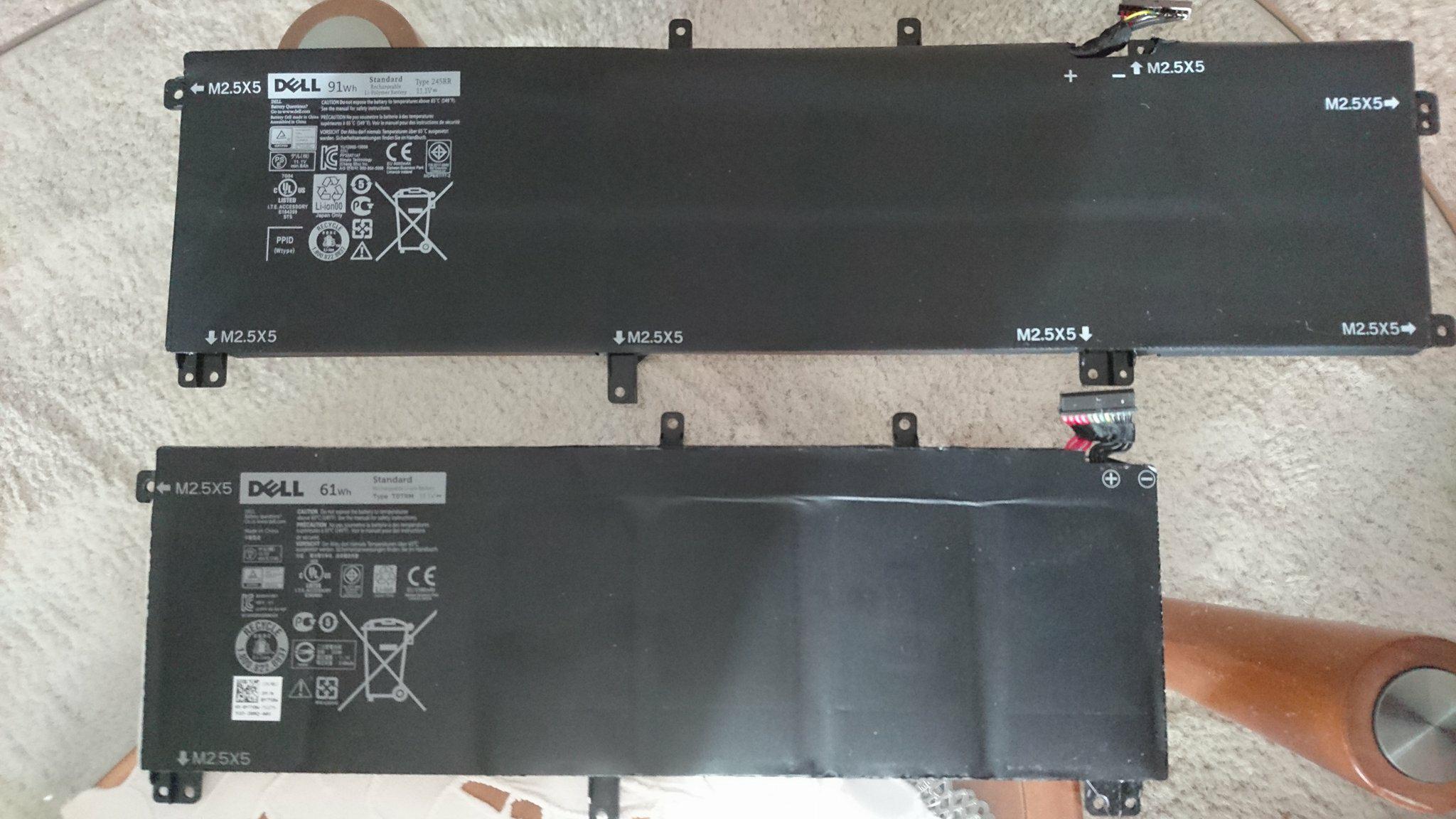
I just recently order mine from link bellow so i can make a few pictures of it when i arrives and see if its fake.
https://www.ebay.com/itm/401000622897
Tryed undervolting and it really does wonders together with applying new TP . It reaches 80c, but keep in mind Fan is "barely" spinning@3000rpmAttached Files:
-
-
One question for those who followed 9530 threads over time.
Did any of you had issue like this from attached photo ? Two years ago i got a new screen on warrany cause of this issue, and a new motherboard cause of the power ON issues.
It happens if a notebook is power off for a day or two.
So even with all new components ,here i am two years later with the same issue but out of warrany.
I does go away with time. Lets say, after a day of notebook running it becomes almost unvisible.
Have you guys had any luck with the new screens ?Attached Files:
Last edited: Jan 6, 2018 -
-
Received it the other day. Runs fine for now .
It takes quite some time to charge up, but since my old one came to ~40wh it's a pretty significant size difference.
What are the charge times for you guys with original 91wh batteries?Attached Files:
-
-
Not sure if Dell command supports charging profiles on the 9530 but it may be worth a look. Charge time depends on factors like the charger used, if the laptops on or internal temps so comparing isn't the best plan

-
Hey people, a friend of mine has a 9530 with bios A04. I did a clean install of W10 on it and I was wondering if there is a safe way to update to the latest bios.
From the horror stories I've read about this laptops' bios updates, I think I'll avoid dell's update executable.
If one has the hdr and rom files, is it possible to use a newer, more reliable version if the AMI flashing utility?
Also, is there any way for the dell bios updater to be forced to run without battery present? The battery on this laptop died and shows up as not charging. Dell's updater states that a minimum of 10% charge is required for the update to proceed.
Thanks in advance! -
Ive got a brand new battery on warranty even tho my laptop is over 3 years old. I wrote in Dell´s facebook page and a service-person msg me and sent me a new battery.
-
Has anyone heard something or noticed anything about the Microsoft fix for the Intel bug?
-
If you can answer yes to the following then flash the BIOS to a new one.
- Is it broken
- Do you need a feature of a newer BIOS
-
The XPS 9530 doesn't appear on this list: http://www.dell.com/support/article...cve-2017-5754-impact-on-dell-products?lang=en
Afaik, you need an microcode update to fix the Spectre 2 vulnerability. Kinda frustrating if Dell won't bring out an update for older Models. The other vulnerabilities can be fixed with windows updates/app updates. -
Has anyone edited their BIOS to change NVIDIA settings? I have an unlocked version of A09 BIOS but there are no settings for the NVIDIA GPU anywhere in the new menus.
-
I had the unfortunate experience of damaging the ribbon cable where the msata drive is located .
Since the ribbon has damaged, the wireless card appears to be inactive.
Just want to confirm if that replacing the ribbon (IO In Out Put PCB Flex Cable) will resolve the issue as I am unable to find any information to what the ribbon is used for, -
I just got a pop-up that there are some Dell updates for my laptop.
The big one is Bios version a10 (I am at a09).
I have had extremely BAD luck with doing any Bios updates on my (many) 9530's in the past.
In other words, it made 2 of them unstable, completely BRICKED another, and magically worked (to a09) on the one I have now.
I am going to take a lesson from my past and SKIP even trying to update the BIOS to a10.
I have no more warranty, and my gut feeling is that I'll have issues if I try.
If anyone out there is brave-enough to attempt it - please post back your success/failure at doing so. -
Don't do a BIOS update without a warranty unless you are prepared to risk it.
-
I have successfully updated to Bios A10. This update is designed to help protect against Spectre, so it is highly recommended that you install it. I had no issues other than Windows Bitlocker detecting a hardware change during reboot and requiring me to input my passkey.
Other recent successes:
upgraded wi-fi card to Intel 8265 (much better wi-fi and BT connectivity)
swapped out fans (they were driving my girlfriend nuts during Skype sessions)
changed TIM to Thermal Grizzly Conductonaut and new thermal pads (my fans rarely spin up now!!!)
Next project:
Swap out my QHD Touchscreen panel with a newer one (I've had bright spots for a while and they drive me nuts)Last edited: Feb 27, 2018 -
Can You show temperatures of your laptop under stress test and without any load at CPU and GPU?
I also want to use this thermal interface, but can`t decide if this tim worth it to use or not -
Also done a successful A10 update.
Is that TIM a liquid metal one? A haven't had balls to do it.
You should try undervolting. -0.085v further removed 10c in my case.
Running also ac8260 since it came available. Never had any problems with it.
Update on ebay 91wh battery. Runs fine 2months in. 3%wear which is fine by me. -
- Idle temps were taken without fans running.
- Stress test performed on CPU and FPU only
- I had to cut the stress test a little shorter than I would have preferred, but this should give a pretty good picture of what average values you'll see
- Sorry, no values from before liquid metal application
Not sure how to insert jpg's to this thread. Will edit this with more info in a bit. Gotta pick up the kiddos.
-
Yes, Conductonaut is a liquid metal (Gallium and Indium). There are a few good tutorials on YouTube. I recommend watching the Gamers' Nexus videos for the best results. I used 2 applications of clear nail polish to seal off capacitors and resistors surrounding the die. I find this to be much more of an elegant solution than using kapton/electrical tape as suggested by some notebook modders. I have also used this method successfully on my delidded 8700K CPU.
When I replaced my TIM, I noticed the DELL stuff was very dry and flaky. So I'm sure y'alls could use a refresh too!
Here is a link to the thermal pads I used. They may be a bit thicker than OEM, which really shouldn't be an issue as they compress under pressure. Just cut to size. https://www.amazon.com/gp/product/B00UYTTMNI
For undervolting, which application did you use? If using Intel Extreme Tuning Utility, is there an easy way to revert back to original voltage settings if/when encountering a BSOD? When undervolting through the BIOS on other systems, reverting back to working specs after a crash is fairly easy. I would hate to be stuck with a bricked computer after undervolting through an application. Please walk me through your process! Definitely interested!!
What final max voltage are you at? Also, which Windows power profile are you using (Battery Saver/Balanced/High Performance)? I know that power profiles can affect voltage settings. Does undervolting apply to all power states or just one?
Also, another successful recent fix I forgot to mention:
Ebay DC Power Jack Harness Cable (my power adaptor wasn't fitting snugly)
Last edited: Feb 27, 2018 -
Whoa, your results looks amazing! On my laptop i have temperature 60 C minimum and fans work almost all time. For how long You use this thermal interface?
Also where did You buy new fans? My sounds terrible and i want to change it. -
Yeah, I'm using Intel xtu.
In case of a crash which will surely happen with finding the optimal voltage, the XTU detects a crash and reverts to stock voltage on next boot., so no problem there.
Using all the profiles (from battery saver to best performance, no problem there, last update W10).
It's applies to all power states
![[IMG]](images/storyImages/25c777dd1a4a9b6618115c540a812dde.jpg) Last edited: Feb 28, 2018
Last edited: Feb 28, 2018 -
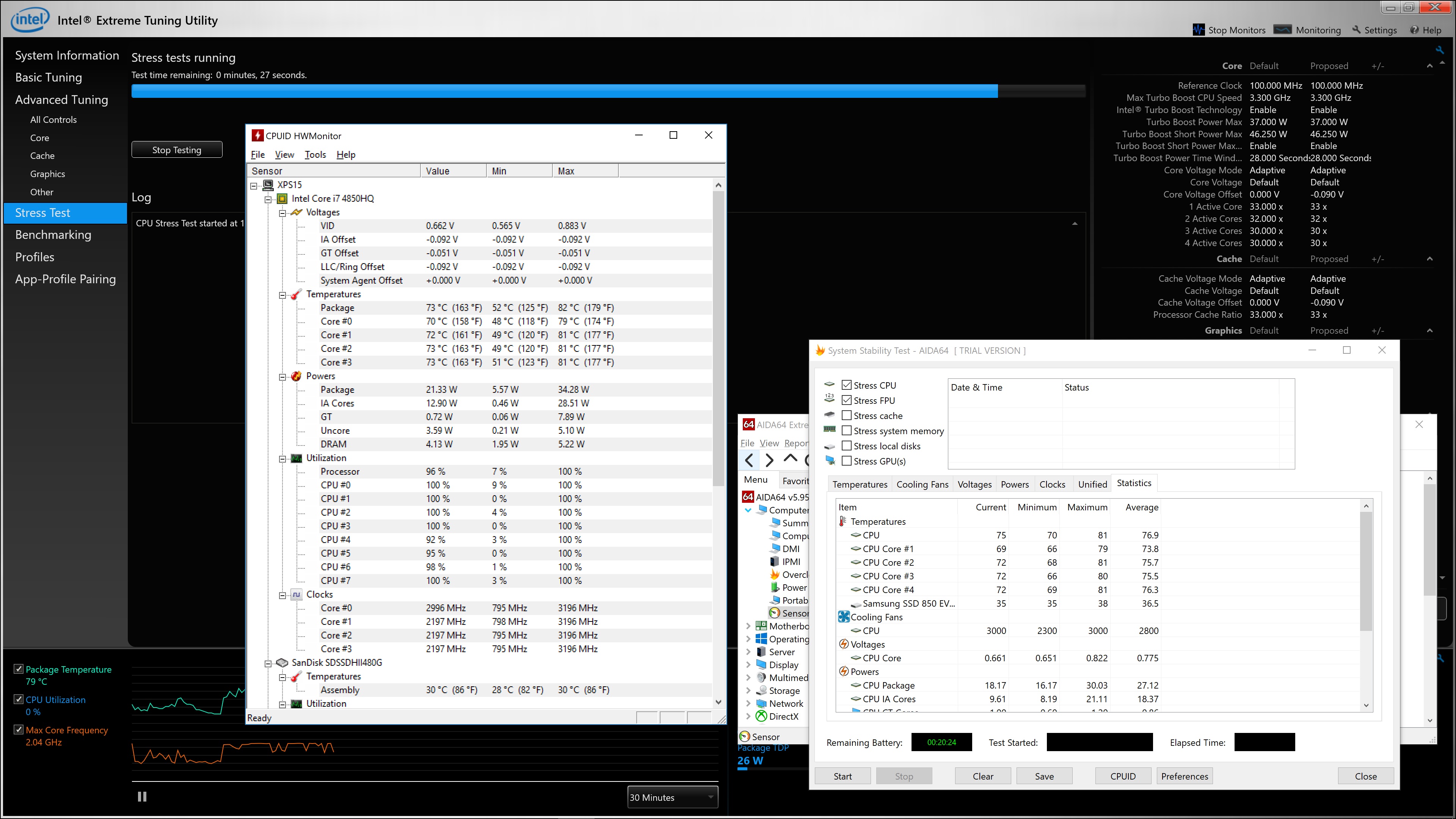
Check out these values.
Idle w/ Conductonaut
Conductonaut Stress Test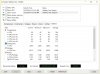
Conductonaut & -0.100V core Stress Test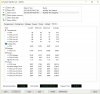
LOVE LOVE LOVE this combination. My fans are staying super low. Less heat radiating down into my lap and through the keyboard (but still some). I believe the greatest benefit will be prolonged battery life. I used XTU to adjust VCore, and Aida 64 for stability testing.
I've been using the Conductonaut on my 9530 for a couple weeks now. About 3 weeks on my delidded 8700K.
Fans were purchased here: https://www.amazon.com/gp/product/B01N9SYL94 (legit OEM spec )Last edited: Mar 1, 2018 -
BIOS upgrade to A10 went fine here on two 9530's (did the Fedora XPS using Rufus). YMMV but given Spectre/Meltdown this may be worth the risk.
-
Well, I got tired of the constant Windows 10 notifications to update the Dell BIOS, so I took the plunge.
I am now at A10 - thankfully - with no issues.
I must say, though - that from my past bad luck in performing BIOS updates, my heart was pumping hard throughout the process.
Even more so when the small update utility window would sometimes show a status of "not responding".
Worse yet, was when the FANS started running at FULL speed !!!
I thought surely this thing was going to be toast.
It was a small ordeal, but thankfully it worked - and I did not end up with a bricked pc....(this time).
powerslave12r likes this. -
I just bricked my M3800 or XPS 9530 by updating Bios from A09 to A11. It finished copying but stuck when reprogramming BIOS at about 18%. Fan at max for almost an hour and I was stupid enough unplugging the power and battery because it stucked for almost 10 minutes. Hold Right Arrow and plug the power button will turn the computer on but nothing in display. Just high speed fan. I have spend $80 for shipping and re-soldered the bios chip (8 pins) near the southbridge (WINDBOND chip) but still cannot revive it.
I reloaded the A10 because 2 out of 4 USB ports keep connect-disconnect sporadically. I rolled back the bios to A09. It worked for a while and Dell A11 was available and killed my M3800.
Now it does similar things but will be off by itself after few minutes but cannot detect or boot to any recovery bios USB drive I tried. My second M3800 is still with A10 bios and works just fine. This one is revised model with Thunderbolt 2 and 3 USB. No problem in USB ports and temperature is normal at about 50C in iddle and 70C full Load with 22C ambient temperature. During heavy game like WRC7, it will throttle down to 900Mhz and drive me nuts. 3DMark11 or 3Mark Vantage do not cause throttling but Heaven Benchmark3.0, Starcraft 2 and WRC7 hit it hard. -
Hello 2 questions
1) Anyone has UI lag using Windows 10 April Update using the 4K version ?
2) Anyone with M3800 bricked his machine during updating the BIOS from A10 to A11 ? -
Anyone get this computer to update to the Windows 10 October Update 1809? It's still not being offered to my computer....
-
Strange. My 9530 is on 1809 since Oct and I'm not having any problems.
N123 likes this. -
Hi!
So I have been having problems with my 9530 for over 2 years now.
The main issue that i'm having is that my laptop goes into a state which it wont recover from (Just turn on...)
I've been able to keep using my laptop by unscrewing the back, Plugging out the battery, Spam the on button, plug it back in and hope that it works.
But i'm now up to a point i need to do it every time i want to use my laptop. Very annoying.
I've also flashed every bios possible, even modded some (enabled hidden menu's) and changed various settings but with no result.
Is there anything i still could try?
Sending it in to dell to replace the mobo is not an option anymore cause it has been done already and is out of warranty.
I'm looking forward to any responses!
Thanks! -
You've tried replacing the battery?
-
Yep, Im on my 2nd battery as my first was swelling just a little.
Tried swapping them but problem persists with both unfortunatly -
I wonder what the lifespan is of these computers.
I often think that mine may be on its last legs and I should probably be backing it up or buying a new computer soon.
It has been a very long rough ride with this laptop.
I am not sure I will be buying another Dell but there really are not that many alternatives.
Hope that you can fix yours soon.
I have not had those problems with mine but you never know... tomorrow may be different.
Sent from my SM-G965W using Tapatalk -
I don't want to cheer too early, But I may have fixed my not waking from sleep/standby problem.
The temporary fix is to reflow the PCH located in the yellow box in the picture.
This seems to have fixed the problem.
I don't know how long it will last, But we will see.
Finally this laptop is somewhat useful again.
![[IMG]](images/storyImages/B1K1pYO.jpg)
-
Update, this computer is strange. I turned of Secure boot in BIOS and now it works. I always had secure boot on before and now for some reason it decided it wanted to have secure boot off.
First real issue I got with my Dell now. Its strange but when I boot up my computer I only see the Dell logo nothing else happens, then I can press F12 to bring up the boot menu and select windows boot and the computer starts normal.
I have done every boot repair there is, updated BIOS to A11, BIOS settings is correct AHCI and uEFI, the boot string is correct compared to those Internet guides.
Im scratching my head here, I have never seen these before, the only thing left is to reinstall windows but I dont really want that yet.
Anyone with any idé?Last edited: Mar 11, 2019
XPS 15 (Haswell) Owner's Lounge
Discussion in 'Dell XPS and Studio XPS' started by mark_pozzi, Oct 23, 2013.