 Problems? See this thread at archive.org.
VIP discount?
-
I ordered the top tier from the outlet on the 26th. My status said it shipped on thursday. Today when I checked the fedex tracking, it is laying at a fedex facility 13 miles from my house -.- . It says schedule for delivery on monday at 10:30 AM ... can monday get any sooner?!!!
EDIT: Its a refurbished xps 15 top tier... i hope nothing wrong with it! I got it for $970.89 -
I ordered the high-end XPS 15 yesterday at about 1pm PST from Costco, and I woke up this morning with a notice saying my order had shipped! I have a FedEx tracking number that says shipping information received and package is expected to be received from Mt. Juliet, TN (outside of Nashville).
I know Dell has a distribution center in TN, but I can't imagine my order would ship this quickly, especially since the Dell site is showing an estimated ship date of 4/3/14.
I know I should be grateful my computer has shipped so quickly, but I am actually somewhat apprehensive. I can't imagine they would ship a returned unit as new, but I don't see how the computer can be shipped directly from Dell without any sort of delay unless it was previously manufactured for someone else and returned. Other threads I have found suggest orders from Costco get processed by Dell and the wait should be similar to a laptop ordered directly from Dell.
Should I be concerned? Costco is no longer offering the laptop on its site, so maybe there were some leftovers from a previous batch that Dell wanted to get rid of? Maybe they reserved the units with the worst coil whine for us discount Costco shoppers. (just kidding).
-
I bought a refurb from Ebay. Seller assured me it was unused (cancelled order) and with no marks. Arrived with a huge scratch on the display + when I called Dell about the display, they told me, before I explained my case, that "I'm afraid the cooling on this laptop cannot be fixed". So an unused, new laptop that has a huge scratch _and_ was clearly returned (multiple times likely) due to defective cooling. Oh did I mention the unit arrived with the wrong power adaptor? Funnily enough, when I wrote the seller, he accused me of "slandering" his company. Returned the unit and bought a brand new one at a higher price. Guess what? That one also arrived with a faulty display + huge coil whine.
What's the morale of this story? It doesn't really matter if you buy a refurb or a new one. You are very likely to get a defective unit anyway, because the QA these days is non-existent. Just be glad you got the on-site NBD warranty. This way I can enjoy my new laptop while waiting 2 weeks for the "next business day" repair. -
Well you bought it from ebay.. and i bought it from dell outlet.. hopfully ill have better luck? -
Did you really get the $2299 top tier model for $970? That is over 55% off. Did you mean $1970?
-
Yes I did. It was on sale for 1699 as a certified refurb.. i used the 25%disc+10%disc(email 1 time only)+my corp disc in the end it came out to be 970ish
-
Has anyone found a reliable anti-throttle mechanism? Does everyone experience this issue? I wish it didn't throttle all the way down to 150hz, but rather slowed down until the required temps are reached
-
Yeah I got something similar with my L702x, paid £720 for it I think, top level one at the time too.
-
Replying to myself in case someone had the same problem with me. It looks like if you just install the latest driver on the latest kernel and run nvidia-xconfig the Xserver will fail to load. While I was trying to solve the issue it appears that there is a confusion with the driver module name. No matter if you are trying to make the nvidia gpu to work using just the latest drivers, or trying to make optimus work using the bumblebee tool always keep in mid that in some cases the name of the driver should be "nvidia-current" and not "nvidia" (also some people have reported the opposite). In my case I didn't want the Nvidia gpu to run the xserver. I wanted the Intel iGPU run the Xserver and the Nvidia dGPU to run CUDA and only CUDA. This is achieved extremely easy: You just install the Intel iGPU drivers (usually thy come by default with the distribution) and you just enable the Nvidia dGPU with the following script: GPU without X windows . Keep in mind that you may have to replace this line: "modprobe nvidia" with this: "modprobe nvidia-current". Also keep in mid that you don't need a running Xserver in order to run this script.
-
I think you misunderstood me -- I barely get 2 hours AND with gaming, it's even worse. We're talking like an hour. I wish it was at least 2 hours for gaming, but I'm talking about battery life in general. It gives me such a headache. My brightness level is all the way down. I don't know what else to tinker with. Any suggestions?
-
So 2 hours just browsing the Internet etc? Hmm, that does seem low. Mine can go about 6-7 hours with normal use. Your battery is 50% less capacity, so technically you should be getting around 3 hours. You might try getting Dell to send a replacement.
-
Yeah man, I didn't mean to scare you. Technically, mine was purchased from Dell Outlet too...But yeah, I think buying directly is definitely safer.
-
Does Dell send replacement batteries? I would hate to send my entire system back to them. That sounds like a headache.
I might try playing around with the battery life a little more and see if it's more varying than I think. The time that shows on the battery life can greatly differ when I slow down a certain task or something. I'm just going to use it regularly and see how long it takes.
On another note, I am loving this thing!
What's everyone else doing on their XPS 15? -
You were 100% correct on this - I wanted to give it some time to be sure, but after resolving my graphics driver issue and disabling Rapid Start, I am seeing ~6s for resume from hibernate with the exact same hardware config (with 6+gb in tow). I don't know specifically what was causing the lag, but am very happy that it's back to "normal". You've also restored my faith in the Crucial M500 - as I was almost positive it was the source of my issues.
-
On my mid-tier, I'm getting about 3.5-4.5hrs on a full charge during work - software development, office apps, internet browsing, wifi and bluetooth enabled, display at ~40% brightness. I had complained to them that I was getting less time than the laptop it replaced, but their response was basically that it is a high performance machine, and that is close enough to what is expected. Also, I don't think they would send out a replacement battery - they would probably send a tech as it is not supposed to be "user serviceable" - but that is just a guess.
-
It's not a coincidence.
In order for the cooling system to function correctly while the system is stressed, the laptop has to be located on a solid and stable surface. Lap use is probably fine for regular web browsing, etc., but gaming requires proper cooling, which can't be achieved when the machine is anywhere but a solid surface. -
lol
Just wait until it arrives! -
I was wondering if it is possible to swap out the battery? I purchased the mid-tier version. I want to swap in the 91whr battery. Thanks!
-
I'm interested in this topic too - just created a wiki article for it - hoping teh_crab gets us an update on his progress soon...
Battery swap - XPS 15 Wiki -
Are you running Win7 or 8.1? 8.1 has been shown to get noticeably better battery life partly because they've eliminated Aero and also done some work under the hood with system timers (just as OS X Mavericks did.) Also, Re you running the factory build or did you do a clean reinstall? If you did a clean reinstall, did you install all of the required drivers? Is there anything in Task Manager showing abnormally high CPU or disk utilization when idling?
-
The smaller battery isn't 50% less, it's 30% less. The larger battery is 50% larger than the smaller because you're measuring the percentage of a smaller number, but that doesn't work going the other way. So the smaller battery should deliver a bit more than 4 hours under your usage profile.darrenham likes this.
-
Nice!! So you were in standard mode and switched to UEFI? Did that work without having to reinstall Windows? Glad it worked out whatever it was, especially since I wasn't especially confident it would make much of an impact.
-
It's not physically possible to do this. The 91whr battery is quite a bit bigger than the 61 one. Hence the reason for the top-tier not having a 2.5" hard drive bay.
-
I noticed an interesting behavior regarding game throttling. When my laptop is on a table, BF4 gives 30-50 fps (with nVidia recommended settings) at 1600x900 resolution. I left it running for almost 30 minutes without any issues. I had a suspicion that throttling happens only if the laptop is not on a level surface. So, I experimented whether blocking the vent triggers it. I couldn't get the throttling to trigger that way. At one point, I had the laptop at an angle (to simulate the angle it would be in my lap). I made sure that nothing was blocking the vents. Just before I kept the laptop at an angle, it was running BF4 for almost 30 minutes on the table. Within less than a minute of keeping at an angle, the frame rate dropped instantly to 5-8 fps! I have attached the HWInfo log while this was happening. You can see the instantaneous frame rate drop at row 1129.
At this point, I can confirm that throttling happens only if the laptop is not on a level surface. But I can't confirm whether it has anything to do with vents getting blocked.Attached Files:
king1153 likes this. -
-
Something about a solid surface...
-
3 more weeks till my ETA is here but I'm hoping this week I can get a possible update and it will come much sooner than that.
-
Any idea who does the actual delivering in the UK? I regularly have nighmares with loads of them so I'm hoping it's someone who'll allow me to pick it up from a depot if it fails once.
-
Wait a minute, that means that I can't use a laptop stand like this one without throttling?!
![[IMG]](images/storyImages/090309_rg_astand_01.jpg)
-
I don't know if I overlooked something. But that is what I had observed. May be when it is at an angle, I am blocking something. While this happened, the laptop was more or less in air. The only part that was in physical contact was the area near the display hinge and the edge opposite to it.
I had called Dell support yesterday. They spent almost 2 hours through remote desktop troubleshooting. They will be sending a person this week to replace my motherboard to see if that will fix the problem. -
Can someone please confirm for me. I have read that the top-tier model has a mSATA 512GB drive whereas the mid-tier has a fast SATA has it does not have the larger battery so can support a larger drive. Is this correct? As if it is then the mid-tier is going to be a faster machine to buy, excluding the fact that it has a smaller battery. Also if this is so, it is possible to remove the mSATA in the top-tier and put a SATA in its place, putting in a smaller battery also. I mean with time the price of the SATA is going to keep coming down and also the price of the battery is too. I use this machine for compilations of Visual Studio Code and also for converting video files from one format to another to storage speed is an important factor to me. I don't use the laptop on battery a lot as I tend to use it in the office, where it is plugged in.
-
UKMail, if you get the tracking number you can stop the 1st delivery attempt and collect from the depot.
Take the correct ID or you will be leaving the depot without your laptop.darrenham likes this. -
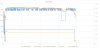
Hmm, I tried to recreate this using FurMark (high-res) and it seems that I can. Its weird because lifting the laptop caused a reduced temperature, followed by increased clock speeds - which makes sense since air intake is easier. The weird thing is, soon after this the GPU throttled to 135Mhz again. This is a really strange behavior...
The large (1000Mhz) drop in CPU near the end is due to changing power plans. The small temperature drop and GPU speed increase near the very end is when I lifted up the laptop (with my fingers under the screen hinge)...and you can see the quick throttling. The x-axis is in minutes.
-
It's entirely possible to do this if you remove the 2.5" drive and its bracket, running only an mSATA SSD. But there's the matter of obtaining the 91 WHr battery from Dell Spare Parts, which many people in a few different countries have tried, and thus far none have succeeded.
This has already been beaten to death in both this thread and the M3800 thread. The top-tier model comes with a 512GB mSATA SSD and the larger battery. The mid-tier comes with a 2.5" hybrid hard drive (i.e. a spinning hard drive with an onboard 8GB cache) as well as I believe a 32GB mSATA cache module which is used as an additional cache courtesy of Intel Smart Response -- and the smaller battery in order to accommodate the 2.5" drive. The mid-tier is absolutely NOT going to be a faster machine because it's still primarily a spinning hard drive, not an SSD.
If you buy the top-tier version, you technically can remove the larger battery and buy the smaller battery as well as the required SATA bracket and ribbon cable to fit a 2.5" SSD. I know that someone has already gotten the SATA bracket and ribbon cable from Dell Spare Parts (can't remember the part numbers), but getting the smaller battery might be tricky. Also, you don't have to remove the mSATA SSD even if you do want to install a SATA drive; you can have both. If you look at the Owner's Manual for this system on support.dell.com or the various pictures in this thread and the M3800 one, this will all make a lot more sense, fyi. -
I'm running Windows 8.1 -- the factory build. I WAS considering a clean reinstall. I'll have to take another look at my Task Manager to verify that there isn't anything funky going on. I wanted to thank you for your response. You've been such a great help in answering my questions about this system.
-
I intentionally bought the mid-tier model so that I could have the 2.5" bay in addition to the mSATA. I knew I was going to sacrifice some battery life, but the storage capabilities were more valuable.
-
I notice the intel GPU clock speeds default values 400mhz, it sits at 600 minimum no matter what power saving options I try, even going to battery will only show a drop to 200mhz for a few seconds then back to 600.
I guess this isn't helping battery life either.
If anyone wants to check I used GPUZ to see what is going off.
I have tried the latest intel (manual install) and it is still the same.
I may contact dell depending on feedback here. -
There is no way that Dell Support will have an intelligent response to a question like that; you'll either get something that doesn't make sense or something that the rep simply made up and is therefore likely to be wrong. I can't check my own right now, but just because you can't get it to drop to 400 doesn't mean something is wrong. For example, maybe running at 400 doesn't happen if it has to drive the QHD+ panel because that number of pixels can't be handled at that clock speed. That's a total guess on my part, but it's just an example of a possibility. Since you don't really go into any detail about what OS you're running and what you've tried to test this, it's hard to say anything definitive even if we did know more about how Intel's dynamic GPU clocking works, which most if not all of us won't.
-
Just got in my XPS15 9530 (top tier model). Pretty solid overall, but just discovered that the touchscreen is very intermittent-- doesn't work most of the time.
Saw some posts on this earlier in the thread-- any recent updates on this? -
Install the touchscreen firmware update on support.dell.com. If you're one of the few unlucky ones, it will brick your touchscreen entirely and require a replacement display from Dell. But if not, it will fix that issue and also make your touch pad work better, particularly with two-finger scrolling. It's odd that a touchscreen firmware update affects the touchpad, but Synaptics does make both devices, and multiple people have confirmed the touchpad improvement, so it doesn't appear to be a placebo effect.
-
You're welcome! I try to do what I can.
-
I was actually hesitating to install that firmware update because of that issue. Kind of scared...lol.
But when you say "brick" do you mean that the touchscreen just doesn't function at all? -
Yes. That is what is meant by bricking.
-
I have made some comparison between my original system and replacement system.
The screen of original system seems a little brighter, white seems more white.
There are no difference in wifi performance between the two XPS systems, but I don't understand why when I exchange files between an XPS and my desktop system, that uses a Linksys AE1000 (only wireless N) transfer speed can reach 20MB/s while between the 2 XPS max transfer speed is only 10MB/s.
(The Max transfer speed changes depending on which system is used as a router)
Ram: original system uses Samsung modules, while Replacement uses Hynix modules
Webcam: this is the more significant difference between the two systems.
My original system uses a webcam with hardware ID:
imgur: the simple image sharer
While replacement system uses a webcam with hardware ID:
imgur: the simple image sharer
The webcam of original system has the capacity to increase the sensibility in low-light situations, you can see in these pictures, also you can notice this change of sensibility, even if sometimes it turns itself off for no apparent reason, seems almost able to detect movement.The webcam of replacement system instead has none of features of webcam of original system.The system on the left is my original system, while the system on the right is the replacement, you can see clearly that image on the left is much better on that light condition.
imgur: the simple image sharer
XPS comparison - Imgur -
Haha - it was already in UEFI mode when I was seeing slow resumes - so I really have no clue what I did to make it work correctly. The only thing I can think of is that I (very thoroughly) removed all my video drivers and reinstalled the latest nvidia version, and disabled rapid start. Either way, glad you convinced me it wasn't my SSD! Thanks!
-
Hi guys,
After spending some serious time figuring out my XPS I would like to ask a few questions:
1) Has anyone managed to make a list with the download locations of all the required drivers directly from the hardware vendors and not from Dell? Dell's support website has old drivers (for example the card reader driver is older compared to the one found on Realtek's website). I am having trouble locating all the drivers. Especially the drivers for some sensors etc.
2) How do you guys measure the power consumption in Watts (from Windows and Linux)?
3) When my laptop arrived, and before reinstalling win8.1 (this time with no bloat-ware, I have my own original copy), I noticed performance drop on Dota2 after a few minutes. I guess that was the GPU throttling you have been talking about. I am wondering if this throttling is caused by some funky dell configuration. Did anyone try to reinstall a normal windows copy and run a video game? Does the throttling occurs again? I will test this myself when I return back from work (I left my pc at home downloading a few video games).
4) What tools do you use to retrieve the GPU frequency?
5) What is causing the throttling anyway? Why it doesn't happen on all the laptops? Is it because the xps15 has a bad cooling system? or bad power supply? or bad bios/firmware? or something else?
6) I replaced the default 512GB SSD with a Samsung EVO 840 1TB mSATA. The replacement was very easy. I am also thinking to replace the thermal paste of the CPU and the GPU. Has anyone tried to do this? Is there something I must be aware of? Some dodgy screw or something? Of course I will be following the manual's instructions.
That's all for now. Thank you very much guys. -
I'll answer the ones I can:
1. The drivers that are worth getting from elsewhere are the NVIDIA GPU, Intel Wifi, and Intel GPU (I'm told that the newer versions work on this system; for a while the reference Intel driver wouldn't work, presumably because of this system's Optimus setup). Intel Rapid Storage might not be a bad idea either. For everything else, honestly it's not really worth the effort. Who really cares about the card reader and random sensors? If the drivers work and don't cause BSoDs, leave them alone. It's not like newer drivers for those devices are going to deliver a massive performance improvement. I like having the latest and greatest as much as anyone, but sometimes it's just not worth the effort -- especially since with devices like that, newer driver versions are likely to exist solely to support newer hardware revisions of the device, not improve the performance of existing hardware.
3. I don't think there's anything special in the Dell configuration that would be responsible for throttling. Someone mentioned that setting the Intel performance setting to Maximum Performance in Power Options > Advanced helped performance, but that was only reported once and I'm personally skeptical given that the NVIDIA GPU would have been active during that time anyway, not the Intel GPU.
5. Throttling happens when the combined heat generated by the CPU and GPU (and perhaps issues around the system's placement and/or ambient temperature) exceeds the cooling capacity of the system. Lots of systems thin and light performance systems these days are designed not to be able to operate both the CPU and GPU under full load at the same time for very long; it's the price you pay for trying to have your cake and eat it too by getting thin, light, and high performance in the same package, unfortunately. But throttling cases seem to be reduced by placing the machine on a solid, level surface, i.e. don't tilt it back or forward and don't put it on a couch, bed, or your lap.
6. Replacing the thermal paste is pretty straightforward. Just make sure to only apply a very thin film, not a thick glob. Here's a quote from earlier in this thread from someone who's already done it:
-
So am I supposed to spread out the paste before applying everything back? I'm used to the line or pea sized dot.
-
I've done the spread and the pea-sized dot. Spreading might be better with a thermal assembly this size, but if you do the dot, press down and then check to make sure it spreads out all the way without oozing over the edges.
-
Ah, I see. Spread option might be it then.
When I built my desktop I accidentally put a tad bit too much when doing the dot method so it was oozing a bit, but luckily it didn't get onto anything.
Err, I think I'm going to go ahead and do the firmware update for my touchscreen. -scared-
XPS 15 (Haswell) Owner's Lounge
Discussion in 'Dell XPS and Studio XPS' started by mark_pozzi, Oct 23, 2013.


![[-Mac-]](images/avatars/[-Mac-])