 Problems? See this thread at archive.org.
Tech replaced intel card with killer n wireless card right now.
I think there's an improvement but I haven't done any real tests yet. The real test will be tomorrow in a room where I used to get terrible connectivity.
Same spot. Before install and after install.
Intel 6325 card:
Killer N 1202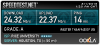
-
Tech came out today and replaced the LCD assembly. No change of coarse. So now i have re install windows (ugh) and if that doesn't fix it they'll be sending out a replacement.
-
Umm, the dummy card is made of plastic, no matter how much it touches the reader contacts, the reader isn't going to tell the difference between it or air... Unless there's a microswitch built into the depress eject, but that would be too buggy I would think.
-
This is how it must be. But I think this is usual in all card readers with press/eject mechanism.
-
I think there might be a microswitch that detects when an sd card in placed in there.
-
I just did some manual timings and didn't get a variation of more than a few seconds, whether the SD blank was in or not, for cold boots of my machine. Cold boot time was 12-15 seconds to "login" screen.
My machine has Win 8 Pro installed on a 120Gb mSATA SSD.
I run a pretty minimal "startup" list - I don't believe in having more than absolutely minimal processes running.
If I need to use something I am okay with the startup "penalty" - I don't believe in paying the memory/cpu/boot/login "penalty" for gratuitous stupid apps. -
A few second is still quite a difference given the use of an SSD. I take around 25 seconds on windows 7 with the sd card reader disabled and minimalist startup services/programs
-
agreed, however, like I said before - I reboot so little that an extra couple seconds there traded for less crap getting into my machine from the air (I have cats) I am welcome to "pay" for. ;^)
It's good to share the info though, and have different people chime in so that we can have some confidence in the behavior. That way everyone can make their own choices. -
Also an update on the new wireless card. It's like night and day. I can connect faster now with the killer N and the speeds are much more consistent and faster.
In rooms where I used to get under 5mbps, I get 20+ mbps.
The tech that installed the killer N was very meticulous to not let the antenna wire touch the shielding on the card. -
I think the sd card delay happens only with Windows 7.
Regarding usual startup time and ssd. My XPS needs only 16 seconds from pressing the power on button until showing the desktop. I installed all drivers manually. Because of that my Windows Performance Index raised a little bit as well:
![[IMG]](images/storyImages/windows_leistungsindex.png)
-
Woah, why is your processor score so much higher than mine.

Not that this means anything. But I think my processor isn't overclocking -
Do you have xps with i5 processor?!
Both i7 (3612QM and 3632QM) should reach 7.5. Here is a test of the "old" 3612QM and it had 7.5 as well:
Test Dell XPS 15 (L521X) Notebook - Notebookcheck.com Tests
Maybe you need to repeat the benchmark, but you need to be sure that there is no background process running.Attached Files:
-
 Notebook - Notebookcheck.com Tests-preview.png)
2013-02-02 01_47_26-Test Dell XPS 15 (L521X) Notebook - Notebookcheck.com Tests.png
- File size:
- 20.8 KB
- Views:
- 152
-
-
No I have an i7-3612QM. It only started to read 6.7 for processor speed after I clean installed windows 7 onto my SSD. My stats when I first got the computer looked exactly like your's with the 750GB HDD.
This is like the 20th benchmark I've run and there are usually more background processes when I run them anyway. -
Just noticed this boot time discussion. Let me contribute my figures I just got.
With the dummy card in, from pressing the power button to showing the login window = 39.5 seconds, (I have a start up menu delay of 8 seconds, so the actual boot time is 31.5 seconds but this doesn't affect comparison so I won't mention it later)
Without the dummy card, total time = 27.5 seconds.
I repeated this several times and figures are constant.
So there is a huge difference. I think I will put a Scotch tape on SD slot and lock the dummy card in safe.
BTW my CPU score is also 7.5 but memory is 7.9.
I'm on Window 7 64-bit. -
There is something more interesting. I put in a read SD card (4GB), and the boot time is the same as without dummy card = 27.4 seconds.
-
Just a hypothesis but, maybe there actually is some kind of microswitch that tells the computer that there's an SD card, but with the dummy card it can't read anything even though it detects there's something there, so maybe it takes more time to boot because it's looking and sort of waiting for the SD card to load?
-
Did you installed W7 in Legacy or UEFI Mode? Any USB Port used?
Is it really important to have it dustproof?
Which Memory has been installed?
me too -
Hello everyone!
I'm new to the forum and this is my first post!
I'm a totally satistified XPS M1530 owner and I'm now planning to buy a new one. Of course my first option is the xps 15 (L521X).
I have extensively read in this thread about the issues concerning wi-fi poor performances and cpu throttling.
I'm in Italy and the XPS15 here is being sold equipped with the following wi-fi card: Dell Wireless 1901 802.11a/b/g/n, Bluetooth v4.0
What you suggest? What should I do? -
Buy it and replace it with Killer N 1202.
-
Because of your score I've checked my RAM through CPU-Z Portable:
![[IMG]](images/storyImages/t_2013_02_02_14_07_54_cpu_z_162_32bits_en.png)
CPU-Z shows only one channel (means 800 Mhz x 2 = 1600 Mhz)
CL11 (CAS Latency) is not the best value. -
Hi
I just purchased the L521x from the Dell Outlet (it will be arriving on Tuesday), with coupons if worked out to $780.
It has Windows 7 installed and is the 500GB HD / 32GB SSD Config.
Is there a guide as to how to replace the HD with a SSD - I would not need the 32GB I assume, so I would remove both and just use the 256GB SSD (Samsung 840). I know there are 500 plus pages on the thread but if someone could point me in the right direction I would really appreciate it.
Thanks -
There's an XPS 15 repair manual that tells you everything you need to know. Just go on the dell xps 15 support site and open the PDF. There's step by step instruction about opening your computer and replacing the hard drive.
How are you guys getting RAM and processor scores to be so high
8 GB ram and i7-3612. Windows 7 ACHI o
Memory score on 7.3 and cpu score a low 6.7... -
CPU and Mem depend on each other. This is normal.
But I found a new problem:
If you use an external monitor and close the lid the mouse is jumping. This means the touchpad is still active (!!!) and the display seems to produce a such heavy interefence so it results "touch" signals.
I've verified this by using a youtube video in full screen, remove my mouse usb dongle and close/open the lid several times. -
ive spent many hours with dell over this issue, multiple lcd,keuboard,palm rest replacements and nothing, its the way they designed the 521.. and if you install a keylogger and leave your laptop running overnight, you will see all the keys that get pressed by the lcd as well... the only solution ive come up with is going out and buying 1.16mm nylon/rubber bumpers and placed them around the display... dell and all its engineers deny this flaw....
everyone seems to have high gpu scores, why are mine soooo low?Attached Files:
-
-
I will do that.
I don't understand what you did. The L521X has already a rubber so the display frame and the basement doesn't touch each other?! Or is it because of the distance?
Set a restore point. After that you uninstall all graphic card drivers. Reboot and check if one is unknown and the other is "generic" (not intel graphics). After that download the drivers from the intel and nvidia website (i used the original ones). At intel you choose the package for it admins. its much smaller. At Nvidia you start the setup to extract all files. After that abort the installation. Know install the drivers throuch the device manager manually. This is how I did it.
Here the index without any drivers installed:
![[IMG]](images/storyImages/2013_01_30_125754.jpg)
Here the index with Intel Graphics only:
![[IMG]](images/storyImages/2013_01_30_20_56_55_greenshot.png)
Here after I installed the Nvidia drivers:
![[IMG]](images/storyImages/2013_01_30_21_08_04_greenshot.png)
This was with the software packages and Win 7 installed through Legacy Mode.
My 7.1 index has been reached by installing the drivers manually and using Win 7 in UEFI Mode (don't know if this makes a difference). -
The rubber gasket is there, but some people have had issues with it not holding the display far enough off the keyboard & touchpad, with the resulting activity caused by the display being closed. Putting slightly thicker bumpers at the corners of the bezel (I assume just inside the existing gasket) seems to have solved this for those who have pursued it.
-
Ok I will try with different amount of paper to check which distance works without problems
-
its about 1.15 mm ish. you can buy black nylon bumbers from hardware stores. place them at the same hight as your issue. so touchpad, place them on the display but at the hight thatll run across the mouse when the lid is closed. also make sure to get a free keyloger but one that logs the start ctrl fn and other windows keys. not all of them do.
yes there is sn existing rubber lining but it servers no purpose when it sits into its groves and the lcd rests on the palmrest..stupid dell engineers!
i wish someone can make a script that disables the onboard keyboard and touchpad when the lid is closed. -
Sometimes when my computer wakes from sleep. The crtl button seems to be stuck and everytime I scroll, it zooms the page. And when I click it opens in new tab.
I think this is also caused by the screen hitting the buttons. It doesn't go away unless I put the computer to sleep again. -
Hey guys! I'm new at this forum and I'm really considering a Dell XPS 15 to replace my old Dell Inspiron 1545. I've heard a lot of people talking about the Wi-Fi issues on this new model and I wanna know if these issues haven't been fixed by now? I appreciate any help you can give me!
-
Has not been fixed but you can ask for a killer N wireless card and that improves wifi slightly but you lose widi. I never needed widi so it was a decent tradeoff since now I can actually get decent wifi speeds
-
capv_pintoval: there have been no fixes for wifi.
The closest thing is apparently replacing the wlan card with a Bigfoot Killer-N 1202, but whether it works well for you or not will depend upon your router.
This still doesn't work for all people, and in any way still doesn't fix all range issues.
It is NOT a build option from Dell, only way to get one is to find one yourself or to convince dell support to replace your card with one after you've established a problem history with them.
If solid wifi performance is a clear need for you then you should probably not consider the l521x. -
If you're having a problem with the keyboard registering presses when the lid is down you could consider disassembling your computer and re-assembling it correctly. Every one of these I've seen has been assembled really poorly, if it's put together evenly it might not have this issue.
-
When I purchased this machine there was no UEFI support yet. Now I updated BIOS and can switch between legacy and UEFI, but it seems make no difference when booting Windows 7.
I have Samsung 800MHZ DDR3 installed (8GB).
Dustproof important or not, is up to you. -
For what it is worth, I have been having this problem as well. It happens to me when I remote into the machine.
-
So I am seeing a lot of you guys having windows 7. Is this laptop better off with Win 7? I've upgraded mine to Win 8. I tested the wifi and I get 25 megs down and 5 megs up with the intel centrino.
-
Windows 8 has better task management but I like windows 7 because of legacy software and I'm not ready to upgrade to windows 8.
It's not better off per-say, each has its pros and cons. UEFI support for windows 8 is better so it boots faster. I don't think windows 8 or 7 will affect wifi performance that much -
You need to install W7 in UEFI mode. It is not possible to switch later.
-
Not relevant for WiFi.
I've tested W8 a while and I'm not as productive with it as with W7. And in my mind it does not make sense to use W8 without touchscreen. -
Guys, am I the only with this issue? Event log: "Reset to device, \Device\RaidPort0, was issued." When that happens, laptop freezes for 40-60 second.
After updating to W8 and using the latest intel rapid storage driver, I get that twice a week at least. I got a feeling I should probably go back to W7 and just use the Dell provided drivers... -
Has dell fixed the throttling problems with this laptop?
Sent from my GT-N7000 using Tapatalk 2 -
Are you using mSATA SSD as Cache and HDD for c:\? If yes try to deactivate the cache by setting "Intel Smart Response Technology" in the BIOS to "AHCI".
Now watch a few days if this helped. If yes there a several options possible. mSATA defect, RAID Controller defect, drivers not good, etc.
-
Is there a little tool to check that?
-
Joker: non throttling fixes. Likely requires a hardware redesign.
Mgutt: wprime95 + furrmark while running a CPU monitor like hwinfo to see the CPU speeds over time.
Fwiw: I have found win8 to be just fine for desktop use, without a touch screen. The start screen doesn't get in the way, and it is quicker IMO to find things than the old start -> search.
The dell win8 touchpad driver seems o do a good job of supporting win8 gestures. The win7 touchpad driver does NOT.
In the end that is personal preference though.
Sent from my brain using neurons fueled by glucose -
I don't want to install. I've tried this portable apps:
GPU stresstest:
Portable GPU Caps Viewer Download - Softpedia
CPU stresstest:
Stress My PC - pc stress test software.
HWiNFO64 portable:
HWiNFO, HWiNFO32 & HWiNFO64 - Hardware Information and Analysis Tools
First result CPU stresstest only, second result CPU & GPU stresstest. I see a minimal throttling for the CPU and it seems that it doesn't reach turbo mode. For the GPU I don't know where do look for?!
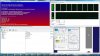
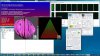 .
.
-
Furrmark shows the GPU rye on screen, there is probably another monitor that shows it but I don't know what it is.
Sent from my brain using neurons fueled by glucose -
Ok I think I found it. If the GPU temperature raises across 80 degrees the throtteling starts. But isn't that normal?
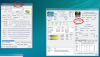
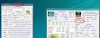
P.S. CPU turbo mode works. -
Mine has a 512 GB Samsung SSD. I am already on AHCI. I uninstalled the driver provided by Dell and let Win 8 installed the intel driver through Windows Update (older driver). Not having issues so far...
-
The complaint people have is that when the CPU heats up the GPU is pulled down. Likewise if the environment is warmer it is harder forntge system to cool down.
Either way, the system can not run both CPU and GPU in turbo/boost.
Sent from my Nexus 7 using Tapatalk HD -
The keyboard is melded to the palm rest no? that's what the tech said when he came over, or is it the touchpad?
XPS 15 (L521X) Owner's Lounge
Discussion in 'Dell XPS and Studio XPS' started by Muddy, Jun 28, 2012.


-preview.png)


