 Problems? See this thread at archive.org.
I don't know if the fan is able to go even faster than in my testing but I think its on its limit and I don't want to burn my GPU/CPU. I think the limit is really ok. Any hardcore gamer should by this instead of hacking the bios:
Amazon.com: Cooler Master ErgoStand - Laptop Stand Adjustable, R9-NBS-4UAK: Office Products
-
Elvis: more like bolted I think, have to check the manual, but it is replacable.
Mgut: I think hard core gamers should not buy this machine!
Sent from my Nexus 7 using Tapatalk HD -
In BIOS I can always switch between UEFI and legacy. I have dual installed Win7 and Win8, and with either mode I can boot two systems.
What's the benefit of reinstalling Win7 in UEFI? -
It boots a little bit faster. My benchmarks:
1.) UEFI mode only 15.5 seconds (W7 UEFI), a bug causes freezing/strange display error (black/white pixels) if you don't use an external monitor as primary screen (no joke!). Someone had the same problem with the Inspiron 15R but this was fixed with an bios update (page 2):
Cannot boot Windows 7 install DVD in UEFI mode (Inspiron 15R - 5520) - Laptop General Hardware Forum - Laptop - Dell Community
2.) UEFI mode + Legacy ROM enabled 16.5 seconds (W7 UEFI), I use this mode
3.) Legacy mode 20 seconds (W7 Legacy)
Has anyone used the Bluetooth of the Killer N 1202? I've tried to connect the Apple Magic Mouse (small mouse for travel) but it can't be found (my smartphone finds it). My smartphone isn't found as well so I think it won't work at all. -
i have used it. its a bit tricky. for some reason i had to uninstall the nvidia software nd driver and the killer software drivers. then reinstall the nvidia followed by the killer. also uninstall all intel non rst tech software , so my wifi, wireless, bluetooth etc before you uninstall everything else.
-
I haven't had any problem using a magic mouse nor Nexus 7 with the killer n, under win 8, via BT.
I don't use them EXTENSIVELY but I haven't encountered any issues with my light usage. -
Ok after I installed the complete Killer N 1202 package that contains the Atheros Suite it worked. But I want only the drivers installed.
At the moment I can't download the package again from Dell. They are updating all drivers today:
Drivers & Downloads | Dell United States
WIFI:10.0.1.71 / BT:7.5.0.122, A00 (offline)
Funny if you open the previous versions and compare the numbers:
WiFi : 10.0.1.71/BT : 8.0.0.206, A00 2/6/2013 9:19:06 AM (offline)
WiFi: 10.0.1.71/BT: 7.4.0.122, A00 2/6/2013 9:17:26 AM (offline)
WiFi : 10.0.1.71/BT : 8.0.0.214, A01 1/15/2013 8:25:15 AM
WIFI:10.0.1.71 / BT:7.5.0.122, A00 1/15/2013 8:25:15 AM -
I think that the wifi and bt drivers are technically separate drivers, if you're getting around the full install by pulling out just the wifi drivers, maybe you're just missing the bt drivers?
I don't run the killer 'manager' app at all, ever, but IF that install is setting up a system service that glues things together that is still running on my machine.
FWIW, I just looked at the dell driver page for the machine and HOLY CRAP is looks like they are updating almost the entire driver stack for Win 8.
I'll check back Thurs or Friday, stuff should be online by then.
yikes. -
Knock knock, anyone home?
Bought an L521X laptop on the 9th of last month. Got it cheap as they're going out of stock, and I wanted Win 7. Loved it, played some Dota, transferred all my files. However, when I began using for work in earnest, I experienced slow wifi on my university's network (e.g. couldn't Skype) and buggy trackpad (especially 2-fingered scrolling). A Dell tech remotely tried to fix my issues by uninstalling and reinstalling drivers for wifi card and trackpad, but no fix. Dell replaced my entire trackpad/palmrest, but the new unit suffered from the same issues. Two-finger scrolling skips from (for example) page 1 to page 4 or 11 in one go, in both Word, Foxit, and Firefox. Even when working correctly it's difficult to differentiate the right and left click areas of the trackpad (or rather, clickpad).
Anyways, after a week of talking to Dell and my university's IT guys I am returning the laptop. A shame, because I love how it looks and its performance. -
Success. I've installed the Killer 1202 manually as described before (download Dell package, extract, abort, manual driver update) and now I downloaded all available packages again (2x Dell, 1x Killer Wireless). The Dell installation didn't work. 1603 error. After that the WiFi driver was corrupt. Restored (puuhh ^^) and again. Same with the second Dell installation. Again restore. Last time. I used the genuine driver package. After it extracted the archive I searched for the files on my drive. Found in "users/{MY_USERNAME}/AppData/Local/Temp/{STRANGE_FILENAME}/" and copied the folder to my usb stick. Aborted the Killer Setup (this deletes the temp folders) and startet the Atheros Setup. Installation finished, restart and Bluetooth works.

EDIT: Failed. It worked two times. After several reboots I was not able to establish a new connection to any BT device.
Now I've installed the Killer Wireless package completly. It works like charm. -
New drivers are causing the scroll issues. If you roll back to december drivers, the scroll issue isn't there. There's a new driver update today that will hopefully fix it.
Also many of the new drivers on Dell's website right now seems to be even lower in revision number than the ones I currently have installed. -
Is the scroll issue with the geniune Synaptics driver as well? I have the recent version installed and I don't have this problem I think.
But I don't think it is a good touchpad at all. Often I click the left mouse button, although I wanted the right one to open the context menu and reverse as well. -
I think it's okaaaay, but not great. Not sure about not having discrete buttons ... it's a click-pad after all so it's easy to not press for the click in a place that properly actuates the device.
I've gotten accustomed to NOT using the physical clicks at all though. Single-tap for select, double-tap for double click, two-finger-tap for context menu. Two finger gestures for scrolling, etc., works well for me with win 8.
But it was an adaptation. -
No there's no problem with generic driver. In fact generic drivers are better as you can enable tap zones. It also removes the discrete buttons. You can enable tap zones to make the right a right click. Also turn on two finger tap as right click in registry.
It's a decent touchpad, not as great as an apple but a lot better than most other PC manufacturers. Just be glad it's a synaptics and not an Alps or Elan. I rarely ever used the physical clicks, I've always been accustomed to tapping to select and right click -
Bloody hell, there goes my night....
-
don't waste your time or sanity updating using the new 2/6 drivers at dells page for the 521x... just wasted bout' 1.5 hours and had to do system restore, half the drivers wouldn't even install... windows 8 version... dell is consistent with all this, at FAILING... video driver says for 421x, trusted dell(foolishly) and then the multimedia key to dim and brighten screen stopped working.. quickset no fix.. nothing fix... system restore THANK YOU!
SO very sick and tired and stupid to keep trusting dell is reliable on any of this -
Never touch a running system
For me this is to rough. I can't be very productive without using a touchpad with two hands (scrolling and clicking at the same time as you do it with a mouse). -
I found a solution. I disabled the touchpad if the usb mouse is connected. This option can be found in the dell driver and sometimes (^^) in the genuine synaptics driver. The last one didn't show me the option so I used this tip:
Tim's Blog: Auto Disable Synaptic Touch pad When USB Mouse Plugged In
Works as expected. -
thanks, but i am aware of that option. it does not work when i am doing a back up or converting files or leave for a bit and close the lid. now if you found a script to dissable the keyboard and touchpad when lid = closed. that would be amazing!
-
Thanks a lot buddy! :thumbsup: -
Most drivers only had the date changed, the version is the same. I'm noticing also the intel rapid storage driver got downgraded to the previous version.
Edit: Interesting they downgraded the intel rapid storage... I've been having issues with the latest one... I guess somebody decided to test it. -
Not quite the same versions. Some of the numbers look the same but it seems that there is an A00 or A01 or whatever number they have. I think it's the same base driver but a bug fix or an error fix that Dell messed up on or something
-
I tried installing some and noticed the installer is the only thing that changed. The actual driver version in device manager is the same. So before installing, check the actual version of the driver and not just the A00 A01 etc version.
-
Anyone had issues with screen cracks?
The girlfriends brother's L521x (which was purchased with the 3 year premium warranty), which is less than 4 weeks old, has developed a small crack in the Gorilla Glass panel (seemingly not his fault because he's only used it half a dozen times since he's been on holidays) - Dell seem completely uninterested and want him to pay for 1) a new panel and 2) a dell service guy to come and replace it, which is complete rubbish, since it seems to be a manufacturing fault.
Any tips/suggestions? -
OK, I tried again (I mean, repeated several times)
My Win7 was installed in legacy mode. I can switch between legacy and UEFI (BTW, does this switch mean choosing in BIOS the boot option to be legacy or UEFI? The BIOS boot menu is confusing for me). I do not see any difference booting up Win7 in terms of appearance or timing. It is always 13.3 - 13.5 seconds counting from I press Enter in dual boot menu to boot up Win7 to I see the 'Press Ctrl-Alt-Del to log in'.
If I plug in network, external monitor, docking, add 2 more seconds. -
Have you noticed it's very difficult to drag-n-drop with with mouse pad? First click to elect the item, then if you click again too soon, it's considered as a double-click to launch the item, otherwise it's considered as another single click. It is very difficult to catch the chance between two to be able to drag the item. My previous mouse pad on E6500 was much easier for this.
-
You shouldnt have to pay. You should have accidental coverage so the screen is covered even if it's your fault. You probably got a bad agent. Just call again or seek help on dell forums. Ask for terry B
Just enable drag lock, I think it helps. -
Are you guys actually able to download the drivers, cause when i try i get an error saying the file doesn't exist.
-
Andy: I didn't have any problem downloading the files yesterday, at work. I live in northeast PA, near Scranton.
OliveX: Drag and drop certainly worked better with drag-lock enabled, for me. I find that for me the touchpad responds well to a light touch. I don't use the click-button feature at all any more.
others..wrt:Killer-N and driver/app stuff ....
I have noticed that on a clean install of the driver set, if I never let the app run and tune the system, I get good but not optimal network test throughput.
I have the mini speedtest on a server at home and it reports 14 Mbit down 20-ish Mbit up, with my machine about 20 feet from the router.
I ran the app and let it do its tune-ups based upon my internet connection (3mbit down, 384kbit up), and now my local speedtest reports 23 Mbit down and 40+ Mbit up. I haven't rebooted yet to see if that state persists across reboots (the app does not run on startup, I disabled that).
Adjacent to the router (DLink DIR-655) I get 100Mbps+ in both directions. -
Not necessarily. If they didn't choose the top warranty option, they don't get accidental damage coverage, as of this time. There are 3 three year warranty options, and only one has accidental damage coverage. It's the $399 one.
Now if a case can be made that it's a defect and not customer induced damage, yes, Terry B is the best option for contact. He will shoot you straight, and let you know what he can do. -
I think if he got it from the US consumer site, it comes with a standard 1 year accidental coverage
-
Dell Outlet has had this deal for a week or so. It's $785 for a "Dell Outlet New" XPS 15, the same config as the $1299 retail choice.
I ordered one a week ago using the coupon code. It arrived today, and to my surprise, it doesn't appear to be an Outlet unit!
It arrived in a retail, black XPS box. Inside, was the fancy, retail packaging that a normal retail consumer would get, instead of the normal
cardboard box with foam supporters in the box. No refurbished stickers on the box or unit. Inside, the unit is untouched.
So, these $785 units appear to be BRAND NEW, RETAIL $1299 units. Anyone looking for a good deal on a XPS 15, this may be it.
Unfortunately, it's only the i5. I'd prefer an i7, but for the price, seems like a good deal.
Are there any huge issues with these that are standout, show-stoppers?
Thanks. -
Sorry I find this kind of hard to believe. I own a few products that use the Gorilla glass . And a couple of them have gone bouncing across the floor with no issue (Smartphone and my Tablet ) . By chance did the laptop take a fall while it was open and tweak the cover ?
-
Iancorp: test WiFi performance at all locations you care about, poor WiFi reception is endemic to the l521x line.
Next check any gaming performance you care about. Model has thermal limitations that manifest as the CPU/GPU being throttled hard under stress.
Good luck
Sent from my Nexus 7 using Tapatalk HD -
He's got the i5, 1GB GT630M. I think the throttling on that model is close to non-existent. It's comparable to every other ivy bridge laptop. (They all throttle)
-
How do you simulate middle-click? I use it often when I open new tab for link.
-
What is Dell doing on L521X drivers?
Almost all drivers are dated 2/6/2013, but they can't be downloaded, and if I check the versions, many of them are old versions. I just clicked into each driver details and checked 'Previous Versions', I found for most of them, the 'new' version either has an older version number, or a same version number as a few revisions ago. -
I'll try out the Wifi. I don't really do any gaming... it's for work and general usage. Is the Wifi issue with the Intel 6235 and the Dell 1901 Wifi cards, or just the Intel? Thanks.
-
I couldn't download either. None of them. Can you post a downloadable link? Anyone just for try.
-
This is not true, some Ivy Bridge laptops don't throttle. It's mostly the bigger ones. The m14x R2 I have doesn't throttle. You can leave it running for 12 hours straight without throttling. It does get loud, however.
You are right about the i5 being the one to get. The i7 quad core just puts out too much heat and you can't game on it so the GPU is largely irrelevant. If you're looking for a system to do work and play media it will definitely fit the bill. -
I've read many pages, but 500 is a lot... question about dead pixles on the i5, common? If so will dell replace the laptop?
-
Hi all,
I have been given a brand new XPS 15 L521X by my work, but I have a big problem : it seems impossible for me to get any program to use the Nvidia card. I have tried to tweak things in the nvidia control panels, to change drivers, even to desactivate the Intel card, nothing works. Do you think it can be a hardware problem and I should return it ? The Dell diagnosis shows no problem... I have Windows 8 pro.
Thanks in advance for your help ! -
Hey Everybody!
So I just opened up my XPS, and i'm sure this wire isn't supposed to look like that. So do you have any ideas about how I might fix it? Or is it a total bust and should I be getting a engineer out? Naturally the WiFi range is less than a meter for this device.
EDIT: Oh, and it was held down with a bit of masking tape when I opened it, unconnected.
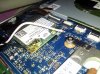
Does the card show up at all in computer management? -
Was this a brand new retail PC or something from the Outlet? I could not imagine anyone in manufacturing allowing this. Obviously, one of your antenna cable connectors is missing, and to have taped it to the connector is ridiculous.
If from the Outlet, I'm guessing the previous owner broke it, and tried taping it on, then returned it saying the Wifi was bad. Dell never investigated. That's my guess.
Anyways, it's pretty much unfixable without replacing the cable assy and that's no easy task. I'd call Dell and request a replacment system. How long have you had possession of the system?
Anyone know what can be done about the "microderm abrasion" device (uh, I mean the trackpad) so that it doesn't leave a noticeable skin residue all over the trackpad?
After about 15 minutes of using it, my trackpad is half white from the trackpad scratching off my skin. Something to put on it? I like to keep my PC's clean, and this
is just ridiculous. -
Yep, Outlet, my guess too somebody broke it and returned it. Only since the 29th of Jan. As for your problem, I would have suggested a bit of oil, bu that stuff shows up everywhere else on this laptop too..
-
Can someone point me to the thread on setting up the Windows 8 Intel Rapid Start correctly? I received a 2nd XPS 15 yesterday (Outlet), and it came with Windows 8 PRO, 750GB and 32GB mSATA.
Unfortunately, it was seemingly not configured to use the mSATA at all. The BIOS (UEFI) has the Intel Rapid Start greyed out and unselectable. I don't see any Intel RST installed in Windows 8.
I recall seeing a thread with step-by-step for setting it up correctly. I'm not sure what my Hibernate settings should be, etc...Normally, I'd rip out the 750GB and put in a SSD, but thought I might play with the Rapid Start stuff...
Thanks. -
Yes it does. I have tried uninstalling then installing it again, everything works as if it was properly installed and recognized... except it is never used, even when i try to force it with the nvidia manager !
-
Bacteria, I'd either return or take that up with dell warranty support as that is just stupid FUBAR.
Sent from my brain using neurons fueled by glucose -
I don't have that problem with the trackpad but I like my mouse setting very fast and sensitive and I use the tip of my finger to scroll. Doesn't leave any skin on it but sometime it does get greasy from oils.
-
Have you checked with GPU-Z too? The way I know my card is being used is though the sensors tab on that, it'll usually show up as under load on the GPU Load bar if playing crysis, but I'm presuming this isn't the case for you?
XPS 15 (L521X) Owner's Lounge
Discussion in 'Dell XPS and Studio XPS' started by Muddy, Jun 28, 2012.


