 Problems? See this thread at archive.org.
Officially returning this. After applying thermal paste, and purchasing a cooling pad, I thought that all my problems were over. However I played another more graphics intensive level of BF3, and the laptop just couldnt cope, even on 1366X768 and medium settings. The gpu throttled terribly all the way to 7 fps. Is there anything that else that can be done to cool it down? All the bloody effort for nothing. So annoyed with Dell. They SHOULD NOT be selling a poorly designed laptop. Its a bloody scam!
-
It's not a true gaming laptop like an Alienware . If you bought it for gaming you picked the wrong weapon. If you plan on doing a lot of gaming you should have picked a gaming rig .
-
Still pissed about the keyboard and mouse getting activated when screen is shut though.
-
It has all the specs to at least play at medium settings. I don't plan on using it solely for gaming I am only a moderate gamer but when you purchasing something thatis claimed to have the ability to play games and it can't, is very misleading.
-
This is not an excuse. The cooling system should be able to handle the hardware they put in the system.
-
He's not giving you an excuse, he's giving you the reality of the situation.
That Dell is selling it into a wrong market is only known by those at Dell who *know* where they are trying to sell it.
It sure seems to me that the fact that a -hot (ha ha ha) late generation XPS notebook can't run both the CPU and GPU at *stock* frequency indefinitely (forget either in turbo) is just embarrassing, bordering on "engineering malpractice". -
Hey, i don't know if you noticed but there's new drivers for the xps 15, i update my bios (A13) and wifi drivers from the intel page and now my wifi works fine.
Can someone tell me if it's just my impression or it's finally a solution to the wifi problem? -
I did mine last week when I first got my XPS 15 and it didn't resolve the issue. Had an engineer out this morning and they installed the Killer Wireless-N card and new screen and it seems to have made things better (marginally).
Does anyone know the best advanced settings to use with the Killer N card? -
I haven't manually changed any of the Advanced settings in my Killer-N, but I have had their "app" run though it's "tuning" deal, and that made a difference.
I then deleted the short-cut from Startup so the app never runs unless I start it manually. -
Does anyone use the RJ45 ethernet jack and have issues with the cable not making a good connection? I've got a problem with such and have tried other cables, etc., and still find the connection to randomly drop.
Wiggle-jiggle the cable and the connection becomes unstable. My brand of CAT6 cables don't work at all. -
Hi guys. Does any of you have a dead pixels problem?
I just bought my XPS 15 two weeks ago, and I found some dead pixels at a corner of the display, then dell sent a technician to replace my display. Right after the new display was installed, I saw it was perfect, but now, after two days, I can see dead pixels again, and they are spreading!
I am so disappointed with my XPS15. Does anyone have this problem? I guess maybe something wrong with the motherboard. I am now running a UDPixel pixel fixing program. If it doesn't work, I guess I will return my laptop. -
No, there is no excuse. Now you understand how I feel and why I've been trying to convince all performance-conscious forum members to stay away from this laptop. They should not be selling this notebook as-is, it's very close to criminal.
I had this problem with multiple replacement systems. The panel they're using on the L521x is a cheap one and they don't seem to care about dead pixels at the factory. I recommend returning your laptop immediately while you still can.
P.S. No software can fix dead pixels, there are claims that you can fix stuck sub-pixels by rotating colours but truthfully I don't think those work either. You can sometimes massage away stuck subpixels but dead pixels (black) are not repairable. -
Thanks man!
I saw too many users of this laptop are not satisfied. I like it, but with dead pixels spreading, i will issue a return. I will run the program overnight, hope it will work. -
Well I've had the new Killer Wireless-N card and screen fix for a day now and I can honestly say that it hasn't made much of a difference. Still getting very poor internet throughput in certain areas of my house whilst other laptops, including an old XPS M1530 with an Intel 4965AGN adapter works perfectly OK. Strangely it seems download speed is more affected than upload.
There seems to be 2 areas in my house where it just can't cope, despite showing good signal quality. I'm wondering if there's something in the overall design of the L521x and materials used that it's making it more susceptible to interference or noise in the signal. Anyway as a last resort I've plugged in a wireless range extender and this seems to be doing the trick. I still have the option of returning it but for the price I paid (I got a bargain from the outlet) I think I'll make do. -
neilmcl: remember that your wireless range extender only helps you at home, if you need reliable wifi with this machine on the go you will need to carry a USB adapter Just In Case. I have a Killer-N 1202 in mine and sometimes it is fine, but sometimes not - such as last Friday when I had a couple hours to burn at Starbucks and the machine could not connect to the AT&T provided wifi. I had to use the USB Netgear WNDA3100v2 that I carry.
It's a given that different routers work more and less well. Some to a fault, with this machine. I could not under any conditions connect with my father in law's Apple AirPort Extreme, but then I had no liberty to tune the AirPort settings (nor did I want to, really). It does seem to work well with my new router though, both 2.4 and 5 ghz bands (ASUS RT-AC66U, using firmware *.266).
My advice is that if you WILL BE relying upon the wifi when travelling, to return the notebook and get one that has reliable radio reception or to get a backup USB adapter. -
Hi all, I'm thinking about buying the i5 + gt 640m version of this laptop but I'm a bit worried about throttling issues. All the complaints about throttling I've seen are in the i7 version. Can anyone with the i5 confirm they also have the same throttling issues ?
I have seen this question asked several times in the forum, but couldn't find an answer.
Thanks. -
My advice would be to not purchase this laptop. I dont think the specs would change anything, its the cooling system, it sucks. I had a look at my older sony vaio laptop thats about 5 years old, the heat sink and fan is massive, and there arent any throttling issues. The L521x cooling system consists of a pissant heatsink and weak fan. Ive repasted the cpu and gpu core to minimal effect with good quality paste, and am using a cooling pad that has three removeable fans that I have placed near the vents. It still throttles
 .
.
I will however give this machine one last chance. I am in the process of getting another laptop base from Dell. With this base, I'm going to perforate the bottom near the vents with a drill to allow more airflow. If I combine the repasting, cooling pad, and freshly perforated base, maybe, just MAYBE the throttling will cease. If not, its bye bye Dell. What a shame, this laptop is fantastically designed (aesthically of course). It had so much potential.
On another note: does anyone know the details of Dell's warranty? I've had this machine for about a month now. Can i get my money back straight away or do there need to be 'tests' on it? -
andy, you should check with Dell, but I believe he no-question return time is 21 days. After that it's up to the Dell people to determine return costs to you.
OTOH, I'm curious to hear how it goes with your customized base plate. Some slots on the front of it with possibly some in-gest fans may help force more air flow through the system to useful affect. -
Thanks for the info c0derbear, if it is 21 days, that is most unfortunate, as I have had it for just over that amount :/. I'm hoping it won;t take long for Dell to deliver the spare base plate. I spoke to them over the online chat and they said they would send a quote to my email later today or tomorrow. Who knows how long this will take, and how much they will charge me for it. Obviously if its too much then I'll tell them to G&GF.
On the other hand would my warranty void if I just alter my current base rather then getting a new one?
I'll post on the forum to let everyone know how I go with modding it. Let's hope that there is a visible improvement. -
Thanks for your reply Andy, so you confirm that your i5 also throttles?? I think it matters a lot, since with half of the cores the heating should be also lower, and should need less dissipation, so the xps 15 heat disspation system may be enough for this one.
Thanks -
Appreciate the feedback c0derbear. TBH, I didn't buy this machine with the intention of travelling much with it, it's a bit on the heavy side for that anyway and I did get a very good deal on it, so weighing up the pros and cons I think I can live with the issue. One thing I wasn't so sure about the engineer's visit was why the screen had to be replaced as well. He did say that he'd only do it if I really wanted him to as he didn't think it made much of a difference as far fixing the problem was concerned.
-
Dell may give you a hard time if you try to return the machine with an altered base.
There was a post on the forum with another user trying to improve airflow with a similar idea of modifying the base. In another post, someone even tried removing the base altogether for use with their cooling pad solution and even that was not enough to fully alleviate the throttling issues. I don't remember if those users had i5 or i7's though but it seems the majority of systems (at least from those that post specs) are of i7's. It seems the HSF Dell chose simply cannot dissipate the heat fast enough. This is apparently the case regardless of cooling pad, thermal paste, base modifications, etc.
With all that said, good luck, maybe in your case the base modification will be just enough to give you the performance you need. -
Thought I would just chime in here. I have no throttling issues at all with this laptop. I have the i7 3632 version with the gt640m. I have played battlefield 3 and far cry 3 both on moderately high settings for four hours straight and am always above 40fps. I do have a cooling board however it is quite and old model and I'm not sure weather it makes a difference or not.
-
David, my laptop is an i7. But I still think that the i5 will throttle, just not as much. The major problem is the cooling inside, it doesnt dissipate enough heat. What I have noticed is that the i7 xps will throttle after around 2 minutes. I can imagine that the i5 will take longer (maybe 5 mins instead) to get to that throttling temperature ( around 80 degrees) but nonetheless, believe there will be the same result. I am not an expert, however,I dont think its worth the risk purchasing something with so many question marks over it. Its up to you!
-
Cheers for the info Bunshaw. I'll just wait until Dell deliver me a new one. Thats a shame that it hasnt worked for those people, The first time I noticed the throttling, I opened up the laptop and allowed the screen to rest on my desk, with the base up. I then had a fan blasting the heatsink. There werent any issues with the throttling when I did this. Maybe if I place big enough holes, the combination of the cooling pad will help make a difference. I am not expecting anything, just being optimistic!
-
Andy, what type of cooling pad are you using? Did you encounter throttling issues without using it?
-
Haven't been in this thread for ages.
So, did this laptop end up being a (very expensive) dud??? What's the consensus? -
Pretty much a very expensive, well nice looking dud of a machine that throttles and has wifi issues.
-
I really dodged a bullet with this one. I spent months in here waiting for it to come out, wanting to buy it. Luckily, the price put me off big time.
-
Take 25% off any Dell Outlet XPS 14 Ultrabook or XPS 15 - L521X!
Enter coupon code at checkout: FB8PQHBVV6Z8V7
Offer Expires 3/19/13 at 11:59pm CT.
http://www.dell.com/us/dfh/p/?dgc=ST&cid=256574&lid=4562297
View attachment 93232 -
Could there be a fix to the WIFI issue on the way?
I've just been informed by Dell, and I don't want to jinx it, that they now think they have a fix and want to arrange for a second engineer visit, this time to change the hinge mechanism, or something along those lines. They admitted that it seems to be an issue with the the way antennas are situated in the LED frame, so I'm guessing the new hinge mechanism will now house the antenna instead.
Anyone else heard anything along these lines? -
We've heard a lot of rumors but nothing confirmed.
The "hinge" mechanism has come up before.
To me it makes sense that a redesigned/laid-out display/hinge assembly would be required to address the issue.
Take one for the team, get some good local wlan performance measurement done and get the swap done and find out. ;^) -
Can't get it done now until the end of next week but I'll keep you guys updated once it's done.
Funny thing was I only spoke to the guy yesterday to explain that the Killer N card and display swap hadn't fixed the problem and he offered to send out a free wireless dongle as an interim measure, should I need it. Then lo and behold he phones again today to tell me they've got this new fix available with the hinge assembly. So here's hoping. -
Lets hope that it works...its been so long that I just gave up and have been using the Linksys AE3000 adapter I was sent as a temp fix...what should I did say to the rep that I want a hinge fix?... if it shows promise I will be jumping for joy while calling tech support...please let us know how it works...
-
Wow Dell are officially the worst. In earlier posting I said I would try modifying the base by getting another one from them, but thats now gone out the window. They tried charging me $200 AUD for a new base! And to top it off, charge another 150 for someone to come in and put it on for me! Oh the nerve they have. They can get f%$^ed!
Congrats Dell, you have lost a customer who tried to put faith in your bs. Now looking at getting an N56vz. Lets see how long itll take them to actually give me my money back. -
Hi guys,
I plan some testing with antennas coming from an old Precision, can someone give me some information about the 2*2 or 3*3, what is this?
Thanks. -
romu: you're talking about WiFi MIMO (multiple-in, multiple-out).It is a capability of 802.11n, 802.11ac, and other wireless connection specs.
short version:
More correctly this is AxB:C, where A is the number of transmit antennas B is the number of receive antennas, and C is the number of concurrent streams the radio can deal with.
Every "N" represents one "stream" of data flow. Begin able to use more than 1 stream concurrently increases throughput. Say every stream can use 150 Mbps (fastest 802.11n speed). a 2x2 would be a 300 Mbps connection, a 3x3 would be 450 Mbps. I believe the 802.11n spec allows for up to 4 streams, in theory.
Limitations:
Both ends of the communications must support the same stream, so "lowest common denominator" applies. Even though a WLAN *card* may support N streams there must be N receive/transmit antennas connected to fully realize this capability.
The L521X has two antennas wired. There is no third. Thus all the cards Dell ships are at best 2x2:2, or at best 300 Mbps WLAN throughput.
more info ==> over here -
Perfect as usual c0derbear, thanks, that's enough for my understanding.
-
I bought 2 of these laptops for my me and my wife. One has spotty wireless, and horrible fan noise whenever the HD was accessed. The other had spotty wireless as well but normal fan operation. Both are virtually unusable when typing due to the placement of the trackpad. Just wow. They look so nice but they are virtually unusable. They are going back. I just submitted a request for shipping labels tonight, how sad. I have bought 3 laptops and 2 desktops from Dell before this. Pretty much no problems with any of it until now. I appreciate the forum- it really helped.
-
So here is my predicament. I bought a used XPS 521x about two weeks ago and I love it. It came shipped with Windows 7 but I wanted to put 8 on it so I bought 8 and installed it. I really liked 8 even without having touch. But then when I restarted it after some installation it couldn't boot up. It would get into the Windows recovery screen but Windows couldn't repair anything. Luckily this was the first day I got it so nothing was on the computer but I had to reformat the hard drives and boot back into Windows 7. I tried to install it again but same thing. Is there something inside the computer that isn't compatible with Windows 8 or what? For hard drives I have the Samsung PM830 (soon to be replaced with the 840 pro) and the other 750 gb 7200 rpm HDD. Could it be some of the drivers? Any help at all would be amazing. Thank you.
-
Well, the obvious question is WHAT did you install? Bummer though, that's frustrating.
None of the hardware is a problem with Windows 8.
Can't say the same about whatever software combination you put on the machine, there's only like a "gadgillion" possible combinations there.
I personally don't think you need the Intel Rapid Start stuff installed if you are using Windows 8, but it's a personal choice, and it's the only thing I can think of that may leave you with an "odd" drive setup ... IF you were using it and the mSATA SSD was setup accordingly.
I have a 120Gb mSATA SSD that is my OS host drive, Windows 8, with data on the HDD. It's been a bulletproof setup since I rolled it over to that like last Sept ish (had the machine from July). -
Honestly it was just the drivers. I don't know, it had to have been the drivers though. Once my new SSD comes I will try again. On an unrelated note...is the 120 gb enough? I haven't bought mine yet but I am going to keep the 750 HDD and am replacing the 32 gig one and plan to put everything but media on the SSD.
-
Depends on how much software you install, but with office 2010, visual studio 2010, a mess of other stuff, but all my data on the HDD i have about 35 GB free space. Plenty.
I plan on replacing the HDD with SSD when incan afford a 1 Tb SSD.
Sent from my Nexus 7 using Tapatalk HD -
Do they even make 1 TB SSDs in a 2.5mm form factor?
I've seen 1 TB SSD on PCIe cards but they were crazy expensive.
If I had more money I would buy a 512 msata to go with my 512 ssd and make that into 1TB of ssd storage. Then I could also get a 128gb sd card for more fun. And also replace the optical drive with another SSD or put a 1TB hard drive in there.
But that's just overkill for me as I still have 420gb free on my ssd after installing windows 7, photoshop, office, mathematica, and inventor. -
Id like to get this project started.
But no one wants to give me input!
http://forum.notebookreview.com/del...xps-x521l-no-wwan-slot-gps-possibilities.html -
I've thought about replacing the optical drive, but while I only use it infrequently it's VERY handy when I need it. Much more handy then an external (that I would have to buy at additional cost).
No, I have not heard of a 1 Tb SSD yet ... but then I figure it'll be '14 or '15 before I'm ready for that anyway, and I'm sure they'll be around then. Maybe not reasonable in price, but around.
Currently my data drive has just shy of 400 Gb of space in use, so clearly a 512 Gb SSD would fit that but not leave a large % for expansion ... not good enough. -
Well you'd only need to buy an enclosure or a cable for the optical drive that you take out and can use it as an external. I almost never use mine too and I can afford to take it out since I've only used it once reinstall windows since I like the DVDs better than usb.
512 ssd + 512 masta would work right?
Or you can use the hard drive you take out as an external. I keep my movies and backups on an external 1TB and that takes up 500GB. So the 512 ssd isn't enough for me either but I only keep important files and programs I need on the ssd. Any other pictures, movies, archived documents, I can just back up to dropbox, google drive, my external hard drive, and my own cloud server. I even mapped my cloud server as a drive letter on my computer and port forwarded it so I can access it anywhere with internet connection, which is pretty cool. -
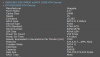 I want to take my optical bay out and put in an SSD but I cannot determine which bay has the other SATA III connection. The 32 gb mSATA uses one of them. That pic is of tests on my primary HDD and I see that is says SATA II under SATA type but further down it says Transfer Type and has SATA II as well. If this still just talking about the drive or is that the connection?
-
agrzesiak: the drive is SATA-2 which is also limiting the connection speed and report. I don't *KNOW* for sure but I would "bet" that the internal HDD sata is capable of SATA-3 ... maybe someone who has replaced it with an SSD can verify.
I'm pretty sure the optical drive connection is NOT SATA-3 simply because there is no way an optical drive could go into those transfer rates. Similarly, they could not take advantage of the higher signalling rate to lower latency. Would be a complete waste.
xnap30: agreed on the enclosures and stuff. But like I said, I'm in no hurry. It'd just be more simple from my point of view to only replace the HDD with a higher capacity SSD.
XPS 15 (L521X) Owner's Lounge
Discussion in 'Dell XPS and Studio XPS' started by Muddy, Jun 28, 2012.


