 Problems? See this thread at archive.org.
It depends on if the heat sink and thermal compound were applied correctly on your machine. In theory the i5 and 630M generate less heat but that won't matter if they applied too much thermal compound.
Can't you test the machine when you get it and return it if it 'overheats'?
-
-
Yes im really hoping it works well for 415 otd you cant beat it
-
If you really want to fix the overheating issue, you can do it yourself. I repasted the heat sink and removed the Bluray drive (I never use) and I don't have any overheating issues whatsoever. It never hits 75C so it doesn't get close to throttling. Removing the Bluray drive allows for better airflow (intake) into the heat sink fan.
I bought my i7 640M version for $900 otd and it's awesome for the price. I remember the version you got was $650-ish at the time, sounds like a nice price drop. -
I have just upgraded the BIOS to A14 from A04 and it works very well. It is a bit confusing because the A06-A13 BIOS'es had problems on my XPS L521X with the throttling.
-
I just got mine in the mail today. It's downloading diablo 3 at 1.4mb/s when I'm next to the router and then when I try to walk to the next room it goes to like 400kb/s. Haven't had a chance to try out the throttling issue yet. Are there any other ways I can test the wifi so I would have something to back it up to show dell? It seems like there aren't any fixes to this so should I even bother trying to fix it?
-
The screen on my (almost) 1 year old L521X appears to have completely failed. When I turn it on, the lower right-hand corner of the screen is dark with the rest of the screen working normally. After about a minute, a large, irregular area of the bottom - middle of the screen goes dark. A few seconds after that the screen goes completely dark. It stays that way until I leave the laptop off for a while (to cool, perhaps?)
I'm able to send this message because I've hooked up an external monitor via the HDMI port. The video card and computer are working fine (as proven by using the external monitor) -- this appears to be a physical issue with the screen.
I have a couple of weeks left on my complete care warranty. In the past, I could start the warranty process with an IM to Dell-LornaM, however Lorna doesn't appear to have been active on this forum since last November (!). I tried searching through this thread for messages about a new Dell Rep on this forum, but I was unsuccessful.
Are there Dell Reps still active in this forum, or will I have to call the customer support 1-800 number?
Ross -
Theres no real fix for the wireless whatsoever (getting the Killer-N wireless card only makes it slightly better). If you want absolutely best wireless performance, you'll have to get a USB wireless adapter.
-
Send a message on twitter to @Dellcares. They usually respond quickly and can send out a tech.
-
My 2 year old xps 15z being replaced under warranty with the XPS 15 ( Had to add £250 for depreciation) .
Would this laptop work well with RME for music production. I do not care about gaming so it is not an issue though i do use the internet. Is there a better dell laptop for professional music production,
Before anyone say's mbpro, I already have one. I want to move to windows for a number of reasons.
I have a 512 840 samsung SSD, how am I best setting this up with the 32gig msata ssd.
Thanks
Andre -
Andre2000: I have no idea wha RME is, can you fill in for us non-music people? If you want a solid machine I've always found the Latitude line to be that, and it probably doesn't have the WiFi issues that the L521X does.
If you're going to put the Samsung 840 in the I'd suggest the 32 mSATA is best used in one of two ways...
- if using Win8 then install NONE OF the Intel acceleration stuff and just use it as a 32 Gb data volume, maybe put swap and hibernation files on it
- if using Win7 then using the Intel Rapid Start may make sense, with the remainder used as a data volume with swap / hibneration files located thereon
But that's just my guess.
I have a HDD for data storage and a 120 Gb mSATA for my OS and applications, using Win8 and it works peachy for me in that setup.
I would not mind a 1TB SSD though for data storage, just can't afford it. ;^) -
RME is an audio Interface RME: Home
Too late to look at another machine as this model has already shiped, Reading the forum if I have any real issues with the internet it would be no go for me. It seems like some ppl do not have this issue.
With regards to the SSD the xps comes shipped with windows 8 pro, what is the best method of getting this on the ssd, clone or fresh Install? I have read there are issues with cloning and experience tells me fresh is always best. I do plan to do this before doing any work on the laptop. How is this achievable with no media disk? I do have a upgrade windows 8 pro disk which I was going to use with the previous 15z will this work?
I will probably just use the 32gig mSATA as a data volume.
Andre -
The way I did it ;connect your msata via housing usb and have windows install the drivers for it,then create a recovery disc, then open the start menu search for windows 7 file backup . then select the option to image your entire drive to an external drive. Then pop out your hdd and your msata, pop in your ssd,connect the external drive that you imaged, pop in the recovery disc and select restore from image.
-
Hi, I am loving my Dell 15 XPS.. Question, is there a way to make the make the function keys switch toggle input? I want the media keys and others to be the primary touch function. Appreciate any help. Thanks in advance.
-
You can switch The function key row using Windows Mobility Center (Windows key+X). You can switch between 'Function Key' and 'Multimedia Key'. Seems that's what you're looking for.
-
Or the BIOS can change that setting as well
-
Hi,
Can anyone please confirm if the wireless issues on Dell XPS 15 L521X have already been fixed, if yes, by which method the Dell rep has used. If the problem still remains, what is the chance of getting the defected one, I mean not every XPS15 has this problem, right? This laptop is very awesome, so I truely believe that many people still buy them even there have been several posts on internet regarding wireless issues.
Thanks -
Wireless issues have NOT been fixes
However the wireless may or may not be an issue depending on how far you are from the wireless router and the number of walls. -
No wireless issues here and my router is in the basement and i'm up 2 floors...
-
To the owners who play CS:GO. please help me. im getting 15-60 FPS. Is this normal? Basically cant play with 15fps when shooting enemy. I put all video settings at low. Even when at lowest resolution, my minimum is 30fps.
-
Run gpuz and monitor temps
Sent from my HTC One X using Tapatalk 2 -
I get over 30fps with near default settings. Do what the poster suggested above because it sounds like your GPU is throttling due to hitting 80C.
-
I got mine a few days ago and I am very happy since. I have gamed at 1080 p on call of duty 2 and nba 2k13 for about an hour at a time with no trouble at all. wireless works fine I am about 40 feet from router 1 wall. I even got a $75 discount for dell for shipping problem so I got mine for $330 super good deal. I do have a quick question? How to you open quickset and is there any way to leave the backlit on the keyboard on all the time? Thanks. BTW I have the killer wireless card in mine!
-
If you're running Windows 8 use Window-Menu -> X and select Mobility Center, that should get you the backlight control.
If running Windows 7 you'll need to find the Mobility Center on the start menu.
Glad you're enjoying the machine. -
... and as yet another band-aid to the WiFi performance of the L521X, I introduce the Intel 7260 MiniPCI WiFi + Bluetooth card.
ARK | Intel® Dual Band Wireless-AC 7260
This is a drop-in replacement for the stock wifi component, and is probably a better replacement than the Killer-N 1202. Bluetooth 4 is supported, and 802.11 ac/a/b/g/n.
Couple this with an 802.11ac supporting router (like the ASUS RT-AC66U that I have) and very very usable WLAN speeds are probably achievable.
Sure, *not* and *nowhere* near *optimal* - but very useful.
I'm getting rates from 100 to 200 Mbps up to about 60' and through two walls, which covers my home usage, and handily beats the crap out of the previous configuration.
I'm sure I'll still need my external USB dongle for various places out of the home, but that's okay. If I find that the card has noticeably improved the WLAN performance in public spaces I'll post-up but until that time consider the status "needing USB dongle" for reliable data rates.
addendum: I guess it's worth noting that the performance profile here is interesting in that clearly it is receiving faster than it's sending, in bulk, at least via LanSpeedTest. Both the stock (intel 6235) and Killer-N seemed to "fight" to have receive do as-well or better than send, and clearly in this situation that's not the case.
addendum 2: On the morning of 7/24 I was able to take my machine to my local starbucks. With the Killer-N it was hit or miss that it would work at all there, the previous Intel 6235 was also a major fail there, so I always used my USB Netgear WNDA3100v2 USB dongle. I don't know if the location had altered their hardware or configuration at all (why would they?) but the Intel 7260 had no problem getting a stable connection and working. I did a few test runs via Speedtest.net and got a reliable 1.5 Mbps up and down. I disabled the 7260 and put in the WNDA3100v2 and the data rate was a stable ~1.0 Mbps up and down. This is a first - that the internal card beat the WNDA3100v2 for stability and/or data rate. Cool. Only a single instance, but cool.
addendum 3: Mid-day 7/24 ran speedtest.net runs at local Wegman's. Both the NetGear and the Intel parts basically scored the same, running just short of 10-11 Mbps down and 1.5 Mbps up. The Killer-N didn't do nearly as well here before.
LanSpeedTest to my old notebook hard-wired to the router (gigabit lan)
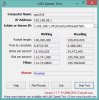
iperf test result to my old notebook

I'm really going to have to figure out how to force/enable 802.11ac on rates on my wifi at home to see what the top-end of the card is, so far it's all 802.11n -
I bought a few from an Amazon seller (DataVis), but unfortunately there are no WINDOWS 7 drivers available for it. Just Windows 8, and others have said they're not backwards compatible.
I'm (at this moment) knee-deep in taking out my Dell 1901 and putting in a Killer 1202. Tell me you have a Windows 7 driver for the 7260 AC card so I can skip the Killer 1202!!!
I just recently installed a new Apple Airport Extreme (the new one with 802.11ac) and am dying to try it out! -
I'm using Win8, sorry lancorp.
Intel lists it as Win7 and Linux compatible also, but no drivers have shown yet. Probably just a matter of waiting. -
I don't wait well...
-
I know what you mean...that's why I have the intel card now....
-
i'm having a problem with the Killer 1202 and bluetooth. The problem is, there isn't any BT!
I uninstalled the Intel Wifi/BT software. Actually, I had to reinstall it in order to uninstall it, as the initial uninstall would error during uninstallation.
Oddly, I had the Dell 1901 card in my XPS 15 so but no software suite for the Dell Wifi, so it was a bit tricky uninstalling the Intel Wifi/BT software (Intel requires the hardware be present when uninstalling).
Once everything was cleaned up, I installed the latest Killer v2 software suite. Installation seemed to be successful, but there is no BT. No icon, no BT devices in device manager. It's just gone.
Ideas anyone?
Thanks. -
lancorp: Do you have an unresolved device in the Device Manager (the BT hardware w/o a driver installed)? There should be one if it's just driver installation is the problem. BUT. There is a very very trivial possibility that the BT hardware isn't being noticed.
-
There was an unknown USB device. I shut it off last night and went to bed. Just now, I turned it on to get the details to post here, and voila! New hardware found, loaded lots of bluetooth-related devices, and now it's working. Go figure!
-
Hi
I posted this on the General XPS forum and am cross referencing it here...I really hope someone can give me some direction
My XPS 15 L502x is randomly shutting down, restarting, going to sleep, etc. It seems to be sometimes related to movement or touch (but sometimes it just shuts off with when undisturbed) . It restarts without issue. I ran the dell diagnosis a few times and 1 time was told that I had a critical blue screen error and the other times there was no error found. After reading this forum, it sounds like I am in good company.
Temperature has maxed out once at 81 degrees-could it be overheating? I also wonder if something is not seated correctly since movement seems to exacerbate problem and it got worse following travel.
I want to take it to get repaired but is there any diagnosis I can do at home or anything I can tell the repair shop based on the experience of others. I am not a techie and am leery of updating bios, etc, while the computer is shutting off. I really really don't want to have to get a new computer-this one is less than 2 years old. Power cord and battery do not seem to be issue. Touch pad is has also died. Any and all suggestions would be greatly appreciated.
Thanks -
Intel Dual Band Wireless-N AC 7260 Win 7 Drivers:
Finally! Intel Dual Band Wireless-AC 7260 Wi-fi Card for Notebooks | LinksysInfo.org -
I have now had the laptop for a week and its been perfect so far never any slow downs at all. I have done lots of gaming. played max Payne 3, rage and diablo 3 in full HD and have not had a problem yet. I was so worried after reading this thread. Guess I just got lucky
-
Do you have the Core i5 or Core i7? i5 also comes with 630M and i7 with 640M.
-
Okay, 1st thing, you do know this is a XPS 15 L521X thread, and not a L502X thread? I just point out because people here (like me) may not have any direct experience with your actual machine.
Next, personal machine or work machine? If this machine was a work-machine I'd not waste my time with any of the following and would look to the immediate replacement with a new machine, much more cost effective use of time IMO. Comparing the cost of hardware vs the "cost" of my work time tells me that. Your balance sheet may be different.
That out of the way, if my machine was exhibiting the behavior yours was I would be very frustrated by the behavior.
In my experience that speaks to "something loose" - physically. This could be something in a socket that has worked loose (ram, etc.) or a wire that has gotten loose and is creating a short now and then (some machines have extra antenna leads that may be unused - like my wife's XPS 1645 that is setup for 3-wire wifi in addition to 2-wire cell-data in addition to something else and only has a 2-wire wifi so about 4 wires 'dangly'), or even worst case a solder joint that's gone bad somewhere critical.
It could also be that there is a hot-spot on an individual component that is causing it, like the CPU or GPU. Or dust/lint clogging air flow channels.
It seems unlikely to me that it's software induced, however it's still possible.
First thing I'd do would be to clean the internals of the machine (gently), making sure there's no crud accumulation preventing cooling from working properly and verifying in the process that there is nothing improperly loose.
I'd also consider re-pasting the cpu/gpu as a preventative measure.
Then try using the machine as normal and see if the behavior manifests.
Next, I'd try booting and using the machine off a live-cd of Linux (no installation required) which would let you use the web, wifi/network, play videos, etc., as "normal" in your HDD-installed OS to see if the behavior replicates at all.
If it does not then either your OS has some malware *or* your HDD is "going bad." Getting a cheap HDD to temporarily drop in and replace your existing HDD with (think CHEAP, like 20Gb or less capacity) would let you do a fresh OS install (maybe using the Live CD you tested with) to verify that the HDD was the focus of the problem.
If the behavior still manifests I'd look to trying easy swappable parts that could be suspect, mostly in a notebook this means trying different RAM sticks. Either swapping the ones you have between sockets, or borrowing/buying replacements and dropping them in. This could be a complete waste of $ though, so be warned.
After all that mess, I'd think about a repair shop ... IF I could find one that I could verify was better than myself at this stuff, and had the proper equipment. I don't think it's more than 1 or 2 in 10 chance that any repair shop would be able to find the issue. These things are commodity, disposable, items after all. -
I have the i5 and 630m....also has the killer wireless. Best deal ever only $340 lol
-
Thank you! Rep to you!
-
Nobody (from what I've seen) has reported overheating issues with that system as the i5 and 630M generate less (due to them being lower performance parts).
-
My i5/640 combo did.
Sent from my HTC One X using Tapatalk 2 -
Did you have Dell replace the Heatsink and Fan or fix it some other way?
-
No issues here with over heating with the i7 with the 640m after replacing the stock thermal paste with AS5.. and I game a fair bit...
-
Can anyone please confirm if the wireless issues on Dell XPS 15 L521X have already been fixed with Killer Wireless-N, 1202?
I has one be4 with dell wireless but while dell e6400 have 2 signal,l521x cannot connect
-
The wireless problem isn't an issue for everyone because it has external factors like the position of the wireless AP in your house/apt and distance from it.
I don't have any real problems with the wifi. The only exception is looking at the dBm signal level, it's not as strong as on my other laptop.
However the signal is still weaker on the L521x and there was never a real fix. The Killer 1202 is sort of a bandaid because it can provide better throughput even with lower signals. -
late comer to this thread, but i've read through about 25% of it. I'm awaiting delivery of a L521x that I ordered from the outlet. I've done quite a bit of reading here and elsewhere and almost cancelled my order. I called Dell and they told me I've got 30 days to return with no restocking/etc.
I think I got a nice price from the outlet (~ $979) on certified refurbished: core i7, 16GB RAM, 2GB GT 640, 1TB platter drive, 128GB MSATA SSD, Killer 1202 wifi, 9 cell, etc.
I'm obviously skeptical, but it seems they are not all lemons. I would not have ordered without the worry-free return option. What do you think my chances are of getting a good unit at this point (end of July 2013) from the outlet? It seems not everyone has had issues, and most of it was from early on. Those that have had issues never seemed to really get them resolved, whilst those that haven't are still happy(?)
Man, things have changed since I bought my Vostro 1500 6 years ago. It took me forever to find a good config at a reasonable price. The laptop industry has become flooded with low-res screens cheap CPUs. I don't understand why configuring high end options has all but been eliminated. -
so, over at the dell forums, I received this email from Dell admins...yup, ill probably be banned from the dell forums for posting this but im done with dell...
Your forum post was deleted by a moderator.
Subject: Re: WIFI problems on Dell xps 15 L521X
Posted to: Networking, Internet, Wireless Forum
Reason: We are writing in reference to your post in the Dell Community. While we value your participation in the Dell Community, we have removed the post described above because it violates the Dell Community Terms of Use................................................................ This post content contains information that suggests or implies unauthorized solicitation including, but not limited to, commercial and legal solicitation and is prohibited on the Dell Community. Specifically this refers to solicitation for or discussion of, legal action against Dell. Please feel free to post and discuss your technical concerns in the Dell Community but discussions of a legal nature are not appropriate for this venue.
COPY OF ORIGINAL POST Your post was submitted as a reply to the following thread: Re: WIFI problems on Dell xps 15 L521X - Networking, Internet, Wireless Forum - Networking, Internet, Wireless - Dell Community ________________________________________________________ But Dell knew about this mistake within the first few weeks, and they didnt even announce it or anything, they kept selling the machine knowing its faulty, so yes we can blame them for the machine, knowing its defective and still choosing to sell it while denying everything. Even their support staff who were helping us, stopped replying to our messages and trying to help... I so wish thered be some lawsuit, the people vs Dell. this is the last thing ill ever buy from Dell, and by god all will hear about Dell's dumbness. Ive already swayed 3 people from buying a Dell laptop!
-
If you don't game I suggest disabling the discrete GPU, then you'll probably be ok.
-
elvis7 likes to live dangerously, virtually speaking, but I like his candor
-
I just bought a couple of day ago a Dell XPS 15 L521X last week I received it and guess what, still having problems with the WiFi card. Dell whats going on with yiu guys why not fixing the problem. Should I return the computer and buy another model or wait to get a replace of the wireless card. Any suggestions.
-
If WiFi performance is important to you then return the computer ASAP, don't waste any time trying to "fix" it.
FWIW ...
I get the best WiFi performance using an Intel 7260 dual-band card which is a recent upgrade. For the 3 locations I've tested it in it trades performance with my NetGear WNDA3100v2 USB dongle or soundly trounces the dongle when 802.11ac is available. I'm using the official Intel Win8 driver pack.
2nd best was Killer-N 1202, I used that one for months but there were plenty of locations where it could in no way keep up with the WNDA3100v2.
XPS 15 (L521X) Owner's Lounge
Discussion in 'Dell XPS and Studio XPS' started by Muddy, Jun 28, 2012.


