 Problems? See this thread at archive.org.
Thanks c0derbear, didn't know about that app, I'll try next time I use my W8 HDD.
-
I don't see the option for "optimize" in the Killer Network Manager. I just see where you can set priority for different programs, etc. Is there a different application to optimize the system?
-
I wish I could just exchange the L521x for Alienware 17 Full HD Gaming Laptop Details | Dell . But, I have had my system since November so I don't think Dell would do it.
-
I was kinda thinking the same thing, but the Alienware isn't really good for flights and travel...
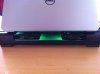
The last lot of new parts are in, along with the AS-5, the DVD tray out and some minor mods to the exhaust area. Seems to be okay now, and if I'm gaming I just hook it up to my custom built cooling pad
-
Careful with that cooling pad, it may be doing more harm than good. The fan air will spill over towards the center and it could actually reduce the volume of hot air being expelled because of higher pressure/resistance in the middle area.
I use this stand to elevate the L521x and have a small low volume USB fan blowing directly up towards the bottom of the laptop. This actually performed several degress better than using my ZALMAN ZM-NC1000 cooling pad. -
You are quite right, I've experimented with the airflow with these fans, and if they sit too close to the centre they restrict the airflow quite a bit.
In their current position however, they work fine. The exhaust for the XPS is clear, with minimal disturbance, and the 2 case fans are seated back under the laptop quite a way, so as only a small portion of the top of the fan actually blows straight up into the intakes, which now there isnt a DVD module in the way, results in cooler, smoother flow for the onboard fan.
The L side, which gets hottest with the mobo and processors has the fan almost directly under the case, and helps pull a bit of heat away too, making for cooler fingers when gaming XD -
I noticed a strange problem on my L521X.
In Device Manager, I see a yellow '!' in front of 'Intel(R) 7 Series/C216 Chipset Family USB Enhanced Host Controller - 1E26' under 'Universal Serial Bus controllers'. Device Status says the device cannot start (Code 10).
If I uninstall this device (right-click on it and choose 'Uninstall') and then 'Scan for hareware changes', it will find it back and install drivers automatically. I can see a series of notifications pop up from system tray. After that the same item appears again without the yellow '!', and 'Bluetooth Radios' item appears in Device Manager too. I can also see the Bluetooth icon appear in system tray.
So I assume this problematic item has something to do with Bluetooth that's integrated with N6235 wireless card.a
But if I reboot the laptop, the yellow '!' appears again and Bluetooth item and icon disappear. I have to repeat the forementioned procedure to let it appear again.
So who can help me on how to fix this problem without manually unistalling and rescanning hardware in Device Manager each time I boot up my laptop? -
I've had an issue with the Intel USB Hub controller. Emailed the Dell tech, got sent a download link for a new USB Hub driver, installed and away it went.
Hit up the tech support side of the Dell website first, enter the service tag, and there should be an option to browse for every single driver that the XPS needs, and it gives the most up to date version there. Failing, email the support crew
-
Well got my new XPS 15, damn it's a nice machine, first thing I did was to clone the hard drive to my new Samsung 512gb 830 SSD with Samsung's migration software (seems good since it aligns the SSD properly and doesn't care that the original drive is bigger than the target drive as long as the data inside is lesser, it just can't copy Dell's recovery partition and I forgot to make a recovery drive before exchanging the hdd in my laptop though no problem as the HDD can be my recovery drive now), set SATA Operation from intel rapid start to ACHI in the BIOS and replaced the hdd and damn this thing is snappy now. It had problems booting up at first with the SSD showing a checking media message and failed or something then it restarted again and worked. I had to go back into the BIOS and change Boot Option from last to auto, before it all worked fine and my laptop now takes about 5-8 seconds from the moment I press the power button to going into the windows 8 desktop. Had to uninstall intel rapid start since it keeps giving me an error message when I start up the computer even if I change the BIOS back to intel rapid start, read around and found on the Dell forum that it doesn't support an SSD+mSATA SSD configuration though no problem there since I don't need it with an SSD.
Still trying to figure out how am I supposed to make the whole 32gb of the mSATA SSD into storage. They seem to have formatted 8gb of the drive from the factory to act as drive D for storage while the rest of it as cache. Wifi seems fine and performing about the same as my old L501x though I've only tested it on the 5ghz band and not 2.4ghz, and my apartment isn't particularly that big, it'll be a long while before I can go to my parents house to test if wifi performance in my room there will work since there's considerable obstacles and distance between it and the router. Screen seems great though I may want to look into calibrating the colours when I'm less busy.
The only real annoyance thus far is everytime I boot up the computer, the blu ray drive makes a sound like it's ejecting a disc or something. Is this a normal thing? -
Yes the blu ray drive making noise on startup is normal
-
Hikari,
You'll want to de-activate and un-install any Intel disk utility software, including Rapid Start support, to completely disable and remove the caching support (and reboot).
Then you will need to use the command line tool "diskpart" to remove all existing partitions on the 32gb mSATA.
Then you can use "diskpart" or the GUI Disk Utility to reconfigure it for normal file-system use.
Normally the bulk of the mSATA is used for caching (~24Gb) with 8Gb reserved as swap space for the smart hibernation support.
If you are running Win7 you'll "miss" that stuff, somewhat, bu if you are running Win8 I don't think you will at all.
I run my OS (Win8) off a 120 Gb mSATA and obviously don't use any of that crap and the machine flies. -
Has anyone had network problems with the Killer N wireless cards? For some reason the driver goes bad in my xps 15 (win 8) and I have to reinstall it every other day.
-
The only quirk I've had with mine is that some router configs don't seem to work well with it, but it could be my machine at that point.
I've never had a problem on the software install side of things. -
It seems the "crappy wifi" disease has also caught Apple.
-
Well after 10 months with this laptop I have decided to send it back for a full refund. Although the WiFi issue was not a big deal for me I decided having flaky WiFi on a £1200 laptop was not acceptable. I have had the hinge replaced, screen replaced, killer card and none improved the Wifi. Shame as its a beautiful laptop. Now going to purchase a Gigabyte P35K Ultrablade. Gorgeous looking laptop with alot more power.
-
Let us know if they accept the return. I have had mine for 7 months now, but I am considering demanding a swap for the new Alienware 17. -
They have already accepted the return. Its being collected by DHL on tuesday. As long as you have given them 3 attempts at fixing the issue then after the 3rd time they will arrange a return for you.
-
Thanks for the info. Are they requiring that you include the original box/packing material? I think I threw away the black XPS box.
-
From what I gathered from the conversation its not essential but you may face a small charge for new packaging.
-
Hi everyone,
I've just signed up on here after following this dicussion with interest because I really fancy getting one of these from the Outlet, as refurbished prices seem excellent for the specification and it looks a lovely machine. As it's not for games, the only thing that really does concern me is the WiFi issue because I know that I require good performance in this respect (I often use my laptop in areas that are on the fringes of useable signal strength). I know that the advice to me would therefore be to avoid this laptop completely.
However, as an electronics engineer with RF experience, I can't help wondering whether anyone has tried a DIY solution on their L521X to rectify the WiFi issues. As far as I can gather (and correct me if it's known otherwise), there is nothing wrong with the controlling firmware or digital side of the hardware, but rather it is an issue with the placement of the antennas. Specifically, I gather that it might be attenuation in the coax lines together with the fact that the antennas in the display are located behind lots of shielding. Is that the case? Are the antennas placed behind a hell of a lot more sheilding in the L521X compared to other laptops?
I'm wondering if for example one could attempt to simply locate the antennas within the base of the unit, connected with a very short length of coax directly to the RF connectors on the WiFi card. The antenna elements could be located in a place such as near a vent where there's hopefully an area clear of shielding. This could be done without doing anything that couldn't be reversed. What I'd do is simply disconnect the existing antennas, and then connect a pair of coax 'pigtails' to the WiFi card, with the screening stripped back off each one to form an antenna at the correct wavelength. Then just experiment with placing the ends of the pigtails in different areas of the base. As long as it's possible to remove the cover without invalidating the warranty (is it?) then it would be oh so simple to try this.
Alternatively, is anyone finding that they're happily using this machine using a USB WiFi adapter? Given that some of them are very small in size these days, and that the laptop seems awesome for the money otherwise, I'm wondering if having to use a USB dongle is a real deal breaker.
Trev -
Woah, looks like you know your stuff
The case can be taken off with out invalidating the warranty, youll need a torx 5 and philips to do it. Im not a radio engineer, but from what ive read, the age long problem with the antennas in the new Dells and apples is as the the antenna is mounted through the screen frame the metal cover cuts your reception (or whatever) down.
There really isnt much space inside the case to work with coax i dont think, unless perhaps you took the DVD module out. I've done think (I work in the cloud mostly) and its improved airflow/ temps, but perhaps the empty bay could serve as a place for your antenna? The underside plate is plastic, im not sure about the top of the body...
The KillerN wireless adapter gear is pretty decent from what I've read, and I've had no problems with the one in my XPS (although I am usually within 10m of the modem or bridge) -
@trev16v: I'm not a RF engineer, but I've made some testing with custom antennas, please checkout this post with images. The results were not significant and didn't show any improvement. I guess my DIY antennas were not made good enough.
I've just received the exchange proposal from Dell. As it is the second exchange, I've requested to switch to an XPS13 L322x instead of the 15, arguing after 2 computers and 4 screens I'm not satisfied with the overall quality of the computer. It has been accepted, I guess it's also a way for Dell to distribute the last Ivy Bridge laptops and make room for the new coming with haswell. -
duplicated.
-
I requested an exchange on Saturday for the new Alienware 17. The rep said he would have to check with his manager so Dell should get back with me today. The only downside I see is that the Alienware weighs about 3.3 additional pounds.
On a side note, I just realized that since the lcd replacement, I no longer get the keyboard imprint on the screen. Go figure... -
That's interesting, and many thanks for sharing. I'm just having a close look at your pictures, trying to work out the arrangement you did. The impression I have is that you didn't actually use the actual original microwave antennas out of the other laptop. Instead it looks like you used the RF connectors and coax leads, but then soldered the other end of each coaxial line to a piece of foil. Is that correct? Also did you solder the inner conductor only, or did you also solder to the outer screen? Either way, doing this wouldn't form a very good GHz antenna, I'm afraid. So, that would hopefully explain the poor performance even with the antennas virtually in free air, unobstructed.
What would be good to try would be exactly as you did, but with a donor laptop's existing WiFi antennas connected. The WiFi on the machine should surely work absolutely brilliantly if a proper pair of WiFi antennas are allowed to dangle outside the machine.
In fact just looking on eBay, I might fetch these to try out (if I do go ahead and get this machine):
TYCO U.FL Laptop Notebook Wireless WLAN WIFI antenna aerial cable Mini PCI - N4 | eBay
For the sake of a few pounds that those cost, it's worth plugging those in and placing them in different areas.
If I do go ahead, then I shall most certainly get those and report back
-
Yes you're right, I didn't take the whole antennas, and that's probably the problem. But, as I've an academic background in eletronics, I took care of not connecting the coaxial cores with the shields. I just soldered the cores on some copper plate and let the shields as this.
-
So as it turn out I wrote to dell customer care and told them the same story I posted here and they gave me a new screen. Go dell in the end, And I have to say the new screen was much better than my old one, with better viewing angles and although i never really had a Wifi problem, its much better now with the new screen.
-
So I went ahead and bought a 2nd XPS 15 L521x with 12gb of ram and the i7 with the 640m.. for the Girl Friend as her current Laptop died and could not wait for the Haswell refresh ..
Now the 1st one I got was running a little warm so I took it apart and put some AS5 compound on the GPU and CPU.. and not Throttling issues at all now..
Now this new one was idling at 60c almost.. and Throttling like no tomorrow.. So 1st thing I did was open it up to see what was up with dells thermal compound... and pic's below this is what I found..
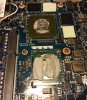
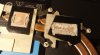
As you can see.. whoever put the paste on at the factory did I really bad job.. way way way to much paste.. No wonder it was not cooling...
So I cleaned it up and put some AS5 compound on.
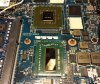
Forgot to take images after applying the AS5
But after all said and done now the system idles around 45c to 48c and under load gaming for 2 hours levels off around 79c.. and no throttling. temps seem to level off after the fan is at 3/4 power.. has yet to run at full speed.
So if anyone is having heat issues this is likely the reason why bad thermal paste jobs from the factory. -
Actually it will throttle at 80C so if your hitting 79C, you'll easily hit the throttle point. Now its probably not throttling very much in your case. I'm not saying replacing the thermal compound doesn't help, it definitely does, but it doesn't solve the throttling issue with heavy gaming.
-
How much did you apply?
Did you spread it or let the heatsink do it?
I've tried a few times now both ways with differing amounts and have been getting idling temps > 60C while on the shipped compound it was 55C+ (ambient temp is around 20C).
Cleaning both chips and heatsink with ArctiClean and tinting the heatsink beforehand.
Not had problems in the past with desktop heatsink applications but the XPS seems to be getting the better of me. I'm starting to think I may possibly have a duff batch of AS5. -
As5 isn't the best compound now a days.
Many have moved to mx4 or the more expensive mx3 (which is marginally better ).
Sent from my HTC One X using Tapatalk 2 -
Thanks for the recommendation BikKnight.
For the sake of £4 from Amazon, I may as well get some and give it a go. -
Not to mention AS5 needs time to cure (burn in) to provide most optimal performance.
I opted for the Noctua NT-H1 since it doesn't need time to cure and its really easy to apply.
The MX4 is a good choice though, its also non-conductive which is good in case you scew up or put too much. AS5 is conductive. (NT-H1 is also non-conductive) -
At £4 the as5 is indeed a bargain.
Sent from my HTC One X using Tapatalk 2 -
MX3 has been discontinued from what it says on the Arctic site.
-
Its still available if you look around.
Sent from my HTC One X using Tapatalk 2 -
I welcome very warmly,
I have a problem with the temperature,
I decided to replace the thermopads to Phobya 5W/m2K or Phobya XT 7W/m2K
and the paste to Arctic Silver 5 or Zalman STG2
I would ask that the thickness of the thermopads have selected numbers?
![[IMG]](images/storyImages/2uib4ec.jpg)
Unfortunately, I have no way to check this because i've exchanged a paste, and the thermopads and removed the old thermopads to bin. and gave everywhere 1.5 mm thick, of course, comes off the cooling system and the twists, because the thermopads are too thick in that place.
maybe it could be:
1. 0,5mm
2. 1mm
3-6.1.5mm
7-8. - arctic silver or zalman or something else?
p.s.
sorry for my english ... -
A new A14 BIOS out chaps..Dell.com Support. Something about BIOS stability...doesn't sound too interesting
-
It says:
Fixes
- Not Applicable
Enhancement
- Improve System BIOS stability
But applied anyway.
Thanks for the update. -
GPU still throttling after A14 ?
-
Great news. I have to take it from a drawer (L521x), I just left it there, too many problems with it ( is sitting there for some time now), to apply the latest bios and back to its place, drawer
-
Bummer. This machine was truly designed on a Friday.
Sent from my HTC One X using Tapatalk 2 -
Wow, they still haven't fixed the throttling? It's been a year since I first bought one of these and they still haven't fixed it? I feel bad for you guys, what a lemon. It makes me triple glad I got a refund and bought an m14x R2 (saved $400 too). It's been good to me, although the screen is rather mediocre.
I really can't believe that Dell is still selling this thing, if it was a car it would have to be recalled or Dell would be destroyed by lawsuits.
P.S. For thermal compound I'm using Innovation Cooling's Diamond, it's good for laptops because it's very thick. AS5 is still ok, it's just that other pastes are a bit better. If you're not going for the highest possible clock speed it's fine. -
The GPU is working fine on the A04. From A06+ it is throttling. I had to recover from A13.
-
Doesn't the cpu throttle on the earlier bios?
Sent from my HTC One X using Tapatalk 2 -
I got what i think is a great deal for only $391 new from dell outlet this weekend. I got the one with the i5 does it have the same problems as the i7? Any other advice? Mine only has the 630 video card im hoping thats enough to do some gaming. Thanks
-
Oh great, I should have read this thread before buying one off ebay. On top of that, it's a used one. I think I made a huuuuge mistake. Here's hoping mine isn't a dud like other peoples. If I have the problems that are mentioned here, am I better off just cutting my losses and reselling it? The one I bought still has warranty on it though if that makes any difference.
Thanks for any advice -
If you buy it, do not update the BIOS. Let it to A04. If the BIOS is updated, downgrade it to A04.
-
This is how you an downgrade your BIOS:
Hidden method to downgrade BIOS to A04
Well, I have this notebook since October and I have tried every BIOS, that was released. I can't say I have seen any improvements made, in case of WiFi or throttling issue... Oh wait, throttling was "solved". I'm really pissed of GPU throttling feature which replaced CPU throttling. CPU throttle could be disabled by ThrottleStop, but GPU throttling at 80degrees cannot be disabled (only by modding bios, but I was not able to get vbios by nvflash or nibitor).
The worse thing is, when you install BIOS A09 or higher, you find out, that you cant revert this upgrade back, since A04 is not UEFI BIOS. So now you have notebook with terrible WiFi issues and throttling, which cannot be disabled. So anyone who likes to play games, is able to play it at max settings(e.g. far cry 3 Dx9 detail, maxed, res:1368x768), but only for 2minutes, then the throttling shows every few seconds...
As BIOS A04 seems still the best BIOS out for me, I googled a lot and found an undocumented BIOS recovery method for this notebook - XPS 15 (l521x)
WARNING: BIOS A04 is old legacy bios without security boot, UEFI and other features, so it works only for laptos released with Windows 7.
I really don't recommend to try it with Windows 8. I don't take any responsibilities for any damage you can take during flash process.
If you really don't know what you are doing, step away!, You can brick your notebook!
BIOS DOWNGRADE:
1. download bios A04 file and extract it using winrar.
2. open the extracted folder and look for the file with .fd extension
3. rename the file to L521X.bin
4. format USB pen drive(I used USB 2.0 2GB pen drive), and place the renamed file to root of the usb drive.
5. turn off notebook, disconnect all usb and other devices, !!!disconnect AC adapter and battery ( you have to open bottom cover of notebook and disconnect battery from mainboard)!!!
6. put pen drive into USB port(I have used the one, which is close to display)
7. press right arrow(End button) and keep it pressed
8. connect AC adapter and with and turn on notebook(right arrow still pressed)
9. it will start with full fan speed(now you can release the button), after 1-2minutes it will start beeping(it lasts for 2-3 minutes), wait untill the notebook turns off and restart itself.
10. if u have done everything correctly, in BIOS setup u will see version A04 is successfully installed.
Hope this guide helps everyone, getting bored and pissed of by these GPU throttling issues.
Last edited by janox1x2x3; 13th January 2013 at 08:24 PM.
At the 9th point it took mine like 3-4 min.
The A14 is still throttling ???!!!PJPeter likes this. -
so does the i5 have the same problems as the i7?
XPS 15 (L521X) Owner's Lounge
Discussion in 'Dell XPS and Studio XPS' started by Muddy, Jun 28, 2012.


