 Problems? See this thread at archive.org.
that's awesome. My next step was to get the 7260 but I thought I'd wait for a killer networks equivalent. I do have the Linksys ea6500 but its crap , ND its dying, luckily I purchased a 3 year warranty with it so as soon as the Asus rt ac68u comes out, I'm going for a swap.
-
thanx for the reply, i will try and get the wireless card and screwdriver.
For the RAM, the old RAM in my Toshiba is PC3-10600 and the one in the xps 15 is 12800, do you think it can slow my pc?
Thanx in advance... -
Have you checked the wear level on your battery? Number of cycles? Etc..
-
Yes the memory will run slower, there's no doubt there. I cannot tell you though if you will notice a difference or not.
The i7 3612QM supports DDR3-1600 (12800) so it's making full use of the faster speed in original memory. -
97% which shouldn't have that huge of an impact
-
Same problem after a year. Used to get about 5-6 with my battery saving settings. Now I only get 3-3:30. Huge decrease after a year.
i7, 8GB, GT640M, Killer-N card, 11% battery wear -
Has your Killer-N Card helped with the wifi issue?
-
Coderbear, I gave in and bought the 7260. Does the black antenna plug into slot 1 or 2?
Ok so online search shows that the black antenna connects to slot 1 and the white to slot two. But in my l521x, the white cable is longer than the black one, so to get it connected, the black cable passes over the card and not around.
Also, in windows and insider, it shows my current connection as being N, even though my router has been set to 5ghz AC only and im connected to that same network. My connection speed is at 400 and has not gone higher.
update 3:
I changed my routers ac channel to 80 MHz and my connection now ranges between 650 - 866Mbps but when I check the wireless type, it still shows up at wireless N. -
I don't think windows understands "ac" that well, it reports N on my machine but the intel software reports AC.
I don't know which connector is black/white on mine, I just went with whichever was closer physically and easy to route. Probably the same as yours.
FWIW, 400 MBps is greater than 'n' can do on two wires, so that was already 'ac' speed but probably on a more narrow channel. Forcing your router to 80 Mhz channel width will certainly give you the best speed. I played around with my router settings too but didn't get any connection difference whether I set it for 80-only or 20/40/80-auto. I need to leave it in the latter mode anyway until I upgrade my wife's notebook with a 7260. She may not notice the switch to 2.4 Ghz but I'll know in my heart I'm short-sheeting her.
If you're some-times getting 866 then that's as good as it gets on 2-wire so you're good to go.
I need to work on my network testing rig, the old machine I was using as a host is loaned out and our mac mini running speedtest-mini just can't broach about 150 MBps even with my machine hard-wired. Stupid Mac. I'm hoping to do better once I spend the time to get jperf/iperf running. -
ive got a lot of issues that have poped up...
after switching the black to 1 and white to 2, my wifi strength got better but I noticed that Bluetooth no longer worked. I tried to repair the intel software and the Bluetooth was completely removed from the system(device manager and icon), so I tried to uninstall the software and reinstall but no go. I then switched them back, black to 2 and white to 1.
after about 4 restarts and reinstall, my pc stopped saying there no network adapter (wifi,bluetooth) and installed everything. I now have Bluetooth working but now in device manager I have : other devices : Bluetooth peripheral device. it wont go away.
My mouse connects to the laptop and stays connected but my phone will connect and then disconnect a few seconds after. (with the killer n 1202, the phone would stay connected and id be able to take calls through the laptop and dial from it.)
ALSO: now ever few minutes, my wifi bars drop from full bars to 2 bars then back up to full within seconds.
ugh wth is going on.
even after I uninstalled everything intel, I was getting issues with my pc recognizing the Bluetooth, it installed the killer n fine but Bluetooth would say unlisted serial device id etc. took a few retries to get it working. now im back to working wifi and Bluetooth , the only problem is when I had paired my phone with the 7260 card, it messed up my system and now it is impossible to remove my phone from Bluetooth devices, it says device failed to be removed and if I delete it at the source, it just pops up. if I try to pair, my pc says failed to pair, uninstall the device and try again.. so I guess I will not be using my phone via Bluetooth anymore.
I am returning the intel ac 7260 card, its complete crap and has caused me 8+ hours of issues and headaches! Ill just wait for the killer ac card to come out.
-
ive decided to play nice, ive retried installing the 7260, everything came on first install, the only issue is that the Bluetooth is listed as generic Bluetooth device, and under other devices, theres Bluetooth peripheral device. so im guessing intel messed up and didn't even release the proper drivers for the card.
transferring from my laptop on a speed of 700 to a lan gigabit desktop, its around 34MBps, transferring from it to my laptop its about 10MBps, a 704MB video file.
range is a lot better than the killer card, I have my router set to mixt (n/ac on 5.2) but set to channel width 80 and auto channel
havnt been able to get my wifi dashboard or wireless display to install. It doesn't seem to be bundled with proset...
using lan speed test, from my laptop's msata 256gig to a gigabit lan desktop ssd 128gig , writing is 20MBps and writing is 17MBps
same test but both pc's on lan, I get 79MBps write and 101MBps write..
Range is only better than the killer n if im on the same floor (basement) but when I go upstairs, I get droped down to an 80mbps speed and only get about 4 mbps down, unlike the killer where id get 200+ if I go upstairs and within 15 feet of the routers center. -
I'm considering buying the 1521X and I'm concerned with the known wifi issues. Is this a problem I'm guaranteed to get or is it hit or miss? Thanks. Almost 600 pages is a lot to go through to find the answer.
-
don't buy it, not worth the hassle or price. go with a different company.
-
The only noticeable drop in my wifi is when I go upstairs which is 3 floors from my router, then I have to use the wifi adapter Dell provided me with.
-
Thanks for the response
-
It helped over the original Intel card. But it's still doing worse on downloads than uploads which is not normal. It still performs worse than many other computers I have including macbooks and macbook airs
-
Hello!
I am from Germany and I am considering buying an Dell XPS 15. Reading about all that WiFi-Issues, I am not willing to spend 1800 for such a device - but I have read about some people who did technical tweaks to get more efficency out of their system for less money. So they did the following:
Buying the XPS 15 with i7 and 8GB of Ram (500 less), replacing the WiFi Antenna with one from Intel and adding another 8GB of Ram.
Now my questions: Is this really possible? Which antenna should I buy? Which ram should I buy? Does it void the warrenty to replace/add these parts?
Or is there meanwhile a fix for this whole WiFi issue which I have missed (since I am not willing to read over 500 pages in a forum)... What is the lates revision of the Dell XPS 15 L521X in Germany?
Greetings and thanks in advance!
CharlsmanKepper -
The only 100% fix is to use a USB wireless card. Even with the Killer-N or Intel Wifi-AC card, it will not have as good wifi as a normal laptop (ie MacBook Pro)
If your going to plunk down anywhere near 1000€, DO NOT BUY. Just find a different computer if you have such a large budget. -
I second the other's advice, it sounds like a bad purchase idea for you. The odds of having wifi problems is high. Not guaranteed, but very high.
If you're still determined to get the machine then be sure to spec it from Dell with the Killer-N. If that doesn't work out for you then try replacing it with the late-model Intel 7260 WLAN card. It's not the antennas that get replaced, only the WLAN card. Of course the root problem is *probably* the actual antenna location and how the casing of the machine (or some other aspect of the build) interferes with signal receive and transmit. There is no guaranteed fix for the WIFI issues.
It does not necessarily void warranty to replace WLAN or add RAM, but don't expect Dell to cover it if you static-shock the machine and break it in that way.
There is also no dell-supported meaningful fix to the poor thermal design that prevents you from running the CPU and GPU to high processing levels at the same time. If computer graphics/games are important to you again this is probably not the machine for you.
There have been two revisions of the machine, the initial release which featured the Core i7 model 3612QM and Intel 6325 WIFI (along with the i5 of that generation) and the current model which has the I7 3632QM (which is basically 100Mhz faster than the 3612QM but otherwise identical) and the Killer-N 1202 WIFI. To my knowledge there are no other basic differences in the hardware. -
Just to note, I have the second revision of the notebook and when I got it, there were thermal issues with gaming and wifi issues just like in the first revision.
-
Hi guys,
Is there anyone here using windows 8.1 preview and the wireless driver is working? I tried to install Windows 8.1 preview and most of the drivers work but only the wireless driver does not work. Tried to download the driver from the Dell driver site, was told it is not an official release yet so there is ot official driver for Windows 8.1 preview. I want to know it someone too is facing a similar issue?
Thank you... -
Coderbear,
can you check your device manager and see what your Bluetooth shows up as? Also check to see if you have "other devices" Bluetooth peripheral. -
I have, on Windows 8 Pro (version 6.2.9200)
Bluetooth/Generic Bluetooth Adapter
Bluetooth/Microsoft Bluetooth Enumerator
Bluetooth/Microsoft Bluetooth LE Enumerator
Network Adapters/Bluetooth Device (Personal Area Network) #2
Network Adapters/Bluetooth Device (RFCOMM Protocol TDI) #2
No "other devices" currently listing. -
Maybe someone could be interested in the new Inspiron Series (Touch, Haswell, GT750m, but no quad core CPU)
It seems that new Inspiron has a better aesthetic than the actual XPS (IMHO)
http://forum.notebookreview.com/del...-inspiron-7537-7737-touch-haswell-gt750m.html -
look under, other devices. not in the Bluetooth section
-preview.png)
-
I reiterate, I have no "other devices" in my device manager.
-
ok, well the Bluetooth is supposed to display, Bluetooth 4.0 etc, I guess intel didn't pack the right drivers :S
-
coderbear, also just wandering, what is your boot time ? mine is 4.9s even with the ssd change,
also, if I open task manager, performance, and system is always writing to disk, anywhere from 7kb to 600 kb.s and it reads 0-1mb/s.
right clicking it and going to properties shows it as ntoskrnl.exe . should I be worried that this will wear down my msata faster than normal and shorten its life span? -
How have you overcome the (10-second) delay in boot caused by the SD-CardReader?
-
latest bios a14, drivers and windows 8
-
Aaaah... okay. I stayed away from 8 (went with 7-Pro) for the moment, but might go there later. That is a great startup time, and proves beyond a doubt, that the 10-second delay is driver-Win7 related.
Thanks. -
im kinda bored so ive moved all my files to the hdd and am imaging my c drive (msata), after which, I will reinstall windows to see if I get a better boot time, my current install has been restored from images about 4 times so perhaps its built up junk. if not then ill just restore my image

-
install complete, but my boot time is now 5s..
my neighbours all in one hp's boot time is 1.8s ...
anyway, found a way to do a clean boot using an upgrade dvd, I almost went nuts when I tried putting in my windows key after installing it and it said nope, your key is only for upgrading..
How to Do a Clean Install of Windows 8 with an Upgrade Disc
also note, my windows performance indexe went up, really up I was only getting 5.9 for my gpu before.
Processor Intel(R) Core(TM) i7-3612QM CPU @ 2.10GHz 7.6
Memory (RAM) 8.00 GB 7.8
Graphics Intel(R) HD Graphics 4000 7.0
Gaming graphics 1792 MB Total available graphics memory 7.0
Primary hard disk 176GB Free (238GB Total) 8.1 -
I wouldn't worry about the disk write activity over-much.
If you're really curious you could get the SysInternals FileMon to find out what files are being written too.
I think my boot time is about 10s so you're better off than I, but I don't think I have mine set for UEFI ... you using that or legacy bios?
I rarely reboot so I don't care much, and resume form hibernation is well under 10s. -
in boot options, its set to auto , under it it says legacy and then ufei, if I go into legacy, its set mini sd,dvd,hdd,network.
if I go into ufei, theres nothing there. I tried turning off the load legacy rom etc and have it only on ufei but the laptop doesn't boot, after the bios screen, I get a black screen with "cheking media""failed" in the tope left of the screen.
Looks like when I formated the msata using the windows dvd, I had not turned off legacy boot so windows formsted the drive as mbr and not gpt..
so I can either live with the 5s boot or reformat and get 2s boot. -
so its done,im now on uefi, and its runs better than before, boot time is 4.4 secs, but I know I can be faster. I ran windows performance recorder an then the analyzer but I don't know how to read the results.. I know that multiple instances of SYSTEM (4) run and take up about 3 seconds at boot up. anyone here knowledgeable on windows performance recorder?
my neighbour's all in one hp boot in 1.8 secs, and hers has bloatware, mind you shes on her 50s so its not a high end pc... -
so my display will no longer dim or go brighter. when I check device manager, it says generic pnp monitor. any ideas?
found the problem, it seems that intel's latest driver/display software interferes with the display brightness controls in windows 8... stupid intel.. I uninstalled it and everything worked again, I was running off the Microsoft generic intel 4000hd driver, until windows auto installed the drivers....
so luckily I keep drivers stored in my files incase I need to reinstall windows or etc and I do not have network access or am in the middle of nowhere. I installed the oct 15 2012 driver/software from intel. hopefully it wont be updated by windows..
ill have to wait until intel gets their act together, first their lack of Bluetooth 4.0 driver and now this. it seems to me that intel is heading down the same slope as dell and failing at everything... -
Hey my pre-installed BIOS is A12 and is working fine. Should I update?
-
yes update!
C0derbear! guess what!
-preview.png)
yup, finally got the intel Bluetooth 4.0 to work
also, the other peripheral device turned out to be my monitors motion sensor...I installed the driver and its now (3axis motion device etc)
if you want to get your Bluetooth working here is the link, yes it says Lenovo drivers but its all the same in the end.
Intel Wireless Bluetooth 4.0 Adapter Software for Windows 8 (64-bit) - ThinkPad T440s and X240s -
nice, thanks.
your exploits have got me wanting to convert my system to UEFI, but I hate reinstalling crap so much I'm going to do some research and see if I can find a back way first. -
just found an odd bug , if im the ac band, and convert a video file using winavi all in one video converter, I have not connections, although it shows im connected to the network full bars, internet fails to load page, cannot reach router and my file sharing does not work, but if I am on a 2.4 everything is fine, ill set it to 5.8 on N and see if it does the same.
-
I have been considering a low cost upgrade from my faithful XPS m1530 for a while now, and despite reading about wifi signal issues, screen grids, and throttling, I decided I liked everything else about the L521x enough that it was worth trying out! So, I just purchased a used L521x with a late August 2013 build date for $560 in brand new condition. Given the price I figured it was definitely worth giving it a shot.
Specs for reference:
i5-3230m
6GB DDR3-1600 (2GB stick on keyboard side
)
32GB mSATA + 500GB 7200RPM HDD
1GB GDDR5 GeForce GT 630m
8x DVD-RW
Killer N1202
blah, blah, you guys all know the rest
The Good:
- I am really impressed with the feel and build quality of the laptop
- It really does feel on par with a MacBook Pro, but fortunately comes with a real operating system
- The boot time with Win8 is surprisingly fast
- While I miss the key layout I had on the m1530 a little, the L521x keyboard has good typing feel
- The touchpad works very well for a clickpad (IMO)
The Bad:
- Wifi signal is weak (BIG SURPRISE HERE! )
- I can hit my 25 Mbps internet cap on speedtest.net when I'm within ~20 feet of the router, through no or 1 wall
- WiFi speeds start dropping down fast with added distance/walls
- I can only see maybe 3-4 neighbor networks, whereas the 4965AGN in the m1530 sees 15+
- I think I can recognize the screen grid people speak of, but it's not bad from normal viewing distance and kicks the crap out of a 1366x768 panel. Since I don't want a thick touch screen I can live with this I suppose. It's a nice step up from the 1440x900 LED on the m1530 which had some pretty washed out colors.
- Even the i5/630m version will throttle under stress test (likely not during gaming though)
Some Throttling Testing:
I decided to test out the throttling myself, since most of the data and screenshots I saw on here were for the i7/640m version. It turns out the i5/630m version will throttle pretty quickly as well.
FurMark 1.11.0 + IntelBurnTest 2.54 on Very High resulted in throttling after only ~3 minutes 15 seconds with an ambient temperature of 72 F.
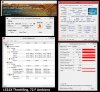
Of course the GPU throttles down to 315-475 MHz core, while the CPU stays pegged in turbo at 2993 MHz. Quite logical You can see the throttling effect in the GPU-Z Core Clock graph.
Maximum CPU temp: 89 C / 192 F
Maximum GPU temp : 80 C (then drops to 78 C with throttling)
I plan to re-paste the CPU and GPU with Tuniq TX-2, and remove the vent covers to free up some air flow. That might help a little bit. Fortunately it doesn't seem like gaming will really push the i5/630m combo into throttling. I may swap in an i7/640m motherboard if I find one cheap enough, but the 630m handles the limited gaming I do currently.
The WiFi Plan:
My biggest reason for considering not keeping the L521x and either buying a new Inspiron 15 7000 or XPS 15 haswell refresh, is the poopy WiFi signal. I've done a lot of lurking through here about this and it seems like the following causes have been proposed:
- Interference from antenna wires running close to CPU/Memory (some netgear power point backed this up)
- Antennas sandwiched between aluminum LCD bezel and the Aluminosilicate glass, greatly reducing signal
- Mystery L521x internal bogeyman
My impression is that the issue could be coming from a mix of #1 and #2 on that list. What I have not seen is a confirmation that the antenna is inside the screen and not the barrel hinge. The hinge cover appears to be made of plastic. This is where the MacBook Pro antenna resides (and along the optical drive opening in 2010 models). Also, the bottom cover of the L521x also appears to be plastic. So has anyone tried installing a new pair of WiFi antennas either inside the barrel hinge or on the underside of the laptop near the rear vents?
I've ordered some WiFi antennas and plan to do some testing with this within the next few days. I'll be sure to post up any results. If anyone has gone down this road before and has any tips, comments, or questions (e.g. 'I've tried it already and you will fail horribly', or 'watch out for X while taking apart Y') please chime in!
I'm hoping for good results here, as I really like this laptop and it'll be a steal at $560 if I can improve the WiFi performance. -
theres no way to replace the antennas, if you get flat antennas and place them on the bottom off theinside laptop it wont work. bad laptop bad build
-
The bottom isn't plastic, it's also a metal alloy, but with a coating. Just FYI.
But good luck.
You may consider the intel 7260 to replace the killer-n, good improvement for me, but no guarantee. Still, you're at like 1/3 the cost of my machine, if that much. -
I'm surprised the i5 and 630M heat up as much as that. Do update the thread when you get a chance to re-paste.
I think even if you have to use a nano USB wifi adapter, for the price it's well worth it. -
Same for me. Once I got the Killer-N it got a bit better. I was able to get wifi and surf the net in location that i was not able to in the past.
-
Does anybody have problems when booting into windows 8?
I mean my problems is that, not always, when i turn on the laptop, after the bios loading screen is over, the screen remains black and it won't boot into windows. I must turn it off and power it on again and then windows boots normally. The annoying part is that, sometimes, after the third power on the windows will boot. And it seems to me that this problem appears more frequently as time passes. -
never had a problem.
you may want to check for error/problem logs.
if you're machine is under warranty you may want to consider calling Dell support. -
I had that.. eventually the laptop stopped booting.. it turned out that the daughter board (sd card reader,audio jack) had fried. remove the base of your laptop and disconnect it and then try booting to see if that may be your issue.bogdan_g likes this.
-
Knowing that i have the problem, i removed the base cover and disconnected the jack and sd card board and booted my laptop. It booted just fine. Second and third time also. I thought that maybe if i disconnect all the connections from and towards that board maybe would do the trick. I did that and apparently now the laptop, after the third boot after the board is reconnected, boots just fine.
Maybe some of the connections were loose?
Did your audio jacks worked when your laptop had the booting problem? I didn't had the opportunity to test the card reader, and now it is also disabled in device manager, for fast booting (and also because i don't use it too often).
I will observe and report how the issue develops.
Thanks for the tip mate! Cheers!
XPS 15 (L521X) Owner's Lounge
Discussion in 'Dell XPS and Studio XPS' started by Muddy, Jun 28, 2012.


![[-Mac-]](images/avatars/[-Mac-])


