Problems? See this thread at archive.org.
Just realized that the HDD connector is a SATA 2.
Is it possible to use a msata to sata wire to connect it to the msata port so I can get better speeds off of my SSD?
-
The Msata is wired through the SATA because its purpose is to boost the SATA Performance. In my case my SATA hard drive is messed up and makes funny noises while playing videos. So the only option for me was to format it and use it as a secondary drive. I have successfully installed ubuntu on it which now runs 10x faster than windows. Im using GRUB2 to boot so it gives me an option to choose windows 7 or UBUNTU when i boot. Anyways the size of the ssd is not enough to boost the SATA as the SSD Partition must be equal between Rapid Storage and Rapid Start which isnt in l521x as rapid storage takes up 18.6 GB leaving only 13.4 GB for rapid start which is not equal and thus you will not see a very visible change when you use the SSD for other purposes,
-
The HDD (or SSD) and mSata are both SATA 3. I noticed that mine were being recognized as SATA 2 this weekend. After trying many things, I rolled back the firmware to A11 (from A16). My SSD and mSata are now both at SATA 3 again.
So, sometime after A11, Dell "broke" this in the firmware and the drives were only recognize as SATA 2.
Hopefully this will work for you as well.
Kevin -
^This.
This made a world difference to my 500GB Samsung EVO mSSD. Went from sub 200 MB/s to 500 MB/s. Thanks! -
Anyone have any experience using the laptop with bluetooth headphones? When my headphones are paired, the computer runs for maybe 1 min fine, then the mouse stops responding or loses it clicking ability for 10 seconds, then starts working again and this just keeps happening. It was actually causing google chrome to crash when I was streaming an F1 race today. After restarting the computer the clicking issue went away but it still kept crashing chrome after some time of use. When I unpaired and plugged them in the computer is completely normal.
-
Hey everyone,
Just upgraded to Windows 8.1 and the touchpad scrolling doesn't seem to working. I remember reading somewhere in this forum months ago of this issue does anyone have a solution?
Thanks -
I have a L521X that is just 3 weeks old. It runs win7 home. I"m not sure if it's an issue since Costco no longer has the floor model for me to test against. I have 2 audio outputs - one dedicated audio only and the other is a combo audio and mic. I can't tell which is which.
What I noticed is that the plug furthest front towards me has a much lower output in volume than the one further back. Is this normal? That maybe a combo plug would have different volume outputs? I used 3 different headsets to test and using the same music, same volume level, one is significantly lower than the other.
Do the others notice this with their units? -
^Don't worry Mrputtputt. My brother and I have the same systems, and we have wondered the same question few weeks ago. We have the same experience, and we came to believe this is normal. If you look at the headphone icon near the jack, you will notice one looks slightly different than the other. The one closer to the corner is just the headphone jack, while the one near the all-in-one card reader is the combo. I believe the combo one is louder by design to incorporate the headphone-mic combo.
-
thanks hanime! glad to hear it's not just my drive system.
Now I just need to find some downtime to send it back to Dell since the bluray drive won't eject (since day 1). only way I can get to do that is to turn the laptop 90deg clockwise or counterclockwise to unweigh the cd from whatever it sits on to eject it!
-
anybody experience why the sleep function keeps getting disabled? i installed the video driver 3 times now to re-enable it. but it keeps on getting disabled. i have not done windows update either. I don't know if it's related to the power settings changing from dell setting to power saver w/o me doing anything.
-
What is the sleep function? Is that the "Put the computer so sleep" under power settings?
-
it's this one greyed out. since i'm still on hdd, sometimes i'm on a rush and sleep is the fastest to get going rather than waiting for whatever is in memory written to hdd.
![[IMG]](images/storyImages/sleep_zps0c4b3f0c.jpg)
i'm not sure but at the same time, my power setting always changes from "dell" to "power saver" w/o me doing anything. not sure why, the power saver seems to eat up battery power faster than "dell" power setting.
i read and successfully re-enabling sleep by re-installing the intel video driver. but somehow, it keeps on getting disabled.
until i get my mSata and install the OS on the mSata like you (hanime), i like using the sleep when really rushed. there are risks to it. I had a couple of times where sleep woke up and after a few clicks, system froze though and needed a hard re-boot. -
Hi guys,
Is it true the webcam in the XPS15 is not compatible with Windows 8.1 ?
I rang Dell support today (after weeks of trying to get the webcam working) and was told I'd have to go back to Windows 8. -
Maybe try this regedit: Sleep : Disable in Shut Down Menu - Windows 7 Help Forums
Some suggested that this is related to the video card driver or ACPI driver.
Related issue: windows 7 sleep button grayed out after upgrade - Windows 7 Help Forums
Hope this helps! -
i tried one of those (the one after upgrade) and that was my workaround. oddly, i didn't do anything one time, i rebooted and it showed up again. i normally just hibernate and not sleep anymore. i got burned a couple of times losing open web pages in IE (mostly a chrome user here). so if i go to sleep mode, i make sure all is saved, and closed. this helps speed up sleep function as it doesn't have to write much into memory.
thanks for pointing out the regedt fix though. -
It is not true - I just installed a new SSD and Windows 8.1 several days ago and after installing all the necessary windows updates, my webcam seems to work just fine.
-preview.png)
-
Dell Support isn't the best...I get the feeling only a small group of their tech actually know what they're doing.
Exhibit A:
I wanted to know if it was possible to use the multimedia buttons on the XPS without hitting "Fn" key. Dell support said there was no way possible. I later discovered their is a setting to switch multimedia keys with the function keys in the windows 8 menus.
Exhibit B:
When Wi-Fi and a bluetooth device were operated at the same time (the computer would hang up, Wi-Fi would stutter, google chrome would freeze...Dell tech tried to assist by re-installing the driver.
The tech proceeded to uninstall my Killer 1202 wireless drivers only to discover that I had no ethernet access that day...long story short, it had been 2 hours with them and I was getting bored and impatient so I just told the guy the problem was "Fixed" eager to sort it out on my own.
The next day I went to Killer website and installed their latest 1202 driver and all my issues were solved in a matter of minutes! Now I can use bluetooth, wire-free, headphones while streaming music and so on.
My only regret is that both times I left good reviews on the post-surveys with them whereas hours later I had a completely different opinion of the experience. They ought to send those surveys out a day afterwards... -
Hello, I am sure this question has been asked a lot in this thread, but I didn't want to go through 600 pages to look for an answer. I recently got the Dell XPS 15 L521X with an i7 core. Now everything seems good to go, but I noticed the amount of time that laptop takes to wake up from sleep mode is more than 15-20 seconds. I have friends who have the exact laptop, and their laptops wake instantly after turning it on from sleep mode. I searched Google and tried all their solutions, but none seemed to work for me. Is there a driver I'm missing?
-
sleep mode will vary. how much do you have open? what is the ram used?
normally i try to close everything that can be saved to speed up sleep mode. i've been burned too many times of having something like notes in a notepad open, put to sleep, and the dang thing didn't want to come back up and blue screened (not the xps, but other laptops of other brands). grrrr
the only time i won't close is if i have a browser open and a streamed media is cached. if nothing is cached, and i most use chrome, i just let it recover.
so sleep will vary pc to pc depending how much windows is trying to "remember".
p.s. i've had sleep mode wake up more than even 30 seconds! -
I have experienced similar things in the past with Dell support. I did laugh when I read they uninstalled your WiFi drivers (I'm guessing remotely?) and then couldn't re-install them. Would of made sense to download drivers first before uninstalling them.
-
This is most likely due to the intel acceleration software that came with these models. I got rid of mine ASAP, it was a pain in the butt. Essentially, it shifts your power state from sleep to hibernate for some reason, and the hibernate setting takes longer to recover from.
Search the intel acceleration driver/ software in your programs and disable it / turn it off. Hope this helps -
It shouldn't act like that at all. The i5 version of this laptop, which is an older version by the way, never acted like this. As soon as I turned on the laptop from sleep mode, it would instantly take me to the log in screen without hesitation. Could it be an OS problem?
The only Intel related things I could find are the GPU, Bluetooth, Rapid Start Technology, and Rapid Storage Technology. Is there a specific way to find the acceleration driver? Uninstalling the GPU didn't really do that much other than restart my computer. -
Hello,
I have an XPS 15 with the 32 GB mSATA used as a cache SSD and the 1TB HDD.
I am going to replace the SSD with a 250GB SSD and install on it the OS, leaving the HDD only with the data. Do you think is better to do a fresh installation of Windows 7 (from the riverstream iso) or it is better to use the backup utility pre-installed on the laptop? The iso is only 3GB, the backup from the Dell utility is almost 15GB according to the first analysis it did, the differencies are only in the drivers and in the pre-installed software?
Sorry for the bad english (it's not my mother language) and thanks in advance. -
Do a fresh one. Its always better without the mass of manufactures bloatware.
-
i have the same situation and though i have the mSATA, i still haven't installed it. Dell also recommends doing a fresh install with only the windows dvd, and then install the dell drivers/apps.
i was always wondering why you cannot just unplug the regular hdd, change bios from intel rapid start to achi, and then just run dbar (dell backup and recovery) cd or via flash drive. there's only 1 drive available for the install process to see anyway. but i think it's because the dbar is configured to irst setting and may look for that mSATA for the irst, and a regular hard drive to install too. i did make a boo boo one time trying to get rid of a partition (not knowing of the mSATA) and i wiped out the entire partition in the 32gb mSATA. using dbar, it still installed but i kept on getting an error that it cannot find irst or irst disabled error since i wiped the mSATA. i ended up creating a new partition to re-enable irst. (i deleted partition via acronis boot cd)
the point i was making in there is i *think* you can use dbar install process on the larger mSATA. the install doesn't require the partition for irst to be active/alive. i managed to go thru the install w/o it w/o errors during install. it only errored when after i logged into windows. the dbar install also has the recovery installed on it which i believe adds to the disk space usage necessarily. (and why you can create more recovery disks even if you installed from a recovery already). plus, there's still the encrypted partitions that i'm not sure what for.
if you go with that approach - install using dbar to msata after unplugging the regular hdd, or just do a clean windows only install on the mSATA while the regular hdd is unplugged, the problem i see is that it's unknown what will happen when you plug back the regular hdd. i can't find in the bios to point the boot to mSATA only, and not just "any" hdd. i can't find either which hdd would be booted into first - msata or regular hdd (even if the regular hdd is converted to a ssd).
i still have to find time to play with it myself and install my new 250gb mSATA (samsung 840 evo).
p.s. i never got a clear answer from dell why i can't just unplug the regular hdd, put new and larger mSATa, set bios to achi, install windows only on mSATA, install all dell drivers/app, plug back regular hdd. i wanted this setup because by leaving old hdd in it's configuration, i can have instant recovery in a pinch. i can just remove the larger mSATA, put the 32gb back in, set bios back to irst, and voila! boot up since i never formatted the regular hdd. i can still use the regular hdd as data by just creating folders in it that i'll use. for ex., c:\temp\data\my documents or c:\temp\data\my music, etc.and create pointers to it. -
I actually can't follow your process for reinstalling the OS on the mSATA, and I actually can't get why you wouldn't format the HDD just to have a old Windows install on it.
If you do have the DVD with the Dell Backup and Recovery I see no point in leaving two OS (in fact, the same OS twice) on the same machine.
For what matters, do you guys think is better to also do a backup via the Dell utility before formatting the HDD and going to install the mSATA? It will be very unlikely that I get back to the original configuration, but, who knows. For what i get the Dell utility creates some DVDs that restore the system to the factory settings, right? There isn't also a partition on the HDD for it? -
Did anyone test if a mini PCI-e card runs in the mSATA slot?
-
anyone have tear down documentation (assenbly dissaembly) for the LCD scrren only? not the entire top bevel, but just the LCD screen? The LED lights are still intact so i only need to change a cracked scrren. THanks!
-
I think it will be similar to this:
https://www.youtube.com/watch?v=CuxaQdJrP4Q -
They are probably running SSD drives . I have one in my Alienware 17 it's amazing how fast it is ready to go .
-
I've tested it on my own and it did not work

Dell XPS 15 l521x mSATA with mPCI-e modu Bild - 20140807 204659 - 1,4 MB - Honda Forum & Tuning
This is a mini PCI-e to USB module, but the USB flash drive was not reconized, so I think it is not a hybrid slot. -
Why does it seem like the i7 version of this laptop is slower than the i5? I never had problems when I had the i5, but the i7 ends up lagging the computer. Also, does a wireless dongle help with the wifi issues? I dislike the fact that I can't be far from the router with this laptop.
-
Sorry wrong thread
-
What lags appear? Which OS?
You can solve (most of) the Wi-Fi issues by changing the module against the new Intel:
Intel® Dual Band Wireless-AC 7260 Plus Bluetooth* -
Hi, I recently got a l521x and noticed my fan is constantly running no matter what, even if I am sitting at my desktop. Does anyone elses do this? Is there a way to make it run slower/quieter? Thanks!
-
Does it change the speed depending on your usage or is it constant?
On which surface does the notebook stand? e.g. table cloth or wood?
If the fan is changing its speed you probably need to clean your fan and you should change the thermal paste of the cpu/gpu.
Do you have the most recent bios version installed? -
It change speed depending on usage(ex. gets loud when gaming).
However, it is a constant speed when I have everything closed and just stare at the desktop. The fan simply does NOT turn off from when it starts up.
It is on a wood table.
I have the bios update from Dell's website(A16), so I believe it is the most recent one.
I'll probably change the thermal paste when I go upgrade my hard drive.
Is it normal for the fan to be spinning up when nothing is going on? It even stays spinning in safe mode. -
Install Core Temp (click on "more downloads" and select the "standalone version" to avoid adware):
Core Temp
My fan starts > 61° C and stops < 52° C. The usual temp is 55° C, the lowest 48° C. I have the IC Diamond thermal paste installed.
Do you have multiple USB or other devices like an external monitor connected? Those can raise the CPU usage/temp as well.
My BIOS is A13.Attached Files:
-
-
Tried on A13 and A16, same results, fan is constantly(somewhat quietly) spinning. I have nothing plugged in, other than the AC adapter and it does the same no matter if it is plugged in or not. Different power plans don't make a difference either. Even at less than 56 degrees C, the fan is still softly spinning.
The fans seem to start spinning a bit more loudly at about 70 degrees. Are your temperatures for when it starts spinning loudly, or did you count them as spinning softly too?
Noticed our CPUs are different too. Could that have something to do with it?
Thanks for the help!Attached Files:
-
-
Do you have a vanilla installation of Windows or is the Dell Bloatware installed? Maybe something in the background controls the fan.
You could give Knoppix a try:
Download Knoppix Live CD or DVD, Get Documentation and Help
This is a Boot CD/DVD of Linux, so you can test the system without Windows. -
Vanilla windows. I booted ubuntu from a USB drive and the fan is still the same.
Maybe a hardware issue?
This isn't a giant problem for me, just a bit irritating, so it's not a big deal if it doesn't get fixed. I'll see how reapplying thermal paste goes and then possibly buy another fan. This is a seller refurbished unit off of ebay that I got for cheap, so maybe they used non OEM parts.
Thank you for all your help! -
it's for instant recovery in case of a critical failure and i need to be up and running fast in a 10-15 mins vs. 1-2 hours minimum just to do the dbar recovery + all the apps you need.
once you read more on irst, ssd, etc etc you'll see why i wrote what i wrote. i've bee behind the tech and only found about when i got this laptop since my previous laptops of other manufacturers didn't utilize irst let alone ssd.
sometimes that happens to me. i reboot and it goes away. haven't been able to pinpoint which app doesn't close completely. most of the time, i leave chrome on. but a reboot quiets the fan even if i reopen the same apps again.
thanks for posting this. i was wondering what would be a good replacement that would still be compatible with the mobo (if that matters). i bought a small access point (AP) to have another one closeby. the AP is hardwired to my router. it's only like 8-12 ft away and the wifi is still dang slow! it's really frustrating to have such a slow wifi when my tablet beats the speed of the laptop.
-
You should answer under a quote. I was really confused by reading your post ^^
You can install every wifi module (half size mini pci-e). There are no compatibility issues if you're having the correct driver for your OS. I've made very good experiences with the intel module (a little bit better than the killer wireless and much better than the dell module). Of course you should check if your AP supports 802.11ac. If not, its not a big deal as it is downwards compatible, but this would be much faster with the new module (300 mbit/s vs. 867 mbit/s). So if you're having only 1-2 bars of signal you are still fast. -
After all your tests there are two options:
a) it depends on your cpu
So we need feedback of an other user.
b) it is a hardware malfunction
But what could that be. The temps are normal, so it can't be the temp sensor. The fan itself is a passive component, so why does it run if its faulty.
I've bought in 2013 a new fan (because I destroyed the plug by unplugging it) in this shop:
Cooling Fan of Dell XPS 15 L521X 37XGD
I've compared all numbers and I was not able to see differences in the housing or anywhere else. So it seems to be the same part than the genuine one. And of course it runs without hassles until today.
Its not really expensive, so why not testing it. -
It may have also just been a noisy hard drive that I thought was the fan.
For now, I've found a working solution via software.
In case anyone encounters a similar situation, here is what I did:
Install HWiNFO
Make your way to sensors, then click the fan icon to open up fan control
You are able to manually control your fan there or create a "Custom Auto" profile.
Select the sensors and set temperatures for the fan to spin up to a certain RPM
Still messing with values right now, but this seems to be working for me.
Thank you again for your help mgutt! -
I have a question for the experts, the left hand side of my 521 LX heats up, while the right hand side remains cold, also my laptop freezes randomly.. ANy pointers
-
On the left is everything that produces heat (CPU, GPU, RAM, etc.) and on the right is only the battery and the optical drive. So its normal that its hotter on the left side.
The freezes could be because of overheating/hardware failure or because of a software problem. Questions:
1.) Open Task Manager -> Performance
Is your CPU usage higher than 0-2% if you don't move the mouse for 30 seconds? If yes, look in the processes. Is there a process always running?
2.) Does your fan work as you would expect it?
So if you're playing a movie/game is it running faster or does it not work at all: Hardware failure. Or is it constantly at maximum speed without getting slower: Your thermal paste / cooling unit needs to be changed.
3.) What kind of freeze is it?
Do you see a blue screen or does the screen turn black or freezes the last seen window/app? -
Hi thanks for the reply,
The processes are fine, step 1 is not a problem, I noticed that it freezes when i have a movie or video playing... The fan runs at full blast occasionally when i have nothing running also.. But i tried lifting it ten times without a movie running and it worked fine, the minute i lifted on the left side with a movie running it froze..
By freeze i mean the screen hangs on the last seen window/app.. -
Ok, that really sounds like this problem:
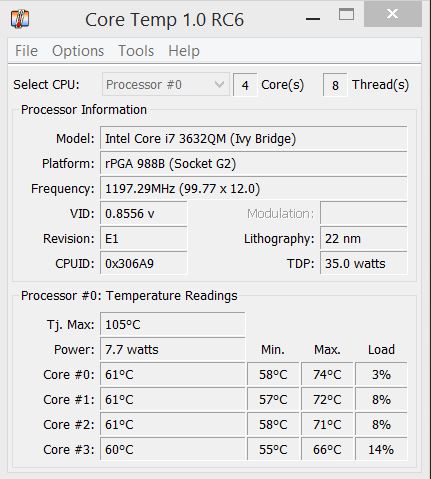
Please install Core Temp and compare your temps with mine:
http://forum.notebookreview.com/del...-15-l521x-owner-s-lounge-635.html#post9745265 -
The max was while watching a video on VLC player.. What can you tell me ?
Attached Files:
-
XPS 15 (L521X) Owner's Lounge
Discussion in 'Dell XPS and Studio XPS' started by Muddy, Jun 28, 2012.


![[IMG]](http://smg.photobucket.com/user/goldenset/media/sleep_zps0c4b3f0c.jpg.html)