Problems? See this thread at archive.org.
You said you don't have any processes running, but your load shows 10, 22, 28 and 36%?!
-
I had put two images i think the first one has gotten deleted, but like i said the temperature was at that, while i was watching a movie which is why the load is high...
The second image is while im watching a video... The first image is of my system in idle mode...Attached Files:
-
-
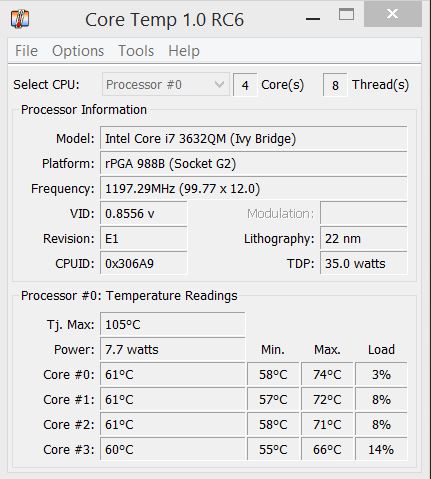
The idle is too high. Compare the load (% value) of the cores. Yours:
![[IMG]](images/storyImages/115073d1408777397-xps-15-l521x-owner-s-lounge-capture.jpg)
Mine:
![[IMG]](images/storyImages/114723d1407829023-xps-15-l521x-owner-s-lounge-2014-08-12-09_36_40-core-temp-1.0-rc6.png)
This means there are processes running in the background. Of course you see a difference at the core temperatures. Mine is 55 degrees and yours 61. This much more.
Please open the task manager again and in the tab "processes" click on the button "Show processes from all users" in the bottom right corner. Then order by CPU (load). There must be one or more processes running in the background causing a minimum load of 3-14%.
But finally it does not solve your freezing problem because 79 degree (your maximum) is not much at all. I did a test through SilverBench · Online multicore CPU benchmark / stress test and my maximum temperature is 84 degrees without problems:
![[IMG]](images/storyImages/115081d1408787431-xps-15-l521x-owners-lounge-2014-08-23-11_48_56-windows-task-manager.png)
Another idea: Maybe you have problems with the recent windows bug:
http://www.pcworld.com/article/2465631/microsoft-pulls-august-windows-update-after-crashes.htmlAttached Files:
-
-
Dell sent a motherboard to replace, and messed up with the thermal paste, the engineer should come and put more thermal paste next week,
Where can i find the latest version of dell quickset, i cant increase/ decrease brightness using the key.... -
I redid the thermal paste on both my XPS 15's last week. Pretty easy to do.
Had a problem last night with my brightness keys not working. Went into device manager and uninstalled the HD 4000, rebooted and reinstalled the driver from the Dell website. Sorted. -
how did folks here get windows experience center to work with nvidia drivers? i installed msata samsung 840evo and after many installs, i narrowed the bsod result when running iwndows experience after installing nvidia drivers. i used the one from dell driver dvd, dell website and even from nvidia site after each install (trying 1 after another from fresh install). all result in bsod.
-
Guys, first and foremost i wanna say that this thread has been an eye opener, and i thank you all for that, now to the point.
I own the L521x i got it in mid 2012, things come and gone and i want to add more memory to it, from what i read it's kind of complex to access the 2nd memory slot in the inner side of the motherboard, so before i embark on that i wanna ask you for ur input.
Over here, in Peru, i dont have many options to get sanctioned kits for the Dell XPS 15 L521x, so instead of buying a 8gbx2 kit i would have to buy 2 kits of 8gb RAM, either in crucial or kingston, the thing is that the configurators somehow only give me info about the kits and i have no way to validate stuff, i firstly need to know if the L521x supports DDR3 with 1.35v that is the memory i find everywhere, the configurators of crucial and kingston suggest memory that is 1.35v but i know for a fact that the memory that comes with the laptop is hynix 1.5v, now i dont know if the laptop can support memory at 1.35v or if it only supports 1.5v, the chipset hm77 according to intel is capable to manage it, but DELL being DELL i dont know, also checking information in the european site of DELL it cites that they got a 16gb kit that uses memory at 1.35v but i'm not sure, anyone here has tried to upgrade the memory using 1.35v DDR3? if so please let me know. Also do u guys think i'm doing the right thing trying to upgrade the memory or it's just too much effort for lil benefit. I would toss this laptop away if it wasnt that nearly all the laptops that sell here are almost the same and with cheaper behavior, sigh the glory of living in a 3rd world country.
To finish it, i'd like to receive any advice you could give me about the whole thing, would i get the lovely beeps of problems when i restart the machine cos most of the upgrade videos show that u gotta disconnect the cr3032 battery that keeps the clock and other stuff in the same place? what would you guys suggest i'm open to everything even the dont do it.
If you lovely souls could answer me soon i'd thank you much. -
Please delete.
-
In the past had an apparent conflict with Flash and graphics drivers, either intel, nvidia or both. While watching a youtube vid, the screen froze and caused damage to the operating system, which only a repair install would fix. I just did another repair install, w win 7 ultimate, and installed all the important updates to win 7, and now have the option to install two updates dated 111/1/2014 for the intel 4000, and the nvidia GT 640M.
I am assuming this windows update is a driver update, wondering if any users have installed the graphics updates, what they consist of, goals of the update and results. Thank you.Last edited: Dec 24, 2014 -
Does the L521X support 1.35 or 1.5 volt memory modules?
Its time to upgrade and I don't know which ones to buy. -
I use a Dell L521X - XPS 15 and have windows 10 installed. The battery life on windows 8 was 3 hours, with a usage of around 13 - 15,000 mWh. For a battery of 60,000 mWh that is pretty decent.
On windows 10 i get a usage of 20 - 23,000 mWH which is horrendous and a battery life of 2 hours that is a 33% decrease in Battery life. I really cant understand such a bad battery performance and a drastic drop like this. Any suggestions for turning this around ? It will be useful to other people as well facing this problem.Last edited: Dec 15, 2015 -
I just jammed 16GB of RAM and a new Evo 850 mSATA SSD in my XPS 15. Have been learning a lot from this forum and already downgraded to A11 BIOS.
I would love to have my Windows 7 Pro x64 install running in true UEFI mode, but I cannot get it done. My BIOS settings don't see USB as an option, and setting to UEFI with Legacy OPROM simply installs using the MBR route. I've tried everything I can think of. I know this makes no difference, but I have a well-prepared USB drive with a bootable EFI version installer all ready to go, but it simply reverts to MBR and legacy BIOS, or does not see the USB at all. (no MSATA, no DVD, nothing but LAN media options)
I've read that @krayziehustler has gotten his to work, but I just don't see how....
Thanks in advance, great forum here! -
I actually have the same problem you do. I went from windows 7 where I could get up to 4 hrs of battery life to windows 10 where I get only 2 as well. I noticed that my computer heats up more than it used to and thus the fan is always on and also it looks like the processor is overclocking without any apparent reason so I’m not sure if it is a drivers problem I haven’t been able to fix this so if anyone has had this experience and fixed it I’d be happy to hear it to! -
Lent my L521X (i7 Quad) to a colleague to do some music mixing - laptop works perfectly for me. Colleague's workload is very sensitive to noise and said the charger (EA90PE1) makes noise when it's plugged into the laptop. I think most laptop chargers I've used makes some noise.
Not sure if anyone else has experienced this with their XPS 15 L521x and found a fix?? E.g. if I swap my college my 130W charger - might it fix it? -
Trying to get a Dell UltraSharp U2711 monitor running at its native resolution of 2560 x 1440 with my L521X but so far the highest Windows 10 allows me is 1920 x 1080.
What am I doing wrong?
I'm using the HDMI port, should I be using the mini Displayport?
XPS 15 (L521X) Owner's Lounge
Discussion in 'Dell XPS and Studio XPS' started by Muddy, Jun 28, 2012.