Problems? See this thread at archive.org.
I touched on this in a different thread.
You can pre-order an XPS 15 pre-loaded with W8 which includes a "Dell 1901" wireless card as opposed to the Intel 6235.
I have never used an L521X and have never experienced the wifi issue, but is it a direct problem with the 6235? If so, isn't there a good chance that the new card will alleviate the problem?
-
-
Some of us have tried the 1901 card and it was no better
-
The problem is the antenna, not the card. Everyone at Dell saying something else is lying or just misinformed. The fact is, unfortunately, that in order to solve the problem they MUST re-design the chassis, which they won't do until 2013 for the Haswell version (supposing they will actually want to invest money to solve the problem, which is not granted at all)
Sent from HTC HD2 with Tapatalk -
I remember people talked about this, but did anyone try placing an antenna on the outside. Routing the wires out of the one of the vents and placing it on the bottom or side of the monitor. I know this is a crappy solution for this expensive of a laptop but I got this as a replacement so my warranty does not last much longer, and well calling to get it fixed is worthless.
-
I've been trying to keep up with this thread, and I see that the wifi issues are still unresolved. Has the latest BIOS update A11 resolved the throttling issue though? I really wanted this laptop, as I don't see anything else outside of the MacBook Pro with this build quality and specs.
-
I'm still going to get one as I keep my laptop about 5 feet away from the router most of the time, and my service is capped at 20/5, anyway. If it has wifi issues, I'll likely never even realize it from the sound of it. Perhaps I'm naive. Or maybe I just live life on the edge.
-
Hello,
I wonder how many slots canbe enter ddr3 for this laptop?2 slots and max 16Gb or 1 slot for extend and 1 ram onboard?
(Model L521x with 6Gb ram at NE: Newegg.com - DELL XPS 15 (XPS15-9168sLV) Notebook Intel Core i5 3210M(2.50GHz) 15.6" 6GB Memory DDR3 1600 500GB HDD + 32GB SSD HDD 7200rpm DVD±R/RW NVIDIA GeForce GT 630M) -
There is an wifi issue thread and I am almost sure someone did try that with good results
Sent from my HTC One X using Tapatalk 2 -
Has anyone have the following problem with their XPS 15? I've had this laptop for about a month now & haven't noticed this until now since I've been using a wireless external keyboard/mouse - if I'm using the laptop's keyboard itself, the cursor jumps around periodically at random times: I'm typing in a document and suddenly I'm at a few sentences above or below, sometimes the window minimizes by itself, and once while typing an email, it sends in a middle of a sentence.
I have anti-virus protection so it can't be a virus. I made sure not to rest my palm so it can't be the touchpad control. Is my laptop possessed? I can't reproduce it to show tech support since it happens randomly - sometimes after typing a sentence, sometimes a paragraph, and sometimes not at all.
This doesn't happen at all when I'm using the wireless external keyboard. Could be a bad laptop keyboard? Anyone else with similar symptoms & how did you resolve it?
TIA. -
I have the same problem with the touchpad on mine. It is so sensitive that the vibrations from typing can actually activate the touchpad and make the cursor move around the screen and cause weird things to happen. The best way to verify this is to go into touchpad properties and disable the touchpad. Then do some typing and just a use a wireless mouse. I can't stand the touchpad anyway so I just carry a small wireless mouse with me.
Almost forgot to say that Dell has offered to replace to the touchpad for me, but I still trying to decide if I am going to return the system, or hold out for a fix to the wifi while I enjoy my ultra-cool USB wifi adapter. -
Hi guys
My XPS15 has arrived. I ordered it 15 days ago (1st Oct)
Having got time to do any serious testing yet, but just by looking at it I can vaguely see the so called screen grids.

Just like somebody said previously, it looks invisible in dark colors but can be obvious in light colors.
Having said that, I personally dont find that too troubling. It is actually kinda hard to see from normal distance. Also, I set me max brightness to 75%, at which the grids becomes even less seeable.
I also did a quick speed test on the wifi, looks ok compared to my sister's mac book air and my dad's desktop which is connect through a lan cable.
Haven't done transfers between computers tho. I rarely do that anyway so I will try it in a few days.
To summarise, I can't say I am terribly impressed by this laptop. Still, it's quality is within my tolerance. -
Not sure about the throttling. (I don't think any update can "fix" it... It's just a restriction of the cooling system unfortunately). But I have been keeping tabs on the upcoming Asus u500, you might try looking in to that.
-
Even 5 feet away I'm getting only 2 mbps download on a 50 mbps service. Also, disconnects every 10 minutes or so. Why would you want to buy a laptop that is clearly defective? What happens if you need to travel with it or use it outside of extremely short range? For $1600 this laptop should have zero flaws in basic functionality.
People need to STOP BUYING this laptop until Dell fixes the problem. Continued sales of the defective L521X just encourages Dell that they can sell poorly tested products to their customers and get away with it. -
Bios a11 does not address throttling.
Sent from my brain using neurons fueled by glucose -
2 RAM slots, one is behind the motherboard.
-
I am very sure my laptop wireless is not THAT defective....I could access internet fine (at least, when compared to other laptops) at around 7m away with 1 wall
-
agreed.
While i'm sure my notebook is adversely affected signal-wise and the wifi could be notably better, the fact that I reliably get 40-100 Mbps u/d from about 12 ft (normal use location) and 5+ Mbps from beyond 30 ft (other room, couple walls, 2nd floor, outside house, etc.) means that it's definitely sufficient for my needs.
I don't have useful performance numbers but the device also works fine on the local Starbucks, Panera Bread and Barnes & Noble wlans. -
same here...the true test for me was streaming an HD movie from my NAS which played flawlessly from about 20 feet away, and through a wall
-
Typically what I can't do with my own at the same distance...with Ubuntu.
-
Pre order Asus UX51 It is not cheap.
Newegg.com - ASUS UX51Vz-XH71 Ultrabook Intel Core i7 3612QM(2.10GHz) 15.6" Full HD 8GB DDR3 Memory 512GB HDD NVIDIA GeForce GT 650M -
Wow.. That's really expensive..
But I guess with the slim case, good graphics and 512 GB.. still...
I've read it also has the same throttling issues though -
512GB is 2X256GB SSD Raid0 and display is a IPS panel.
It's not absolutely the same throttling issue of L521x.
L521x has thermal shut down only because you have connect it to external monitor and with last Bios update has ridiculous clock until 130MHz on GPU when Cpu and GPU work together.
Before to express a final judgment on Asus UX51VZ I think is better to wait some serious review on the final units instead of prototypes.
Inviato dal mio GT-I9100 con Tapatalk 2 -
Of course, waiting for a review of final hardware/software would be the way to go.
I just cancelled my l521x order because the ship date was changed from October 15 to November 8 (Ordered on October 2). The given reason was a part shortage. I'm guessing they're phasing out the Windows 7 configurations to start producing and shipping the Windows 8 ones with the new Ivy Bridge chips. -
LOL not at all...the pre-viewer experienced light throttling (no drastic fps drop, he found out watching HWInfo's log) only after 2 hours of gaming with Crysis 2 at FullHD resolution and details set to "Hard Core mode". In FullHD and "Gamer Mode" it was fully playable. Dirt 3, Skyrim and Need for Speed Unleashed 2 were fully playable without throttling in FullHD and max details, AA on. And it was a 2-month pre-launch prototype...So not really the "same" throttling
 :thumbsup:
-
How were you able to play those games at those settings for that long without the laptop overheating? My l521x starts beeping at me 10 minutes into SC2. -
I'm not the pre-viewer I was speaking about, but that is the reason why I wrote that it's not the same situation. The fact is that UX51 (aka U500) has a dual fan cooling system, with one heat pipe dedicated to CPU and one dedicated to GPU, and this makes a huge difference. However, it should be released within 10 days, so we still have to wait 2-3 weeks for a full review of the actual product.
Anyway, this is the in-depth preview
EDIT: if you want to discuss more about UX51 (U500) this is the thread, so we can keep this one in-topic
-
i've had it with this laptop. wifi and touhpad killed it. cant connect anywhere outside my living room where my router is and useless at school. cant type anything without the touchpad picking something up and moving my cursor mid-typing. as soon as i get my refund im ordering a vaio s series. has everything the xps15 has AND more for $200 less. read about the s series here and the thread here has nothing but happy customers
-
what about orangegate and blu/violet gate?
-
i dont think it will bother me that much. maybe if im editing photos but in that case i will probably use a larger external monitor.
-
OK i have been using this laptop for a few hours now.
The wifi seems to work fine for me. my room is around 10 meters from the router and there are 2 concrete walls in between. Still picks up 5 bars and browse/download ok.
the screen grid is kinda annoying but i have realised it is most visible at 100% brightness. I don't like my screen too bright anyway so i set it to be 66% on charge and 33% on battery. Looks ok at these settings. But again, for a laptop of this price, they really should have done a better job.
touchpad feels ok too, can't complain. I never liked touchpads on laptops anyway. Thats what my mouse is for.
I do have 2 problems tho. The battery seems to drain quite fast 3 hours and its almost up. Also, the cpu seems to be VERY hot. I have only been random browsing and transferring files and its constantly at 50~60 degree Celsius.
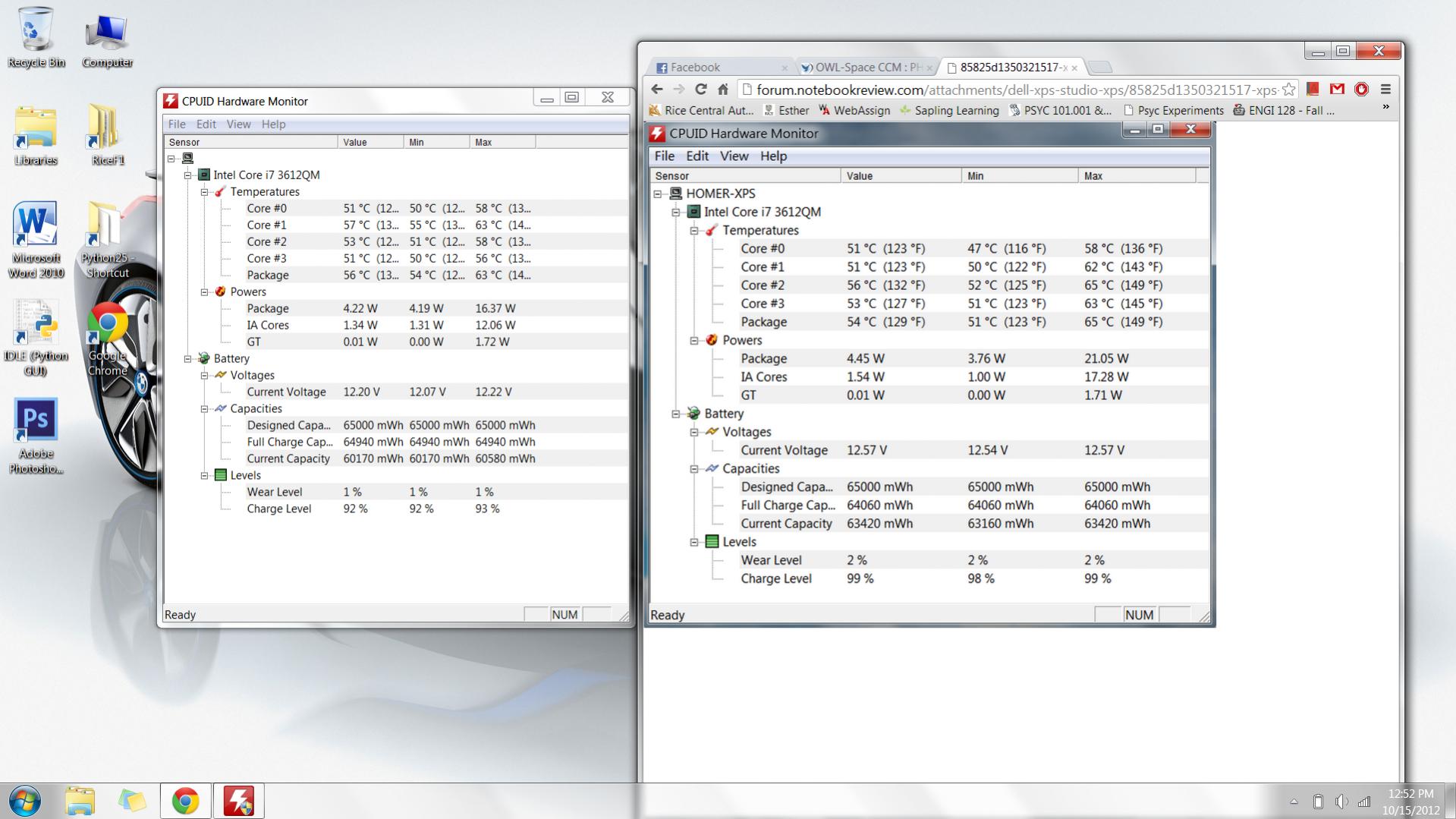
heres a screen shot from HWMonitor
Is this normal? Or is it just me? -
homerchiu: I don't think that kind of heat generation / battery drain is not normal for the usage you are talking about, I'd be looking to some background process keeping the system overly busy (like antivirus, or other utilities).
What changes to the system configuration have you done since you received the system?
Whicih power plan are you using, and have you modified it at all? -
homerchiu: what laptop config did you purchase (hard drive/ssd, Intel/nVIDIA, etc.)?
-
Nah nothing substantial was running in background. Since i got the laptop, I removed mcafee and put Avira on, installed office, thats about it.
As soon as i start the laptop the cpu cores hit 45+ degree celcius. After a while they fluctuate around 50. I have checked task manager but couldn't find anything suspicious.
I have just updated from A09 to A11. let see if it makes a difference.
I got the i7 3612version, 8gb ram, Nv 640 2gb ddr5, 1tb 5400rpm version. Got it for $1600 aud. Now that i think about it it really is kind of a rip off tho^^"
That being said, I actually can't find many other models out there that matches my requirements as well as this one. Ah well. -
Im having the same problem with battery drain. I can't find anything that's causing it but I only get around 3 hours too and only about 2 and half while watching movies. I'm not aggressive battery saving modes and lowest brightness.
I don't have much install and I disabled almost all startup programs that aren't necessary. I only use mine for browsing and microsoft word.
A04 BIOS
not the newest wifi driver or latest nvidia driver though. However, I don't really need to update them since I can pick up good wifi in my dorm. My school has really good repeaters and wifi placements. Haven't been able to really test the range of wifi.
Here's my comparison: http://forum.notebookreview.com/attachments/dell-xps-studio-xps/85826d1350323611-xps-15-l521x-owners-lounge-comparison.jpgAttached Files:
-
-
Dude, consider yourself lucky. Mine idles at those temps. If I am browsing the internet, listening to music, downloading files, ect... I get 70°+ C and my fan starts to ramp up, gaming i get 85°+ C and my laptop starts beeping at me.
-
Pretty much same for me. You can see in the comparison, mine idle at 55... When I game, I get half and hour and it goes down to like 20% on battery from 100, fan running like crazy
-
Maybe use SysInternals process explorer to find cpu-active processes?
There must be *something* causing the cpu to run hot, it's not going to do so without software activity unless there is some REAL CRAZY VOODOO going on. -
tech came over and replaced the display earlier.. its worse.. this is how it looks while watching a movie, video picture, web browsing, everything!! ;(
Attached Files:
-
-
Glad My screen doesn't look that bad .
Taken with my Razr MaxxAttached Files:
-
-
GAMING UPDATE (See my previous posts for more information)
I just popped Starcraft II on, and was unable to play at anything higher than "low" settings at 1680x1080 resolution. Even then, my FPS averaged 28 - 30. This is truly terrible. This card and processor should be seeing a minimum of 60FPS with "high" specs. -
Just received my L521x back from the repair depot. This was a new laptop that has gone through 3 visits from a service tech and a depot repair. The depot was supposed to fix the issue I have where it won't turn on or just touching or bumping the laptop case causes it to turn off. It has been out of the box for 5 minutes and had already turned off 3 times (like battery removed kind of turned off). So I call Dell, I'm on hold for 10 minutes and they hung up on me. I'm done with the XPS 15. People! Do not buy the ultra-thin Dell laptops. Too many issues and all they have are crappy band-aids. If you even get that. Do not try to convince yourself that it will be okay in your situation. There are so many more issues than just the WiFi. Touchpad (all sorts of issues), WiFi, throttling, screen, USB port problems and it may even just randomly shut off! Who knows what may crop up a month down the road after your purchase. These things are lemons!
-
Make sure you're in 32bit colour not 16bit. Mine came from factory at 16bit for some reason and it made a big difference once I changed it in the display settings.
-
yup, im on 32 bit...
-
Ok i have done some testing.
I ran Dell's CPU stress test and the CPU reached ~80 degree celcius. The fan went nuts but surprisingly not as annoying as i expected.
Here are the CPU loads and temperatures at t=10 minutes, 15 minutes and immediately after the stress test.
10 min into the test: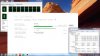
15 min into the test: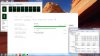
After the test: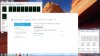
I also ran 3DMark11 basic to test its graphics card.
The score is quite good for an Nv 640.

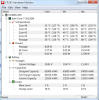
after the 3dmark11 test, the CPU temperatures were recorded to hit 88 at one point.
If anyone wants to look at the full results from 3DMark11, here's the link.
NVIDIA GeForce GT 640M video card benchmark result - Intel Core i7-3612QM Processor,Dell Inc. 0880F2 score: P2082 3DMarks
all the tests were conducted on BATTERY. -
Why does a stress test run with the CPU at 2.1GHz? Isn't it supposed to run at a steady 2.8GHz?
That being said, I have been able to run games decently using Throttlestop and capping the clock at around 2.4GHz. -
No, the typical processor frequency is 2.1 GHz. And the turbo mode is on only when the stress is not multithreaded.
For the ones who experience high CPU workload, use the task explorer in admin mode to see all the processes. If your CPU consuming process is svhost.exe, then on Windows 7, this probably comes from Windows Defender. -> Taken from my IT Manager experience.
So, still no news at all on the wifi front from Dell!
-
Yeh I did check...Windows Defender is turned off tho.
Ill keep checking.
Also, so far i have had no issue with wifi at all. Like i mentioned, I place the laptop 10 meters away from the router with 2 walls in between. still gets full stable reception without any dropouts. Its reception is even better than the Cisco wifi adapter i use for my desktop, which is laterally 10 cm away from where my laptop is. I am either very lucky or they really have fixed the problem after mid September.
My major concern right now however is the battery consumption and the screen grid.
Btw, i did another PCmark test. here's the result.

-
Got a bit of a dilemma.
Currently typing on an Xps l521x, originally received as a replacement unit for an l502x (cost 1200 euro).
Now having doubts about using this thing as a daily laptop to take to class.
Because of all the problems this laptop has, I considered giving it to my dad and buying a Sony S13P.
But now I'm having a bit of Buyer's Remorse (probably sending it back), because my dad only needs a 700 euro machine, and he'll never use what this laptop has to offer.
I know this is a very personal dilemma, but I do feel like hearing a random-stranger-on-the-internet's opnion would give me some peace of mind.
So, what would you guys do?
On a sidenote, I do like to game every now and then, and I would probaby have to buy an external screen for that Sony S13P (though an extra expense, I have considered it). -
Intel Core i 2nd and 3rd Generation CPUs should be using Turbo Boost whether 1 core is active or all 4 cores are active. As long as they are operating within the TDP power and current limits and the core temperature is less than the thermal throttling temperature, they should be using Turbo Boost.
Many modern laptops can not run both the CPU and GPU at their full rated speed while on battery power. Some throttling while on battery power is not unusual. Throttling while plugged in is usually just bad design. Inadequate cooling or an inadequate power supply are the two main causes of this. -
inaccurate.
The 3216 processor has a bunch more capacity that that ... if the environment allows
- nominal rated freq is 2.1 Ghz
- quad-core turbo is ~2.8 Ghz
- dual-core turbo is ~3.0 Ghz
- single-core turbo is ~3.1 Ghz
Running on AC power, doing transcoding with Handbrake, I regularly see the quad-core 2.8 Ghz with eight threads running 90-100% utilization.
I haven't done a specific dual- or single-core test but I expect my machine runs them to spec.
Tjee: if the l521x you have is having any issues I wouldn't hand it off to a parent no matter what the cost, it's not worth YOUR time in supporting it. If it's running fine then at least your pap would essentially never need a hardware upgrade.
XPS 15 (L521X) Owner's Lounge
Discussion in 'Dell XPS and Studio XPS' started by Muddy, Jun 28, 2012.


![[-Mac-]](images/avatars/[-Mac-])