Problems? See this thread at archive.org.
So, I just tried doing this to see if it would improve my wifi, and it appears it has slightly.
At 1 meter away I get 13 - 13.5 Mbps which was the same as before. Then I tried moving around the house.
5 meters away on the same floor with 1 wall in the way I got 7.5 Mbps
5 meters away (diagonally) halfway up the stairs (stairs are in between me and router) and a wall I got 7.5
10 meters away on floor above, with 2 walls in the way 6.9 - 7 Mbps
12 meters away on same floor as above with 2 walls and a bed in the way it suddenly dropped down to 3 - 3.5 Mbps. This last reading though is about 3 Mbps better than before reinstalling, rebuilding the driver stack and changing to rst/cts & 5.2 GHz prefer, and turning the wireless to max on all battery setting with or without power plugged in.
Before restack it was the same a meter away but 12ish meters away on the bed on 2nd floor it was 0.15 - 0.47 usually on the lower end, now its gone up quite a lot, this is in comparison with my girlfriends old Inspiron 1546 which got about 6 Mbps at the 12 meter in the same place. Thanks C0debear its improved my wireless to a usable condition. I have a feeling I will get a better wifi reception at home so I will retest when I am there (in my girlfriends student house at the moment with sky basic/student package with it probably a 15 Mbps package, on a 60 Mbps package at home so I will have to see how that goes, will post again on saturday or sunday.
Ps I only just recieved this laptop new (well I bloody hope it was, the windows sticker under the flap did appear to have a small bit or thermal damage but that could have just been from testing at the factory if it got very hot hmmm, will be calling Dell if the wifi is broken at home) on the 16th October, its the i7 3612QM, 16GB RAM and 512GB SSD. Apart from the wifi its a lovely and quiet machine, fan did go overdrive when updating the BIOS, probably a safety procaution
EDIT: After being here at the 12 meters a little while the speed has dropped to 0.67 Mbps hmmm :S
-
-
'dusk - now and then check the speed, like someone characterized a while ago the whole wwan thing is a miracle it works at all, much less reliably, there's tons of stuff to cause it to vary in performance.
Something about comparing it to (paraphrasing) "carrying on a quiet conversion across a large room with a rave going on within it" -
You're not alone! On A04 Bios with updated drivers for intel 4000 and gt640m, and I only see about 4 hrs on A04. Light Browsing and Microsoft Word.
Already disabled a lot of startup programs and services too. (nothing important though) -
useless anecdotal...
Last night I was helping with a local colleges' programming club - they're practicing for the upcoming academic programming competition - and a couple of them are working on a senior project that involves github as a repository. I spent a bit over two hours doing a bunch of push/pull/sync/clean/rebuild/edits/compiles/runs along with a number of web searches. All code is java worked on under Eclipse Juno.
By the end of the evening my battery was down to like 65% (so 35% used in a bit over 2 hrs including some on-n-off during the day before-hand) and the estimated remaining time on battery was reporting just under 4 hours (by my math, with usage relatively the same, 3.72 hours remained).
I'm running the Power Saver power plan, with on-battery settings tuned to give me maximal battery endurance at the cost of performance (including both video drivers and wifi driver set to medium transmission power at the driver), and my display brightness is maybe 30% or 40%.
My machine is the mostly stock standard i7/32Gb msata/750Gb hdd config, but I've upgraded the ram to 16 Gb.
I do NOT have the fancy-pants Intel Smart Connect driver installed, and it's interesting to me that my machine will "eat" 8% battery in Intel Rapid Start "hibernation" for the first half of the day (today). -
Mankind desperately needs a new innovative battery technology on everything...phones, tablets, laptops. Sigh.
-
ok so transfer speed over 5ghz n only to my lan gigabit pc, is 11mb/10mb read/write and when i plug in my 521, its 113/181 read/write ..
Just got the shipping depot box today, going to send laptop to have screen looked at n monday seeing that even if i drop it off today, no shipping is done on weekends. -
I just thought of something that a Dell Tech mentioned to me, and I just sort of took it for mistaken information, but it might have some bearing(?) on the WiFi. He told me that the Processor in this computer does not support WiDi... yet has it on here (i love using it, so I can't get rid of it). Does this make sense?
-
I keep rapid start off now. I only use aggressive hibernate and sleep values.
1 and a half hours of coding in idle, surfing web, and microsoft word drops me 25% -
So basically I noticed my laptop browsing to be really slow with even the wifi adapter the last couple of days. Then last night my laptop crashed so I thought maybe it because I updated to firefox 16.01 . So this morning I noticed every time I returned to my laptop it restarted on its own.. I did a system restore and right after I updated my flash to 11.4, right away I noticed the system began to freeze and crashed. So basically I went back to my system restore and all the restore points were gone...on top of that every time I clicked a desktop icon I would get an memory error message "explorer.exe application error the instruction at..." and the computer would freeze and restart -_-... So I noticed when I restart I only have 5min-10min before it would freeze and then I noticed that Intel Rapidset Technology could not find storage so this time when the computer crashed I waited to see what would happen and this message came up
"Intel UNDI, PXE 2.1 build 083
PXE_E61:Media test failure, check cable
PXE-MOF" Exiting PXE ROM
No bootable device_ insert boot disk and press any key'
So I called dell tech support and ran a diagnostic. Which found an error code:
error code 2000-0142
validation 67989
Msg: Hard Drive 0- S/N 6WS1P7M4 short self test unsuccessful.
Now I have to change my hard drive and reinstall everything from scratch again this so frustrating how can a new laptop have so many issues... -
Wow, my screen definitely doesn't look like that!
-
Mrt194: doesn't make any sense to me.
The parts spec for theachine reads like and intel advert for all their tech.
Sent from my brain using neurons fueled by glucose -
What is interesting is the Dell rep told me my frequent uncommanded shutdowns were caused by a bad hard drive. They were to send back the hard drive separately so I could take it to a computer shop or something to back it up if needed. The "repaired" laptop would be sent with the new hard drive. Alas, the unit arrived with the original hard drive, but the paperwork stated they replaced the motherboard and palm rest assembly. And the problem was still there. Three shutdowns within the first couple of minutes. Seriously?!
Since this was a replacement unit for my broken L501x I told them I was done with the new XPS 15. Three service calls and a depot repair is enough. I requested the Inspiron 15R SE. The Alienware is just to thick for my travel preferences. So, I'm bowing out. The 15R should arrive tomorrow. It's been over 2 months since I sent in my L501x. Hopefully this one works out. -
Just ordered a 128 gb Samsung p830 ssd. Anyone have anytips on how I can install it? Can I keep all the data on my HD and just move it over to SSD? Also I found a ODD caddy on ebay, maybe I can put the HDD in the ODD and have an SSD + HDD hybrid
-
What are you trying to do? With the larger mSata drive, you could reinstall Windows completely on that and use the internal HDD as extra storage. Actually, that is what I would recommend. If you want to still use RST, you will need the Dell Intel pdf document detailing the reinstall procedure. Like how to create the hibernation partition and such.
-
It's not the msata. it's the traditional 2.55mm ssd. I'm trying to get all my windows 7 + programs and files from HDD to SSD?
-
Ah, I thought it was the PM830. I would think it should work, but I'm less familiar with how the computer might behave with the 32 GB mSata working with it. Intel and Dell have said there is no point to run the SRT if you combine the mSata with an SSD. The whole point of SRT is to speed up things with a traditional HDD. RST can be used though. You should consider not buying the SSD and instead upgrading the mSata drive. This is what I did. I have a 256 GB mSata drive with windows on it. Then I have the regular HDD also in there, but it only acts as extra storage. No need for a caddy. It just shows up as two drives under my computer. You should have this document for reference also:
http://www.google.com/url?sa=t&rct=...MFmdzWp3iJ_vyCrdw&sig2=j9lsG15vhjmw16GYzPCfLQ -
got dell coming on Monday to replace my screen, I notice the connection seems to be faulty as it goes fuzzy when I move the screen about/knock the computer.
Hopefully the new screen doesn't have worse wireless that my current one as the wireless has just got to be reasonable after all the driver updates -
My replacement parts came today. Dell sent a contracted tech with a motherboard and a display. Parts went in and now the thing doesn't POST. Just beeps once every 2 seconds or so...
Dell is going to send me a box and prepaid label to ship the thing to "depot" for troubleshooting and repairs. So frustrating. -
I have been testing every now and again when I have it on here, if im sitting in the living room next to the router (within 1 and 5 meters) I tend to get a stable 13 - 14 Mbps connections then moving away it drops by half with a wall in the way, then drops a lot if I go further or add another wall whilst another, older laptop (inspiron 1546) carries the stable 6 Mbps around most of the house, I actually haven't checked it in the living room yet, so I don't know what that gets at such a close proximity to the router, I probably should check it but as I've said a few times I an going home on saturday so that morning and evening I this was will have to check against my old XPS 15 L501x which this was supposed to replace.
Does anyone know if they will replace our existing systems with the newer Windows 8 version if we request that if they don't fix the WiFi problem, free of charge (if covered by warranty, and in these circumstances do people think its a good idea to purchase extended warranty, as I have the basic 1 year contract with 1 year accidental damage and 90 days premium support) -
one of the main reasons to go with Dell is their warranty. 3 years in to my XPS m1530 Dell replaced my screem dvd and keyboard, painlessly. I've been a believer ever since.
-
yes, but obviously this it not a warranty concern as it is a defect "by design" of the product. So the fix, I don't ever dream to see it coming one day, should be available whatever the warranty status is.
-
It seems that now L521x models on DELL site are shipped with Win8 + i7-3632QM + Dell Wireless 1901 802.11a/b/g/n (2.4GHz and 5GHz), Bluetooth v4.0+HS. It seems to be something like a new revision to me, let's see if Dell fixed anything.
-
Edit wrong thread.
-
Does it have msata? If not then perhaps Bluetooth nd WiFi have their own slots, with the loss of msata. But if that's the case. I'll take it if it works and just go buy an ssd. And have dell send me the 63000. Because for a replacement better model, this is absurd.. I'll wait and see. I was told replacement systems have a 90 day warranty so I should within range then. Plus a. Vacation is coming along in December so WiFi is a must!!
-
Apart of different WiFi card, CPU and OS there are no other changes. You can still buy model with 1TB + 128GB m-SATA for example.
-
The tech should be coming in today to change the hard drive... I am considering putting windows 8 on it but I don't know if it really worth it what do you guys think?...Who did you talk to to change your XPS 15 to the 15R I might as well go with the alienware if it actually works...I cant afford to waste anymore time on this laptop it was a replacement for my XPS 1640 (which operated better then the XPS 15) medical school is stressful enough...
-
Windows 8....a resounding yes!!
It will make your XPS boot and turn off faster. Whether you like the Metro or not. The desktop is leaps and bounds better than Windows 7.
You can mount ISOs natively, new Task Manager on steriods, much much improved copy system, File History feature, and the built in System Restore that can return to Factory, refresh all software but keep files and a host more features that would be impossible on Win 7.
Use Bios A11 if you can and install it via UEFI. -
IIRC the Del 1901 has on-board bluetooth, so the "msata slot" is probably not used.
-
but 1901 no have widi i love widi
anyone notice how the new xps 15 is no longer new and is just xps 15.
Does anyone know if the display,wifi,touchpad,throttling problems are fixed in this windows 8 system? -
I'm waiting for that answer. On the phone with Dell now to return mine within the 21 day period. As soon as I get an answer on the new model I'll be ordering it, if it's fixed. -
It's on the wireless card
-
no, widi has to be on mobo,processor and wifi card..
they all function together so if one of them is not compatible than widi wont work. -
Honestly, the only way you'll know that is if all people receiving the machines report their experience ... over about 100 or more reports say (the more the better).
Single reports of "no problem here" won't help - we have that with the current model. -
Can anyone recommend a program that will run in the background and record temps and cpu speed as they go up and down and create a log file or graph for me to review?
-
core temp, its also free make sure to turn logging on
Core Temp -
Anyone noticed that now GT 640M is now shipped with GDDR5 instead of GDDR3? That makes pretty big upgrade.
Windows 7 ---> Windows 8
GT 640M GDDR3 ---> GT 640M GDDR5
i7-3612QM ---> i7-3632QM
Intel Advanced-N 6235 ---> Dell Wireless 1901
I'm wondering if they maybe also updated m-SATA Samsung 830 into 840.
EDIT: I might be wrong, maybe XPS 15 was always with DDR5 already? -
Thanks Dude!
-
it was always with ggr5. probably not with 840
-
Yes, it was always GDDR5, that's one of the biggest reasons I bought one.
-
Are you going to see what's causing battery life drop? Is there a program that records battery life and usage and tells what's causing drain?
-
Hi guys,
For what it's worth, I had Dell come out and replace my screen. Interestingly enough, WiFi seems better!
Here's what I did:
Dell XPS 15 w/ Intel Centrino 6230 Driver Version Intel 15.2.0, and newly replaced display
VS.
Apple iPhone 4
using speedtest.net
WiFi: College dorm, so slow WiFi speeds to begin with.
Approx 9ft from router w/ cement wall inbetween me and the router also various metal objects (i.e. door, metal storage closet, etc)
Apple iPhone 4: Ping 35ms, Download 4.43mbps, Upload 13.47mbps
Dell XPS 15: Ping 21ms, Download 4.98mbps, Upload 16mbps
Approx 35 ft w/ 3 cement walls and 1 metal door. Note I am equidistant from 2 routers. 2nd Router has a cement wall with window inbetween
Apple iPhone 4: Ping 24ms, Download 2.43mbps, upload 2.42mbps
Dell XPS 15: Ping 25ms, Download 3.76mbps, upload 14.14mbps
Until now, I'm fairly positive my iPhone outperformed my computer. I will do more testing when I am at home with really good WiFi, but I thought it was worth mentioning that it beat out my trusty iPhone! -
Nice.
The antennae are in the screen, so that makes sense to me.
Sent from my brain using neurons fueled by glucose -
Maybe Dell redesigned the antennae or something in the screen?
-
Hmmm... is it normal that when I have the lid closed and am using an external monitor, I have random mouse lag / erratic behaviour, but when the lid is open the mouse works fine? It's the same with trackpad enabled/disabled (although I don't know why the trackpad doesn't automatically disable when you close the lid...)
-
I know I shouldn't update to A11 BIOS but I couldn't hold... Then I brought myself troubles...
First Windows 7 couldn't start at all. BSOD appeared shortly after 'Starting Windows'. I then figured out it was because the new BIOS set HDD as 'Intel Smart Response'. I changed to 'AHCI' and it was OK.
Then in each time Windows 7 switches off the display after a few minutes and I wake it up, it says 'display driver stopped responding and has recovered'. I still have no clue why and how i can fix it. -
no its not normal, mine does that and i hate it !!! its a cinflict with the screen and touchpad...
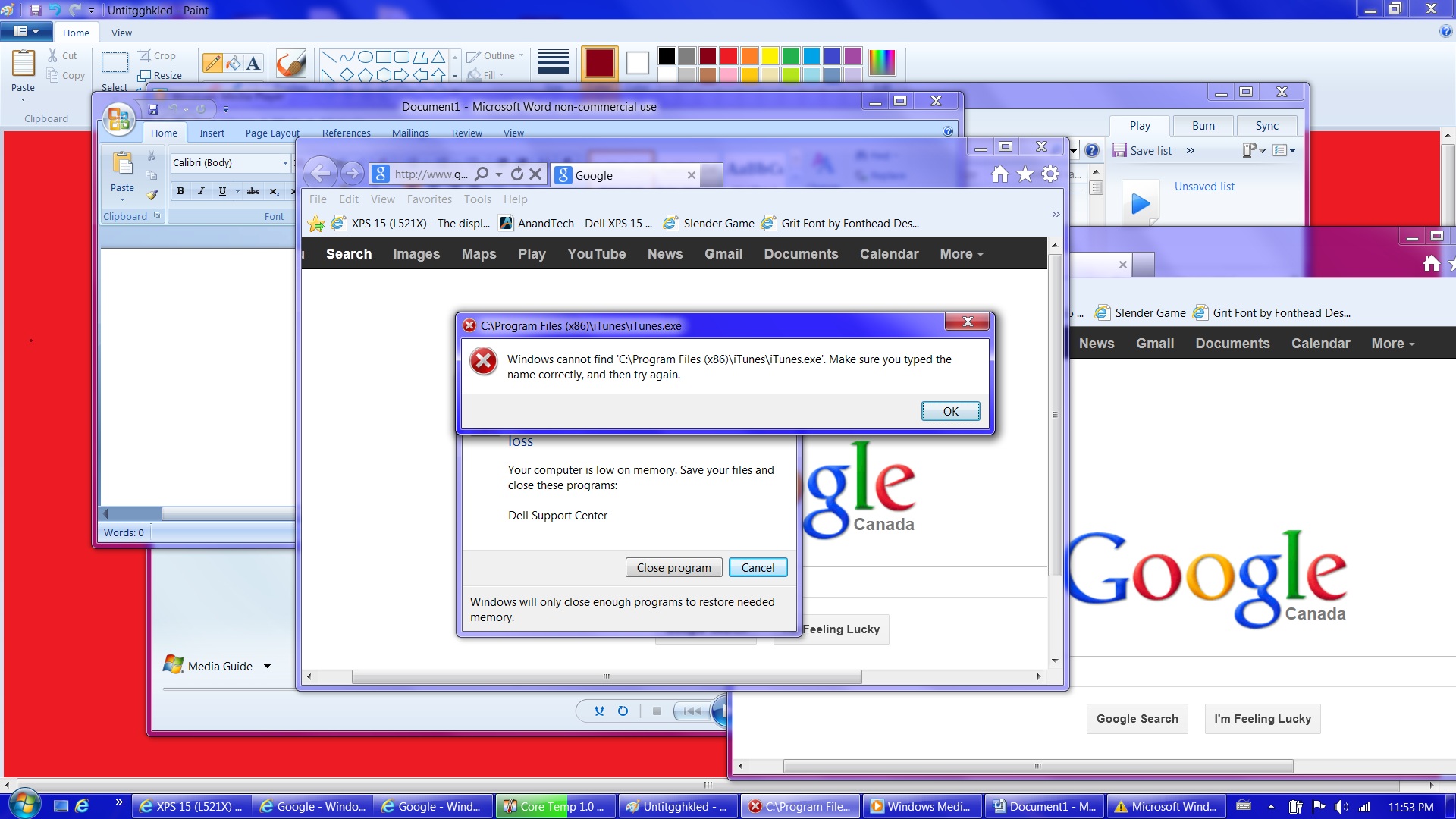
this is what happens if i close my lid and leave it for a bit...
The red image, you can see all the dots the screen/touchpad made before it went off to the minimize all on the bottom right and started opening everything and deleting and OMG DELL you now officialy suck at making laptops!!!Attached Files:
-
-
Did you have your touchpad off when that happened? I actually had mine switched off and I was having issues. I still don't understand why it doesn't automatically switch off if you shut the lid though. It's a pretty silly oversight...
-
Bios A12 (apparently) on the way...
This was posted by DELL-Terry B on 19 Oct 2012 1:21 PM in DellForums
-
how about the screen? Did the pixel grid go away?
-
I didn't have pixel grid on my old screen unless your eye was like a quarter of an inch away from the screen, and its seems to be about the same with this screen. So, no complaints here!
XPS 15 (L521X) Owner's Lounge
Discussion in 'Dell XPS and Studio XPS' started by Muddy, Jun 28, 2012.