 Problems? See this thread at archive.org.
I ordered the following system a couple of days ago from the dell UK outlet to replace my old XPS Studio 1640:-
XPS 15 - L521x
Processor: Intel Core i5-3210M (2.50 GHz with Turbo Boost 2.0 up to 3.10 GHz)
(2 GB GDDR5 NVIDIA GeForce GT 640M Graphics)
Genuine Windows 7 Home Premium
8 GB Dual Channel DDR3 1600MHz Memory (2 DIMMs)
32GB mSATA3 SSD for Minicard Slots
750 GB SATA Hard Drive (7200RPM)
8X DVD+/-RW Drive Slot Load
Display : 15.6 Inch Full High Definition (1080p) True Life WLED Display and Skype-Certified Hi-Def Webcam
English Genuine Windows 7 SP1 Home Premium (64Bit OS)
Back Up Media Not Included
Wireless: Intel Centrino Advanced-N 6235 and Bluetooth 4.0 Combo Card
Battery : Primary 9-cell 65W/HR
Internal Qwerty Backlit Keyboard
Palmrest
Looks like a great deal for £680 delivered compared to a new build price of £1079!
This thread does scare me however...
I will report back when it arrives on the 6/11
-
I am about to do the same, and worried, but if EVERYONE was having problems I am sure dell would have done something more.
Remember some paid over 1000.00 for this laptop, and if everyone who paid RRP was having problems, then I cant imagine the would just be covering their ears and mouth and eyes.
Also if there is any problems, demand they do something about it right away, The outlet has the same support as regular machines, and have had good service when bought new or refurb.
I am thinking of buying tomorrow, as cannot find a all metal build for 800.00 or less with the same specs. -
Hello everyone...I used to follow this forum a lot looking for answers and hopes for a fix on WiFi and GPU Throttling, but honestly got sick of it a month ago or so...can anyone put me up to date on those matters? Has a solution for both issues been posted or is it time to complain about them? Thanks a lot for every piece of information =)
-
No, I bought it from Dell Italy, and we don't get the Outlet here. I get full speed in down (15 mega) and up (1 mega) up to 10/11 meters from the router. Then I don't see my router anymore, while I still can connect to it with a CISCO AE3000 and a Netgear WDA3100 Wifi dongles.
-
jdcb92: no known status change. Lots of speculation about the "new" models with the update CPU, dell 1901 wifi, and Win8, but no proof anything is really different otherwise.
-
I just received a refurbished XPS L521X as a replacement for a broken Studio XPS 16. It came with the following specs:
Intel i7-3520m
750GB 7200 RPM HDD w/ 32GB mSSD
8GB RAM
Intel 6235 Wireless-N
I am having the wireless issue that seems to be described so much here in this thread (I think I've read over 200 pages). Thankfully I haven't had any touchpad issues or LCD issues.
My system came with Bios A08, which I've since updated to A11. I've also updated to the latest wireless driver from Dell, which actually seems to have made things worse. Any suggestions for me?
Also, I enabled the mSSD caching but that destroyed the Rapid Start. Any way to get this back? This whole mSSD w/ HDD thing is new to me. And I have seen posts with people upgrading their mSSDs to 64 or 128GB. Any recommended ones? -
Hey Guys, L521x issues status
http://forum.notebookreview.com/del...nd-up-issue-status-tips-tricks-resources.html
Please PM me or post there to discuss any issues.
Please post this thread when some one comes in and starts to ask questions. -
Oh, well...that is plain sad...thanks a lot
-
What I don't understand, with some hardware at least, like screens, wifi modules, etc. Why they persist? I'm totally ignorant to the processes involved, but unless Dell ordered an unholy amount of panels, wifi modules, etc. in bulk and have to use up their stock, or they're ordering bespoke/custom hardware, I don't see why they can't just source new parts that will fit in with the XPS series (at least, the parts that can be easily changed) and go for a silent 'upgrade' if you will.
Similar to how the M1330 could come with either Samsung, LG or some other comany's monitors. I don't see what's stopping Dell from procuring parts that will work better than their current batch. -
I noticed last night that if the bottom cover is removed you gain about 2MB/s on a lan test. Can anyone else confirm? I'm testing with LAN Speed Test v2.0
-
A12 bios is up.
I uploaded it to my Dropbox in case you guys are having trouble downloading it.
https://dl.dropbox.com/u/48260492/L521XA12W.exe -
I have torn-down and rebuilt my use of the mSATA SSD on mine, I followed instructions on the doc below (got from Dell) but cached it on my site for safe keeping
http://www.bearandwife.com/bear/sources/Intel Responsiveness Technologies - Dell 0.91.pdf -
I tested the A12 bios.
I would say it's an improvement over A11. The GPU doesn't throttle as bad. It does still throttle at 100% CPU and GPU load. -
At what temperature does the gpu starts to throttle?
on the A11 it seems to be around 80º C -
When I just run Furmark, it doesn't throttle at all. It actually goes into the 7xxMHz boost.
Once the CPU hits about 85C, the GPU starts throttling but the CPU stays in turbo at 2700MHz -
Are you just run only Furmark or Furmark + Prime95?
Inviato dal mio GT-I9100 con Tapatalk 2 -
WiFi speed seems fast with A12.
HP Envy 14t:
![[IMG]](images/storyImages/IMG_20121101_190203_504.jpg)
Dell XPS 15 L521x:
![[IMG]](images/storyImages/IMG_20121101_190505_768.jpg)
-
I ran Furmark alone and the GPU didn't throttle at all.
I ran Furmark + Prime95, and the GPU started throttling when the CPU hit 85C. -
that's good news!!
85º seems a good compromise for the gpu to start throttling and stop the computer from crashing,
this could really help on gaming performance, could you try to play a heavy game to see if the throttling has improved? -
3.83 Mbps seems fast? That's a joke, right?
Good to hear they might have found a good compromise with throttling.
I've been without mine for a month due to back-ordered parts. Its in their depot and I can't get an exchange until they send the first one back... America's Best Support! -
I would, but I just restored it to factory default. I'm not keeping.
Sent from my MB886 using Tapatalk 2 -
Exactly! When I purchased my XPS Studio 16 in 2009 there were many threads on problems with overheating and display problems and in the end the unit I received from the outlet was perfect! Granted the RGBLED screen needed calibrating but for the last 3 years the laptop has served me well.
Remember only people with issues will complain on forums, we never hear from the many 1000's of happy users with cracking machines...
At the end of the day if my laptop is not 100% it will be returned to dell within 7 days for a full refund, so I have nothing to loose... -
I also ran a12 in, and setup a throttle test
- furmark at 1280x720 windowed for about 15 mins
- i added a long wprime95 run and ran it for about ten minutes then grabbed a screen shot
- killed off wprime and grabbed a second screen shot short after a minute or two
With furmark alone the GPU went to max turbo and locked at 704 Mhz, temp was steady at 79-80 C, CPU at 1.2-1.5 Ghz on 4 cores
Once wprime settled in the gpu got pulled down and bounced from 270 to 405 Mhz with temp still steady 79-80 C, CPU at 2.2-2.3 Ghz on 4 cores with 1-2 cores reported as throttling on cpu-z.
System was stable.
Heat management obviously still favors the cpu, but it didn't flat-line the CPU to 1.2 Ghz when under duress. I don't have games installed to test how play is. Obviously it is going to depend per-title.
here's a couple screen shots - note they're large 1920x1080 ...
full-hot system : http://www.bearandwife.com/bear/images/l521x/a12-burntest-hot.jpg
shortly after shutting down wprime : http://www.bearandwife.com/bear/images/l521x/a12-burntest-recovery.jpg -
I'm inclined to stick with A04 since it seems to favor the GPU I think...
-
It still seems like it starts to throttle at 80º for the gpu, so not great news, still the cpu doest throttle directly to 1.2ghz that alone is a big improvement.
Unfortunately, for who want to play games on it 80º is pretty easy to reach duo to the poor cooling system so you should still expect gpu throttling
If they on the next bios raise the gpu throttling temperature to around 85º and let the cpu reduce the turboboost properly like he is doing now, to keep the heat in check that should give the best gaming performance without the computer crashing -
It would be great to have a Dell rep talk to the Dell techs to find out if this is a possibility...
-
Battery test on A12 anyone?
-
I just upgraded a few minutes ago and FWIW my battery says 5:46 hours left at 88%. That is quite an improvement!
-
What speeds can you get on a LAN test?
-
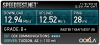
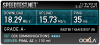
Wireless speeds on new bios A12.
my XPS 1521 from 25 feet away from the router...
Here is my sons MBP from 30 feet away from the same router....
-
just installed a12. I sit my laptop in the same spot on my office desk everyday. With a11 and before was only able to get 7.5/8 on speedtest. Just ran the test then and it reached 9.5/10
-
not sure if this made a difference but once A12 was installed windows update said there was a nvidia update which I installed (it was an optional update) I am now pushing 11.5/12 on speedtest which is quite an improvement from this morning on a11
-
I see. But I do' think that can be the case. Howcn a power supply caue throttling? Lack of power? The laptop is not a bulb.
-
A power supply can most certainly cause throttling, Dell has had major issues with this before. The Studio XPS 16 series throttled significantly until the power supply was replaced by Dell Technical Support. It all happened on this forum actually. With a 90 watt power supply that system throttled because the GPU wasn't getting enough power and was forced to run at a reduced power state and therefore throttled. Once Dell Tech Support replaced the 90 watt adapters with 120 watt adapters, there was no throttling.
-
damn you Dell!!!
just updated my bios to A12...
got the bios message do not unplug your power supply, 50%...90%..100%
fan kicks in really hard for 5 seconds then the laptop restarts..boots into login screen withing 5secs, damn fast compared to a11 in 23secs..
then laptop just shuts off...
I turn it on and everything works great boots in 5 etc, I log in and then... the touchpad stops working, I do a few reatarts , log outs and notice the touchpad works fine until I log in... so I go through the menues using tab and etc and add Bluetooth device, I add my bt mouse and rollback the touchpad driver.. restart and now its working again but I no longer have the dell toupad software so no touch features etc.. why would a bios update do that?
going to reinstall the touchpad software now, ill let you know what happens.
no go!, it seems that the dell/synaptic driver/software does not work for me under windows 8, uefi with A12 biso !!
16.2.12.17, A01
so I guess I am without gestures and scrolling until there is a fix... anyone else?
omg, update!! bios A12 made rapid start work! no longer getting the message : your system does not meet the minimum requirements!
ok so that's a plus I guess, loose touchpad features but gain rapid start. -
I see but definitely it won't be the case.
-
i am looking forward to the xps15 haswell PCs with Intel's Haswell chips coming in first half of next year | PCWorld
can you imagine 8+ hours of battery life as well as wireless charging. Now all they have to do is fix the ancient format of Wifi and remove the dvd drive to put in a second fan to fix throttling
-
If it is lack of power why that 'lack' is only allocated to GPU, but not CPU, RAM, HDD, mainboard etc etc?
And the capacity of the internal battery is 65Whr, right? If the laptop needs more than 90W, then we should not expect the battery can last more than 40 minutes. -
Seriously, if next year Dell does come out with a new xps15 thats got a perfect (no grid) screen and longer battery life,
I will definitely go for an exchange (I have only just bought it for like a month)
I love this laptop but the screen grid is problem. Not big enough for me to refund it tho. -
Because the GPU is by far the highest power draw (when it is engaged). Seriously.
Thus the whole dynamic scaling of processing speed and other factors, managed by the system, employed to both managed TDP but also power draw. Try forcing your system to run in "max perf" mode when on battery and see how long it lasts. -
A mirror of the A12 please?
-
search back, someone already has
-
Thanks, i have it! i installed, and didnt notice any improve in the WIFI......
-
Same here.
Though what's funny is I downloaded a torrent (legal torrent for those wondering) and it was 100% of my download capable speed, whereas speedtest.net only shows me 40-50%. -
What's the exchange policy/resale value on Dells like anyway?
I'm considering getting an XPS 14 through their outlet and then selling it next year for its successor, if it doesn't have the same problems that both the XPS14 and 15 from this year have. -
Quick question for all of you, I feel like I've done this before but I can't seem to figure it out (if it is possible) is there a way to have the power plan change automatically when you plug it into the charger and disconnect it from the charger?
-
yes there is... if you have quick set, then right click the battery icon and select dell extended battery life settings.. or if you have fast access, right click the battery and select ecoaware.
-
What do I enable/disable? None of those change the power plan to power saver automatically
-
Go -> Right click on battery -> Dell Extended Battery life option -> Enable "Dell Extended Battery life"
Now, when unplug the power it will change to power saver mode automatically. -
Awesome got it working! Thanks a ton
XPS 15 (L521X) Owner's Lounge
Discussion in 'Dell XPS and Studio XPS' started by Muddy, Jun 28, 2012.


![[-Mac-]](images/avatars/[-Mac-])


