Problems? See this thread at archive.org.
Anyone have a take apart guide for this laptop. Does the lcd come apart somehow?
-
You have to change your BIOS/UEFI settings from Intel Rapid something to ATA.
If you want to do a clean install and utilize UEIF (which I recommend, I mean my boot time from cold start on 750GB 7200RPM HDD is about 2-5 seconds), then you need to have a clean HDD/SDD meaning NOTHING on your storage device. You'd have to delete all partitions on HDD/SDD (including OEM reserved space) and change your BIOS settings to UEIF.
If you want to keep the legacy boot, keep your boot option as legacy ROM instead of changing to UEIF. It should install correctly.
IMPORTANT. As of right now, Intel Rapid stuff is useless on Windows 8. Changing back the option from ATA to Intel Rapid stuff WILL CAUSE BLUE SCREEN. (damn, I don't remember the name of that Intel thing.. lol) -
I bought one with Windows 7 from Dell Outlet (new condition). Will report next week and see if I have issues (I hope not but not too optimistic).
Just to make sure: there's no difference with the new Windows 8 versions of the XPS 15 besides OS and new wireless card? Touchpad is still the same? -
I might have an old 120 watt adapter I can test.
Sent from my SGH-T999 using Tapatalk 2 -
I also have one. What to test?
-
The question was asked whether the cpu/gpu throttling was affected by power supply - e.g. using one rate over 90 watts, I assume on the hopes that it would minimize the throttling.
Personally I am guessing the throttling behavior is related to heat production and the inability of the HSF to dissipate said heat, so it won't be affected, but it doesn't hurt to try.
If you look up the Anandtech (?) review of the L521X you can probably use one of their test procedures to replicate throttling pretty easily. -
Dell's website is so .
I have been trying to download windows 8 drivers and most of them says "file not found". -
I got them from here:
Dell Community -
Thanks! You are the man!

-
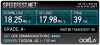
Hey Guys installed Windows 8 Pro lsst night and FWIW....my wireless speeds have increased a lot! I have NOT installed any of the drivers from Dell yet. Everything has worked out of the box so far except for little things like trackpad scrolling but that is nothing. I will play around on it for a while and test everything our but so far I am loving Windows 8.
Here is my download results from speedtest.net from about 40 feet away from my router. In the past i would get about 2Mbs download speed if anything......
-
Rule 1: If it ain't broke, don't fix it.
Don't update drivers unless you need to jamezr! -
Why are you wan testing? Can you not get anything faster than 2.25MB/s on a LAN test? If not then your wireless issues are way worse than mine have been on 2 of these laptops. I must be picky.
-
Stupid rule and the 1990s way of thinking if you owned a PC. If its a new driver it's supposed to fix things. If its out there it should have been fully tested first. With this mentality the ones who build these drivers have an excuse to not test them properly.
-
Try powering the laptop with your 120 watt, and run Furmark and Prime95 at the same time. If you could record the temperatures and GPU and CPU clocks that would be awesome.
Also, I noticed when I ran Furmark alone, it still throttled even though it was only 80C. It went down to around 575MHz.
If you are running the latest GPU driver and bios, we can do a direct comparison between my XPS on a 90 watt and yours on 120 watt.
Sent from my MB886 using Tapatalk 2 -
If vendors were reliable I'd agree with you...especially with newer gen hardware...but particularly with the l521x and wifi that is decided *not* the reliable case.
At the moment I'd not be surprised to find the built in drivers in the win8 image are more current than most stuff otherwise available. -
I just received my Refurbished XPS 15 today and I seem to have WiFi issues. My question is, can we use a Linksys or Cisco external card with this laptop to avoid WiFi issues temporarily or does the issue happen with external cards as well?
I got a steal deal. My config is
i7-3612QM
512 GB SSD
16 GB RAM
8X Blu Ray + DVD Writer
GT640M 2 GB video card
Idiotic Intel N6235 + Bluetooth
3 Years In-Home warranty
I got the system for $1500 out the door.
I really do not want to return this system. Can I use external WiFi card?
Thanks in advance. -
Sure a few have done this. If you complain dell might send you one.
-
Techy came by. Changed mobo,display nd palmrest touchpad etc. K so the new mobo has bios a4.. Which is bs cuz i have windows 8 installed and you need a11. So after failling insalling bios a11 via bootable usb. I put in the depot hdd and am burning a recovery image windows 7 home, from there ill upgrade bios to a11, set it to uefi etc nd put the msata back in and my original hdd . Hopefully it works, i just finished installing windows 8 with all my software last night O_O .
This mesdage is frommy phone so sorry for mistakes. -
Nope, nevermind... The windows screen hangs and blue screen the restarts.. Loop...
Ill try clean install -
Let us know how you get on with this. I and a few others are having problems with windows 8. As soo. As you install all the needed drivers, doing a reboot blue screens. See if it does it on yours. Cheers
-
Just wondering why people are saying you need bios A11 installed for win 8 when Im still running on A04 and everything is just fine. Installed great and boot time from pressing button is a constant 9 seconds.
-
I was on a call with Dell technician and finally he is sending out a technician to my home to replace the wireless card to Intel Centrino 2230. Does it solve the problem? When I was on a call with him, I told him that my Inspiron 15R SE works fine from the same location which has 2230 card so he suggested to put the same card in XPS 15.
Has anyone replaced to this card and got the issue resolved? -
Mikvidhal: a few ppl have tried different wifi cards, I do not know of any instances where it fixes the wifi performance.
Good luck.
Sent from my brain using neurons fueled by glucose -
ok, so got everything working! windows 8 and rapid storage but the only thing that refuses to work is rapid start...
Ive done the 8gb partition and made it a hibernation but the rst wont install saying I do not have minimum etc.
I had rapid start working great on windows 7...
So the dell resolution guy called me to see how everything is going, I informed him that I have yet get things working for the mobo came with a4 and im currently install w7 etc. he then told me that he looked into it and that the techies at dell told him that rapid start is only for ssd's and not hdd's.. now Dell is being seriously dumb with the techs they hire! anyway, I told him they are wrong and its made to work with msata and hdd's and he should go back and ask again because it was working fine until depot messed everything up.
Anyone have trouble upgrading to windows 8? ive done it twice now and im sure I can help.
... touchpad seems better and doesn't have one side higher than the other so yay, screen still has grids but not too bothersome as before, unlike the other display XD more testing required.
speed test on 2.4ghz 17ms ping, 49.49Mbps/s down 1.01Mbps/s upload
9mb/s read 9mb/s write over network to pc on giga lan.
5.8ghz speed test 17ms ping 48.28 Mbps down 1.00Mbps upload
16mb/s read 17mb/s write over network to pc on giga lan
old config (mobo touchpad,display was only getting 3mb up/down on 2.4 and about 8 on 5.8) -
Maybe they're talking about win8 with Uefi boot. I believe that was added in a09
-
Is it just me or the screen tends to flicker on Windows 8?
I recently updated my XPS to Win8. I have installed all the drivers (everything).
However, I notice that the bottom of the screen flickers when I use full screen mode on games or apps.

How does that happen? I tried reinstalling the video drivers (both Intel and Nv). It would work straight after the reinstall but after a while it flickers again
-
you sure it isn't the screen itself? My screen had a faulty connection and would flicker/get an orange tinge unless i moved it around. Got the screen replaced and the new one is perfect
-
My SXPS 16 did that and had to have the graphics card replaced
-
LOL, if he's taken a screenshot of it, it can't be a loose connection!
-
Yes, it looks similar to symptoms I had with my XPS M1710 when the nVidia GFX started to fail. GFX needed replacing (twice in the space of a few months) and all was well. If the GFX card is writing garbage to the screen then a screen print will, of course, capture the garbage too.
-
If its the graphics card it will, not if its a loose connection.
-
So, new bios A12 is available on dell website. But I'm not able to download it... i don't know why, but it always says file not found. Is anyone able to download it and test it or put it here for us?
-
Sorry guys one more question.
I have been reading about the Windows 8 UEFI boot set up...HOWEVER, I wonder if thats only beneficial when you have an SSD?
Is it worth doing that if I only have the pre installed HDD (with the 32 GB msata) on my XPS?
It seems like I have to deactivate Intel Smart Response in order to get UEFI boot...which means I will lose the benefit of having the msata as the cache drive...? -
I cannot download Bios A12 either. File not found.
-
the listed fix is:
"Update Nvidia VBIOS N13P-GS version [80.07.59.00.0A], N13P-GV version [75.17.46.00.03] to support Hynix A-die."
At a guess, it looks like GPU bios update to support different system memory modules (the Hynix A-die which apparently includes a thermal sensor).
Still, it's only listed as available today, so maybe by the weekend the file will become present on the FTP site. ;^( -
What you just said was true.....BUT imagine installing Windows on the 32 GB msata card. Then having your other drive (mine is 500GB) for backup and storage.Now you system has the benefit of the speed on the msata SSD card and the extra storage. So in effect to have a nice very fast dual hard drive system that boots extremely fast!
-
Oh right, yeh, that could work!
I think the entire windows 8 is only about 8 to 10 gb...so 32 msata should envelop the system no problem!
I was actually thinking about getting a 128gb msata to replace the current one...unfortunately not many shops in Australia sell msata cards... -
32GB for a system partition is potentially very snug by the time you've installed programs and had a few months/years of Windows updates, save some space for hiberfile and paging file, windows restore space, recycle bin etc..
I have a 128GB mSATA and I still have Windows 7 installed on the HDD, with 64GB of the SSD set aside for Intel Rapid Storage Technology caching. Observation of the performance stats for disk I/O in Resource Monitor is indicating that the caching is very effective. Not only are my regularly accessed system files being cached, but all sorts of data files that are currently of interest. I'm sure that a large part of a System partition is bloat, seldom if ever accessed, and just sitting there most of the time wasting your fast storage. Much better in my view to leave the SSD free to cache the stuff that gets used frequently and leave the bloated old crap sitting on the HDD where it can be ignored.
I'm still desperately trying to decide whether to keep or return my system, as I really am not happy with the screen quality, but I love everything else about the machine. If I keep it I will be installing Win 8 (I have done once already, to the SSD), but this time round to the HDD for the reasons stated above. -
I agree with you about how the Intel Smart Response accelerates the actual stuff rather than bloats...however the question remains -
With Intel STR running, we can't use UEFI, which also something thats gonna substantial accelerate the system (boot time, in particular)
So really thats a choice between Intel STR and UEFI :/ -
OK, but in a given day how much time do you spend cold booting the system vs the time spent actually using the machine and wishing for speedy response while using apps and data? With Intel Rapid Start Technology my machine resumes from deep sleep (not the same thing as hibernation) to the login screen in 9 seconds. It resumes from sleep in about one second. How often do I need to cold boot? - only when applying (some) system updates, which is seldom.
By the way, I'm far from expert in all this technology. The first time I came across it was one week ago when I received my machine. I'm just passing on my observations and thoughts from my perspective. I'm not at all clear just how much benefit UEFI will bring. Legacy BIOS seems to work just fine. Is it a fact that using UEFI prevents the option of using IRST? Speaking from a level of no knowledge on the subject it strikes me that the two things ought not to be mutually exclusive. -
I have windows 8 pro running, with uefi and intel rapid storage, acceleration running. and I was finally able to creat a hibernation partition on the msata.. although rapid start doesn't want to install, windows 8 uses the 8gb hibernation anyway...
-
So, installing/upgrading Windows 8 on L521x is just normal install on HDD and do an install of Intel Rapid Storage Technology driver that works with mSata as caching drive?
Do I have to change "things" in Bios?
I Remember I did a clean install on previous L521x that I sent it back, after install (Win_7) was very slow and at start It was coming a window with RAID stuff. It was saying something that the mSata drive is not active......I think I should have had the IRST driver installed to get rid of that window, I do not know. I just deleted it, (it was an option there) to have a normal start of the system. and left it sending it back.
On XPS 15z easy to install and working fine and at some point was faster booting than XPS L521x. -
When I received my model from the Outlet Dell had not enabled the Rapid Storage feature. The software was installed, but the technology was not enabled. I had to enable it myself, which in turn wiped the existing Rapid Start hibernation partition, which I then had to recreate manually. What a major screw up from Dell! Anyway, installing the software is not enough. You have a driver and an app. You need to open the app and enable the Rapid Storage feature.
Likewise, Rapid start can be enabled and disabled. In my case it was already enabled on arrival. Not so Rapid Storage.
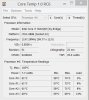
Here's my complete partition layout. Win 8 is currently unpopulated, awaiting installation if I choose to go ahead. You might notice that the 64GB cache partition is not listed in Disk Management. Equally the hiernation partition is not listed in the Rapid Storage software UI. Getting on top of all this really is a journey of groping around until the light bulbs turn on.
-
Should I be excited about A12? Any real chance it will improve the throttling issue?
And, what's the deal with listing files that are not available for download? Why does Dell do this? -
As much chance as any other bios update - sadly it's not like Dell is very forthcoming with the reason driving the bios update, any more than what I quoted before. As Dell uses Hynix DRAM for system memory, and the GPU has to work directly with the DRAM to some degree, it could be that their fixing a problem wrt GPU behavior and that there are no other changes within the BIOS.
But, the bios is big these days. Who knows what really changed?
Seems like a crappy CMS in action, to me. They simply should not have those links live if the FTP storing the file hasn't received the file yet! -
just installed fast access (still have it from my studio xps) and its works great with windows 8
makes signing in so much easier!
got the touchpad working ok, doesn't seem to be much conflict with the display anymore,
wifi seem to be great with the display, guess antennas are the issues but range is still bad. -
Same here. Just got my machine, Win7, 32 msata, 750GB, 8GB ram. Love the slick design, it's slightly heavier than expected, not a fan of the glossy display. And, luckily, No Touchpad or LCD grid issues, and, more important, no WiFi speed issues. Now, if Dell could fix the Range I would be really pleased with my XPS 15.
Fingers Crossed for Bios Rev A12... -
Does anybody know if the new Win8 model of XPS still has the big WiFi range/dropoff problem with the dell card and new i7?
-
Ordered the same specs. Did you buy yours from Dell Outlet? Also, what's your WiFi speeds when you move away from the router?
XPS 15 (L521X) Owner's Lounge
Discussion in 'Dell XPS and Studio XPS' started by Muddy, Jun 28, 2012.