Problems? See this thread at archive.org.
My system showed it had the Toshiba firmware installed and yet it ended up arriving with the PM961, so hope is not lost yet
-
Honestly if I was you I would just go with the 4k the difference is more than I could have ever imagined. I originally had the FHD and I could honestly never go back.
-
I finally have a plan committed!
-
This one does a pretty good job. You'll want the drivers for the HD 630.
-
Does anyone else have a power button that is ever so slightly raised on the right hand side? It is not a big deal, but I can tell it is flush on the left side and ever so slightly higher on the right.
-
Spoke to Dell technical support today and they are going to send me a new DA power supply. They wanted me to update my bios and when I refused they just said ok we will send one out today.
-
My order has now arrived and i'm glad I went for the 4k instead of 1080 again (I sent back the 1080 due to the pinched screen)
It seems to feel quicker, though it still has the Toshiba SSD.
The keyboard is more tactile and not spongy like the 1080 model was. I DIDN'T choose for a fingerprint reader this time.
Mcafee is still buggy and causes major lag in web browsing. (Typing lag and loading lag) removing that rubbish immediately -
When I first got my FHD one I remember thinking the keyboard was a little mushy, but the 4K one is actually much nicer. The first thing that I did when I got into Windows was uninstall Mcafee....It is a shame that they do not let you opt of Mcafee because they actually build $40 CDN into the price of the computer for it.
-
dupe please delete
-
Playing around with mine (1080/i5-7300) and I've managed a stable -0.140 under-volt. 2 hours of Prime95 = 70-71 Celsius.
Mine has no noticeable light bleed either.
Seems like I got a golden sample; really love it so far, completed the first two planets of Mass Effect Andromeda while on a recent road trip. -
May I ask what the problem are with the FHD screens that you have received?
-
Strange, I've been running Mac OS and Windows in parallel for many years without any problems. Itunes is something I try to avoid no matter what the OS it might be running on
-
Amazing,how many people in here have actually already returned at least 2 9560s? Must be like the fifth post I read just here about people being on the third unit by now.
-
40 bucks for a trial version??
-
It is a 12 month sub in Canada
-
Dell definitely has some QC issues happening....After my first two XPS issues I tried my luck at an Alienware 15 which also went back due to a QC issue. My issue is there really is nothing else that can compete with the XPS 15, so we keep going until we get a great one.
-
What do you guys think is the best way to extend the XPS 15 wirelessly to a TV that has an HDMI port but is not a smart TV (not connected to internet)?
My TV is pretty old. With Windows 7 I can connect wirelessly and extend my screen without issue with an old and discontinued Netgear WiDi adapter that won't work with Windows 10 and the XPS 15. The TV has an HDMI port but no USB port and I think (?) that's required for the Microsoft Wireless Display Adapter. In that case, what's my best option to wirelessly extend the XPS 15 to an old HDTV?Last edited: Mar 29, 2017 -
Yes, it is a sad fact that Dell has bad QC problems (even though some users here claim that not to be the case )
-
I believe that QC in general has gotten worse, but I do not think that Dell is necessarily worse than any of the other PC manufacturers. Surfing the forums I can see that Lenovo and HP have just as many issues. I would say that potentially Apple has better QC, but they build that extra QC into the pricing of their products. The fact that I was able to get this XPS for $1860 CDN less than a similarly spec MacBook pro says something. I am willing to put more time and effort in dealing with Dell's QC issues in order to save that much money over getting a perfect MacBook pro the first time.
I am not arguing for Dell, but I still love buying computers from them. For my issues I have ended up with about $400 in extra freebies above and beyond all the discounts I received at the time of order.improwise likes this. -
It will only work before windows 10 decided the previous buggy driver is for your best interest. And there's currently no real solution for windows Home at all.
-
I've played a little bit with my new 9560. Most things hardware seem okay.
I have very mild coil whine in battery, where I have to physically put my ear on the keyboard to hear it in a quiet room.
I do get some mild coil whine when plugged in power, louder than on battery but still mild. I have the noisy DA130PM130. Do you think that replacing it with the newer model, it will be better? I could call DELL and ask to replace that with the newer model.
Edit: On a second inspection, I think that the right side of the monitor is a little cooler? Not 100% sure. Hmmm I guess that will be a lengthy call with DELL tomorrow
1) Monitor will probably need replacement
2) Power brick should be replaced with a newer, because it is a little noisy.
3) Complain about SSD although I don't think they will do something about itLast edited: Mar 29, 2017 -
You may want to double check your power adapter.
I have a very slight whine coil on power, even though my adapter is the supposedly new HA130PM130.
Other posts here and elsewhere have mentioned the older DA130PM130 is actually the quiet one.
I also use the Google 60W usc-c charger on-the-go and a universal 95W power adapter at my office and both cause no whine coil.
Still beats me on what/where that mild whine coil is coming from and why only on 130W power ........ -
Hhmm thanks for the tip. I'll do further tests with the power brick. I might buy a USB C one to test.
The monitor definitely needs replacing though -
Very slight is normal and as long as you can't hear it with some ambient noise from at least 3 feet away it is fine.
Anything that can only be heard in a silent room or by picking it up and putting to your ear is normal. -
I had the LCD issue - get it replaced to return the unit for another. The right hand side of my 4K LCD was warmer (or the left cooler) and had a reddish tint, it annoyed the hell out of my when on web pages/documents. Swapped it out and now have a near perfect LCD (some pinched backlight bleed but its hardly noticeable).
-
Nice! Good to know that they fix that.
I don't want to risk changing the whole machine as this seems to be perfect in all other aspects. So I will try to get the LCD replaced. -
Yeah I had the same dilemma - had a good base unit (samsung ssd, low coil whine etc) but the LCD was pants. Now have a machine that vaguely resembles a £2000 piece of kit
If you are going through support it will take a while, have some pictures prepared of the issue and/or just keep arguing you are not happy. I have the premium support warranty option as standard on mine, so they send an engineer next day, based on part availability. YMMV. -
I've just been on the phone with DELL for an hour.
They basically tried to talk me through the SSD. They requested me to send a screenshot of the software used to get the read/write values, aside the fact that this is all over the internet.
They also requested me to send photo of the display, so they can 'assess the defect with the quality team'. I understand this one. They want to improve their quality, but I doubt they want the photo for that, they probably want to see I really have the issue. Which is quite difficult to show in a photo.
In any case, I am in the middle of a house move and I can't deal with DELL support via email or expecting phone calls from them. I explained the situation and I suggested to return the system for a full refund. They happily processed that.
This concludes to another return for a full refund. Well, done
Last edited: Mar 30, 2017GoNz0 likes this. -
Wondering what happens to all of these returned systems? Clearly they just give them the once over and re-ship out to customers again "as new"? Chances are a lot of the issues users are having with these systems is because they keep on sending out the same "defective" systems to new customers.
-
I should be happy my delivery is next but the usual what the hells going to be wrong with this one feeling just struck.
-
I think I may keep this one. No backlight bleed like the last, still has redshift on a black background (original has a bit on a white background)
White is dull though but I think that is more to do with the original being a lot more blue than pure white.
What to do :| -
Return and quit buying XPS?
-
Nothing close to it for the price though m8, might keep this one due to the additional £100 off + 10%
That £100 back I am due can offset the Sony A77m2 and lens I just got so I can make use of the 4k panel in photoshop
Anyone want to buy a gaming projector, I need a new server next
LegendaryAced likes this. -
Make sure your sample can handle -140mV when idle and when transition from high FID to low FID. There can be some instability during transitional processes which I already mentioned in this thread. You might face random BSOD/failures when go from AC to DC and/or when "just stopped" Prime95.lewdvig likes this.
-
Undoubtedly, the value is great. I would pay full price (no discounts with coupons or sales chat), if they were able to provide quality products without QA flaws.
2 out 2 orders were faulty. Unless I am extremely unlucky, there seems to be a trend and we've been talking about it in numerous occasions.GoNz0 likes this. -
They sell them as refurbished units on their outlet.
-
terrible backlight bleed (I think caused by bad pressure from plastic bezel) and uneven color
-
I felt a little heartbroken putting the laptop back in its box ready forcollection tomorrow.
Such a good laptop being put to waste because they can't deal with their quality assurance issues. Meh...
Back to my 6yo Toshiba... -
Sorry to hear that LegendaryAced,
Mine seems to be pretty good, just finished my repaste, and relpaced the Killer wificard becasue it was crap. (it was also broken with one ground plane not actually connected to the pcb!).
Wifi is now stable (was my only issue).
Undervolted to -135, any lower and it craps the bed switching between mains and battery at 100% load.
Temps have dropped from high 87/88> 82-4 with the undervolt and the repaste dropped it under 76 with prime95 small fft's
Added my dbrand skin (need better light to take a photo of it but here's one)![[IMG]](images/storyImages/beC41UH.jpg) thefiverivers and GoNz0 like this.
thefiverivers and GoNz0 like this. -
Looking good
-
So my new 4k model seems fine apart from the screen blanking out randomly/random screen corruption occasionally ( can't find any obvious cause).
Updated to the newer intel gfx drivers and disabled the panel self refresh and "extended battery life for gaming"
The fan on the left has a noticeable grinding sound :/ is there a simple fix for that (reseat?) or does it need an engineer to replace it?
I'd be tempted to try and run the fans full speed to see if that cures it but haven't found a manual fan control app to do it yet. -
If you don't mind taking the fan out and having a look you may be able to fix it, if not it is one of the least invasive fixes for a Dell engineer to do. At least they bring new fans!!
The blanking happens in the latest 2 drivers but to me it is better than Dells where it locks up windows when using chrome. -
A quick update, I had to disable font smoothing using a registry hack in order to get a 4K in FHD to appear as sharp as it should, at least much better than just switching to FHD and disabled scaling and ClearType. Strangly enough, it was not enough to just turn of font smoothing in Peformance settings. It's still not as sharp as a true FHD panel but at least much better than before.
-
Thanks, reseated it and it seems to have improved it a lot. time will tell! I think its the third leg that just rests flush(ish!) against the system board.
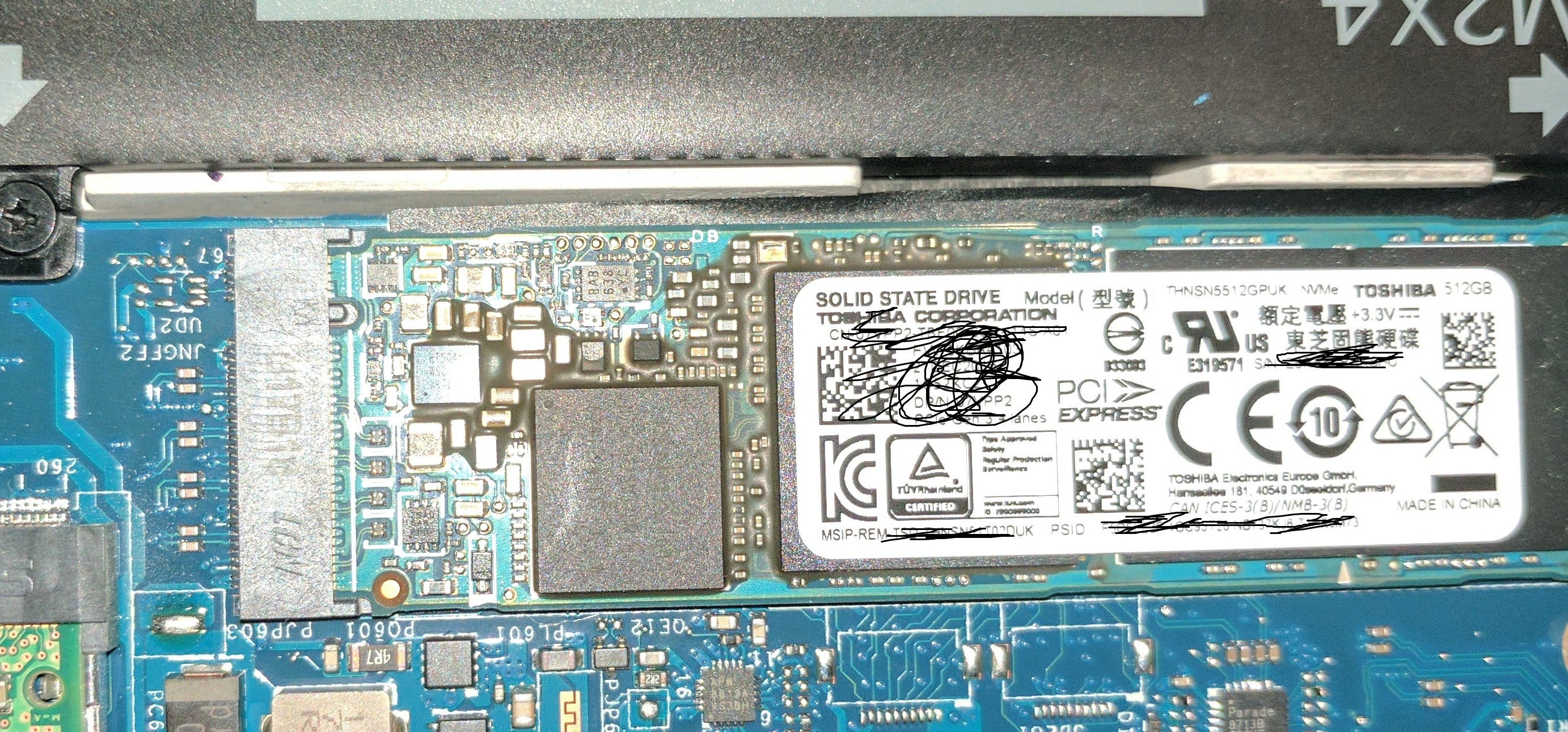
Is it normal for the chips to look discoloured around the Toshiba ssd?Attached Files:
-
-
So, what options are there for a SED SSD that supports eDrive (BitLocker) for the XPS15?
-
Mine has some of that, but not nearly that bad and only around the area covered by the label.
-
Quite a few OEM support it, Toshiba do both but finding ones another matter!
-
Yeah, that is exactly what happened. I ran Prime95 for 8 hours, then booted Mass Effect and ran it for a couple of hours and go a random reset. Backing off to -0.130 is stable overnight though. So I'll leave it at that. Thanks!pressing likes this.
-
I'm currently running -0.150 on my i5-7300HQ undervolt and it seems to be stable thus far... Prime95 passed and no issues gaming...wow!
-
Is undervolting a widely popular thing to do here? For those of us unfamiliar, is it a good or bad idea for an average user to get involved in this? Is it just to extend battery life?
XPS 15 9560 owners thread.
Discussion in 'Dell XPS and Studio XPS' started by GoNz0, Jan 20, 2017.