Problems? See this thread at archive.org.
Any chance you've tried the matte screen protector and found it usable? Do let us know, thanks!
-
Unfortunately it is.
 cost me a lot of money
-
So did notice some freezing on chrome and throttling. Undervolted to -120 for CPU and -75 for gpu and temps have dropped significantly from default voltage.
I am going to be repasting the CPU and replacing the thermal pads this weekend thanks to @Eason nice write up and swap out the ssd for the 960 pro with @gonzo ISO. Wish me luck!
Sent from my iPad using Tapatalk -
Oh, dear, my apologies ... I only meant it as a compliment that your review was on ultrabooks, though I should have been more considerate of your disappointments too. My bad ...
If it's any consolation, or a possible route, Microcenter is still selling the 9560/i7/16GB/512BG/4K for 1599 USD in store: http://www.microcenter.com/product/474706/XPS_15_156_Laptop_Computer_-_Silver -
I personally have not tried it. However, I've read multiple reports on these forums that it works... but with the caveat that you more or less need an industrial cleanroom (or a lot of luck) to apply it without trapping dust between the protector and the display. If you search on this forum, there are tricks for doing it, but it's still hard.
-
I was advised to have the primary user account on my Win 7 not be an administrator account as I was told that was more secure. Does the same hold true for Win 10 on an XPS?
-
I still stand by not changing the thermal pads as you can dump more heat into the ram along with causing the heatsink to no longer fully contact the chips.
For the 1st time I dumped a small blob of paste on the bits where the pads contact the heatpipe rather than the contact plates and this was enough to squidge through the gap in the heatpipe so was enough to fix that issue.
Win 10 set as admin is still not the true admin and it is just scaremongering for the truly non internet savvy user, as in the grandparents that click yes to every pop up and kids who know no better, and obviously the other 75% of the internet, fingers crossed all who come here do not fall into that category
thefiverivers likes this. -
I've had soo many bloody calls about the onedrive and edge adds MS is pushing :/
How hard is it to use google rather than nagging me ^_^ -
So you're basically saying there is no reason not to make your primary user account an Admin? I certainly try to avoid clicking on unwanted pop ups and never download stuff intentionally but it has happened that I've ended up on a website I wish I hadn't..
-
Yes and windows 10 makes you an admin but without full rights, common sense and a good antivirus and you should be fine. Making you a standard user is a pain in the arse as you need to enter an admin password for just about everything you want to do!
-
Ah ok that sounds logical. I havnt inspected the current pads closely yet but I was also leaning towards not changing them bc of the issue you described namely overheating. Plus with the significant drop in temp from just undervolting and a cpu repaste I figure that should be a great combination for my needs. Thanks for the input!
Sent from my Nexus 6P using Tapatalk -
I'm hoping you're spot on here as it would make life easier but googling around is getting much more mixed results. The claim being that malware has a much easier time installing itself on a standard account as compared to an admin account. Is this wrong or somehow significantly mitigated on Win 10?Last edited: Apr 5, 2017
-
If you have a standard account it needs an admin password to install software. Some malware has ways around it, but that type it wouldn't matter what account your on.
-
In the killer network manager, has anyone else noticed that if you do actually set you internet speed in the boxes, it does seem to load webpages much quicker.
On a side note, I still get really laggy keyboard when typing replies on this website alone. Just me? -
I don't use it as it is a complete waste of time, the majority of software I used was greyed out so I couldn't control it, what tit thought that would be good!
-
I have that problem sometimes. Yesterday was terrible. 9550 with M$ Edge
-
Does anyone know which RAM is compatible with the XPS 15 9560?
I was looking at the following:
G.SKILL Ripjaws Series 32GB (2 x 16G) 260-Pin DDR4 SO-DIMM DDR4 2400 (PC4 19200) Laptop Memory Model F4-2400C16D-32GRS
https://www.newegg.ca/Product/Product.aspx?Item=N82E16820232156
CORSAIR Vengeance Performance 32GB (2 x 16G) 260-Pin DDR4 SO-DIMM DDR4 2400 (PC4 19200) Memory (Notebook Memory) Model CMSX32GX4M2A2400C16
https://www.newegg.ca/Product/Product.aspx?Item=N82E16820236067
HyperX Impact 32GB (2 x 16G) 260-Pin DDR4 SO-DIMM DDR4 2400 (PC4 19200) Laptop Memory Model HX424S14IBK2/32
https://www.newegg.ca/Product/Product.aspx?Item=N82E16820104667
If there are other tried tested 32 GB modules working on 9560 please let me know.
Thanks. -
Probably the intel HD drivers, if they are Dell ones then it is the issue, go get the 4590 and manually install them (search the forums/google if you are unsure how to put them on, or download DDU to uninstall them)
-
All of those will/should work, I have some crucial OEM cas17 sticks running fine.
-
Unfortunately, as somewhat expected, replacing the speakers did nothing to fix the issue. Since my return period doesn't end until the end of April, I figure I have enough time to get them to replace the motherboard. If that doesn't fix the problem or causes more issues, I'll still have enough time to order a replacement and return the original, and not be without a laptop. I'll post an update here once they replace the motherboard.
In the meantime, has anyone else here experienced this issue? It seems slightly different than the descriptions of audio issues I've read on reddit, the Dell community, and here.
- It appears to be an issue with the speaker amplifier output picking up noise from rest of the system (ground lift or isolation/shielding issue maybe?). (Not the input since adjusting the sound volume doesn't affect the volume of the popping and crackling.)
- It is present even when the sound is muted in Windows or Linux.
- Sound is just fine when external speakers or headphones are plugged in in the headphones or external speakers, but crackling and popping still happens in the internal speakers even with these plugged in.
- Changing the speaker volume doesn't affect the crackling and popping volume.
- Disabling the onboard audio in the BIOS completely eliminates the strange crackling and popping sounds.
-
Hello. Received my matte screen protector today. Result is very good. I managed to apply it from 1st attempt (the only thing experienced problem - remove protective layers
- it wasn't as easy as on guide-video)
Those who may refer to rainbow effect - its hardly noticed. Picture as clear as it could be - i'm really happy with it.jbnb likes this. -
Just a random thought but I wonder if this is related to throttling and lag. I experienced a screeching sound from my speakers when watching a 4k video on YouTube that coincided with the video/chrome lagging and freezing. Went away immediately after the lag and stuttering stopped.
Sent from my Nexus 6P using Tapatalk -
Thanks! So it's this one, right? With the cutout/fit good as well?
https://www.amazon.com/gp/product/B01IU04KAW/ref=ox_sc_act_title_1?ie=UTF8&psc=1&smid=A1NE7W5XMD8F3E -
That's actually a good point. When I was testing with some 3D benchmarks, the change in the noise is very much noticeable when the FPS drops. I haven't noticed any 2D video or Chrome lagging (I put the recommended drivers on right away), but the link to throttling seems very possible. Maybe I'll try playing with power states and see if that has an effect.thefiverivers likes this.
-
Hey guys, you've probs heard this a million times, but here goes.
So i'm in New Zealand, ordered the 9560 and received it with the Toshiba XG4 ssd (512gb).
The tech support actually agreed to replace it with a PM961, however this became a problem as apparently the warehouse doesn't have any. The only options were Hynix PC300 or SanDisk A400.
AFAIK, the sandisks have even worse speeds than the toshiba xg4. The PC300 specs on the SK Hynix website are only marginally better than my toshiba.
I'm getting 1800 read, 800 write on my toshiba. And that PC300 512gb is rated at 2200, 700ish, plus I have no idea what the 4k speeds are.
My question is does anyone have any experience with the PC300? The 1tb pc300 has faster write speeds of 1100, but still is no where near the glorious PM961. Am I just being fussy? Or has someone managed to get support to ship a pm961 from an overseas warehouse? Perhaps I should push for a partial refund and put it towards a samsung 960.
Thanks for reading. -
Only you can answer the last of your questions. Here's my take on it:
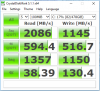
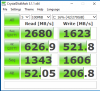
99.99999999% of users would never even notice the difference between a sata based m.2 and a PM961 SSD let alone the Toshiba (every normal daily task that I do I'd never know). I have a Hynix PC300 1TB drive and it's just about as fast as every PM961 drive that I've had, I'll show you CDMs so you can compare.
You can pick what to do. If they give you a decent refund I'd keep it and put it towards something you'd notice in every day usage.Attached Files:
Last edited: Apr 5, 2017antares26 likes this. -
-
While this has nothing to do with the laptop brand or model, the advice holds true for Win 10 if:
* you don't install software very often
* you aren't careful when you do install software
* you aren't careful with file management.
As a non-administrator, any action you take to modify the system (install software, delete certain files) will require you to enter the administrator account credentials. -
Thanks a lot. What about from malware that doesn't come from actively installing software? I rarely install anything but I certainly have had the occasional pop up or ended up accidentally on what seems to be unsafe websites. Would I be better off as a standard user for the risks associated with browsing a wide variety of webpages? Is there any downside to being a standard only user besides having to enter the password for some programs? Could it cause any other issues or you're always prompted to enter the password when needed and then every application runs normally?
-
To be fair this is a hardware thread not operating system security thread, might be best you take this to the right forum section http://forum.notebookreview.com/forums/windows-os-and-software.15/SDeP58, Gregg Helleren and thefiverivers like this.
-
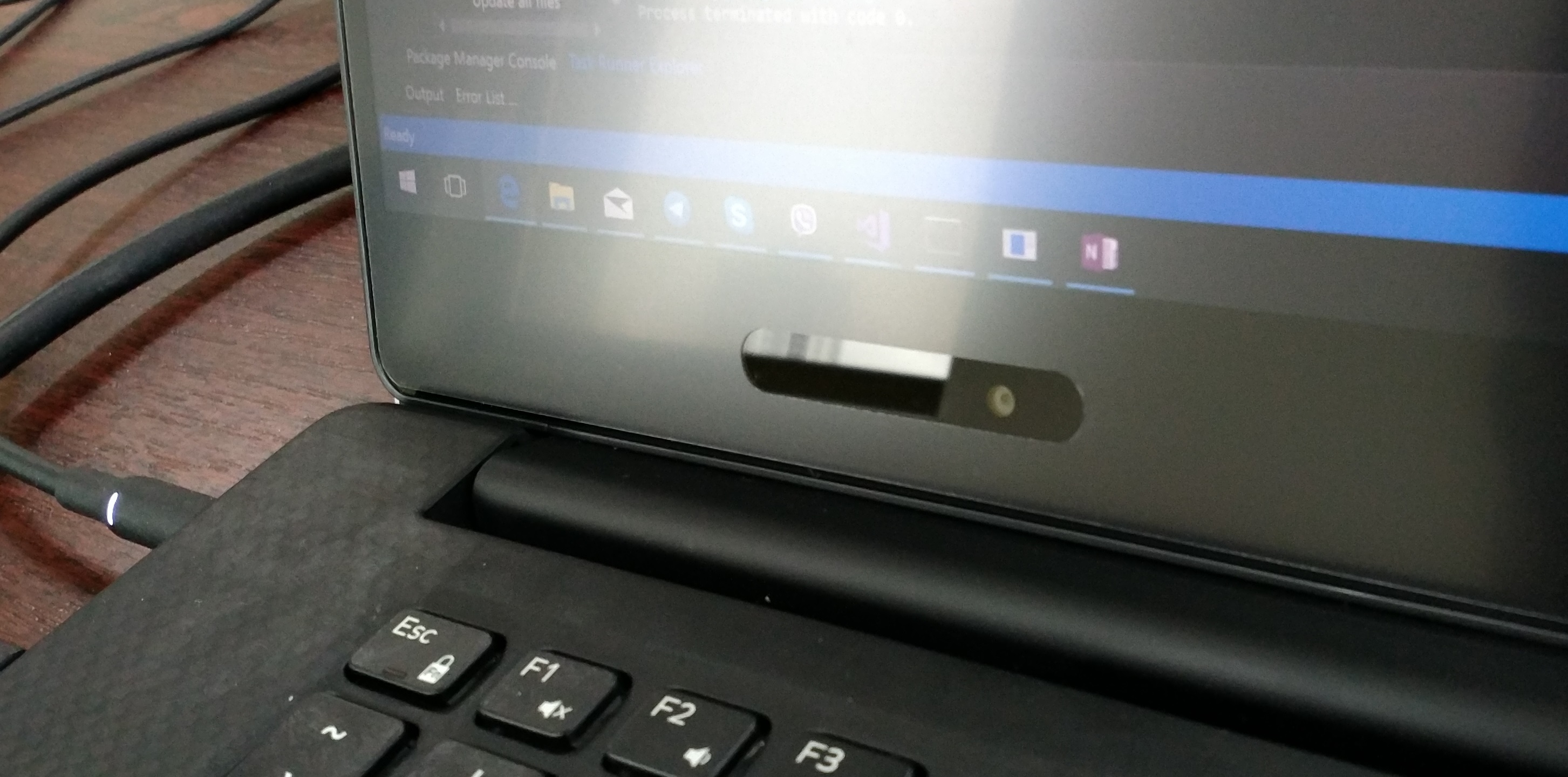
1) Its have unreasonably big cutout for camera
2) its stays 1mm away from actual screen border
Actual result is VERY GOOD - you can compare it on the picture bellow.
Camera cutout is glare comparing to the rest surfaceAttached Files:
-
-
Is it still a Torx 5 (T5) you need to open the XPS 15 9560? Recall that the 9550 had that.
-
Yes, same chassis.
Sent from my SM-G920F using Tapatalkimprowise likes this. -
Letting all of you know:
Received celicious matte screen protector and successfully applied it.
Final result is very good. Screen still crisp and clear, picture is sharp colors vivid. No rainbow effect can be noticed from 30cm distance. You can easily lower brightness of your display by 15-20% because no annoying glare effect... (now i can work comfortably at 25% brightness in sunny day)
The only cons about celicious - large cutoff for camera... looks too huge.
If I choose again - I would look another protector which doesn't have such huge cutoffGoNz0 likes this. -
I ordered one should arrive Monday, I'm not fussed about the cutout, but I can see why it would bother you.
-
For anyone wondering, I've installed the Windows 10 Creators update (due for everyone else in a few days) and everything seems to be working fine at the moment.
Its made the intel GFX driver go to 21.20.16.4574 .
So far I haven't had any flickering/ glitching. Haven't been using it for too long so far though but the lag from typing in this textbox has gone!
I think Edge has more momentum when scrolling with the touchpad. I felt like It used to stop a bit early before. -
I had a critical process died today, clean install... :'(
I will keep an eye on it as it was coming out of hibernation. -
The new Intel HD 530 driver is causing BSOD for several people in 9550 (see new thread) So the related 9560 driver might be worth rolling back. . .
-
4590 for the 9560 but that isn't listed on the HD530 page. makes me wonder if you could force the 4590?
-
I just used an older driver from a few months back that workedGoNz0 likes this.
-
Ok so i got my 9560 with the 1tb toshiba earlier in the week. Plan to do a fresh win install somepoint this weekend.
I wanted to benchmark the toshiba in achi mode so ive installed the ocz rd400 driver and enabled ahci in the bios but it wont boot. Get an windows error message stating 'inaccessible boot device'. If i reselect raid in the bios then it boots fine. Have i missed something? -
Managed to get this working. Turns out i had to boot into safe mode and restart so that windows knows about the new configuration.
GoNz0 likes this. -
I put a Samsung 960 Pro in my XPS15 but for some strange reason, I can't get it to boot from the damn device unless it's running in Legacy mode. If I swtich to UEFI Mode (without secure mode) I just can't get it to boot from the 960 Pro. Even stranger, if it press F12 at startup, the SSD is displayed among the boot options, and if I select to boot from the SSD, it will work fine. Any ideas?
-
You may just need the AHCI intel driver, easy way it to use my ISO as it is setup for this. Otherwise try loading the driver by putting it on the usb stick when you are trying to install. extract these to a folder on the usb drive, https://1drv.ms/u/s!ArTAP9qwiGB0hfl2oUKrwd40B-ALTAimprowise likes this.
-
And the Intel driver would be better than Samsung own? But how can this be a driver issue, aren't the drivers loaded by Windows so unless Windows itself starts up...
-
If you can't install to a new drive it needs the intel Raid/AHCI drivers to boot, once booted the samsung takes over.
It looks to me that you can see the drive in the BIOS but the windows install media can't see it?improwise likes this. -
Never mind, it was Dells BIOS that had ****ed up and not even a so called "restore factory settings" worked (neither of them). Had to reinstall the BIOS. Running now with Samsungs latest driver, will see what kind of numbers I get. Now, the next fight is to enable SED, that probably will be a struggle
-
What the hell happened with Samsung Magician in version 5.0? Seems like it has lost most needed functionality...like encryption!!
-
Thank you! Just ordered mine, and looking forward to it.
-
no bitlocket support on Samsung nvme drives. It has everything apart form IEEE1667 (Microsoft's eDrive)
Big FU Samsung for not bothering to include the one thing everyone needs!
I found this on my 960Evo and am not a happy chappy!
Sent from my SM-G920F using TapatalkLast edited: Apr 7, 2017 -
Yes, that is a very sad fact but that I knew before (as we have discussed it previously). But apparently in the latesr Samsung Magician even the option to handle data security is gone, so you cant even enable a password any more! Will try if BIOS HD password will work, thats supposed to enable hardware encryption but not sure. Will also look into WinMagic SecureDoc.
Sent from my iPhone using Tapatalk
XPS 15 9560 owners thread.
Discussion in 'Dell XPS and Studio XPS' started by GoNz0, Jan 20, 2017.