 Problems? See this thread at archive.org.
Eh... a big plus with it is the brightness. I think its around 400nits so it's pretty bright. No issues using it during the day/sunlight. Colors are pretty good but there's a decent amount of ghosting... Although you can use CRU and overclock the monitor to 65Hz refresh rate...that helps a little... that's what mine has been at for the past 6+ months with no issue. It's pretty nice for gaming too I might add... but I'd love a 4k screen...I've heard some people don't like it, like the last 2 posts ago....
-
-
Hi Philaphlous can i please ask about the overclocking monitor to 65Hz refresh rate? Does it help a little with ghosting? Could you pls share with us how did you manage to make your screen running on 65HZ please. Thank you.
-
I've done it last night...google CRU monitor overclock and you'll find a forum with all the instructions...it's very easy!
@Philaphlous the only thing at the moment i can't do it is to fix the 65hz resolution, at every windows reboot it goes back to 60hz and need to manually raise to 65hz. Is the same for you, or am i missing something? -
i found this article about it, not sure if its worth taking a time
https://www.reddit.com/r/Dell/comments/66dhvd/dealing_with_xps_15_9560_display_response_time/
Some panels can be overclocked, ie, make them refresh the screen more times per second than theyre strictly meant to. This won't help you though as now youre simply adding more frames to blur through.
Another form of overclocking/driving is where you provide higher voltages and frequencies to the panel, causing the pixels to change brightness faster, however this also likely causes other negatives such as glows around high contrast areas and other visual faults you wont like.
Playing a 30 fps video simply will not help. Your panel updates at a fixed 60fps, when you play back 30 fps video, its just sending the same image twice in a row, yes this causes another screen update, but its updating from one identical image to another identical image, so nothing happens. All you'll do is take a fluid and blurry image and turn it into a stuttering and blurry image.
Long story short, there is simply nothing worthwhile you can do to reduce the motion blur of this screen. It is what it is. Yes its blurrier than many screens, but on the flip side, theyre pretty good screens otherwise. -
Isnt it just placebo?
Edit: So I tried to do 65Hz on my 4k screen but the screen went black Last edited: Feb 8, 2018
 -
Hi to all.
There is a way to change or remove the F9 button function?
Usually I use Cinema 4D and when I press the F9 button, Cortana start and I can't use the button for the use that I need with the software.
Thanks -
You are not using the F keys then, but you are using FN + F9. By default, the XPS is set to automatically press the FN for the alternate functions of the F keys (brightness, volume, etc.). You can switch to the normal functions of the F keys by pressing FN + ESC.
-
really really thanks, Cool tip.
-
Also it can be set in BIOS.
-
Means?
-
You can tell it to be standard f keys without pressing fn.
Sent from my SM-G920F using Tapatalk -
Ahhh ok, thanks
Well I think that the solution suggested to me by @ Davka is useful (I don't knew it).
The fuction buttons are necessary every days and because I need to use F9 inside Cinema 4D only when I work on some projects
I can press FN plus F9 in order to have the command that I need.
Anyway, thanks for your reply.
-
is your ssd nvme?
-
Yes. Pm951.
-
yeah, i get like 12-15 hours with browser open and wifi connected, 20% brightness with fhd version 9-cell. totally idle almost 20 hoursVasudev likes this.
-
[QUOTE="Vasudev[/QUOTE]
Can you please share the guide or the link? -
Download this file as zip and run the bat file as admin. Go to power options and set appropriate options like HiDPM/DPM options along with enabling SATA link power mgmt in IRST.
https://gist.github.com/theultramage/cbdfdbb733d4a5b7d2669a6255b4b94bLast edited: Feb 11, 2018 -
Thanks forn the reply but, I don't know where the link is
-
Forgot to paste it, its fixed in prev. post.
-
I continue to run into the problem when when I turn my laptop on it throws an error message saying the the main boot drive is not installed.
This is my first time using the forum so if I did something wrong I apologize. -
Hi Everyone,
First & foremost, if I posted this in the wrong forum I'm sincerely sorry, as I just want the gracious & grateful advice of the experts for my unit & needs and I always come to the Owner's Lounge or thread for it.
I quietly visit this great venue frequently yet still about once a year, after the new models or refreshes have been out for a while, I come to you experts for gracious & grateful advice on if there’s something new that will better fit my needs.
I presently own the XPS 15 9550 i7 6700HQ, 16GB, 512 PCIe SSD (Toshiba) with the 4K and my “main” thing I enjoy doing with my computer is “viewing” pictures in the best detail possible so, to all you gracious and previous 9550 owners out there, would I benefit any selling my unit and purchasing it’s refresh in the 9560?
Thank you kindly & kind regards,
SDeP58 -
^^^ This is annoying somehow
No, you won't benefit anything by updating to 9560Vasudev likes this. -
So i just found out my 4k display is glueing off? I can push the 4k display on the left side a little and i could feel how it is going back to its default position. But the right side is OK. Anybody had this problem?
-
First & foremost, I want to thank you for your time and expert advice in responding as it is greatly appreciated.
Next, If your referencing the quotes in your gracious response, I'm sincerely sorry if I annoyed you in quoting and emphasizing what I basically do and enjoy with my computer, as I see so many people interested in photo editing and I wanted for the gracious members to know that I'm only interested in photo viewing, which I guess from the members standpoint still can be considered the same thing. At any rate I always prefer safe than sorry.
Finally, because of your gracious & grateful reply I will now try to extend my warranty on my unit with Dell as I just wanted to be real sure I wasn't wasting my money on something I needed to sell.
Kind Regards,
SDeP58 -
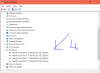
Guys, could any of you check device manager to see if they have 8 Cores or just 4 like in my case? please see attached photo.
If you do have 8 instead of 4, then why am I getting this?Attached Files:
Vasudev likes this. -
-
-
^^^ That was it, can't remember doing that but oh well.
Thank you very much! -
hello guys, just got myself a 9560 with the 4k screen. Loving the laptop for the most part but there are some things that seems to be off. Firstly, my internet speed drops drastically when I use my usb 3 hdd enclosures. Ive also tried using a usb-3 to usb3 hub which did not help. I have the killer wifi card and I do know that there are some issues with usb3 and 2.4ghz wifi signals. I also have intermittent and weak wifi signal even after a dell support tech help me setup the (supposedly) proper killer driver 12.0.0.307 from april 2017. However, I think I also notice some intermittent wifi slowdown when I seem to use my non usb 3 and I notice that sometimes the wifi connection degrades, although this could just be the usual intermittent degradation for the killer card vis-a-vis 2.4 ghz signals.
I also observed that when I pull out or plug in the psu while playing video there is a slight but consistent stutter in video (~1 secs). Also, the laptop seems a bit laggy compared to my older sager, ie programs opening 1-3 secs later than expected, startup and shutdown times longer.
Are these things normal issues of the laptop that can be fixed by driver or even component updates? Or could these be symptoms of something wrong with my laptop which requires a replacement ( some kind of electrical ground)?
tia -
Check out this thread and see if it helps you. Killer Wireless 1535 terrible signal range?
-
thanks but Ive done those tweaks already, except that i prioritize 2.4ghz since my router is that bandwidth. Also, I dont think I have killer control center, I have something else called killer network manager and afaik , it doesnt load on start up - but how can I check to be sure?Vasudev likes this.
-
-
Just order intel wifi from ebay or aliexpress and forget all problems forever.
-
thanks, installed it. will monitor to see if things changeVasudev likes this.
-
yup if this doesnt work thats what i plan to do. I asked dell to replace mine with an intel but they said they can only replace similar components. intel 8265 wifi right?
-
Intel has worst range than Killer. Ask Phoenix.
-
i believe you are correct, but intel has a more stable and stronger signal when connecting thru 2.4ghz. heck my phone has even a stronger wifi connection than the killer at the moment and thats with all the tweaks and downloads already. but still, thanks for trying to help. maybe works for others, unfortunately not so much for me.
how about the slight stutter in video when i plug and unplug the psu. shoud i be worried about that?Vasudev likes this. -
On 5GHz and longer distance Killer simply wins hands down.trvelbug likes this.
-
i definitely agree. unfortunately, where i live 2.4ghz is still much, much more prevalent. and in that channel, it is just so subpar thats it is beaten by my phone
Vasudev likes this.
-
Until I got a new router, phones did pick up the signal faster and were working at longer distances than lappies.
-
the sager in my sig with its intel wifi card was way, way better than my phone in all accounts. but yeah, maybe ill just get a 5ghz router if i cant source the intel card locallyVasudev likes this.
-
We had some issues with high DPC latency in the past, but that has been resolved with the current drivers and suite. If you ever want to give us another try, make sure you update to the latest suite - https://www.killernetworking.com/driver-downloads/item/killer-control-center-x64
-- Anthony with Killer Networking
*-*-*Check out this review on the Killer Wireless 1535!*-*-* -
If you have already installed the latest Killer Control Center with the latest drivers, I would also suggest updating your BIOS and chipset drivers, as they have a direct effect on the power supply of you Wi-Fi adapter. Also, make sure your router is on channel 1, 6, or 11, whichever has the least or weakest competition according to your Wi-Fi Analyzer in the Killer Control Center, and the channel width (or side channel or sideband) is set to 20 MHz, if you have a lot of other 20 MHz Wi-Fi radios in your area.
What I usually suggest is placing the phone so that the laptop's screen is between the phone and the wireless access point, and then running a test from something like speedtest.net, which you can run on both the phone and the laptop. If the phone still wins, then there's an issue with the laptop. If the laptop wins, then the issue is with the wireless environment or network.
If you want to troubleshoot further, you can reach out to us directly at [email protected]. -
Hi,
BIOS Version 1.7.1 is online. I just updated my machine without any issues. I had 1.7.0 before and had no issues as well.
https://downloads.dell.com/FOLDER04796641M/1/XPS_15_9560_1.7.1.exe
regardsWilly330Ci, duevvu, varuka and 1 other person like this. -
Thanks, I actually rma'ed my laptop and the new one is definitely getting better wifi performance all around. Couldve been a bad card or a bad laptop overall, still observing and testing the new one, but at this point all the previous issues I had are basically gone...Vasudev likes this.
-
Fingerprint scanner stops working for me after a while. I can still unlock machine with password but fingerprint scanner gives me an error message. A reboot fixes the issue though.
-
Did you disable Windows Biometric services in services.msc? Sometimes OOSP 10 can disable that service. Make sure Natural Authentication service is set to manual as well.
-
Hello all, long time follower, first time poster- question, I had an issue with the dell shutting down when playing games after the latest Thermal Framework update. I downgraded to an older version, which fixed the issue. I see that dell released a BIOS update (1.7.1). Does anyone know if this update addresses that issue?
-
Nevermind-
Fixes & Enhancements
Fixes:
Update to the latest CPU microcode to address CVE-2017-5715 and associated Intel Reboot issue
Looks like thats what it is. Will update BIOS and thermal framework and see if the problem persists.Vasudev likes this.
XPS 15 9560 owners thread.
Discussion in 'Dell XPS and Studio XPS' started by GoNz0, Jan 20, 2017.




![[IMG]](images/storyImages/9e99f4b8cc0ec4d8e4736a77bee4b3cb.jpg)
