 Problems? See this thread at archive.org.
@custom90gt
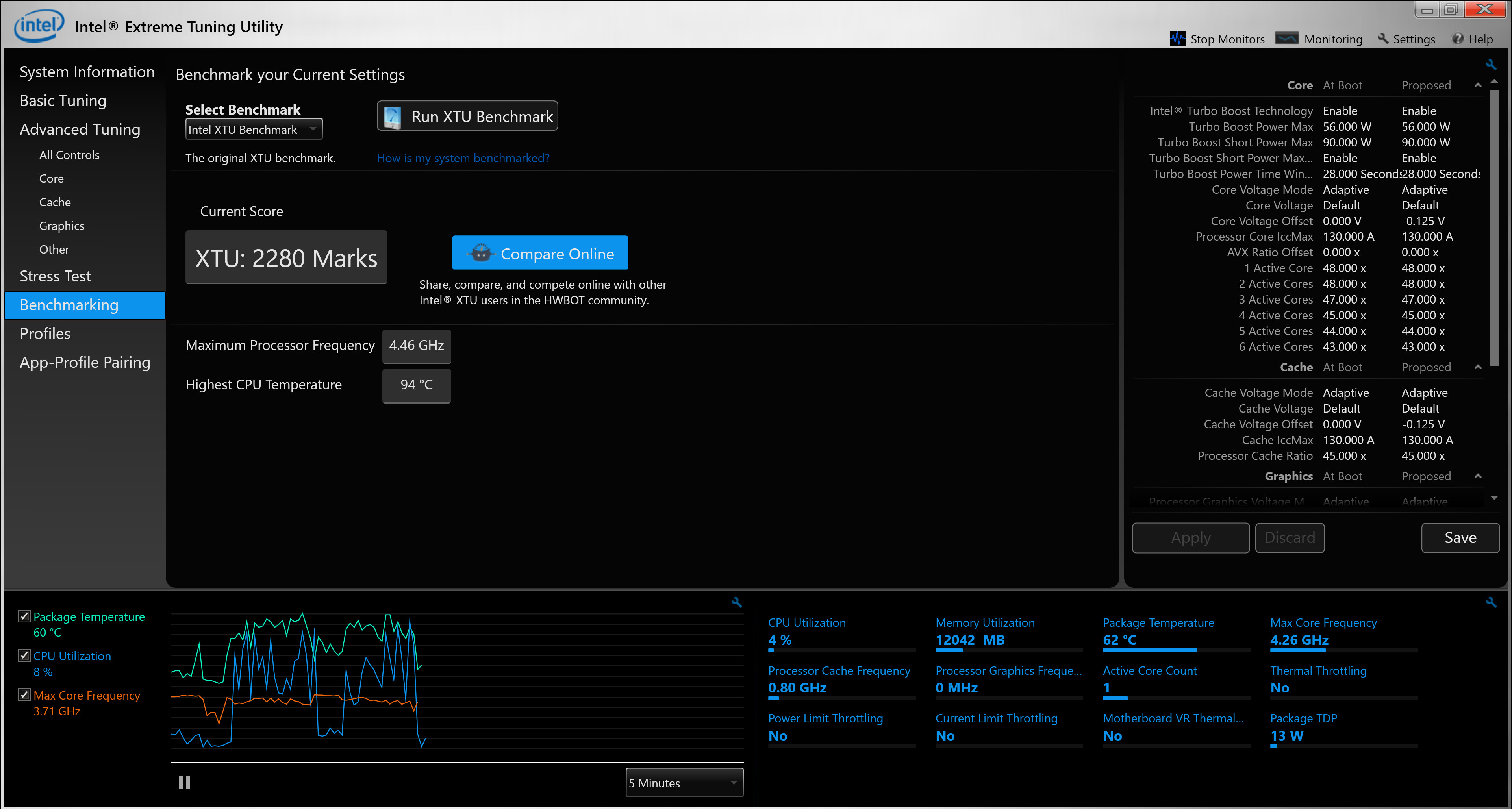
This is my first run with the XTU Benchmark, using stock paste, only changed the undervolt to -125mV
While the benchmark was running I noticed it says briefly sometimes, "power throttling". What value in XTU should I increase to stop that?
Also, is it safe to use my 240watt power brick from my previous Alienware m15 with this machine or would it harm the battery?
@Mr. Fox @Papusan
-
-
Enjoy
 Can you max out your power limits? As well see how far you can go with undervolting.
-
I matched the Turbo Boost Short Power Max to the Turbo Boost Power Max by decreasing it from 90W to 56W but I still got Power Limit Throttling.
-
You have i9-8950HK from what I can see. Max out all power limits. Same for AMP. And you should be able to do -150mv if the silicon is average. I would switch to TS and try remove BD PROCHOT. At least try it.Spartan@HIDevolution likes this.
-
I set the power limits to unlimited and increased the undervolt from -125mV to -150mV now I am getting both Power and Thermal Throttling but I did get 7 more points in the score:
-
You could probably get rid of the power throttling with ThrottleStop, but you reach near 100C so it won't help much. Only maxed out undervolt, better thermal paste/pads will help in a small degree. But be sure you have backup if you go further with the voltage shrink (undervolt).
https://www.notebookcheck.net/Dell-...GTX-1050-Ti-Max-Q-Laptop-Review.355641.0.htmlSpartan@HIDevolution likes this. -
still waiting for @custom90gt to tell me if it's safe to use the Alienware m15 240Watt Adapter on the Dell XPS or the increased voltage would harm the battery
-
+-5% for Voltage and you are good. And stated higher AMP's ain't dangerous.
Edit. XPS specs https://topics-cdn.dell.com/pdf/xps-15-9570-laptop_specifications_en-us.pdfLast edited: Apr 10, 2019 -
Has anyone found a fix for the black screen flashes every few minutes after waking from S3?
-
Will it even fit? At least previous chargers for the Alienwares did not fit the XPS but perhaps the changed that this year?
-
That is not how a charger works. There is nothing such "increased voltage". Voltage is standardized (5V, 11V, 19V, 19.5V), 19.5V in this case for both the 9570 and your other one. It doesnt matter if you use a 100W or 1000W charger. Only the current gets higher and that is "pulled" by the device, not the charger. Every device just pulls that much current that it needs. Voltage is fixed, or regulated via communication between device and charger (thats how quickcharge works on phones for example, start with 5V then switch up if the device supports it). Some Dell charger communicates with the devices, so if it is not compatible it wont charge with a higher voltage, or in this case, it is just fixed. Every 19.5V charger should work if the plug fits.Spartan@HIDevolution likes this.
-
Anyone have experience with a USB-C charger with the 9570?
I understand that the 9570 USB-C port has a limit of 100Ws, and the standard charger is 120W, so the laptop may lose energy over prolonged use, and charge slower when not in use, but portability is my number one concern. Any personal experiences/recommendations you guys can share?
Looking for ones that are compact and 85 - 100W:
https://www.bestbuy.com/site/insignia-type-c-wall-charger-black/5880500.p?skuId=5880500
https://www.amazon.com/Fantany-Cert...c+charger&qid=1554930511&s=electronics&sr=1-3
https://www.amazon.com/Adapter-Char...usb-c+charger&qid=1554931011&s=gateway&sr=8-5
https://www.amazon.com/Nekteck-Cert...usb-c+charger&qid=1554931011&s=gateway&sr=8-4 -
> Every 19.5V charger should work if the plug fits.
Must be a Dell charger that has the central data pin to identify the power, how much the laptop can draw.
> I understand that the 9570 USB-C port has a limit of 100Ws, and the standard charger is 120W, so the laptop may lose energy over prolonged use, and charge slower when not in use, but portability is my number one concern. Any personal experiences/recommendations you guys can share?
Dell sells the 130W USB-C charger. The 9570 USB-C port is above the standard. With a lower-powered charger you end up in a throttled mode; maybe okay if you want to travel light but not best for regular use. Mind checking specs and user reports for XPS 15 compatibility - USB PD doesn't always work as desired. -
@Ultra Male,
you can use the 240w from your m15 without issue. In regards to the power throttling sadly the only way that I know around that is with Throttle Stop (even though I know you're not a huge fan). With that you can override the powerlimits even when XTU won't do it. Also I would be curious if your undervolt could go more. My last XPS (i7) would do -165mv without issue.
@TSE,
I use a 95w Dell USB-C and a 65w Dell USB-C and a 65w google chrome charger on my XPS. All of them work without issue although it's not able to run the CPU/GPU full tilt because it's not enough wattage. Dell's 130W USB-C charger may work but I don't know if the 9570's USB-C port is above the 100w standard. I've never seen any proof that it is even though the 9575 is...Papusan likes this. -
> you can use the 240w from your m15 without issue. In regards to the power throttling sadly the only way that I know around that is with Throttle Stop (even though I know you're not a huge fan). With that you can override the powerlimits even when XTU won't do it. Also I would be curious if your undervolt could go more. My last XPS (i7) would do -165mv without issue.
I recall this hack was first mentioned for Thinkpads, independently of TS, in the form of some script, presumably also worked on XPS.
I also recall some claim that the 9570 can't even feed max power at once to both the CPU and the GPU (even when overheating is not an issue yet). Not sure if an AC charger offering more watts can get around this.
> Dell's 130W USB-C charger may work but I don't know if the 9570's USB-C port is above the 100w standard. I've never seen any proof that it is even though the 9575 is...
I believe the WD15 and TB16 have fed 130W to XPS 15 for quite a while. -
Yeah it's listed as supplying 130W via USB-C but I've never seen any proof of it though. I'm not sure what hack you are talking about for the thinkpads though.Spartan@HIDevolution likes this.
-
The Alienware m15 adapter won't fit the plug is too big for the XPS 15
-
You’ll need psu with 4.50 mm barrel. m15/17 and Area-51m has the
7.50 mm type. I don’t think Dell offer higher powered psu with this type connector. Maybe you can get one (non-original) with higher wattage on the web. Not sure. -
Adapter cables are available.
-
It seemed so when I was fooling around with an AC watt-meter. Though it is difficult to determine losses to be sure. And it isn't easy to plug in an amp meter with USB-C, and even dedicated gear my not support above-standard.
Dell doesn't work exactly flawlessly with standard USB-C stuff, I think it was primarily desiged for the power levels they had in mind (like 20V 130W), while USB-C compliance was secondary.
Maybe this, I don't remember exactly
https://medium.com/@n4ru/45w-performance-from-15w-kaby-lake-r-d8d5e7ea4fad
https://github.com/erpalma/throttled -
Maybe Dell is using something non-standard to power some of their machines with USB-C chargers which can give out over 65 W. I recall seeing something about this when looking at their TB16 docks which say that charging currents of over 65 W work only with Dell laptops and if you use them with other computers the docks only charge with 65 W.
So there might be something unique with their own charging methods with USB-C and you might not be able to charge the current 9570 models with USB-C chargers with full power if those PSU's are built by other companies. -
The USB PD standard demands support for many voltage-current combinations, topping at 100W @20V 5A, for the sake of interoperability. But this complicates charger and power circuit design, and until recently higher-power chargers were difficult to find. Companies such as Dell are mainly interested in a few such combinations used by their laptops (for instance, these don't eat less than 20V in any case). For certain purposes, such as XPS 15 demanding 130W, the standard is a bit narrow.
Additionally the USB power negotiation with 3rd-parties seems to be unstable as found by some reviewers. Mostly 60W@ 20V 3A gets accepted "finally". 45W @ 20V 2.25A mostly not, except with Dell and only one 3rd party. I haven't heard if 90W or 100W works so far (not many chargers until recently). -
Ah, I thought that the M15 may use the same barrel connector. You could convert it if you wanted to, although the stock 180W should be more than enough for your XPS.
You can do a USB-C current meter and get those values. I have one but I don't have any USB-C chargers with over 95W, nor do I have a current 9570, lol.
Yeah that method may work, but I've had far more success with TS than XTU when it comes to bypassing the XPS power limits.pressing and Spartan@HIDevolution like this. -
I just returned the laptop hits. As much as I loved it, 2 things turned me off:
1) overheating and running at 3.3 GHz under load due to thermals.
2) the screen is awesome and is the best I've ever seen intl terms of brightness and crispness and color BUT man, as I expected, I ran into horrible issues with DPIS scaling. Origin and all its game wouldn't scale well, I researched it and it seems like an old problem since more than 2 years which Origin didn't care to fix and my Adobe CS6 Suite apps also wo t scale even if I ran them in compatibility mode and played with the DPI scaling changing it to system or system enhanced.
I am at the shop now awaiting an MSI GT75 Titan 8SG to be delivered from their other branch.
The store in Dubai I am dealing with is called Virgin Megastore and have been super helpful with me I already returned 3 laptops so far due to issues offcourse not coz I wanna waste their time. -
I guess TS is using the same method, since bypassing the power limits became available in TS shortly after this was published. I meant for the guy who doesn't use TS.
-
Yeah I figured you wouldn't be happy with the thermals on the laptop. I would consider the XPS on the exact opposite side of the spectrum as the GT75. The 51M in front of me seems to be great when it comes to thermals, but portability and battery life sucks. I'll likely return it because for me it's not a good fit.
Sorry I should say they are NOT the same method. Throttle Stops new RwDrv.sys allows you to bypass the power setpoints even when XTU will not. XTU seems to only let you go so far before it just reverts back to stock.ALLurGroceries, pressing, Papusan and 1 other person like this. -
When that method came out it was the first where the modified power limits would stick, changing them in XTU was considered in vain because of the reverting. TS didn't have this option then. I recall the idea of the script was to keep writing the modified values to the relevant registers, in case something would want to revert it. TS is active in the background all the time, so can do it too.
-
When the 9580 comes out, everyone should be allowed to switch for free actually, because of the fraud Dell did. I am thinking right now, if I should try a full money back before it comes out.
Vasudev, pressing, Papusan and 1 other person like this. -
I think we may be talking about two different things. XTU constantly "loses" the settings and reverts back so a script is great to keep re-enforcing those values. If you want to run your XPS 9570 at say 75W then XTU wouldn't actually allow that to work. With TS and the new RwDrv.sys you could set it to 85W and actually have it work.
I'm in full agreement there. I'm still upset they changed the GPU set point after reviewers got their hands on the unit. I should have done another review to see just how different the scores would be. Unfortunately, the biggest changes came in gaming itself and not synthetic benchmarks. -
It is two different ways, but I guess the scripted re-enforcing is probably the same what TS with the new RwDrv.sys is doing directly (no need to script if you know where to write). Intel likely didn't mean to allow this, hence it doesn't stick in XTU normally. Unclewebb should know.
-
Sadly I think we'll have to disagree on that one. Even with the script, XTU cannot enforce certain variables. I'd love to see that as the case, but it never worked for me on my 9560/9570s. Anything above 57w or whatever it was and it would revert back to stock settings. With Throttle Stop I was able to run cinebench extreme at 75w...ALLurGroceries and Dannemand like this.
-
Well, both have arrived now. And the Razer is going back within a day. Apparently Razer still has not been able to provide a keyboard with full backlit keys even for 2019 for som markets, like a small one called Europe. No way I am paying $3500 to a company that can't even fix keyboard backlight, even in the second gen of the product.
The HP...well, will give it a few days before drawing any conclusions but let me just say that HP is back! While not a perfect laptop by any means, there is much that initialy feels like it puts Dell and the XPS15 to shame. From build quality to handling of software, drivers and updates. But more on that later
(Not my video)Last edited: Apr 11, 2019 -
Excuse my ignorance, but what is wrong with the 9570? I have one and it seems fine.
What are GPU set points? -
Going to wait for the 9580 or the Thinkpad X1 Extreme. I'm assuming the GPU on the upcoming model is going to be the GTX 1650, given how its tdp aligns with the GTX 1050 TI. Recent discounts on the 9570 and the MSI GS65 were tempting, but the former seems to still have audio problems, and the latter has MSI's creaky build quality (which is the best part of my current GE62), the upside down motherboard, and only 256 GB of storage for that particular model, which seems really poor for what is marketed as a gaming laptop, given how large games are getting recently. The value prospects of these older models decreases quite a bit as we get closer to the next generation, too. From my last gen experiences, prior to returning both the X1 Extreme and 9570, I did like the overall build and battery life of the XPS more, but I do wish they include another Thunderbolt port and another m.2 slot, like the X1 Extreme, while improving the keyboard and fixing the audio problems. I recently got a 90w Nekteck USB C IF charger with PD, which is similar in form factor to the 87w Macbook Pro 15 charger, and I want to try it out on something other than my phone. As is the case with most current and past gaming laptops, my current laptop has a UBC C port that isn't connected to the battery.
-
The point where the GPU throttles due to temperature.katalin_2003 likes this.
-
Here Unclewebb's explanation:
http://forum.notebookreview.com/threads/the-throttlestop-guide.531329/page-929#post-10824817
"Intel CPUs use at least 3 sets of turbo power limits. Intel XTU allows access to two of these power limits. The WinRing0 driver that ThrottleStop uses only has access to the MSR turbo power limits. ThrottleStop has never had access to the power limit registers in the Memory Mapped IO (MMIO). This was never really a problem until recently when more and more manufacturers started using this secondary set of power limits.
The RwDrv.sys driver is used in Read Write Everything.
http://rweverything.com/
I asked the programmer if I could include this driver with ThrottleStop to gain access to the MMIO power limits but I never heard back from him. His native language is not English so my email probably ended up in the trash. That is why I left this driver as a separate download.
The Disable and Lock Turbo Power Limits feature simply disables this secondary set of power limits and locks them to prevent any other software or system drivers from turning them back on. In my opinion, this was a huge addition to ThrottleStop but I have had very little in the way of positive feedback about successful use of this feature. Thanks for letting me know that your laptop is full speed ahead in Linux and in Windows with the help of ThrottleStop."pressing likes this. -
I have the same feeling except audio cracking (which is not present under linux).
-
Thanks for finding more info on that. I wonder which ones XTU has access too since TS can do things that XTU cannot.katalin_2003 likes this.
-
I haven't had the crackling issue since I updated the Realtek and Intel SST drivers, a few weeks ago. I also keep MaxAudio Disabled.
By the way, having S3 sleep would be nice.
https://www.notebookcheck.net/Dell-...ack-S3-sleep-to-the-XPS-15-9570.416301.0.html -
From the article...
Dell removed S3 sleep mode from the XPS 15 9570 with BIOS 1.3.0, which it released in July 2018. Company representatives have repeatedly insisted privately to NBC and others that the XPS 15 9570 does not support S3, despite it doing so in earlier BIOS releases. Instead, Dell has forced the XPS 15 9570 to use Modern Standby, which should result in lower power consumption and faster wake times than using S3 can achieve. However, it has had the opposite effect according to multiple people online, with their machines repeatedly draining their batteries as if they were being used long after they had been put to sleep.... Some heads should roll The higher up, the better.
This is nothing more than save face and hope for good weather. Aka hope that ,any of the screwed buyers will come back when new models being released...!! Soon release of the 9th gen Intel Mobile processors. I mean it's around 21. April.Last edited: Apr 12, 2019Ashtrix, pressing, idark77 and 1 other person like this. -
Modern standby is NOT for all form factors.
And this is wrong. Modern standby defaults to what your smart phone does when you tap the power button and the screen goes off. You will be draining power, and on larger SoCs (where ARM's low-power states aren't available, ie Intel's), this is what you get. For an ARM tablet, this would be awesome. Not so much for x86.
Power gating is not ideal for prolonged low power states due to eventual leakage, a factor many x86 SoC designs don't adequately compensate for. It's one thing to rapidly transition from low > high power state on demand, and is' another to sustain low power draw as you listen to an ACPI wake event in the background for the fast transition. And this is why Linux explicitly disables this nonsense through the CONFIG_INTEL_SMARTCONNECT kernel config option.Attached Files:
Last edited: Apr 13, 2019 -
-
Have I posted this?
 Was it meant to be
@Alienware-Frank ?
Was it meant to be
@Alienware-Frank ?
 See... The General Manager aka CEO for
AW and Dell XPS brand.
See... The General Manager aka CEO for
AW and Dell XPS brand.
Last edited: Apr 13, 2019Ashtrix, pressing, idark77 and 1 other person like this. -
What I meant by "this is wrong" is the INTENT of Dell implementing connected standby support to "extend usable battery life" because this feature wrecks usable battery life in practice.
-
Hi everyone. I have the i5 Version with 256 GB Toshiba SSD. Sometimes at the login Screen or sometimes while working, the xps kind of freezes up. I then have to wait a while until i can do anything again. Feels like the xps is on full load while i am not doing any demanding tasks. Unfortunately in this state i can't open up taskmanager to see if a process requires full cpu power.
Does anyone know this behavior and has maybe a solution for it? Or maybe some hints on how to find out what causes these freezes / hang-ups? Can this be caused by undervolting with Throttlestop? -
If you have too aggressive of an undervolt it can lockup. Are you starting Throttlestop up with windows? If so then I think you're on the right track. You can always try to decrease your undervolt by 10-20mv to see if it helps.
-
Yes, i start Throttlestop with Windows. I had it undervolted to -120 mV. Have changed it now to -110 mV
So an undervolt can cause these hang ups? -
Yes if it's just on the edge it may cause hang ups that are recoverable. I would try -100mV and see if it fixes it. If not it could be other things, but I'd start there first.
-
The awful Horror Story continue...
![[IMG]](images/storyImages/csm_xps_15_lt_2018_2_1_cc8bcfbe7b.jpg)
Dell seemingly cannot fix the XPS 15 9570's DPC latency issues
Another missed self-imposed deadline, well done Dell. Over two weeks ago, Frank Azor the VP General Manager of Alienware & XPS brand stated the following on Twitter:
New BIOS to solve most of the other root causes is in development and testing. Working to get it published within [the] next 14 days.
"So, it appears then that Dell has still not ascertained all the reasons behind these latency issues. It is looking more likely that the company is simply stalling for time before it releases a new XPS 15 and abandons support for the XPS 15 9570 altogether".Ashtrix, maffle, Dennismungai and 1 other person like this. -
So i reduced the undervolt to - 100 mV. But the hang ups still happen. Any other ideas? Ram usage is at about 62 %. Processor load shown on core temp widget shows not much load while the hang ups happen.
How can i get to the bottom of this?
XPS 15 9570 Owners Thread
Discussion in 'Dell XPS and Studio XPS' started by el3ctronics, May 16, 2018.


