Problems? See this thread at archive.org.
Maffle: What have you done to my friends?
AzorFrank: I've done nothing. This is who they are, didn't you know that?
Maffle: No, I didn't.
AzorFrank: Now learn something about the new XPS!
Maffle: No. I refuse.
Dell: Maffle, try to be open about this.
Maffle: About what? That I've made the wrong choices in my life? That I bought a XPS when I should've bought something else? I know what my weaknesses are. I don't need AzorFrank to take me on a tour of them.
Dell: If you'd just...
Maffle: To be brainwashed by this con man?
Dell: You are wrong. This 'con man' will take away your pain!
Maffle: Dammit, Dell, you were once a decent company. You know that pain and guilt can't be taken away with the wave of a new magic XPS. They're things we carry with us, the things that make us who we are. ...If we lose them, we lose ourselves. I don't want my pain taken away. I NEED MY PAIN!
-
New BIOS: https://www.dell.com/support/home/d...7&oscode=wt64a&productcode=xps-15-9570-laptop
No mention of a dpc fix, fan fix or gpu t3mp fix. Can't test it as I am not home. Curious though.pilililo2 likes this. -
From a very quick test, I think they might have improved the constant fan-nonsense in 1.9.1. At least I'm able to run firefox, watch youtube videos and right click stuff on my desktop without the fans coming on (running on AC). Yay!(?) – Maffle?
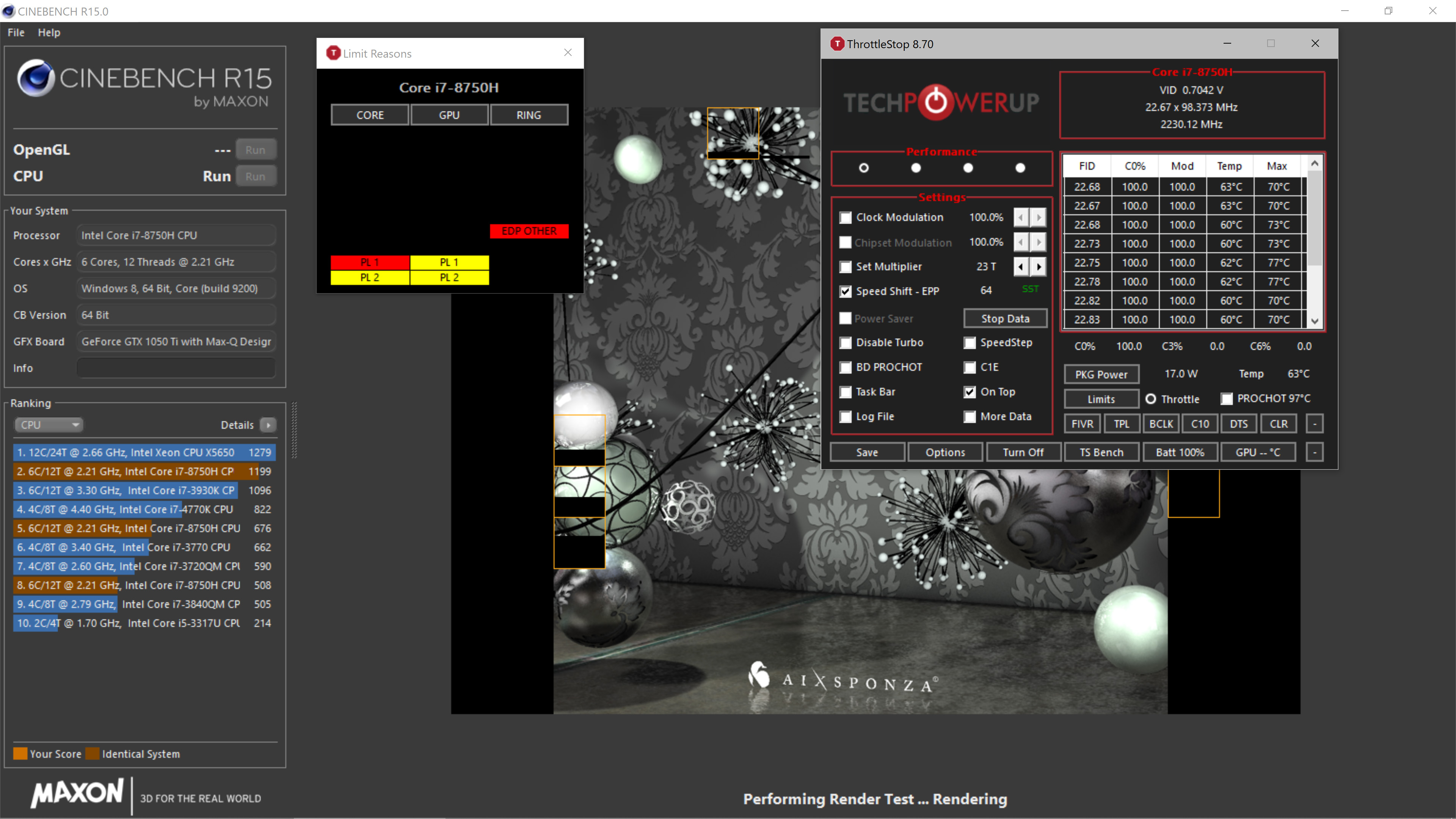
Edit: This might be a coincidence, but my system was throttling hard (hovering around 16-17w when running cinebench) after the update. Re-enabling spectre and meltdown protection put things back to normal (cinebench ~1230). Just in case anyone experience a similar behaviour.
Edit2: No improvement on DPC latency.Last edited: Apr 25, 2019splus likes this. -
Just tested it. Nothing changed or fixed. Same broken fan behavior with 1.9.1. Reverted back to 1.6.0 and fan issue is gone again.Last edited: Apr 25, 2019Papusan, idark77, pressing and 1 other person like this.
-
Yep, sorry about getting your hopes up for nothing.
-
I just flashed the last bios 1.9.1, nothing changed...
I-N-C-O-M-P-E-T-E-N-T-S
-
Incompetence is one of those words you really should not spell wrong, especially in capital letters
Sent from my SM-N960F using Tapatalkmaffle likes this. -
My 9570 automatically downloaded the 1.8.1 bios . . . and said it would install on next startup. I disabled Windows updates to counter this.
Is there any way I can re-enable updates yet not have 1.8.1 install? I'm happy on the 1.5 bios. -
If you don't want Windows Update to update your bios you should disable driver updates only (dont ask me why there is uefi firmware device in device manager and windows treats this as a driver like every other device ... ) so Windows Update can be still enabled.
Microsoft also provided tool to exclude problematic updates so if you want to have enabled driver updates you can exclude bios update, but i suppose you have to exclude it every time new verion comes out. https://www.tecklyfe.com/how-to-block-problematic-windows-updates-in-windows-10/
Ubuntu also suggests updating bios but does not force user to do this. And removing one package resolvers problem. Much better approach and much quicker to handle.CryoBolt likes this. -
The problem isn't really that Windows update carries firmwares, that's a good thing, but rather that Dells updates are crap...
Sent from my SM-N960F using TapatalkCryoBolt, Spartan@HIDevolution, pilililo2 and 2 others like this. -
Every time it wakes up from sleep the internal speaker would not be recognized anymore, any ideas on how to fix it?
-
The fabled DPC latency fix BIOS out now (1.10.1). installing....
splus, annabel_shanderin and custom90gt like this. -
-
I am trying it. The DPC is definitely better. Praying that they do something about the S3 sleep too.
annabel_shanderin and custom90gt like this. -
-
Is it just me that cant shake the feeling of there being some kind of "variable brightness" going on even with the 9570? I have a distinct feeling that it sometimes are not as bright as it should be, while otther times it is. And since I am on my third 9570, this really should not be about a faulty panel or something. I have a distinct feeling this usually occurs after laptop has been resumed from sleep or similar, and a reboot seems to make it better.
(Of course I have the adaptive brighness disabled in Power plan, as it is by default these days. Also power settings in Intels CP are disabled, although that piece of software seems really buggy). -
@custom90gt LatencyMon gives the green light so far.
If I have some time, I want to try again manually forcing S3 in windows (with @maffle registry hack) and see if the CORE0 utilization bug is still there.maffle, splus and custom90gt like this. -
The DPC of ACPI.sys has improved indeed. I used to get a max of 1,7ms in latency monitor, now it maxes out at 0,6ms. It's definitely better, but is it good enough? Not sure. Will have to do some testing.
EDIT: It's not cutting it. Sound is still glitching periodically when setting my buffer to 128 samples (which I regard as a max) on my BabyFace. And this is when running on AC with wifi disabled and playing only a simple ableton live instrument. Sigh.Last edited: Apr 30, 2019maffle likes this. -
That has been a persistent problem since a few bios versions ago (can't remember which one), there was an option to enable/disable this behavior in the bios but it has disappeared. The screen dynamically changes brightness and saturation (and maybe something else), the first time I saw this I thought there was something going on with my eyes, but now that I know it's there it's very noticeable.
As far as I'm aware, there has been no official communication from Dell regarding a fix for this. -
@annabel_shanderin
I am not involved in Audio processing. Not sure if this will help. Give it a shot!
I solved the audio crackling problem from the external speakers about a month by COMPLETELY wiping the old audio driver and the associated components (intelsst, maxxaudio etc) and installing the latest driver from Dell. I keep maxaudio disabled.
The wiping is not that easy because you have to make sure that old driver won't be reinstalled upon rebooting.maffle likes this. -
On another note (but may be related), my system is throttling to 17W. Any ideas? temps are fairly low and I'm running on AC (with a fresh boot).
Attached Files:
-
-
have never seen this option in bios for XPS15, but I recall XPS13 used to have it?
Sent from my SM-N960F using Tapatalk -
Hi Abujafar,
Thanks for the suggestion. However, I'm pretty sure it has nothing to do with the realtek driver. I'm using an external audio interface and its corresponding ASIO driver (RME Babyface). The crackling I'm struggling with is for example in ableton live when I set my audio buffer low, around 128 samples, to minimize latency, and it is (AFAIK) due to ACPI.sys (still) causing too high DPCs. When playing a youtube video, everything is fine. But thanks again for the suggestion! -
Have you checked window's Night Light. I have it turned on, but I noticed it wont turn itself off when I turn it back on in the morning and I have to go to settings and toggle it on and off. Restarting the machine also turns it off.
-
@annabel_shanderin
I have the RME BabyFace Pro and Dell 9550 (6300HQ i5, 32GB ram, samsung 850 EVO SATA SSD). That can run huge virtual instruments live like the Garritan CFX (40GB+) with virtually zero clicks at 44.1KHz & buffer of just 48.
I know the 9570 still has DPC latency issues but these steps might help you.
- Check two updates for RME (firmware update for the RME box & update for TotalMix).
- Try a different USB port for the RME (one of the USB ports is internally linked to the keyboard etc...use the other USB port).
- Turn off all networking and bluetooth etc.
- Disable Microsoft Defender (do this via command line as more effective)
- Control Panel\All Control Panel Items\Power Options ---select " high performance"
- Download latest DELL COMMAND I POWER MANAGER. select Thermal Management ---select " ultra performance"
=========- Maybe best trick is to lock CPU performance. There is more than just setting the speed but there are a few easy tricks.
>>>You can go into BIOS and turn off c-states. That is probably most effective trick as it locks CPU speed and c-states. On laptops this typically locks out all turbo speeds but you need to test on 9570 (2.2GHz base clock of 8750H). It runs hot.
OR
>>>There are alternative tricks which lock CPU speeds but allow some c-state migration. Download free ThrottleStop software. In the TURBO LIMITS TAB - MISCELLANEOUS section there is a min and max rate for your CPU. You need to set those at max multicore your CPU will run at long-term. (**see below for alternative)
For example, 6300HQ base clock is 2.3GHz, Max Turbo clock is 3.2GHz. Max turbo clock all cores is 2.8 GHz ( https://en.wikichip.org/wiki/intel/core_i5/i5-6300hq ) so I type 28 in both min and max rates. Click OK and main ThrottleStop screen shows all cores essentially locked in at 2.8GHz.
The 8750H shows a 3.9GHz Max turbo clock all cores but I think you will need to find a lower rate that the CPU will maintain as the scheme changed a bit with newer chips for marketing purposes only.
=========- Disable the troublesome c-states on ThrottleStop main window (C1E).
OTHER IDEAS
- Do NOT undervolt "Intel GPU" or "iGPU Slice"; reports of DPC latency issues.
-You should disable SpeedShift in BIOS.
- On first run I would keep SpeedShift off (you have that switch in BIOS). You can test SpeedShift on & off with ThrottleStop interface. Microsoft has screwed up the power options recently. You might try enabling SpeedShift and setting EPP=0 for max performance. I don't think you can access SpeedShift with c-states disabled but not sure on your system.
BTW you can see if SpeedShift is enabled in ThrottleStop's main screen (EPP will be displayed in green font). Only way to turn off SpeedShift is to restart computer.
- If your system runs hot you can use ThrottleStop (Turbo FIVR screen) to undervolt the CPU and/or "disable and lock turbo power limits"
- Do not run ThrottleStop and Intel XTU at the same time.
(**) Alternative ThrottleStop CPU speed lock can be done in Turbo FIVR screen, "Turbo Ratio Limits" section, set to your desired speed.
EDIT - Completely remove all nVidia drivers with DDU. Find a way to prevent Dell from auto reinstalling.Last edited: May 2, 2019annabel_shanderin and maffle like this. -
Tried out 1.10.1.
- dGPU poll issue not fixed, random fans going on all the time under Windows 10 with AC power connected, every single time the dGPU was triggered for some milliseconds. Only way as a work around as my knowledge so far is to deactivate the Nvidia GPU in device manager like this: https://i.imgur.com/TcdQmOp.png BUT this then causes a 100% drain with modern standby, how could be other wise... Alternative for this would be using S3... BUT... this then causes a 1.5W permanent drain after waking up.
- ACPI.sys calls seem to be reduced by 50% as I see it. it spikes still to 600ns though, before this bios it was spiking to 1200ns
- c0% activity bug still present if you use S3 sleep under Windows 10 with a usb device connected, leading to permanent ~1.5W usage drain until all USB devices removed
- manual fan register set now 100% broken. making manual fan mode via HwInfo ect NOT WORKING anymore with this bios!
Reverting back to 1.6.0.Last edited: Apr 30, 2019 -
Haven't noticed that problem though but will check for it, this is something else however (the Night Light is mostly a blue light filter thing if I recall correctly).
-
This is why I decided to hold back for a while with this....who knows what corners have been cut to lower DPC...maffle likes this.
-
It is blue light filter, but it feels like warming the picture comes at the cost of overall screen brightness.
-
Yes, that I agree on.
-
More as expected. And the new XPS models is soon here Maybe with the proper fix?
I mean for the
"New" models.
Post your findings here... In the comments section on bottom.
![[IMG]](images/storyImages/csm_xps_15_lt_2018_9_515f0c9234.jpg)
Dell releases new XPS 15 9570 BIOS to address DPC latency issuesLast edited: Apr 30, 2019maffle likes this. -
I mean DPC is green for me now. Not that it means anything to me since I don't do anything with sound.katalin_2003, Papusan and abujafar like this.
-
You mean under Windows 10 or all the time? You have to disable this in the Intel GPU settings under Energy:
![[IMG]](images/storyImages/APn3bkS.png) idark77 likes this.
idark77 likes this. -
-
Yeah for me the GPU set point is what I would like them to fix, but they won't do that. Nothing is broke for me on 1.10.1. Oddly I don't seem to have the fan polling issue that maffle has....katalin_2003 and Papusan like this.
-
@improwise I second maffle's suggestion. It's under "Power" in Intel Graphic Control Panel.
Last edited: Apr 30, 2019maffle likes this. -
@custom90gt Also for me everything seems ok. On top of my complaint list is S3.
I want to give some small props to Dell's engineers. Over the various BIOS versions, I noticed that laptop getting cooler at Idle. It seems that fewer background processes/interrupts are running.Last edited: Apr 30, 2019 -
So I take back my previous statement about the fan polling. If I open Nvidia control panel the fans instantly spin up to ~2700rpm. Just right clicking on the desktop doesn't do it, but if I actually go into the control panel it will...katalin_2003, Papusan and maffle like this.
-
@custom90gt oh yeah. With everything ok, I meant "the usual known problems still in place but no new ones."
custom90gt and maffle like this. -
I have the fan polling issue that @maffle has.custom90gt, Papusan and maffle like this.
-
Are you guys using the modded realtek drivers? I have not yet flashed the new bios but ever since installing the modded drivers I don't get the incessant clipping sound when watching videos on YouTube. I'm going to install the new bios, test it out, then revert to the latest official drivers. Will report on all issues. Still haven't modded my thermals... but I think I finally decided I'm keeping the device today, so I'll get to it this weekend. In the end, the issues are present and annoying, but ultimately not enough to sour the whole deal. After all, where the heck else am I going to get an i7 with 32 gigs and 1tb in a nice slim package (with an amazing touch pad imo...) for literally $1,200?
(Did I just get stupid lucky with this refurb pricing?) -
As mentioned in the original question, I have already done that. But since the Intel CP seems as buggy as Dells bioses, you never know for sure...
Sent from my SM-N960F using Tapatalkmaffle likes this. -
I wonder if that is really Dells doing or latest Windows updates, as I noticed something similar after having reinstalled Windows 10 recently.
Sent from my SM-N960F using Tapatalk -
Well. Package power goes linear to temperature of course also at idle. If you monitor TS all the time, and it stays all the time around 0.5-0.6W at idle as it should be, then there should be no difference at all. Every other value shows there are some pesky background processes running, whatever, even Chrome is nasty just having open for a single tab (Thank you MS for throwing away Edge and going Chromium too btw).
![[IMG]](images/storyImages/7ppgUwc.png)
The only thing affecting display dimming on the 9570 though is via software, there is no sensor in it as I think, so the Intel driver does it if you have that on. And yes the damn Intel tool is buggy and resets settings all the time.
The fan issues btw also does mean, that everytime it spins on, there was a brief moment of around 11W package power drain (you can see that in TS when the fans spin on), caused by the dGPU to wake up and the PCIe lanes also going into max mode. This wouldnt just be a pesky fan issues, but also a temperature and drain issues Dell should worry about.
Deactivating the Nvidia GPU in device manager is also totally buggy. If you do it and then reboot Windows 10 or come from a cold boot (not tested if also from standby but mostly... yes), there is a bug as I see it, that the dGPU stays in some undefinied state and causes a drain with PCIe lanes not throttling down or going off, you have to then activate it and deactivate it again at least once. Modern standby though is also then broken, because Windows 10 isnt smart enough to handle a deactivated device it seems.
I got around 2786 in CB R20 with a -125mV undervolt and bios 1.10.1, which is ok I guess. It drew around 55W package power. Clock for all 6 cores was around 3.5GHz. However CPU was near throttle point to 97°C and eventually throttled towards the end of the test. 420 in single core run.Last edited: Apr 30, 2019improwise likes this. -
Anyone know why the last two BIOS updates aren't being uploaded to LVFS for updating from Linux?
-
Dear pressing,
Thanks a lot for all the tips. I really appreciate the time you took to write it all up. However, I went through each and every suggestion, and none of them brought down the DPC of ACPI.sys (or improved playback performance in ableton live). I can optimize all I want, and I have tried several ways, believe me, but I am convinced that dell is the only agent of change here. Only they can bring down the DPC times of whatever makes ACPI.sys interrupt so much. The last BIOS update made it much better; my only hope now is that they will improve it even more. But thanks again for taking the time!pressing likes this. -
They mostly wont. They said they "brought it down as much as possible" and even said "with a cost of performance and thermals". Wonder why they said that, if maybe it drains more on battery now. I dont see any performance drains or worse thermals. I even think it runs more cooler now because of a lower c0% activity over all cores on idle.
I guess your numbers are same as mine? Around 600ns for ACPI.sys, which is down around 50% by this bios:
![[IMG]](images/storyImages/xLkGAjZ.png)
Thats not enough for your audio software to work? I agree 600ns is still a bit "high" like almost on the critical range. It is the badly programmed bios of theirs which just causes too many interrupts.
I actually think, that the laptop runs faster now too under Windows 10 in general, it feels more "snappy", everywhere, with animations, window resize, min/max. Where it always felt laggy since the beginning compared to other laptops with the same CPU.
I have the dGPU deactivated right now via device manager, otherwise I would go crazy because of the fan triggers. So this bios is totally not an option to use over time. I would have to do some workaround toggles everytime I reboot or cold boot, or come from standby.Last edited: May 2, 2019
XPS 15 9570 Owners Thread
Discussion in 'Dell XPS and Studio XPS' started by el3ctronics, May 16, 2018.