Problems? See this thread at archive.org.
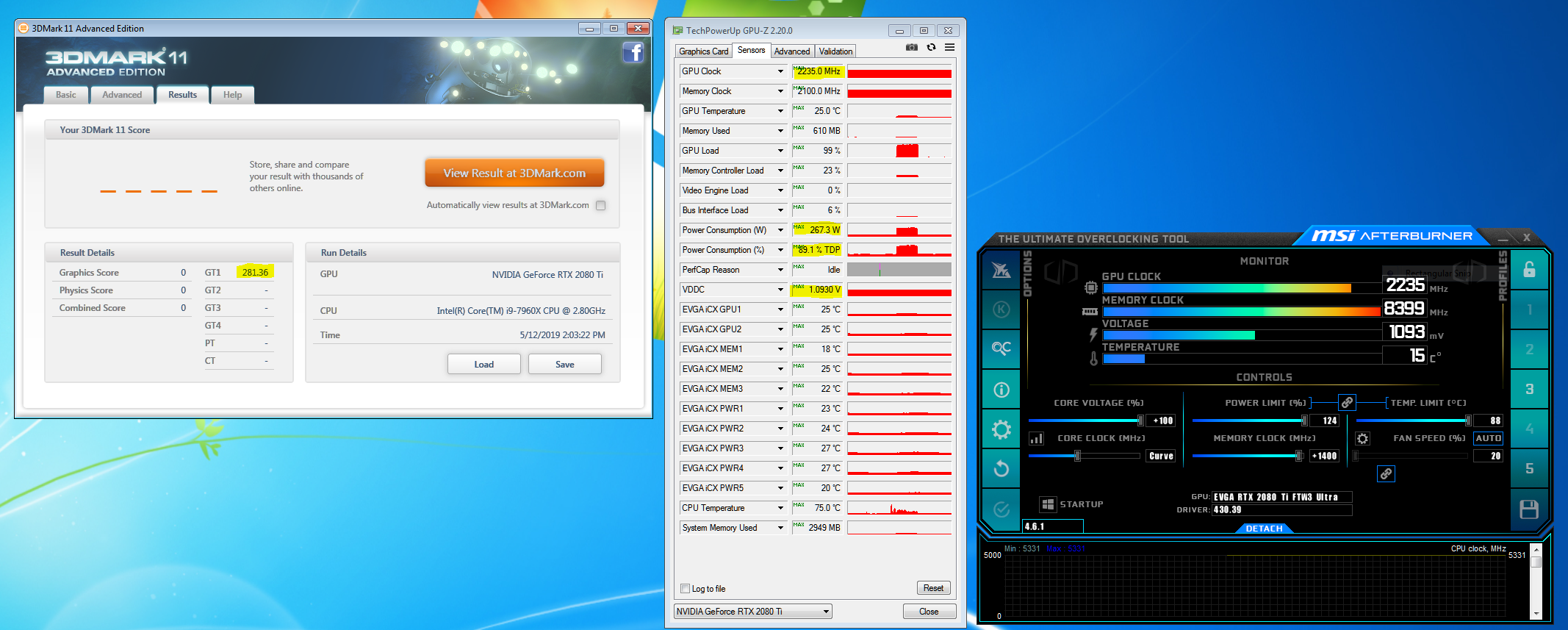
Now we're talking! Back to 2235 @ 1.093V stable like the XC2 was, with the stock vBIOS with the right shunt mod resistance. And, the GPU is back to telling lies to the vBIOS about power utilization so it doesn't know it is drawing double what it says it is drawing, LOL.
![[IMG]](images/storyImages/Plan-3.jpg)
-
-
And, with the K|NGP|N vBIOS...
Robbo99999, Rage Set, Johnksss and 1 other person like this. -
Yes indeed... I had it playing in the background while packing...Super! That's what I'm talking about... Hoorahhh... That's really good for the FTW3... It'd make some KP purchasers second guess their $2K card lol ... Jk.. But kinda not haha.
The FTW3 card with Samsung memory paired with a good core is a winner...Isn't that awesome? When I had first tested the pre loaded KP vbios on the KP card, the voltage was so low that I thought something was wrong with the card lol... I'm still baffled that there are sissy vbios loaded on this card...
I got a chance last night to test some runs, but had to sleep early to wake up early for my trip... I'll post up a lot this coming week.
So far on the stock AIO, max graphics 42125 with a max core so far of 2250mhz... Pretty decent for that dinky AIO... Once it's on the chiller I hope to see where it can really shine...Mr. Fox likes this. -
Here's a full run...
https://www.3dmark.com/3dm11/13303254
Johnksss, Robbo99999, Rage Set and 2 others like this. -
I will test it here in a bit. Trying to get my 3DMark 11 physics score back up to 28K again, but I'll save that for another day.
I am going to test the Aorus Extreme vBIOS now.iunlock likes this. -
thats what i initially did. had i stopped there, i wouldnt have gotten 3400 mhz stable but only 3300
 3400 gave me another nice boost in bandwidth and latency, ill post results soon
currently working on 3500 mhz, havent gotten it to boot yet though.
Sent from my Xiaomi Mi Max 2 (Oxygen) using TapatalkLast edited: May 12, 2019Robbo99999 likes this. -
I don't run it much because HWBOT doesn't even include it as a beta with no points.
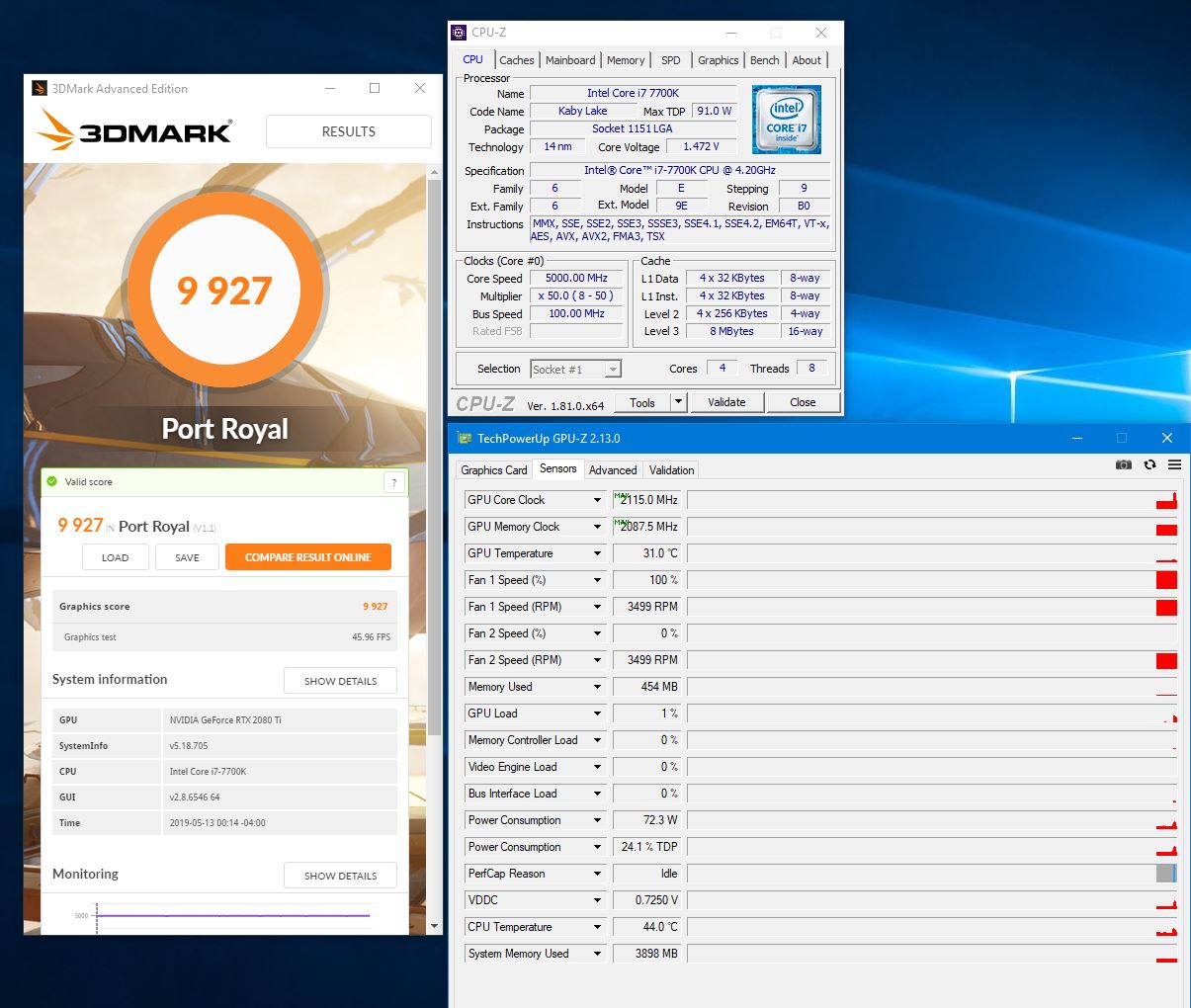
I could not figure out why I was maxing out aroung 9700-9800, but figured out it was the older drivers I use that do better in most other benchmarks. But, it doesn't do better with Port Royal. As soon as I installed 430.84 the score immediately went above 10K.
https://www.3dmark.com/3dm/36072218
Johnksss, Papusan, jaybee83 and 1 other person like this. -
-
ooooh i think the snow man is planning a cpu upgrade
Convel, Robbo99999, Mr. Fox and 1 other person like this.
-
Have you a crystal ball?
I forgot ask about the heat transfer differences from the chips between 9900K vs. 8700K (with equal power consumption). 8 cores aka a bit bigger die allowing for better heat transfer.jclausius, Robbo99999, jaybee83 and 2 others like this. -
Amethyst Ball, actually... and it shows you are waiting for the AMD Zen 3 desktop APU + Radeon dGPU laptop in 2020.
It's not as big of a difference as between 7700k and 9900k, and overall the additional size brings along more thermal generating cores as well.
I think the "bigger die" providing better heat transfer is a red-herring, with more active cores each bigger die is really just bringing more over all generated heat.
![[IMG]](images/storyImages/9900K%20Mockup.jpg)
Besides, according to Intel specifications, they are all 95w TDP CPU's, so there should be no thermal differences at all, right?
Last edited: May 13, 2019 -
I am asking because I am trying to break the stupid 10K on my "lesser" rig - 7700k (@5K) + 2080Ti FTW3 Hybrid (2100./2115 on vcore) and 8350 mem (+1350)
Attached Files:
-
-
You could try restoring your CPU to stock settings and re-run the test on your PC, see how the decrease in CPU performance affects the score.
Disabling HT or cores might help widen the effect, if it does matter.
There might be a plateau effect where once reached a certain level of CPU to drive the GPU to full performance might be enough. -
Probably it matters .. because -> Link 3dmark 7700k / 2080 Ti
Papusan, Robbo99999 and hmscott like this. -
I suspect that it does, but the stupid benchmark has only a GPU score. I don't get that. I am not particularly fond of Port Royal. It seems more like a RTX GPU marketing demo than a benchmark. They should not exclude the CPU/Physics performance unless it has no bearing on the outcome whatsoever. Omitting the CPU performance measurement makes isolating the cause of a low score more difficult, which is exactly why you are asking, right?
You're getting pretty darned close to 10K. You can try killing all unnecessary Windows processes and using a @j95 driver mod with all of the performance-killing GeFarts garbage removed. That might be just enough to get those last few extra points.Last edited: May 13, 2019 -
-
@Mr. Fox - thanks - I am running usually a preaty clean windows (no crap running) but I didn't knew about the drivers, where can the magical set can be found if I may ask
I beat the lazyness and started the other rig .. I am 99.9 % sure that I can beat the stupid 10k ...
-
Here you go. Be sure to follow the instructions @j95 provides closely. Delete all but the specified folders.
https://premamod.wordpress.com/2017/08/15/j95-nvidia-inf/
When benching, I kill all processes that Windows does not require to avoid shutting down. With nothing running in the background before you launch 3DMark, what is your memory utilization percentage?Last edited: May 13, 2019 -
Hmm .. like sysmem ? I guess ~ 40-45 % with 3dmark running
-
No, just idle on the desktop without any programs running... how much memory usage? CPU utilization should also be at or close to zero percent, with very few spikes of more than a few percentage points. Memory usage being higher means you either have a memory leak or bloatware is gobbling up memory. And, by bloatware I am referring to Windows 10 native applications and services, not third party bloat.
Last edited: May 13, 2019tilleroftheearth, Papusan, iunlock and 1 other person like this. -
i usually never leave home without my trusty ol' crystal ball
i was actually surprised to see how little heat the 9900k gives off, im reaching about the same temps as my previous 6700K at the same all-core clocks of 4.6 ghz, maybe a tad higher (naturally, the increased Tjmax of 115C helps a lot in this regard now i only start worrying about temps once they go above 105C
) i would expect my thermal headroom to be good for around 4.8 to 4.9 Ghz under heavy loads before reaching critical temps. just too bad that my CPU VRMs cant keep up
let's see what the P870DM can do with it
Papusan, Robbo99999, Talon and 2 others like this. -
No worries about 105C. AMD uses a max Tjunction temp of 110C on their Radeon VII. Cook on!Papusan, jaybee83, hmscott and 1 other person like this.
-
You know you want one, otherwise why all the deep reading of technical details?
The good news? There's an easy "hack" to increase the heatsink pressure to decrease the Junction Temperature:
"After completing all testing and photos, I reassembled my card and wondered if I could push Junction Temperature below the 110°C I've been seeing on the stock card.
Changing the thermal paste didn't make much of a difference (barely 1-2 °C better).
My trick for such situations is increasing mounting pressure by adding little metal washers. Pictured above, you see two of the washers: one to get a better look and another below one of the mounting screws to indicate the location I placed it in.
Of course, you want to use a total of four washers—one for each screw. I used 6 mm outer diameter, 3 mm inner diameter and 0.5 mm thickness, but you can use everything that falls into that size range. Also, I'd recommend plastic washers, so you don't accidentally short something if you lose it in our case.
With the washers installed, my Radeon VII Junction Temperature dropped by around 10°C to 100°C, which is a significant improvement."
https://www.techpowerup.com/reviews/AMD/Radeon_VII/33.html
Since then, driver and software updates have improved tuning and voltage control, along with fan control, allowing the Radeon VII to reach higher performance with lower temps and quiet operation.
Hey, rather than wasting $ on another RTX jalopy, you otta try a Radeon VII - or wait for Navi.
Last edited: May 13, 2019 -
Hey fellas just landed and settled in at the hotel ... regarding upgrading the 8700K to a 9900K, I have these exact two chips in the A51M's and you've probably seen me mention that I really like the 8700K in these laptops over the 9900K for daily usage, but it's also nice having the 9900K in there for sure...
@Papusan I'm sure that you're eager for the upgrade and that's great. I know you've been running the 8700K for quite some time now so by all means it would be a nice upgrade. Thermal wise the 9900K does pretty well in the 46x to 48x range, but when you get to ~50x it can get pretty warm. The heat sink on the A51M is pretty good with the fans cfm being 17.0.
![[IMG]](images/storyImages/A51-M-Fan-cfm-iunlock.jpg)
However, I think the fans on the P870 might have a higher cfm output along with it having a better heat sink (vapor chamber) so you might be able to achieve slightly better temps at the given clocks mentioned above.
Since the pcb of the 9900K is thicker than the 8700K and with the die being slightly taller, it'll be making better contact with your heat sink, which is a good thing.
I've noticed that the core differential is really good with the 9900K, which is surprising, because with more cores the differentials usually is wider than a 8700K for example with 6 cores.
I think the reason why the A51M gets into the red under full load when running 51x - 52x is because the amount of thermal dissipation needed is more than the fan (cfm) can handle.
Whether this will happen with the P870 I don't know, but I'd be really interested to see how it works on the vapor chamber heat sink. Plus, you have the help of the arctic and penguins.
9900K upgrade... I'd say go for it... it's a great chip.
You can do it!
-
You got a higher fps with the KingPin vBIOS, yet clocks were the same. Is that within margin of error, or is this vBIOS somehow better, you weren't hitting power limits in either vBIOS right, so I'm wondering where the difference lies?
Do those drivers provide a performance benefit? Do you use them at all, how much of a performance boost do you get? I'm assuming he hasn't done any image modifications and it's just bloatware removal. If they would give me a few more fps in games I might consider using them. -
https://www.techpowerup.com/reviews/AMD/Radeon_VII/35.html
""Strange Brigade" leverages DirectX 12 and asynchronous-compute in the best possible way for this chip [Radeon VII], and it ends up performing close to the RTX 2080 Ti at 4K, which is extremely impressive.
"Far Cry 5" is another game where the Radeon VII lives up to its promise, staying consistently ahead of the RTX 2080.
DirectX 12 title "Deus Ex: Mankind" Divided also shows good numbers for this card. It's the titles not using DX12 or the latest rendering technologies that drag down the average.
Hitman was supposed to be a posterboy for new-generation graphics technology, but with Hitman 2, DirectX 12 support has been dropped, and graphics tech has been dialed down in favor of content. The game hence ends up performing subpar across AMD hardware.
If you've jumped straight to Relative Performance, we would advise you go through our individual game test results if you haven't to see if this card suits your specific use case. Hardcore Battlefield V players, for example, can expect slightly better performance than from an RTX 2080."
Thats "Day 1", before all of the driver and software optimizations that continue to arrive, plus lots of videos and articles on how to tune give you everything you need to know to get the best out of the 7nm Vega VII.
I wonder how 7nm Navi and then the follow on 7nm+ / 5nm GPU's will perform? Given multiple GPU support [in preparation for multi-GPU on 3D die] and DXR [without RTX], it will be a whole new world of affordable fun.
Last edited: May 13, 2019 -
Dohhhh...you're right... it's late lol... also what probably messed with my calibration is seeing penguins in tropical places at the water zoo... it's the craziest thing ever and messes with your head haha!
-
That's ok man, Penguins *could* live in the Arctic, if only it weren't for all of the predators out there!!
" Penguins live only in the Southern Hemisphere. Would they thrive if they were introduced to the Northern Hemisphere? Marilyn responds: ... In the Antarctic regions, penguin environments have few or no predators, but the Arctic has bears, wolves, foxes, and more."
Could Penguins Thrive at the North Pole?
https://parade.com/211349/marilynvossavant/211349/ -
Yup haha... very true... @Papusan just has to make sure to watch out for the Polar bears that might eat his laptop.
Regarding the 9900K in the P870...there are a lot out there already running it, but his ambient temps are likely lower than the avg so it might just work out well for his circumstances.Papusan, bennyg, Talon and 1 other person like this. -
Excting! Where are those benches of the Radeon VII laying the smack down at 4K? I truly hope AMD gets their **** together in the GPU front. You think I wouldn't buy their hardware if their GPU offered top end performance? I wouldn't think twice about owning AMD again. Unfortunately their GPUs are just a fail for me no matter how "tweakable" they are right now. They need to deliver the goods again.
-
You know, here in the tropical therms we have a tradition of venting heat outside to cool our computers.
I wonder if in @Papusan's realm they pipe in "chilly" air directly from the outside to cool their computers - I've heard of this for datacenters, but I haven't seen it for home computers.
@Papusan maybe you can build a vent to the outside to pull in chilled air from the outside and push it through insulated flexible tubing to your laptop for extra cooling?
Creating a cooling bubble in which to place the laptop - so it can constantly pull that cold arctic air in to drop the temps even further.
I've heard Intel is trying to reduce their contribution to "global warming", maybe this is what they are talking about?
Gee, these "Coal Guys" are really unhappy about Intel's statement's:
https://thecoaltruth.com/intel/Last edited: May 13, 2019 -
I'm with you mate. Say AMD drops a beast that can out due the current best (KP) card tomorrow ... I'd jump on team red in a Nano second...
They have a good chance to take advantage of Intel and Nvidia's glutiny right now...
Whether they decide to or not is the big question, but I'm thinking that they are being very strategic with when they drop the mic in front of team blue and green's face lol...
I'm sure that we all welcome that... Because at the end of the day we the consumers reap the benefits of their hustle and cat fighting.
Natural cooling... Love it... I'd totally do it.Last edited: May 13, 2019 -
Yes, and I have been using @j95 driver mods for a very long time. You should try them. Eliminating all of the worthless bloat and telemetry can't be bad whether or not you see any increase in FPS. The more crap that is running that doesn't need to never helps performance. It merely creates overhead and consumes resources.Papusan, Robbo99999, iunlock and 2 others like this.
-
I'll give it a shot! (and report back with my thoughts)
-
alright guys, new numbers are up
lets start with the tightened timings i got at 3400 mhz and how they compare to my previous settings / setup:
![[IMG]](images/storyImages/uiK2t9J.png)
crazy to see that im STILL able to run at stock voltages! and not only that, but look at the timings, theyre still at or even below the SPD values! makes me very hopeful that there is still some gas left in the tank, whatcha think guys?
now for the performance stats (10 consecutive runs with AIDA64 averaged):
![[IMG]](images/storyImages/gU0RV2S.png)
higher bandwidth - check
lower latency - check
alrighty, time to go for the as of yet unattainable 3500 Mhz... I have a feeling that CWL and RRD might have been the culprit so far, so lets take care of those little buggers and get that 3500 Mhz rolling! wish me luck, fellas
Last edited: May 13, 2019 -
Installed the latest NVidia driver from J95. Tried to follow his instructions, which weren't that clear - but I assumed I needed to delete any folders that didn't appear in his screenshot, but there was at least one folder in his screenshot that didn't appear in any of my extracted driver folders. Driver installed ok with signature enforcement disabled. Just ran 3DMark Firestrike as well as Timespy, and got some of the worst results I've ever seen (both graphics & physics scores), not by a large margin, almost margin of error, but still some of the worst - at the very best they're the same as a vanilla NVidia driver install in terms of performance unless I messed up the install.
-
Bloody hell man, turn the voltage up already! Nice improvement. I don't understand your tables too well because my RAM knowledge is limited and I only really understand the timings as they're listed in their common order (as seen in HWInfo), so mine are 14-15-15-32-240-1T for example, and out of those I'd only be able to tell you that this meant CL14, tRFC 240, and Command Rate 1. Might be good to display the table timings in the order that HWInfo lists them, because I think a lot of people understand timings in the order I listed them, which I think is also a common order for them to be listed in BIOS.
-
LOL, dude!
*sigh*
someone can help explain to him that I actually AM testing with all relevant voltages cranked up? i seem to be failing as an eloquent explainer in this regard!
as for the listing order, that's actually exactly what im doing however, not following HWInfo64, but the order the BIOS lists them. so easier for me to write down and input RAM profiles in a jiffy
still no dice with 3500 mhz, unfortunately. calling it a day for now, next thing im gonna try is go for 3600 mhz instead, might be that the added QCLK is the culprit, or that the RAM multi is putting too much strain on the CPU, thus gonna try 133 instead of 100 mhz strap and using a lower multi....still some options left to check!
PS: alright, let me give this one more try with a comparison to CPU overclocking.
say, u WANT to reach 5.0 ghz on the CPU, but u have no idea what VCore is necessary to even boot at that speed.
so what u do is this: set the highest VCore that u know is safe, say, 1.45V and crank those multis up to 5.0 Ghz.
u reboot aaaaand....it boots! yay!
now, are u just gonna call it a day and leave it running like that, at 1.45V and 5.0 ghz? remember, u havent checked if it might still be stable at 1.40? 1.35? maybe even 1.30? because u havent checked!
so lowering that voltage doesn't only save power and thermal headroom, it also prolongs the life span of your cpu.
so you continue testing at 5.0ghz, but now u slowly back down the VCore until it either gets unstable OR until ure back down to stock VCore again.
and that's exactly what ive been doing: crank up all voltages to the max, get the machine to boot errorfree, THEN dial those voltages back down again to see what the lowest necessary values are to still retain stability. that, of course, only AFTER ive dialed in the tightened timings, since those also scale with voltages...Last edited: May 13, 2019Convel and Robbo99999 like this. -
Someone pissed on my cornflakes this morning, so I'm a bit more uptight than usual! (For your P.S. bit at the end, the theoretical example there where you talk about using the highest safe VCore for 5.0Ghz, well I'd do the opposite - I'd leave it at the max safe voltage & then up the Mhz, rather than leaving it at 5.0Ghz and reducing the voltage.)
jaybee83 likes this.
-
what if you cant get 5.1 ghz stable at that safe voltage?
 Last edited: May 13, 2019
 -
-
-
I didn't check before & after CPU utilisation, but I went back to vanilla NVidia drivers right now, and over a 3 minute period HWInfo is telling me I'm using an Average Total CPU Utilisation of 0.4%, so there's probably not really anything to be gained there. That's also a stock Windows 10 install too. Those J95 drivers certainly didn't give me a boost based on my testing, they were at the bottom of end of what I'd normally see. I used the standard drivers rather the DCH.
When I install NVidia drivers I only install the Graphics Driver and the PhysX software, I don't install Geforce Experience, nor the 3D Vision driver, nor the HD Audio driver. -
Yes, then you'd go for 5.0 Ghz at the minimum voltage, but you're not at that point yet with regards to your RAM overclocking, no?
-
What's with that MSI Afterburner? New version or custom skin?Mr. Fox likes this.
*Official* NBR Desktop Overclocker's Lounge [laptop owners welcome, too]
Discussion in 'Desktop Hardware' started by Mr. Fox, Nov 5, 2017.