Problems? See this thread at archive.org.
It could be a weak memory controller, but the RAM voltage may be too low. Your DMI, VDDC and VCCIO and other voltages (which AMD may call something different in their BIOS) affect RAM overclocking stability as well. So, I would try bumping all of the voltage(s) up a little more and see if the freezing issues go away.
That's great. Nice job. It looks like you already do have a good CPU, but you need one with more cores/threads to pump up the overall score.
-
-
Great graphic score! You guys make me want to join the single card runs. Keep it coming!
-
There isn't much head room with Ryzen so even a few hundred mhz is a huge deal... RAM does have a bit affect on the nature of how Ryzen's run for sure...
I'm actually putting together a Ryzen build right now and so what I did was to make sure that the RAM can run comfortably at, at least ~3600 at minimum with decent timings. Ryzen favors RAM frequency over timings so as long as you're over ~3600MHz (RAM), the max OC you'd be able to achieve on the CPU should be well known...ie...you'd hit your limits of what the chip would allow, even with better cooling.
What CPU do you have specifically?
Also, try what @Mr. Fox suggested with the RAM voltages...Mr. Fox likes this. -
Congrats! These cards shine the more you push them....
I know right?! I've tripped it so many times lol... and my PSU's are tipping over the UPS all the time so that beeeeeeep always makes me jump out of my seat lol.
Awesome graphics score.
I've been so busy the past few weeks and even busier going into this week that I haven't had a chance to do much... but slowly setting up everything in between the craziness. I can't wait to get back to benching.... -
That CPU will do better at some things than the HEDT CPUs will. It depends on the benchmark.
-
-
Yeah .... I am really tempted to get the gigabyte binned 9900k with mb/full wb for 1600$Mr. Fox likes this.
-
Have you looked into a delidded binned 9900K? You already have the Z390 Dark, which is one of the top boards. That combo doesn't look that great when the bin is only for 5.1.
-
I agree. $1600 is very steep for that combo, especially with a bin of only 5.1GHz. I've binned well over 20+ 9900K's so far to have some pretty solid data to where I can say with confidence that 100% of all the 9900K's that I've binned could do 5.1GHz.
This is just the first batch: (Custom builds.)
![[IMG]](images/storyImages/9900-K-Lottery-iunlock.jpg)
For $1600 they should be offering a bin at the very least of 5.3GHz with showing data that it could do 54x to 55x with some good cooling. That would be considered a good bin.
As for the board itself I really do like the full water block coverage as I think that's really neat and actually practical...
As a reminder, I've jumped on Gigabyte boards right from the launch of the Z390, while most were still rolling with Asus. I really like GB boards a lot and it's nice because they are the underdogs that came out strong from the daunting Z370 era as their boards were terrible back then... so yea I guess you can say that I'm a fan lol... I love my GB Master Z390....it's a tank and a nice change to be different from the norm.
Is the Xtreme board worth ~$900? That's hard to say, because one could just pick up one of the top boards (evga Dark) for ~$500 and do some great things with such a strong board... the way that I see it, you're paying ~$400 for that full coverage water block, which in itself is awesome. Most of the componenets on the board itself are the same as their upper line of boards so the power phases etc...are among one of the strongest right now.
If the board was let's say around ~$700, I think that'd be pretty fair considering that evga hydro copper blocks are ~$200+ ....
I would highly recommend skipping out on that combo deal @rodarkone. We care about you brother...
.Last edited: May 20, 2019Papusan, Robbo99999, Mr. Fox and 1 other person like this. -
dont forget that "5.1 ghz binned" doesnt mean squat if you dont also define the circumstances under which those chips reach 5.1
the highest bin on SL is also 5.1 ghz for the 9900k, but that's due to their very rigorous stability testing with prime95. i doubt that 100% of 9900k cpus can do that but sure, 5.1 ghz CB15 or cpu-z validation, i believe that
especially since its just one multi higher than the max. 1core boost.
Sent from my Xiaomi Mi Max 2 (Oxygen) using TapatalkLast edited: May 20, 2019electrosoft and Rage Set like this. -
https://www.3dmark.com/compare/spy/7228717/spy/7229667
I'm so close. The CPU score is killing me. I'm going to go through my settings. -
How odd. Was it a used 9900K? It's rare to hear of lemons in ratio to how much is sold, but it happens.
Keep us updated on the 7980XE, because if it can do 5GHz that'd be awesome.
I'm curious if they binned the 9900K's with using that motherboard (water cooled), which would allow most if not all 9900K's to run 51x just fine.
As for SL chips, I have my own opinons on their binning process, but that's for another convo.
You doubt that 100% 9900K's can do 51x? Well obviously. 100% is a bold number ... what I was saying is that out of all my personal tests, 100% of them hit 51x on AIO. Nothing fancy...
-
Was brand new 9900k
but there are a lot (20-30% ) that are not doing 5GHz on all cores not all are so hot tho’ ...
Lemon:
![[IMG]](images/storyImages/cb6e20a51f36bfc544d7f4a3ff253e53.jpg)
-
Ekwb - predator 360 push/pull - some asus strix rog ... escapes me (z390-e gaming I think)
Ekwb - Phoenix 360 push - z390dark
Tested on 2 systems, multiple times (I thought that I am not installing the wb correctly)
I didn’t wanted headaches so I returned it
Ordered a new one 2 days back unfortunately delivery is ... very late (no stock) i remember back in stock 24-25 delivery ...2 days maybe.Robbo99999, Mr. Fox and iunlock like this. -
understandable, since SL is binning voltages rather than multis makes sense if you think about the volume they have to go through. also, they use "medium, run of the mill" cooling and motherboards to ensure that these settings would be applicable to a wide range of use cases. wouldnt make sense to use highend cooling and mobos only to have a ton of unhappy customers wondering why their 9900k is not reaching 5.1 ghz on their cheap asrock mobo with basic aio cooling
may i ask what stress testing you used for your chips? just benches like CB and 3dmark physics? or also more intense ones?
Sent from my Xiaomi Mi Max 2 (Oxygen) using Tapatalk -
That's true, but SL achieves those "OC's," with ridiculous voltages that make no practical sense in the real world, even with those using aio or water, therefore, IMO I see very little value in that other than to show that it can hit those clocks.
If I was a regular gamer, I'd be looking for a more efficient chip that can run at the lowest voltage at 50x, which is plenty. (9900K) --
It's not about what it can hit with high voltages, because that is not efficiency... we as enthusiasts are always trying to find the "lowest," voltage to run our OC's, not the other way around. Of course, once you get into higher clocks you have no choice.
Those who are buying the SL chips are likely using it for other things than just gaming, but even then the likelihood of this group of people are not using a cheap fan running their 9900K's on air.
When I run my tests I use pretty much all the usual, wPrime, OCCT, 3DMark etc... but more importantly I run real world tests as well with extensive gaming, streaming, recording etc... real world scenarios.
Running at 51x with the 9900K on water is not that hard. Where it gets real is when you are trying to run it at 53x+ stable where it won't freeze up on your during real world scenarios, let alone the synthetic tests.
In fact, I'm binning a 9900K @ 51x as we speak with gaming, recording, streaming etc... on an AIO.
The information that I have provided is from my own personal experiences and tests that I've personally conducted myself so that is why I am able to give definitive numbers like 100% etc... because 100% of all my 9900K's passed my tests at 5.1GHz just fine on AIO.
Again, it's not that hard to OC the 9900K to run 51x...
-
If you're using the Steam version, that alone can lower your scores due to the extra overhead. If you are, use the Steam 3DMark key to activate the standalone version instead.
Also, kill off all of the bloated Windows 10 processes that are not needed. All they do is gobble up CPU clock cycles and create unnecessary overhead. A nifty tool that makes that simple is Easy Services Optimizer. It is a portable app that doesn't have to be running. You can set 4 profiles with varying services that are disabled. Apply the "Extreme" profile for benching, then close the program. When you are done benching, re-launch the program and click on the "Default" profile button, and then click the button in the top left to apply the changes to restart all of the default services. You don't even need to reboot. It kills and restarts the services in real-time. And, you can tweak the profiles to your liking.
https://www.sordum.org/8637/easy-service-optimizer-v1-2/
Papusan, Convel, custom90gt and 4 others like this. -
yeah, thats what i meant by saying they bin voltage, not clocks. they set a predefined voltage and just check how high a chip can go clock- and temperature wise with that voltage. this allows them to bin a high volume in a short amount of time. plus, the result in consumer hands is more positive with a high probability, since everyone who actually tunes the voltage will achieve at least the same clocks at lower voltage or higher clocks at same voltage. thus, happy customers and easy binning for SL. from a business perspective, that's pretty smart. and from an enthusiast perspective: nobody cares, since every enthuasiast would do his/her own manual binning anyways thats where the fun is after all!
btw @Mr. Fox thx for pointing out that handy service tool, perfect!
Sent from my Xiaomi Mi Max 2 (Oxygen) using TapatalkPapusan, Mr. Fox, JoeT44 and 1 other person like this. -
That's very true when volume is involved. What always made me cringe is the thought of someone who doesn't know much about OC/Tuning.... buying an SL cpu and running it at those high voltages right off the get go.
-
-
-
I managed to run my Ryzen 7 1700 at 3.9GHz with 1.325 volts in Prime95 stable and memory put at 3466C16, anything higher and it bonkers out.
Now the problem is I use ASRock AB350M with 6+2 phase, but the Vdroop is stupid high, in UEFI its set to 1.4 volts but during stress test the actual voltage goes to 1.325 volts and idles at 1.4 otherwise.
There no LLC settings in the UEFI, does anyone know if these offset settings I got could help to solve this issue? I got two offset one for CPU and one for SoC, they go in incremental in 50mv all from -200 to 500 on both.
Also is idling at 1.50 volts a dangerous thing to do?Last edited: May 20, 2019 -
Zzz best with what I have ...
https://www.3dmark.com/spy/7235600 -
From what you are describing, perhaps the issues you are experiencing are the result of a poorly designed motherboard and firmware rather than the CPU and RAM.
You will find lots of opinions on the voltage. My opinion is that 1.500V is pretty high, but as long as the CPU doesn't overheat it would be OK for short periods of benching. That is assuming you keep it nice and cool. Probably wouldn't want to leave it like that for 24/7 use. I wouldn't say it is dangerous per se, or that it is going to kill your CPU suddenly and unexpectedly. It's definitely not ideal. Heat is bad. Heat + high voltage is extra bad. Cold + high voltage, not so much. And, I base this on my experience with Intel CPUs. It could be as worthless as tits on a boar with an AMD CPU and should be taken in that context.
I think maybe you'd be better off investing in a higher quality enthusiast/overclocker-centric motherboard as opposed to running the CPU at 1.500V idle just to have enough voltage under load on account of the goofed up VDROOP thing on. Sometimes the stuff made for gamers isn't all that it's cracked up to be.
Great score, bro. Your GPU is really humming. Based on your clock speeds the graphics score is exactly where it should be. Looks at the graphics scores in this comparison. Less than 1% variance between them.
https://www.3dmark.com/compare/spy/7228717/spy/7235600Last edited: May 20, 2019 -
-
Thanks, yeah GPU is decent with the cooling ... But I am struggling with the CPU but I can only hope for better
https://www.3dmark.com/fs/19384857
Playing with other toys ... I need a 2080Ti break -
Yeah, definitely something is wrong with the Cpu settings or a lot nasty running in the background. From my older test. [email protected] (Well above 21K in FS Physics with 3 bin lower clocks)
-
Yes, that is definitely true. Windows 10 is so bogged down with worthless feces running in the background that it is a wonder that any resources are left to display your desktop wallpaper. If you let it have its own way, everything runs like trash. It is totally asinine and ludicrous how much utter rubbish is running by default on an untweaked Windows 10 system.
-
I evaluated my voltages and went back to my stable and potent 5.0 overclock. Worked on memory timings. Increased the first four cores to 5.1 and used @Mr. Fox advice on the standalone 3DMark suite.
https://hwbot.org/submission/4159448_ https://www.3dmark.com/spy/7236868 Thanks bro for the advice.
-
Nice ....
now you need exotic cooling - we all need Mr Fox magic and move to chillers
Btw I saw some folks are using portable ac units, if I remember (again) Mr Fox had one and use it for laptops ... any yey/ney’s ?Mr. Fox likes this. -
Thanks. My next step is DICE but I'm still pondering the idea of a chiller. A chiller would be an easier component to integrate into my current cooling setups. I have a portable AC that I purchased for OC'ing, but I'm using it for actual cooling of parts of my home. When I install my other AC's around the house, I'll use the portable AC for its real purpose, hahaha.jaybee83 likes this.
-
*BOOM* That happened. Awesome score, bro.
Glad that helped. Other than the things Windows 10 won't let me disable even running NSudo as Trusted Installer, I only allow the services Windows 10 needs to function for my Extreme profile. My Default daily driver services profile only has a few core services with dependencies, like the Micro$oft Office Click-to-Run Service and the validation service needed to keep Windows 10 from losing its activation. Everything else deserves to die, LOL. Autoruns is also useful.
Did you know you can also kill explorer.exe with Task Manager after opening the benchmark? Then restart it Ctrl+Alt+Del > Task Manager, then run New Task > explorer.exe to get the desktop back. The frees up services for the CPU as well. Sometimes doing that makes enough difference to move up one notch in ranking when you're right on the verge of overtaking the next highest score and cannot muster the juice to do it otherwise.
@JoeT44 used his portable AC unit with the desktop and it helped a lot. It's not as effective as the water chiller. You would still see a huge benefit from it if you channeled the air directly into the case and forced the radiators to suck in only chilled air. And, it helps keep your work space more comfortable. If you want to take the overclocking to the highest possible level short of using DICE, LN2 or other extreme measures, chilled water is the only way to go. The down side to the chiller is having to watch out for condensation and it makes your work space warmer due to the hot air it creates (just like having an AC unit not exhausted outside). I think both use about the same amount of electricity. Their internal components are essentially the same thing conceptually. One chills air and the other chills water.Last edited: May 21, 2019Papusan, Rage Set and Robbo99999 like this. -
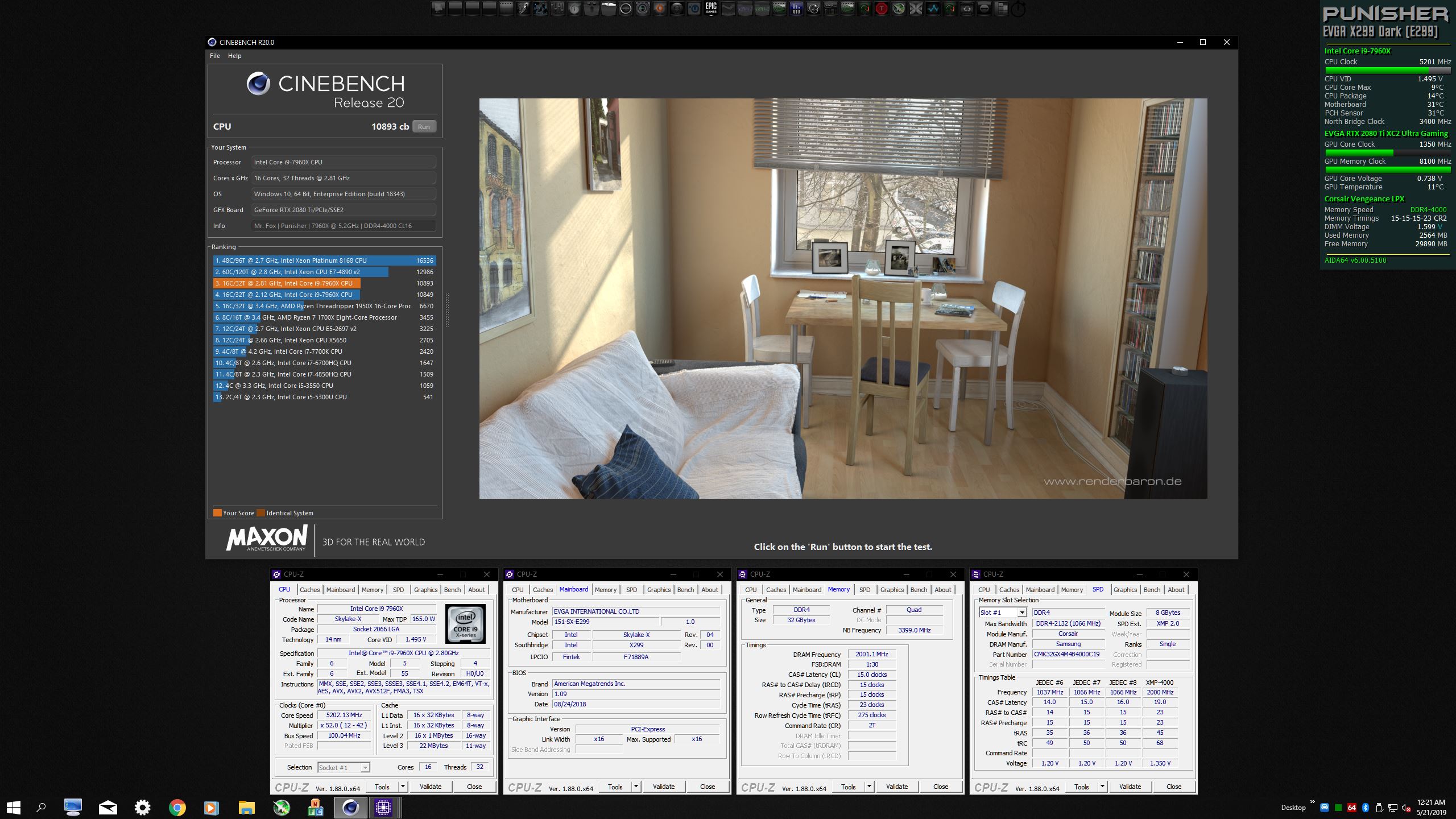
New personal best scores...
#1 for 7960X and all 16-core CPUs and in Top 20 for all CPUs in CBR20... https://hwbot.org/submission/4159586_
![[IMG]](images/storyImages/image_id_2187004.jpeg)
wPrime 1024M - https://hwbot.org/submission/4159583_
![[IMG]](images/storyImages/image_id_2187003.jpeg)
(See thumbnail for W10E Insider Preview CBR20.)Attached Files:
Last edited: May 21, 2019Prema, sweepersc2, Papusan and 5 others like this. -
-
-
What do you think about nvLink for gaming? 2x rtx 2080 for example.
Mr. Fox likes this. -
I have always loved SLI and seldom had issues with it for gaming. In most cases I could tweak things with NVIDIA Inspector and get better performance than single GPU. In the rare case I could not, disabling SLI and playing with single GPU gave me the same experience as everyone running one GPU.
The only issue I see with it now is the cost of RTX cards is stupid. Since it is not necessary for gaming, probably not a smart thing to do in terms of cost. I would say NVLINK is probably best reserved for those that have lots of discretionary money to spend and plan on doing a lot of overclocked benching. If I could afford it (and I can't) I would definitely do 2x 2080 Ti for overclocked benching. I haven't had a dual GPU setup for a while now and I really miss it. -
@Mr. Fox - what chiller do you have ? I found the Hailea 500A for 500$ at performance-pcs seems a good deal
-
Check his signature. It is the same one.
-
Yeah, that is an awesome deal. You can get the Koolance QD3 quick-disconnects there also. I highly recommend them. OCN55 will get you a 5% discount at Performance PCs if you have no other discount promotions available. That is a great place to buy stuff.
Exactly. -
Oh sry I am on phone don’t see the sig’s.
Yeah i need QC’s - hope those are compatible with ekwb. -
I'm going to need to work on the CPU a bit more for Fire Strike Extreme. I know I can do better.
https://hwbot.org/submission/4160645_ https://www.3dmark.com/fs/19401873
I am proud of this Time Spy Extreme score. Going to hammer it a bit more this weekend.
https://hwbot.org/submission/4160655_ https://www.3dmark.com/spy/7253396
-
-
-
@Mr. Fox I sent you an EM.
*Official* NBR Desktop Overclocker's Lounge [laptop owners welcome, too]
Discussion in 'Desktop Hardware' started by Mr. Fox, Nov 5, 2017.