Problems? See this thread at archive.org.
Bad luck with computer hardware is not fun at all but it happens to all of us. I was rearranging my build and I wanted to remove the reservoir all together, because my external radiator actually has a fill/bleed port. After hours of working on it, and getting ready to power I ended up spilling water all over my 3090 Kingpin, my Z590 Dark, and everything else. So instead of powering up and having fun. I had to tear everything apart, strip everything down and dry it all off and clean with alcohol. Even the 3090KP, and motherboard and all
^ Very annoying. I knew if I hadn’t done everything perfectly right I could be potentially regretting it later. I was up until 5AM. It was one of the most frustrating days ever involving PC hardware.
Fortunately everything works.
![[IMG]](images/storyImages/A7-B2-F742-5385-4986-948-A-E08-A33888-FCB.jpg)
![[IMG]](images/storyImages/604-F71-E0-AE22-4-AE7-B7-A1-89082991-C634.jpg)
![[IMG]](images/storyImages/444-D8-B2-B-F623-414-C-829-A-019322-BBD802.jpg)
![[IMG]](images/storyImages/173-CFB76-BD37-401-F-868-D-7-F0-E2-EA34-B55.jpg)
-
-
Bro I am sorry. It does suck and like you said, you at least got to see what the other side in Ryzen performed (even if you mostly disliked it). Take some time off from overclocking. You can still visit and offer your great advice/wisdom and perhaps if/when Intel brings back HEDT, you will have a platform worthy of your time and money. As an aside, you can always do what @Papusan is doing and get some older hardware and amass points that way.Last edited: Nov 7, 2021
-
Well, had I known that I probably would have taken you up on it but I already purchased the 10700K by the time you offered. But, I will keep it in mind, thank you. I need the work computer functional on Monday, so maybe this was for the best.
I am going to see if the Rockit Cool 11th Gen bare die frame will work with the 10900KF.
And, I guess one good thing came of it. The 10700K has a decent SP rating and seems like good silicon. Most of the Intel 10th Gen CPUs that I have handled (about 20 or so) have an SP rating of 65 or so. I can count on one hand how many have been higher that 65.
Last edited: Nov 6, 2021Rage Set, Clamibot, Falkentyne and 2 others like this. -
Hey, can we trade? 10Th Gen die frame for 11th Gen die frame? -
This is a bare die 11900K at an easy peasy 5.3Ghz all core. 303 watts power consumption. No die frame, just bare block lol
This isn’t shooting for high numbers. As I can do much better. This is just demonstrating how good bare die 11900K is. My CPU is average, maybe slightly better than average? 300 watts at 5.3Ghz all cores with stupidly low temps with just ambient water. I freaking loveeee this CPU!
![[IMG]](images/storyImages/121-DBD0-B-79-E6-4-F44-87-F4-65-B9615543-D1.jpg) jc_denton, electrosoft and Clamibot like this.
jc_denton, electrosoft and Clamibot like this. -
My matte to glossy screen mod came out perfectly! I really wish I hadn't cracked this screen earlier today.
 Such glossy goodness!
So now I just have to wait for my new screen to arrive next Friday, and I'll be performing the exact same procedure I performed today on this toast screen. I still went through with the full procedure on my broken screen to make sure I do it right every time afterward, and it looks like I got it right the first time. -
Thank you. And, you are correct on all counts. Had it not been for the maddening USB drop-out issue and horrible RAM latency, I would most likely still be rocking that 5950X. It was disappointing that it didn't overclock higher than it did, but it was very powerful and most impressive at the clock speeds it was capable of reaching.
It works, so I think I will hang onto it since I know now it will work with both 10th and 11th Gen. Who knows... maybe someday I will need it for an 11th Gen. Hopefully not though.
Yeah, that's looking good.
The 10900KF is doing fine in the Z590 Dark. Now I just need to get the Windows 7 thing sorted. The 10700K is working great in the work desktop.
I guess it is time to settle back into a state of dull normalcy, LOL. Maybe my wallet will stop hemorrhaging now.
-
I beat the 2nd running 5300. Gold
https://hwbot.org/submission/4848720_papusan_7_zip_core_i7_3770k_38568_mips?recalculate=true
![[IMG]](images/storyImages/2586216.jpg)
https://hwbot.org/submission/484872...hmate_core_i7_3770k_10.45_cb?recalculate=true
![[IMG]](images/storyImages/2586223.jpg)
https://hwbot.org/submission/484872...r11.5_core_i7_3770k_10.45_cb?recalculate=true
![[IMG]](images/storyImages/2586222.jpg)
https://hwbot.org/submission/4848793_papusan_geekbench3___single_core_core_i7_3770k_4694_points
![[IMG]](images/storyImages/2586287.jpg)
https://hwbot.org/submission/4848793_papusan_geekbench3___single_core_core_i7_3770k_4694_pointsLast edited: Nov 7, 2021 -
Perhaps another severe point of utter disappointment... For the first time ever, I am unable to get Windows 7 functioning as intended on Z590. It will work to a point only if I leave a dozen or so things with no drivers installed in Device Manager, but there is an unidentified item that installing a driver makes it no longer bootable. Even with all of the correct updates and hotfixes in place the NVMe drives are not visible. I'm reasonably confident that this problem is due to the manner of PCIe implementation. This is based on what I see happening in Device Manager and the NVMe drives not being accessible.
It will be difficult for me to enjoy owning a product that will not allow me to run Windows 7. I don't even know if I want to try because I don't play when I don't get my way. If I knew the person responsible for this it is possible that they'd no longer have a pulse.
I really hope I can find a solution to this. Otherwise, I think this may mark the end of my interest and participation in technology as a form of satisfying entertainment. A life without freedom and autonomy is not worth living, and I think this was a very deliberate act by people with a nefarious and Hitlerian agenda. They are unworthy of the air they breathe.Last edited: Nov 7, 2021 -
Really unfortunate to hear this brother Fox. The good thing is Z590 DARK doesn't BSOD so it has support unlike other boards, Canonkong earlier suggested only MSI will work but I saw Gigagbyte Z590 Tachyon also got Win7 working one person also got Apex working, that video in the tachyon thread I quickly skimmed the Gigabyte Z590 Vision D running Win7, unfortunately I could not see Device manager in that video. But they did play a ton of games assuming NVMe ? no idea. Also Z490 Apex XII got XP SP3 running with NVMe backported driver plus USB3.0 backported driver as well. If that was possible I think there is definitely a possibility to make Windows 7 work in Z590, it's far more advanced OS than XP is.
I still do not understand why Canonkong took out all the modded drivers for Intel systems while he provides updated AMD drivers still to date. Also Luumi still did not make the video guide yet for Z590, I hope he can make some time and do it.
By the way do the USB3.0 ports work also did you update the Win7 installation with Simplix pack ? -
It does BSOD, but not until you get to the point of installing Chipset drivers. I have a hunch it is PCI Express Root Port drivers or something related to that, which might explain why the NVMe SSDs are not visible. When I say not visible, I mean literally. Not even something in Device Manager asking for a missing driver. And, it is not the CPU because the problem is the same with 11900K and 10900K.
Yes, I got the Intel and ASMedia USB ports and the ASMedia SATA ports working. The only SATA drivers that would work are the default Windows Standard AHCI SATA drivers that list all of the attached drives as separate IDE devices. I tried a bunch of different Intel AHCI SATA drivers and none would install except the ASMedia SATA drivers. And yes, this last time I installed the Simplix pack before attempting to install the chipset drivers and it never finished. After the second Simplix reboot it started having the same 0x05 BSOD, so there must be something chipset-related in one of the included updates.
Unless we can see what is in Device Manager, we can't be certain that those MSI and Gigabyte systems are fully functional. If it is possible, then EVGA needs to step up and do something about it. Otherwise, the Z590 Dark can't be taken seriously as an enthusiast product due to inadequate support on their part. Surely, they understand that enthusiasts require Windows 7, and to some lesser extent, Windows XP support for the product to be viewed as relevant and viable.
I hope there is a way. My interest in a computer that cannot run whatever OS I feel like running on it is very low. A computer like that becomes an unexciting tool of limited purpose rather than a source of pleasure for me. Canonkong might be our only hope. Maybe I will ping him and ask if there is any way he can help. Maybe he has already tried and found hardware issues that drivers cannot address.
I may do another Windows 7 install and not attempt to install drivers for the chipset and leave everything that doesn't work as unidentified/no driver. It is impossible to recover the OS and make it bootable again once it happens, so if I do that I will make a Macrium image that I can re-write to the drive when it goes bonkers.
Edit: And, another challenge I am encountering is booting USB devices that are not configured for UEFI. Macrium Reflect and Mini-Tool Partition Wizard USB recovery media do not boot in Legacy mode, even though the BIOS is configured correctly. Choosing Legacy, or UEFI with CSM and Legacy boot option produces the same failure. So, it is possible these issues are related to a newer and more diabolical UEFI version, which would fit with the Satanic agenda of the Redmond Retards. This is the reason I refused to entertain the idea of owning a Clevo X170. The Insyde BIOS implementation that it has provides no Legacy/CSM support. If you expose the menu options they are non-functional. I don't want to own an emasculated eunuch turd computer whose functionality has been artificially restricted by some stupid devil-worshipping bastard that wants to play god with technology.Last edited: Nov 7, 2021jc_denton, Papusan, Ashtrix and 1 other person like this. -
Its seems there is BIOS restriction on allowed OS. Only hope is to check with Prema or LostNBIOS( from Win-raid) to see if there are any OS whitelist which can be overridden. Then again, you need to use older drivers or hardware which had good support/last Win 7 driver. With nvidia GPU you can add device id thrugh NvCleanstall but for AMD 5950x drivers for Win 7 I have no idea.Last edited: Nov 7, 2021
-
Another dead 11900K! OH NO!
Only this time from a member on Overclock.net
I was giving him advice on the delid. Even though my delid did not go perfect. Apparently he set the temp for 150C. But his actual oven was much hotter apparently.
I feel horrible. I feel responsible for motivating the delid of these 11900K’s and all of them are dead.
I told him 300-325F for like 15-25 minutes.
Last edited: Nov 7, 2021jc_denton likes this. -
Well, do you intend to try the V- cache AMD chips? Or are you waiting to see Zen 4 next year or Zen 5 in 2023/4? Of course in part dependent on Intel's offerings at those times.Vasudev likes this.
-
Well, it looks like even UEFI mode with CSM and UEFI Boot Device option and pure UEFI with CSM disable isn't working for Mini-Tool. Damn. Ain't it special? These are people that have done unspeakable things with their mommy. (You can connect the dots to decide what that means.)
Here's what happens with Mini-Tool no matter how I set the BIOS.
Man, that's really horrible. While it was inspiring to see your success, this is not your fault. I would have attempted it anyway. And, there is always a risk that varies with user experience and technical skill even when an operation is proven safe and well-established. Some people can break things just by staring at them. This person assumed all responsibility and he destroyed the CPU by burning it to death. That's not on you. Perhaps he miscalculated the Celsius to Fahrenheit conversion. -
I am not sure. Probably not. Time will tell, but right now I am extremely disenchanted with the way all technology is headed and I won't participate in something where I am unable to control things in the manner I wish to control them. If what I am seeing now is a sample of what is to come, I won't investigate anything that anyone offers. To that I say "hell to the nah" LOL. Now I can better relate to what happened to Sodom and Gomorrah and the Great Flood. I would have done the same thing. This kind of stuff really pisses me off... the gall of it is unacceptable.Last edited: Nov 7, 2021
-
Damn this is a lot, since I have virtually no experience except reading and scouring over all the possible forums for the installations of Windows 7 on latest hardware. About the 05BSOD, Luumi said that happens " A5 is usually ACPI BSOD at least if you try to boot XP with wrong BIOS" so back to that Tachyon, the user used a modified acpi.sys supposedly that goes into system32/drivers. It's sad to see this on Z590 platform since it's the darn same LGA1200 socket that gets XP and Windows 7 run normal. Also as I mentioned previously only one older ASUS BIOS had the Windows 7/XP support for Z590. The recent page at HWBot has a new beta which has XP and Win7 support but as you said, we do not know how far the installation is successful on that board, esp the NVMe aspect and Chipset drivers and the Device Manager.
Also that's weird behavior from Simplix installation, even more surprising how the OS ends up in a loop. But it coincides your thinking that it's definitely a chipset driver related aspect for this. There are too many variables, but one guess - Simplix installs the xHCI backport USB 3.0 drivers from Windows8.x to Windows 7 / Vista, and since you already have all USB3.0 ports working (I dunno how they are working on a stock Win7 SP1 ISO with usual KMDF, NVMe, SHA2 update fix), maybe try to give the script this command by avoiding those xHCI drivers. - in the Simplix.bat file, append /NoUSB to the last line and then execute it to stop it from installing those xHCI drivers (This is usually done on that Crosshair Dark Hero X570 board since as per Canonkong those are not good for ASUS X570 boards), not sure if these drivers can even cause such OS reboot loop. Sorry I'm just trying to find all possibilities here
Also remember Canonkong saying to disable xHCI handoff in the BIOS too for some boards but that's for the start of boot, is it there such an option in EVGA's AMI BIOS ?
Anyways all after these horrific experience, and specifically after you mentioned this new behavior of the UEFI / CSM options not having any effect on the Macrium Refect Legacy / Mini-tool partition wizard booting up is really heartbreaking to see on Z590 DARK platform. That makes it instantly struck off because Windows 7 is on it's last legs this is the last true platform to get it right. All the Software vendors are going to pull the plug soon, Chrome targeted 2022 January, it was 2021 last time once that is pulled Windows 7 will drop even more, at the moment Steam has over 3% of users running the OS. This is why despite that damn Z690 having the CSM option and those CPU-Z Validations on bot. I refuse to believe how well Windows 7 works on that brand new platform which is actually made devil in mind - Win11.
Not sure if you can try to reach to any contacts you might have on EVGA side and fix at BIOS level.. and perhaps canonkong also for the Intel Chipset drivers.Last edited: Nov 7, 2021 -
Hence it better to recommend temps in degree Celsius http://forum.notebookreview.com/thr...rs-welcome-too.810490/page-1280#post-11126753
People do mistakes and it's better make it more easy for them to avoid them.Clamibot, Ashtrix, jc_denton and 1 other person like this. -
The issue is ovens in the US have no settings for Celsius. You have to convert it for it to be relevant.
It is also possible that user has an oven with a thermostat problem, or he set it to "broil" instead of "bake" (which would destroy anything if not closely monitored).Last edited: Nov 7, 2021 -
-
Yeah. It is getting to where overclocking is both less useful and less fun. I saw it coming years ago and did warn about it. And that is Intel and AMD. And with ARM from Apple, Microsoft is rumored to be working on one, etc., this being what both Intel and AMD are currently trying to "innovate" to beat, I'm just not seeing our hobby improve anytime soon.
Oddly enough, audio has scratches my itch. Especially implementation of diy DSP in the chain and designing enclosures and creating active speakers with built in amplifiers (signal in to dsp to pre-amp to amp), all while wiring up the power supplies, etc.
But, I will likely finally upgrade with Zen 4 or whatever Intel has at that time (best value at a specific level).
Then again, with these mandates, who knows what my income will look like that far out (even if for the shot, you should be against mandates and vaccine passports restricting freedoms; sorry for the political aside)Ashtrix, Papusan, jc_denton and 1 other person like this. -
@Mr. Fox Just reading your run of bad luck is pretty mind boggling from the 5950x delidding debacle to the 11th gen delid of death to the Win 7 issues, I can see why you're just ready to shut it all down. I'm so sorry brother. Luckily as @jc_denton put it we're lucky to be in this position to break stuff and in the end it is just that...stuff.
There's always Alderlake but it is so odd and normal adjacent you might want to sit back and lick your wounds a bit and let the dust settle with the 3D cache refresh or Zen 4. With a 10-15% uplift on the Zen3 refresh I expect the 5950x to right back out in front clearly for multi performance and at least get closer for single if everything plays out properly. Even with a 15% boost, 5900x still won't touch the 12900k but at least it will equal or surpass the 12700k in multi and hopefully get closer in single like the 5950x should too.
@Clamibot I did the exact same thing to a few panels in my time. Welcome to the club! BTW, what version of Prema is on your unit? I haven't even touched my Z690 setup because I'm diagnosing and fixing numerous (understatement) issues and problems with my X170SM-G at the moment it is mind boggling. I'll have a post about it later this week but the poor QC inside was really disheartening.
-
I think when things start having the effect they are having the political argument goes out the window and we are dealing with rogue government gone wild, not politics. I think they are two different things. Politics deals with personal opinions and preferences. What we are experiencing affects us all and it has nothing to do with political view. We see both red and blue turning against the current administration because they are DINO Marxists with an agenda that usurped control by pretending to be Democrat in order to destroy (or "fundamentally transform" to use their words) America. That goes against everything our nation has been built upon. They are trying to tear us apart (us meaning the nation as a whole, not a political party) from the inside out. I do not believe it will stand, and I believe most of what we saw in January with the so-called "insurrection" was a staged event and they are playing the COVID card in the same way, and I suspect that is going to backfire on the Marxist "squad" losers.
I think what we are seeing in technology has some chilling similarities with losers that are control freaks who have placed themselves in a position of authority with aspirations to rule us all.Last edited: Nov 7, 2021 -
That's one 'well done' CPU
Clamibot, Rage Set, electrosoft and 4 others like this.
-
I’m finally 100% content with my platform. The 11900K is performing marvelously at 5.3Ghz all core with some cores boosting to 5.4Ghz.
And this chip is killer on direct die.
I know the Z590 dark was a little late to the show after all of the other Z590 boards. And bios 1.06 proved exactly that. Bios 1.06 is day and night difference. I know this board like the back of my hand. This bios is almost like I am running a different cpu. It helped a lot.Clamibot, Papusan and electrosoft like this. -
You ain’t lying. I did that to ATI X1800XL video card when back in like 2008 era. It stopped working, and I baked it very WELL DONE. I was a teenager and I totally baked it to death, the GPU die fell off and everything else lol.
Been paranoid about it ever since. Which was why I baked mine at low temp just to get it hot and soften a little.Clamibot, electrosoft, Ashtrix and 2 others like this. -
I am pretty sure what happened was a terrible user error. 300°C is 572°F and it would be crazy for anyone to do that on purpose.Clamibot, tps3443, electrosoft and 4 others like this.
-
That's a fantastic daily driver frequency. You're pushing it hard voltage and clocks wise but your temps are so in check it will negate the heat monster and migration (hopefully).
Where did you settle in memory wise? -
I wonder how high he can push it in benchmarks He should have more than good enough temp headroom.
https://hwbot.org/submission/484955...25m_core_i7_3770k_2sec_194ms?recalculate=true
![[IMG]](images/storyImages/2586850.jpg)
https://hwbot.org/submission/484954...00m_core_i7_3770k_20sec_76ms?recalculate=true
![[IMG]](images/storyImages/2586840.jpg)
https://hwbot.org/submission/4849507_papusan_gpupi_for_cpu___100m_core_i7_3770k_22sec_739ms
![[IMG]](images/storyImages/2586812.jpg)
https://hwbot.org/submission/4849540_papusan_cinebench___r11.5_with_benchmate_core_i7_3770k_10.46_cb
![[IMG]](images/storyImages/2586834.jpg)
https://hwbot.org/submission/484954...nchmate_core_i7_3770k_953_cb?recalculate=true
![[IMG]](images/storyImages/2586837.jpg)
https://hwbot.org/submission/4849505_papusan_cinebench___2003_core_i7_3770k_4527_cb
![[IMG]](images/storyImages/2586810.jpg) Last edited: Nov 7, 2021jc_denton, Spartan@HIDevolution, Tenoroon and 2 others like this.
Last edited: Nov 7, 2021jc_denton, Spartan@HIDevolution, Tenoroon and 2 others like this. -
I'll have to get back to you on that. Since the internal screen is unreadable now, I'll have to wait until Friday to see what Premamod BIOS version I have (since my new screen comes in on Friday). What issues are you having?jc_denton likes this.
-
-
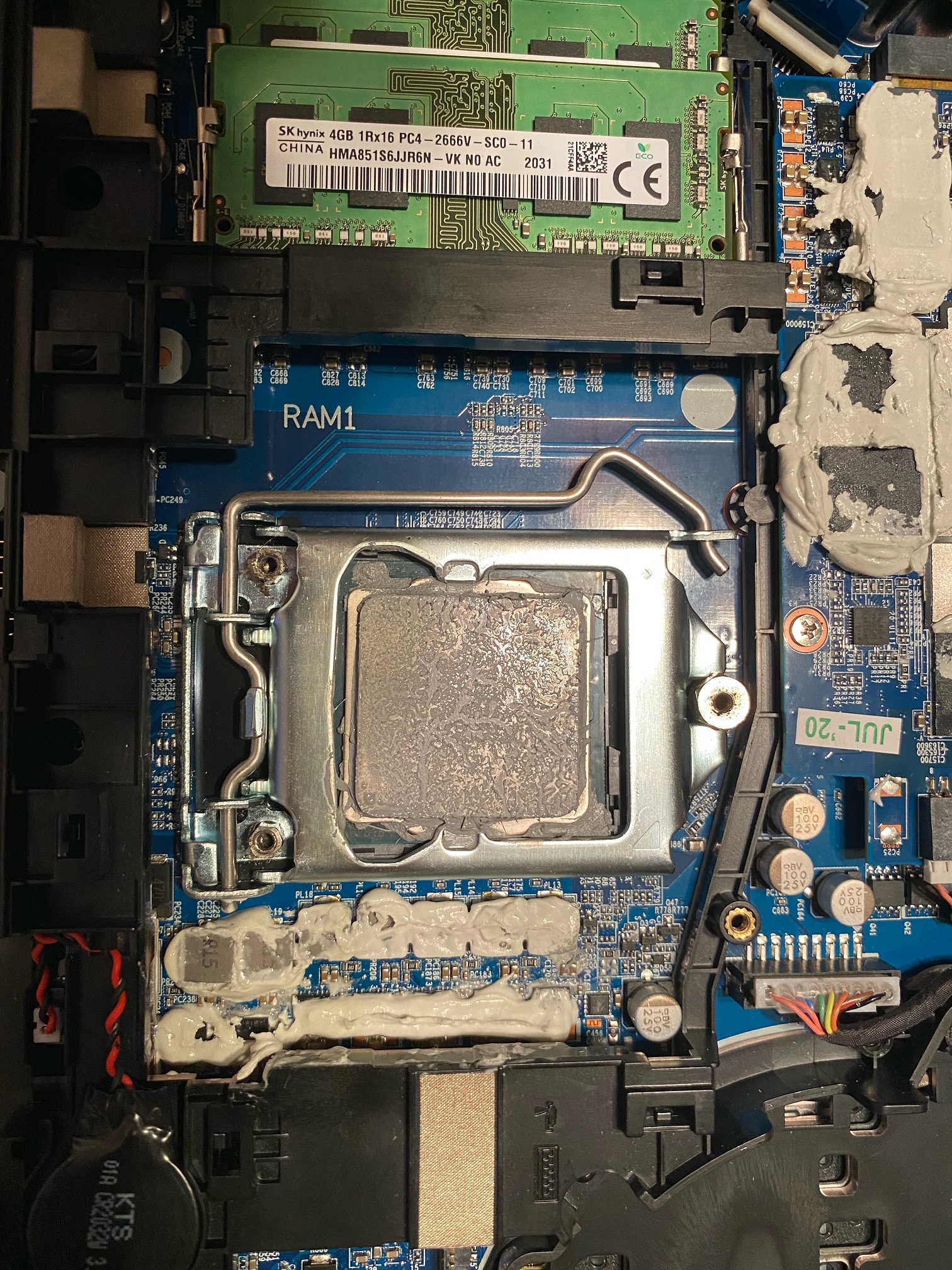
System kept crashing or wouldn't make it past a blank screen randomly. This was from day one. I initially thought it was a memory issue but it isn't (or not completely) as I've now tried 4x sets of memory (Stock 2x4 sticks, 2x8 Corsair 3800 sticks, 2x16 Corsair 2666, 2x16 Team Force 3200) with the same results. Lots of trial and error and discovered system would become more unstable the tighter the CPU screws are. System actually worked most stable with almost no / or none CPU screw tension (but horrific temps) showing something up with the socket. Lots of trial and error and boils down to a lof of QC issues and more. I finally started to break it down and take pictures of all the poor work done inside as I slowly start to clean up the mess.
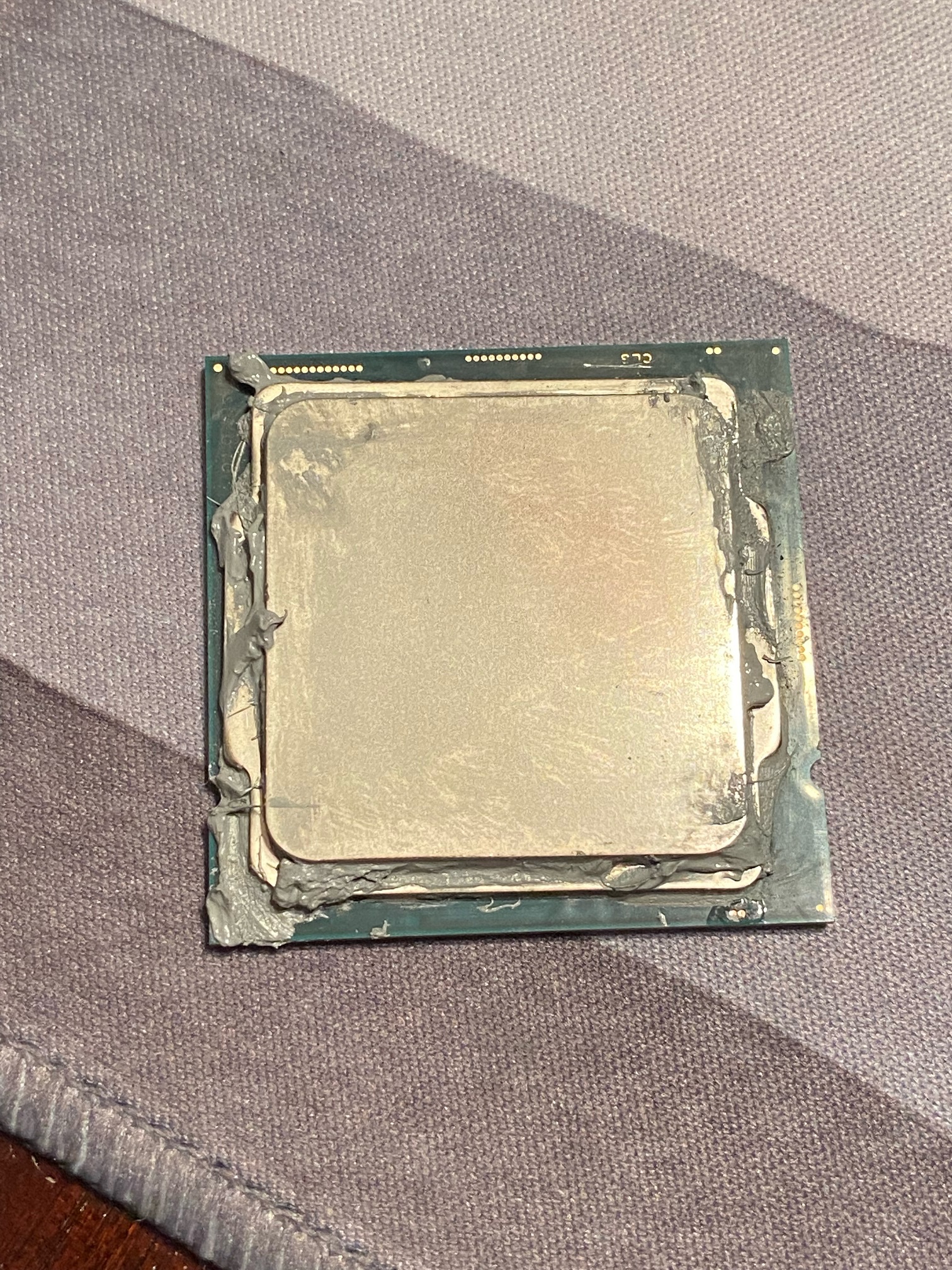
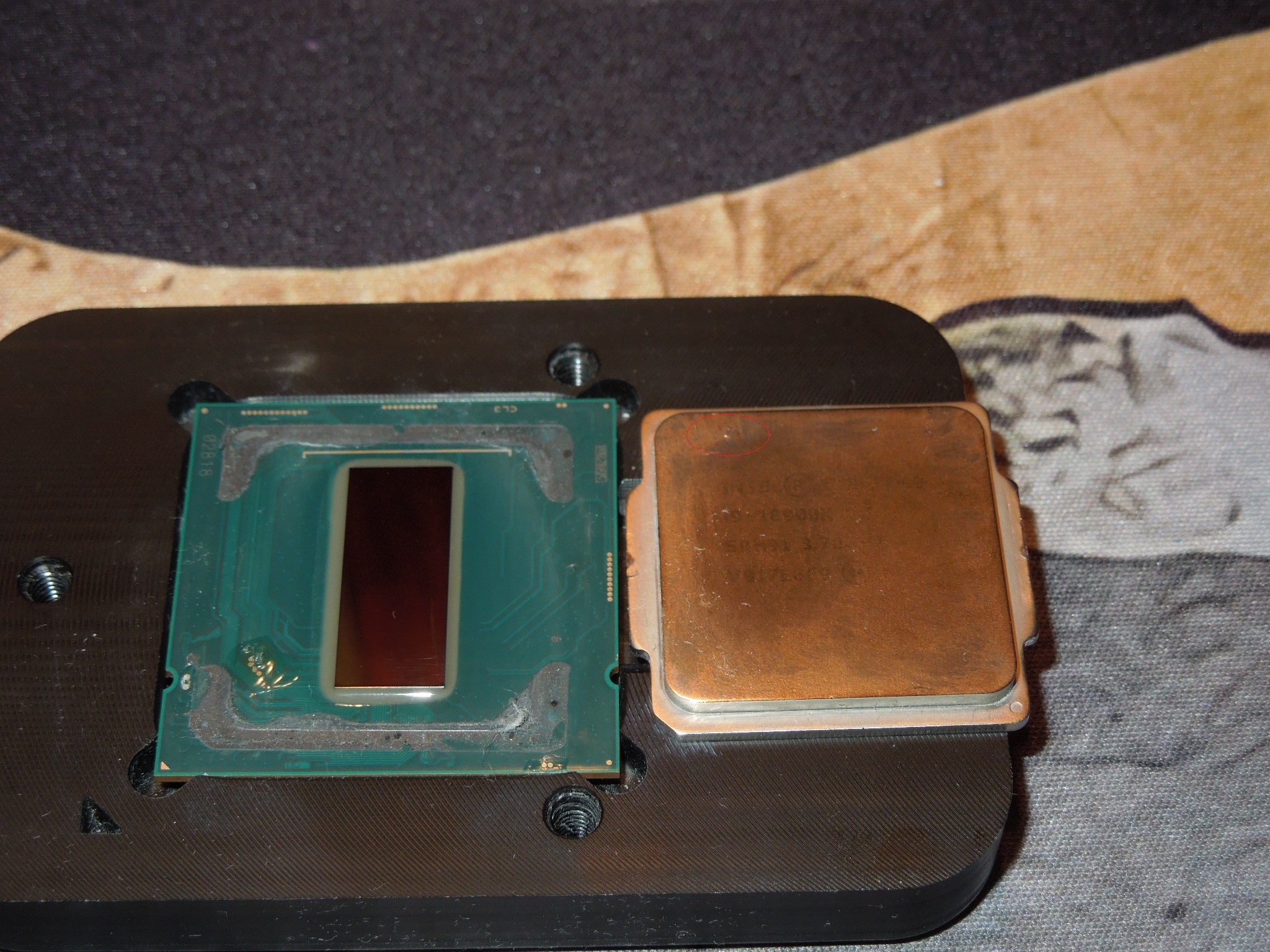
Right now what seems to be a very bad delid/relid and k5 and thermal compound run amok both over on the sides and under the CPU (both thermal grease and K5 (!)), A system that wasn't supposed to have used LM (only nano grease) but I've found LM in four spots already (Heatsink fin, Left heatsink fan exhaust cushion, system board, one on GPU by memory) and the heat sink was clearly used in a LM system before as both the GPU and CPU contact points are LM soaked and the CPU copper plate had hard swaths of LM baked on. Worse, CPU wasn't fully in the slot because of the gunk underneath it or odd mount and was raised on one side. Relid was not only crooked but over so far the left socket retention clamp was barely making contact. This might have caused seating issues too.
Right now, I spent the last few days cleaning out the CPU socket, buffing down all the LM chunks on the heatsink, playing LM detective looking for more drops and pieces in the system and today re-delidded the CPU and the askew mounting wasn't aligned to the LM on the top leaving about 20% with nothing (might explain some cores hitting 95). I thought the CPUs were relidded with copper IHS's but I was wrong as they are relidded with the stock IHS. The IHS writing was worn away from previously being used in a LM based system.There was some fused chunks of LM on the top of the IHS too. It looks like one of the CPU pins was maybe bent then nudged back into position (or it was like that from the factory) as it failed the flashlight test (one of these pins shines unlike the others).
At least 8 screws were loose inside. Fan was missing a screw (replace with one out of my screw kits).
My theory is that due to the bad CPU mount on many points, sometimes it would make adequate contact to start up and sometimes it would not. Once in use, sometimes heating up would shift the mounting and it would freeze/crash and won't start back up till you left it to rest.I just know opening up was a, "wth?" moment and as I started to clean up the mess I was just getting more irritated.
Right now, the 10900k has been completely cleaned up and properly relidded and is curing as I type. Whoever applied the nail polish / silicone coating to the contact points inside applied so much it was as high as the die. I took that off with acetone and applied conformal coating nice and thin. Usually I only see that if someone accidentally uses a gel based nail polish which can fluff up like that and/or too much of the normal stuff and leave it in a large droplet instead of flattening it out. There was at least 3x as much LM as needed used inside and there was large streams of it inside on the PCB. The lid was resealed only on two sides with a lot of LM in play inside.
I'll pop the 10900k into my main rig tomorrow while I fish the wife's 10105 from her desktop and try it in the X170SM-G along with my 11900k just for my own edification.
The system, when it would start up and stay stable, would do 4.9 all core CB23 but hit ~95. No thermal throttle, but seeing your results gave me a big, "hmmmm" along with the other issues.
As for the PremaBIOS question, no matter what I do, I can not get rid of the -.090 UV in BIOS except to manually alter it even after a full CMOS/NVRAM clear and clean W10 install. I wanted to see what your version was. Mine is 1.07.zT1 and it is odd to have a hard coded UV if yours does not.
Next step will be to remove the GPU and check it over meticulously along with underneath.
I'm hoping a piece of stray LM from the previous whatever happened with the system didn't get loose and run amok somewhere. -
Not much better than my daily frequency. I think it’s all about silicon quality. My chip doesn’t seem to like the real high frequency benching speeds much.
I have a better chance stabilizing all core 5.4 daily than benching all core 5.5.
By the way. Great results on that 3770K. I loved those chips. Back then I had a i7 3820 with X79 motherboard they too enjoyed 5Ghz pretty well. Even with a crap Alienware motherboard. I ran a 3570K too, couldn’t afford the 3770K lol.
The 3570K was my first introduction to Intel platform using both Z77 and X79. I had always ran AMD before hand.jc_denton, electrosoft and Papusan like this. -
Memory is Gear 1@ 3,882Mhz CL14-15-35-266-1T-16 tFAW.
This seems be the sweet spot.electrosoft and Papusan like this. -
5.4 is still better than 5.3. And better for benching You could as well try up the BCLK.
In the chilled territory now with my 280mm AIO. 1.65v and the higher BCLK to boost mem speed have started being flaky. Yep, its about the silicon lottery. And thanks
https://hwbot.org/submission/484964...0m_core_i7_3770k_22sec_594ms?recalculate=true
![[IMG]](images/storyImages/2586919.jpg) Last edited: Nov 7, 2021Rage Set, jc_denton, Spartan@HIDevolution and 4 others like this.
Last edited: Nov 7, 2021Rage Set, jc_denton, Spartan@HIDevolution and 4 others like this. -
I'm a dingus. I forgot that System Information in Windows reports the BIOS version.
I hooked up an external screen to my laptop and pulled up that utility. I have BIOS version 1.07.zT1 just like you.
When I first got my laptop, I also had an undervolt applied to the 10600K that came with my system. This undervolt was by 50mv. When I installed my 10900K and performed a BIOS reset, this undervolt went away. You may want to try both a CPU swap and BIOS reset at once.
I'm sorry to hear you've had to put a lot of effort into physically cleaning up your system. I hope those streams of conductive doom haven't screwed up your system.electrosoft, jc_denton, Spartan@HIDevolution and 2 others like this. -
It sounds like the guys at zTec really botched that up. Sorry to hear that. It was certainly not what was demonstrated.
I think the -0.050v offset is programmed into the BIOS default.Clamibot, electrosoft, jc_denton and 1 other person like this. -
Good nigth brothers
Soon 6:00 AM here
.
https://hwbot.org/submission/4849698_papusan_cinebench___2003_core_i7_3770k_4563_cb?recalculate=true
![[IMG]](images/storyImages/2586945.jpg)
Why complain. The screwed one with (some Jokebooks) can't be undervolted, HaHaLast edited: Nov 8, 2021 -
I won't likely be able to earn any points for 3DMark benchmarks after all of the submissions with the 5950X, but the graphics scores are nice to look at. The FS GPU score is almost 2000 3DMark higher than with the 5950X but the physics and combined scores are way out of reach on a CPU running short on cores/threads.
Last edited: Nov 8, 2021 -
Yep and soon will 12900K disrupt the 3D results with 5950X as well. Even stock 12900K will beat some nicely oc'd Ryzen in 3D physics. Only very good graphics score kan keep you afloat.
Highest ranked TS physics scores.
Last edited: Nov 8, 2021Clamibot, electrosoft, Ashtrix and 5 others like this. -
I guess so much for our concerns about BIG/little cores, eh? I don't like the concept, but the numbers are good. Once in a great while newer can turn out to be better. It is a shame it so seldom happens.Clamibot, electrosoft, Rage Set and 4 others like this.
-
The problem with BIG/little cores is this chips won't be an bench allrounder. Good in something but fall back ( collapse) in other benches. One step forwards and two steps backwards. On top it compete with an Amd Ryzen chips from 2020. We are soon into 2022.Last edited: Nov 8, 2021
-
You’ve got me ready to throw that 10850K in, and give it a go on 1.06 bios. This bios is amazing. Prior bios are pure crap compared to 1.06.
Atleast you’ve got the Z590 Dark at its best.Clamibot, electrosoft, jc_denton and 3 others like this. -
Looks like BGA's are breaking tradition of 'no flagship for mobile' and getting TI variants. I wonder if MXM versions will be carried.
NVIDIA GeForce RTX 3080 Ti Laptop GPU
https://videocardz.com/newz/nvidia-...-spotted-with-7424-cuda-cores-and-16gb-memoryClamibot, electrosoft, Papusan and 2 others like this. -
3080 Ti Laptop GPU is just disgusting. Equal disgusting as next gen castrated Intel mobile processors. 3080 Ti will be the second top dog Ampere mobile graphics that can't match the core count of the real 3080 desktop card. What a failure. But intended and expected.
A few years ago we had 200W xx80 mobile graphics cards with the same die as the desktop counterpart. Now we see more and more differenciating between laptop and desktops SKUs. This will also translate into more expensive laptops.Last edited: Nov 8, 2021 -
Initial look at these...which many of us probably know alr.
* E-Cores useful for MT tasks only - Streaming and etc Production, the brunt of the work is Golden Cove only, it's the real star of the new CPUs (Anandtech) for gaming they are nothing.
* P/E Cores share same power plane, disabling E will give some headroom for P cores.
* DDR5 cusp, many people either have to settle for DDR4 or try to get a starting DDR5 kit, G-Skill Trident Z5 is expensive but it's not in stock hard to find plus both D4 and D5 buyers must be aware what they are, for DDR4 potentially support problems EOL, DDR5 starting era so first adopter tax. Mind you IMC is actually improved another proof that Intel emasculated LGA1200. ADL gets DDR4 C14 4000MHz Gear 1 at 45ns (higher latency because of newer E cores to the ring bus and more L3 cache), but once DDR5 matures DDR4 will be left in dust however it will take time, there's a fresh rumor today from MLID that Raptor Lake will support DDR4. We do not know what Intel plans for LGA1700, it does have more pins. But after seeing the LGA115x syndrome for the past decade and Intel's formula of 2 Chipsets max. It could be anything...
* OC is too limited now, at-least what I'm seeing, the heat density of the ADL silicon and the new STIM all of them along with Intel's factory binning it's close to wall. I think at best people can run them on 5.1GHz - 5.2GHz all core OC with solid loops, too much heat. I remember someone on OCN thread saying how ADL consumes more Amps on VRM which is why all Z690 are too fat in VRMs. And this CPU hits Tj Max way faster than 10th or 11th gen.
Kitguru's Leo had a video of the CPU. Check at 21:51 mark, Ofc it's solid performance for the same watts if we compare vs 10900K or 11900K. Also it's clear win for the i5 here in the charts if you see, 12600K for the gamers and some MT tasks too for the value, it has more roof for OC but unfortunately low bin, not sure how the lower than i9 have IMCs tuned.
Intel is binning these CPUs hard just like 11700K vs 11900K which had ABT which essentially draws insane power and kills OC but worthless for OCers since they can get much much lower voltage, heat and power draw than that auto boosting behavior. But now 12th gen is almost like Ryzen still we can have Fixed set of clocks without that XFR thing and "Auto boosting" behavior of Ryzen but the roof is much smaller.
* Cache bugs as per Falkentyne should not exist anymore since this is a brand new design where Intel should have fixed all issues, still when I google for WHEA I see that on even 4790K (please note Cache errors on SKL is not equal to that Haswell refresh at all just pointing out the scope of WHEA) to 11900K series so it's a matter of time how stable Z690 and ADL platform is.
I wonder how the future entails. For this design, I do not like this more E cores. 12700K is basically reduced E cores but Intel also cut off the bins on that for P cores ad 12900K gets top bins, and in future rumors Raptor Lake new Cove P design plus more added Small cores BS per SKU. There's even a sadder rumor, Zen 4 is all big core serious stuff. But Zen 5 rumors are pointing to be Zen4D (it's from MLID who was worse reputation) still it's a rumor, Zen 5 + Zen 4D same big little BS, but AMD why should they do this...Intel is the one who is taking the ideas at the moment - Xeon Sapphire Rapids, same like MCM but has very short distance on PCB due to EMIB / Foveros. Big.Little from ARM. Also the tuning aspect, maybe they will leave it but it won't be viable like the old days of OC.
So much for the BGA trash earth saving cores, the BGA gamer boys are going to adopt to Windows 11 else Windows 10 will have Performance plan issues all over the place, if they keep Battery optimized the Intel Thread Director and Windows 10 will assign the background tasks (x264 encode or anything idk how the downloads etc will work) they will have lower performance since they will be gone to E cores not P cores which are strong, Anandtech had it covered a full page.
Also for fun check Jayz lol..
I forgot to mention this earlier @electrosoft , your analysis of that X170SM-G was really horrific to hear too much, unfortunate really. But I think you have pretty much everything figured out, if it was me it would have been a nightmare and I definitely do not have that much experience to see thingsLast edited: Nov 8, 2021iunlock, jc_denton, Falkentyne and 5 others like this. -
Intel Raptor Lake 13th Gen Core CPUs Will Retain DDR4 Memory Support In Addition To DDR5
At least the top dog AL desktop chips don't follow the laptop chips with more of the E-cores than the real P-cores. Still an awful tech for max performance.
Last edited: Nov 8, 2021jc_denton, Rage Set, Clamibot and 1 other person like this. -
Ok, good to know we're on the same BIOS.
I'll see what happens today when I swap in the 10105 and the 11900k. I'll be pulling the 11900k from the desktop and swapping in the 10900k to make sure it is working 100% as intended.
When I finally cleaned up the CPU, I immediately knew it had been subjected to LM as it was faded and there was a nice, little lump of LM fused on it.
Cleaning up the heatsink double confirmed it.
The fused lump on the IHS and the large spread of fused LM on the CPU heatsink would definitely cause some optimal pairing issues along with the internal mismatch of LM and dry area.
The extra large dollop of nail polish / conformal could also come in play due to it being so tall under the IHS.
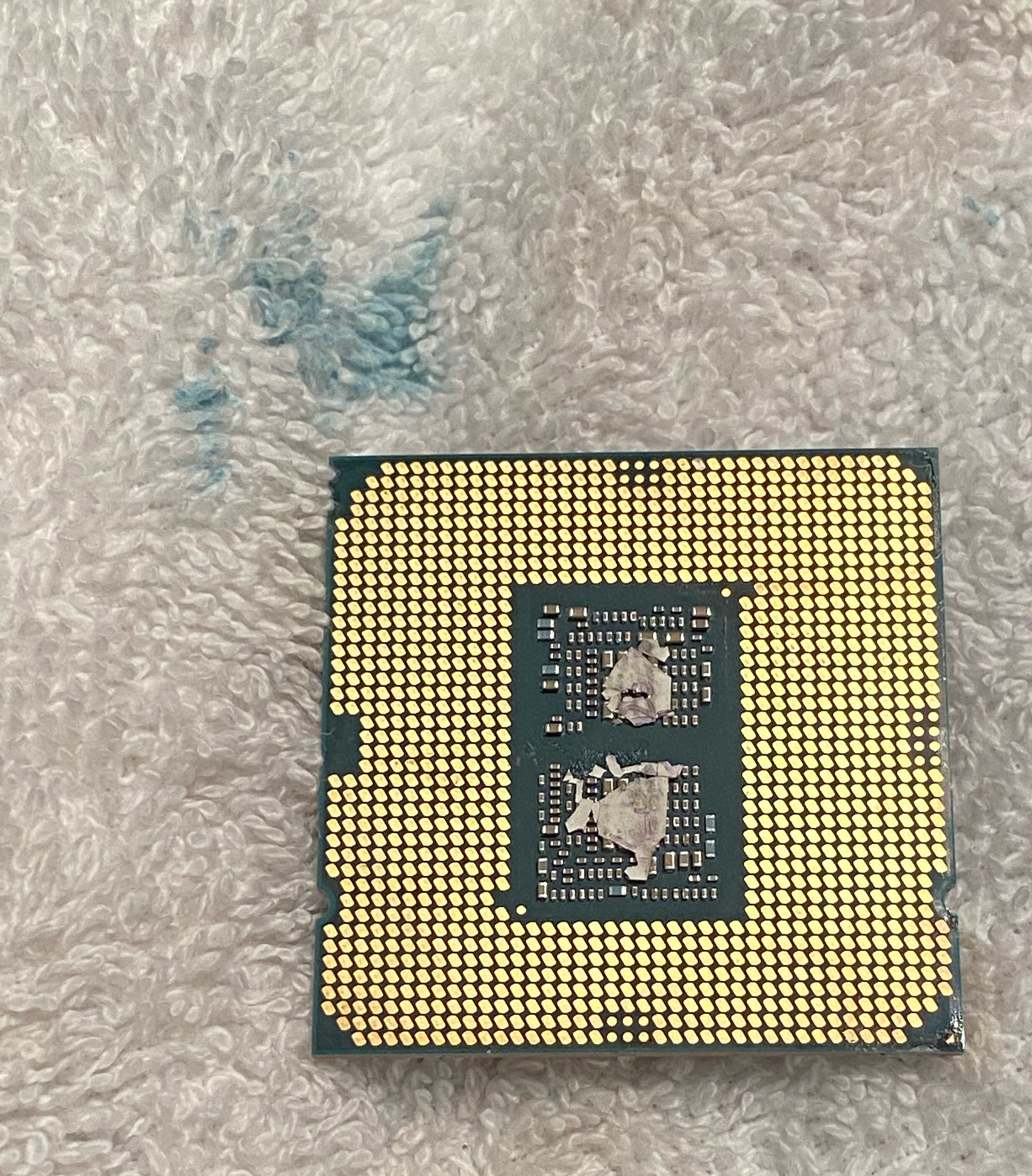
The uneven mount but more importantly looking at the underside I see some thermal compound on a few of the contact pads too
I'll double check the CPU pins to check for any thermal compound on them.Attached Files:
-
-
That’s why copper and LM kinda sucks. You’ve gotta sand it down every re-mount. Try flux polish first though see if it fixes that IHS. Nickel plating does this but not bad at all, flux aways takes it right off or your finger nail.
Can you run no IHS at all? How’s the mounting pressure? That would be worth trying.jc_denton, Falkentyne, Clamibot and 2 others like this.
*Official* NBR Desktop Overclocker's Lounge [laptop owners welcome, too]
Discussion in 'Desktop Hardware' started by Mr. Fox, Nov 5, 2017.


![[IMG]](images/storyImages/2586907.jpg)
![[IMG]](images/storyImages/2586898.jpg)
![[IMG]](images/storyImages/2586903.jpg)