 Problems? See this thread at archive.org.
I absolutely agree about copper and LM and issues down the road. I had problems with crud after soak on one of my copper IHSes on the P870TM1 before.
Yeah the problem is the system was never supposed to have LM at all on the GPU or CPU only nanogrease. It had the nanogrease but the heatsink was clearly used before in another system with LM.
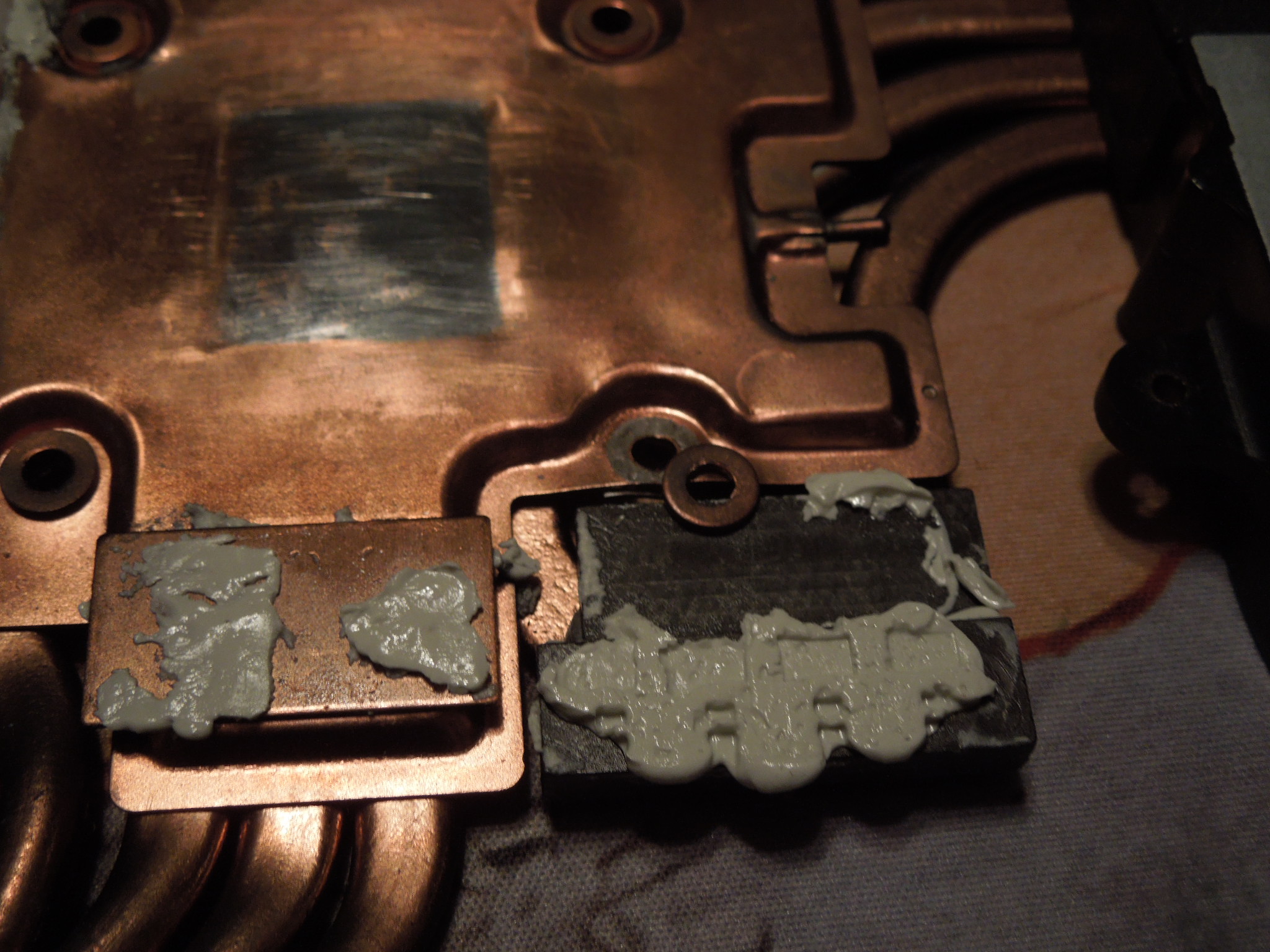
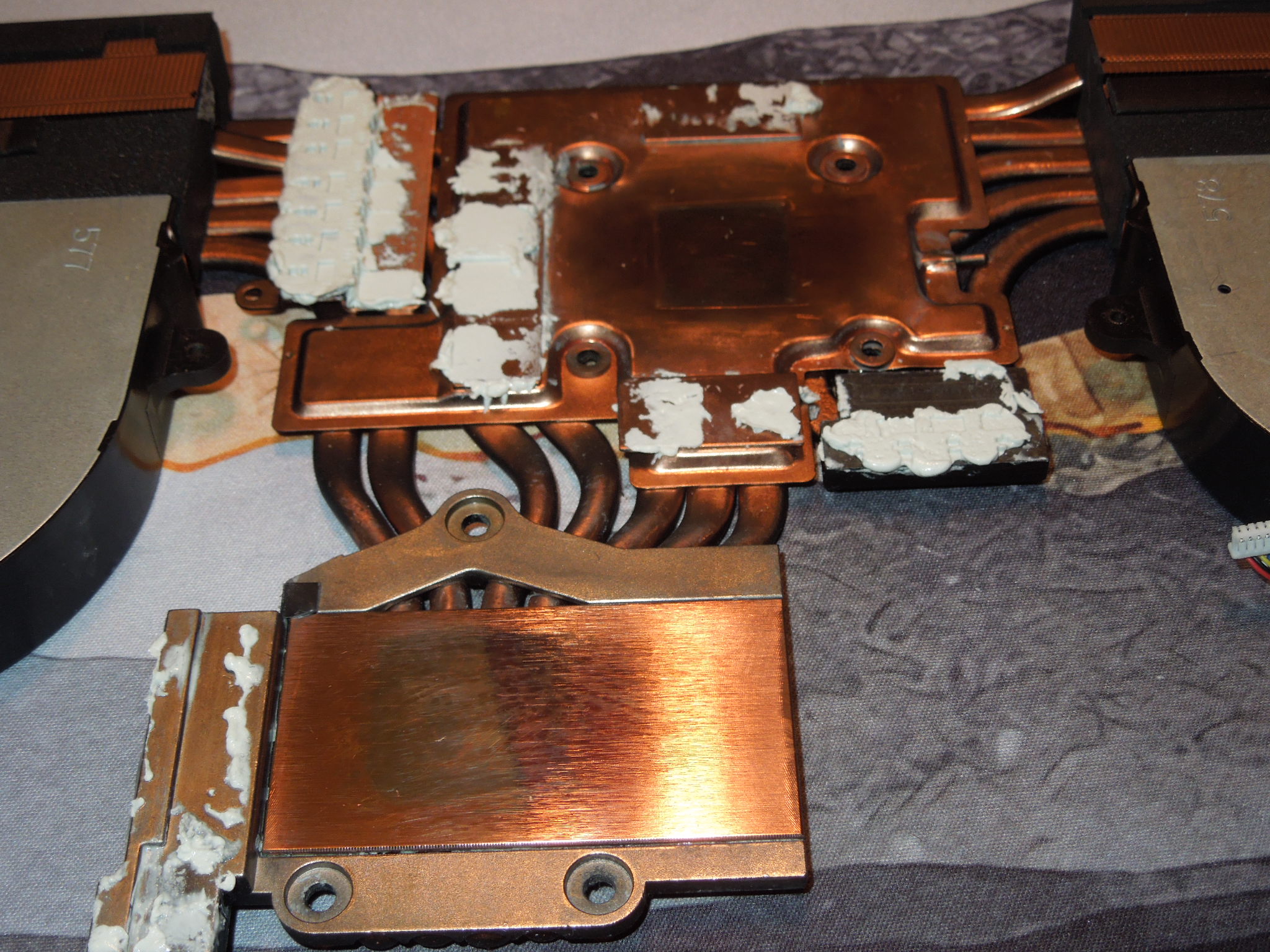
I already buffed down the chunks on the heatsink so it is nice and flat and smooth again.
I tried Fitz's and some other metal polish and it cleaned it right up except that stubborn chunk would not buff down or move no matter what even after 30 minutes. I ended up just using a razor blade to level if off. I'd rather have a few micro scratches recessed which can be filled with thermal compound than a lump that will compromise the entire pairing.
I could explore a DD mount down the road but with a uniform heatsink like this it may put too much stress on it getting that now without a shim or block.
Even one of the soldered washers was loose. I tamped it back down with a few drops of glue but still...
Heatsink pictured after buffing out the lumps...
-
-
Yeah I was always doing the same with that P750 I had lol. But you know, once you get it right, you know you’ve gotten it right.
My laptop was ugly as sin inside lol. Packed with Gelid extreme pads everywhere and K5 Pro everywhere.
But it performed great! It managed a desktop power GTX1080 with 250 watts, and a desktop class i7 8086K at 5Ghz all cores. Countless hours of enjoyment on that machine, I beat RDR2 with decent performance.Rage Set, Clamibot, electrosoft and 1 other person like this. -
Did you mean Flitz or actually meant flux? I am asking only because, if it is not a typo, I want to get more details on that if flux is what you meant to type.electrosoft likes this.
-
The first time I opened up my laptop and took off the heatsink, I was wondering why the thermal pads looked like they had melted.
Also that image with thermal paste on the bottom of the CPU irked me. How does one mess up a paste job that badly? -
Yeah I meant Flitz polish compound. It’s a must have for silicon, and the IHS too.
This is the die of that dead 10900K. I may try and test it again. The silicon looks fine after Flitz polish.
This CPU should work, or may potentially be repairable.
I have never used flux on silicon. I only use a razer blade now and Fritz polish compound. I actually used a metal blade on the 11900K, it came out great.
![[IMG]](images/storyImages/4-FC45-AFA-AA5-D-46-F4-B942-B0-E4-DE514781.jpg)
![[IMG]](images/storyImages/0-D3-C1100-E477-4228-834-D-EAB7156-B2467.jpg) electrosoft, jc_denton, Clamibot and 2 others like this.
electrosoft, jc_denton, Clamibot and 2 others like this. -
They possibly did the liquid metal prep (baking liquid metal into the copper to avoid absorption) on the heat sink not knowing whether the system would ship with thermal grease or liquid metal. That would explain why it is there if that is the case. It would not explain the clumps of dried liquid metal or the other messes captured in your photos.
I almost did not ask because I did not want it to seem like I was being sarcastic asking about the typo, but I genuinely wanted to know in case flux was actually the word you meant to use. I learn something new almost every day by asking questions, LOL.
Yup, Flitz polish is good stuff. When I run out of the small foil packets I am going to buy a bottle of it on Amazon. -
That's Nanogrease on the perimeter and on some of the pins. That's actually K5 Pro caked on the bottom of the CPU.

That would make sense about the pre-bake. The clumps dried on the CPU heatsink (but none on the GPU) didn't make sense.
I ended up picking up a full tube of Flitz a few months ago even with some packets on hand I liked it so much.
Post delid/relid 10900k and running CB23 in loops with mem at 4000 for extra ooomph in my desktop Gigafail Z590 motherboard so the CPU is rock solid (5 degree differential between cores = win):
-
AMD Datacenter event had some interesting bits of information on Zen 4 and up.
![[IMG]](images/storyImages/image_2021_11_08T15_14_27_294Z.png)
![[IMG]](images/storyImages/image_2021_11_08T15_17_57_082Z.png)
![[IMG]](images/storyImages/image_2021_11_08T15_13_50_667Z.png)
![[IMG]](images/storyImages/zgjKwuY.png)
Check out Milan X 806MB of L3 (edit - 768MB of L3 that's total) LOL insane...Q1 2022, so expect same AM4 Zen 3D refresh around same time.
AMD's 5nm is new HPC node, rather than the one which Apple uses, probably relaxed density as they all do. Zen 4c is official by the way, it's not big little combination on Server side but rather AMD says "Cloud Optimized / Cloud Native" specific for some OEMs I guess, I think this is to combat the ARM SKUs, because ARM parts like Marvell ThunderX2 and Ampere Altera Q8x series all have one type of ARM core but no SMT. So they get some advantage in Per core licensing I guess. So AMD wants to crush them with their Zen 4c, cut down variant with reduced Cache on same 5nHPC node but having similar high density of physical cores as ARM processors approach with that type only.
Genoa Zen4 96C192T is 1:1 with Bergamo Zen 4c, 128Cores both same Socket with DDR5, PCIe5.0 and other enterprise feature of CXL which Intel XEON also has on Sapphire Rapids.
They did not disclose anything on the AM5 side. I hope they do not go with Zen 4 + 4C BS or Zen 5 + 4C. Because their 5nm HPC is already dense as per their slides and having higher performance ( note - TSMC node not IPC or vs prev Zen 3). So I really really hope AMD does go with only big cores on Client and HEDT and create a new SKU if they want for the smaller cut down cores, like X series for bigger cores and C series for smaller cores, for eg - 7950X 16C32T Zen 4 and 7750C 32T Zen4c and put those smaller ones in BGA trashjokelaps with even more reduced cores and leave our Desktops and HEDT with solid high performance x86 cores.
Time will only tell, they also got MCM out too. And it looks beastly MI200 GPU 128GB HBM2e 560W TDP with Liquid cooling on TSMC 6N. Check out how MCM looks in render below, it is going to be RDNA3 but no HBM.
![[IMG]](images/storyImages/MI200_Package.jpg) Last edited: Nov 8, 2021
Last edited: Nov 8, 2021 -
I bought this exact Alphacool D5 pump/top combo pictured below for $37 dollars! It includes the pump, the top, and even like 8 fittings. I saw it on ebay and couldn’t believe it!! It is the VPP755 V3 variant which consumes less power than traditional D5, however it does have very good head pressure which is essentially equivalent to my full power D5.
It was sold by some wholesaler, apparently the computer it was in was crushed during the shipping process.
Anyways, what a deal!!
Water pressure makes a massive difference within my system. My 3090 Kingpin runs like 34C@335 watts during Assassins Creed Valhalla. These amazing results came after cleaning my clogged up Optimus Signature V2 CPU block. I can’t wait to throw this in!! I’m hoping for even better results one this is in my system.
![[IMG]](images/storyImages/708-DF7-DC-82-AB-4-F94-AA43-64-CBE8509-CB6.jpg)
![[IMG]](images/storyImages/EA85-D8-BF-07-CF-440-A-9309-50-BD745-ACA13.jpg)
Last edited: Nov 8, 2021 -
I find that K5 Pro is actually really good for laptops. I find it better than thermal pads because it eliminates fit problems. It is kind of messy, but using a syringe to apply it makes the application very easy and helps keep the mess to a minimum. That is what I use on my turdbook and it made a big improvement in CPU and GPU core temps. Imperfections in the shape and design of the heat sink and fit issues associated with variations in thermal pad height are eliminated. While the thermal conductivity rating is not high, it increases the surface area available for heat transfer and reduces the potential for issues with contact at the die of the CPU and GPU.
Yeah, that is a real steal of a deal you got there. Congrats on that. Even if the pump itself were no good, the top alone is worth $35.Last edited: Nov 8, 2021 -
KP Pro gets around and in nooks and crannies but it does stay pliable and malleable on the memory and VRMs and such. It doesn't harden and it can be re-positioned after use.
I'm not sure what that was attached to the bottom of the 10900k CPU since it was hard and crunchy unless the heat underneath baked it into large, crunchy mounds. -
Yeah you really need an ultrasonic cleaner to get K5 pro off. It’s like Vaseline or something. Nearly impossible to remove it all without one.
-
I'll cross that bridge when I get there.
Oh my EVGA Queue popped for the other, lowest priced, 3060 card ($329.95) and lo and behold I also used the 17 eVGA bucks sitting in there from you picking up the AZ590 so thanks bro! It's greatly appreciated.
-
Hey no problem, that’s really cool. Is that 3060 available by chance? -
I'm pretty sure I'm going to use this one to build out a system for sale because I have so many components laying around and I'll have an extra Z590 motherboard once I pull this Gigabyte motherboard from my main rig. I'll probably pick up an 11400f as the only thing missing is a CPU. I have everything else. I'll throw in this 2x16 DDR4 3600 kit I have and make it a mini monster.
-
I love the 11400F. I actually have one on my desk. It was $120 dollars new OEM tray. I was gonna use it as the delid practice CPU lol.
The 11400F rips!!!Clamibot likes this. -
Yeah, that is a killer price for a 11400F!
-
Now that I have no need or desire for it, I get a notification on the X570 Dark being available to purchase. Ooops. And, I received the original 5950X IHS from Rockit Cool in today's mail, LOL.
I have no idea. Whatever it was, it didn't belong there and would not have been there if the person that assembled it was paying attention and building it like it was going to be their own. Some of the stuff you encounter could only be viewed as inexperience or not caring. Neither of those possibilities is comforting.
That's a crazy good price for the 3060. So low it makes me want one even though I have absolutely no use for it, LOL.
Although it is difficult (tedious) to clean up, if that is what you are using for a thermal solution, then there should not be any reason that a person would have a need to remove it all.Last edited: Nov 8, 2021 -
So I did some more testing (and found another spot of liquid metal smudge).
11900k was a no go but I kinda knew that right out of the gate as it needs a BIOS update.
Put the 10900k back in and same symptoms. Basically low to no socket tension or it won't boot. Leaving minimal to no screw tension it boots consistently each and every time. 10900k worked flawless on the desktop looping CB23 and P95 no problem. I even threw in a RB 2.56 stress test for shiggles. This was with my G.Skill B-Die running at full 4000 CL15.
Even swapping CPUs and full reset, that -90 UV is still in the BIOS upon clear. Guess it is hard coded in there and varies depending on CPU installed from ZtecPC.
Team Force 2x16GB memory doesn't work at XMP 3200 either under the keyboard or bottom slots. Works absolutely peachy at 2667. Even bumping up Vmem made no difference.
Corsair 3800 sticks still work great at 3200 like that always did.
I'm going to do a clean install and see where the temps land with the re-delid and re-lid and cleaning up all the gunk and crap. It would hit 95 running CB23 before 4.9 on all cores. I'm going to also test each individual CPU screw to see if it is one particular one that is triggering the event. I've been tightening them in unison so far. -
I hope it turns out OK. That really sucks.
I came really close to purchasing a replacement 11900K today. I added it to my shopping cart three times and removed it. I'd like to have the third M.2 slot functional since the Z590 Dark doesn't have enough PCIe slots for me to use an add-in card like I have for several years. The X16 slots drops my GPU to X8 and the X4 slot doesn't work when M.2 slot #3 is occupied. I'm running 3 NVMe SSDs on the Strix Z490 (2 on mobo and 1 in slot) without affecting the GPU slot and I have been able to do that on every motherboard I have owned (including the chintzy ASUS Z490 Prime garbage board) in recent history before the Z590 Dark. So, that kind of sucks. My options are, live with only 2 NMVe, downgrade the CPU to 11th Gen, or downgrade the GPU to X8.
I went to HWBOT and 3DMark and did some searching and it is really difficult to see the 11900K as anything other than a downgrade from 10900K that runs hotter. I found a couple of benchmarks where the 11900K does better, but it does not offer enough performance to close the gap on the 2 cores and 4 threads that it is missing.
Edit: If I knew it would not be a waste of time I would remove the WiFi module. I have no use for WiFi and it would have been a better product if the Z590 Dark didn't have it. A total waste of PCIe lane/bandwidth for something silly. But, I don't know that doing that would allow me to accomplish what I want to with the third NVMe SSD. It really sucks that they are also wasting resources on WiFi with the X570 Dark as well. I hope the folks at EVGA are not going stupid gamer-boy on us. Vince needs to slap them around a little bit.Last edited: Nov 8, 2021jc_denton, electrosoft, Ashtrix and 1 other person like this. -
As I look at the X570 Dark in my EVGA account and the 3060 that Brother @electrosoft just purchased, and browse their web site to see that they seldom have anything but mice and keyboards in stock, I can't help but wonder how they stay in business. Their high capacity PSUs, motherboards and video cards are why they are famous and they literally never have anything for sale that I want to buy, and haven't had since long before the COVID fiasco or the crypto craze. Everything awesome that they have to offer is a limited production lottery that is approaching EOL status before you can acquire one.
-
I really hope this won't happen. If they start force you to use Benchmate on Win 11 with Alder lake, I expect they will do the same for all HW and this will destroy oc'ing on older hardware. This means you can't compete equally with older bench scores. BM will add a overhead on your max overclock. I don't like what I see from todays/tomorrows tech.
-
I hope not as well. It seems everything is reaching the point of catering to society's lowest common denominators now and it would be a shame for that to happen here, too. The answer should be "No, you can't because Windows 11 is crap and we don't want to ruin things for everyone else in the world just because you want to run Windows 11."
If that is going to happen, hopefully he means standard for Windows 11 Kool-Aid drinkers only rather than everyone that doesn't drink the Kool-Aid.Last edited: Nov 8, 2021 -
Yeah I’ve got about a 140 point loss in R15 multithreaded with 10th Gen vs 11th Gen
While the loss is like only 6% it’s still annoying. I still like 11th Gen better though.
I look at a lot of graphs while running games and the difference is worth while for me. I also love the wifi module because it gives us wifi 6 too. This makes gaming wirelessly with VR possible. Or I can enable Bluetooth and my desktop is a hotspot for my MacBook. Yeah I know, these are all pretty cool consumer level features that don’t help overclocking potential. But, I run hardware at the highest OC level in daily situations. And it’s these features that really help that $600 dollar price tag make sense for me.
Also, the Z490 Dark only had (2) NVME slots on it. The wifi m.2 on either Z490/590 doesn’t accept standard sized nvme SSD’s. And I don’t think It’ll even work at all with a smaller sized SSD. My X299 Darks wifi M.2 slot wouldn’t work with an SSD at all. We’re you talking about just removing it all together and seeing if it gives you lanes? Have you tried the dip switches to disable the Wifi M.2 slot to see if that helps?
If you have a Z490 board with (3) SSD M.2’s installed it’s just because that board just so happens to have three SSD’s. The Evga motherboards never did. Besides the Z590 which made (3) M.2 slots a standard.
As for Windows 11, I’m not getting near it. I wouldn’t mind a newer Windows 10 LTSC though mine is from 2019.Last edited: Nov 8, 2021Clamibot likes this. -
You mean like the mighty 486 with a math co-processor? I remember thinking that I had finally reached the pinnacle of computing madness when I got one of those, LOL. It was a Packard-Bell from Costco. Only 4 of my 5 kids were born and two were in diapers.
Right. My Strix Z490 only has two as well, but I think maybe you missed my point. I am not talking about using all three of the native M.2 slots because I can't. My intent was to use a PCIe add-in card for the third NMVe and I currently do with the Strix Z490, as I did on the Z490 Dark, Z490 Prime and I also used the PCIe add-in card on the X570 board. Doing that did not reduced my GPU to X8 from X16 on any of those boards. I can't use the first M.2 slot with the 10900K because it is exclusively PCIe 4.0 and the M.2 slot is not usable. The X4 PCIe slot on the Z590 Dark shares resources with the third M.2 slot. You can't use the X4 slot if the M.2 is occupied. If I use the second X16 slot next to the X4 slot for the PCIe NVMe add-in card it drops the GPU to X8. So, I'm screwed as far as installing a third NVMe unless I want to use my GPU with half the bandwidth. Even my crappy Strix mobo doesn't have this limitation. I don't know why the Z590 Dark does except for the possibility of the WiFi (also PCIe) robbing me of that capability.
The Z590 Dark is supposed to be a no-holds barred overclocking enthusiast motherboard above all else, not a gamer board with a bunch of features that don't contribute to overclocking. The X570 Dark has the same issue. They added WiFi and RGB to appeal to gamers. I doubt that guys like Vince and Luumi are worried about WiFi hotspots and VR capabilities, and I know that I am not. So, that being the case, it is no longer an enthusiast board unless you are enthusiastic about something other than overclocking. Not that any of that is bad, but it's not what they say it is. It's got extra crap.Last edited: Nov 9, 2021 -
X170SM-G mystery solved (so far) news at 11:
So I'm sitting here watching DUNE earlier with the wife and thinking about the X170SM-G and wondering why it works one way and not the other, going over all the mistakes I found and fixed and then thinking "well, so much was done wrong, maybe they just grabbed whatever screws they could find and went with those? Maybe it is the screws themselves?" I know I've fixed PCs before when a wrong screw was causing a short via the post so why not? I'm thinking an inconsistent short and placement closed loop issue is the last possibility.
After DUNE was over, I pulled up some images of the original heatsink to take a look at the retention screws and notice two issues:
A> The original screws appear to be painted and non conductive
B> The original screws are about 1/3 to 1/2 the size of the ones installed in mine
I'm thinking they are causing a short of sorts as something is improperly grounded and/or they are so long they are passing through something electrical (which shouldn't matter anyhow since the original screws are much shorter) and causing another short.
I sized them up (M3) and switched from the apparent M3x10 to M3x6 (M3x4 was too short to reach) insulated screws I keep in a big kit of numerous screws (same kit I replaced the missing fan screw) pop them in, tightened it down nice and snug, hit the power button and viola!
Not only booting consistently but MUCH quicker to boot. I mean right to the ZtecPC logo fast. Before sometimes it would delay variably before getting to the boot logo. Now it just, boom, there we go.
I spent like 5 minutes turning it off and on, moving it around, taking the screws out then back in, extra tightening them as a test and nope....turns right back on. I put the other screws back in as a test and right back to the inconsistent boots ranging from booting consistently with low to no tension to not booting at all with even medium tension.
I was literally at my last straw thinking what else could it be? I had meticulously cleaned both the socket, re-delidded and relidded the CPU to exacting standards, buffed out the LM lumps, sheared the LM clump off the IHS, tested it extensively on my desktop motherboard and spent the last few days cleaning and certifying as much as I could inside the system.
While I'm glad it appears things are heading in the right direction, the poor QC was bad. This was just the icing with a cherry on top. I'm very irritated @Terreos and I had to battle these odd ball blank screens and random crashes over a very bad and sloppy job (documented earlier) culminating in improper screws.
Original screws are the silver ones.
Replacements I used look like the shorter, black one.
-
More like dual processor boards become the norm and single processor boards get phased out. I doubt it would be akin to what The Precision 7820 provides where its literally a dual processor workstation. IIRC these littlebig strategies is supposed to save the planet or something so there is no reason to not push that idea to its logical conclusion and before long you need to buy two processors for a standard Zxxx or Xxxx (i.e. mainstream performance) which would help differentiate between it and H or B series boards
Im on copious amounts of sleep aids so I apologize if this thought experiment is illogical. -
I think they are so backlogged with commitments to resellers and queue that was so overrun they threw up the proverbial white flag and shut it off knowing they need a massive window to play catch up for all their high end in demand items.
Ethereum is on the rise. Card prices are trickling up again. I expect the next few months with the holidays here to be a mad house and a large spike in prices.Papusan likes this. -
I'm real glad you finally figured it out! I would've never thought of this on my own because in my system, the screws do not appear to touch anything such that they would ever cause a short. That's another item to add to my mental list of potential issues with a computer.
It seems my laptop was the one all the QC went into. It works perfectly and I love it!
On another note, I've been experiementing with how low I can get the power draw to go on the 10900K installed in my laptop. I managed to get the power draw to as low as 4 watts when idle. That's insane power efficiency for a desktop CPU. I keep discovering new things about this laptop that keep making me like it even more.
My new screen is now supposed to arrive on Thursday. I can't wait for it to come so I can convert it to a glossy screen and complete my dream laptop. The only thing missing from this laptop now is a working glossy screen.
Dreams do indeed come true. My perfect laptop is almost complete.jc_denton, electrosoft, Ashtrix and 2 others like this. -
I believe the one @electrosoft purchased may have actually been the first one they shipped. Maybe @Terreos can confirm that, but I can vaguely remember that was the case.
@Ashtrix - So, I messaged canonkong to see if he can help with this and offered to pay him if he can make it all work.
![[IMG]](images/storyImages/VjSXL8X.jpg)
Last edited: Nov 9, 2021 -
I’d have to dig the email up, but I was number #3 to order one. Whether it got shipped first or not I can’t remember. But it was indeed early.
I can’t believe it had that many issues. Otherwise I never would’ve sold it. It really seems like they almost duct taped it back together after they sent it back to me and it held long enough to pass hands. I’m happy @electrosoft seems to be a very handy man and has it working the way it should.
Not gonna lie ZTecpc just lost any future purchases from me. That’s honestly Razer levels of bad of QC testing and repairing.
Papusan, Clamibot and electrosoft like this. -
I'm glad you picked one up end cycle reaping all the QC and price reductions. Can't go wrong with that! I mean, if you want to test the theory get three metal, uninsulated m3x10 (or x12) screws and have a go at it and see if your system experiences a quasi NZXT meltdown.
At least we also now know definitively the 11900k needs a BIOS update to work.
Right out of the gate it was a monster upgrade for you so as you continue to dial in and explore it can only get better.... especially with a less cracky brokey screen come Thursday?
-
For those that are visual learners...
I am testing my memory a bit on how that is made, but don't the three screws around the CPU thread directly into standoffs that also attach the ILM to the motherboard? If so, being too long would bottom out in the threaded standoffs and inhibit contact pressure because they would not allow adequate pressing of the heat sink cold plate against the IHS, but there would be nothing they can short against that I am aware of. Or, are these not the same three screws that you are referring to?
I went and watched the Dune remake at the theater with my wife for our 35th wedding anniversary on 11/1 and we really enjoyed it. I liked it much better than the original.Last edited: Nov 9, 2021 -
I got zTecpc's very last unit. I had to wait 3 months for it because it had 2 defective motherboards in a row. The third one worked perfectly and they shipped the laptop to me after that. I think they went all out on my unit to make their last customer super happy.
I'm looking forward to getting my replacement screen. I'm bummed I broke my original screen and had to spend more money on this laptop, but at least I learned this lesson: never attempt to remove an ultrathin screen glued to its housing, remove the entire housing instead.Papusan and electrosoft like this. -
@Mr. Fox really a lot of hassle I'm seeing, hopefully canonkong can help with that. I wish he just releases all the Intel Z590 chipset drivers he modified to public to help many, also the activity over Win-raid is low on Win7 page, I think so many people are simply domesticated with the horrendous WaaS POS Win10 and even more are willing to run the beta sheep guinea pig release called Win11 made for dumb cattle. I still cannot comprehend, but the intelligence level is very low nowadays they are just "Consooom the product" nothing else and we have to pay the price.
Not an expert on the lane bifurcation like you...just sharing.
So Z590 Apex feature set..
From what I read on the manual, here's the manual (for some reason ASUS website has no manuals some site update I guess) so basically we can get away with PCIe3.0 SSDs total 3 of them yeah they will choke the DMI if we use all simultaneously but they will run. Anyone please let me know if I'm wrong on the bandwidth sharing on the Apex.
There are only 2 M.2 slots are on the board, one is CPU only 11th gen 4.0x4 which is obv disabled for 10th gen but looks like M.2 second slot usage will also reduce the GPU lanes by x8 from x16 basically that's the only slot for CML and using that will reduce the GPU lanes. However, on that board we can use DIMM.2 slots for 2xNVMe SSDs only on PCIe3.0. And there's also the PCIex4 length slot which has no relationship with the GPU lanes but rather SATA ports and perhaps DIMM.2 is also independent to the GPU lanes both of them share lanes with SATA ports, running DIMM.2 2x 3.0 SSDs will disable one SATA, running PCIex4 length expander card as you are suggesting will make another SATA port disabled.
Not an expert on this lanes, but is it because of 2x LAN ports that are there on DARK that are perhaps eating up, I was thinking we could get the U.2 port and use it, but it's the same story. Using that one by this method -> Get an U.2 to NVMe Adapter to get that PCIe SSD and get the SFF8643 to SFF8639 Cable (12G Mini SAS HD to U.2), because EVGA has the former we need the latter to fix in the enclosure. But sadly this is worthless as it will disable the M.2_2, so pointless in this case (this is only useful for my case, where i would spend on an MLC 860 PRO SSD and run it at PCIe3.0 speed but it won't work
EVGA really screwed up I guess ? A side note not related. EVGA went with doublers. Apex has no doublers, I thought ASUS always use doublers.Last edited: Nov 9, 2021Papusan, electrosoft and Mr. Fox like this. -
The Cooler Master Masterliquid ML360 Sub-Zero TEC AIO is on sale right now. With the rebate you'll get if you fill out the mail-in rebate form, the effective cost of the AIO is $190 up until the end of this month. I'm not really sure why companies do rebates, they really should just offer the discount upfront.
Anyways, now since this cooler isn't super overpriced anymore, maybe some of you would like to get it for your gaming systems so you can achieve the absolute best single core performance for those sweet sweet high framerates. I kinda want to get one now, but I don't have a system to put it in. Maybe I can try out some crazy experiments with my Clevo X170SM-G.
-
Yep the CPU retention screws that thread directly into ILM to the MB, and the original screws can make some contact (no to low tension), but as soon as they are about medium tension the system won't boot more often than it will. Full tension = no boot at all.
It doesn't even require anything close to a bottom out for the system to start crashing or failing to get past a blank screen.
I did notice the original screws used to be coated (you can see fragments around the head) but were worn away.
With the replacement screws, I can go full tightness and it boots no problem.
Agreed, as a fan of the novel and having actually been ok with the original movie, I vastly preferred this version much better. -
-
EVGA going all in for AMD X570 motherboards now....nice.Vasudev and pathfindercod like this.
-
I know my experience was pretty bad, but I'm going to give ZtecPC a mulligan on this one. Everyone has a bad day for whatever reason and all companies go through it at least a few times where the stars don't align and things just go wrong for whatever reasons. Donald has been there for me EVERY time I needed something quick, friendly and on the spot even when he was with his previous company and now with ZtecPC. That speaks volumes to me personally and carries a lot of weight. I learned a lot taking the system apart and it is not like I don't do it with every laptop I get (BGA or real laptops) so I was going to get under the hood any way.
I'll notch this one up to a rando QC one off.
-
It is good to see. They are over a year late to the party. Fashionably late or better late than never? Last AMD I owned was like a FX-56 or FX-60 or something like that.Papusan likes this.
-
As expect the Corsair Dominator "Platinum" DDR5 I got is a steaming pile of dung.
Right now, SK Hynix ram without a heatsink and a gamer boy RGBs can do over 6000 with lower timings. Unfortunately might be another month or 2 before we can start to get some real DDR5 on the market. This crap I have now sucks! When I get some proper DDR5, Alderlake is going to fly.
![[IMG]](images/storyImages/Screenshot-16.png)
That aside, I love the Z690/12900K setup so far. Super stable, no issues, encountered exactly zero bugs. -
Right yeah that’s not very good, buts it’s DDR5 in its infancy. I can do 80GB/s with 40.1ns latency on 11900K with DDR4.
No denying that 12900K is still a dang beast either way lol.
DDR4 is very well matured, and DDR5 probably needs at least a year or two before it starts getting good.Vasudev, Papusan, electrosoft and 1 other person like this. -
The speed is higher than 5950X and the latency looks almost identical. I hope that steaming hot deep dish pile of doggie dung is not going to be the new normal. AMD has been able to get their fanboys to embrace the horrible latency as just "how it is" in the latest circus. Acceptance of mediocrity and garbage can be contagious. I'm just saying... don't have your surprised look on your face if that is what we have to look forward to.tps3443, Clamibot, Papusan and 1 other person like this.
-
Makes sense why Intel supported DDR4 and DDR5 for Alder with plans for Raptor too. It will take awhile for DDR5 to completely outclass DDR4 outside in pockets here and there. Once it hits its stride it is going to torch DDR4 just as DDR4 did to DDR3.
Either way, Alderlake is pretty righteous. Now that I have the X170SM-G heading in the right direction I'll clear space for some Alderlake fun times.
Looking at Intel's roadmap, it looks like 8 P-cores for the next year or two while they stack on e-cores for consumer grade CPUs. I suspect AMD is going to catch up sooner than later if that is their plan.tps3443, Mr. Fox, Clamibot and 1 other person like this. -
http://forum.notebookreview.com/thr...ooling-technology.835395/page-2#post-11089282
A good option if you like to see low idle temps, but outside that wasted money.
Summary and conclusion
It's a nice technical gimmick, admittedly. With the MasterLiquid ML360 Sub-Zero, Cooler Master has a very unusual product with a high rarity value and extremely good workmanship at the start, but of course that alone does not save such a project. The cryo cooler also does a decent job up to approx. 100 watts....
Well, what do we learn from it? Advertising and hope for a miracle are one thing, unfortunately reality is another. It was an experiment, nothing more. You can hardly get any practical use here in everyday life, even if Intel might see it differently. It's a shame actually. Yeah, nothing different than what I have already posted from before.
---------------------------------------------------------------------
DDR4 vs. DDR5 on Intel Core i9-12900K Alder Lake Review techpowerup.comLast edited: Nov 9, 2021Ashtrix, Spartan@HIDevolution, tps3443 and 2 others like this. -
To be fair, the cooler was designed exclusively for achieving maximum performance in the types of workloads you'd see when playing video games, not power virus benchmark applications or any other workload that fully stresses all CPU cores. It's only useless for those who enjoy benching or use their computer for workstation tasks.
The MasterLiquid ML360 Sub-Zero will definitely give you a significant performance uplift for regular everyday workloads and in gaming, which covers the majority of use cases. If you're purpose building a computer for gaming only and want super high framerates, this is definitely the cooler to get.
Also, EKWB came out with a much more powerful TEC, but it costs more than Cooler Master's offering at normal price, and that's just for the waterblock!Spartan@HIDevolution, tps3443 and Papusan like this. -
Buy an expensive cooler only for games that is pinned to (one or two) cores doesn't make sense. And the deal posted was for this particular cooler.
Again from Igors lab. A nice gimic.
When gaming, you can achieve the promised 5.3 GHz for the first time - on a maximum of 2 cores, but mostly only one. Games that can use many cores extensively will hardly be able to draw any greater use here, because then everything goes down to 5.1 GHz and sometimes even further down to the well-known 4.8 GHz Allcore.Ashtrix, Spartan@HIDevolution, tps3443 and 2 others like this.
*Official* NBR Desktop Overclocker's Lounge [laptop owners welcome, too]
Discussion in 'Desktop Hardware' started by Mr. Fox, Nov 5, 2017.


![[IMG]](images/storyImages/121-VR-A577-KR_LG_1.png)
