 Problems? See this thread at archive.org.
Why not instead give the wifey the one from your sig?
MSI 16L13 Barebones (Eurocom Tornado F5) - The Roadie Wifey's
Intel i7 7700K 4.4ghz | GTX 1070 8GB | Samsung EVO 850 500gb SSD | 16gb DDR4 2666mhz HyperX | 15.6" 1080p 120Hz AUO B156HTN05.2 | Intel AC8260
-
-
Cool, so taking your best scores from each RAM type the benfits you got from your new RAM: you got about 15% improvement of Read bandwidth, about 20% improvement of Write bandwidth, and a decrease of 2ns of latency (so about 5% reduction in latency). Well that's good, every bit counts! Does it give you a boost in Physics scores in the various 3DMarks? In the past I've noticed improved Physics scores with better RAM.
(I did the percentages in my head, so apologies if they're slightly or somewhat off!) -
Yes, it helped a little bit on Physics score. But, not as much as using a water chiller to overclock the CPU higher. That's going to be next on my list. Probably should have done that before the RAM. But, I totally agree... every little bit helps. A little bit here, a little bit there... eventually adds up to a lot.Papusan, Johnksss, KY_BULLET and 1 other person like this.
-
Awesome new CPU and scores!
How did you get Catzilla to install and run? Please let me know, as I cannot get it to work on either of my systems. -
Catzilla 720p: http://www.catzilla.com/showresult?lp=938382|*|Result Details | http://hwbot.org/submission/3848754_
![[IMG]](images/storyImages/nX6HCZB.jpg)
Catzilla 1080p: http://www.catzilla.com/showresult?lp=938390|*|Result Details | http://hwbot.org/submission/3848774_
![[IMG]](images/storyImages/mJASKMh.jpg)
Catzilla 1440p: http://www.catzilla.com/showresult?lp=938396|*|Result Details | http://hwbot.org/submission/3848785_
![[IMG]](images/storyImages/Es58kDF.jpg)
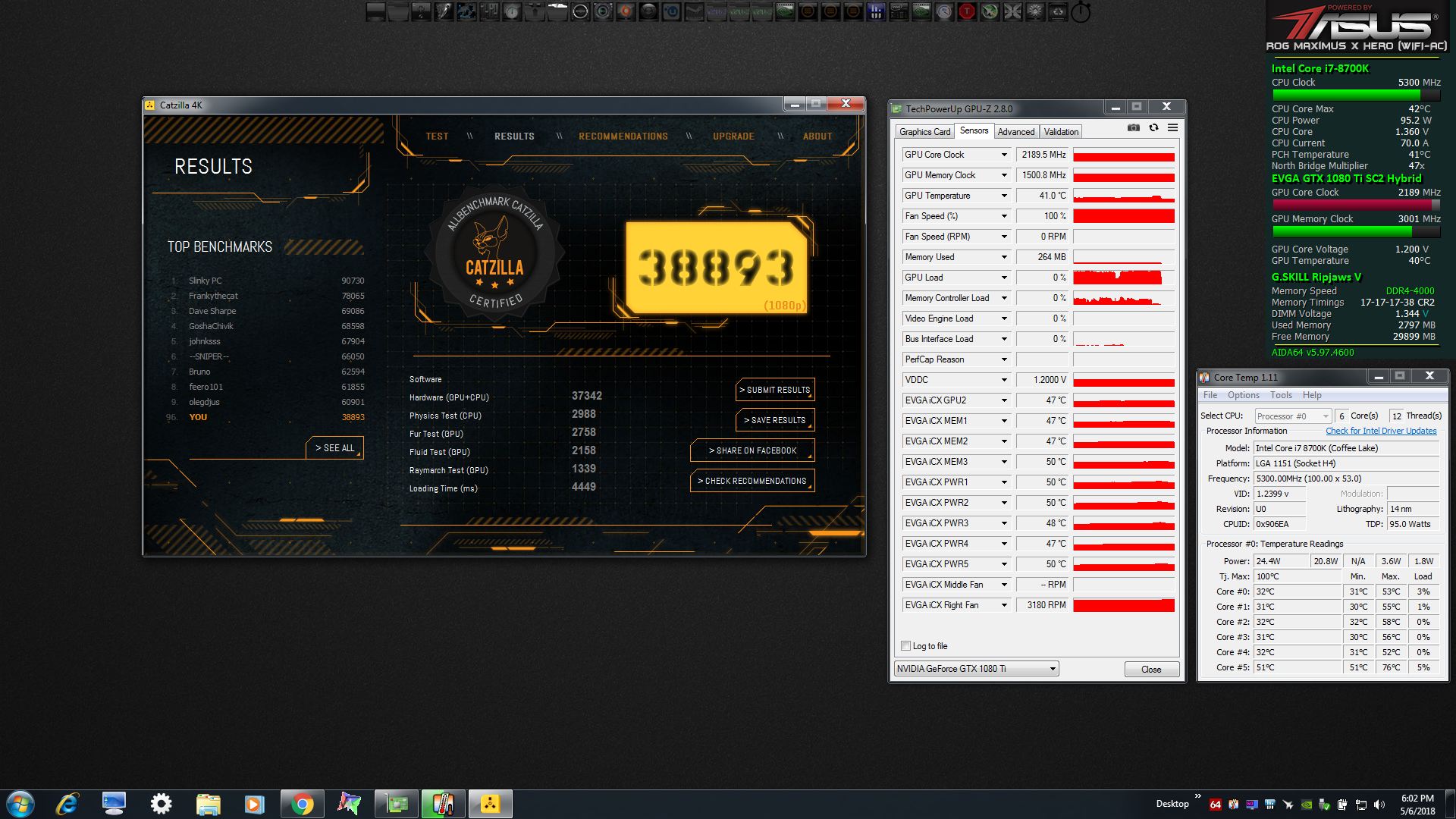
Catzilla 4K: http://www.catzilla.com/showresult?lp=938397|*|Result Details | http://hwbot.org/submission/3848792_
![[IMG]](images/storyImages/08Jtln5.jpg) Robbo99999, Johnksss, KY_BULLET and 1 other person like this.
Robbo99999, Johnksss, KY_BULLET and 1 other person like this. -
Okay, got it working in Windows 7. Seems I only needed to use the EZ installer.
Last edited: May 6, 2018jaybee83, KY_BULLET, Vasudev and 1 other person like this. -
Spoke to soon. I just broke it again. LOL
jaybee83, Papusan, Mr. Fox and 1 other person like this. -
Nice Scores! I haven't run this benchmark since I used to use my old Alienware laptop, this is the 720p run on my desktop at max overclock, it stabalised at 2088Mhz on the core:
I thought 720p was gonna be CPU limited, but it's not at all, it's GPU limited, was 720p CPU limited for you?jaybee83, Mr. Fox, Vasudev and 1 other person like this. -
Thanks! They are pretty decent for single GPU. I do not believe it was CPU limited. How can you tell for sure?
When this benchmark works, it really cranks the CPU and GPU more than most others. When I was completing those runs my UPS was showing a draw of about 675W. Looking as the OSD information, CPU was pulling about 130W peak, so the modded 1080 Ti was pulling over 500W. I cannot imagine how much Brother @Johnksss was pulling with that killer system he has.
Edit: The points I got from those Catzilla runs moved me up a spot in my league and Team @Prema got a nice chuck of points as well.
http://hwbot.org/country/united states/
Convel, jaybee83, Papusan and 1 other person like this. -
Yeah, crazy amount of GPU watts/power there, ha it's that 1.2V! It's kicking out a lot of fps too, so I guess that's giving the CPU a thorough work over too. About your CPU bound question, if you keep GPUz open (like you have) during the benchmark, then after the benchmark have a look at the graphs to see if the GPU was at 100% load during the benchmark - it it's at 100% load then you're not CPU limited (there will be the odd drop of GPU load during the loading phases though). You can enlarge the graphs to see more history of time in GPUz by going the Sensors tab in GPUz and then you can drag the GPUz window wider to see more history (you might already know this).
-
CPU pulls about 540W max so far, but about 260W in that test. GPU's about 430W each.
I also cant use UPS because it will shut off.Robbo99999, jaybee83, Mr. Fox and 1 other person like this. -
Looks good to me, bro. Always up between 95-100%.
Attached Files:
Robbo99999 and KY_BULLET like this. -
-
Yes, you're definitely not severely CPU limited in that test, but looks like you are a little, because it's not at 100% load the whole time - ok there was that big dip in the graph but that was a scene loading phase or something, but there were little fairly constant "micro dips" down to that 95% load you saw. So your system can very nearly push the GPU to it's limit in that 720p test, but not quite - that's not surprising though because you have a beast of a GPU and it's an old 720p benchmark. Because my GTX 1070 is significantly slower than your GTX 1080ti my system can push my GPU to it's limit (100% constant GPU load) in that 720p test, but lets face it I'd rather have a GTX 1080ti!
-
Okay, this whole conversation is cracking me up! I had to go check the roster to see if you were a team captain or something.
You do know that you can run 100% and still not be optimal? How? I already did it. A few times. Including at Mr. Fox's house. So I would let that 100% 3dmarks scenario go. Really. -
I had to read your post a few times to work out what you meant and who you meant it for & came to conclusion you were talking to me. For a start we're not talking about 3DMark. My point is that if GPU load is not at 100% then the GPU is not being pushed to it's limit. What pushes a GPU to it's limit: the rest of the system (CPU/RAM) - this is assuming the benchmark is not hard capped at a certain max framerate. If a GPU is exceedingly fast, like an overclocked GTX 1080ti of Mr Fox's, then in old benchmarks that perhaps can't take advantage of all CPU cores or maybe have some "RAM speed related limitations" (a bit like F1 2015) then it's quite easy for a benchmark to be unable to push a GPU to it's limits - ie. 100% GPU load. LOL, you don't have to be a "team captain or something" to understand how PC's work.
-
Yeah, you have a total misunderstanding of how these benchmarks work in comparison my friend. I wont knock what you know in gaming because i did learn a thing or two over the years, but benching is completely different. And just because you think your gpu is running top notch will do nothing to help your case if someone has a faster cpu with no gpu over clock and running at 65%. Regardless of memory timings and speed. And the team captain comment was more of a joke. Considering you were preaching to a master. It had nothing to do with how PC's work, but did have all do do with benching different bench marking software's.
And I commented on it because like i previously stated. We already proved it. We did it already. That includes memory timings and speed. Why do you think we have different settings for different benchmarks? Because one setting does not fit all. This is not gaming.
but no worries, carry on.
bloodhawk likes this. -
I don't really know why you're making this so complicated, if a GPU is not being pushed to 100% load then it's not being fully utilised for one reason or another - either due to CPU/RAM limitations or a framerate cap on the benchmark/game. This is more likely to happen on old benchmarks (likely not using all threads of CPU) at low resolutions on the most powerful GPUs where very high frame rates are seen.
-
Complicated? I'm ranked in over clocking. Not sure what you're going on about .Last edited: May 7, 2018bloodhawk likes this.
-
Replying to my own post to illustrate the point I'm making above. So I tested just now 720p Catzilla vs 576p Catzilla to compare CPU/GPU load. I've included the screenshots below. Clearly you can see that GPU load is pretty much constant 100% load in the 720p test, but in the 576p test the GPU load cannot be maintained at 100% and there are distinct drops below 100%; you can also see that average CPU load has increased in the 576p test - most likely due to more frequent spikes to 100% CPU load & thereby creating bottlenecks that don't allow the GPU to stay at 100% load. This test covered just Test #1 on Catzilla (I pressed the Escape button to cancel the test at this point) - you can see in the HWInfo Window that time duration for the measurement was 2mins 30 secs both times so the average data column is relevant for comparison.
720p:
576p:
This benchmark does look like it's using all 8 threads of my CPU properly, but whether or not it can use the 12 threads of Mr Fox's I do not know - if it's limited to 8 threads then that's likely the limitation right there. But either way you can clearly see that my platform (CPU/RAM) becomes a more limiting factor when I get down to 576p. These limitations are likely analagous to what Mr Fox is seeing when running 720p because his GPU is significantly faster than mine, so therefore harder to push his GPU to the absolute limit (100% GPU load) in this test. -
Maybe @Mr. Fox can explain it to you because you still do not understand the situation we were faced with.
Go run this and report back.
And make sure to actually show the percentage in the picture.
![[IMG]](images/storyImages/B3J7xCA.png)
And you see how it says 96.9FPS@98%...Well I was getting 68FPS at 100%....Go figure.Last edited: May 7, 2018 -
I am not even sure it matters. If the benchmark scores are high and you are earning points and rank, that is what matters. You tweak the settings and use whatever works best. Sometimes the GPU utilization is less than 100% because it does not need to be at 100% to achieve the best result. At times, the CPU and memory utilization are more important to achieve better results. It is a matter of figuring out what needs to be tweaked to drive the best result, because one test will react differently to changes than the next.
-
I'm talking about Catzilla, not 3DMark, but if your point is that it's stabalising at 98% GPU load during that test, then yes I consider that 100% load for all intents & purposes - sometimes some games/benchmarks stabalise very reliably around that figure as a maximum possible load. The difference was that the GPUz screenshot that Mr Fox linked during his 720p Catzilla test was different though - GPU load was not constant, there were little but visible fluctuations in GPU load that wasn't seen during my 720p test. I've explained why I think I saw that in his test already in previous posts, so not gonna waste finger energy typing that out again.
-
Yeah, I'm obviously not saying that you got crap scores, or that you have a rubbish system - obviously you don't. I was attempting to explain the fluctuations in GPU load you were seeing - it's academic, is all.
-
I think the dynamics are too complex to rely on GPU or CPU utilization alone as being an indication of success or optimal performance. I think those might be good things to look at when a person is getting results that are worse than expected or normal compared to others.
Understood.Papusan, KY_BULLET and Robbo99999 like this. -
Well, yeah, if you've already optimised your system as much as you can: max CPU overclock, max RAM overclock/latency, max GPU overclock, then you've maximised everything & what you get is what you get, can't do better than that - that's optimal. GPU load & CPU load discussions are a moot point when you're already maximised/optimised on everything.
-
ure both right guys @Johnksss @Robbo99999
lower res pushes system into cpu limitation, whereas higher res tilts into gpu limit. everyone (should) know(s) that.
on the other hand, anything in the range of like 95-100% gpu utilization is mostly just due to respective recording tools margin of error. plus, 100% load doesnt always equal 100% load depending on type of stress. same with cpu loads so its all good!
Sent from my Xiaomi Mi Max 2 (Oxygen) using Tapatalk -
I wasn't really trying to be right, but more looking for an answer, but i'll figure it out soon enough.
That part is well when it works, but what I was talking about is when it doesn't work. And that's where the confusion came in at. -
btw, any news on your Corsair 3800 Kit testing? have u been able to reach 3600 yet?Mr. Fox likes this.
-
-
Since modding your GPU, do you get any performance caps in GPUZ? I'm thinking no, but just curious.
Also, what TIM are you using on your GPU? Mine is starting to heat up some. I'm sure it's just the ambient temps but I'm thinking about re-pasting it. Thanks!Mr. Fox likes this. -
After the power mod and vBIOS change I see no GPU-Z performance caps... ever... except when the GPU is idle and then it shows idle. I have Phobya NanoGrease Extreme on the GPU. Kryosnaut should produce nearly identical results on the GPU. I removed the waxy square TIM pad that came on the EVGA hybrid cooler before installing it.
Yes, ambient temps make a huge difference. Our house has solar power and during peak hours the computer than runs that disables our HVAC and water heater, then re-enables them during off-peak hours. Now that the temps here are in the triple digits the ambient temps will go from 68-70°F to 80°F while the AC is off during peak hours. During that time of day, my overclocked CPU and GPU cannot run correctly at the high frequencies I use for benching. They become unstable even though not technically "hot" they are not cold enough to run stable with the same amount voltage.Convel, Papusan, Vasudev and 1 other person like this. -
I have a tube of Noctua NT-H1 at home (Best I could find at Micro Center).
Looks like it scores just below Phobya Nanogrease Extreme.
https://www.hwcooling.net/en/the-test-of-27-thermal-compounds-part-2-en/2/
I will try this stuff out this weekend. -
The main problem I had with NT-H1 in my testing was truly horrible durability. It is way too thin, soft and creamy, and it would not stay between the heat plate and die for more than a day or so. It works fine at first, then swiftly loses effectiveness due to pump-out. I had pretty much the same experience with Gelid GC Extreme.
That testing was on laptops, so it may work better on your desktop GPU. As long as it stays where you put it and does not dry out it should be fine. Expect it to work great at first. If it starts not working well within a few days, you won't have to wonder why.
-
Yeah I have TG Kryo- SNOT on there now and I think it's pupmed out and dried up some on both my CPU and GPU.
I'm going to check both this weekend. You think it's a bad idea to try CLU (Don't have any Conductonaut ) on the GPU if I use Kapton tape around the die?Mr. Fox likes this. -
It should be fine, especially with Kapton tape around the die. Since the GPU die faces the floor of the case with a vertically mounted motherboard, gravity will carry it away from the GPU if any escapes. You can also use electrical tape, a few coats of clear nail polish or fill in the valley between the outer support frame and die with RTV silicon or liquid electrical tape. No need to protect anything outside of the outer support frame. Only the small SMD components on the PCB between the die and the support frame are at risk... unless you plan on using the GPU for a game of Hot Potato or toss it around the room like a football.
Speaking of the support frame, it is really retarded that notebook Pascal GPUs no longer have that. The support frame serves a legitimate and valuable purpose, and it sucks to see them cutting so many corners on quality. Eliminating it was really stupid. Great way to end up with a chipped or cracked GPU die.
Last edited: May 11, 2018jaybee83, Convel, Papusan and 1 other person like this. -
Nice! I think I will try CLU over the weekend and see what my temps are.
My GPU is about as close to a bare PCB as one could get. I don't have a backplate, only a partial plate on the die side. Actually, 4 of the Memory chips a just above the die are open and I have the little aluminium heatsinks on them that I had from my Acrtic Acellero Extreme.
I will let you guys know how it goes if I decide to do this.
Below is what my GPU looks like. Is there any benefits to placing aluminum heatsinks on the SFC VCore modules, or anywhere esle for that matter?
-
Thermal Grizzly Kryonaut worked fine on my GPU for many months (and probably would have continued to do so), Coolaboratory Liquid Ultra only lowered temps by 1 or 2 degC when I changed to that. I used Kapton tape around the die. I don't intend to redo that pasting of the GPU ever, I hope not anyway, because I don't want to go through the rigmarol of trying to clean off the liquid metal from the copper heatsink! (Also using Thermal Grizzly Kryonaut on my CPU IHS to cooler interface with good results (of course with liquid metal delid though) & no deterioration over the last 1.5 yrs).
To me, the best use of Liquid Metal is in a CPU delid (Intel CPUs), but I don't see a large value in using it for anything else, doesn't make much difference to GPUs in my own experience (and from what I've read).Last edited: May 11, 2018KY_BULLET likes this. -
It makes a lot of difference (like ~10°C) on laptops if you can get the heat sink to fit well enough, but not nearly as much difference on a desktop. On a desktop, the main benefit (other than delid on die application) is durability.I have never had any degree pf rigmarole cleaning off the copper surfaces. You can see a silver place where the liquid metal was, but there is no reason to try to remove that silver surface film. It does not hurt anything and may actually be of benefit since it is filling in pores in the copper. Once in a while I have had a bit of stubborn crust near the edge and I knocked that off easily with the scuff pad included with CLU.Robbo99999, Convel and KY_BULLET like this.
-
Wait it dried up on your desktop!?
I recently took off the waterblock on the 6850k, which was on there for a good year or so. And my Kryonaut application was still good as new. Heck i scooped it up and and put in my tiny tub of used Kryonaut that i use to test heatsink contact, and it performed as good as new.
There is definitely something wrong here, because it was the same with the application on my GPU, but thats only 4-5 months old.
And Kryonaut dried up for you, i can almost guarantee you that Conductonaut / CLU will dry up on you as well.Convel, Papusan, KY_BULLET and 1 other person like this. -
I think he was speculating. I suspect the warmer weather might be contributing to the temps creeping up, but I guess the only way to know is see what he finds out when he does the repaste.
I have not seen Phobya or Kryosnaut or the Cooler Master Maker pastes dry up (so far), but I have had a bad tube of the Kryosnaut that must have been mixed wrong or something. Sometimes I almost wish it would dry up because it would make cleaning it up easier, LOL.
I was initially very unimpressed with Kryosnaut because the first tube I purchased never worked worth a damn. I ordered another tube of it later to give it a second chance and it was way lots better. Not sure what the deal was with the first one.
I just ordered more of that and more Conductonaut yesterday. I purchased the largest containers I could find about a year ago and just now starting to reach the end of them after tons of repastes with CPU and GPU swaps on numerous systems.
I ordered some flat heat pipes from Digi-Key to see if I can mod that P870DM3 CPU heat sink you sent me.jaybee83, KY_BULLET, Papusan and 1 other person like this. -
I think that is why Phobya NanoGrease Extreme works better for me on laptops. It is noticeably thicker. Not as thick as IC Diamond, but definitely less susceptible to pump out than Kryosnaut, Gelid GC Extreme or NT-H1. I had Gelid get so dried out on the Alienware M18xR2 that it literally turned into dust. When I took it apart to see why my 780M SLI was suddenly running hot, it was like powder, LOL.
-
Yeah it was fine just a little pumped out but still wet. I actually repasted with NT-H1 and got the same temps as with Kryonaut.
Although, I did break down and buy a TT Floe Riing 240 for the GPU which is probably why my temps were the same. If I had more Kryonaut, temps might've improved a couple C's.
Ran Superpostion on extreme and topped out at 48c at 2076mhz core (started at 2088) and 6055mhz on memory. I didn't take a screen shot, scored 6419.
Also went ahead and put a 4mm thick piece of thermal pad across my SFC modules. I tried to mount the aluminum heatsink but they was a little too tall and rubbed my NZXT bracket.Last edited: May 11, 2018Robbo99999, Papusan and Mr. Fox like this. -
Awesome. Can you show us some pics of the new cooling setup?KY_BULLET likes this.
-
Sorry for the messy wire situation but here is a pic of the Riing 360 on my CPU and the Riing 240 on my GPU. I'm waiting on a 3 way fan splitter wire to be delivered so I'm not gonna straighten them up until I get that
http://imgur.com/gallery/GFupS22
Here is a quick run on SkyDiver
https://www.3dmark.com/sd/5103086
Last edited: May 12, 2018Convel, Robbo99999, Mr. Fox and 1 other person like this.
*Official* NBR Desktop Overclocker's Lounge [laptop owners welcome, too]
Discussion in 'Desktop Hardware' started by Mr. Fox, Nov 5, 2017.


![[IMG]](images/storyImages/VHdcEgb.png)
![[IMG]](images/storyImages/ivj8TFn.png)
![[IMG]](images/storyImages/bU0CJLY.png)
![[IMG]](images/storyImages/osLAqGa.png)
![[IMG]](images/storyImages/avvFjyB.png)
![[IMG]](images/storyImages/puZpf45.png)
![[IMG]](images/storyImages/zATNCUq.png)
![[IMG]](images/storyImages/i3ked7g.png)
![[IMG]](images/storyImages/fJyFO9Z.png)

![[IMG]](images/storyImages/3HufnTE.png)
![[IMG]](images/storyImages/XQU0LeJ.png)
![[IMG]](images/storyImages/hAWssGH.png)
![[IMG]](images/storyImages/RPEk80K.png)

