Problems? See this thread at archive.org.
Yesterday I did a front panel cooling mod, thought I'd show you guys the results here. It's lowered case air temperatures around the GPU by 7 degC, and lowered GPU temps too *(see footnote at end of post, too much detail!). This means at my max GPU overclock including added voltage, I can run BF1 at a stabalised 2088/2076Mhz rather than 2062Mhz - this is during the 'hot' summer months of the UK, so it's making a practical difference here - this is while running at cooler temperatures too of course.
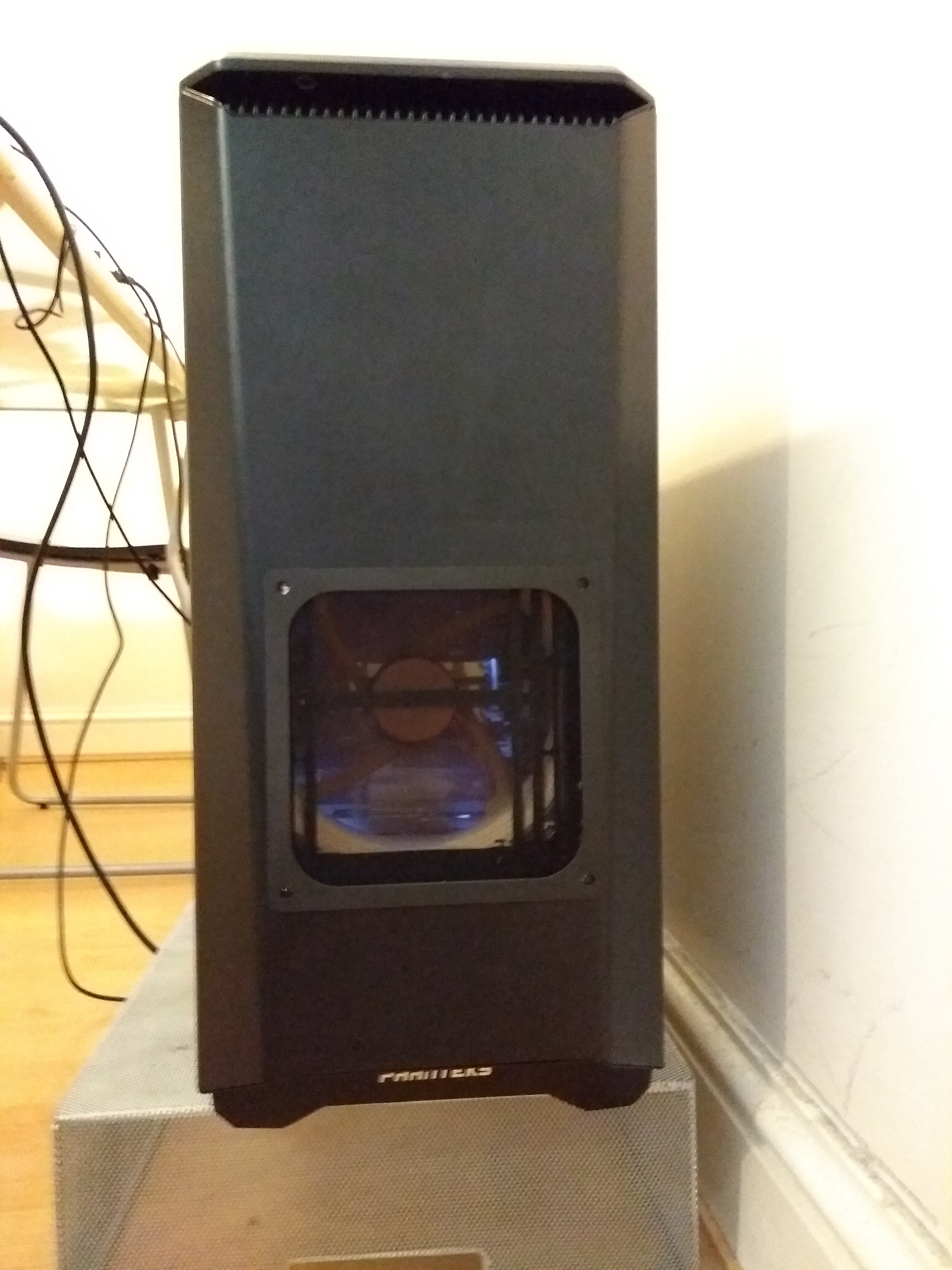
Here's some pics of the mod - using tin snips I simply cut out a "140mm" sized hole out of the front panel to line up with the front 140mm fan, previously the front panel intakes were small restrictive openings at the very top & bottom of front panel. I used a 140mm Silverston magnetic dust filter to slap over the cutout, and the thick rim of the dust filter covers up the sins of my poor, ugly, sharp-edged & dangerous-to-fingers cut out!
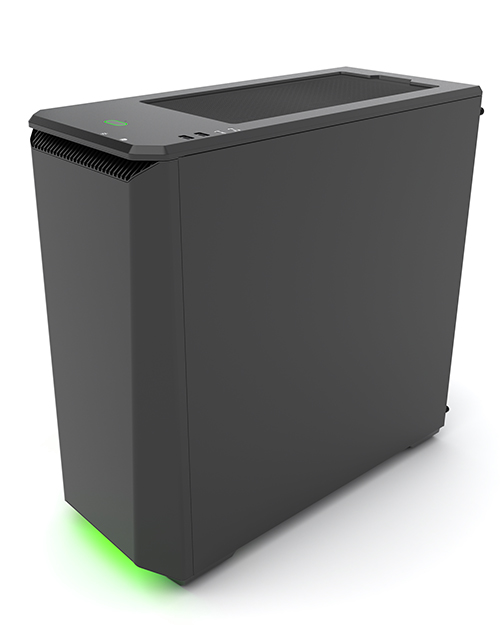
(but first a pic from the website showing the unmodified case!)
And here's a Pic showing all of the cooling modifications I've done to my case over the last nearly 2 years:
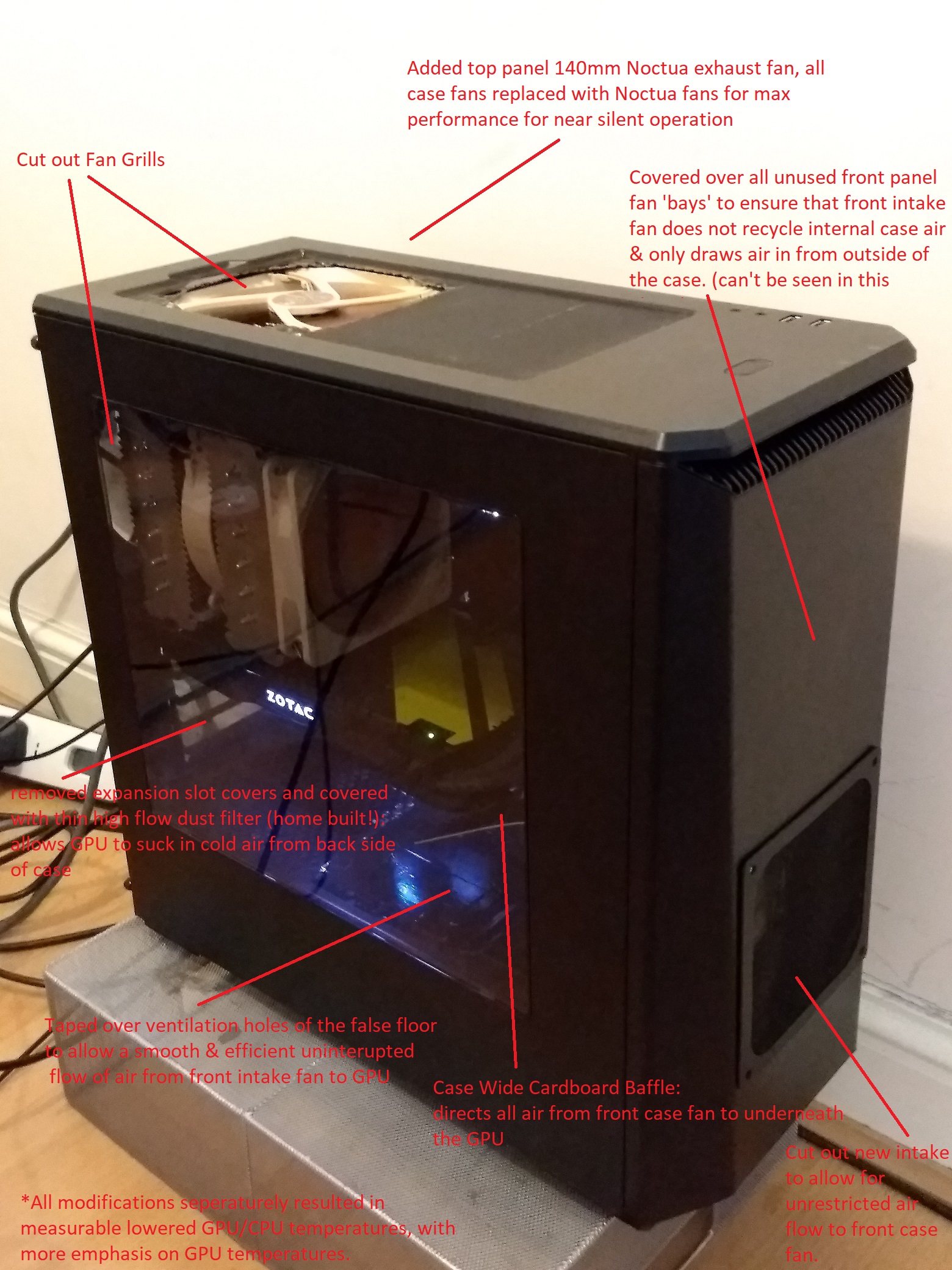
Yeah, so that's an overview of all the case mods I've done, I've really focused on performance rather than aesthetics - note the lack of RGB and some kinda messy cut outs!
*Footnote: New front intake cut out mod I did yesterday lowered GPU temps on 50min Firestrike Graphics Test 1 looped test. Lowered by 2 degC while at 7% less GPU fan speed (auto fans), while at 1 bin higher core clock. I have not tested like for like manual fan speeds, but I'd estimate that it would be in the region of 5 degC lower GPU temperatures given the above and the fact that the air around the GPU is about 7 degC cooler than before.
-
-
-
Not using the AIO per se, but I am still using the Riing fans and controller. Well, sort of an AIO hardware cocktail, LOL. I have the excellent EVGA GPU cooling system mated with the larger and better Riing radiator and fans using Koolance quick disconnect fittings. I got rid of the tiny 120MM EVGA radiator. It works fan-tastic (pun intended).
So, I can still definitely use the software. Thanks for the heads up. I will check it out. The extra 200 RPM will be a welcome change. I run them full blast 24/7 already.Last edited: Jun 6, 2018 -
Yup, definitely made them run faster. Thanks, bro.

Arrrrbol, custom90gt, KY_BULLET and 2 others like this. -
Nice, no more testing crudely unstable overclocks in Windows & the problems that can cause (bluescreens, corrupted OS, time, hassle):
http://www.guru3d.com/news-story/evga-builds-cpu-stress-tester-into-bios.html
I would use that feature to dial in a close to 100% stable overclock, and then I'd probably fine tune it & test of ultimate stability in a Windows environment using the stress testers of my choice. -
nice! id use that feature in a heartbeat!
 Sent from my Xiaomi Mi Max 2 (Oxygen) using TapatalkArrrrbol, Convel, Robbo99999 and 2 others like this.
 -
Wow that is cool, I would totally do that. Makes me wish I would have picked up an EVGA x299 board now...
-
CPUs, GPUs (badly), now motherboards overclocking themselves. No role left for humans anymore.
Dey tuk r jerbs!Arrrrbol, KY_BULLET, Mr. Fox and 1 other person like this. -
Lol I didn't really read the article, I took it as you could test your overclock from the bios, not that the system was auto overclocking?Arrrrbol, Robbo99999, KY_BULLET and 1 other person like this.
-
Unless I misunderstood it, you can still use the feature to test manual overclocking. EVGA is smart enough to know (arguably the smartest one) they cannot take that away from their customers without incurring some serious wrath, LOL.
Most newer desktop boards have an auto overclocking feature, but real overclocking enthusiasts never use that. It's mainly for gamer noobs that want a small performance boost and don't know how to do it on their own. It will never be optimal tuning because each system is different. What might be optimal for one is not for another.Arrrrbol, Convel, Robbo99999 and 3 others like this. -
EVGA FTW!
Sucks having to boot back and forth trying to stabilize an OC.
Nice that EVGA is trying to make things better/easier the right way other than offering more bloatware.
MSI has a Feature called FAST BOOT that would get you to the bios faster but I only used it once. I'd rather keep the bloat to a minimum
-
https://www.amazon.com/Intel-Corpor...pID=41Lm2MUBaeL&preST=_SX300_QL70_&dpSrc=srch
Intel i7 8086K in stock and shipping.Arrrrbol, Mr. Fox, custom90gt and 1 other person like this. -
Glad you don't have to do the autotard overclocking and can do manual stress tests. That is really cool. It sucks having to disable my windows storage spaces prior to testing a new overclock.
-
That's good, says a bit more about the system - so auto or manual overclock testing in the BIOS, still looks good.
-
Yeah kinda scared me there for a minute. I thought you wasn't going to be able to manual OC and do a stress test to check it.
You guys think the other manufacturers will follow suit on this?Arrrrbol, Papusan, Mr. Fox and 1 other person like this. -
I don't see how they couldn't. It seems fairly easy to implement and would be a really good selling point to overclockers. I guess time will tell though.
-
it depends on how the community reacts to it with their wallets
-
Interesting. Seems like they are charging a bit more for it for some reason. I wonder if it actually performs any better than an 8700K at the same clocks? These seem like a better option at first blush, but I will be looking for some benchmarks of the 8086K with interest.
https://siliconlottery.com/collections/all/products/8700k50g
https://siliconlottery.com/collections/all/products/8700k51g
Thanks for the video, bro. Man, what an awesome UI.
I think they probably will. Would be nice to see that incorporated into a BIOS update for our existing hardware. If you were looking to buy a new motherboard, I would look no further than an EVGA Classified. If Kingpin puts his name on their stuff, you know it has to be excellent. Personally, I will only purchase EVGA and ASUS unless something changes dramatically from status quo.Last edited: Jun 8, 2018Arrrrbol, Convel, Papusan and 1 other person like this. -
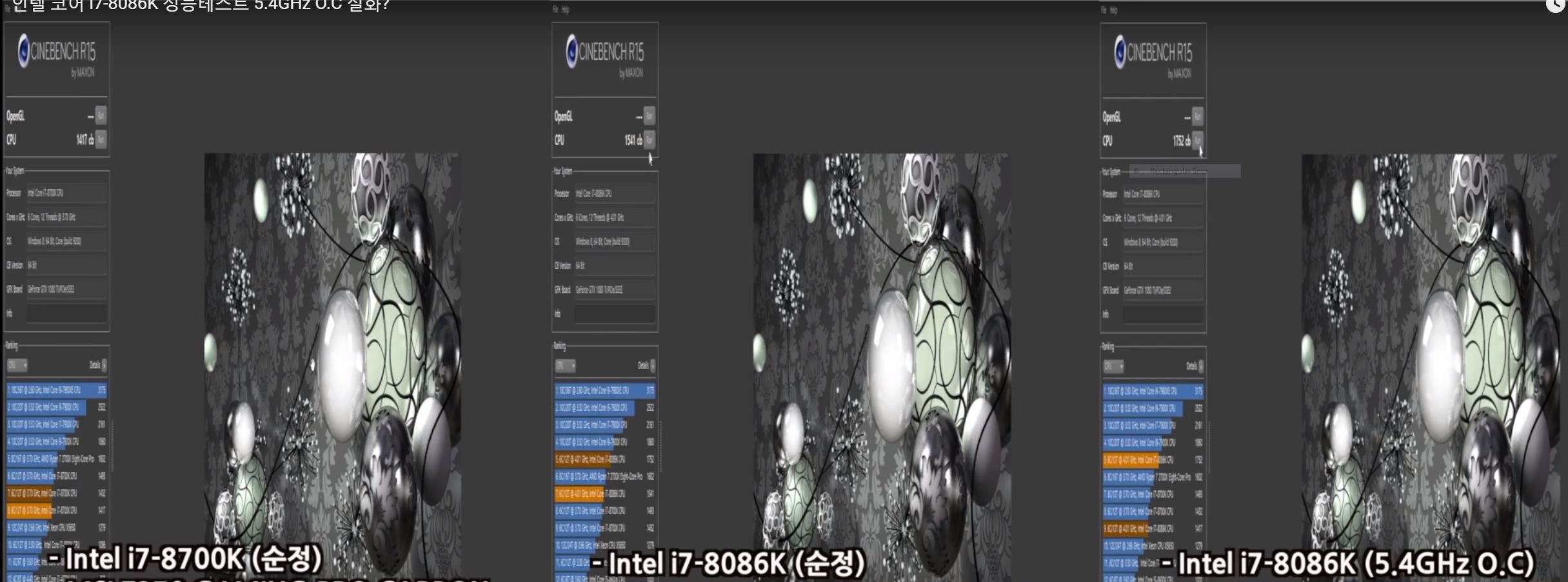
Obviously I don't understand what the guy is saying but he hits 5.4Ghz on this 8086K.Arrrrbol, Convel, Robbo99999 and 4 others like this. -
Yeah, looks pretty decent. Thanks for the link. Too bad they do not show any information on the voltage used for 5.4GHz. Cinebench scores are where they should be compared to 8700K.
8700K @ 5.4GHz - https://i.imgur.com/cS4HGqL.jpg
8700K @ 5.5GHz - https://i.imgur.com/8KuxE9u.jpgAttached Files:
Arrrrbol, Convel, Papusan and 1 other person like this. -
-
We would need to see voltages to see if they're really something special, but it seems these are simply highly binned 8700k pulled from the line with a new label on them. Still nice to be able to get a binned 8700K, but sucks for those that purchased in the last 5 months or so when they probably starting binning 8700ks. Which is exactly why people stopped getting good ones lately.
-
Silicon Lottery has a thread over here, so we might see some details on the 8086K binning quality pretty soon: http://www.overclock.net/forum/18068-silicon-lottery/1638821-coffee-lake-binning.html
If it is a LOT BETTER bin quality, I might consider getting one for my desktop so I can put that awesome sample in the P870DM, since it has an average (i.e. crappy) 8700K sample. I haven't even bothered turning it on for several days because running the CPU stock bores me to death. It takes too much voltage to run cool with an overclock like @Papusan's does.Arrrrbol, Convel, Robbo99999 and 1 other person like this. -
Or, you could sell me the crappy one. Even the crappy one is better than mine lol!
I wonder if you could run the 8086k In your P870? If it's just a hand picked relabeled 8700k, I don't see why you couldn't, except might need a little Premamod to make it happen.Last edited: Jun 8, 2018 -
yeah, would be curious to see whether or not wed need a microcode update for that. or if its just pnp
in the meantime, heres some overclocking more to @Mr. Fox liking
Arrrrbol, Convel, KY_BULLET and 1 other person like this. -
It's not really a crappy sample per se... basically a very average sample based on what I can see. But, having an average sample in a laptop i s crappy because it is harder to keep it cool.
It would be definitely be interesting to know if it will work in the P870DM, but an expensive disappointment if it did not work out better than a nicely binned 8700K. I will need to see some convincing evidence that 8086K bin quality is consistent and have some confidence I would end up with an excellent sample before I would be willing to entertain the idea of spending the money.Arrrrbol, Convel, Talon and 1 other person like this. -
Yeah I seen that video yesterday. That's handpicked out of the handpicked samples
Arrrrbol likes this. -
Yeah totally agree with you there. You could be one of the guys that get the "Guaranteed 5.0ghz" and that's all you will see. Talk about a KICK in the you know WHAT!Last edited: Jun 8, 2018
-
-
Here's this for anyone that has an ASUS board. This is what der8auer was using in that video. Very simple tool compared to all of the extra fancy schmancy fluff in the AI Suite. It works for multiple generations of Intel CPUs, including the latest. Just watch very closely when you launch it that it reads the settings from the BIOS correctly. If not, close and re-launch it. Run as Admin in W7 compatibility mode. When changing settings, click apply once. If other settings appear to change, close and re-launch it again. Change only one setting at a time. (You have to be careful the same way with AI Suite as well, so if you're used to AI Suite, no different here.)
This is the newest version I could find on the web. I just found it yesterday. I had the version prior to this one that I got from Brother @Johnksss.
ASUS TurboV Core v1.02.02 [Download]Last edited: Jun 8, 2018 -
Yeah, I think they will unless there is some kind of patent they've got that would prevent it.
-
Whatever it is runs in a UEFI environment, so it cannot be too complex. It is also the perfect environment for this kind of stability testing. It eliminates all of the wildcards with software gone wild. Like testing or firmware flashing in DOS is better in so many ways. If the overclock tests out flawlessly stable, anything that goes wrong in Windoze can be rightfully blamed on the dimwits at Micro$lop or half-assed, buggy Windows drivers coded by people that suck at their jobs. (Confirmation of what we already know, LOL.)
-
My central AC went out yesterday around 11AM and it was 107°F the last two days. Finally got if fixed today, but it's still around 80°F in the house. Still have about 10-12° to go before things are back to normal. My desktop was not very happy about it being 100° inside my house today. But, not nearly as unhappy as I was, LOL. Thank God I had the portable AC unit. Things would have been pretty horrible without it. I can't even imagine what it would have been like in the peak of summer with it being around ~120° outside, with overnight lows above 100°.
Arrrrbol, jclausius, Robbo99999 and 2 others like this. -
wtf, 120*.
Screw that, where are you located? -
Well, I'm not sure about that, I'm sure I've read situations where overclocks can be Prime stable (similar to that EVGA BIOS stress testing) but then fail in other workloads or while doing normal stuff in Windows - at the end of the day your overclock wants to be stable for things you use it for, so I'd see the BIOS testing as the initial testing, and then I'd probably do some kind of testing in the Windows environment, as well as just gaming & using it normally, and if it fails then I would tweak the overclock accordingly.
-
Ha, the hottest room temperature here in the UK (no AC) that I remember since I've had my desktop is only 28 degC - that's a long way from your 48 degC outside temperatures - insane! If it was 48 degC in my room then my CPU would be at 80 degC playing BF1, and my GPU fans would ramp up as well as throttle it's boost a fair bit (but how much I do not know!).
-
-
lol that's way too hot. I was stationed at Ft Huachuca and it was also way too hot. Having said that, I'm going to apply to a few residencies down there...
-
I all of a sudden went too 85c plus with my LM installation with P95 on 16 threads. At first I was at 72c but it was cooler then. I figured it was gone so I pulled it and the LM was just beading up in small balls not the original smooth coating of the IHS. I just put on ThermalGrizzly and now under 16 thread it is at 75c. No AC on and temps here are 88f. Since my double bypass I am cold all the time, finally at 88f I am comfortable (my daughter hates it).
I had an emergency install of TX4 two days ago when I found the issue as I had it laying around. That was running P95 16 thread at 80c. So TG gave a 5c drop. No real difference in any of them idling. -
LM is normally very stable in temps over time from what I've read, so that's a surprise to see that result there. The beading up in small balls you saw - that would be just because you removed the heatsink I would have thought, I wouldn't imagine that it could be as smooth & even as it would have been before putting the heatsink on. Thermal Grizzly is a good non conductive paste, so not surprised you saw better temps from it than your standard non-conductive paste. So far my LM is stable on my GPU for the past year (think it's over 1 yr now). LM also stable on my delidded CPU for just over a year (LM under IHS, thermal grizzly on top).
Does your heatsink sit very flat & even on your IHS?Last edited: Jun 9, 2018 -
Yeah, it is stupid hot here. I really miss the Pacific Northwest weather and scenery. After living in Washington and Oregon for over 30 years this was a pretty massive change. It is slowly becoming more tolerable, but I don't think I will ever like it. I love winter and cold weather and there is no such thing as that here. At least there is no humidity to speak of, so there's that to be thankful for. But the dust is almost as miserable as the heat.Arrrrbol, Papusan, KY_BULLET and 1 other person like this.
-
I expected some separation and beading but not 100%. Trying to meld, with a qtip, was just pushing the few small beads around. Not too sure what happened but was not willing to repeat it so TG was the choice.
I have used LM before with no issue so I am not sure what happened either. I can say the TX-4 binded perfectly to both the IHS and copped water block. The LM did not appear to bind at all to the water block so maybe they both need lapping. -
-
-
Couple personal bests on the new driver 398.11.
https://www.3dmark.com/3dm11/12807821 Top 100 on this one
Superposition
Last edited: Jun 9, 2018Arrrrbol, custom90gt, jaybee83 and 2 others like this. -
I thought my 8700K at 1.248v under loading doing 5.0Ghz stable was cherry, but this guy is showing 1.184v under load at 5.0Ghz all core on his 8086K. Holy crap that is one binned CPU.
Vistar Shook, Arrrrbol, Convel and 5 others like this. -
Last edited: Jun 10, 2018Vistar Shook, Arrrrbol, KY_BULLET and 1 other person like this.
-
I think lapping the surfaces would have made it harder for the liquid metal to spread on the surface & would cause it to bead with itself even more - I speak from experience of applying the same batch of LM to both a super smooth CPU core vs spreading it thinly on a copper GPU heatsink.
I've only ever bought one batch of Coolaboratory Liquid Ultra, and I saw the same thing, it does love to bead with itself rather than spreading - especially on a very smooth surface. -
Nice, 66% better score than me, ha! (Superposition benchmark)
*Official* NBR Desktop Overclocker's Lounge [laptop owners welcome, too]
Discussion in 'Desktop Hardware' started by Mr. Fox, Nov 5, 2017.