Problems? See this thread at archive.org.
Glad I could help confirm it. Yes, I know that about you already and that's one of the things that makes you awesome.
Not going for the Apex Z370. It's missing too many features for me to want it. And, it only has two DIMM slots.
The Taichi is missing numerous hardware features as well. The only button it has is a clear CMOS button. No LN2 mode switch, no Slow Mode switch, no Memory OK, no Retry Settings button, not even power and reset buttons. I had to install buttons on my Praxis Wetbench just to turn it on and reset.
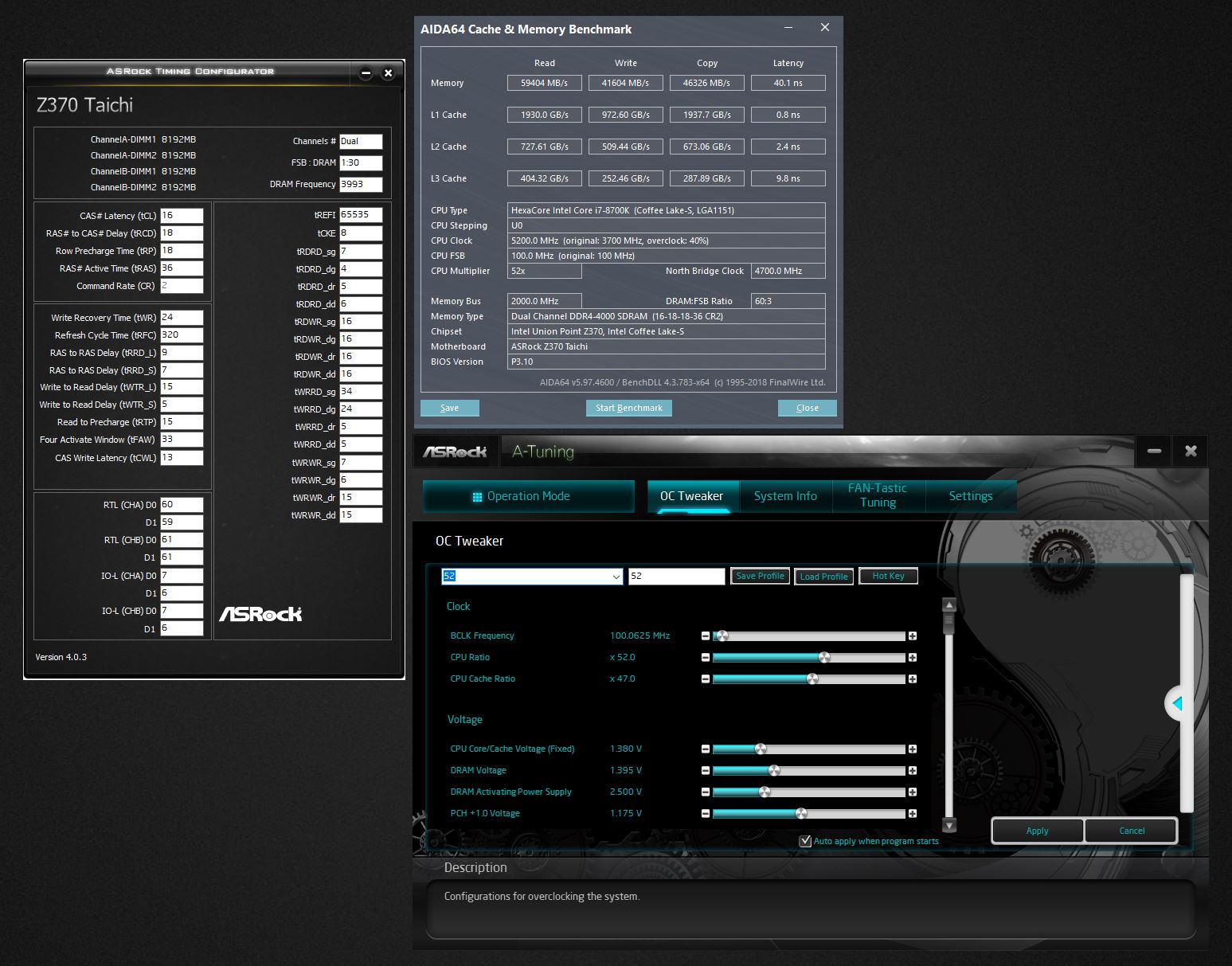
I could actually forgive almost all of the above if my ASUS board was not being covered under warranty. I would just live with it and know better next time, but this pathetic memory write and copy performance is not something I can find a way forgive. I do not understand why it is fast on read and terribly slow on write and copy speeds. And, I have changed a bunch of timings. (I am looking forward to testing those settings on the ASUS board when I get it back.)
-
-
It needs a little more voltage for the CPU overclock at 5.2GHz and a LOT more voltage for the memory. For the CPU, most of the settings I used before work now for 5.2GHz, but I have not tried pushing 5.4GHz. The PCH hitting 75°C and idling at 63°C, the sucky RAM write and copy performance, and some settings like cache ratio not being applied from BIOS settings are such that I am not interested in playing with it any more than I have at this point. To add insult to injury, the A-Tuning Utility does not seem to work with Windows 7, so I have to use XTU to set the cache ratio. ThrottleStop would probably work for that as well.Papusan, KY_BULLET and Robbo99999 like this.
-
Can you try a slower speed like 3600MHz and see if write is faster? I'm curious. The Apex has two DIMMs BECAUSE it's an overclocking board, where single rank memory stick per memory channel and only one stick per channel is the best for overclocking RAM. You'll see the same on all the similar boards: Apex X299 has 4 slots (quad channel), OC Formula from ASRock has 2 mainstream and 4 HEDT, EVGA X299 Dark has 4 slots, etc.
What about the Maximus X Formula? (Not to be confused with the Z370 OC Formula).Sent from my OnePlus 1 using a coconutPapusan likes this. -
Yes, I know that about the APEX boards and the reason for it. There is nothing not to love about the Maximus X Hero (WI-FI AC). It's an excellent board and it would be a waste of money for me to buy another Z370 mobo. I would gain little or nothing and lose features. 16GB RAM sticks are way too expensive, so I need to have 4 slots for 32GB. Now that I have 4*8GB at 4000 I can use the kit for quad channel when I eventually upgrade to HEDT and not have to spend more money on RAM.
On the Taichi, the write and copy speeds are the same with 2 DIMMS at 4000 as 4 DIMMS at 4000. I know that because I could not get it to boot 4 sticks at 4000 until I figured out I needed to bump the voltage from 1.350V to 1.425V for 4 sticks. If I recall correctly, 3600 write and copy was about the same as 4000. I will check to confirm that.Last edited: Jul 22, 2018 -
I think I could live with 4 slots myself, but two is way too little. The other day I was running an android emulator, watching a show and infrequently checking other sites and discord while I waited for opening and endings to pass, and noticed myself at a nice cool 18.9GB RAM used. I laughed at people thinking I was mad for wanting above 16GB. Maybe next time I'll see about 64, whenever my next computer is.
I still feel nobody should let me at PC parts without a chain, collar, and strict budget though. I swear my dream setup would easily cross $20,000... just one PC and peripherals.Sent from my OnePlus 1 using a coconut -
-
@D2 Ultima - Fit and finish leaves a lot to be desired on the Taichi as well. The board weighs less (didn't check the weight, but you can feel it handling the two boards) and has a flimsier feel to it. The M.2 SSDs do not fit tightly in the slots. The M.2 screw stand-offs have no shoulder to fit the notch on the end of the M.2 drives and with the screws cranked tight the drives are still loose. You can wiggle them side-to-side with no resistance at all. If you tap on them they rattle because the screw heads do not pinch the SSD against the stand-offs. Already noted the crappy PCH heat sink. Only one RGB header, and the RGB lighting under the PCH heat sink is made kind of crappy. If you are not looking directly at the board, you can see all of the LED diodes under the heat sink because they are too close to the edge. The rear I/O plate is a cheap piece of aluminum like a low-budget board (versus a permanently attached I/O plate) and I cannot use it on an open bench. There is nothing to hold it in place. The silver plastic shroud on the rear plane that covers the I/O ports and audio stuff is very thin and flimsy, and has a cheap feel to it compared to the ASUS. The metal PCI-e reinforcements do not seem to be anything more than thin metal covers to make them look like reinforcements. I think they are there for aesthetics/deception purposes only. They don't even fit the PCI-e slots tightly. You can squeeze them with your fingers and see movement. Some of the components on the motherboard are soldered in place just a little bit crooked, including the one RGB header.
Last edited: Jul 22, 2018Papusan, D2 Ultima, Convel and 1 other person like this. -
See, mine has the prochot switch on the X399, which is the LN2 mode switch. Also, the mem ok button was worthless for me when doing ram overclocking on the M8E, so I did it the normal way anyways, which is why that didn't matter to me. It was an extra bell that was kinda useless.
My question is how much LN2, DICE, Cascade, or SS are you doing? If the answer is none, there goes your complaint on slow mode switch. Now, the X399 has both power and reset, though.
So, just looked at a pic, it has the proc hot switch in the ram corner. It is missing the buttons on board and that would piss me off for power and reset for an open bench. Like seriously piss me off. Just throw some damn switches on the board. So, I'm starting to see that my view is different because they don't treat all boards in the Taichi lineup with the same respect. Here is a board pic of the X399.
![[IMG]](images/storyImages/X399%20Taichi(L2).png)
As you can see, prochot (LN2) at the top of the ram slots on the right side, bottom you have the CMOS reset button, debug, then reset and power. On your board, it looks like they have the ****ing connectors for the buttons, but NO BUTTONS. Inexcusable in my opinion. But I just watched another rant by buildzoid yesterday breaking down the X470 and showing Asrock lied about the VRM controller being an IR. Now that shocked me and it is one thing to do the value proposition, its another for false advertising. Looks like they care **** all for mainstream boards altogether, which is a damn shame.
Here is the Z370:
![[IMG]](images/storyImages/Z370%20Taichi(L2).png)
As to the memory, I know enough to troubleshoot myself, but not enough to fully guide someone through playing with timings aside from giving them info from which to analyze and play with timings. If I saw timings like that, I'd be right back in the BIOS trying to figure what went wrong. -
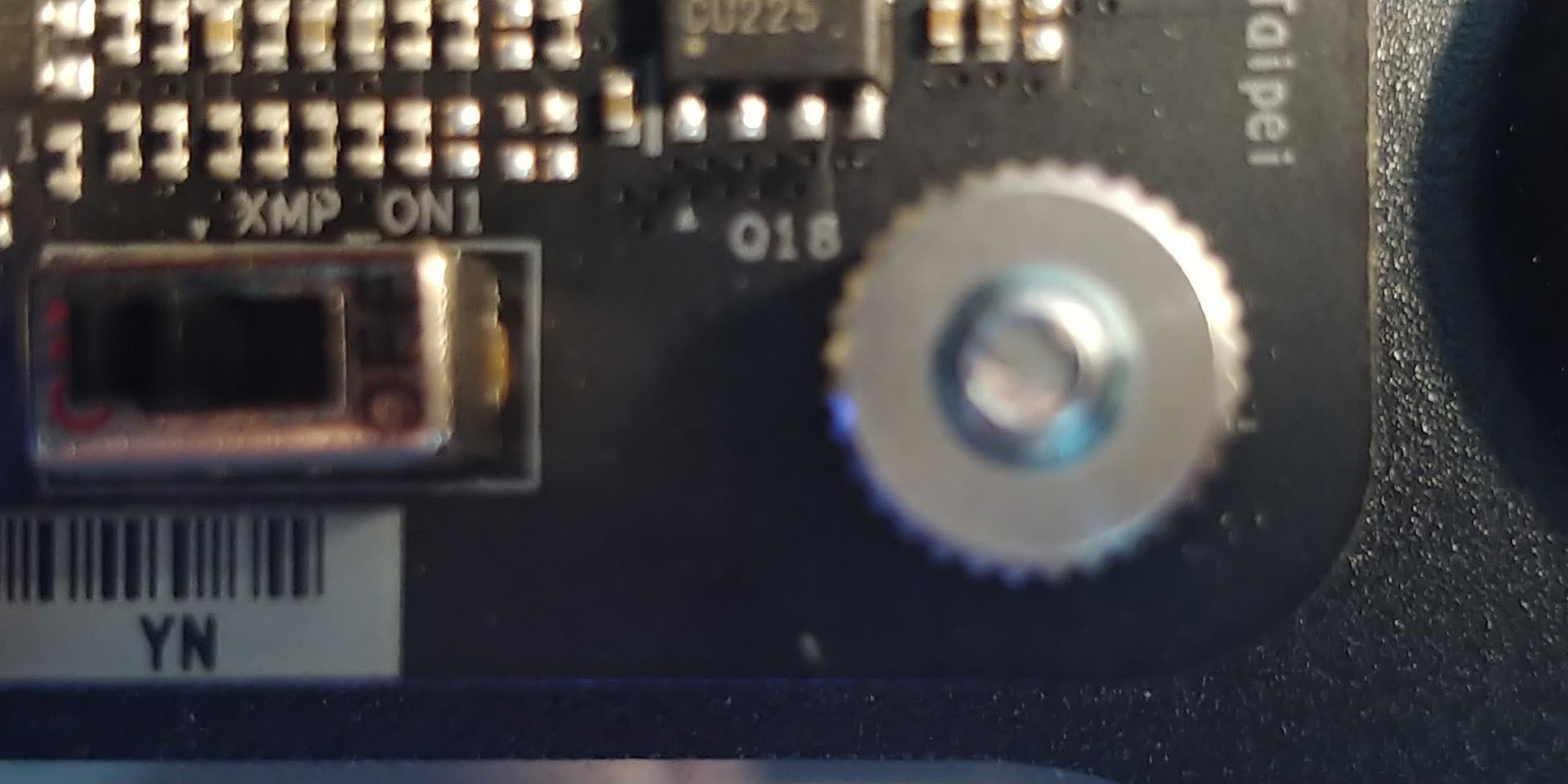
Nope, that is not an LN2 switch. It is a chintzy and totally worthless XMP switch that doesn't do anything. If you switch it on it is suppose to apply XMP without entering the BIOS. Because the XMP profile is not bootable with stock voltage it does nothing. Even if it did work, what kind of enthusiast is scared to go into the BIOS to set XMP, LOL. Pretty dumb "feature" if you ask me.
Attached Files:
-
-
That is just ****ing STUUUUPPPPIIIIIIDDDDD! You waste a chip on that instead of an LN2 switch?!?!? Yeah, you convinced me, their mainstream isn't worth crap. I figured it would have at minimum the features they have on the HEDT side, just less work on the VRM, fewer traces needed on the PCIe, maybe a couple fewer slots and m.2, cheaper chipset, 4 fewer ram slots, etc. NOPE. They decide not just take away those things and make it equivalent but for mainstream, they neuter it. Even if trying to sell your OC Formula, that is absurd. Is the Fatal1ty board like on the X299 and X399, with different sound license and basically an extra 10Gbps ethernet port in addition to the two 1Gbps ports on it, meaning basically the same board as the taichi? If the z370 fatality board is the same as the taichi z370, then there is no choice for Z370 except maybe the Asus Strix line aside from the maximus lineup. This **** isn't that hard... SMFH~!Vasudev, Papusan, Mr. Fox and 1 other person like this.
-
Here's this 3-minute look. I'd actually say it's an OK product for the price if you're on a limited budget and cannot afford something better except for the crappy memory write and copy speeds. I'm pretty sure no amount of tweaking is going to fix that. It's way off... like 10,000 MB/s slower than it should be for write and copy speed. Probably just buggy UEFI firmware coding.
I am wondering if maybe they did not put any kind of TIM on the PCH heat sink. That's just too warm for not being under any kind of serious stress. It's at least 20°C hotter than what I am used to seeing. That and the sluggish memory write and copy make it hard to recommend.
CPU seems to run OK.
Last edited: Jul 23, 2018 -
Looks to me like this board should cost $160 and not $220... if it's a top end midranged board like the ASUS Z370-E/-F units, then it's king of midrange. If it's meant to be alongside the Maximus, then there's no point.
Mmm thanks! I'm glad you checked this out, I now want you to check out a bunch of other boards >_>ajc9988, KY_BULLET, Vasudev and 1 other person like this. -
Not going to really get into all that was said over the last few days...
@Mr. Fox
So i'll just ask this. Isn't your ram 4200? Can you over clock your ram to 4300+ using this board? No XMP, because most benchers do not use it.
And you can't use the same settings for another board. They will never match up because each manufacture uses its own calculation algorithm and extreme over clocker to configure their product. -
Dude, looking through your timings, I see a big issue on booting. You are not matching the CAS write latency to your CL. That is ****ing your timings. Also, set the CKE to 1, if possible. I'll take a closer look in a minute, but that is part of the problem!
-
I think this is the problem... BIOS is not setting RTL correctly. There is a huge difference in the values between channels and DIMMs on the same channel.
https://linustechtips.com/main/topic/773966-comprehensive-memory-overclocking-guide/?page=3
Round Trip Latency: Since these settings are not timings, and are not always listed under tertiary timings, I feel they need their own section, as they are probably the single most important settings you can adjust to see the biggest impact on performance. They include two settings:
- RTL (the title of this section should give you hints as to what this is)
- IO-L
Here is what is being set in the BIOS.
-
Well, you can try moving the first one up one or the 60 to 59 to match. I'm not so sure on the no more than 1, but cannot recall where mine were set at (I think mine were slightly tighter, but cannot remember for sure or find my screenshots when I was troubleshooting for the timings). I didn't have the CL and CWL the same, but I know I only had them like 1 or 2 different (and on Ryzen, it is almost a must to peg those at the same for stability). I also cannot remember what I was setting the I/O latency to, but think that was the same. Been too long since I played with it.
But, on other news, I'll be building my nephew a new rig in a couple months. So, I'll get to bench a 1080 Ti finally and an 8700K. Then I'll throw my 4133 ram into his build to make it a fair fight on ram between us. LOL. Here is his build. I am researching how much more it would cost for syncing all of the RGB together or going to the H500P Mesh. Another possibility is a cheaper 1080 Ti (or whatever is available in Sept./Oct. when I do the build) and doing a Kraken G12 hybrid mod.
https://pcpartpicker.com/list/DPrgzY
If you have any recommendations for changes, let me know. Shooting for $2K (this is slightly over that), so cannot add much in cost. -
If I try to change them it will no longer POST.
Yeah, ASROCK MRC must be really screwed up. This is lousy any way you want to slice it. The DDR4-4000 XMP defaults produce slower write and copy performance than my G.SKILL 3200 did. This comparison is with all default XMP values and BIOS "Auto" timings. The only thing not XMP default is the ASROCK will not boot 4 sticks with XMP-4000 default voltage and I had to raise that for it to boot.
![[IMG]](images/storyImages/69lUQfg.jpg)
Looks like a nice build. Looking forward to seeing your results. Hopefully, I will have the ASUS board back soon and I can sell this ASROCK POS on eBay.Last edited: Jul 23, 2018 -
-
It's no surprise that the winner was the ASUS board in this comparison. As far as reviews go, not too bad. Seems accurate and it looks like there are a number of negative things they noticed that agree with what I have observed. Nevertheless, the Taichi finished in second place out of four. Not good for the Gigabyte and MSI boards tested in the comparison. They didn't really test memory overclocking, and it may not have fared as well if they had done so. The two extra SATA ports doesn't really do as much for you if you use all three M.2 drives, as it only supports one more SATA drive that the other three with two fewer SATA ports. They had to add a third-party SATA controller for the two extra SATA port because the Z370 chipset is the limitation.
https://www.hardwarezone.com.sg/fea...d-shootout-new-cpus-new-boards/conclusion-262
ASUS ROG Maximus X Hero
![[IMG]](images/storyImages/asus-thumb.jpg)
ASUS ROG Maximus X Hero. (Image Source: ASUS)
ASUS’ motherboard may be the most expensive, but it justifies that with a winning combination of good looks, strong overclocking performance, and an extensive feature set that will appeal to enthusiasts. It is equipped with useful hardware buttons for those who want to take their processors to their limits with LN2 overclocking, but it also comes with extensive customization options for those who simply want to add some bling to their rig.
For instance, its support for custom 3D-printed nameplates and individually addressable LEDs leave plenty of room to play with. More importantly, it boasts solid overclocking performance and one of the most intuitive BIOS interfaces around, so overclocking should be quite a breeze.
Finally, it is thoughtful in its execution, with an integrated I/O shield and large buttons for updating the BIOS and clearing CMOS that make it a pleasure to install and work with. It offers the complete package, which is why we're making it the winner of this shootout.
ASRock Z370 Taichi
![[IMG]](images/storyImages/asrock-thumb.jpg)
ASRock Z370 Taichi. (Image Source: ASRock)
The ASRock Z370 Taichi is an affordable motherboard crammed with plenty of features. It boasts a good array of storage and network connectivity options, with a total of eight SATA 6Gbps ports (two more than the rest of the boards), onboard Wi-Fi, and dual Intel Gigabit LAN ports.
However, while more casual users will find a lot to like here, enthusiasts may feel a little left out. There are no dedicated power and reset buttons, or anything like what the ASUS board offers. Of course, there’s the price gap to consider, but the fact remains that this is still one of ASRock’s highest end boards.
Furthermore, we weren’t impressed by its lackluster overclocking performance compared to the rest of the boards. It also posted the highest power consumption and heatsink temperatures, so something appears a bit lacking in the design department. Finally, those who enjoy their RGB LEDs will be disappointed as well, as there’s just one RGB header and the only LEDs are built into the PCH heatsink.
And, here is my review... @D2 Ultima
![[IMG]](images/storyImages/WbtcRqS.jpg)
https://www.newegg.com/Product/Product.aspx?Item=N82E16813157792Last edited: Jul 25, 2018CaerCadarn, Vasudev, Convel and 3 others like this. -
Ooops. Forgot a couple of gripes and had to update the review (above).
Hope the timeline stays the same or improves on the ASUS repair/replace. Who knows... maybe I will get lucky and they won't be able to fix it and will send me a new replacement. Either way, as long as I get it back and it works right I will be a happy camper. If anyone wants a good deal on the almost new Taichi, let me know.
Last edited: Jul 25, 2018 -
Well, DADGUMMIT. Just my luck, LOL. That really sucks for me, but it is great for someone that needs one.
KY_BULLET, Robbo99999 and Papusan like this. -
Ha, you win some, you lose some!
I was reading some recent news over on Guru3d this morning:
http://www.guru3d.com/news-story/core-i9-9900k-8-core-will-have-soldered-heatspreader.html
http://www.guru3d.com/news-story/in...700ki5-9600k-specifications-also-exposed.html
Intel's upcoming 8 core ring bus based CPU's are gonna be using solder rather than toothpaste between the chip and the IHS! They won't be using it on 6 core models though. I predict that the soldered 8 core might run cooler than the toothpaste 6 core / 12 thread CPUS - based on the fact that we see about 15 degC decrease in temperatures by delidding with liquid metal which equates to solder performance. I also predict that the 8 core (no HT) 9700K is gonna be the best gaming CPU out there - I reckon it'll be better for gaming than the 9900K 8 core (HT - 16 thread). Release date is September! -
Why did Intel delid the CPU? Just to reduce the temps or did they feel the heat ryzing from AMD?
Intel will never give what customers want or ask them. I believe this chip will run far hotter even with LM. Unless Intel moves to 10nm or lower they're out of the game. Broadwell to CFL all use 14nm on different boards labeled as new.KY_BULLET likes this. -
Oh yeah, Intel definitely chose to run with solder because they needed to - they wouldn't have been able to cool that 8 core CPU without doing so. I still think it will run cooler than the toothpaste 6 core / 12 thread versions, or at least the same temperatures, but I don't think it will run hotter - I mean delidding with liquid metal reduces temps by 15 degC (same as solder) so I think that will make up for it.Vistar Shook and KY_BULLET like this.
-
I meant it will be more like Skylake X.
-
-
I mean you will get slightly better temp with Liquid meal and not seal the lid on the PCB vs. soldered on IHS from Intel.
-
It will be hotter than CFL chips and more likely un-optimised 14nm+++ since Ryzen is giving stiff competition. Even with delid der8auer will solve problems and mods. Maybe this time Intel users might have to sand the delidded CPUs just to get perfect surface whilst impacting its lifespan in the long run.
Papusan,Mr. Fox, Bloodhawk,Prema and others might be ready for an hefty upgrade. -
Not quite. Intel has issues but 14nm isnt bad.
8 core mainstream thermal issues should be considerably better than SK-X.Vistar Shook, Papusan and Talon like this. -
My preference would be to have the crappy thermal paste and delid it myself so I can use liquid metal. I don't really want the IHS soldered because that takes the control of things away from me. Delid with liquid metal is better than factory soldered by Intel. People seem to have forgotten that CPUs with soldered CPUs ran hot and people that owned them wanted to delid them and could not. If you ever want to go bare die, you cannot if the IHS is soldered. So, I consider it a step backwards to have it soldered from the factory. I don't want anything that limits my options, and soldering does.
Soldering the IHS to the die may also have some potential drawbacks (like liquid metal) for folks than do LN2 overclocking. (Not sure on that, maybe @Johnksss can comment about it.)Vistar Shook, KY_BULLET and Vasudev like this. -
Think of it in this way: From Broadwell to Future 9th gen are 14nm having more or less same socket size whilst forcing users to upgrade their mobo,RAM modules,PSUs etc.. to get best performance. Only few handful of users are able to extract 100% performance from their z/h 170 mobos running 7700K at very high frequencies.
-
RAM and PSU upgrades? I'm not sure what you are referring to. You cannot really look at this from the perspective of a notebook owner. Nothing can be taken seriously any more in the realm of notebooks, and everything made now is a joke in one or more ways.
The socket is irrelevant. People would complain if they changed sockets as well. If hardly any AMD CPU is good at overclocking, almost everyone can expect mostly the same experience from the same hardware, and the only real way to achieve significantly superior results is to buy a new CPU that offers more performance than the last one, how is that an improvement? That scenario is actually worse in my opinion. It's sort of like saying eating at McDonald's is good because they are consistent, the food is always the same regardless of location, and ignores the fact that they are selling garbage that will make you sick.Vistar Shook, KY_BULLET and Vasudev like this. -
Some info... https://overclocking.guide/the-truth-about-cpu-soldering/
"Thermal cycling is a significant problem for overclocking with liquid nitrogen because you go from +30 °C to -190 °C. Normal thermal compounds can’t stick properly to the DIE at e. g. -180 °C so extreme overclockers have a lot of trouble getting the TIM to work. The main reason is the different thermal expansion coefficient. Silicon, copper and compound have different coefficients and a sudden heat load can lead to separation of these components."Ashtrix, Vistar Shook, Vasudev and 1 other person like this. -
That is a good write-up and confirms my sentiments about having the IHS soldered. It's not necessarily the wonderful thing that some people think it is. People always need something to mitch and boan about, and some have landed on that topic. I'm glad Intel uses crappy thermal paste and makes delidding so easy. What a blessing that is to those that are not content with status quo.Vasudev likes this.
-
What I don't like with soldered on IHS on Cpu.... The OEM create/design cooling (Cooling capacity is determined by wattage). If they are happy with the final results... They will throw it out. Then we will have almost no chances to correct their misstakes. With a desktop you can add better cooling. Not in Notebooks.
-
So, mixed blessing. Way better temps stock now, but harms the OC community slightly. If Intel could do solder as well as AMD (Der8auer delidding the soldered chip got 1C difference in temps with liquid metal, with Intel, they were using thinner PCB and the difference in thermal expansion was causing issues with LGA contacts, etc.), then maybe, but other things would have to change also.
For LN2, you don't seem to need to delid for Ryzen chips, so... -
See the post above. When done right, you get 1C higher on soldered vs LM. That means Intel was doing MUCH more wrong compared to AMDs implementation. At 1C, you wouldn't delid and would see no need to do so. Question is, will Intel do it as well?
-
My preference would be that neither one of them soldered and left the decision to the end user whether to leave it alone, or delid and use liquid metal (or something else for LN2). Just more control freak Nazi crap to deal with, where you can have anything they want you to have and that's all. Perhaps if the Ryzen chips clocked as high as the Intel chips the soldering might become more of an issue. With less overclock headroom, there may not be enough thermal cycling, expansion, contraction to create a problem with it being soldered. I don't know that Intel did a bad job of soldering in the past, or that they will in the future. But, if you are pushing a 40-50% overclock and things cannot move freely with the thermal cycling, that cannot be a good thing. I think soldering imposes a mechanical limitation we would be better off without regardless of whether it is an AMD or Intel CPU.
-
Yes, after researching it I found out that Der8auer got 4 degC lower temps with delidding with LM vs solder on Ryzen ( https://segmentnext.com/2018/04/24/amd-ryzen-5-2600-delid-der8auer/) - although I'm sure I also saw information from him at another time that it was only 1-2 degC difference (which is what ajc seems to be referring to below). Either way you look at it, temps are gonna be about 10-15 degC lower with solder vs toothpaste, so I just think this is a big positive. Yes, I get that we can't really delid it anymore, which is kinda fun in it's own way, and we miss out on a couple of degC, but a couple of degC is barely relevant & the bigger effect of lowered temperatures & increased performance for the whole consumer population is a lot larger & more beneficial.
-
For ordinary consumers this is a positive. For overclocking enthusiasts I do not think it is a positive. Seems ordinary consumers, gamer-boys and the wannabe/poser overclockers are the only ones that matter today. They've got to be in control of everything to feel important, and they need to do what they need to do to keep the kids from whining and crying.
I think @Papusan nailed it with this comment.
We are always shackled by the lowest common denominators. That's life. It sucks, but it is what it is. -
After the big debate about solder vs. paste and high heat on HEDT processors I can’t see Inte could do it otherwise. And AMD use solder as well. And the coming 9900K with higher clocks if its true means they hadn’t any choices. Oh’well
Last edited: Jul 26, 2018 -
Well they can't cater the whole market for a few niche extreme overclockers (after all the solder will cater for most overclocker's needs). They could maybe offer a few CPUs for sale that include the IHS separate from the chip so you can put your own LM on - but even that would likely be unmanageable for the small volumes, they probably couldn't predict the manufacturing volumes as well as no economies of scale too.electrosoft, Vasudev, ajc9988 and 2 others like this.
-
I love my LM on my CPUs but if the change is only a few degrees then I welcome solder on my CPUs. I can keep my warranty and not have to go through the hassle? of delidding my chip. I agree that LM is better for temps, but if were talking a few degrees that is a small compromise I am willing to make. Sure it won't make everyone happy, but it sure will shut up all those other complainers about how Intel needs to solder their chips again.
-
I've had to clear a lot of content out of this thread to make it usable again. Hint: when you start picking apart people's statements sentence by sentence, back off. That kind of behavior never goes anywhere.
If some decent posts got caught in this, I apologize. You can repost items if you feel it's safe to do so.
CharlesKY_BULLET, Vistar Shook, Robbo99999 and 3 others like this. -
Here is the video showing Roman doing direct die cooling after delidding soldered Ryzen 1000 series and getting 1C cooler.
-
Yay! Got a tracking number. ASUS is shipping it 3 days sooner than originally projected. Now, let's just hope it's actually fixed, LOL. I'm ready to be done with this castrated Chai Tea mobo.
-
Okay, I'll bite...
So what you're saying is...AMD has a super superior soldering process..... So superior that LM + direct die is a futile attempt to beat it? Intel saw this and got scared and try to replicate the process for their 9900K? Would this be safe to assume?
Short answer only my friend.
@Papusan
That seems to be true. Which brings back the point of them going back to solder. This is actually a good thing. A few degrees loss vs killing the cpu from incorrect application of LM over time. That seems like a good trade off for everyone not using exotic cooling.
I also understand you are using a direct die comparison.Last edited: Jul 27, 2018 -
This is for Intel chips. Direct die cooling vs. delidded with Liquid metal. And Liquid metal cool a notch better than solder.
KY_BULLET, Vistar Shook, Johnksss and 1 other person like this.
*Official* NBR Desktop Overclocker's Lounge [laptop owners welcome, too]
Discussion in 'Desktop Hardware' started by Mr. Fox, Nov 5, 2017.