Problems? See this thread at archive.org.
No, the point on direct die being 1C, then the other video showing 4C on the Ryzen 2000 is that solder makes delidding meaningless, practically, in most cases. AMD is using Intel's patent to solder.
I was not saying that AMD soldering convinced Intel to solder, I said the threat of Zen 2/Ryzen 3000 chips performance scared Intel into doing it again.
Now, more generally, we see the extra 4C from the IHS as a shim, plus or minus a degree or two. That is
-
-
If the debate continues as it's going now then there's no problem.
Nothing wrong with a little AMD vs. Intel debate.
Charleselectrosoft, KY_BULLET, Johnksss and 1 other person like this. -
That is not an unreasonable speculation. They need to pay attention, so if that's actually how it played out it's wise and appropriate on their part to react in this manner. Lord knows that the garbage they have been using is trash that demands delidding if you want decent temps, especially with overclocking (along with the added voltage that facilitates it).
-
All of the other stuff in that post, about the process density, about the rumors on speed and IPC, was to give backing to the argument they are reacting to what they think will come from Zen 2/Ryzen 3. Intel will not be able to respond to those chips until the Holiday season in 2019, as that is what they gave for their 10nm chip releases in the past day or two. So, being a bit proactive and soldering now so that it holds up better for the non-enthusiast crowd makes sense.
https://www.pcmag.com/news/362743/intels-10nm-chips-to-arrive-during-2019-holiday-seasonLast edited: Jul 27, 2018 -
Well, here's hoping that they have an urgent and compelling need to and it's not only a proactive maneuver "just in case" LOL. We know they will respond if given a reason to. So, having a reason to have to is good for everyone. And, if we could only see the same kind of pressure put on NVIDIA it would be amazing. They should all be sore losers and throw all of their effort in trying to one-up each other on performance and overclocking. If they do that then we all win.KY_BULLET, Robbo99999, Papusan and 1 other person like this.
-
I don't know that Intel can react this time. I think, and this is personal opinion, they have ran through their bag of tricks. If I am correct, they might even be waiting for EUV pellicles to be able to use the new lithography with 4 times fewer patterning steps on 10nm.
I have many reasons for thinking this, but I do believe Intel's rough patch will extend to 2021. In 2020, they will have tiger going against Zen 3 with EUV. If AMD is also going to put the dies on an interposer chip, it removes the latency significantly, while the cost of doing so is a little more than adding an extra die to the CPU package.
Now, why I say 2021 is that is when Intel's architecture to replace the iCore series comes out and they have Keller at the helm helping with designs (so with the extra cash and talent they have, plus the person who is great at MCM and multi-die on interposer designs overseeing product development), I think we will see Intel rebound well around then, with good competition next year and the year after. That is why Intel announced the Cascade-AP chips, which are monstrous BGA chips for servers that use MCM (Multi-chip Modules) like AMD. From the rumors I've seen there, there is a chance for them to have 2-dies, meaning two 28-core behemoths.
But, on the AMD side, there are rumors suggesting in the next year or two, we may see 16-core chips on mainstream. If 7nm helps them to keep heat managed and increase their frequency and IPC, we could be in for a hell of a fight. There are even rumors of an 8-die Epyc chip with a controller chip in the center.
I don't know how much you guys follow the AMD side, but looking at both sides, competition is going to be fierce.KY_BULLET, Robbo99999, Vistar Shook and 1 other person like this. -
Solder and high clocks for 9900K is to hold up the pressure until Intel come with 10nm. Not sure if Intel will release a next and last top dog chips before the change. But over a year with same chips before the change is long time.
KY_BULLET, Vistar Shook and Mr. Fox like this. -
It will be interesting to see what happens. Too bad Windoze OS X is in the mix. It's like having someone pee in our corn flakes knowing we're going to have to put up with that piece of crap OS.
KY_BULLET, Papusan, Vistar Shook and 1 other person like this. -
I forgot to mention, Samsung hired one of AMD's Radeon groups gpu architects. Everyone expects that is for mobile at first. But, there is a possibility Samsung starts looking at the GPU market. Then, there is Intel's card in 2020, I think it was. AMD doesn't have anything to compete with Nvidia because of one reason: Independent Software Vendors.
To do multi-die GPUs, you have to use non-uniform memory architectures (NUMA) on them. The software developers don't want to support it. So, no multi-die GPUs for gamers. Navi isn't going to go up against the high end with Nvidia, so more pain unless Intel can help us out.
Nvidia's multi-die GPU whitepaper also calls for NUMA. So, multi-die isn't happening for awhile (except on commercial side where they don't care about SLI or multi-card/die solutions).
Graphics cards suck! And, unless Nvidia already built up stock last quarter, we may not get them anytime soon. TSMC expected low revenue from the PC side and more from Communications (mobile devices like phones, etc., because the Apple A12 and a couple other chips for phones are scheduled). If true, and the rumors on gigabyte or another Taiwanese AIB partner shipping back 300,000 gpus and them sitting on possibly 1M, we could have to wait for them to clear inventory first. I do not hope that happens, because if I am reading the tea leaves right, we are looking at Q4 to Q1 2019 for new cards from Nvidia, unless they rebrand the 1080 Ti with GDDR6 for the 1180. But there are too many rumors surrounding it for a clear reading. I need to check Nvidia's Q3 projections and yearly projections after the collapse of the crypto market.Mr. Fox likes this. -
I have been reading all of the speculation about the GPU overstock, mining collapse and NVIDIA needing to hold back until they sell off the excess. Kind of makes sense. I'd do that if I were in their shoes. Otherwise, they are going to be stuck with a lot of stuff that has to be sold at a loss.
It's a double-edged sword for us. With no competition, we can have the flagship GPU for two or so years without spending a dime to upgrade. I don't mind that part too much. But, no progress isn't something to be excited about.
I'll be observing what happens with Intel and Samsung with interest. I've read about that as well. I'm skeptical, but there's always a chance they will shake up the PC space. Whether or not they actual produce something that gamers and overclocking enthusiasts will care about carries an even bigger question mark for me and I have more doubts than anything else. I have no interest in what they do in the mobile space simply because I don't care about that stuff. Intel has pulled this before and fizzled out after drumming up some hype.
I'm to the point now that I no longer get excited about planned technology. I find talk of it annoying because it is too often unmerited after the fat lady sings. I reserve any enthusiasm until I see actual results... after all of the marketing hype, speculation, shill reviews and what-not dies off and people like us get a chance to abuse it for all it's worth. If excitement is actually warranted at that point, then count me in. I like the option of saying " see, told ya so... just more crap surrounded by a pack of lies" a lot better than disappointment after adopting the screwed up product.electrosoft, Johnksss, jclausius and 2 others like this. -
Intel Core i9-9900K shows up in 3DMark Time Spy, comfortably beats the AMD Ryzen 7 2700X
https://www.3dmark.com/spy/4126457
http://forum.notebookreview.com/thr...e-lake-cpus-z390.811225/page-13#post-10772092KY_BULLET, Vistar Shook, Mr. Fox and 1 other person like this. -
Sure. Debate is one thing, but overly expressed opinions as fact is something entirely different.
 KY_BULLET, Vistar Shook, Papusan and 1 other person like this.
 -
Looks pretty nice. Once we can see verifiable results by overclockers that actually know what they are doing, I may have to sell my laptop to buy one and a second 1080 Ti SC2 for SLI.Vistar Shook and Papusan like this.
-
When time come and the 9900K is released... You should look after a cheap 1080 Ti SC2 if you want SLi.
Nvidia Thread
NVIDIA Partners Clear GeForce 10 Series Inventory By Offering Promo Bundles, Price Cuts on Various Custom Graphics CardsPost by: Papusan, Today at 4:35 PM in forum: Hardware Components and Aftermarket UpgradesVistar Shook and Mr. Fox like this. -
I'm here as well, what do I do now?
-
Ah, you got a desktop recently - well you could show pics, benchmarks, temperatures, building experiences, that kind of thing.Johnksss, Georgel, Papusan and 1 other person like this.
-
WElp
mITX 8700K + 1080TI]
The build in the description: Silverstone Raven RVZ-01 E Case, Corsair SF600 PSU, ASRock Fatality mITX Z370 Motherboard, Intel I7- 8700K -(4.8GHz)- OC CPU, 32 GB G.Skill 2400MHz DDR4 RAM, WD Black 1TB HDD X2, KC400 1TB SSD, Corsair H55 cooler with EK Vardar Furious 3000PWM Fan, MSI GTX 1080Ti Aero OC GPU
Water cooled
Fan is outside the case
Hard to build inside because it is so tiny, took a good few hours
Temps and Benchmarks:
Are there other benchmarks people usually do?
I'd say that if you want to build an uber PC inside of RVZ-01E, it is possible and kinda fun, but if you don't need to ever carry it around, then why not do a larger case?
If I made another build, I'd probably go with better RAM, but that's about it, I'm waiting on 9900K and next gen Nvidia to have something to upgrade to (?)
I added a photo to show what Fan Outside The Case means.
Basically, the water cooling radiator is on the inside, but the fan is held by screws to the radiator, outside of the case. It has a mesh and cage to protect it, but it doesn't have physical space to fit inside the case.
![[IMG]](images/storyImages/iMZwEaD.png)
![[IMG]](images/storyImages/I5KpZg9.png)
![[IMG]](images/storyImages/wqIlqdF.jpg)
-
Right, wow, that is a tiny case! Looks good, must be very practical, I think I remember you talking about wanting to build a really small desktop PC for carrying round - you did it! What do you use it for? How does your GPU fare in that small case (temps, etc)? Does the GPU manage to get cool air from anywhere?
-
Surely!
Besides the GPU having basically a grille in front of it, so its entire surface can intake air, there are also two thin 120mm fans in front of the GPU, taking in air at all times.
Can play with GPU maxxed out in 4K games without the temps ever becoming critial. It is a little noisy, the Aero MSI 1080GPU can get a bit noisy if you push it to its max performance threshold, and I do that more often with Anime and madVR than gaming. But at the end of the day, it is the full performance of 1080TI in this case.
Well, about how practical it is, pretty practical. It weights about 10 KG, so weight may be an issue, but it is easy to put in a backpack and carry around. Full power, portably.
I use it for work, gaming, and anime. madVR is a thingy which can consume more raw power than most games, and I rely on it for watching anime and movies, and so far, it works greatly. You wouldn't think, but Silverstone guys really thought about everything with this case. I wanted to eventually upgrade the case a while ago, but couldn't find any single case even remotely close as awesome as this is.
If I would have anything bad to say about it, that it shte embedded autio in the motherboard is awful. So darn awful... But the motherboard doesn't run too hot and I can render stuff for hours at maxed out CPU, plus I can actually game for hours, and do all the work that my older Clevo lappy didn't let me do because it would overheat. Patiently awaiting on Intel and Nvidia to release their next gen components to upgrade.
Yes, upgrading is what I love the most about this, you can upgrade without having to scrap the entire thing like you do with most laptops
Oh right, the best part is that this is connected to a 4K 43" Display, so quite the multiemdia / gaming platform. To be honest, the display part in a laptop was null for me, I always needed a much larger display to be happy, and this solution really fits all my needs.
I wanted to make a separate thread about it, but when posting a post, the NBR platform saves my progress, but not when posting a new thread, so I gave up after closing it by mistake, after having wrote a lot about this build and its advantages and disadvantages...
Basically, you need to follow all the steps very carefully to get it up and running, every single mm of space counts to get it runing properly, and it is quite tight, so if you aren't fine with working in tight spaces, then don't even think about it, this requires you to work and think in terms of using every single mm of space.Papusan, KY_BULLET, Robbo99999 and 1 other person like this. -
Well, that sounds great, very practical indeed, fitting the usage! So you have a monitor & keyboard at home & then keep a monitor & keyboard at work then - just moving the small PC between them?
Oh yeah, the Aero is a reference NVidia GPU isn't it, that's good though in a small case - exhaust that heat straight out! Have you got a pic of the GPU side of the case, I couldn't visualise the relationship between the 2 intake fans / the GPU / & Grill?
Yeah, I can completely understand the difficulty of working in tight spaces, e.g. building in that small case - I used to service my own car and clearance to bolts, etc was often a major stumbling block!
And yeah, motherboard sound can be rubbish, I noticed you have an external USB DAC, me too, loads better than the motherboard sound even though the motherboard sound is supposed to be good on this board - drives my AKG K702 headphones so much better, the motherboard sound is muddy. -
The audio on-board is absolutely trash, sounds like a bag of mud being beaten by deaf birds
As for the GPU, it doesn't have space inside the case, it has its own chamber.
You need a bit of imagination, but while you see the CPU, the GPU is hidden from it on the other side
You have this accessory
![[IMG]](images/storyImages/rvz01e-6b.jpg)
Looking at this image, the bottom half is where the GPU chaber is. While in usage, the bottom half of this image is actually the upper half for this case.
The part you see is where the SSDs and the HDDs are, but the GPU is inside of that chamber.
![[IMG]](images/storyImages/rvz01-e-inside.jpg)
This image shows how a completed build looks like. Once again, it is bottom up for some reason, but I can ensure you, if you want to have the case on your table, the feet only go if you arrange it the other way around vertically.
For this image, the GPU is on the lower side, which would be the upper side normally. Of course, most builds with this case are for compact PCs and multimedia centers, so most people can do just fine with anemic small air coolers, but if you want 8700K in there, you need a water cooler.
This is not how mine looks like though, (I will take some photos iof I get the chance, but my PSU is shorter, SF600 being smaller physically, so more of the PSU cables are fitted in the area which is the right part of the image, and, as I said, the case needs you to connect every single cable in a certain order, otherwise it will not work at all.
First you need to route all cables
Connect GPU Fans
Route cables for GPU fans
Insert PSU
Connect water pump holder to MOBO
Insert Mobo
Connect case cables to mobo
Connect RAM
Connect mobo to PSU
Connect all other PSU cables to PSU
Put in the CPU
Attach water cooling to CPU, leave the radiator on the outside, without any fans
Connect water pump cable
Connect GPU fans cables to MOBO
Place HDDs / SSDs in GPU holder
Connect PSU cables to GPU
Place GPU in its holder
Connect the GPU holder to the case
Attach SATA power and SATA data cables to HDDs / SSDs
Connect everything power to everything, double check
Now the hard part - Attach the CPU fan though the case. Physically force the CPU fan connector thorugh one of the case openings.
Connect that cable to MOBO
Attach the water radiator on one side of the outer lid, the fan on the other.
Screw in
Place in the LID
...
Should be done.
The trick is that you have very little space to move at all times, everything needs to fit within mm of space, and especially that last few steps to make water cooling work are something I designed from the ground, the case is not made to be used like this
If anything, you may be sad that none of the MOBO or GPU lights aren't visible from the outside
![[IMG]](images/storyImages/ComponentsInstalled.jpg)
I should do this actually...
I do this for my Audio reviews, afor Head-Fi which uses the same platform engine, but I forgot that this may be necessary... -
Yes, I can see what you mean by having to work out the last few steps yourself in order to get water cooling to work (including putting the CPU radiator fan on the outside of the case). Is the CPU radiator fan pushing or pulling (ie is it intake or exhaust)?
The GPU has it's own compartment - that's good in as much as it protects it from heat from the other components. Does the GPU suck in it's own air through a grill in the side of the case, or did you say there was a case fan that pushed air into that GPU compartment (or both)? Are there any exhaust case fans anywhere? -
The case works best as a positive pressure case, so CPU fan intakes air and pushes it into the case. The air goes through the CPU water radiator, so it is warm, but it isn't exactly hot, it manages to cool the MOBO and other intenrals well enough
The PSU has its own large space intakes and such, so its heat and its air flow is not connected to the MOBO chamber or with the GPU chamber
The MOBO chamber has basically, the MOBO, the RAM, and HDDs, while the GPU has one HDD and the GPU
In reached the conclusion that Silverstone knew fairly well what they were doing when they made this one, everythhing has its own few mm of space where they sit really tight.
There are two GPU fans that aid the GPU air intake, so it always sits in a positive pressure of cool air
![[IMG]](images/storyImages/maxresdefault.jpg)
On both those images, on the right is the GPU chamber. It floats above those two fans, held in place by its support.
![[IMG]](images/storyImages/rvz01e-9b.jpg)
Also, made a drawing of how things sit inside
![[IMG]](images/storyImages/GjCN8dS.png) Robbo99999, Papusan and KY_BULLET like this.
Robbo99999, Papusan and KY_BULLET like this. -
BTW,
I was actually considering upgrading the case to something a little less mobile in the future, but nothing in this world provides as much cooling directly to the GPU
Most cases place the GPU intake fan looking straight into a large metallic box, where the PSU usually is, I think this is a very poor design, especially on NZXT cases, at least the iTX ones, are deisgned really poorly. Most cases as well, will face the GPU to try suck air out of nothing, while Silverstone has two fans blowing air into the GPU at all times...KY_BULLET likes this. -
i don't know if you ran across any of these, but scroll down a bit in this post and click the spoiler button for other cases I considered for my build - http://forum.notebookreview.com/threads/mighty-muscular-mini-itx-build.812322/#post-10656108Georgel likes this.
-
Right, I'm with you, I understand how that's layed out now for the GPU. That's pretty awesome with the direct cool air supply to the GPU - in fact it reminded me of a recent review I read on Gamers Nexus, and it didn't click that it was almost the same case as this one - Gamers Nexus found that the GPU temperatures were better than any case (full size or other) that they have ever tested (see following links - basically 42 degC delta T GPU temperature vs 47 degC delta T - this little case cools GPUs 5 degC cooler than any other case they have ever tested)!
This is the review for your case (or one very similar):
https://www.gamersnexus.net/hwreviews/3328-silverstone-rvz03-mini-itx-case-review-for-gaming
This is a review for a random case, but it shows all of their temperature testing history of other cases too, for comparison to temperatures above:
https://www.gamersnexus.net/hwreviews/3285-lian-li-o11-dynamic-review-benchmark-der8auer-case-design
Well that's a very intelligently designed system! -
The case you went for is quite cool, but larger than what I am using by a fair margin
Yes, noticed it, but
Ncases are crappy in terms of where the GPU is situated and how it gets its airflow. Also, its connector sits under quite a bit of strain
Dancases - Where is the HDD / SSD ? What happens when you actually have a PSU connected? The PSU cables is much more than in their photos. Also where is availability?
Enthoo Evolv Shi t X - This is huge by any definition . I would consider it if I didn't needed portability, but as it is, it is a cute desktop case which is really well made, but not a portable miTX
The DuneCase thingy doesn't allow for any kind of GPU, PSU nor for a very wide array of configurations, making it worse than a laptop, which is the reason I went to Desktop from the start, I wanted to have spare components readily available -
I've never physically inspected this, but the M1 looks like the GPU is on the bottom (heat rises, so that may cause a problem with mobo and components situated above), and there is a fan or two situated underneath between GPU and bottom of the case. Can't say for certain how this affects cooling. I'm sure there are multiple reviews for this case that may have coverage on cooling.
Specs say there is a drive bay for 2x 2.5" HDDs and a third 2.5" HDD can be mounted on a panel. PSU is SFX (silverstone has a nice one), mounted sideways, so modular cables hook up toward the bottom of the case. In regards to availability, they do these in 'runs', since it is really just an enthusiast inspired case. Caseking handles stuff in Europe (UK / Germany), they would be the closest to your location. SFFLAB handles things in the United States. -
For Ncases, yes, it is a pretty big issue. Unless you go blower style, but even then, the main issue is that the fan itself intakes pretty warm air, meaning that its cooling abilities are never used at their max potential.
As for the DAn Cases, the thing is they are very rarely available. I think that the nicest PSU in SFX form is the SF600 I have right now, unless someone put something new on the market already. There was a site whose only thing was to review PSUs, and they pretty much have indicated that this is what you most probably want for SFX form facter.KY_BULLET likes this. -
Yes. They're only available when they do "production runs", so you have to catch them during this time. But they run them once or twice a year.
In regards to PSU, I was thinking there was a Sliverstone SFX-L 800W PSU that fit. But don't hold me to that.Georgel likes this. -
Since I don't think my system could use more than 600W of raw power, I went with SF600.
The main issue is that 800W is quite a bit of an overkill, especially for an iTX case.
Another thing is space, you really need to force the space constraints to fitr any iTX-Long compared to a typical iTX which leaves you enough space to deposit the cables
-
It's unfortunate the selection of smaller PSUs are so limited, because the SX800-LTI really is a mediocre Enhance Electronics PSU that doesn't live up to its lofty price tag, unlike the SX700-LPT from a different OEM. Backed by a mere 3-year warranty, it makes do with 85°C bulk electrolytic capacitors, has bad ripple on its +3.3V rail, and units manufactured prior to this year all have sleeve-bearing fans with a noisy profile.
https://www.tomshardware.com/reviews/silverstone-sx800-lti-psu,5239-12.html
The Corsair SF600 has a 7-year warranty, the Seasonic SGX-650 a 10-year warranty, and the EVGA SuperNOVA 650 GM should have a longish warranty too, yet they're all significantly cheaper.
Thankfully, I can fit an SFX-L length PSU with ATX width and depth, making the EVGA SuperNOVA G7 1000 an excellent option come September.
Georgel likes this. -
Well, seems everything is as it should be now. I don't get the ASROCK sucky RAM write/copy speeds, but it is what it is. Has to be the memory training and tertiary timings are buggered up. Anyhow, Taichi goes on eBay tomorrow. ASUS could not find any hardware issues. Must have just been corrupted BIOS that flashing would not correct. They manually reprogrammed the firmware. So far, no problems observed.
Default XMP 4000 settings (no tweaks).
Tweaked a little bit...
Either way... utterly destroys memory write and copy performance of the Taichi Chai Tea.Last edited: Aug 1, 2018Johnksss, KY_BULLET, Robbo99999 and 1 other person like this. -
-
-
No, the last bit was a personal note not related to the RVZ-01 discussion. Just wanted my opinion on the beefiest SilverStone PSU voiced. While I'm fond of compact computers and interested in SFX-L PSUs, I went with mATX for the sake of better cooling and SLI compatibility, should I need it.
-
That's part of the reason why I went with SF600 instead of Silverstone's 800W PSU, I did some reading and it seems like SF600 has better overall build and control.
Tho, I gotta ask you, do you really need 1000W of poiwer for anything you are doing?
On that note, I went with iTX because it is transportable
I find it important to be able to carry my PC if I have toConvel likes this. -
Went ahead and changed my Reservoir to Dual XSPC 270MM's and used my pumps with them. I like this way much better.
![[IMG]](images/storyImages/d6qcHWF.jpg)
![[IMG]](images/storyImages/RYjrCeR.jpg) electrosoft, Georgel, Mr. Fox and 1 other person like this.
electrosoft, Georgel, Mr. Fox and 1 other person like this. -
Yeah, that is great looking. I really like the XSPC D5 Photon pump/res units.Johnksss likes this.
-
Did you get different RAM, or just LED accents for your existing memory?
-
I purchased LED heatsinks.
https://www.amazon.com/dp/B07C9HSLQ...mp-feature-scomp-wm-5&ref=aa_scomp_aapi1&th=1
![[IMG]](images/storyImages/71uaiOAkYcL._SL1500_.jpg) Georgel, Convel, KY_BULLET and 1 other person like this.
Georgel, Convel, KY_BULLET and 1 other person like this. -
I have never seen those before. Interesting. Thanks for sharing.
Did you remove the stock heat sinks, or just put that over them for looks only? If you removed the stock heat sinks, are you able to notice any improvement in memory temps? My Corair LPX has no thermal sensors, but the modules never seem to get hot to the touch.Johnksss likes this. -
@Mr. Fox
No problem.
Yes. I had to remove the original heat sinks first. Then install these. Process is reversible if you take care when you remove the originals.
They seem to be about the same in temps i gather. Hard to tell with no temp sensor. They never seem to be hot to the touch at all. -
Mine never feel hot to the touch either. I have been running it without the RAM fan this week with the house having ambient temps over 85°F in the heat here and they never even feel warm. My IR thermometer shows no signs of heat either. I wish these Corsair stick had thermal sensors. Not sure why they do not, but I guess it doesn't matter in the grand scheme of things if they never get hot.
ASUS didn't really fix anything on my motherboard. They were not able to replicate my issues and found no problems. They manually programmed the BIOS to the latest version (unfortunately). After further testing, it seems it has come back with the same issues, so there was a huge waste of my time and money. The problems are not as bad or as frequent as before, (for unknown reasons,) but essentially the same. All of the problems that started after the latest BIOS release seem to go away with only two sticks installed. Used to be 100% stable with all four, and downgrading the BIOS does not help because doing so does not downgrade the ME firmware. I think it might be the problem is that the new Intel ME firmware is crap. The ASROCK Chai Tea mobo I have on eBay has the same Intel ME version and it pitches a fit with four sticks of the same RAM and doesn't even want to boot with four sticks.
I have an RMA from Corsair to replace this 4000 kit to see if maybe it is the RAM itself is having an issue. When I explained it to Corsair, they accepted the RMA, so I am crossing my fingers. If that doesn't work, I guess I will be using two 8GB DDR4-4000 sticks from now on instead of four. Replacement RAM should be here on Tuesday.
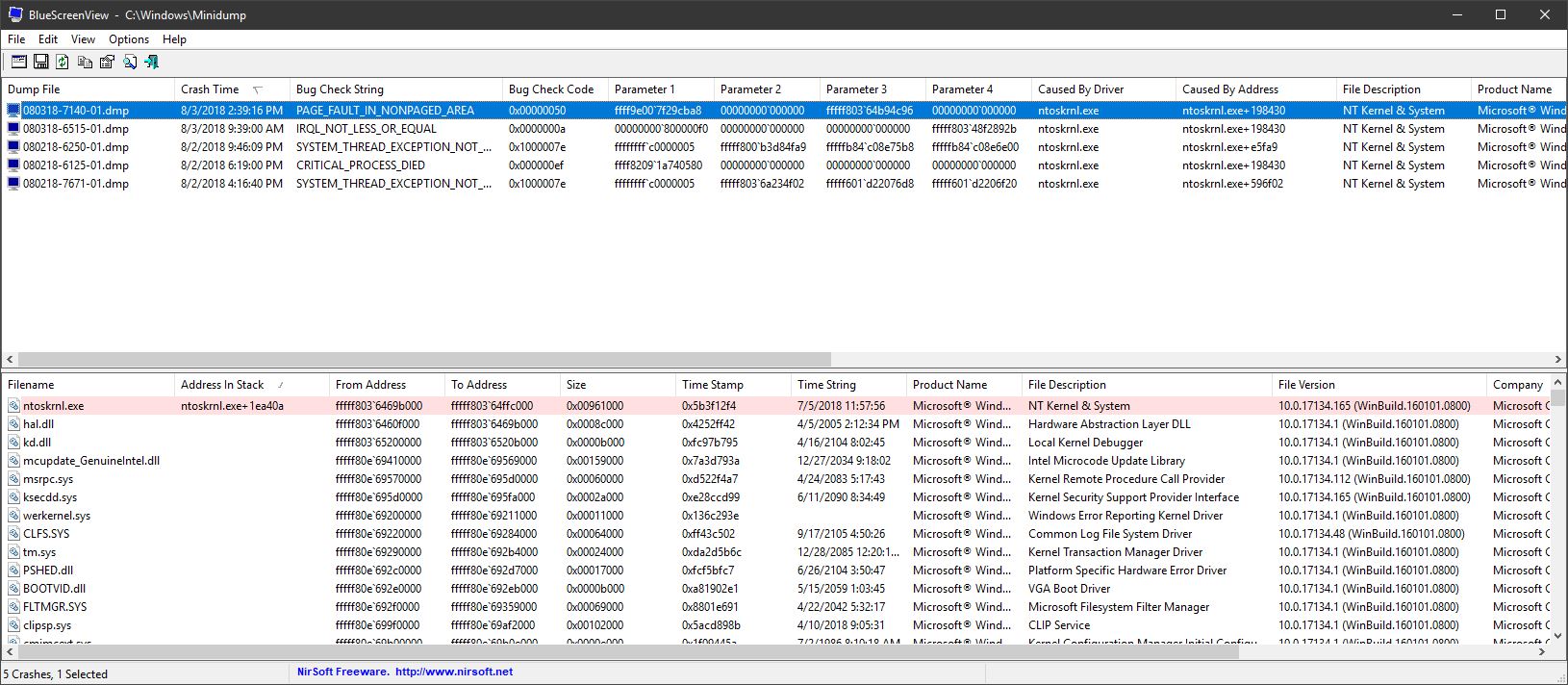
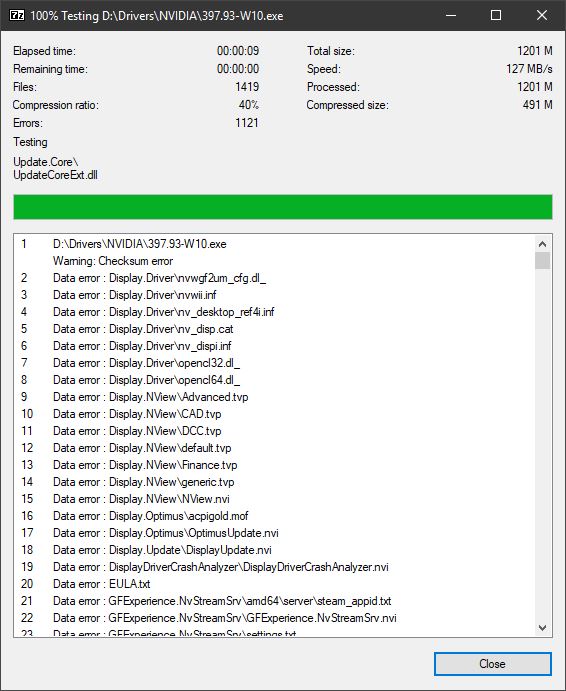
The really weird part is, it passes all Memtest86 tests and Windows Memory Diagnostics. With two sticks installed never any hiccup. With four sticks installed, I randomly see what is shown in the screen shots attached. So, either the RAM has developed an issue or the ME is garbage. I cannot extract compressed archives with four sticks due to CRC errors. Even something as simple as installing GeFarts drivers fails. With two sticks, no issues. But, it has no problem booting with four. I also never see the random "(A7) ME FW - Downgrade - Request MeSpiLock Failed" error message with two sticks. I hope it is the RAM and not buggy Intel ME causing it.
Did your system straighten out, or is it still misbehaving since the last BIOS update?Attached Files:
Last edited: Aug 3, 2018 -
-
@Mr. Fox
Well.... It can be the ram/ram slot or slots/cpu/cpu pin or pins/bios/motherboard components and or me. The fact that you couldn't do a bios flash back is kind of a flag. Since you don't need anything but power for that. And of course the right name for the bios file. I would grab another board and put the parts on it and see what happens. Since that board is going to come just like how yours did when you bought it. Then if that didn't work, then I would RMA the board and ram. Or dump the firmware from that board and flash it to mine.
Mine is fine. Although from time to time after a hard crash with out of spec settings.... The computer will reboot and I will loose 1 or 2 memory slots. Then I have too basically pull all 4 sticks and set them back in place and then it's fine.Mr. Fox likes this. -
Intel could still throw a kink into the works in the 11th hour, but it seems the CPU upgrade path is going to be there as I expected. Will be interesting to see if the price is good or outrageous.
https://www.pcworld.com/article/329...-intel-9000-series-cpus-motherboards.amp.html -
Last edited: Aug 4, 2018
*Official* NBR Desktop Overclocker's Lounge [laptop owners welcome, too]
Discussion in 'Desktop Hardware' started by Mr. Fox, Nov 5, 2017.