Problems? See this thread at archive.org.
I am optimistic replacement RAM will fix it. Will find out Tuesday when the new sticks get here for the RMA exchange. The serial numbers on my sticks are numbered sequentially. The two modules with serial numbers ending in 18 and 19 work fine in channel A or B. No errors or odd behavior. The two modules ending in 20 and 21 work fine in any of the 4 slots one at a time. If I install both of them without 18 and 19 I have issues with instability, BSOD and CRC errors, the error message about the ME downgrade failure, etc. I do not think there is anything wrong with the motherboard itself. I am able to do the BIOS flashback now. ASUS Tech Support gave me the wrong file name to use. After tons of Google searching I found the correct name (totally by accident - wasn't even searching for that) and renaming it worked flawlessly. They told me to use M10H.CAP and it never worked. Naming it M10HWIFI.CAP does work, every time.
I am now looking for a schematic to verify a jumper I found on the mobo is a service jumper to disable all BIOS write protection and unlock all SPI regions to I can flash whatever ME version I feel like using. I think the new Intel ME might be contributing to the memory errors, and I know it lowered my benchmark scores. If the replacement RAM doesn't fix it, then maybe I can blame the Intel ME update for that as well. Given that I only have errors with two of the sticks regardless of which slot they are in, I do not think the ME is to blame for that now.
-
-
Well....You could try to just hold the cpu water block on by hand and try to turn the computer on with all 4 sticks inserted.
-
Maybe I am not describing the issue clearly enough. I think one (maybe two, but probably just one) of the 4 RAM sticks has a defect. If you didn't live so far away, I could just bring these 4 RAM sticks over and see if two of the four caused problems on your system, but I don't have another system to test them in.
It has no problem completing POST or booting Windows with all four sticks installed. The problems are after booting Windows while running in Windows. It has issues with CRC errors, random BSOD, etc. with all 4 sticks installed. I cannot extract compressed archives because WinRAR and WinZip say they are corrupted, and I cannot install drivers. If I remove two sticks (those ending in S/N 20 and 21) my system works correctly. I can move the other two sticks (ending in S/N 18 and 19) to the other slots and everything still works fine.
Only one pair of the four sticks (those with S/N ending with 20 and 21) whether installed with all four, or just those two sticks by themselves) cause the problems mentioned. If I run the other pair (S/N ending in 18 and 19) there are no issues no matter what slots they are installed in. All four sticks work fine one at a time in any slot. I only have issues when that one pair (S/N ending with 20 and 21) are installed. It does not matter what slots they are installed in.
Also, with the two sticks ending in S/N 20 and 21 are installed, I randomly see the error message "(A07) ME FW - Downgrade - Request MeSpiLock Failed" and with the other two sticks installed I never see that error (so far). The problem started with the latest BIOS update, which updated the Intel ME firmware, and that I why I think there is a possibility the ME firmware is contributing to the problem. But, since it only happens with the sticks ending in S/N 20 and 21, Corsair is sending me a new kit. Those two sticks seem to be the common denominator. That would also explain why ASUS could not find a problem or replicate my issues.
I guess I will find out on Tuesday when the replacement kit arrives. If everything works correctly with the new kit it was a defect in one or both of the modules ending with S/N 20 and 21. If the problems are the same, then it has to be either a hardware problem or the Intel ME, or the replacement RAM they send me is no good. I won't know anything until I have the replacement RAM kit though. Either way, it will still be a mystery why everything was fine until I flashed the latest BIOS that triggered my weird issues.
It does not explain the slow RAM write and copy speeds in the ASROCK Chai Tea mobo, but I had a helluva time getting that motherboard to boot with all four sticks installed. It would not even try to POST most of the time, and now I am thinking that difficultly with POST issue was the same two sticks that give me stability issues on the ASUS board. (The slow write and copy speeds were a problem with that board using the two good sticks that don't give me any issues in the ASUS board, so I think that was strictly an ASROCK Chai Tea memory performance issue.)Last edited: Aug 5, 2018 -
No, I understood the whole scenario, but I was getting at something slightly different. No worries, you're probably right. It's probably one or both of the memory sticks you mentioned.
-
When you said this...
Are you thinking something like the water block is screwed down too tight and messing up the pin contact? I saw you mentioned that once and I forgot to reply to acknowledge your suggestion.
I looked at all the pins very closely with a magnifying glass before I sent the board to ASUS and after I got it back and all the pins look good. I also do not have the spring-loaded water block nuts super tight. I just have the springs loaded enough for the block to make good contact in case something like that was causing a problem. -
Yes. That was what I was getting at. If you compressed the socket to much over time the board can get bent and you develop mic cracks in the pcb. The pins can be seem strait when looking at them which is fine, it's when you set the cpu on top and compress it down is when the problem arises and that's a bit harder to see with the cpu in the socket.
Or.
Like on my board. I can't just open up Aisuite 3 or TurboV and just pick a setting and hit apply. There is a very good chance that it would fry something on the board or damage it enough to keep running but cause major errors. When opening these programs on this board they may not be correct and when you hit apply you just fed what ever voltage was showing in sections you can not see. not sure if that is with your board, but it sure is with any X299 Apex or Extreme.
That's why I was like, grab another board.
I just hope it's just the memory and not the board that caused the memory to go bad, because chances are it will happen again if it was the board. (Speculations of course)Robbo99999, Convel, Papusan and 2 others like this. -
Sold my Strix GTX 1080 Ti yesterday for $650 locally. Not bad considering I used the card for 1.4 months or so and I only paid around $750~. The GTX 1180 will easily best my Ti and I figure I can pick an OEM card up for around what I sold my TI card for. Maybe max $100 out of pocket.
I may even go Titan this go around depending on price and launch date. Excited for the next gen!Robbo99999, Convel, Mr. Fox and 2 others like this. -
Sorry about the late reply! I failed to find a moment to myself this weekend.

I don't need the capacity for the hardware I've currently got and in the pipeline (8700K + GTX 1180), but if my interest in VR picks up again, even if it's after foveated rendering becomes broadly adopted, I might go SLI and will of course overclock either way. Heck, the future for this case and PSU may even be HEDT, as I do intend to keep them for a while, so the additional capacity is nice to have as a precaution.
Why I'm interested in it over current SFX and SFX-L models is ripple control and reliability, where your SF600 is already excellent, but also noise. If I'm able to fit a PSU with a lower component density, even though it's still got a 120 mm fan like SFX-L, it seems the better idea.Georgel likes this. -
Oh, I see!
SF600 is quite excellent on an overall level, nothing to complain. Haven't ran into any issues with it at all, it can even survive if the lights go out for a second, my PC doesn't restart lol
As for having enough space for SLI, if you do have, there may be other options on the typical ATX PSU which may be even better
Convel likes this. -
Glad it's working well for you! Most people seem satisfied with the SF600.
 As for fitting a longer-than-SFX-L PSU, that won't be possible because my secondary radiator is taking up some of the case space usually reserved for the PSU. Depth and height wise, I'm in the clear for an ATX PSU, but length wise I can't fit anything longer than SFX-L. Dimensions aside, the Super G7 sits above the Super G3 line, so quality shouldn't be lacking.
Georgel likes this.
As for fitting a longer-than-SFX-L PSU, that won't be possible because my secondary radiator is taking up some of the case space usually reserved for the PSU. Depth and height wise, I'm in the clear for an ATX PSU, but length wise I can't fit anything longer than SFX-L. Dimensions aside, the Super G7 sits above the Super G3 line, so quality shouldn't be lacking.
Georgel likes this. -
This (official) from ASUS... Z370 boards with i9-9900K support: https://rog.asus.com/forum/showthre...or-Maximus-X-amp-Strix-Z370-Boards#post730996 - mine's on the list, so I guess my next upgrade might be that.
Brother @Robbo99999 will like the low latency
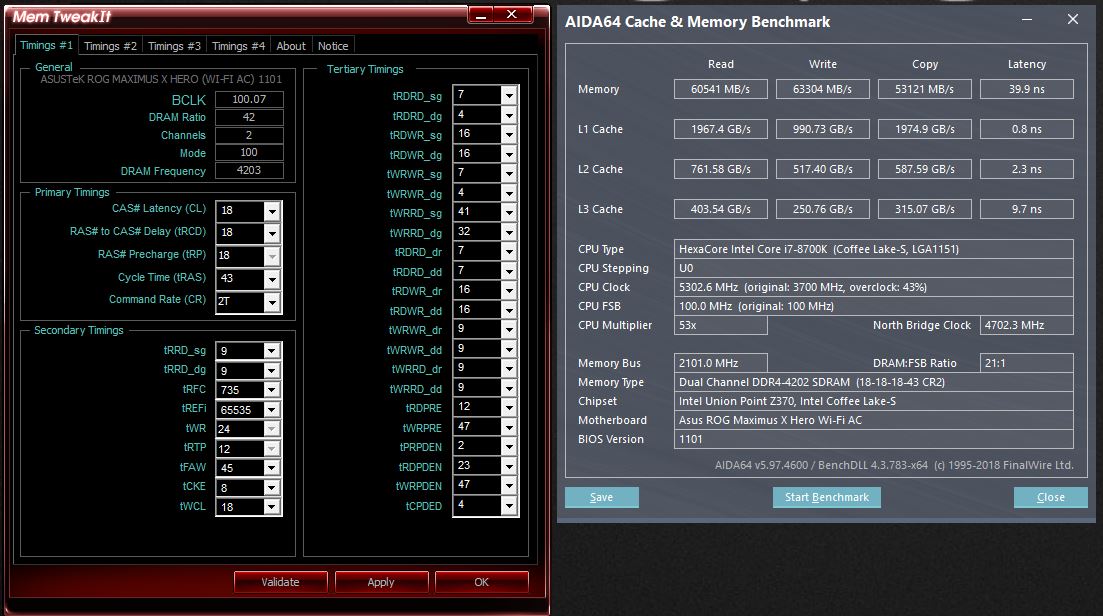
Brother @Johnksss - not sure if it will be of any value, but I attached the memtweak info if you want to try it with your Corsair RAM. I'm going to renew my TB Pro if you want the SPD or XMP export for 4000 let me know.Attached Files:
Last edited: Aug 7, 2018 -
-
https://www.asus.com/us/Motherboards/ROG-STRIX-Z370-E-GAMING/HelpDesk_BIOS/
Asus updated their BIOS page to confirm 9000 series CPUs ready. -
For my board it was released like a month ago. But, flashing it is what made my system unstable with 4 sticks of RAM. It only functions trouble-free with two sticks now. Spoke with a manager at ASUS yesterday. Appears they may be replacing it under warranty because they don't know what to do to fix it. They agree that it appears to be the motherboard based on the information I provided to them. He said I should know something by Friday or Monday, after he consults with their motherboard engineers. Corsair replaced the memory under warranty and it made no difference.
https://www.asus.com/us/Motherboards/ROG-MAXIMUS-X-HERO-WI-FI-AC/HelpDesk_BIOS/
Vasudev, KY_BULLET, Robbo99999 and 2 others like this. -
This Z370-E bios was released over a month ago for my board as well on 7/6. But they updated the release notes to explicitly state 9000 series support. Probably after Intel gave their blessing or dropped the NDA. I've had zero issues with this BIOS either.
-
Are you using 4x4GB or 2x8GB?
I also have no issues with it as long as I only use two of my four sticks of RAM. Works flawlessly with two, and it's a mess with four. It was fine before the new BIOS/ME/CPU microcode update. Downgrading the BIOS does not fix it because it keeps the goofed up ME version. Even BIOS Flashback from USB retains the new ME version. It seems like the ME is the problem to me. If I had 2x16GB I wouldn't care. I bought 4x8GB because I want/need/prefer 32GB for higher benchmark scores and then I am ready for quad channel HEDT down the road without having to buy more RAM. (Yes, some benchmark scores are higher with 32GB of RAM for some weird reason. 3DMark 11 is one of them.) -
2x8gb. That must be the issue then. Hopefully Asus can find the issue and fix it or issue a new bios.
-
Well, now they're giving me the run-around. Yesterday the manager I spoke to said he and several others agree the mobo needs to be replaced. Now he is saying I need to test a different memory kit in another speed or brand to see if it still has the problem. No way in hell I am spending $500 of my own money on a RAM experiment to satisfy their curiosity, especially when I bought this specifically because it was on their QVL as being tested and compatible with 4 modules. And, it was trouble-free until BIOS 1602 was flash. Then it suddenly doesn't like having all 4 memory slots filled with the same RAM that worked fine before. Bottom line is they didn't do enough testing. So, looks like I might end up being left holding the bag and having to live with only 16GB if they have their own way. But, I will continue to be a pest and escalate it if they are trying to brush me off.KY_BULLET, Vistar Shook, jclausius and 1 other person like this.
-
-
I guess this is no longer a supported benchmark. There is no way to submit scores to ASUS or HWBOT? I have tried both versions. ASUS site seems closed and the HWBOT version closes as soon as I enter my user name and password. Uploading the save file doesn't work on HWBOT. Seems file cannot be parsed and their forum says this is an known issue.
Last edited: Aug 11, 2018KY_BULLET likes this. -
Still only stable with two sticks. Sent a bunch more information to ASUS yesterday (per their request) including BIOS screen shots.
Here's a 4266 AIDA64 benchmark...
-
Theres no way to revert back to the stable microcode? I seen a post by Dufus a while back showing how to do an update within windows but not sure if it would work to revert back?
Here is the POST
Hope you get it figured out. I know this is probably aggravating you to no end.Last edited: Aug 11, 2018Vistar Shook, Mr. Fox and Papusan like this. -
Doesn’t help. Seems it’s the latest ME firmware who is the culprit and can’t be rolled back.
-
That's why I say, grab another board to test. They are like 250.00 bucks. If everything works, then that would be proof enough for the RMA.
Mess around and they RMA that board and give you an Identical one with the new microcode/me and you are back in the same boat.
Edit:
Not sure if this was posted and I missed it here.
https://www.theregister.co.uk/2017/12/13/intel_management_engine_gets_hardwarebased_lock/Last edited: Aug 11, 2018 -
I can downgrade the BIOS by normal flash or USB Flashback and everything except the Intel ME downgrades. But, if I look at the big picture it's still performing way better than average with 2 sticks. Other than the problem with using 4 sticks, there is nothing I have any business complaining about. Yes, it is extremely aggravating because it used to work fine and I know it did. Had I purchased the RAM after the current BIOS I would not know any better. The ASROCK board helped me realize how superior this ASUS board is in every way.
I am pressing them to give me a way to flash the ME to the older version. I am about 99% sure they can provide me with a software solution unlocking the ME region for flashing the downgrade. They haven't said no yet. If downgrading the ME doesn't correct the problem, then it has to be hardware. If it does, then they have to admit the new Intel ME is garbage. They readily acknowledge there is a problem, but they're not ready to admit either of those things just yet. The manager I spoke with did and he and several of his peers agreed replacing the motherboard was appropriate, but the engineers want more information. So, I gave it to them. I will probably hear back from them on Monday, after they look over the stuff they asked me to send them.
I don't have $250 to burn right now or I would do definitely do that. Already took a $50 bath reselling the 10-day used ASROCK Chai Tea mobo that was a much worse performing piece of crap than my ASUS board in its current state that I am not too happy about, LOL. The thing is, if I have to use this BIOS and ME for a 9900K upgrade, it might not have this problem with the new CPU and that $250 experiment will probably cover half or more the cost of the new CPU. The problem I am experiencing with 4 sticks might be an unavoidable consequence of making the Z370 chipset compatible with 9900K. I have noticed several people complaining of RAM instability with 8700K following their flashing the new BIOS over in the ASUS forums as well. So, maybe kind of a catch 22.Last edited: Aug 11, 2018Robbo99999, Papusan and KY_BULLET like this. -
You kind of lost me....
You were only borrowing the board to prove a point. Not keeping it. -
Update: It was MSI, not Asus for this particular fix...subject line from the email:
MSI DOS BIOS UPDATE TUTORIAL (ME Unlocker)
Ran into the same problem with an MSI motherboard, laptop actually, and MSI can give you custom tools / command options / bin's and steps to repair. PITA. A couple of ticket go arounds and they sent me the instructions, attachments, and links.Last edited: Aug 11, 2018 -
Update: It was MSI, not Asus for this particular fix...subject line from the email:
MSI DOS BIOS UPDATE TUTORIAL (ME Unlocker)
The tools and technique let you work with individual sections of the BIOS, ME in this case yes, independent of the rest of the BIOS. I had backed off a BIOS update, but the ME portion didn't regress when regressing to the previous BIOS.
The laptop worked fine, but the ME showed a Yellow warning in the Devices and wouldn't start / work - kind of a feature instead of a bug in a way. In fact I liked it so much I left it that way for a long time. Then I needed to clean it up before selling it. MSI reacted quickly out of the blue from my first request, which was great. The instructions were buggy, but I figured it out and sent them corrections.Last edited: Aug 11, 2018Robbo99999, Papusan, Johnksss and 1 other person like this. -
Yes, and that definitely got their attention. When I told them a crappy ASROCK Taichi board did not have all of the malfunction problems their flagship Z370 board did, they changed their tune almost immediately. But, it cost me over $50 (purchase price versus sale price) to get their attention. If I spend another $250, that's $300 flushed down the toilet up front, minus whatever I might get for it later. That was my only point.
But, you're right. I never intended to keep the Chai Tea mobo. Got tons of offers from losers expecting to steal it for an idiotic price like $100. I finally got $150 for it. After eBay and PayPal take their cut, that's a pretty big loss for an experiment.
Yes, I know there is a way to do it. It's sometimes proprietary. Prema and Svet have ways of doing it for Clevo and MSI notebooks. MSI actually goes overboard locking their crap down to the point of absurdity. Much worse than Clevo.
I could probably figure out a way to do it with Prema's help, since he figured out how to unlock the ME region on the 16L13 without MSI's proprietary ways, but I don't want to brick the board and have to replace it with my own money. I'd rather wait and have them give me the right tools, or have them brick it for me so they can replace it at their expense.
It's really retarded that any of this firmware crap is locked down. It really pisses me off that we can't flash whatever firmware versions or firmware mods we feel like flashing whenever we feel like it, as often as we feel like it. The lockdowns are utter BS and all of the ODMs deserve to burn in hell for it, whether they are selling notebooks or desktop parts.Last edited: Aug 11, 2018 -
It's not really hacking the ME, just unlocking it and working with changing it independent from the usual "packaged" BIOS. I think the instructions / commands would work for Asus too, the images / bins are old and specific to the laptop, so aren't worth sharing.
-
"automated" is just a wrapper around the same things I did manually.
A GUI to hide it, perhaps?
Nah, same BIOS instructions for the same activities. Just different bin's.Johnksss likes this. -
I have asked like three times, twice by phone, and they pretend I did not ask. They change the subject. Next time I have the manager on the phone I am going to try to pin him down and ask what the deal is. Doesn't make any sense to me that they would resist the request to downgrade the ME to see if that would resolve the 4-stick issue. It makes me a bit suspicious that there might be some funky nonsense going on, like maybe artificially making 9th Gen CPUs only compatible with W10 since nobody believed Micro$loth's lies about Kaby Lake and Coffee Lake CPUs not being compatible with W7. In spite of their lies, many went ahead and did it anyway and foumd that all of what they said was just pure BS.Last edited: Aug 12, 2018
-
But why? The Chinese government receives special treatment from Microsoft. And now, the Chinese can get special treatment for hardware
Intel Sneaks in Windows 7-compatible H310 Chipset Revision
by btarunr Thursday, 19:21 Discuss (31 Comments)
Without making too much noise about it, Intel sneaked in a revision of its H310 Express entry-level chipset with support for Windows 7. Microsoft, if you'll recall, restricted support for newer processors (Intel "Kaby Lake" and newer, and AMD "Zen" and newer) on the 9-year old operating system, late-2016. There are ways around this restriction. The revised H310 chipset is pin-compatible with its predecessor, and hence major motherboard manufacturers are putting out revisions of their H310 motherboards with the newer chipset, being referred to as either "H310C" or "H310 R2.0."
To bolster this change, Intel is also releasing Windows 7 drivers for the chipset (INF Update Utility); integrated USB 3.0 controllers, the SATA AHCI controller, and even Management Engine Interface (MEI). What you don't get (yet), however, is Windows 7 versions of Intel UHD 6xx Graphics drivers, so you're restricted to using discrete graphics cards. Windows 7 refuses to die down, not just in enterprises, but also among PUBG gamers from China.
Intel Preps New H310 Chipset Revision With Windows 7 Support For Coffee Lake
And H310 series motherboards will get support for the 9th gen Cpu's.
Then again... Why should Asus screw up?Last edited: Aug 12, 2018 -
You need to get a tech who actually knows about this stuff. And that could take quite a few 2 to 5 minute calls to find one before you start going into detail about the problem. Managers are fine and all, but they do not actually make a tech judgement call without first talking to the tech. Then checking their stance on what they can or cannot or are willing to do or not do. Then they get back to you.
-
That's actually what seems to have happened with my last 2 half hour calls. It got escalated twice, then a level 2 tech got his manager involved. He talked to me then put me on hold and discussed with some other people. He came back and said the recommendation was a replacement motherboard after consulting with others at his level and he would put through the recommendation. Then they wanted more information.
-
And that is where that other Hero motherboard would have came in....Spartan@HIDevolution and Papusan like this.
-
I'm probably going to do it that way, but I will give them one more chance to stop wasting my time.
![[IMG]](images/storyImages/6VldvBj.jpg) Johnksss, Papusan, Vistar Shook and 2 others like this.
Johnksss, Papusan, Vistar Shook and 2 others like this. -
Nice latency! (Ha, I'm not talking about their dilly-dallying!)
-
-
Maybe hit up Linus Seb at YT for a prototype by showing your mods for 5.1GHz on a laptop.Papusan, Mr. Fox and CaerCadarn like this.
-
Good idea. But, pretty soon I won't have any use for it anyhow. 9900K has a soldered IHS, so there will be no bare die cooling. Maybe in the grand scheme of things it's good that I was too late to commit to funding it on the Kickstarter. My nicely binned 5.5GHz benchable 8700K will get moved over to the P870DM-G at that point. I will not be able to cool it well enough in the laptop for that kind of overclock, but at least it will run cooler with much lower voltage than the CPU installed in it now.Last edited: Aug 18, 2018
-
On second thought, I think I am moving to X299 instead of going with 9900K. Will sell my P870DM-G and my Maximus X Hero as a combo with this super-sweet 8700K sample to fund an i9 LGA 2066 CPU and maybe another 1080Ti for SLI and a 1500W+ PSU. Brother @Trafficante is giving me his ROG Rampage VI Apex board.custom90gt, Vasudev, Papusan and 1 other person like this.
-
I think ASUS is going to replace the motherboard. They sent me an email yesterday and it sounds like that is the plan. They wanted me to fill out another RMA. Before I do that I am waiting for an email response to confirm that is their intent. If they are going to try to do more testing with it and fix it, then I am not sending it to them a second time. They already had a chance to do that and they blew it. I'd just keep using it as is before I'd do that a second time. Was a waste of my time and my money and they didn't do jack for me.
So, what I am selling might be a brand new motherboard. If it has the same BIOS/ME, it might be an exercise in futility as far as my 4-stick RAM overclocking. It works fine up to 3800MHz with 4 sticks. At 3866 or 4000 is when it starts getting flaky with the latest ME firmware. But, I didn't buy 4 sticks of 4000 to run it at 3800MHz.
For some stupid reason they refuse to give me the older ME to flash the downgrade and told me if I did that myself it would void my warranty. Not sure what kind of nonsense is going on there. Maybe some kind of secret under the table thing to make Windows 7 non-functional with 9900K. Who knows. They won't answer any of my questions about that any more.Last edited: Aug 18, 2018 -
You probably just need to change a few other settings to make it run stable again, but sometime it takes time to find it.
I was about 100 percent sure they were going to deny that request, but you never know. Someone might not care to lose their job and simply send it to you.
ME has become a big thing with Intel as of late and Asus is a partner, but Asus also gets certain allowances as well.... -
Well, I think whatever is going on, Intel and Micro$chitt need to mind their own damned business and stop trying to play god, especially in the OS space. It's not up to them what OS people choose to run on whatever hardware they want to run it on, but after I started asking hard questions about the ME they shut me down real fast.
And, now I see several different owners of Z370 motherboards posting in the ROG forums about their RAM overclocking getting stunted by the new ME firmware. The people with no complaints only run two sticks, so there is something kind of stinky going on with the ME.Last edited: Aug 18, 2018
*Official* NBR Desktop Overclocker's Lounge [laptop owners welcome, too]
Discussion in 'Desktop Hardware' started by Mr. Fox, Nov 5, 2017.